Cxbx-reloaded: Sonic Heroes E3 Demo: Reaches menus, but with broken texture swizzling?

Before I go any further, you guys never cease to amaze me with the progress you make on Sega titles that I've tried super hard to work on but never could make progress with. This was one of them. Good work guys.
So, not only does the menu itself show up as black, but any other textures, as seen in the intros, seem to have swizzling issues. You can get to the loading screen leading up to the point where you finally get ingame, but Cxbx then crashes, but not with an exception. Just a hard crash. Since Cxbx just exits, and doesn't even give me any prompts at all, it's hard to go back to the debugger and track it.
I don't have the full game on hand, so we'll see what the full game can do later on I guess.
Shogun
 blueshogun96
All 13 comments
Okay, figured out part of the issue. It crashes when trying to call g_pD3DDevice8->CreateVertexShader. Something with the vertex shader code is bad. This issue is similar to the problem I initially encountered with Azurik. Notice how the shader is essentially "empty", meaning it has nothing but the vs1.1 header in it, and nothing else. My assumption is that the game is using fixed function shaders, which is not something I even investigated well enough. That's an experiment for another day, and I really should have looked into it back when I was actively working on Cxbx.
Shogun
blueshogun96
on 10 Apr 2017
@blueshogun96 The vertex shader code is pretty bad, right? Isn't it one of the bigger issues with the emulator?
 BenNottelling
on 10 Apr 2017
BenNottelling
on 10 Apr 2017
I have the full game and can report that it does nothing, just crashes when trying to boot
 bhodg22
on 10 Apr 2017
bhodg22
on 10 Apr 2017
@BenNottelling, Well, it needs work, that's for sure. Frankly, I never touched it much at all, except to get the bare minimum working for Outrun 2, and that was it.
Shogun
blueshogun96
on 10 Apr 2017
@blueshogun96 Now that PR #350 fixed swizzling issues for some titles, how does that influence this one?
 PatrickvL
on 11 Apr 2017
PatrickvL
on 11 Apr 2017
@PatrickvL I had a look at this last night, the textures are still corrupted for me
 LukeUsher
on 11 Apr 2017
LukeUsher
on 11 Apr 2017
Well, in truth, the top screenshot doesn't even look like a double (or not-done-at-all) unswizzling issue (see issue #273 for an example of how that looks.)
This reported graphics curruption is probably something else entirely.
PatrickvL
on 11 Apr 2017
Yeah, I am convinced it's something else at this point. I noticed Alter Echo (XDK 5233) had a highly similar if not identical issue in my old branch years ago. Since I don't have access to that game right now, I haven't been able to test it in almost 10 years (can't believe it's been that long already) :(
Shogun
blueshogun96
on 11 Apr 2017
Observations:
- It's cleary not a vertex issue as the vertices are in the right spot.
- It's clearly not a swizzle issue alone because swizzling changes the order of pixels, not the color
- It's clearly not a PS issue because PS are ran across the entire surface, not individual pixel blocks
What you are seeing is likely a palette texture with bad swizzling or some unsupported texture type. Alternatively it might be a bad texture address.
You'd debug this by using a tool like this one (apitrace. However other tools like RenderDoc also exist):
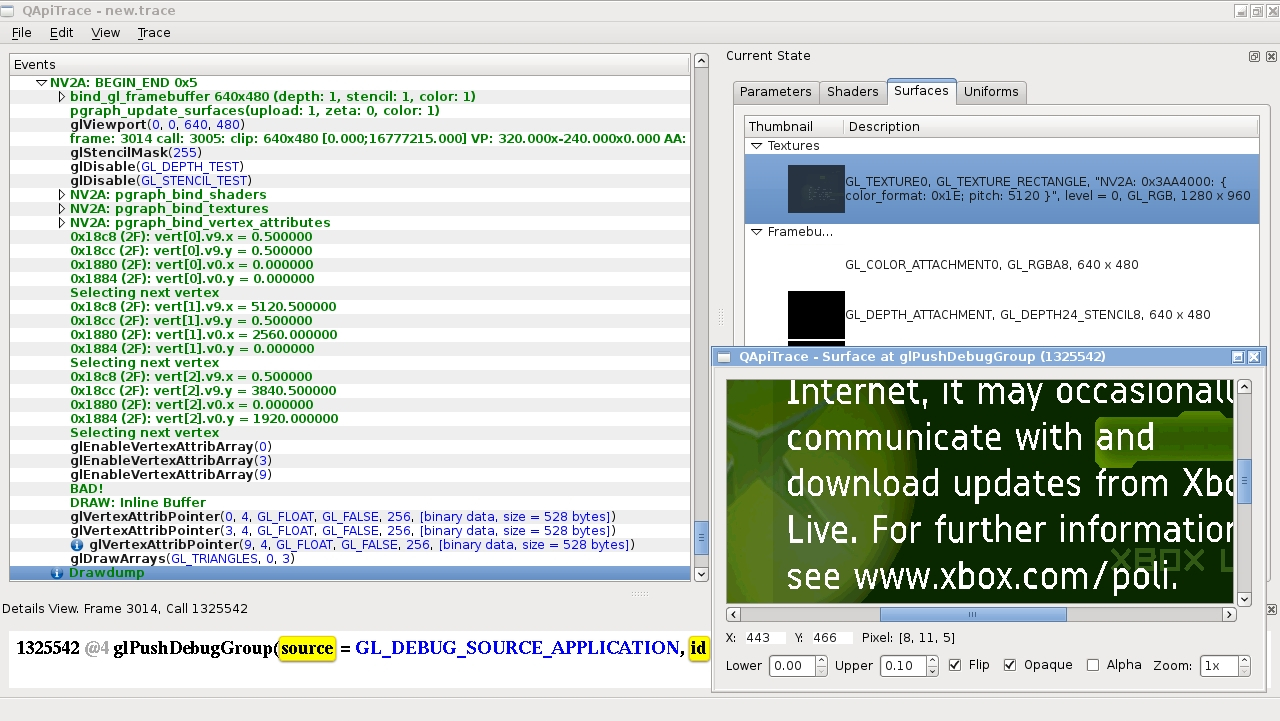
In xqemu we use GL Debug Labels to store Xbox GPU information for each texture. On the right side you can see that each texture has GL and also NV2A information present. We can use this external tool to verify the texture got uploaded correctly (so if a texture is wrong I can check what texture type it is). It's ran after running the emulator so we can step forward and backwards in time.
Also note how apitrace shows the GL debug stream grouped by Xbox GPU actions - that way we can search how and where from the texture got uploaded.
You can do similar things in Direct3D (with a bit more manual work though).
Another hint: This game is working fine in xqemu. So you could use apitrace to see what kind of texture it is to verify cxbx behaviour.
 JayFoxRox
on 11 Apr 2017
JayFoxRox
on 11 Apr 2017
It could also be that after creation, the format of the texture was changed at runtime, since we currently convert textures to native formats only once. In that case, it might have changed into a DX# format, as the above screenshot looks like what's described here, regarding decoding of DDS images : http://zenhax.com/viewtopic.php?t=682
PatrickvL
on 12 Apr 2017
@JayFoxRox apitrace looks amazing, I can't believe I wasn't aware of it's existence. One of my motivations for updating to DirectX9 was to be able to use Microsoft's graphics debugging tools in Visual Studio, but it looks like API trace will do the job just nicely.
LukeUsher
on 12 Apr 2017
@LukeUsher you know about https://renderdoc.org/?
 Sarkie
on 13 Apr 2017
Sarkie
on 13 Apr 2017
This issue was moved to Cxbx-Reloaded/game-compatibility#139
PatrickvL
on 15 Aug 2017
Related issues
 Voxel9
·
25Comments
Voxel9
·
25Comments
 RadWolfie
·
26Comments
RadWolfie
·
19Comments
PatrickvL
·
18Comments
PatrickvL
·
19Comments
RadWolfie
·
26Comments
RadWolfie
·
19Comments
PatrickvL
·
18Comments
PatrickvL
·
19Comments
Most helpful comment
@JayFoxRox apitrace looks amazing, I can't believe I wasn't aware of it's existence. One of my motivations for updating to DirectX9 was to be able to use Microsoft's graphics debugging tools in Visual Studio, but it looks like API trace will do the job just nicely.