Cwa-documentation: Incorrect Notifications status in Settings when risk notification off
Avoid duplicates
- [X] Bug is not mentioned in the FAQ
- [X] Bug applies to Android and iOS
- [X] Bug is not already reported in another issue
Technical details
- Device name: Pixel 3a emulator
- Android version: 11
- App version: 2.2.1
Describe the bug
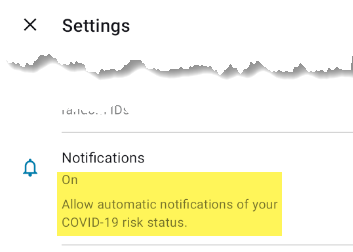
If the notifications setting "Your risk of infection changed" is set to Off, the Settings overview shows Notifications set to "On".
Steps to reproduce the issue
- In CWA Start Screen, tap three-dot symbol
- Tap "Settings"
- Tap "Notifications"
- Set "Your risk of infection changed" to Off, and ensure that "Status of your coronavirus test" is set to On
- Tap back arrow, top-left
- Notice that Notification shows on and there is no indication that the notification for risk of infection has been disabled.

Expected behavior
If "Notifications - Your risk of infection" is set to Off, then the Settings overview should not show On.
Possible Fix
Since there are two different notification settings:
- Your risk of infection changed
- Status of your coronavirus test
The "On" status should only be shown if both settings are "On". If one of them is "Off", then the overall status could be shown as "Partially On". (If both sub-settings are "Off" then the overview status is correctly shown as "Off".)
Also, the overview text only lists "Allow automatic notifications of your COVID-19 risk status". It does not specifically mention notification of the "Status of your coronavirus test" and the text is not generic enough to cover both cases. This also should be reviewed.
Internal Tracking ID: EXPOSUREAPP-7285
 MikeMcC399
All 2 comments
@MikeMcC399 Thanks. Applies also to iOS
 dsarkar
on 14 May 2021
dsarkar
on 14 May 2021
Internal Tracking ID: EXPOSUREAPP-7285
dsarkar
on 14 May 2021
Related issues
 ndegendogo
·
3Comments
ndegendogo
·
3Comments
 stritti
·
3Comments
stritti
·
3Comments
 HolgerMayer
·
3Comments
HolgerMayer
·
3Comments
 kheinz57
·
3Comments
kheinz57
·
3Comments
 dreh23
·
3Comments
dreh23
·
3Comments
Most helpful comment
Internal Tracking ID: EXPOSUREAPP-7285