Cwa-documentation: UX: Risk View unclear
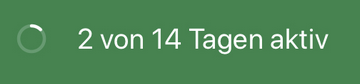
- it is unclear to user what the countdown display does convey and what might happen on day 14?
- detail text after tap does not answer this question
- i would love to propose an improvement, but i also don’t know the answer.
please, can you explain?
 kosmar
All 20 comments
I agree this is something I was wondering about, too. From an epidemiological point of view, it makes sense to have the number of days since last exposure.
For days without exposure, it is a little different. If the app is not active on any day within the past 14 days, exposure cannot be ruled out (in the context of the app). If the app is active for 14 days and did not detect any exposure, the user is considered safe (also looking from the app's perspective). I think the wording may be optimised here, maybe to 'days active within the past 14 days'. Status quo suggests that these 14 days are finite.
Can anyone confirm/ clarify?
 max-hzi
on 19 Jun 2020
max-hzi
on 19 Jun 2020
so the meaning is
_full days of active app within last 14 days_
?
and if i turn bluetooth off for an hour i break the streak?
please clarify
kosmar
on 19 Jun 2020
No, I turn bluetooth off each night and the count continues.
 paulinepauli
on 19 Jun 2020
paulinepauli
on 19 Jun 2020
_Tägliche Aktualisierung_ on bottom of risk view
seems misleading or unclear, too
https://twitter.com/macava/status/1273884530252881920
kosmar
on 19 Jun 2020
maybe to understand the issue better, can you tell us what would currently be the countdown text displayed on day 15 and day 53?
kosmar
on 19 Jun 2020
additionally, its not transparent which _risk_ is implied here.
is it telling me that i behave risky because the app learned that i meet more people than current stats in germany suggest? (would make most sense imho)
or is it the risk of infecting someone else, because i did encounter x positive people recently? (also makes sense, but very delayed and fuzzy)
kosmar
on 19 Jun 2020
also
the view tells me on day 3 risk is 'low', but rather it should be 'unknown', as the app knows virtually nothing yet.
kosmar
on 19 Jun 2020
Maybe the point is:
If the app has not run 14 out of 14 days, a complete risk level cannot be named.
But why do I have a low risk level with only 3 days at the moment?
paulinepauli
on 19 Jun 2020
additionally, its not transparent which risk is implied here.
I suggest that you have a look at the documentation (e. g. over here https://github.com/corona-warn-app/cwa-documentation/blob/master/cwa-risk-assessment.md). It reports if you had contact with a person which reported a positive test result.
Your risk could indeed already be high, but only if the app recorded contact with a person which reported a positive test.
As a side notice, please try to reduce the number of postings and gather the comments in a single one.
max-hzi
on 19 Jun 2020
As this is also a cross platform issue, let's continue the discussion in the cwa-documentation repository.
 tkowark
on 19 Jun 2020
tkowark
on 19 Jun 2020
ok, i believe i may have understood the meaning according to
https://twitter.com/MatzeLoCal/status/1273907275820867584
my suggestion for frontend would be
[icon showing a pie chart rather than current countdown]
sensor active for n% within recent 14 days.
german:
Sensor war 14% aktiv innerhalb der letzten 14 Tagen
subject debatable, i didnt find a better one now.
also _last 14 days_ could be called __last 14 days incubation period_, but that may be confusing sciencespeak to avoid? do you have guidelines for that wording?
and of course _14 days_ must refer to human lived past not to app install time or anything else.
kosmar
on 19 Jun 2020
I would suggest: "21% der letzten 14 Tagen aktiv".
And a detailed description after tap or in FAQ. e.g.:
"Ihr Risikostatus kann am besten ermittelt werden, wenn Sie die Risiko-Ermittlung der App immer aktiv lassen. Die Prozentzahl zeigt, wie viel Zeit die Risikoermittlung in den vergangen 14 Tagen aktiv war. Zeiten, in denen das Handy oder Bluetooth ausgeschaltet ist, werden als inaktiv berechnet."
I hope, I got it correct.
paulinepauli
on 19 Jun 2020
In the meanwhile we received feedback from our UX team:
Thank you for the valuable input. In a future version we will enhance the user guidance for the days of tracing KPI to clarify is intended purpose and provide additional details for the current value.
As a consequence, we'll move this issue to cwa-backlog for future follow-ups.
Mit freundlichen Grüßen/Best regards,
SW
Corona Warn-App Open Source Team
 SebastianWolf-SAP
on 25 Jun 2020
SebastianWolf-SAP
on 25 Jun 2020
I would suggest: "21% der letzten 14 Tagen aktiv".
Please do not do that. Exposing such statistical information can be used for discrimination. Discrimination based on app usage is unlawful, but exposing information is still unwise. People can safely shutdown their phones when they are home alone.
 MichaelPFrey
on 25 Jun 2020
MichaelPFrey
on 25 Jun 2020
Please do _not_ do that
well, thats the data displayed now already, afaik – just rewritten to make some sense for users
kosmar
on 25 Jun 2020
Please do _not_ do that
well, thats the data displayed now already, afaik – just rewritten to make some sense for users
I was unclear in my partial quote - my bad.
Currently, the app shows the days active. paulinepauli (whos comment I partially quoted) suggests to show the activity in percent. Showing how many days the app is active is fine by me. Showing of many percent of the last 14 days it was active how ever is dangerous. (Switching the phone of when home alone does not affect the accuracy for the purpose of the app, but lowers the percentage that the tracing was activated)
MichaelPFrey
on 25 Jun 2020
Showing how many days the app is active is fine by me.
the number of days is actually an _accumulated_ and rounded number of _active minutes_.
at least thats what the source code seems to suggest what it is.
var numberOfDaysWithActiveTracing: Int { numberOfHoursWithActiveTracing / 24 }
in Risk.swift Zeile 32
so if you switch the phone off half the day at home, you will currently end up a display of _7 of 14 days_ , which you may agree is the same as _50% of 14 days_. so your suggestion and paulines are effectively very similar, except one is understandable in meaning.
kosmar
on 25 Jun 2020
display seems to jump back to 1/14 after day 14.
https://twitter.com/wortkomplex/status/1277917451330740226
not helpful in building trust in the app :(
kosmar
on 30 Jun 2020
No offense intended, but I find the discussions about "what this probably means" amusing. When such an app displays a status and people have to speculate about what it might mean, the UX has a – major – issue, which needs to be fixed ASAP.
Even if the speculations are true or the possibility to find an explanation by googling around, with the UX of an important app intended for a wide audience there should not be any room for speculation.
 MarkusBreuer
on 10 Jul 2020
MarkusBreuer
on 10 Jul 2020
recent update feels much better to me.
any user feedback? thanks!
kosmar
on 22 Jul 2020
Related issues
 hendrikb
·
3Comments
hendrikb
·
3Comments
 Tobias333
·
3Comments
Tobias333
·
3Comments
 pdehaye
·
3Comments
pdehaye
·
3Comments
 cougarten
·
3Comments
cougarten
·
3Comments
 cknoll
·
3Comments
cknoll
·
3Comments
Most helpful comment
No offense intended, but I find the discussions about "what this probably means" amusing. When such an app displays a status and people have to speculate about what it might mean, the UX has a – major – issue, which needs to be fixed ASAP.
Even if the speculations are true or the possibility to find an explanation by googling around, with the UX of an important app intended for a wide audience there should not be any room for speculation.