Cwa-documentation: Wie speichert man einen Eintrag im Kontakttagebuch?
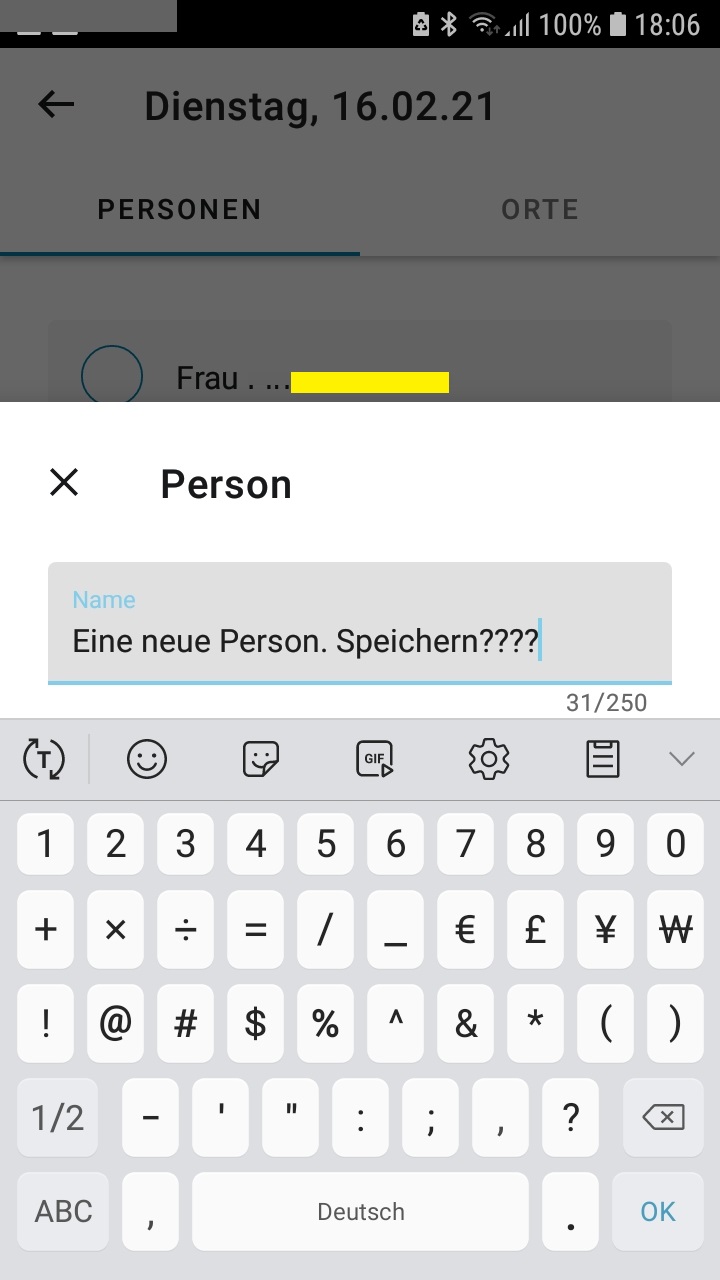
Bei meinem Android-Handy erscheint kein Speicherbutton, wenn ich versuche, eine neue Person ins Kontakttagebuch einzutragen.
 DGrothe-PhD
All 9 comments
Hi @DGrothe-PhD,
maybe this helps: https://www.coronawarn.app/de/blog/2020-12-28-corona-warn-app-version-1-10/
If you have more questions, please, let us know.
Best wishes, DS
Corona-Warn-App Open Source Team
 dsarkar
on 20 Feb 2021
dsarkar
on 20 Feb 2021
Thanks for the link. However, it is different on my phone: In the screenshot in the link, the "Speichern" button is just above the keyboard, but on my phone it looks like this: (yellow ribbon added over older entry for privacy reasons)
DGrothe-PhD
on 20 Feb 2021
@DGrothe-PhD
What happens when you press "OK"?
 Ein-Tim
on 20 Feb 2021
Ein-Tim
on 20 Feb 2021
Thanks, pressing OK (tiny) works - but it's not obvious enough for me
DGrothe-PhD
on 20 Feb 2021
I really don't know what the behavior on Android should be, @dsarkar maybe transfer this to the Android repo for further investigation?
Ein-Tim
on 20 Feb 2021
For Android German the keyboard shows "OK", for English it shows "Done". That may depend on exactly which Android keyboard is enabled though.
The screen shots and instructions on https://www.coronawarn.app/de/blog/2020-12-28-corona-warn-app-version-1-10/ seem to be from iOS.
 MikeMcC399
on 20 Feb 2021
MikeMcC399
on 20 Feb 2021
For me, the keyboard shows a blue checkmark instead of an OK button (Android 10). Maybe this needs an additional explanatory sentence in the blogpost.
@DGrothe-PhD If you are satisfied with the answers, you can close the issue :)
Corona-Warn-App Open Source Team
 heinezen
on 21 Feb 2021
heinezen
on 21 Feb 2021
The layout on Android differs from the layout on iOS shown in https://www.coronawarn.app/de/blog/2020-12-28-corona-warn-app-version-1-10/
Here is an example on a Google Pixel 3a phone with Android 11:

Google Pixel phones use the Gboard keyboard which offers the tick button ✅ to complete an entry.
Samsung phones use the Samsung keyboard with 🆗 (German) and Done (English).
MikeMcC399
on 22 Feb 2021
It is now more obvious how to save the data for a person in CWA 1.14. In addition to the person's name, the data stored has new fields for telephone number and e-mail address. To store a new or edited person, there is a separate button, labelled "Speichern" in German or "Save" in English.
The screenshot below is again from a Google Pixel 3a phone with Android 11:

MikeMcC399
on 12 Mar 2021
Related issues
 dreh23
·
3Comments
dreh23
·
3Comments
 hendrikb
·
3Comments
hendrikb
·
3Comments
 cougarten
·
3Comments
cougarten
·
3Comments
 cknoll
·
3Comments
cknoll
·
3Comments
 kbobrowski
·
3Comments
kbobrowski
·
3Comments
Most helpful comment
The layout on Android differs from the layout on iOS shown in https://www.coronawarn.app/de/blog/2020-12-28-corona-warn-app-version-1-10/
Here is an example on a Google Pixel 3a phone with Android 11:
Google Pixel phones use the Gboard keyboard which offers the tick button ✅ to complete an entry.
Samsung phones use the Samsung keyboard with 🆗 (German) and Done (English).