Cwa-documentation: Exposure Logging is in false "restricted" state without internet connection
Note: this is a different issue to corona-warn-app/cwa-app-android#491 and can be solved independently.
Describe the bug
When there is no internet access exposure logging will go to "restricted" state, the same state which appears when Bluetooth is off. But even without internet access phones will still receive / send Bluetooth beacons, and they can be matched later on with Diagnosis Keys (once internet access is enabled again).
This looks like sub-optimal UI/UX design, and leads to following issues:
- a person without mobile data enabled might believe that it does not make sense to take the phone or turn on Bluetooth when going e.g. grocery shopping, since exposure logging is not active anyway without internet access
- a person taking a flight might be led to believe that it does not make sense to turn on Bluetooth (after both internet access and Bluetooth have been turned off by airplane mode), since without internet the app won't work anyway (as a side note - it's possible to safely switch on Bluetooth after airplane mode was activated - some people may not know about this, perhaps it'd be good to indicate it in the app as well)
- user has no way to opt-out (stop transmitting BLE beacons) once phone has internet connection disabled
Expected behaviour
It should be clear for the user that even without internet access app is working (it just needs internet access from time to time), and it's still worth to always carry a phone / keep Bluetooth on even in a situations without internet access.
Additionally, user should be able to opt-out at any time, regardless of whether internet access is enabled, as stated in privacy policy:
To withdraw your consent to the exposure logging feature, you can disable the feature
using the toggle switch in the App or delete the App.
Possible Fix
Better UI/UX design with two separate states:
- state indicating if exposure logging is on (this requires Bluetooth)
- state indicating if exposure risk score is up-to-date (this requires internet)
Internal Tracking ID: EXPOSUREAPP-1572
 kbobrowski
All 68 comments
I'll move that to the documentation repo, since it affects both apps.
 tkowark
on 16 Jun 2020
tkowark
on 16 Jun 2020
@pfille independently checked out in another issue if internet connection has an impact on bluetooth scanning:
"In addition I checked, if CWA still works without an internet connection and it does. However, then in the app I get the status "Keine Internetverbindung", which is confusing as the tracing still works. Okay, in this case there is no notification."
https://github.com/corona-warn-app/cwa-app-android/issues/491#issuecomment-645524218
This test supports this issue and that it should be fixed as proposed by @kbobrowski.
 aurisnoctis
on 18 Jun 2020
aurisnoctis
on 18 Jun 2020
Here are supporting pictures of the app's wrong message so that everyone knows what we're talking about.
I think this issue should get the bug label, not enhancement since it's clearly not expected/desired behaviour. @tkowark or other maintainers (@SebastianWolf-SAP @jakobmoellersap @mynchau) could you consider changing the label?
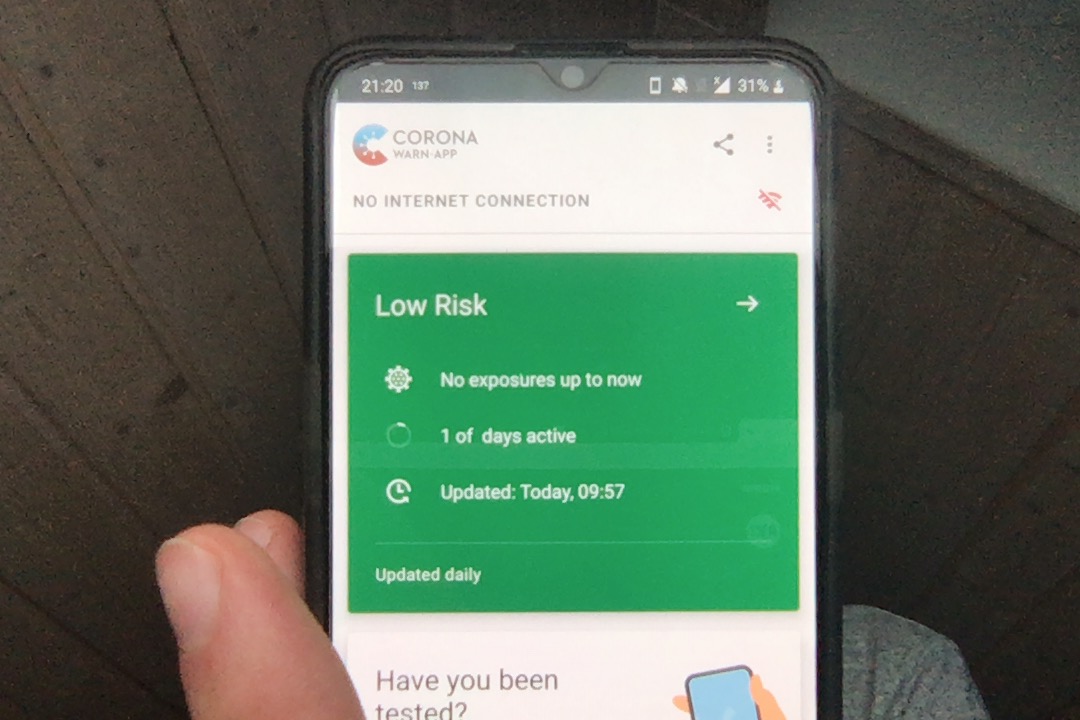
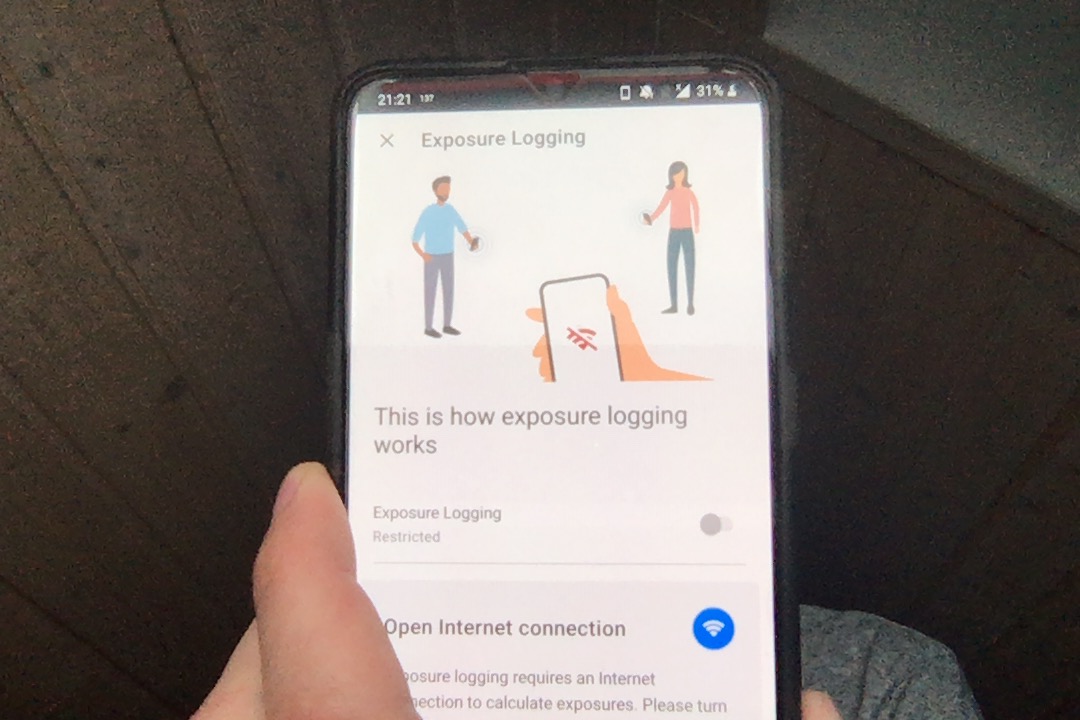
Particularly bad is that the slider is toggled - a slider should only be toggled by user action. In this case it suggests that something was switched off internally - when in fact the only message should be:
"Can't download potential positives because of lack of internet connection. Bluetooth logging not affected."
 corneliusroemer
on 18 Jun 2020
corneliusroemer
on 18 Jun 2020
message should be:
"Can't download potential positives because of lack of internet connection. Bluetooth logging not affected."
I agree.
I feel it's even worse for new users, because it shows (my phone is set up for american english):
[red]NO INTERNET CONNECTION [WIFI "Bad" logo] [/red]
[gray-box]
Risk unknown →
Since you have not activated
exposure logging for long enough,
we could not calculate your risk of
infection.
[/gray-box]
So this step does imply that something is wrong, or that it was never active in the first place.
When pressing the red message you see an even more confusing message:
Exposure Logging: [Slider in Off position]
Restricted[gray-box]
Open Internet connection
Exposure logging requires an Internet connection to calculate
exposures. Please turn on WIFI or mobile data in your device
settings.
[/gray-box]
If I wasn't a developer with the ability to look up these issues, then I'd probably have uninstalled the app already, thinking I'd need a permanent internet connection.
I try to minimize my connection to the internet to a minimum. My plan is to carry my phone with me at all times, and only check for infections every night (I hope I can manually force a check).
Given the confusing UI, I'm not sure:
- If the app works (I can't see if any beacons were ever exchanged, because a lack of timestamps when the last beacon was exchanged or even if I had ever seen another device)
- If it exchanges beacon despite lack of internet connection (UI implies it doesn't, because of the red message)
- If and when the internet was used to fetch a list (to me, UI implies this was never done, as it doesn't show any timestamp)
- How to control wether my phone sends beacons (to me, UI implies it currently doesn't do that, due to lack of internet connection)
So the UI should be improved to remove this uncertainty.
For context: I have set up a phone specifically for corona-warn-app, and I run it without SIM (so no mobile internet plan or GSM), and for the most part without WiFi. I try to keep the cost and attack surface low (this is an Samsung S3 mini from 2012, running a custom ROM - LineageOS 14.1 (Android 7.1) by NovaFusion - that I don't fully trust, and OpenGApps Pico).
 JayFoxRox
on 18 Jun 2020
JayFoxRox
on 18 Jun 2020
I agree to change the message. It have to be short, unambiguous, but it also have to be in a "non-nerd-language", so everybody understands. This might be too long, but goes in a good direction:
https://github.com/corona-warn-app/cwa-app-android/issues/610#issuecomment-645543087
 bufemc
on 18 Jun 2020
bufemc
on 18 Jun 2020
This issue may be related to issues discussed in corona-warn-app/cwa-documentation#236 (see this comment) - essentially if internet connectivity is down in the short one-minute time window it may be that exposure status is not updated until next day, and then again it has to be active in a short time window during next day.
If the situation described above is indeed the case, then it makes sense to encourage users to always keep wifi / mobile internet on, since if it is not the case exposure score might not necessarily be updated when internet connectivity is recovered. But it seems that this is very sub-optimal way of doing things, perhaps if corona-warn-app/cwa-documentation#236 is resolved then it would be fine to tell users that they don't have to keep the internet on all the time.
Until corona-warn-app/cwa-documentation#236 is resolved (especially the issue mentioned in linked comment), I would encourage everyone to keep the internet on at all times, it's true that Bluetooth beacons will be exchanged without the internet, but the status of the exposure might not be updated when internet connectivity is recovered.
kbobrowski
on 19 Jun 2020
As increasing the limits for the server connection seem complicated: Could one for the time being
- store a timestamp of the last successful server connection
- initiate the exchange routine every hour
- check within the routine whether a successful download exists within the last 24 h
- if TRUE stop
- ELSE check for Internet connection
- if TRUE do the exchange with the server
ELSE stop
This would at least solve the problem of postponing the exchange for one day if it fails today.
 mwbaumstark
on 19 Jun 2020
mwbaumstark
on 19 Jun 2020
Dear maintainers, I don't want to seem pestering, I know you have an awful lot to do right now.
But just as a friendly reminder, given that this may be one of the top 5 community raised issues in terms of severity/impact, I would very much appreciate if you could comment on the discussion so far and give your viewpoint after 3 days.
I also reiterate my suggestion that this issue be labelled a "bug" instead of "enhancement" as it clearly is one.
Also, may I ask why no one has been assigned to this issue yet? Not entirely sure what this means for your workflow, but it can't harm to have one person responsible - you are assigning frequently on less severe issues.
Tagging @tkowark @SebastianWolf-SAP @mynchau @jakobmoellersap as those who are most active commenting/closing issues.
corneliusroemer
on 19 Jun 2020
Dear @kbobrowski, dear contributors,
sorry that it might have taken a little too long for you,. We've received a response from our UX colleagues:
- The risk status card is shown even if internet connectivity is not available, even if new risk calculations are not possible. The error information itself about the lack of internet connectivity is limited to the exposure logging status element (which it is impacting directly)
- In a future version we will clarify the user guidance and the setting regarding exposure logging based on representative end-user testing for the situation if internet connection is not available (thank you for the input)
As a consequence, we will take this issue to our newly created cwa-backlog repository. That repository hosts features or bugfixes that are planned, but can't be implemented directly or simply take some time.
The issue will move back to a development repository once the end-user testing is done, an agreement with the contracting parties about the implementation has been reached that it's due to be implemented shortly.
Best regards,
SW
Corona-Warn-App Open Source Team
 SebastianWolf-SAP
on 19 Jun 2020
SebastianWolf-SAP
on 19 Jun 2020
@kbobrowski
This issue may be related to issues discussed in corona-warn-app/cwa-documentation#236 (see this comment) - essentially if internet connectivity is down in the short one-minute time window it may be that exposure status is not updated until next day, and then again it has to be active in a short time window during next day.
If internet was not available at some point when the app tried to update the risk status and the app shows accordingly that risk status was updated e.g. day before yesterday --> Can I expect that if I have internet connection continuously from now on that this 'skipped' day will not be entirely lost for matching? For the example if the last risk update is from day before yesterday and today the risk update works correctly as indicated by the updated status in the app, will it include matching of encounters for yesterday?
aurisnoctis
on 22 Jun 2020
@tkowark Given that there will be a fix for this issue under iOS in CWA 1.3, will we get something similar for Android?
I can reliably reproduce the issue:
- Open CWA
- Keep mobile data on
- turn off Wifi -> everything seems fine, CWA is fine with mobile data
- turn Wifi on again
- After the phone is connected to Wifi again, the "no internet connection" status appears in the app.
- Switching out of CWA and back in again, fixes the "no internet connection" status
My device: Samsung Galaxy S8 (Android 9) with CWA 1.2.1
 daimpi
on 24 Aug 2020
daimpi
on 24 Aug 2020
The Internet status will be removed with https://github.com/corona-warn-app/cwa-app-android/pull/1096
Thanks for your patients.
Cheers,
Luka
 harambasicluka
on 1 Sep 2020
harambasicluka
on 1 Sep 2020
Should this problem be solved with the version 1.3.0?
Because with this Version the behaviour of the App, without Internet, is even more confusing...
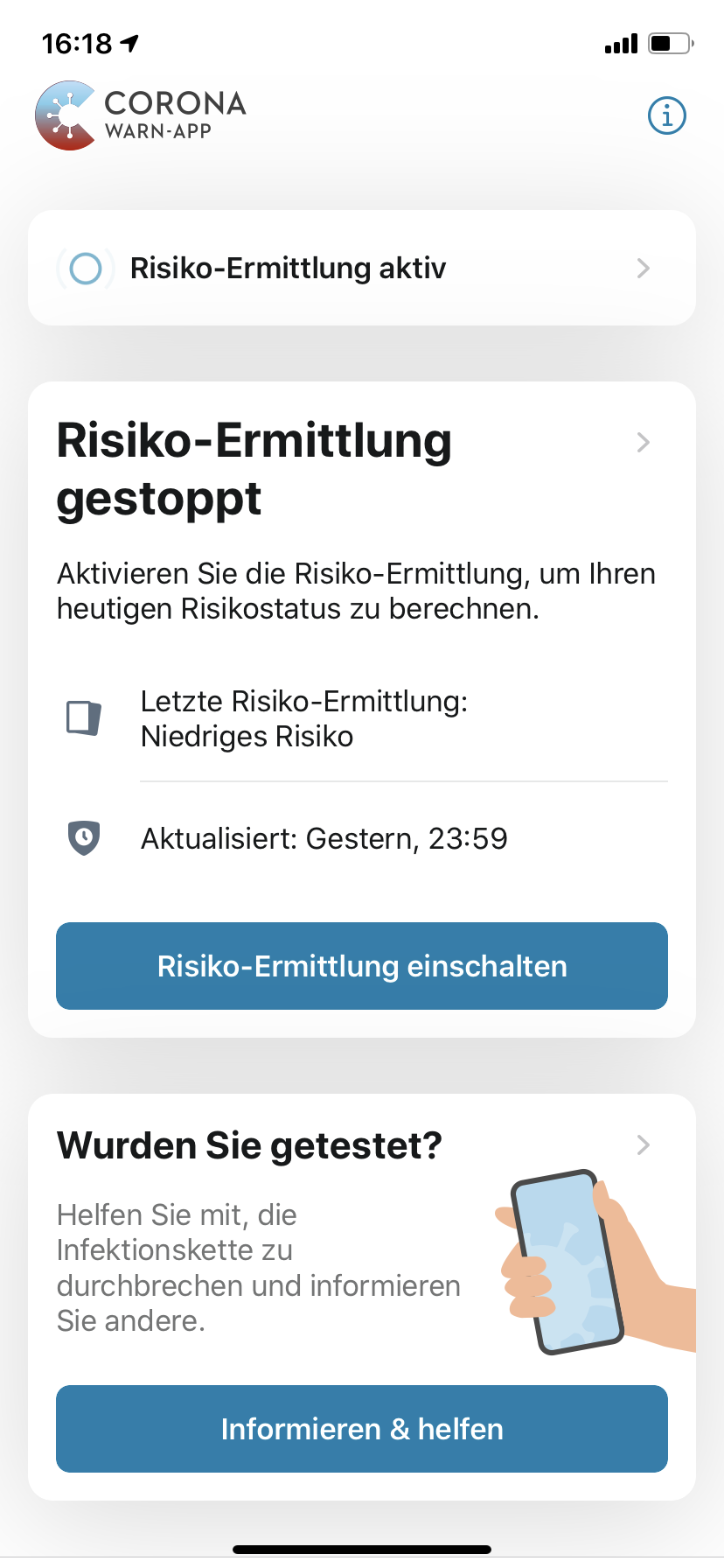
In the small box the App says:
Risiko-Ermittlung aktiv
and directly under that in the next box there is the contradictory statement:
Risiko-Ermittlung gestoppt
 Ein-Tim
on 4 Sep 2020
Ein-Tim
on 4 Sep 2020
Could please somebody from the devs come back to us and give an update about this Issue.
Will this contradiction be fixed?
Ein-Tim
on 1 Oct 2020
You should receive an error popup with 1.3.1
 thomasaugsten
on 1 Oct 2020
thomasaugsten
on 1 Oct 2020
Yeah, I do but this is even more confusing. The user will get
a) confused
b) think that the App isn't working without Internet connection...
Imho this is suboptimal and has to be improved.
Ein-Tim
on 1 Oct 2020
This is the fact the initial start of the app is not working without internet
thomasaugsten
on 1 Oct 2020
Yeah but the user will think the whole App is not working... (and mainly that no contacts will be traced!)
And please see my screenshot from above, don't SAP and the RKI see a contradiction here?
Ein-Tim
on 1 Oct 2020
I can reliably reproduce the issue:
Open CWA
Keep mobile data on
turn off Wifi -> everything seems fine, CWA is fine with mobile data
turn Wifi on again
After the phone is connected to Wifi again, the "no internet connection" status appears in the app.
Switching out of CWA and back in again, fixes the "no internet connection" status
My device: Samsung Galaxy S8 (Android 9) with CWA 1.2.1
Same as @MikeMcC399 (https://github.com/corona-warn-app/cwa-app-android/issues/1141#issuecomment-712193621) I can't reproduce this issue anymore with CWA 1.5 under Android 🎉.
daimpi
on 19 Oct 2020
Thats nice @daimpi, could you share a Screenshot what the Android App is now showing without Internet?
Ein-Tim
on 19 Oct 2020
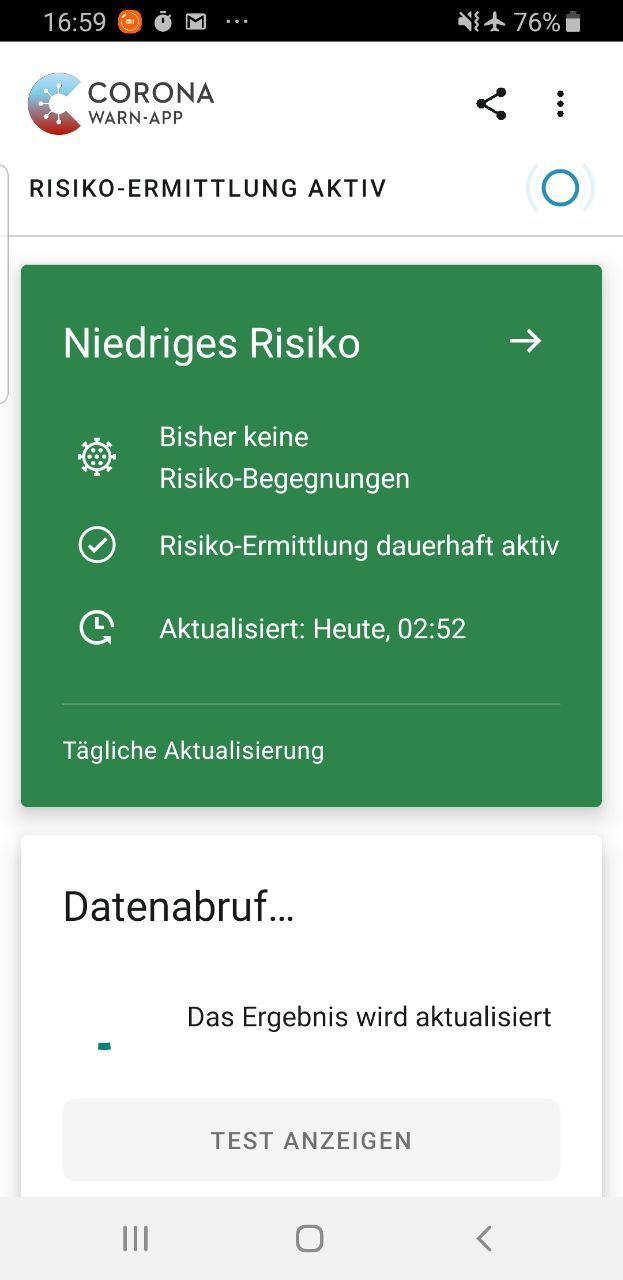
Yes sure, this is how my phone looks on airplane mode with Bluetooth enabled:
daimpi
on 19 Oct 2020
Thats how I think the App should behave without Internet. On iOS, the behaviour is still the same as in the Versions before... And seems like they don't want to change anything here...
Ein-Tim
on 19 Oct 2020
On iOS, the behaviour is still the same as in the Versions before... And seems like they don't want to change anything here...
That's a pity 🙁.
@thomasaugsten is there anything planned wrt adopting this improvement also for iOS?
daimpi
on 19 Oct 2020
Okay interesting...
Now my App looks like @daimpi's one without Internet... Seems like they fixed it for iOS too.
So if anybody else could confirm that the behaviour on iOS is also correct now, I think this Issue can be closed 👍
Ein-Tim
on 20 Oct 2020
That's great to hear 😊 🎉
So if anybody else could confirm that the behaviour on iOS is also correct now, I think this Issue can be closed 👍
@ndegendogo could you maybe check whether you can confirm @Ein-Tim's findings on your device? 🙂
daimpi
on 20 Oct 2020
@daimpi on the first glance it looks fine. However, I would like to try a few more tests in Wifi later.
(Recently, I had a very strange and annoying behaviour with cwa 1.3.2 when I had Wifi without internet - not sure if I can reproduce this condition easily).
 ndegendogo
on 20 Oct 2020
ndegendogo
on 20 Oct 2020
@ndegendogo sounds good 👍
Looking forward to your results 🙂.
daimpi
on 20 Oct 2020
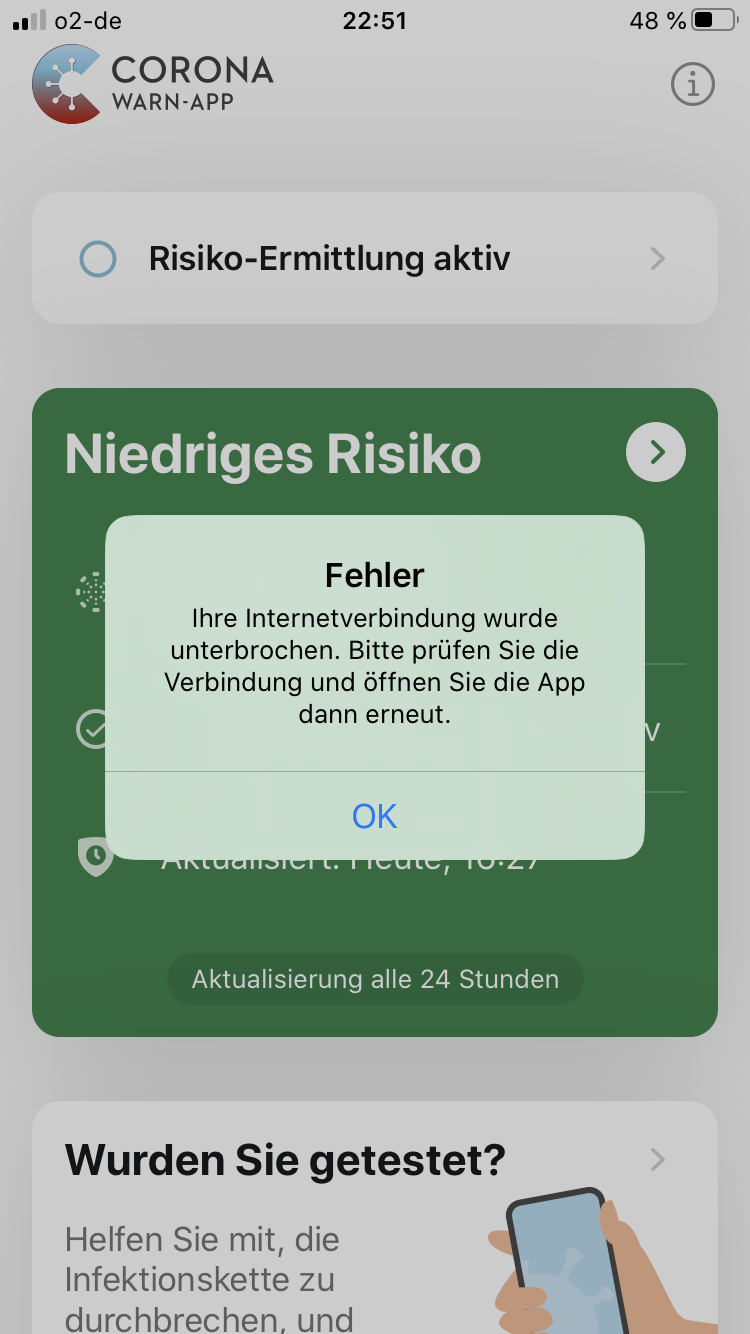
So, not 100% sure what is the expected / desired behaviour.
With Wifi and mobile data enabled, but no internet coverage I get an error popup message. Same if I have mobile data disabled and Wifi enabled but no coverage.
I can acknowledge the error, and then see the main screen and my risk status. The message pops up again each time when I open the app or return from a submenu to the main screen.
The main screen shows clearly that "Risiko Ermittlung aktiv" (this was the original focus of this ticket, yes?)
When I disable Wifi: no error popup.
Edit: cwa 1.5.0(8) / iOS 13.7 / iPhone 8
ndegendogo
on 20 Oct 2020
@ndegendogo that doesn't look like it's intended. Do I understand this correctly: you get this message when you don't have internet coverage but have the respective networks (wifi and/or mobile data) enabled (but they are unable to provide internet for some reason)?
So could this be reproduced in the following way?
- remove your home wifi password from your device
- disable mobile data, while leaving wifi enabled (is this necessary? I thought this would be needed b/c simulating no mobile coverage might be hard)
- error appears
Or is there maybe an easier way to reproduce this?
daimpi
on 20 Oct 2020
easiest way to reproduce:
- disable mobile data
- keep Wifi enabled
- go for a walk (out of Wifi coverage)
It may be that iOS behaves differently than Android.
ndegendogo
on 21 Oct 2020
@ndegendogo
easiest way to reproduce:
disable mobile data
keep Wifi enabled
go for a walk (out of Wifi coverage)
It may be that iOS behaves differently than Android.
I couldn't reproduce this under Android, I didn't get any error message and "exposure logging active" stayed on all the time.
@Ein-Tim can you reproduce the error on your iOS device?
daimpi
on 21 Oct 2020
@daimpi
Can reproduce this Issue from @ndegendogo, but on my phone it looks like this:
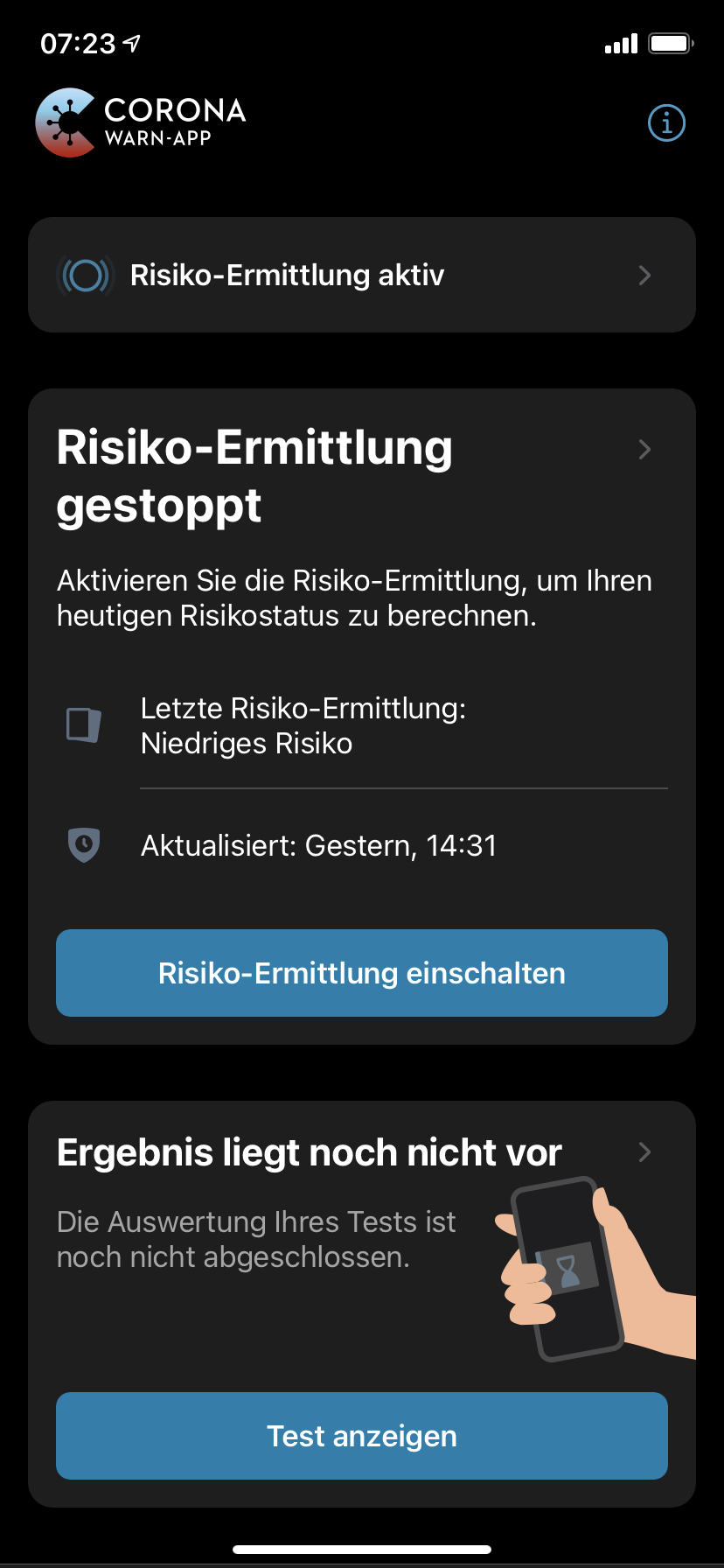
After deactivating WLAN (which was not connected), closing the App (open App Switcher and "slide" it away) and reopening it everything worked as it should. I think this is not perfect but its definitely better than before 👍
I will take a look at the App during the Day and see how it behaves in different connection situations and then report back here 🙂
Ein-Tim
on 21 Oct 2020
@Ein-Tim but the wording is still very confusing and contradictory, IMO.
Maybe it is worth a separate ticket, but: what exactly do they mean with "Risiko-Ermittlung"? The BLE part? The daily key download and matching? There should be different and clearly distinguishing words for these two procedures. Especially because they have different technical preconditions, and the user may want to deactivate one but not the other.
ndegendogo
on 21 Oct 2020
@ndegendogo
Yes, the wording which you can see on the last screenshot is very confusing. But I mean it got a bit better because sometimes the App also shows the correct screen.
The little Box on the Top refers to the Exchange of BLE Keys and the big Box in the Middle refers to the downloading of new Keys from the Server. (As of my understanding)
I agree with you @ndegendogo, these two processes should be separated better...
Ein-Tim
on 21 Oct 2020
My guess on the error popup: maybe a (failed) attempt to download the keys for the risk check.
And I appreciate a lot that I can trigger this procedure manually; with a broken background task for several days you start to panic ...
Only there is no need to try this again and again on every return from a submenu. Slightly annoying; but not the biggest issue here.
ndegendogo
on 21 Oct 2020
@ndegendogo @daimpi
Sooo, during the day I saw:
Nothing really changed imho, the App still shows this contradictory screen if the phones isn't connected to the Internet.
So this still has to be improved, even when it looks like that in some situations the App now shows the right screen...
(Tbh, I could not (yet) find any pattern when the App works and when not...)
Ein-Tim
on 21 Oct 2020
So overall the issue seems to be fine on Android now, but is definitely not resolved on iOS.
daimpi
on 21 Oct 2020
any pattern when the App works and when not...
My guess on the pattern is:
- when Wifi or mobile data is deactivated by user, iOS (and cwa) knows in advance that there will be no internet on this path. No attempt to connect, no error message.
- when Wifi or mobile data is enabled by user, cwa tries to connect to the internet.
- if this attempt fails -> error message.
@Ein-Tim would this be consistent with what you see?
ndegendogo
on 21 Oct 2020
@ndegendogo
Not really, no, I was sitting in class today with my phone in Flight Mode (but Bluetooth enabled) and CWA still showed the "wrong" contradictory screen...
Again now, I deactivated Mobile Data
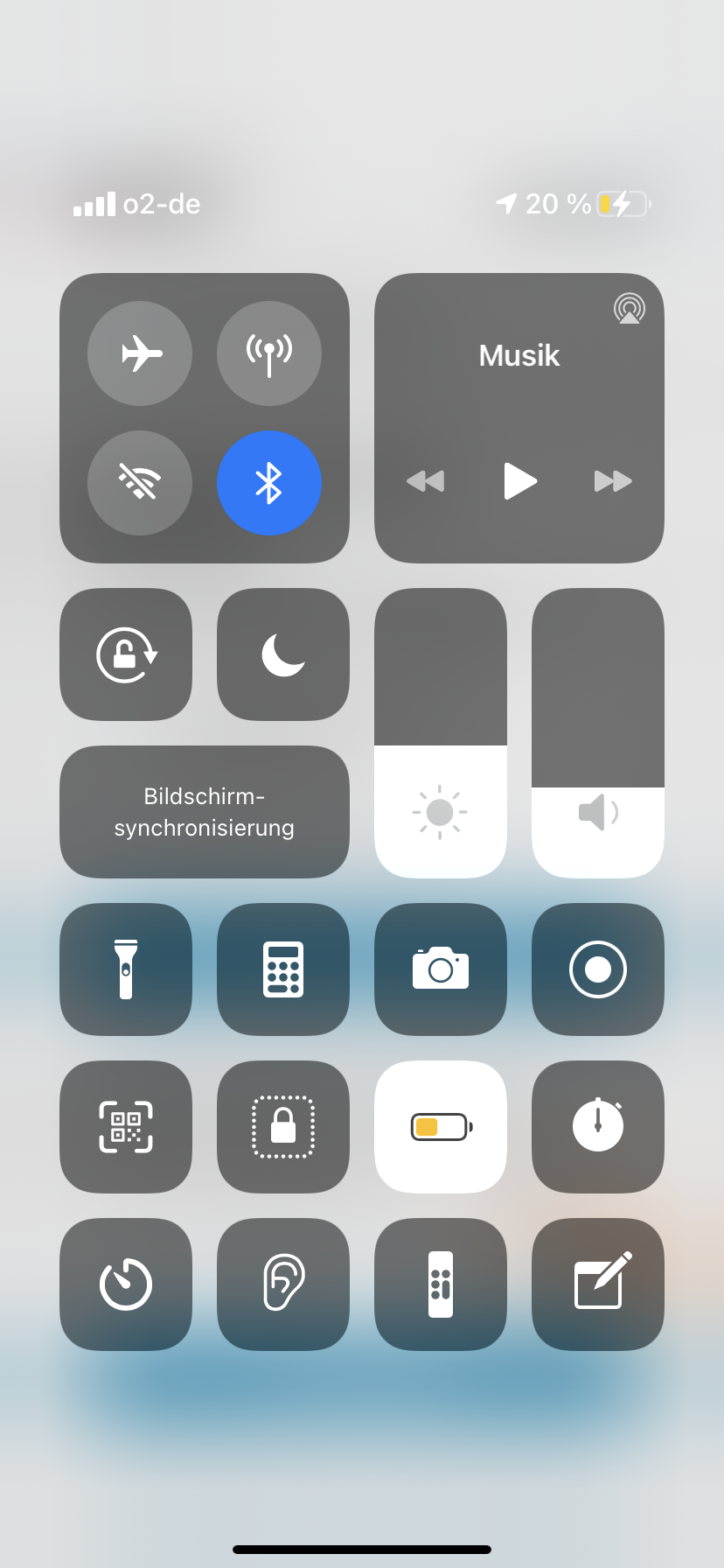
and opened the App, this screen was shown:
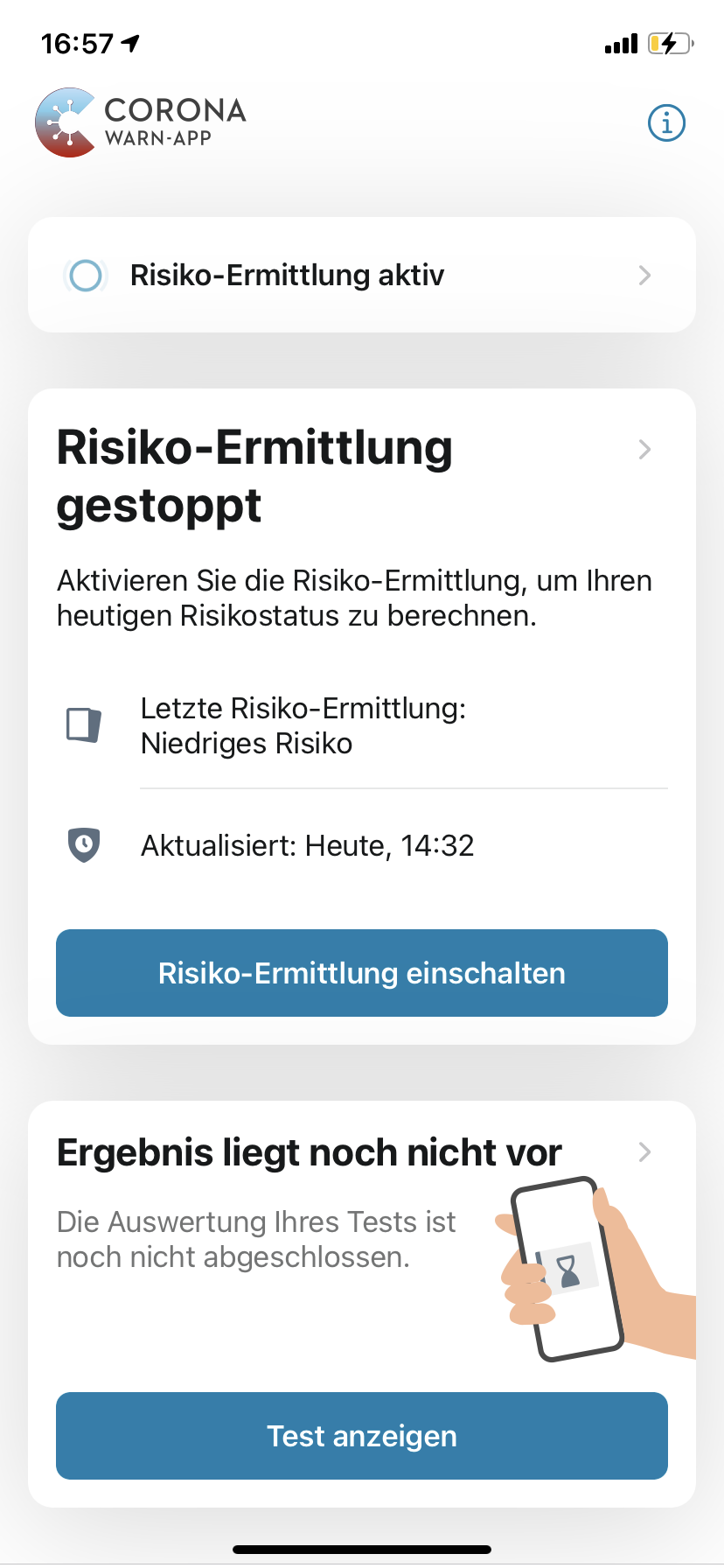
Ein-Tim
on 21 Oct 2020
@Ein-Tim
So maybe different behavior of the different iOS versions? (I am on 13.7)
ndegendogo
on 21 Oct 2020
I'm on 14.1
Ein-Tim
on 22 Oct 2020
Yesterday I also updated to 14.1. Mainly because of #1106 .
So, I'll repeat my tests and will report the results.
ndegendogo
on 22 Oct 2020
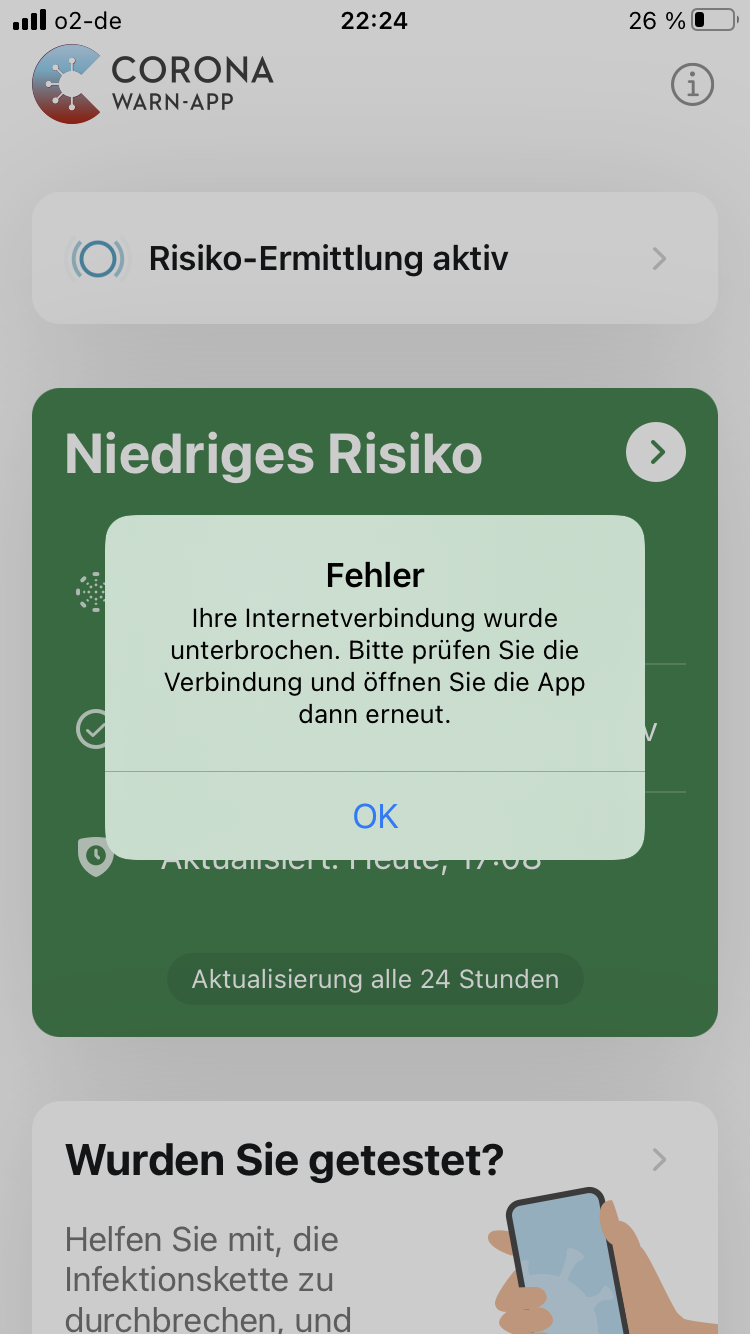
With: cwa 1.5.0 (8) / iOS 14.1 / iPhone 8
I could still reproduce the error message, like yesterday with iOS 13.7. (maybe it was slightly harder).
I did not see that message
ndegendogo
on 22 Oct 2020
Mhh @ndegendogo
I think it definetly got better but I can still sometimes repoduce this screen.
@Oliver-Zimmerman @hermesmar (tagging you because you are asigned to this ticket)
Are there any improvements planed for further releases regarding the behaviour of the App without Internet Connection?
Ein-Tim
on 23 Oct 2020
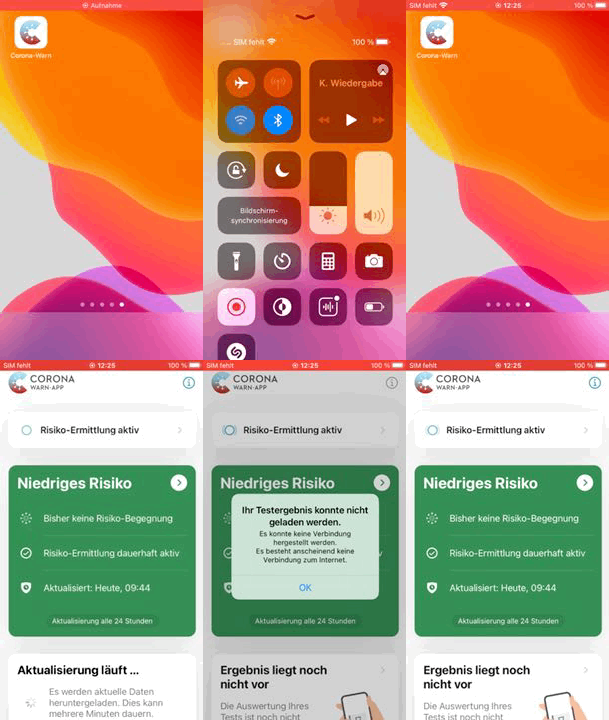
Update from my side @ndegendogo & @daimpi
iPhone 6s | iPhone XR
------------ | -------------
 |
|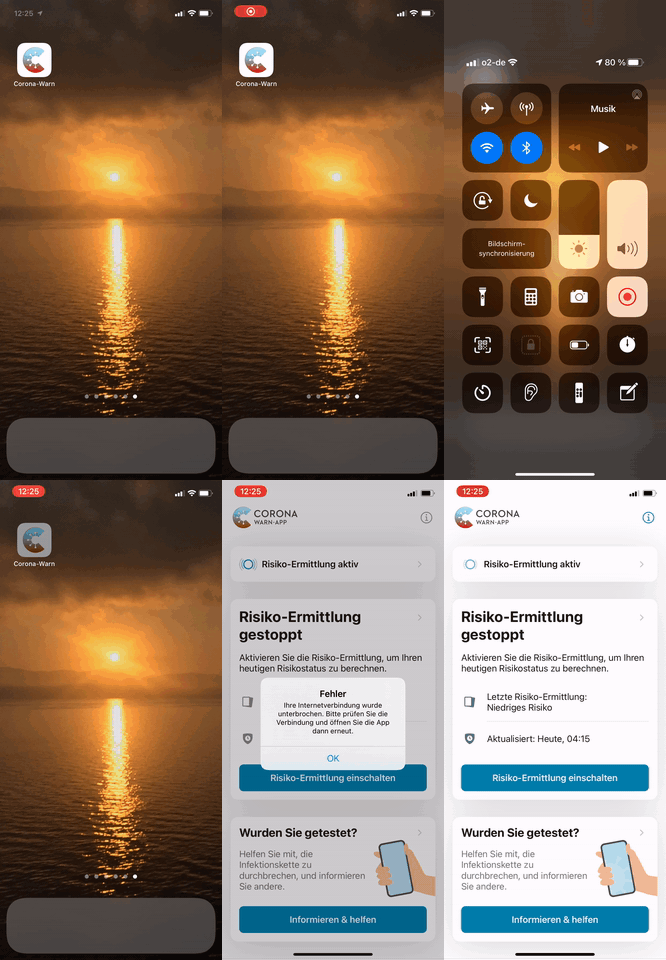
Works as expected | Doesn't work as expected
iOS 14.2 Public Beta 4 | iOS 14.1
Please note that I still could not find any pattern when it works and when not, it just sometimes do and sometimes not 🤷♂️
Ein-Tim
on 25 Oct 2020
For me it looks like the 6s has a cached app config and can start without internet the other phone has never received a app config and cannot start.
thomasaugsten
on 25 Oct 2020
@thomasaugsten
Seems unlikely to me because this XR is my phone which I use every day and I open CWA very often there...
But it still could be because as far as I remember I never had this problem on the 6s so maybe its a prblem on the XR...
If it's ok I would watch the behavior of the iPhone 6s in the next days and if there everything works and other iPhone Users can not reproduce the behavior of my iPhone XR, this Issue can be closed 👍
Will report back in 3-5 days 👍
Thanks for your work @thomasaugsten
Ein-Tim
on 25 Oct 2020
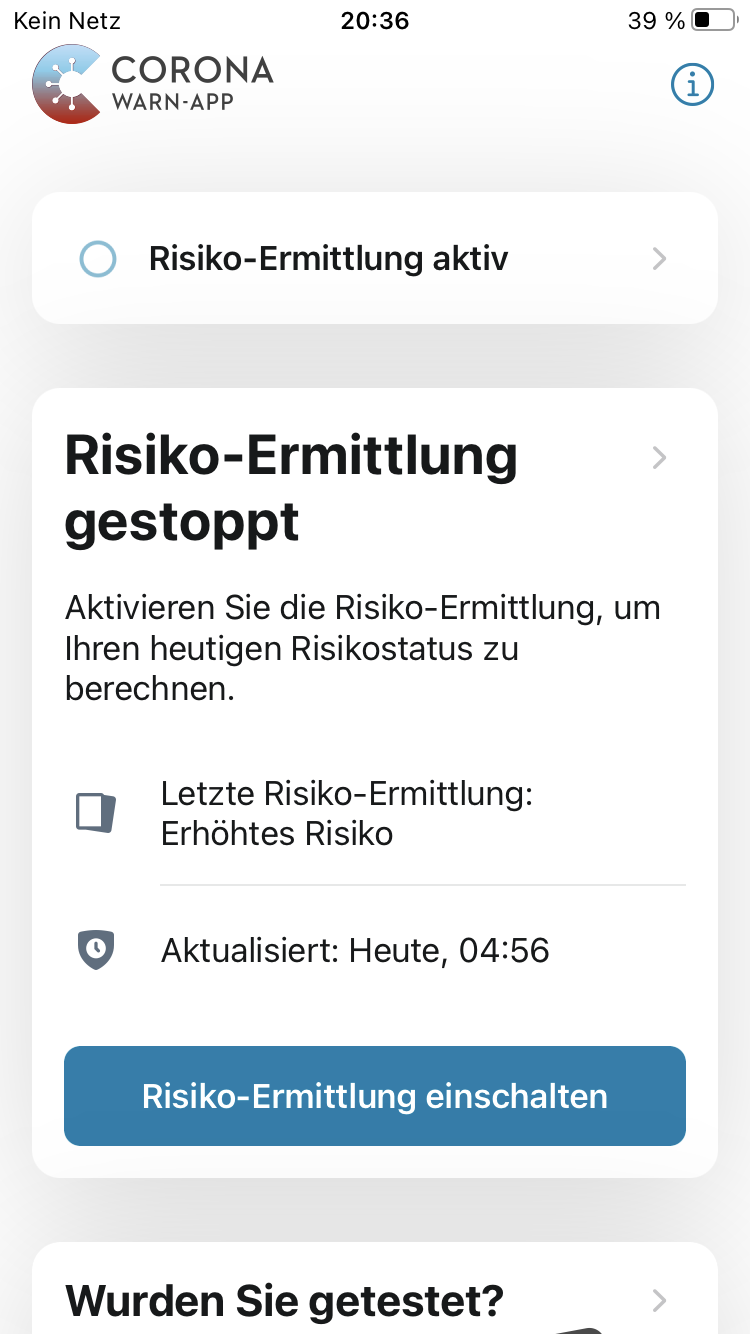
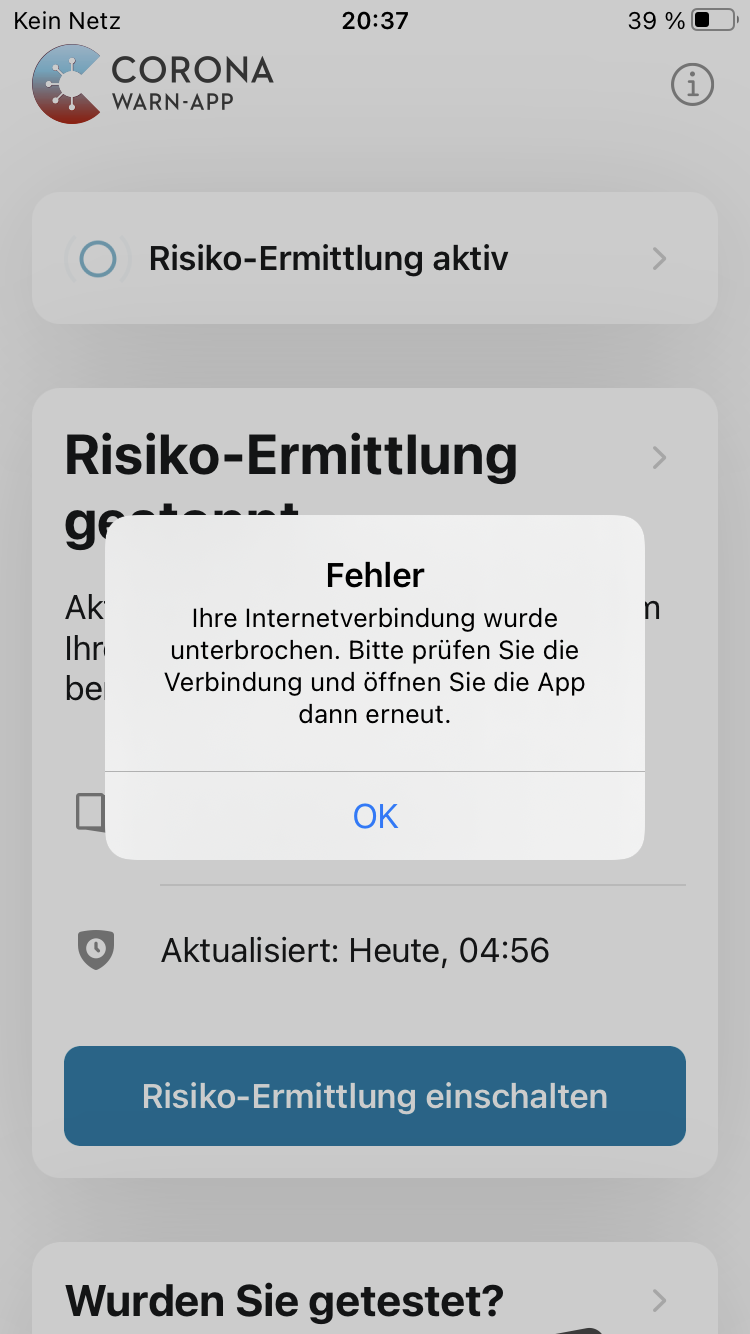
@thomasaugsten today I also got this screen, it is contradictory and really confusing (see screenshot).
cwa 1.5.2(1) / iOS 14.1 / iPhone 8
How to reproduce (my guess):
- enter an area with no internet coverage
- start cwa before iOS is aware of this fact
After a few seconds the error message popped up (no internet access, see second screenshot).
ndegendogo
on 30 Oct 2020
ndegendogo
on 30 Oct 2020
Especially confusing is the fact that very different functions are all called "Risiko-Ermittlung":
- the logging of contacts / RPI => this function is still active
- the download of DEK keys, followed by the matching and risk assessment => this function of course needs internet
Suggestion: find a better wording for the different steps of "Risiko-Ermittlung", like:
Begegnungs-Aufzeichnung
Kontakt-Abgleich
Risiko-Berechnung
Also the recommendation is confusing:
"Aktivieren Sie die Risiko-Ermittlung" / "Risiko-Ermittlung einschalten" should be something like "Aktivieren Sie das Internet"
ndegendogo
on 30 Oct 2020
Dear @ndegendogo, @kbobrowski, @Ein-Tim,
I think this is has been resolved and we can close it?
Best wishes,
DS
Corona-Warn-App Open Source Team
 dsarkar
on 23 Nov 2020
dsarkar
on 23 Nov 2020
As @Ein-Tim pointed out here, the current message is a bit confusing: "Risiko-Ermittlung aktiv / Risiko-Ermittlung gestoppt" on the same user screen.
@Ein-Tim you have a very good overview over the tickets - is this confusing wording tracked on another ticket, or here?
ndegendogo
on 23 Nov 2020
@ndegendogo
you have a very good overview over the tickets - is this confusing wording tracked on another ticket, or here?
This Issue is tracked here AFAIK (since the confusing wording will be solved when this is solved).
@dsarkar Could we please wait for the upcoming 1.7.0 release this week, I would like to do some additional testing if there are any situations the App still shows this screen. If not this ticket can be closed then 👍
Ein-Tim
on 23 Nov 2020
But, actually, the root cause of the confusion is that they use the same wording "Risiko-Ermittlung" for two partial activities:
1) capture and store RPI (= Erfassung / Aufzeichnung der Begegnungen)
2) matching and risk assessment (= Auswertung, Risiko-Berechnung),
and these have different hardware requirements (first needs Bluetooth, the second internet).
So it was a good idea to split into two messages. Only the wording should be improved.
ndegendogo
on 23 Nov 2020
@ndegendogo
Yes you are right, this is the root cause, but AFAIK (and also my quick search in the documentation Repo) your comment here is the only one which mentions this problem.
Also the explanation which the App gives under "Überblick" is even more confusing.
There the little box on the top "Risiko Ermittlung aktiv/gestoppt" is explained like this:
[...] Ist sie aktiv, verden Begegnungen aufgezeichnet. [...]
That's true, but why is this called "Risiko Ermittlung" and not somethin like "Begegnungsaufzeichung"?
This function doesn't "ermittel" any risk yet, it only recives RPIs and saves them...
Then the big box (Risk Card) in the middle is introduced as: "Infektionsrisiko". Thats true, but only if the card is either green, red or gray. If the card is white the the "Infektionsrisiko" Box is suddenly showing something about the "Risiko-Ermittlung". Why?
I think it would be the best if you open an Issue in the Documentation Repo about this. (If you don't want to open one, I could, of course, also open one) 😀
Have a nice evening!
Ein-Tim
on 23 Nov 2020
I think it would be the best if you open an Issue in the Documentation Repo about this. (If you don't want to open one, I could, of course, also open one) 😀
@Ein-Tim I think you are right. A new ticket, focussed on the confusing wording, seems a good idea.
If you don't mind - go ahead and write it 👍
ndegendogo
on 23 Nov 2020
Mhh @ndegendogo I've started to draft a new Issue but after I thought about it again I think it is not nessecary.
This very confusing and contradictory screen was fixed (got heavily better) with 1.3.0 and above.
AFAIK there are (at the moment) no other situations where the App shows this screen (or a similar contradictory screen like this).
See also the iOS Issue https://github.com/corona-warn-app/cwa-app-ios/issues/1497.
There the App, in the little box, shows:
Expsoure Logging Actvie, which is correct, RPI are constantly recived/send/stored.
The big box shows:
Exposure CHECK failed (Risiko-ÜBERPRÜFUNG fehlgeschlagen), which is correct!
I hope you understand what I mean 😅
Ein-Tim
on 24 Nov 2020
@Ein-Tim yes, you are right. The messages in 1.6.1 that you linked look MUCH better.
ndegendogo
on 24 Nov 2020
@Ein-Tim
I guess you are reporting about what you see on iOS, correct?
I can see EXPOSURE LOGGING ACTIVE on Android 1.6.1 when WiFi and mobile network are disabled (provided Bluetooth is enabled). So that is good.
I don't get any other message though. I think that Android would only complain if it couldn't download keys for a couple of days. It wouldn't give an error if the network is temporarily unavailable.
Anyway on Android I don't see any wrong status information being displayed.
So, are we saying that the issue is solved on both iOS and Android? I think, yes!
 MikeMcC399
on 24 Nov 2020
MikeMcC399
on 24 Nov 2020
A related Android issue "wrong message "KEINE INTERNETVERBINDUNG" (no internet connection)" with link
https://github.com/corona-warn-app/cwa-app-android/issues/1141 was confirmed closed two days ago.
MikeMcC399
on 24 Nov 2020
@MikeMcC399
So, are we saying that the issue is solved on both iOS and Android? I think, yes!
Yes, but under 1.5.0 there still were some edge conditions in which the App showed this screen, with 1.6.0/1 we can't really test this because of https://github.com/corona-warn-app/cwa-app-ios/issues/1497.
So it would be the best if this Issue does not yet get closed before we can test the behavior under 1.7.0 👍
Ein-Tim
on 24 Nov 2020
Dear @ndegendogo, @kbobrowski, @Ein-Tim,
Any feedback regarding this issue on the CWA version 1.7.1?
Best wishes,
DS
Corona-Warn-App Open Source Team
dsarkar
on 1 Dec 2020
@dsarkar Seems fixed for me 👍
Ein-Tim
on 1 Dec 2020
@dsarkar same for me. I could no longer reproduce the contradicting and confusing messages with cwa 1.7.1
Thanks
ndegendogo
on 1 Dec 2020
Hi @ndegendogo, @kbobrowski, @Ein-Tim, @kbobrowsk, and community,
Thanks for the feedback and contributions. We will close this issue now.
Best wishes,
DS
Corona-Warn-App Open Source Team
dsarkar
on 2 Dec 2020
_Cross Link_
Related: https://github.com/corona-warn-app/cwa-app-ios/issues/1627
Ein-Tim
on 4 Dec 2020
@Ein-Tim IMO cwa-app-ios#1627 is not a duplicate but a different focus. See more detailed explanations
ndegendogo
on 4 Dec 2020
@ndegendogo
Sorry, don't wanted to say that your new Issue is a duplicate. Just wanted to point it out so if other people experience this they can find your Issue better 👍
Ein-Tim
on 4 Dec 2020
Related issues
 kheinz57
·
3Comments
kheinz57
·
3Comments
kheinz57
·
3Comments
kheinz57
·
3Comments
 dreh23
·
3Comments
dreh23
·
3Comments
 oezguercelebi
·
3Comments
oezguercelebi
·
3Comments
 HrFlorianHoffmann
·
3Comments
HrFlorianHoffmann
·
3Comments
Most helpful comment
I agree.
I feel it's even worse for new users, because it shows (my phone is set up for american english):
So this step does imply that something is wrong, or that it was never active in the first place.
When pressing the red message you see an even more confusing message:
If I wasn't a developer with the ability to look up these issues, then I'd probably have uninstalled the app already, thinking I'd need a permanent internet connection.
I try to minimize my connection to the internet to a minimum. My plan is to carry my phone with me at all times, and only check for infections every night (I hope I can manually force a check).
Given the confusing UI, I'm not sure:
So the UI should be improved to remove this uncertainty.
For context: I have set up a phone specifically for corona-warn-app, and I run it without SIM (so no mobile internet plan or GSM), and for the most part without WiFi. I try to keep the cost and attack surface low (this is an Samsung S3 mini from 2012, running a custom ROM - LineageOS 14.1 (Android 7.1) by NovaFusion - that I don't fully trust, and OpenGApps Pico).