Cwa-documentation: Error message unclear on QR code scanning
I've been trying to check my test result with scanning the QR code that I'm given, but each time I get this error dialog:
_Diagnosis cannot be found_
Message below is:
_To make it easier to read the QR code, try to align the QR code vertically to the scanner, or turn on the flash._
I think those title and text message are not very compatible. When I read the title, I assume my test result is not in database, but when I read the text, I assume qr scan is unsuccessful.
That makes me wondering about what is the actual reason;
- QR scan is unsuccessful ?
- QR scan is done but code is not found ?
- Code is found but test result is missing ?
- Another issue ?

Internal Tracking ID: EXPOSUREAPP-3018
 seckincann
All 15 comments
The reason for this message is
- The QR codes is not a valid CWA Diagnosis QR Code
- The QR code is not readable to recognize a valid CWA Diagnosis QR Code
 thomasaugsten
on 23 Sep 2020
thomasaugsten
on 23 Sep 2020
Hey everyone,
I have created a Jira ticket EXPOSUREAPP-3018 for this issue so that the developers are notified.
Thanks again for your input!
Best regards,
SG
Corona-Warn-App Open Source Team
 svengabr
on 1 Oct 2020
svengabr
on 1 Oct 2020
Had today the same issue with the same error message!
 waldobing
on 22 Oct 2020
waldobing
on 22 Oct 2020
Still same issue today and even another person I know gets the same alert. When can we expect a solution? The URL behind my QR-Code starts with https://localhost//?XYZ. Does every URL start like this?
Update:
The website or app of Mein Laborergebnis worked fine for me. My laboratory was called _LADR_. But the instructions of my test were wrong because they advised me to use the CWA. I would suggest to rename the error message to something more understandable.
 GeorgeDouglasMcFly
on 23 Oct 2020
GeorgeDouglasMcFly
on 23 Oct 2020
See also this comment
A more detailed error message according to the reason of failure would give a much better user experience
 ndegendogo
on 27 Oct 2020
ndegendogo
on 27 Oct 2020
Same issue and error message here.
I don't think readability is the problem as it happens with with 2 different tests taken by two persons at the same facility and i've no issues at all to read the information/link with a 3rd party app. It is in the format https://localhost/?XYZ whereas XYZ matches the sequence that is printed below the qr code.
I even tried to manually generate another qr code thar contains the readout information without any other result within CWA.
The sheet that contains the QR Code is specifically mentioning CWA though and matches the example here (the lower half):
https://github.com/corona-warn-app/cwa-documentation/issues/400#issuecomment-669937832
Therefore i would expect the code to be a valid one for CWA and none of the above mentionted reasons make sense to me.
Also i think it would be a good idea to be able to manually enter the sequence just to rule out any issues with the readout of the qr code.
 fuxxx
on 29 Oct 2020
fuxxx
on 29 Oct 2020
@fuxxx
... i think it would be a good idea to be able to manually enter the sequence just to rule out any issues with the readout of the qr code.
Just for cross-reference, your suggestion is already registered under https://github.com/corona-warn-app/cwa-wishlist/issues/227.
 MikeMcC399
on 29 Oct 2020
MikeMcC399
on 29 Oct 2020
I'm also having the same problem. I scanned my QR code which brings me to a localhost address and gives a 404. It's not clear where / how the error is happening.
 sbourke
on 31 Oct 2020
sbourke
on 31 Oct 2020
I'm also having the same problem. I scanned my QR code which brings me to a localhost address and gives a 404. It's not clear where / how the error is happening.
Are you scanning the code within CWA? The code is supposed to be used within the app through the "I got tested - help and inform" (my translation) function.
Sounds to me like you are using a different QR scanner.
fuxxx
on 1 Nov 2020
Are you scanning the code within CWA? The code is supposed to be used within the app through the "I got tested - help and inform" (my translation) function.
Sounds to me like you are using a different QR scanner.
I think sbourke is actually experiencing the issue mentioned by seckincann. And then tried to find out if the QR code could be read by another app, just to confirm that the issue is within CWA and not with the QR code’s readability.
I am having the same issue (that is, getting the warning as documented by the original poster) on three different devices in the family, scanning QR codes from within CWA, as actually recommended in the test receipt.
Our tests were done in Cologne, at Wisplinghoff lab, Toyota Allee, on a Tuesday morning. We were not charged for the tests. We agreed to transfer the results for CWA. (*) We tried to scan the QR code for four consecutive days. On Saturday, we tried to check the results on their website (using the GUID) and they were shown to be available since Wednesday. Therefore, I think there must be some issue between the lab and the CWA backend that caused the QR code to not be recognized (not sure on how the test information will be transferred to the backend).
I second the original author of this issue that the error message should be clearly stating “not found” instead of suggesting a QR code reading issue.maybe modify the text just a bit so it reads “your results may not have been received yet, OR your QR code was not properly scanned.” Or even better as suggested above, use different error messages for each occasion (“your QR code could be read and seems to be valid but we were unable to find your test result” / “the QR code you scanned is not recognized as a valid CWA code. Try scanning again under better conditions”...)
(*) this part is probably the most error prone, as I think about it - maybe the agreement is not being recorded from the paper document handed before the test, and thus it is not a backend or app issue?
 durchstarter
on 8 Nov 2020
durchstarter
on 8 Nov 2020
@durchstarter please post your experience with the lab results also at #400 - they are collecting exactly such stories and experience there
ndegendogo
on 8 Nov 2020
 Ein-Tim
on 12 Feb 2021
Ein-Tim
on 12 Feb 2021
@seckincann, Thank you for contributing here. In the meantime this notification was changed:
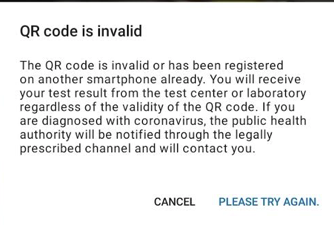
We think that this message is much clearer, and suggest closing this issue. Thanks again, Best wishes, DS
Corona-Warn-App Open Source Team
 dsarkar
on 15 Feb 2021
dsarkar
on 15 Feb 2021
I have also suggested a further improvement to the message, mentioned by @dsarkar in the previous post here https://github.com/corona-warn-app/cwa-documentation/issues/429#issuecomment-779073282.
The suggestion for improvement is logged on the wishlist as item "Improve response to scanning non-CWA lab QR code" https://github.com/corona-warn-app/cwa-wishlist/issues/343, so that the two different error conditions:
- QR code invalid due to wrong format
- QR code already used
are separated and cause distinctly different error messages to be shown.
MikeMcC399
on 15 Feb 2021
@seckincann @MikeMcC399
I suggest to close this issue in favour to corona-warn-app/cwa-wishlist#343.
dsarkar
on 15 Feb 2021
Related issues
 cougarten
·
3Comments
cougarten
·
3Comments
 Tobias333
·
3Comments
Tobias333
·
3Comments
 stritti
·
3Comments
stritti
·
3Comments
 kheinz57
·
3Comments
MikeMcC399
·
3Comments
kheinz57
·
3Comments
MikeMcC399
·
3Comments
Most helpful comment
See also this comment
A more detailed error message according to the reason of failure would give a much better user experience