Cwa-app-ios: "Exposure check" notification after confirmed positive
Avoid duplicates
- [x] Bug is not mentioned in the FAQ
- [x] Bug is not already reported in another issue
Technical details
- Device name: iPhone 12 Pro
- iOS Version: 14.3
- App Version: 1.10.1 (0)
Describe the bug
The push notifications to regularly check the app in order for the "exposure check" to update continue to be pushed even when the app has been elevated into the state of "confirmed positive" and the quarantine time is not yet up.
At this stage there is no need to refresh the other ids from the server as the user is in quarantine and
Steps to reproduce the issue
- Enter Confirmation code from lab, via QR Code or Tan,
- wait,
- after 7 days the alert to open the app In order to do the exposure checking will be displayed
Expected behaviour
Notifications will be disabled once confirmed positive for at least 10 days (duration of quarantine )
Possible Fix
Allow for user set timeframe in which no notifications will be pushed after the app receives a confirmation code of a postive test.
Additional context
Internal Tracking ID: EXPOSUREAPP-4805
Internal Tracking ID: EXPOSUREAPP-4781
FYI solved with PR #1960
 moburkhardt
All 28 comments
Hi @moburkhardt 👋🏻
Could you share your EN-Log here?
The notification which you are receiving is fired when there was no check in the background for more than 36h.
In general, I agree that it makes no sense to send this notification to the user after a positive test was entered, since the App will not show any result of the exposure check.
The Dead-Man notification should be deactivated if there was a positive test result entered in the App.
How to export Exposure Notificaiton Logs under iOS 13.7 or newer
_This log does not conatin any private information._
German:
Einstellungen ➡️ Begegnungsmitteilungen ➡️ Status von Begegnungsaufzeichnungen ➡️ Begegnungsüberprüfungen ➡️ Überprüfungen exportieren
English:
Settings ➡️ Exposure Notifications ➡️ Exosure Logging Status ➡️ Exposure Checks ➡️ Export Exposure Checks
To upload the file here, rename it from .json to .txt
 Ein-Tim
on 19 Jan 2021
Ein-Tim
on 19 Jan 2021
@moburkhardt Thanks for reporting. Could you provide us with the following information, please:
- Date of your PCR test
- Date when you scanned the QR code
- Date when you received the positive test result
- Date of the push notification to check the CWA
Many thanks. Best wishes, DS
Corona-Warn-App Open Source Team
 dsarkar
on 27 Jan 2021
dsarkar
on 27 Jan 2021
PCR test date 13.01.2021
Phone Tan input 15.01.2021
Postive Test result 15.01.2021
Date of Push notification to check CWA 19.01.2021
moburkhardt
on 27 Jan 2021
@dsarkar I think the Dead Man Notification should be deactivated if the user has entered a positive test result.
Yes, the risk checks will still work in the background (and if they don't work there will be a push notification), but since the result of the check is not shown to the user it is also not necessary to remind the user to open the App.
Ein-Tim
on 27 Jan 2021
@Ein-Tim OK.
@moburkhardt:
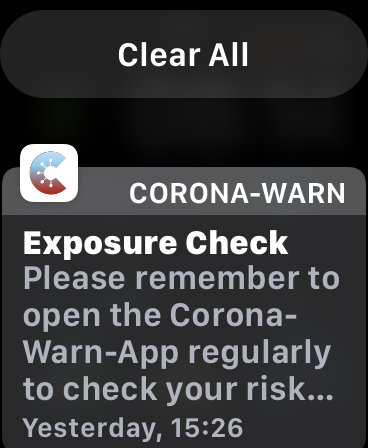
Was the notification one of these ('Deadman notifications.')
- DE "Bitte öffnen Sie die Corona-Warn-App, um die Risiko-Überprüfung anzustoßen." or
- EN "Please remember to open the Corona-Warn-App regularly to check your risk status."
Thanks for the feedback.
dsarkar
on 27 Jan 2021
@dsarkar Yes the notification was the EN localised 'Deadman notification'
Screenshot attached
moburkhardt
on 27 Jan 2021
@moburkhardt Thanks.
dsarkar
on 27 Jan 2021
Hi @moburkhardt, Thanks again for reporting. We have created an internal ticket for this issue. Any further development will be published here. Best wishes, DS
Corona-Warn-App Open Source Team
Internal Tracking ID: EXPOSUREAPP-4805
dsarkar
on 28 Jan 2021
Yes, the risk checks will still work in the background
@Ein-Tim why? My understanding was that after the positive test the risk checking stops. Has this changed, or is there a misunderstanding on my side?
 ndegendogo
on 1 Feb 2021
ndegendogo
on 1 Feb 2021
@ndegendogo
I also asked me why they do this but I didn't find an answer.
But yeah, they do it, @thomasaugsten stated this somewhere (if I find it I will link it here)...
@moburkhardt Could also provide his EN-Log, then we could see that the checks still happen after a positive test was entered.
Edit: I can't find this statement anymore, but I'm quite sure that the checks will still happen even if a positive test was entered.
@dsarkar could you maybe clarify this with the devs, I would not want to spread misinformation 🙂
Thanks!
Ein-Tim
on 1 Feb 2021
@Ein-Tim unsure how to grab that log, could you point me to some more Infos? I’d be happy to provide further Infos.
moburkhardt
on 1 Feb 2021
@moburkhardt
How to export Exposure Notificaiton Logs under iOS 13.7 or newer
_This log does not conatin any private information._
German:
Einstellungen ➡️ Begegnungsmitteilungen ➡️ Status von Begegnungsaufzeichnungen ➡️ Begegnungsüberprüfungen ➡️ Überprüfungen exportieren
English:
Settings ➡️ Exposure Notifications ➡️ Exosure Logging Status ➡️ Exposure Checks ➡️ Export Exposure Checks
To upload the file here, rename it from .json to .txt
Ein-Tim
on 1 Feb 2021
@Ein-Tim thanks for that, here is the export:
ExposureChecks-2021-02-01.json.zip
moburkhardt
on 1 Feb 2021
@moburkhardt
Did you reset the App or is it still showing the thank you screen?
If you resettend it, do you remember when?
Ein-Tim
on 1 Feb 2021
@Ein-Tim I reset the CWA between the 25th and the 26th.
moburkhardt
on 1 Feb 2021
@moburkhardt
Okay thanks.
@ndegendogo
As you can see, the checks continued in the background even after the 15.01.21 (Input of positive test).
But when looking at your log I don't see a gap in the check which would trigger a dead man notification (<36h)...
@dsarkar please transfer this to the devs, it makes no sense to me that the dead man notification was fired on the 19.01.21
Ein-Tim
on 1 Feb 2021
We aware of this Bug. After submitting the test result the risk calculation is stopped (not the submission to the ENF) without disabling the deadman notification we will improve this in the next version also with the possibility to reset the app more easy
 thomasaugsten
on 1 Feb 2021
thomasaugsten
on 1 Feb 2021
Thanks @thomasaugsten
So the fix for this will be in 1.12?
Btw what do you mean with:
After submitting the test result the risk calculation is stopped (not the submission to the ENF)
Do you mean that CWA continues to download files from the server and submits them to the ENF but then the final step of the risk calculation (done by CWA) is not carried out?
Ein-Tim
on 1 Feb 2021
O/T @dsarkar What does the Sprint 14 label mean?
And btw the Fix 1.13 label has the description Fix is planned for 1.12...
Ein-Tim
on 5 Feb 2021
O/T @dsarkar What does the Sprint 14 label mean?
@Ein-Tim very good point!
@dsarkar I think what we are missing here is the mapping of sprint numbers to calender time.
ndegendogo
on 5 Feb 2021
And btw the Fix 1.13 label has the description Fix is planned for 1.12...
Fixed.
What does the Sprint 14 label mean?
see for example https://www.atlassian.com/agile/scrum/sprints
I think what we are missing here is the mapping of sprint numbers to calender time.
Sprint 14 tasks are intended to be resolved and fixes/features included for release 1.12 or 1.13.
When I put the sprint-14 label it was not clear if the fix can be included in release 1.12 already.
Now I can forward you the info that it is planned for 1.13, so I remove the sprint label and replaced it with Fix-1.13 label. I hope that makes it a bit more transparent what's going on.
dsarkar
on 5 Feb 2021
Thanks for explaining @dsarkar! ❤️
Ein-Tim
on 5 Feb 2021
FYI: Fix is in https://github.com/corona-warn-app/cwa-app-ios/commit/1e48962ba4ae9e793ab46595922b73d7a94062bc.
Branch: https://github.com/corona-warn-app/cwa-app-ios/tree/feature/4781-end-of-life-behaviour
Ein-Tim
on 9 Feb 2021
FYI solved with PR https://github.com/corona-warn-app/cwa-app-ios/pull/1960
dsarkar
on 10 Feb 2021
@dsarkar
According to the title of #2033, dead man notifications are scheduled and sent in End-of-Life state.
Could you plese clarify if they will fix this issue or not?
Ein-Tim
on 19 Feb 2021
@Ein-Tim ok, I will check with the developers.
dsarkar
on 23 Feb 2021
@dsarkar What did the devs say?
Ein-Tim
on 5 Mar 2021
@Ein-Tim I am sorry, this question snowed under. Will bring it up again next week. Stand by, please.
dsarkar
on 5 Mar 2021
Related issues
 mss1010
·
3Comments
mss1010
·
3Comments
 Applaus-Klaus
·
3Comments
Applaus-Klaus
·
3Comments
 wandoliver
·
3Comments
wandoliver
·
3Comments
 benekuehn
·
3Comments
benekuehn
·
3Comments
 rainervonuns
·
3Comments
rainervonuns
·
3Comments
Most helpful comment
Fixed.
see for example https://www.atlassian.com/agile/scrum/sprints
Sprint 14 tasks are intended to be resolved and fixes/features included for release 1.12 or 1.13.
When I put the sprint-14 label it was not clear if the fix can be included in release 1.12 already.
Now I can forward you the info that it is planned for 1.13, so I remove the sprint label and replaced it with Fix-1.13 label. I hope that makes it a bit more transparent what's going on.