Cwa-app-ios: sometimes 10% battery capacity usage per hour
Avoid duplicates
- [x] Bug is not mentioned in the FAQ
- [x] Bug is not already reported in another issue
Describe the bug
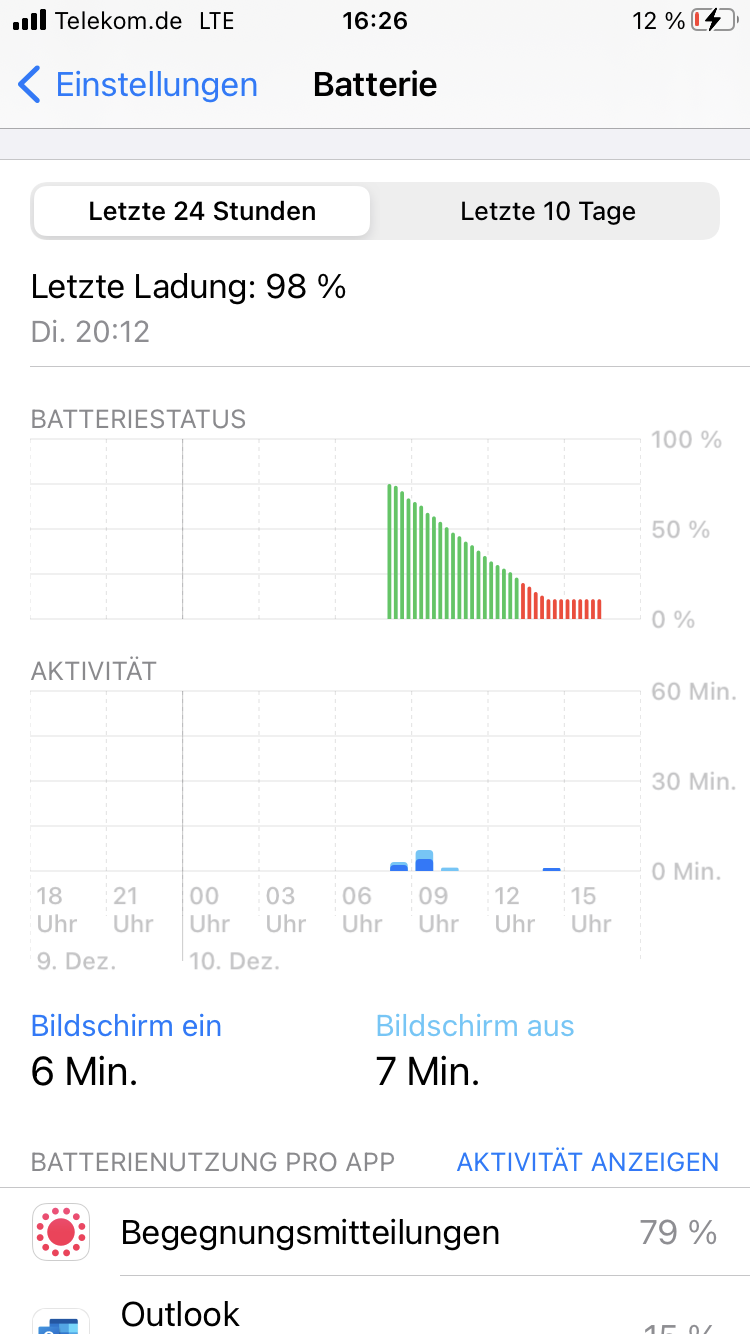
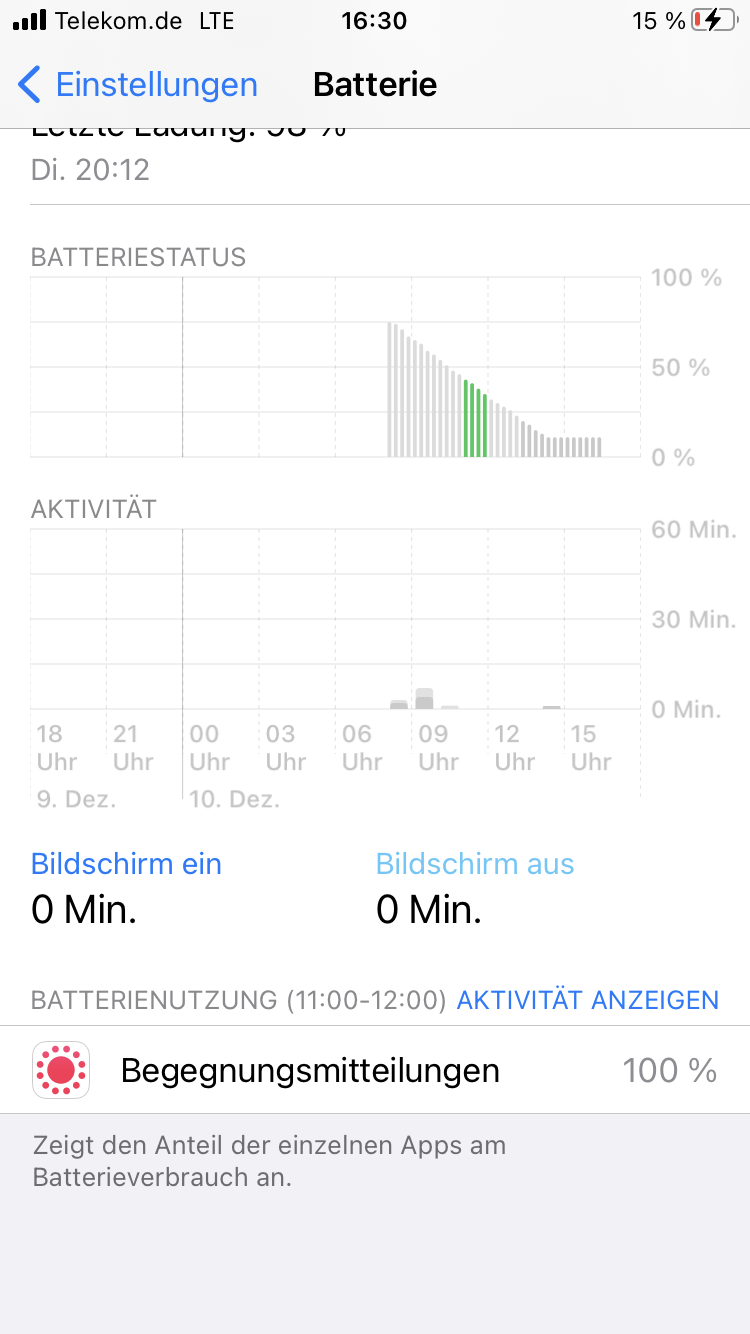
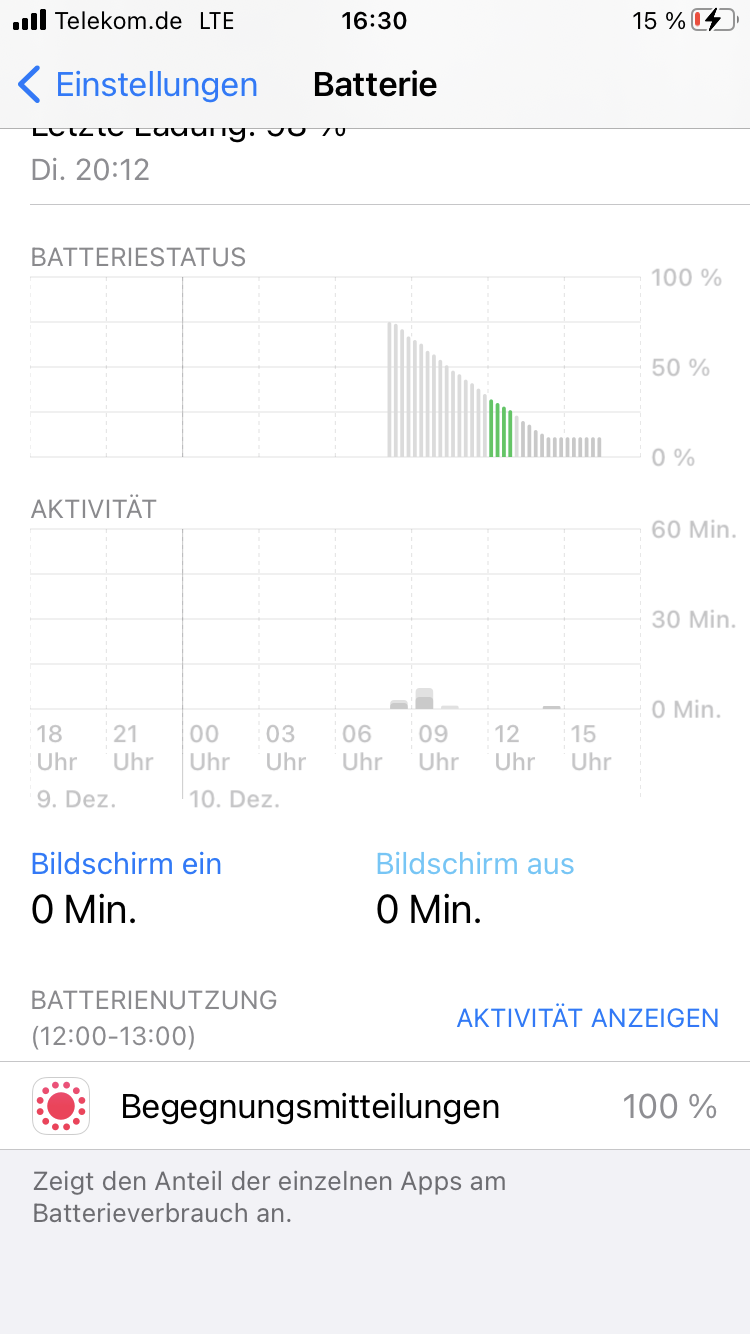
In some situations, the battery usage of the exposure framework is extremely high. In these screenshots you see the behavior. The curve is very steep here, while the device was mainly in standby and not used.
In some hours, the battery was drained by approx. 10% overall by exclusively the the exposure framework.
So, far this happened twice, but only on my iPhone 7. But I don´t know, which special conditions were related. Connectivity is always available either via WiFi or cellular LTE.
Expected behaviour
Steps to reproduce the issue
Technical details
- iOS Version: 14.2
- Device: iPhone 7
- app version: 1.7.1
Possible Fix
Additional context
Internal Tracking ID: EXPOSUREAPP-1882
 mss1010
All 36 comments
See also: #671 and #912
Just a small remark:
If you do not use your phone, than it makes sence that "Begegnungsmittelungen" is the only "App" (=100%) which is shown in these screens...
Edit: I think this can, just like #912 back then, be closed as a duplicate of #671.
Also the reminder from @jucktnich is a good one.
If you like to (@mss1010) you can share
- the battery health
- is this the original battery
- is there any phone you know of near your phone which constantly shares RPIs?
 Ein-Tim
on 10 Dec 2020
Ein-Tim
on 10 Dec 2020
Just a small reminder:
The cwa can NOT influence the battery usage of "Begegnungsmtteilungen".
 jucktnich
on 10 Dec 2020
jucktnich
on 10 Dec 2020
See also: #671 and #912
Just a small remark:
If you do not use your phone, than it makes sence that "Begegnungsmittelungen" is the only "App" (=100%) which is shown in these screens...
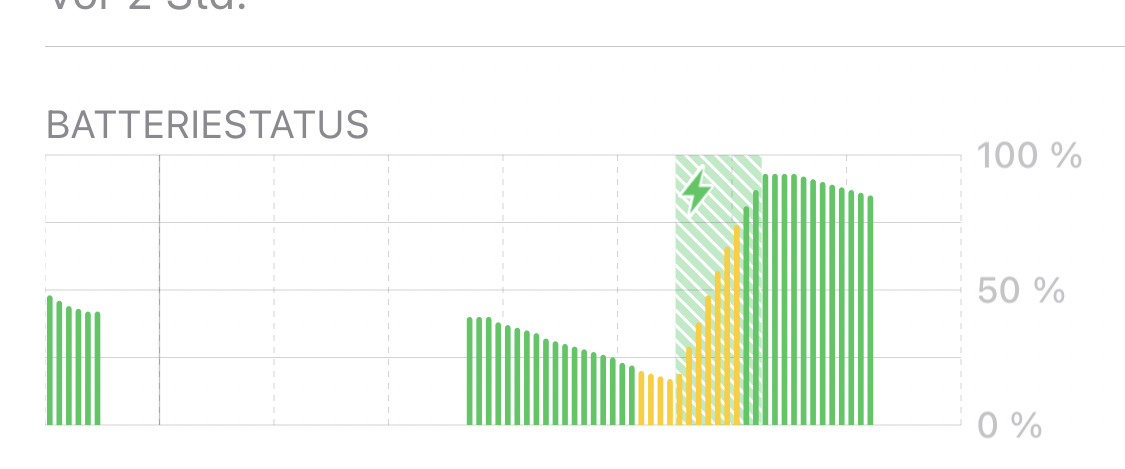
That’s basically true, but if the battery consumption is 10% in one hour.
A „normal“ consumption chart has a much flatter curve like this:
mss1010
on 10 Dec 2020
See also: #671 and #912
Just a small remark:
If you do not use your phone, than it makes sence that "Begegnungsmittelungen" is the only "App" (=100%) which is shown in these screens...Edit: I think this can, just like #912 back then, be closed as a duplicate of #671.
Also the reminder from @jucktnich is a good one.I don't think it will make any sense to further investigate this, but if you like to (@mss1010) you can share
- the battery healt
- is this the original battery
- is there any phone you know of near your phone which constantly shares RPIs?
Im aware of the other issues, but it‘s not a duplicate because the behavior is very different. Im not complaining about relative, but about absolute consumption of 10% battery capacity per hour.
I know that its not directly influenced by the app, but I was hoping that the developers can use their contacts to apple to address this.
mss1010
on 10 Dec 2020
I think apple knows this issue. You can eventually help them by open a ticket under feedbackassistant.apple.com and attache the iOS Systemlog.
jucktnich
on 10 Dec 2020
@mss1010
Yes you are right...
I just checkd an iPhone 6s which is mainly laying around and not used, the ENF does not drain the battery at all on this phone. So maybe it is worth to take a look at your case, even though it might be a edge case.
You can do what was proposed by @jucktnich, but it's also the task from the devs to talk with Apple about this. (Discussion about this back then: https://github.com/corona-warn-app/cwa-app-ios/issues/671#issuecomment-696099259)
Sorry for my not so nice reaction 😅
Have a nice evening
Ein-Tim
on 10 Dec 2020
See also here for related observation on Android.
 ndegendogo
on 11 Dec 2020
ndegendogo
on 11 Dec 2020
The cwa can NOT influence the battery usage of "Begegnungsmtteilungen".
(via @jucktnich
Well - we don't know how this number is measured.
One part of ENF functionality is sending and receiving RPI - this is definitely out of control of cwa.
The other part is the calculation of matches.
We don't know if this counts towards cwa or towards ENF. My own numbers suggest it might be the latter, at least if it is triggered from background. But of course we don't know, to be answered by Apple.
ndegendogo
on 11 Dec 2020
And if we assume that risk checks from background count towards cwa, then the change from 1 daily check to 5-6 checks per day since cwa 1.7 could maybe explain higher consumption now.
ndegendogo
on 11 Dec 2020
If you like to (@mss1010) you can share
* the battery health

* is this the original battery

* is there any phone you know of near your phone which constantly shares RPIs?
- battery health is 95%
- it´s the original battery
- yes, but this is the case all the time. But only on some days the high consumption happens
mss1010
on 11 Dec 2020
@ndegendogo cwa also can't influence matching numbers...
jucktnich
on 11 Dec 2020
I just checkd an iPhone 6s which is mainly laying around and not used, the ENF does not drain the battery at all on this phone.
@Ein-Tim interesting.
Could you please give a few more details? (Just for comparison): cwa version? iOS version?
Is background check working on this device?
How regularly? Is it connected to WLAN? (So with current cwa 1.7.1 we would assume 5-6 checks per day - yes?)
ndegendogo
on 11 Dec 2020
cwa also can't influence matching numbers...
@jucktnich correct. But one check per day (pre-cwa 1.7) or 5-6 checks could make a difference
ndegendogo
on 11 Dec 2020
Yes, but what's the clue for the developers? Should they offer a setting to disable multiple checkings per day? That would be, i think, the only way to decrease battery usage.
jucktnich
on 11 Dec 2020
For sure @ndegendogo
- CWA Version: 1.7.1
- iOS Version: 14.3 Public Beta RC 2 / Build: 18C66)
- Background checks working reliable (4-5 checks per day)
- Connected to the internet via WiFi
- Not used at all
I definetly think that the Battery is drained faster because of the ENF. But I never expierienced spikes like @mss1010 reported...
Ein-Tim
on 11 Dec 2020
@jucktnich
The clue for the developers is that the user will not make a difference between ENF and CWA and if the phone gets empty to fast, because of "the App", the user will deinstall it.
See also this discussion: https://github.com/corona-warn-app/cwa-app-ios/issues/671#issuecomment-696109490
Ein-Tim
on 11 Dec 2020
Should they offer a setting to disable multiple checkings per day?
@jucktnich excellent idea.
Of course, I know, many options will make usage more complex ...
But many people prefer more control how they want to setup their preferences, and are unhappy with "one size fits all".
Examples:
- some are happy with one check per day in favour of battery consumption
- some prefer multiple checks per day and don't care so much about battery (this is me!)
- some prefer one check per day if not in Wifi, and don't want to pay extra data volume
- some prefer multiple checks even using mobile data (again: me)
ndegendogo
on 11 Dec 2020
@mss1010 (and everybody else), maybe you could monitior if something has changed with v 1.9.1 and v2 of the ENF.
Ein-Tim
on 17 Dec 2020
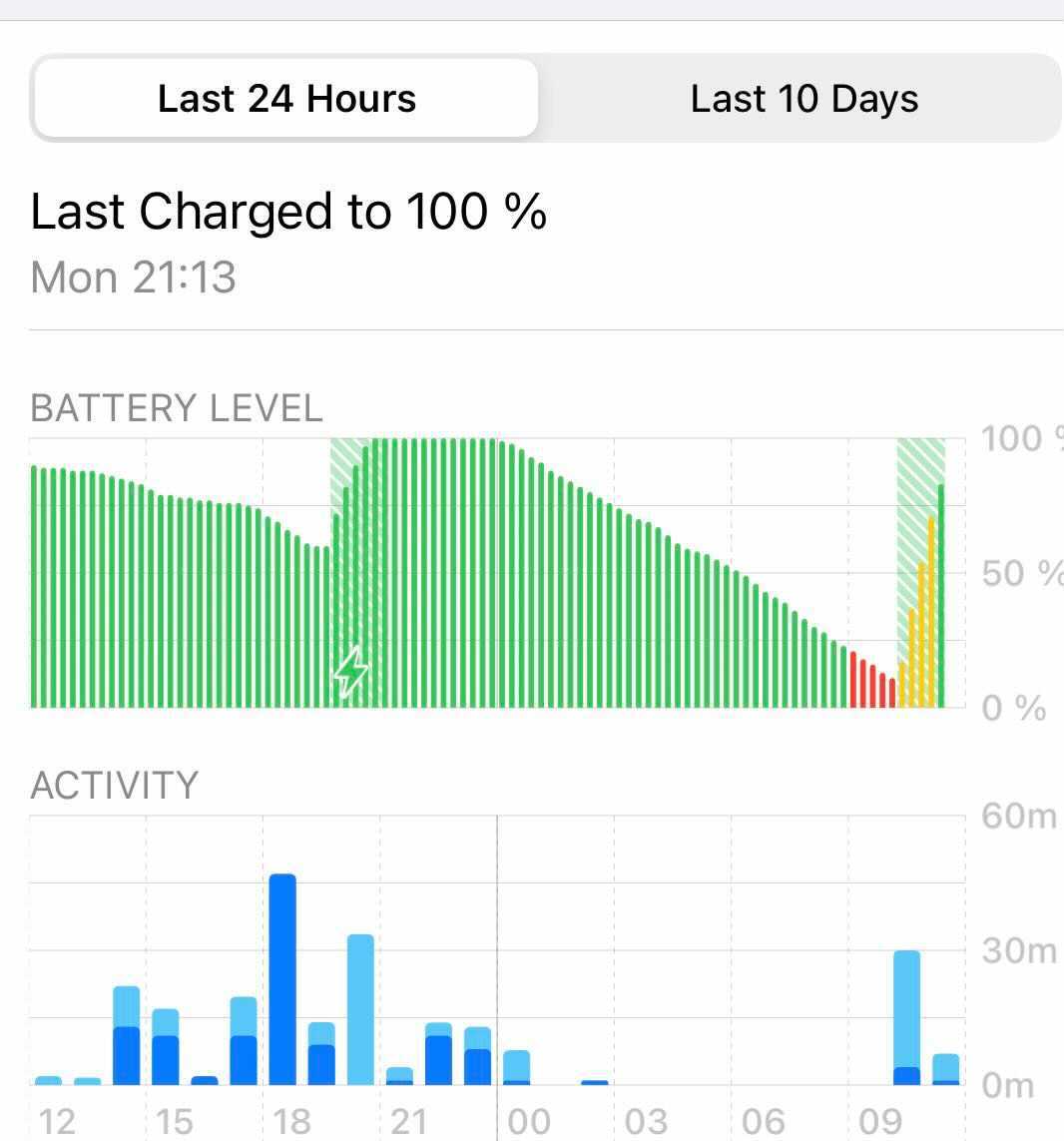
I face a similiar issue. A new iPhone 11 Pro is discharging 100% over night, while my 2 years old iPhone 10 remains fully charged. The only difference is that the new iPhone 11 has CWA installed. I spot this issue since some days now.
All PNS are disabled, across all apps. Almost all background services are disabled as well (it is enabled for CWA, though). But overnight it gets discharged since some days.
iOS 14.2
CWA: 1.10.1
 itinance
on 12 Jan 2021
itinance
on 12 Jan 2021
What's the "Batteriezustand" on the iPhone 11?
jucktnich
on 12 Jan 2021
@itinance
Is there any other device with an installed Corona-Warn-App near the iPhone 11?
Ein-Tim
on 12 Jan 2021
@jucktnich
What's the "Batteriezustand" on the iPhone 11?
Battery Health -> Maximum Capacity: 99%
@Ein-Tim
no. No other device next to it at night running CWA (my wifes fone is complete off during night)
I just see almost every night a constant drop in battery capacity from 100 to 0.
itinance
on 12 Jan 2021
Did you tried to reboot the device?
jucktnich
on 12 Jan 2021
Interesting. Is "Exposure Notification" responsible for 100% of it?
("Battery" and look at the text under the diagram)
Ein-Tim
on 12 Jan 2021
Exposure Notifications: 46%.
While alle other services are single figures.
itinance
on 12 Jan 2021
Okay thanks.
Could you update to iOS 14.3 and report back after monitoring for some time?
Ein-Tim
on 12 Jan 2021
@jucktnich i will reboot todays evening and see what is happening then during night (now at day time it makes no sense due to heavy usage including personal hotspot)
itinance
on 12 Jan 2021
Okay thanks.
Could you update to iOS 14.3 and report back after monitoring for some time?
Alright! Many thanks for this conversation!
itinance
on 12 Jan 2021
Internal Tracking ID: EXPOSUREAPP-1882
 dsarkar
on 12 Jan 2021
dsarkar
on 12 Jan 2021
@itinance is your iPhone 11 Pro still discharging 100% over night?
 thomasaugsten
on 14 Jan 2021
thomasaugsten
on 14 Jan 2021
@thomasaugsten
@itinance is your iPhone 11 Pro still discharging 100% over night?
Unfortunately Exposure Logging has disabled during Wednesday Night for unknown reasons. I just noticed it todays morning and re-enabled it.
However, iOS 14.3 is installed since 2 days and todays night I will check again and tell here the results tomorrow.
itinance
on 15 Jan 2021
Any update @itinance or do you want to monitor a bit longer?
Ein-Tim
on 16 Jan 2021
Any update @itinance or do you want to monitor a bit longer?
Yes! No significant battery drop last night. 4% energy consumption over last 24 hours.
itinance
on 16 Jan 2021
What about you @mss1010?
Ein-Tim
on 16 Jan 2021
I did not see the issue anymore. We could close the issue if you like
mss1010
on 16 Jan 2021
For sure. 👍
As the author of this Issue you can go ahead and close it.
Ein-Tim
on 16 Jan 2021
Related issues
 delcorny
·
3Comments
delcorny
·
3Comments
 felixbohnacker
·
3Comments
mss1010
·
3Comments
felixbohnacker
·
3Comments
mss1010
·
3Comments
 Applaus-Klaus
·
3Comments
Applaus-Klaus
·
3Comments
 wandoliver
·
3Comments
wandoliver
·
3Comments
Most helpful comment
I did not see the issue anymore. We could close the issue if you like