Cwa-app-ios: Irregularities in risk checking schedule (CWA 1.7.1, 1.9.1)
Avoid duplicates
- [ ] Question is not already answered in the FAQ
- [ ] Question has not already been asked in another issue
Your Question
- Source File:
- Line(s):
- Question:
Since cwa 1.7.1, the schedule for risk checks is performed (roughly) every 4 hours, and it covers the hourly key files of today plus the daily files of the past 14 days.
In last time I saw a few irregularities on this expected behaviour. I would like to know if there is an explanation for this, or if it might indicate an issue with the current implementation / possible impact on the robustness.
I am aware that without WLAN a scheduled check is skipped. I am commuting to work in the morning, and back in the late evening, but here at home and in my office WLAN is usually available. I don't use any power saving options.
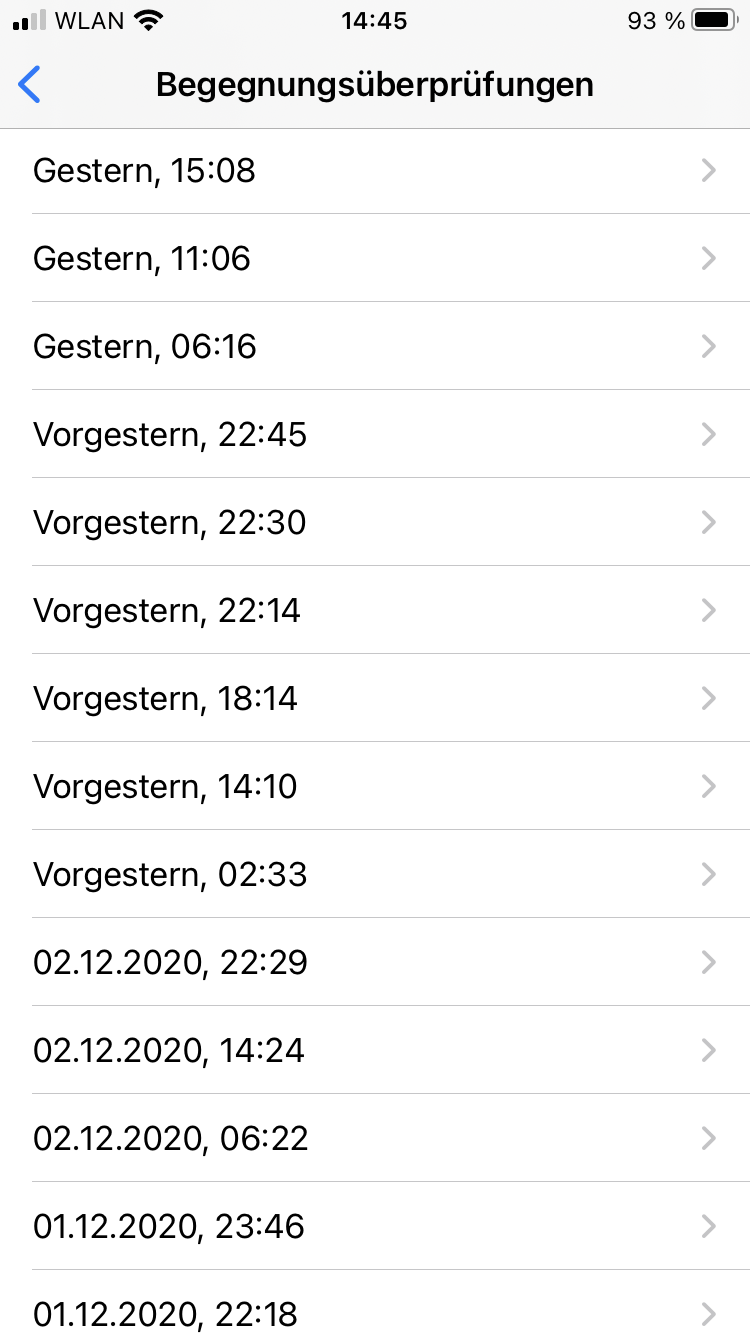
Especially last Thursday (03 Dec, 'vorgestern') the observed schedule was:
02:33 first check, 1 hourly file
06:30 and 10:30 check skipped
14:10 check with only 5 hourly files - why?
18:14 and 22:14 check as expected
22:30 and 22:45 two more checks - why?
(Does it try to make up for the skipped checks in the morning? 🤪)
Note: I don't remember for sure if these two additional checks were performed from the background or if I opened the app at that time.
cwa 1.7.1 / iOS 14.2 / iPhone 8
See screenshot and attached ENF log file
ExposureChecks-2020-12-05.json.txt
Possibly related: https://github.com/corona-warn-app/cwa-app-ios/issues/1649
Internal Tracking ID: EXPOSUREAPP-4289.
 ndegendogo
All 29 comments
Hi @ndegendogo, we will forward this question to the developers. Hopefully we can come back with more information on Tuesday. Best wishes, DS
Corona-Warn-App Open Source Team
 dsarkar
on 5 Dec 2020
dsarkar
on 5 Dec 2020
Thanks @dsarkar
ndegendogo
on 5 Dec 2020
Today (09 Dec):
it checked at 00:07 / 04:47 / 08:50 / 12:58;
then skipped 16:58;
then checked again at 21:22 - but only 15 hourly files - why?
ndegendogo
on 9 Dec 2020
@ndegendogo Feedback from developers. Will translate it later to English.
Die Aktualisierung ist von mehreren Faktoren abhängig:
- allg. Zustand des Gerätes (u.a. auch Akku-Status)
- Stabile WLAN Verbindung
- Herstellerspezifische Abhängigkeiten (manche Hersteller geben uns nur 1x pro Tag Zeit, eine Abfrage zu schicken)
- Unter iOS macht das OS zusätzlich Abschätzungen, wie oft der Nutzer da Handy in die Hand nimmt
- insb. nachts setzt die Aktualisierung oft aus, da das OS antizipiert, dass das Handy nicht genutzt wird.
- Die Anzahl der Files ist abhängig vom Aktualisierungszeitpunkt.
- So sind es nachts in der Regel 15 Pakete und tagsüber deutlich mehr.
- Je nach Uhrzeit, kommt immer ein weiteres "Stundenpaket" dazu.
Best wishes,
DS
Corona-Warn-App Open Source Team
dsarkar
on 10 Dec 2020
Die Anzahl der Files ist abhängig vom Aktualisierungszeitpunkt.
So sind es nachts in der Regel 15 Pakete und tagsüber deutlich mehr.
Je nach Uhrzeit, kommt immer ein weiteres "Stundenpaket" dazu.
Yes, exactly, this is the pattern that I usually watch. Starting with 00:00 UTC (01:00 local time) the new uploaded keys are collected into the next hourly file, and this package is ready for download at the next full hour.
For example:
02:33 => 1 hourly file + 14 daily
06:30 => 5 hourly + 14 daily
10:30 => 9 hourly + 14 daily
14:10 => 13 hourly + 14 daily
18:14 => 17 hourly + 14 daily
22:14 => 21 hourly + 14 daily
However, on 03 December the pattern was different.
1) 14:10 checked only 5 hourly files. What happened here? Did 06:30 download only but not check, and then 14:10 check only but no fresh download? Or did it start to download, was then interrupted prematurely after 5 files, and performed the check with all files available at that time?
2) Why do we see a successfull check (22:14) followed by another (22:30) and yet another (22:45)? Is it not expected to wait for minimum 4 hours?
ndegendogo
on 10 Dec 2020
@ndegendogo, roger. We will bring this to the developers, also in context with the other issue you have been reporting, possible context there. DS
dsarkar
on 10 Dec 2020
@dsarkar thanks a lot.
I see many pre-releases the last time, so it looks like everybody is quite busy at the moment. 😀
ndegendogo
on 11 Dec 2020
Can you please retest with v1.9.1
 thomasaugsten
on 16 Dec 2020
thomasaugsten
on 16 Dec 2020
Thanks - I'll continue to watch
ndegendogo
on 17 Dec 2020
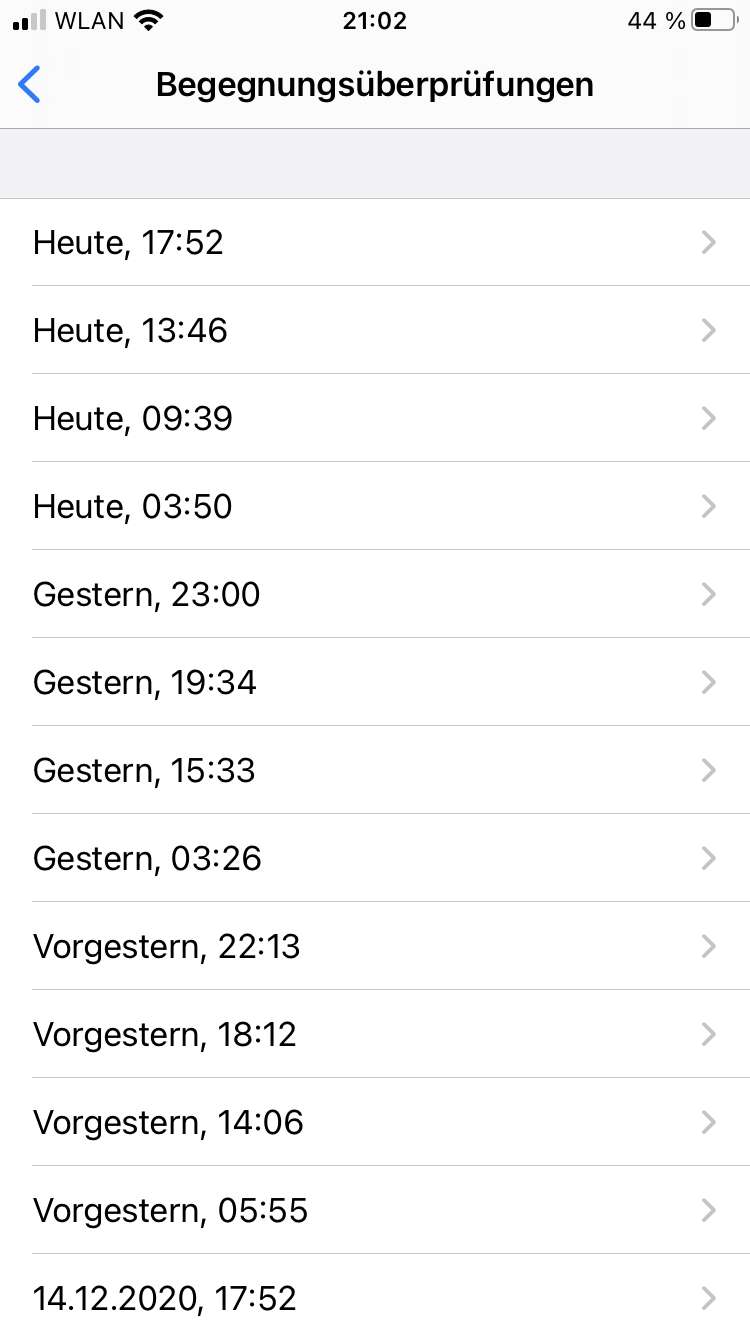
Today again an irregularity. First check at 03:50; next check not at ~07:50, but two hours late at 09:39.
Interestingly, this one has only 6 hourly files - why?
cwa 1.9.1 / iOS 14.2 / iPhone 8
See screenshot and ENF log
ExposureChecks-2020-12-17.json.txt
ndegendogo
on 17 Dec 2020
Note: I was shopping around 07:50, this may explain the delay (no WLAN, possibly even connectivity interrupted during the download?).
Question: What is expected to happen in such a case?
Will it retry?
After 4 hours, or maybe even after 2 hours?
Could it be that the check at 09:39 is in fact a retry / leftover from 07:50, and therefore downloaded and checked only 6 hourly files?
(Just a crazy idea ... 🙃)
ndegendogo
on 17 Dec 2020
Does not seem like a typical interruption since all files in the 09:39 check have the _correct_ timestamp...
So either the check at 07:50 was interrupted at a very early point -> no log entry was written or it never started...
(Just a small remark: You could delete the 1.7.1 from the title since you are still experiencing this with 1.9.1)
 Ein-Tim
on 17 Dec 2020
Ein-Tim
on 17 Dec 2020
Does not seem like a typical interruption since all files in the 09:39 check have the correct timestamp...
@Ein-Tim ... whatever "typical" means.
Definitely it was not interrupted after call to ENF, as the timestamps show.
So either the check at 07:50 was interrupted at a very early point
Indeed, such an early interruption would be compatible with what we see.
And maybe interrupted during key download (hence only 6 hourly files), but then resumed 2 hours later at 09:39 with ENF / matching procedure?
ndegendogo
on 18 Dec 2020
Today I experienced something similar:
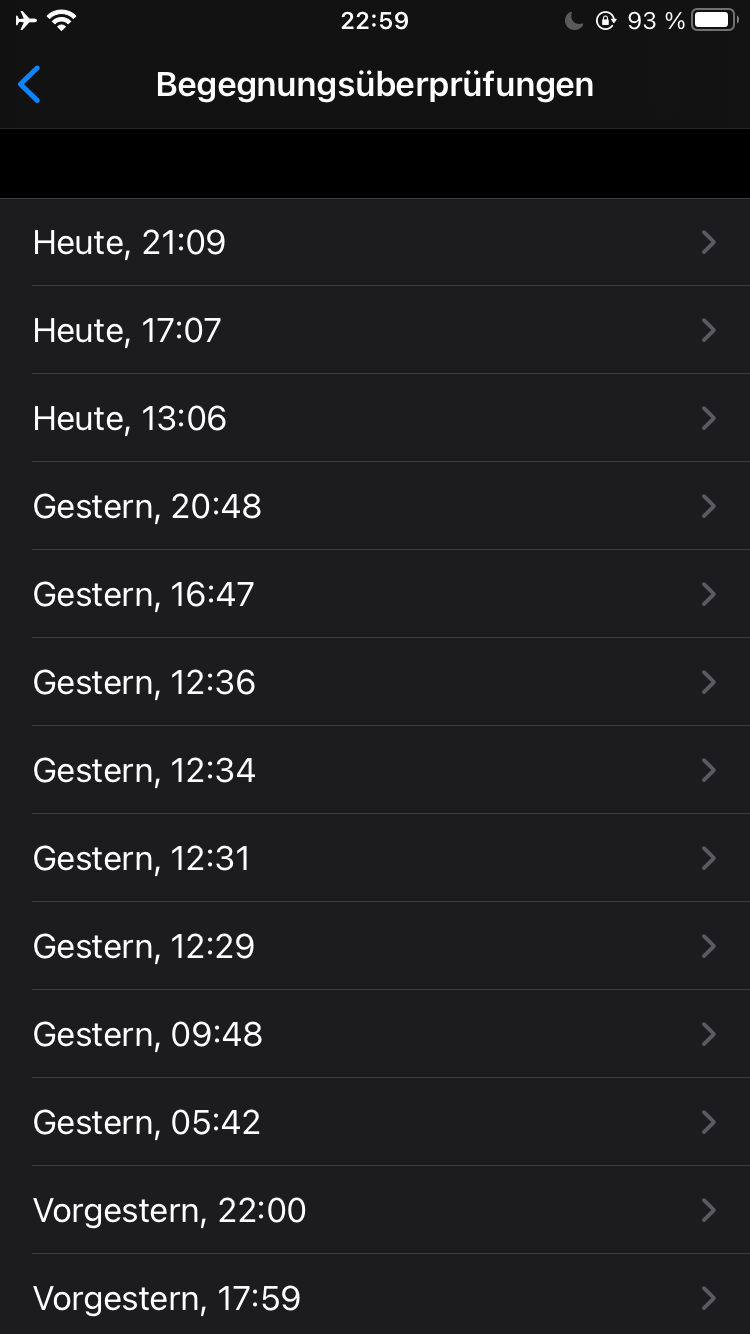
No checks happened between 20:48h yesterday and 13:06h today. The phone was mostly on a power supply and connected to wifi.
- iPhone 6s
- iOS 14.4 Public Beta 1
- CWA 1.9.1
Edit: Please don't mind the checks between 12:00h and 13:00h yesterday, I tested something...
Ein-Tim
on 23 Dec 2020
@Ein-Tim did you check the number of hourly files? Are they complete?
On my side it often misses a check in the morning, and recently I had a gap > 24h. My hourly files were always complete in last time. I think I mostly have WLAN coverage.
ndegendogo
on 24 Dec 2020
@ndegendogo
If I get everything correct here, I think the hourly files are complete.
Nevertheless delays like this aren't good... But this was the first time I saw something like this, will keep monitoring 👍
Stay safe and happy holidays!
Ein-Tim
on 24 Dec 2020
Stay safe and happy holidays
@Ein-Tim thanks- and same to you and your family!
ndegendogo
on 24 Dec 2020
@Ein-Tim please be aware there are only 6 checks every 24h allowed by Apple.
@ndegendogo 24h gaps can happen if the background scheduler breaks up (device condition, crash) and is recovered by iOS after 24h . You can check for ENA crash files in the analytics settings
thomasaugsten
on 24 Dec 2020
You can check for ENA crash files in the analytics settings
@thomasaugsten thanks for the hint.
I had a check on 2020-12-20 at 05:46, but then no further check for the rest of that day. Also not on the following day 2020-12-21 till I opened cwa at 09:26.
I look into my analytics settings but do not see any entry related to this time.
Can it be that the server had any problems on that day?
ndegendogo
on 24 Dec 2020
No this is very unlikely because it is monitored and it would create a lot of reports. If you see again auch a behavior please create a sysdiagnose. Press all 3 buttons for 1 second
thomasaugsten
on 24 Dec 2020
@thomasaugsten thanks again, and have a merry Christmas!
ndegendogo
on 24 Dec 2020
@thomasaugsten
please be aware there are only 6 checks every 24h allowed by Apple.
Wait, the rate limit dropped from 15 checks every 24h to 6?
Thank you for answering at this time, merry Christmas!
Ein-Tim
on 24 Dec 2020
With the update to ENF v2 yes
https://developer.apple.com/documentation/exposurenotification/enmanager/3650384-detectexposures#discussion
thomasaugsten
on 24 Dec 2020
@thomasaugsten
Thank you so much for answering and also for answering so quick!
Have a nice evening and happy holidays! ❤
Ein-Tim
on 24 Dec 2020
create a sysdiagnose. Press all 3 buttons for 1 second
just to remember, how: press both volume buttons and the power button ...
ndegendogo
on 24 Dec 2020
Today I got again a check with less than the full set of hourly files.
Possibly this was related to no internet coverage.
More details on the timeline:
- 14:05 I opened the app (still at version 1.9.1) and got a manually triggered check (the previous was 09:52, slightly more than 4 hours ago).
- after this I updated to cwa version 1.10.1 and opened the app again.
- I then disabled mobile data because I wanted to test behaviour for another ticket, and went out for a walk, out of coverage of my WLAN
- 14:30 I opened the app. No check as expected - the previous was just 25 min ago; (but maybe this restarted some timer)
- during the afternoon I was at home, but forgot to re-enable mobile data
- shortly before 18:00 I went shopping (possibly the check was due at that time and I had no internet?)
- one hour later I went again for a walk (mobile data still disabled).
- I opened the app at 19:49 and unexpectedly got a check (I thought that I had no WLAN coverage, but am not 100% sure about this).
- this check at 19:49 shows 14 daily files, but only 16 hourly files.
cwa version 1.10.1 / iOS 14.2 / iPhone 8
Questions: Can this sequence of events explain why I got less than the full set of hourly files?
Do you need any more info (e.g. a sysdiagnose or similar?)
See also attached ENF log.
ExposureChecks-2020-12-30.json.txt
ndegendogo
on 30 Dec 2020
An aspect is maybe the app tries to download hourly package as often as possible. This means if WIFI is available in the best case every 2h in the background or when you manually open the app. The exposure check with the downloaded packages happens only all 4 hours because of the 6 per Day Limit of Apple. This means he will do an exposure check every 4h when new hourly packages are downloaded in the last 4h.
thomasaugsten
on 30 Dec 2020
From my side everything what I have watched so far was explained. However, next week I expect "rougher" conditions; my holiday is over, I have to return to work, and I will have times without internet coverage then .
@Ein-Tim you also reported some irregularities here - do you want to keep this ticket open?
ndegendogo
on 2 Jan 2021
@ndegendogo
For me it is okay to close this issue 👍
Edit: Thanks for asking before closing it! ❤️
Ein-Tim
on 2 Jan 2021
Related issues
 Applaus-Klaus
·
3Comments
Applaus-Klaus
·
3Comments
 wandoliver
·
3Comments
wandoliver
·
3Comments
 benekuehn
·
3Comments
benekuehn
·
3Comments
 christianbrb
·
3Comments
christianbrb
·
3Comments
 olafthecruel
·
3Comments
olafthecruel
·
3Comments
Most helpful comment
With the update to ENF v2 yes
https://developer.apple.com/documentation/exposurenotification/enmanager/3650384-detectexposures#discussion