Cwa-app-ios: [iOS] iPhone storage usage constantly changing and largely varying
Avoid duplicates
- [x] Bug is not mentioned in the FAQ
- [x] Bug is not already reported in another issue
Describe the bug
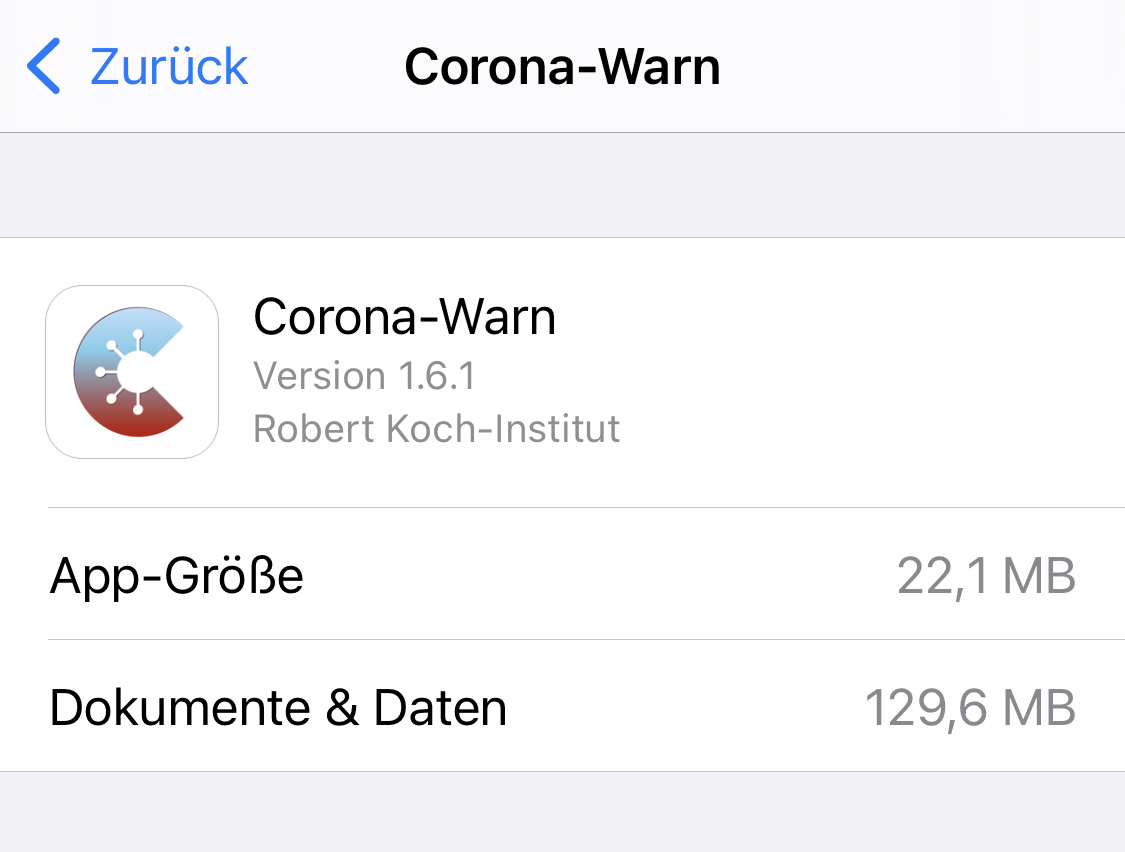
Since I installed the app on the release date, the storage usage on the device is constantly increasing. Now it‘s at around 130 MB of data. See below screenshot.
I dont have insights in the actual size of the keys of the last 14 days, so can you check if this behavior is valid?
Expected behaviour
I would expect, that only 14 days of data is stored locally, ans therefore at some point the space usage should should stay on a certain level, because old data should be deleted.
Steps to reproduce the issue
Technical details
- iOS Version: 14.2
- Device: iPhone XS
- Corona Warn App: 1.6.1
Possible Fix
Additional context
Internal Tracking ID: EXPOSUREAPP-3959
 mss1010
All 28 comments
Dear @mss1010,
Thank you for reporting this issue. Please, provide us with the following information:
iPhone model?
iOS version?
Corona-Warn-App Version 1.6.1?
Best wishes,
DS
Corona-Warn-App Open Source Team
 dsarkar
on 20 Nov 2020
dsarkar
on 20 Nov 2020
Hello DS,
ok, here is the information (also added to the opening post)
- iOS Version: 14.2
- Device: iPhone XS
- Corona Warn App: 1.6.1
And now this is really funny. I monitored the increasing size all the time, and now when I check it again, it reduced to 118,6 MB.
But maybe still it would be good to make sure, that there is no bug.
One question: which data is stored locally? Is it only the received keys from other devices of the last 14 days? Or also the downloaded keys from the server?
To the community: Maybe it would be interesting if you share your local storage usage, just to have some comparison.
mss1010
on 20 Nov 2020
@mss1010, Thanks for your reply. Actually, on my phone, the App size is 20,5 MB and Docs & Data is 17,3 MB.
Regarding your questions, could you please have look here:
https://www.coronawarn.app/en/faq/#keys_matches
https://www.coronawarn.app/en/faq/#data_access
Best wishes,
DS
Corona-Warn-App Open Source Team
dsarkar
on 20 Nov 2020
@dsarkar The real question is:
Is the download Data (Hashes) stored by the App or the ENF? Where does iOS show this storage usage? (cc @thomasaugsten)
 Ein-Tim
on 20 Nov 2020
Ein-Tim
on 20 Nov 2020
the storage usage is shown in Einstellungen > Allgemein > iPhone-Speicher > (Search for Corona-Warn)
mss1010
on 20 Nov 2020
No sorry, I think this was a bit confusing, I meant if iOS really adds the downloaded Data to the storage usage of CWA or if it's jsut shown as "System" or "Other" Storage, yk what I mean? (That would be important to know because if the downloaded Data is not added to the size of the App then the increasing storage usage is not connected to the (daily) downloaded new data)
Ein-Tim
on 20 Nov 2020
Just to throw another number in:
cwa 1.6.1 / iOS 14.2 / iPhone 8
app size: 21.7MB
app data: 76.1 MB
 ndegendogo
on 21 Nov 2020
ndegendogo
on 21 Nov 2020
So, it would be interesting to get more details how to interprete this "app data".
Is it the downloaded key files of the last 14 days? What else?
ndegendogo
on 21 Nov 2020
My numbers:
cwa 1.6.1 / iOS 14.2 / iPhone XR
app size: 20,5 MB
app data: 190,6 MB
cwa 1.6.1 / iOS 14.3 Public Beta 2 / iPhone 6s
app size: 20,5 MB
app data: 82,1 MB
CWA active on both phones since more than 14 days, but the iPhone 6s never leaves my flat, everywhere I go I take the XR with me, maybe a starting point 🤷🏻♂️
Ein-Tim
on 21 Nov 2020
Dear @Ein-Tim, @mss1010, @ndegendogo,
We will approach the developers with this questions. Thanks!
Best wishes,
DS
Corona-Warn-App Open Source Team
dsarkar
on 22 Nov 2020
Dear @Ein-Tim, @mss1010, @ndegendogo, dear community,
Thanks again for your contributions.
We have created a ticket for this issue (Internal Tracking ID: EXPOSUREAPP-3959) in the internal tracking system. The developers will look into this issue now. Any further developments will be notified here in this Github issue.
The developers would like to collect more information from the community on this topic. In order to understand this issue better, it might be helpful to establish some possible correlations (some of them you have already done), for example:
- CWA version / iOS version / iPhone model / App size / App data size
- How long has the CWA been installed?
- Did you reset the CWA, if so when?
- How long has the phone been running?
- Phone has been moving around or not?
- Any other observation
Best wishes,
DS
Corona-Warn-App Open Source Team
dsarkar
on 24 Nov 2020
iPhone XR:
- CWA-Version: 1.6.1
- iOS-Version: 14.2
- iPhone XR (A2105)
- App size: 20.5 MB
- App data size: 190,6 MB
App has been installed since release day.
App was never reseted.
Phone was first activated 1 Year ago, last restart was 2 weeks ago. Phone moves around every day (including Buses and other crowded places).
iPhone 6s:
- CWA-Version: 1.6.1
- iOS-Version: 14.3 Public Beta 2
- iPhone 6s (A1688)
- App size: 20.5 MB
- App Data size: 82 MB
App has been installed since 2 months.
App was once deinstalled(=reseted), but then installed again (The Logs in Settings weren't deleted by the deinstallation).
Phone was first activated 2 Months ago (after a complete reset) and the last restart was 1 Month ago.
Phone never moves around.
When I'm at home the 6s and XR are often nearby (and exchange keys)
Ein-Tim
on 24 Nov 2020
The basic data for me is in the opening post. In addition:
- I never reset the app
- The phone is running 16 hours per day, meaning reboot every day
- I have it always with me and had regular contact with other people
- since about 3 weeks I installed the app on a second device, which is near the main device about 10 hours/day
Especially the last point might be interesting, because the devices are exchanging new keys every 5 minutes, if I remember correctly.
In general, can someone explain, what size one "contact key" has? Then we could do some rough calculations for estimation.
mss1010
on 24 Nov 2020
@dsarkar Could the developers please ask where iOS shows the disk space which is took away by
a) the storage of the recived RPIs
b) the downloaded Hashes.
With where I mean if they show it under the App data size of CWA or if the just show it as "Other" in the "iPhone Storage" Menu. I hope you understad what I mean.
Ein-Tim
on 24 Nov 2020
cwa 1.6.1 / iOS 14.2 / iPhone 8
app size: 21.7MB
app data: today it is 96.5 MB (and three days ago it was only 76.1 MB with same config).
cwa installed and running since release day.
Updated cwa versions as available, never deleted or reinstalled cwa.
I am commuting to work daily with public transport, so I guess I pick up some RPI.
I never reboot the device, except for iOS upgrade (last was ~ 2 weeks ago).
ndegendogo
on 24 Nov 2020
And from a friend:
cwa 1.6.1 / iOS 14.2 / iPhone 12
cwa code 22.1M / data 17M
installed since ~ 2 weeks
stays mostly at home, very few contacts.
ndegendogo
on 24 Nov 2020
After updating to 1.7.1:
iPhone XR:
- App size: 20,6 MB (+0,1 MB)
- App data size: 193,4 MB (+2,8 MB)
iPhone 6s:
- App size: 20,6 MB (+0,1 MB)
- App data size: 112,4 MB (+30,4 MB)
The iPhone 6s somehow gained 30,4 MB in only 2 days. Will continue to monitor this...
Ein-Tim
on 26 Nov 2020
Updated yesterday to cwa 1.7.1.
reporting in the morning (14 daily key files + 4 hourly files)
iOS 14.2 / iPhone 8
cwa code: 20.6MB
cwa data: 97.5MB
ndegendogo
on 26 Nov 2020
An update from me: around a week ago, the cwa data usage changed to 119,6 MB and since then stayed exactly on that value. Strange behavior.
@dsarkar Do the developers already have some findings about that?
mss1010
on 2 Dec 2020
@mss1010
Can confirm this, for me it only increased by 0.01MB
Ein-Tim
on 2 Dec 2020
Yes, same here.
cwa 1.7.1 / iOS 14.2 / iPhone 8
it is evening now
cwa code: 20.6 MB
cwa data: 97.5 MB
Exacly same numbers as I had 7 days ago but that was in the morning
ndegendogo
on 2 Dec 2020
We see that iOS will not clean up temporary system files of the app when the phone has enough space left. In the next version we add a feature to trigger this system clean up manually.
 thomasaugsten
on 3 Dec 2020
thomasaugsten
on 3 Dec 2020
Should be fixed with 1.9.1:
Moreover, further improvements have been made in version 1.9. On iOS devices, for example, the Corona-Warn-App system files are cleaned up and deleted at shorter intervals, as the operating system released these files with a delay in the past.
(Source: https://www.coronawarn.app/en/blog/2020-12-16-corona-warn-app-version-1-9/)
Ein-Tim
on 16 Dec 2020
Corona-Warn App 1.9.1 only uses 75.1 MB on my iPhone XR and 64.4 on the iPhone 6s.
Seems fixed for me, how about you @ndegendogo and @mss1010
Ein-Tim
on 17 Dec 2020
CWA 1.9.1 / iOS 14.3 / iPhone 6s / App size 21.4 MB / Data 30.9 MB
dsarkar
on 17 Dec 2020
For me it also reduced after opening the app. Now the question is, if the cleanup is also triggered if I don’t open the app for a long time.
mss1010
on 17 Dec 2020
cwa 1.9.1 / iOS 14.2 / iPhone 8
code 21.4MB / data 43.8MB
I opened the app yesterday after the upgrade to 1.9.1, but usually I try to avoid this and watch only the ENF log (at least as long I have 0 matches, which is currently not the case).
ndegendogo
on 17 Dec 2020
After some time now the storage usage stayed on the same value of 42,4 MB. I think we can call the issue solved.
mss1010
on 28 Dec 2020
Related issues
 pavll
·
3Comments
pavll
·
3Comments
 rainervonuns
·
3Comments
rainervonuns
·
3Comments
 Hermann12
·
3Comments
Hermann12
·
3Comments
 benekuehn
·
3Comments
benekuehn
·
3Comments
 Lhendrichs
·
3Comments
Lhendrichs
·
3Comments
Most helpful comment
After some time now the storage usage stayed on the same value of 42,4 MB. I think we can call the issue solved.