Cwa-app-ios: ENErrorDomain-Fehler 11/13
Avoid duplicates
- [x] Bug is not mentioned in the FAQ
- [x] Bug is not already reported in another issue
Describe the bug
After opening the app, this error pop up is shown immediately. It pops up twice, fast after each other.
Expected behaviour
Status Update of the current screen and data in the background.
Steps to reproduce the issue
First time error code was 11

Now, it says error code 13

- Open the app
- Wait
(7/14 Days active. Last Update of the Status: Vorgestern)
Technical details
- iOS Version: 13.5.1
- Device: iPhone XR
Internal Tracking ID: EXPOSUREAPP-1911
 chk-code
All 102 comments
App was closed and hard closed a couple of times, But no difference in the behavior.
I remember that some days ago I received a system notification from the Tracking protocol that something went wrong.
Seems like this error comes from the Tracking Protocol?
chk-code
on 24 Jun 2020
Same problem here (ENErrorDomain-Fehler 11), iPhone SE, iOS 13.5.1
Disappeared after restart of phone.
 pstadt
on 24 Jun 2020
pstadt
on 24 Jun 2020
I've the same issue.
iPhone XS Max, iOS 13.5.1
 felixoi
on 24 Jun 2020
felixoi
on 24 Jun 2020
Same problem here (ENErrorDomain-Fehler 11), iPhone SE, iOS 13.5.1
Disappeared after restart of phone.
Restart didn’t fixed it for me.
chk-code
on 24 Jun 2020
Hi @chk-code ,
Thanks for your report. We will try to reproduce this issue.
Meanwhile, copied directly from the header file of EN Framework.
ENErrorCodeInternal = 11, /// Internal error. This indicates a bug in this framework.
It seems an issue of the framework.
We'll also align with Apple.
 haosap
on 24 Jun 2020
haosap
on 24 Jun 2020
This error occurs when the API gets called to often in an internal defined time frame. So there has to be a breakpoint where the hook-up function gets into a loop calling the framework or a wrong condition leading to multiple calls. (This is related to Error code 13/rate limited)
It makes sense that the error occurred now, and not earlier, because today was the first time the app actually called the API to check matching key identifiers.
@chk-code Did the app accessed the framework? You can check that under Settings app->Privacy->Health->“COVID-19 Exposure Logging“. Under „Active apps“ there is a grey text where you can see the number of times the framework was accessed. Under „Exposure Checks“ you can also get a JSON output of the check. So you can see if the access was successful.
 tens0rfl0w
on 24 Jun 2020
tens0rfl0w
on 24 Jun 2020
@tens0rfl0w Seems like it didn’t access the api?

Still getting the error message, after some hours
chk-code
on 24 Jun 2020
@chk-code Ok, thank you! You are right, there was no successful access to the framework from the app. Seems like it is an internal framework bug like @haosap already pointed out. Would be interesting to know if error 13/„rate limited“ occurred because the app run into internal error 11 and retried connecting to the API to often, or if error 13 happened first and after that the API broke.
tens0rfl0w
on 24 Jun 2020
Hi @tens0rfl0w @chk-code ,
We have already addressed this to Apple and are waiting for the response from Apple.
Thanks for reporting this issue. cc @ChristianKienle
haosap
on 24 Jun 2020
Same error for me. @tens0rfl0w for me it's only error 11. I did get it first a few minutes ago. I did install on day one and didn't start/restart the app frequently. IphonXs. Btw I am also getting the "Region für die Kontaktmitteilung.." message since time of Installation.
 mf71
on 24 Jun 2020
mf71
on 24 Jun 2020
Same issue as @chk-code reported appeared on my iPhone 11 after a restart.
 ForlornWongraven
on 24 Jun 2020
ForlornWongraven
on 24 Jun 2020
I have also the error 11/13. Yesterday it works like the other days before without this issue.
 toddy
on 24 Jun 2020
toddy
on 24 Jun 2020
Same here : / on my IPhone 11 Pro
 Siska2
on 24 Jun 2020
Siska2
on 24 Jun 2020
Did somebody get this error with 13.6 Beta2?
 thomasaugsten
on 25 Jun 2020
thomasaugsten
on 25 Jun 2020
I also have error 13 since yesterday. It worked the days before without any issue. Iphone XR - iOS 13.5.1
Restart does not help.
 dnuc
on 25 Jun 2020
dnuc
on 25 Jun 2020
Same error for me (since 23.06.2020). Restart did not fix the issue for me.
Although the app itself regularly indicated a refresh in the risk pane during the last nine days of tracing, the COVID-19 protocol of iOS seems never to have been accessed successfully (iOS settings indicates zero accesses to the protocol, checked daily).
Additionally, an iOS warning "Not enough storage space for COVID-19 tracing" popped up once, although plenty of space is available.
Model: iPhone 6S
OS: iOS 13.5.1
Tracing: 9/14 days
Last update: 23.06.2020 15:50
 nicopasslick
on 25 Jun 2020
nicopasslick
on 25 Jun 2020
same here, first domain-error 11 occured, now domain-error 13,
iPhone 7, iOS 13.5.1,
tracing 9/14 days,
Aktualisiert: vorgestern
The "not enough storage space" also showed up yesterday, but vast amount of storage available.
EDIT: as others mentioned before, later that day, this error disappeared by itself. :-)
 BettinaPfeifer
on 25 Jun 2020
BettinaPfeifer
on 25 Jun 2020
I have excactly the same Error "ENErrorDomain-Fehler 13"
aktualisiert: vorgestern
Tracing 7/14 Days (that was two days ago, and does not count higher anymore)
Iphone 8. IOS 13.5.1
Restarting the IPhone did not help.
For me after two days of struggeling i found the best solution for me:
Just uninstall the app and wear a mask.
Its a shame
 kraftzwerg
on 25 Jun 2020
kraftzwerg
on 25 Jun 2020
Somehow, today the problem solved itself for me. I have an updated status from 8am.

Also, I can see that the Framework had 2 successful calls (privacy-health-COVID 19)
Seems like something happened in the background or the deadlock recovered?
Cc: @haosap @tens0rfl0w
chk-code
on 25 Jun 2020
Hello, guys
I work on the Danish app. We see this error (ErrorCode 11) as well. Based on our observation, this issue occurs when the phone submits the zips files with the keys to the EN API for detecting exposures. Then it returns this error (ErrorCode 11) from EN API, if we go to Settings and check COVID-19 logging page there are no exposure checks on the phone, on which we are able to reproduce the problem. Basically, it means that the error is thrown when doing exposure detection and leads to termination of the exposure detection process.
We are now trying to update the device to 13.6 beta and see if the error remains there.
 pavshr
on 25 Jun 2020
pavshr
on 25 Jun 2020
Can you confirm that the errors are gone after one day waiting?
thomasaugsten
on 25 Jun 2020
It is solved for me too!! I reinstalled the app several times. Today it seems to be working. iOS 13.5.1, iPhone 11 Pro
Siska2
on 25 Jun 2020
Can you confirm that the errors are gone after one day waiting?
Is it necessary to reinstall the app like Siska2 referred?
toddy
on 25 Jun 2020
If the error 11 is somehow related to error 13 (would be great to get an insight on that from Apple), which I understand is the case for the German app, then it should help to wait one day. On iOS there is a limit on how many key files you are allowed to submit to EN API during the day. This limit is set to 15 files (src). In other words, if you have already submitted 15 files today, then you need to wait one day to call detectExposures again without error being thrown. On the other hand, if you try to submit more than 15 files during the day, we would expect error 13 to be thrown, but for some reason error 11 is thrown too in your case.
pavshr
on 25 Jun 2020
Error 13 is the rate limit of 15 files. Error 11 is an internal error of the framework.
The app are retrying the risk analysis at every start until it reached the rate limit error 13.
After one day all errors are gone.
thomasaugsten
on 25 Jun 2020
I have excactly the same Error "ENErrorDomain-Fehler 13", it shows twice when opening the app.
Iphone X, IOS 13.5.1
Restarting the IPhone and reinstalling the app did not help.
 PeterDanie
on 25 Jun 2020
PeterDanie
on 25 Jun 2020
I have excactly the same Error "ENErrorDomain-Fehler 13", it shows twice when opening the app.
Iphone X, IOS 13.5.1
Restarting the IPhone and reinstalling the app did not help.
Does reinstalling reset your data collection?
ForlornWongraven
on 25 Jun 2020
Restarting the phone and reinstalling the app would not help for error 13, because this key file limit is an iOS setting, and is not reset by restarting the phone or deleting the app. Only a factory reset of the device or iOS software update seem to reset the limit in our tests.
pavshr
on 25 Jun 2020
I have excactly the same Error "ENErrorDomain-Fehler 13", it shows twice when opening the app.
Iphone X, IOS 13.5.1
Restarting the IPhone and reinstalling the app did not help.Does reinstalling reset your data collection?
Yes, unfortunately it does.
PeterDanie
on 25 Jun 2020
Restarting the phone and reinstalling the app would not help for error 13, because this key file limit is an iOS setting, and is not reset by restarting the phone or deleting the app. Only a factory reset of the device or iOS software update seem to reset the limit in our tests.
Ok, yes, I see, thx!
PeterDanie
on 25 Jun 2020
hi, I had the same error 11.
iPhone 11 iOS 13.5.1.
After restart (no reinstalling) it is working again. But now I have 3 entries in the contact protocol. Two of the same day.


 arnegns
on 25 Jun 2020
arnegns
on 25 Jun 2020
Team,
same here,
Iphone X, iOS 13.5.1
- got notification "not enough storage space"
- Checked Space: only 90GBof 256 GB used, anyway decided to free up some space
- started CWA - got "ENErrorDomain-Fehler 11"
- clicked around but error kept coming again
- restarted iphone
- solved
 swgm
on 25 Jun 2020
swgm
on 25 Jun 2020
Hello,
same issue (ENErrorDomain-Fehler 13) here on iPhone XS, iOS 13.5.1, App-Version 1.0.2. Restarting didn’t help.
 patdre
on 25 Jun 2020
patdre
on 25 Jun 2020
Fixed itself as well. Just got two different sets of keys.
ForlornWongraven
on 25 Jun 2020
Hello,
two days ago I've got "ENErrorDomain-Fehler 11" and yesterday "ENErrorDomain-Fehler 13" on my iPhone SE, iOS 13.5.1,App-Version 1.0.2 (2).
Restart didn't help but after I deactivated and reactivated the Settings
"Änderung Ihres Infektionsrisikos" and
"Status Ihres COVID-19-Tests" in
"Einstellungen/Mitteilungen" in the corona-warn-app, the error disappeared and after that I've got 2 entries in the contact protocol.

 MichaWen
on 26 Jun 2020
MichaWen
on 26 Jun 2020
None of the reported workarounds worked for me. XR 13.5.1 Had both error codes.
Maybe this issue is related to Mobile Device Management?
 androck
on 26 Jun 2020
androck
on 26 Jun 2020
I have excactly the same Error "ENErrorDomain-Fehler 13", it shows twice when opening the app.
Iphone X, IOS 13.5.1
Restarting the IPhone and reinstalling the app did not help.
Update: since 25th June evening the app seems to work again without any measures taken, at least no more error messages are shown.
PeterDanie
on 26 Jun 2020
Some more information from my side:
- iCloud is enabled and not blocked by some kind of firewall
- I am not behind a proxy
- I can access the App Store
PeterDanie
on 26 Jun 2020
Now, it is working without any error codes at my phone after I have wait 24 hours and have not touched the app. I have also three "Kontaktüberprüfungen" in the settings.
toddy
on 26 Jun 2020
After reinstalling the app, the error 13 was still there, but i had no more data in the app.
Now, 24 hours after i deleted the app, i reinstalled it again. And now the error is gone. But my Data is also gone.
I think the Error will apear again after 7 Days of Data collection.
kraftzwerg
on 26 Jun 2020
Hi @kraftzwerg ,
In fact, the error 13 is telling the user that the API rate limit reached. We'll try to improve the information next release.
haosap
on 26 Jun 2020
@kraftzwerg No Data is gone. Only the current state of the app. At the next risk analysis all collected contact will checked and the app will show the state of all collected data.
thomasaugsten
on 26 Jun 2020
Its working again for me with no actions on my side.
androck
on 26 Jun 2020
We are currently trying to track down the root cause of this issue. If you don't mind can all of you experiencing this issue describe more about:
your current iCloud setup
Have you disabled iCloud?
Are you blocking iCloud by using some kind of firewall?
Are you behind a proxy?
Can you access Apple services that are "pinned" like the App Store?
iCloud not disabled, all in
PiHole in the network, blocks some traffic. But at the time of error, I was out of town and used LTE
No Proxy
Cann access everything.
Currently, the app runs without prbolems.
chk-code
on 26 Jun 2020
FWIW rebooting my iPhone solved it for me
 benjohnde
on 26 Jun 2020
benjohnde
on 26 Jun 2020
This error popped up for me today as well and - weirdly enough - the exposure part of the Health app is responsible for 35% of my battery drain in the last 24h, which - if related - could mean something seems "stuck" inside Apple's framework.
 PatTheMav
on 26 Jun 2020
PatTheMav
on 26 Jun 2020
Rebooting the iPhone didn't fix the "ENErrorDomain-Fehler 13" for me.
- iCloud is set up
- No proxy
- Access to Apple App Store is working fine
- Connected to Wi-Fi
- Everything else is working as usual
iPhone 7, iOS 13.5.1
 TSchnitzler
on 26 Jun 2020
TSchnitzler
on 26 Jun 2020
I have an iPhone Xs with 13.5.1.
I got Fehler 11. I tried closing the app and as suggested also turning the settings off and on, but only when I rebooted the phone the message went away. I don’t know if that will be helpful. Just wanted to add it. 😊

 niklas-heer
on 27 Jun 2020
niklas-heer
on 27 Jun 2020
Hey guys, for the error code 11, a restart of the iPhone solves the problem and the „ Risikoermittlung“ was successful. Restart the app alone doesn’t help. IPhone 8
 MartinSchmeichel
on 28 Jun 2020
MartinSchmeichel
on 28 Jun 2020
I can confirm that waiting and not opening the app for 24 hours solved the error 13 issue for me. When opening it today it no longer showed the error and data was up-to-date.
TSchnitzler
on 28 Jun 2020
I have the same problem on my iPhone XS with iOS 13.5.1
 dude123-tech
on 28 Jun 2020
dude123-tech
on 28 Jun 2020
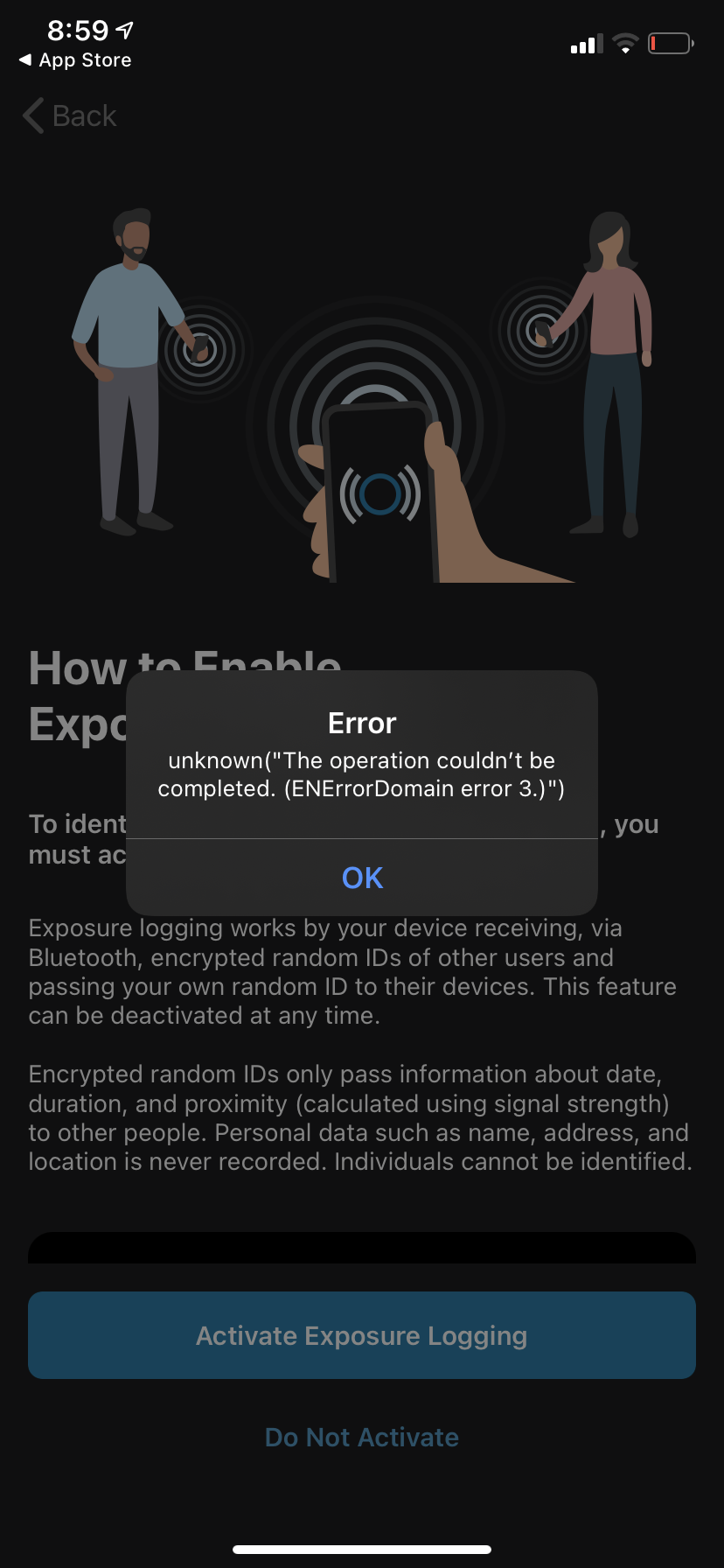
Anyone else getting the error code 3? Already happens when setting up the app.
When I hit “Not Now”, the app starts to hang, after reopening it, it just shows a blank screen:
iOS 14 Developer Beta 1
iPhone XR
This is a beta and it might have something to do with that but I still think you should look into that, maybe it is intended to be this way and you need to fix something before the release of iOS 14 this fall.
 MrLeaw
on 29 Jun 2020
MrLeaw
on 29 Jun 2020
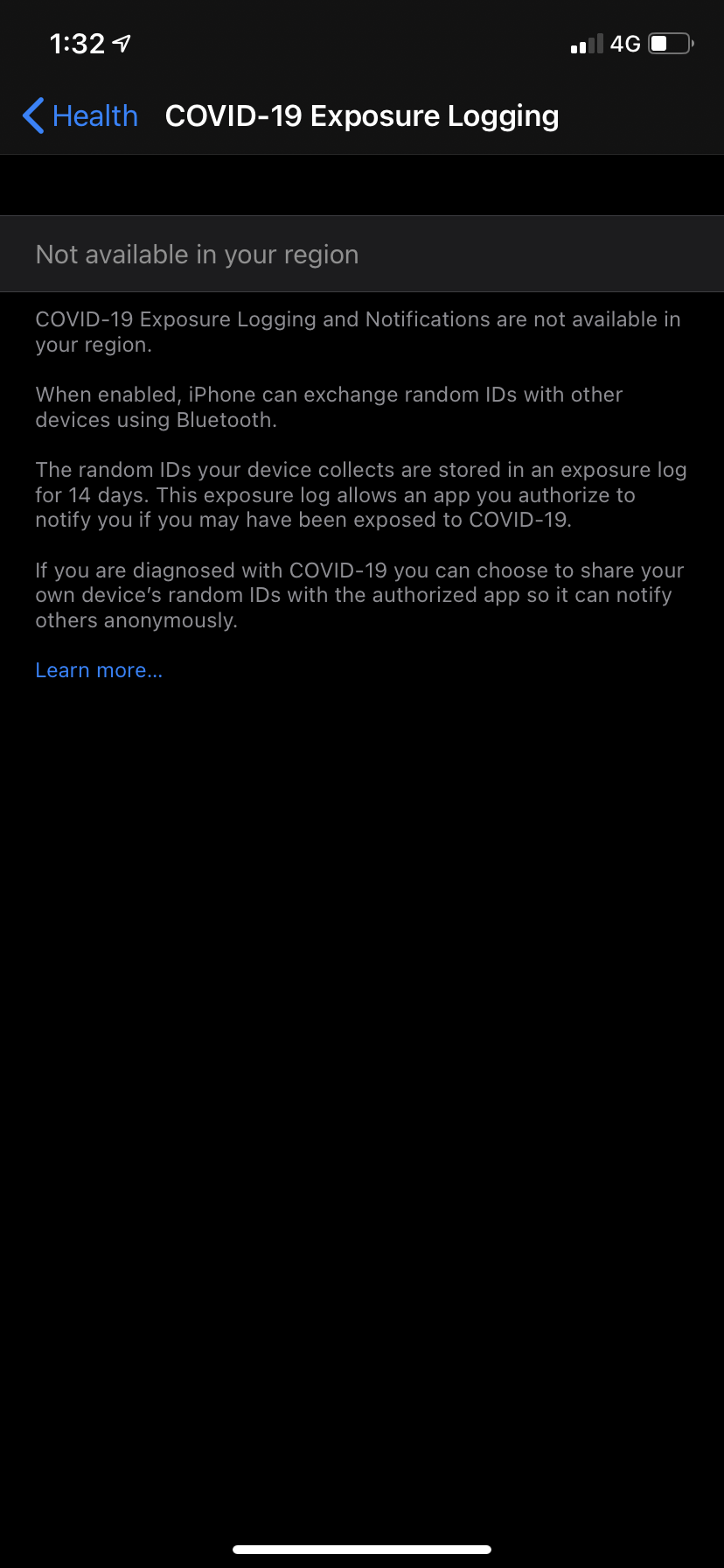
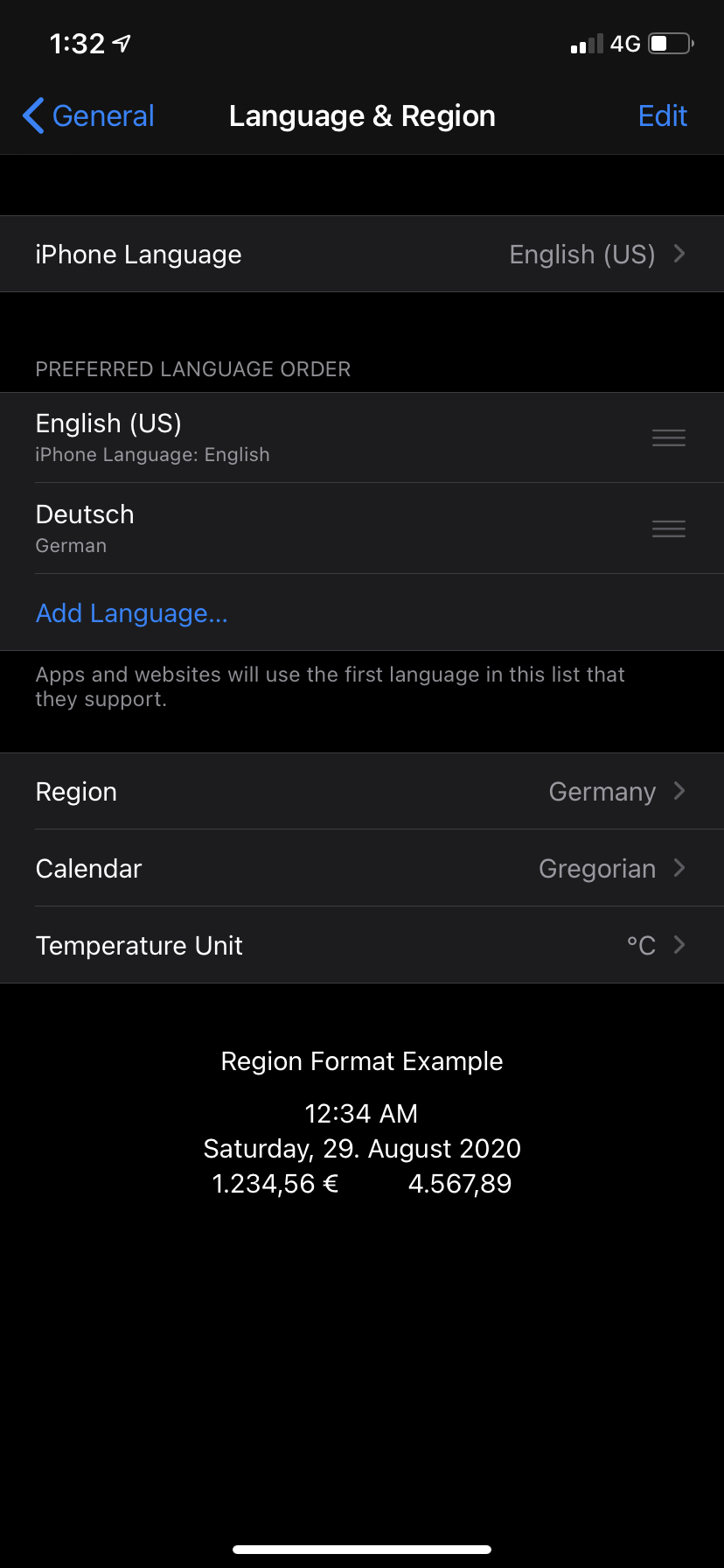
And it gets even more interesting... Seems like it’s a problem with the beta though.
MrLeaw
on 29 Jun 2020
Anyone else getting the error code 3? Already happens when setting up the app.
When I hit “Not Now”, the app starts to hang, after reopening it, it just shows a blank screen:
iOS 14 Developer Beta 1
iPhone XRThis is a beta and it might have something to do with that but I still think you should look into that, maybe it is intended to be this way and you need to fix something before the release of iOS 14 this fall.
Hi @MrLeaw ,
The ENF doesn't work on iOS 14 beta at the moment.
haosap
on 29 Jun 2020
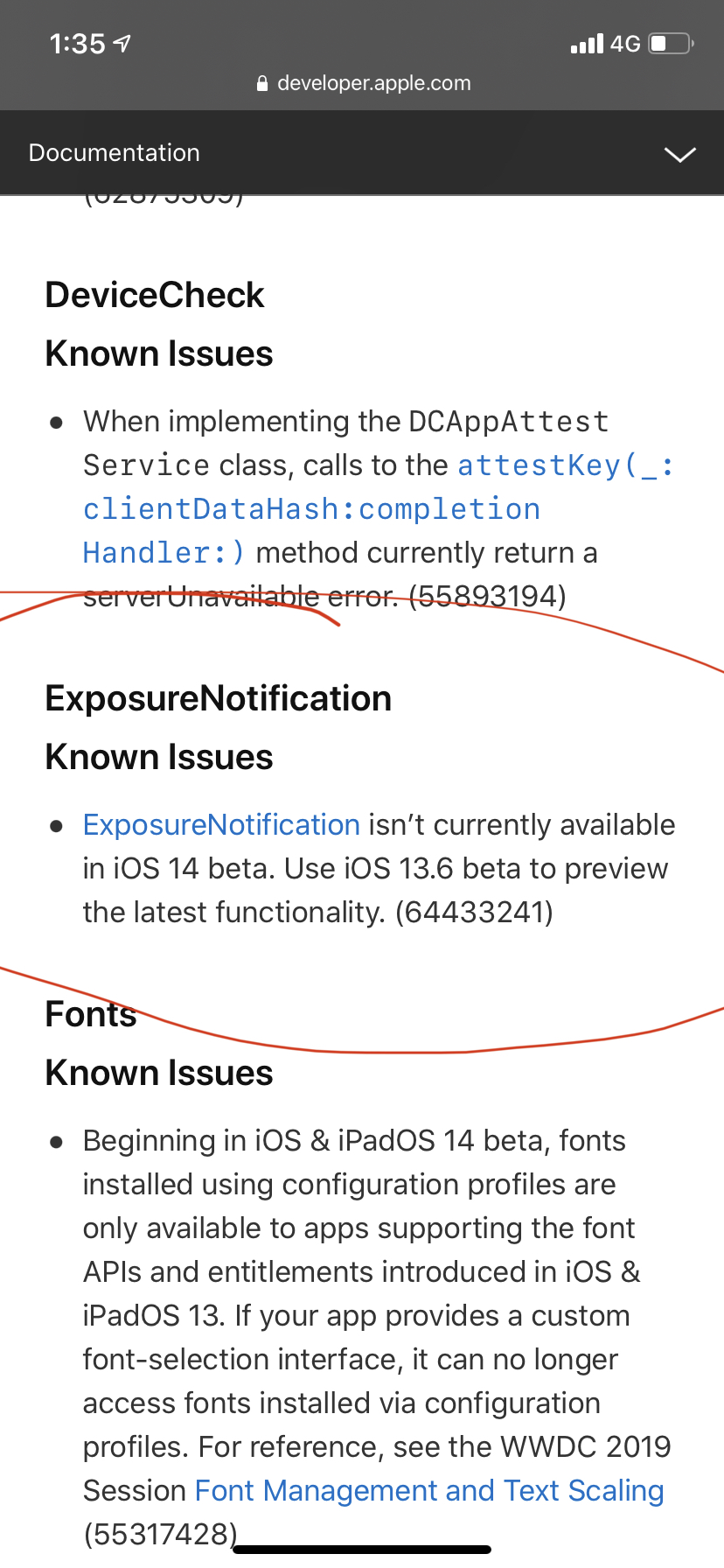
Confirmed with Apples Developer Documentation. iOS 14 beta is not yet supported
MrLeaw
on 29 Jun 2020
I have the same issue today, ENErrorDomain 13:
iPhone XS, iOS 13.5.1, App version 1.0.2(2)
All required settings are turned on. I turned them all off and on again, restarted the iPhone, nothing helped.
The last updated happened on Saturday 2020/06/27, 0:41
 thbonk
on 29 Jun 2020
thbonk
on 29 Jun 2020
ENErrorDomain-Fehler 11; iPhone XS; iOS 13.5.1 - restart of device fixed that; only hard closing app did not work; immediately after restart of device I received new contact tracing data apps (visible within "Kontaktüberprüfungen"); WIFI was turned off, LTE was available, browser worked nicely (network available)
 bazzzer
on 29 Jun 2020
bazzzer
on 29 Jun 2020
I was told by the technical support hotline that error 11 is caused by a bug in iOS that will be fixed with 13.6 and I just have to wait for that or use the beta. I would be interested in the nature of said bug but sadly I couldn't find anything online about it.
 mgttlinger
on 30 Jun 2020
mgttlinger
on 30 Jun 2020
Hi there... I was experiencing the same issue since three days but I finally found out how to solve it.
The issue can be solved by manually closing all apps in background (including CWA) and restarting the app. If the error still persist, then restart your iPhone and the app gets working again.
May this issue is caused by some iOS limitations if too many apps are opened in the background?
 jbreitung
on 30 Jun 2020
jbreitung
on 30 Jun 2020
I just tried that. Sadly did not change anything for me.
mgttlinger
on 30 Jun 2020
I just tried that. Sadly did not change anything for me.
Also doesn‘t work to me, IPhone 8, IOS 13.5.1
 jvater
on 30 Jun 2020
jvater
on 30 Jun 2020
Worked for me at IPhone 11 with IOS 13.5.1: After Error 11 given reboot IPhone (Vol Up, Vol Down, Press Power until Apple Logo shown). After reboot turn on the Covid Warn App. Since 3 days works, perhaps the procedure must be repeated each day.
 dikiyzver
on 30 Jun 2020
dikiyzver
on 30 Jun 2020
Hi there... I was experiencing the same issue since three days but I finally found out how to solve it.
The issue can be solved by manually closing all apps in background (including CWA) and restarting the app. If the error still persist, then restart your iPhone and the app gets working again.
May this issue is caused by some iOS limitations if too many apps are opened in the background?
Doesn't work for me. iPhone 6S, iOS 13.5.1
 wolfgang-noichl
on 1 Jul 2020
wolfgang-noichl
on 1 Jul 2020
The new app version released today, solved the problem for me. iPhone 8 IOS 13.5.1
jvater
on 1 Jul 2020
iPhone 6S 13.5.1
Still the same error message (13) despite app update and restart.
Edit: Ok, it seems the app finally pulled itself together. Two hours after installing the update it has now re-calculated the risk and no error message.
 fieselschweif
on 1 Jul 2020
fieselschweif
on 1 Jul 2020
Works again for me now (no app update in between).
wolfgang-noichl
on 1 Jul 2020
App Version: 1.0.3
iOS Version 13.5.1
I also get the ENErrorDomain-Error 11 as soon as i start the app. It flickers once and vanishes but comes back a second time after a second or so. Reboot didnt solve the problem.
 PechGehabt
on 2 Jul 2020
PechGehabt
on 2 Jul 2020
After another Reboot the app now shows "No internet connection" and Error 13. But i have an internet connection working properly
PechGehabt
on 2 Jul 2020
I got Error 11 for the first time today (after I had already re-installed the app a few day ago, trying to get rid of Error 5 - and starting from zero days again).
After a restart of my device and starting the app again, I instantly got error 13 instead.
 Kvorra
on 2 Jul 2020
Kvorra
on 2 Jul 2020
I got Error 11 for the first time today (after I had already re-installed the app a few day ago, trying to get rid of Error 5 - and starting from zero days again).
After a restart of my device and starting the app again, I instantly got error 13 instead.
Exactly the same happened to me. App worked from 1st day onwards, then Error 5 for many days, then disappeared for two days. This moring Error 11, after Restart of iPhone SE Error 13.
In case someone hasn't seen it yet, here is today's update of the FAQ: https://www.coronawarn.app/de/faq/. So let's hope and wait 24 hrs? or for iOS 13.5.2?
 ReinholdL
on 3 Jul 2020
ReinholdL
on 3 Jul 2020
Today it works for me again. Didnt do anything - just worked. Maybe they fixed something in the backend...
PechGehabt
on 3 Jul 2020
I got the errors 11 and 13 only shown to me after I updated to v1.0.3, two days ago. Neither reinstalling nor rebooting helped.
iPhone X, running iOS 13.5.1
 camelusferus
on 3 Jul 2020
camelusferus
on 3 Jul 2020
Same problem here. Fresh install v1.0.4 and I got still error 13. Nothing like reboot or WIFI on/off helped.
Errors like this will damage the app reputation significantly. Hope that will be fixed fast. Thanks
 manolo4711
on 3 Jul 2020
manolo4711
on 3 Jul 2020
Same problem here. Fresh install v1.0.4 and I got still error 13. Nothing like reboot or WIFI on/off helped.
Errors like this will damage the app reputation significantly. Hope that will be fixed fast. Thanks
Thank you, Manolo4711 for the info on avaiability of v1.0.4. I also installed it, but Error13 goes on flashing. Hope for the next hours (ref. FAQ-page). But I also see the increasing reputation damage. A real pity.
ReinholdL
on 3 Jul 2020
When the error occurs, I see that the app is trying to connect to gateway.icloud.com. What fails. Hope that helps
 jakomar-tech
on 4 Jul 2020
jakomar-tech
on 4 Jul 2020
Same issue here with Error13
 steffen-klein
on 4 Jul 2020
steffen-klein
on 4 Jul 2020
Same issue here - first Err 11 and after latest update - Err 13.
iOS 13.5.1; iPhone SE.
Last update yesterday 4:02am.
Reproducible are every start.
Will try restart and 24 hours wait‘n‘see.
 evilyeti
on 4 Jul 2020
evilyeti
on 4 Jul 2020
I also get Error 11 today. Deinstallation and reinstallation didn’t fix it.
After restarting the iPhone I get Error 13.
iPhone 8 with iOS 13.5.1
 BITespresso
on 5 Jul 2020
BITespresso
on 5 Jul 2020
I consistently receive Error 13.
Restart in reinstalling does not help.
iPhone 11 Pro Max, iOS 13.5.1
 abenten
on 5 Jul 2020
abenten
on 5 Jul 2020
Same Error.
Had Error 11 many times, reboot of the iPhone has not made any changes. Reinstalling the app ended in now having Error 13.
App does not work anymore, now displaying "Unbekanntes Risiko".
iPhone 11 with iOS 13.5.1
App-Release 1.0.4
Error first occurred on July, 4th. Since than no tracing at all.
 Hendrik1774oAlter
on 6 Jul 2020
Hendrik1774oAlter
on 6 Jul 2020
Same issue here - first Err 11 and after latest update - Err 13.
iOS 13.5.1; iPhone SE.
Last update yesterday 4:02am.
Reproducible are every start.Will try restart and 24 hours wait‘n‘see.
Indeed restarting the phone and NOT OPENING the app for 24 hours solved the issue and the Corona-Warn app is back in operation.
Looking forward for iOS 13.5.2 or 13.6, which will hopefully get rid of the API rate limit error.
Thanks @ReinholdL for the hint above!
evilyeti
on 6 Jul 2020
for those of you who don’t know this yet, see https://www.coronawarn.app/en/faq/#ENError11 https://www.coronawarn.app/en/faq/#ENError11 for Error 11/13. Looks like one really has to wait up to 24 hrs after installing App v.1.0.4 until the risk update works again, without problems. So just have patience after updating to 1.0.4. Hope this might solve the problem at least for some of you.
Am 06.07.2020 um 16:32 schrieb Hendrik1774oAlter notifications@github.com:
Same Error.
Had Error 11 many times, reboot of the iPhone has not made any changes. Reinstalling the app ended in now having Error 13.
App does not work anymore, now displaying "Unbekanntes Risiko".
iPhone 11 with iOS 13.5.1
App-Release 1.0.4
Error first occurred on July, 4th. Since than no tracing at all.—
You are receiving this because you commented.
Reply to this email directly, view it on GitHub https://github.com/corona-warn-app/cwa-app-ios/issues/759#issuecomment-654275553, or unsubscribe https://github.com/notifications/unsubscribe-auth/AQDUWRFG5DXWGX6OSG4RVT3R2HOAXANCNFSM4OGKFJ4A.
ReinholdL
on 6 Jul 2020
To be honest, I have not seen any app producing so many "something went wrong" errors in the last years as the German Corona-Warning-App, both on iOS and Android. I am sure this thing does not do its job properly (besides known counting problems), as no warning is shown at all until you open the app. Good job, SAP and Telekom!
 Anguel
on 8 Jul 2020
Anguel
on 8 Jul 2020
Version: 1.0.4
Device: iPhone X (MQAG2ZD/A)
Screenshot: 
App konnte seit 02.07.2020 keine neuen Daten abrufen.
 kevin-kraus
on 8 Jul 2020
kevin-kraus
on 8 Jul 2020
guess you updated to app v.1.0.4 and then this error 13 appeared. Waiting for max 24 hrs solves the problem in most cases, so hope it also works in your case.
See also https://www.coronawarn.app/en/faq/ https://www.coronawarn.app/en/faq/
Am 08.07.2020 um 13:32 schrieb Kevin notifications@github.com:
Version: 1.0.4
Device: iPhone X (MQAG2ZD/A)
Screenshot: https://user-images.githubusercontent.com/36297312/86913686-4a205000-c11f-11ea-92bf-dfc6b750d67d.png
App konnte seit 02.07.2020 keine neuen Daten abrufen.—
You are receiving this because you were mentioned.
Reply to this email directly, view it on GitHub https://github.com/corona-warn-app/cwa-app-ios/issues/759#issuecomment-655461312, or unsubscribe https://github.com/notifications/unsubscribe-auth/AQDUWRDMOBNX5U3VS5U745DR2RKL3ANCNFSM4OGKFJ4A.
ReinholdL
on 8 Jul 2020
guess you updated to app v.1.0.4 and then this error 13 appeared. Waiting for max 24 hrs solves the problem in most cases, so hope it also works in your case.
See also https://www.coronawarn.app/en/faq/ https://www.coronawarn.app/en/faq/Am 08.07.2020 um 13:32 schrieb Kevin notifications@github.com:
Version: 1.0.4
Device: iPhone X (MQAG2ZD/A)
Screenshot: https://user-images.githubusercontent.com/36297312/86913686-4a205000-c11f-11ea-92bf-dfc6b750d67d.png
App konnte seit 02.07.2020 keine neuen Daten abrufen.—
You are receiving this because you were mentioned.
Reply to this email directly, view it on GitHub https://github.com/corona-warn-app/cwa-app-ios/issues/759#issuecomment-655461312, or unsubscribe https://github.com/notifications/unsubscribe-auth/AQDUWRDMOBNX5U3VS5U745DR2RKL3ANCNFSM4OGKFJ4A.
Nope, app got automatically updated 3 days ago. And the app tells me that it hasn’t got updated in the last 6 days. So I do not think the Update has something to do with the error.
kevin-kraus
on 8 Jul 2020
I'm experiencing this issue (Error 13) on an iPhone 6s plus with iOs 13.5.1 and cwa version 1.0.4.

Looking at the exposure settings, this seems to stem from the app hitting the rate limit for exposure requests. (Note 20 times in last 24 hrs)

Looking at the log of exposure checks the app seems to be resubmitting old keys for exposure checks:


Hunting around in there I found exposure checks on subsequent days with the same keycount and hash:


Best guess what's happening (I haven't looked at your code): The app is resubmitting old keys instead of focusing on newer ones.
I hope this helps. If I can provide further info, let me know.
 fischerwulf
on 8 Jul 2020
fischerwulf
on 8 Jul 2020
I have it on the current version 1.0.4 too, IPhone8. Reboot did not help.
 Petk12
on 8 Jul 2020
Petk12
on 8 Jul 2020
Hi, I have the same problem as well and nothing helps. I also see that the app checked the log 20 times over the last 24 hours. Could it be deterministic? I'm on iOS 13.5.1
 tugbabodrumlu
on 9 Jul 2020
tugbabodrumlu
on 9 Jul 2020
I also get the 11 error, on top of that my exposure logging is deactivated, and when I activate that I get this error (plus when opening the app). I also got an error that the storage for storing is full, albeit more than than 60gb are free on my phone -not sure which storage is referred to. Would deleting the stored data be worth a try?
 spinscale
on 9 Jul 2020
spinscale
on 9 Jul 2020
@spinscale Did you check how many log checks do you have? @fischerwulf 's explanation makes a lot of sense to me so I wonder if anybody has a working app after 20 log checks.
tugbabodrumlu
on 9 Jul 2020
@spinscale Did you check how many log checks do you have? @fischerwulf 's explanation makes a lot of sense to me so I wonder if anybody has a working app after 20 log checks.
I actually can remember that yesterday I also had 20 Checks. App not working and errors etc. Today after your comment I looked, got 14 checks. App works now like a charm so probably the cause for this behavior is exactly what you said and it only happens >=20 checks.
kevin-kraus
on 9 Jul 2020
What I don't understand is why it's necessary to resubmit old keys. These keys are from past days and once they have been submitted to the server no new contact codes would be generated from these. There is no extra information to be gained from rechecking these keys more than once. Hence it should suffice to check the diff between the currently available and already checked keys. Therefore only one exposure check per day should suffice.
I'm guessing the risk score is calculated from scratch each time and all keys stored on the phone are submitted in the batches that they were received from the server. This then runs into the rate limit of max 20 checks per 24 hrs if too many batches are in the local db.
However this reasoning is based on a rudimentary understanding of the framework and how the app works. (Again, I haven't looked at the code and am happy to be proven wrong and know that there might be considerations which I'm not aware of)
fischerwulf
on 9 Jul 2020
@tugbabodrumlu my last exposure checks are from four days ago and I do not see 20 checks for that day, but only 12, if that helps anything.
spinscale
on 9 Jul 2020
@spinscale It is hard to speculate before checking the code as @fischerwulf also commented, but I asked around and 3 people who had more than 20 log checks had exactly the same problem.
tugbabodrumlu
on 9 Jul 2020
@kevin-kraus This morning I also got 14 checks and app works normally.
tugbabodrumlu
on 10 Jul 2020
@tugbabodrumlu yes same over here. But now another problem shows up: the App is constantly installed and running since release but still I only get 13/14 days displayed.
kevin-kraus
on 10 Jul 2020
It's been more than 14 days and the app still shows 13/14.
It also says there's not enough storage although my phone has 34 GB free space. This message never appeared again.
 dsouzajj
on 16 Jul 2020
dsouzajj
on 16 Jul 2020
Issue 11 should be fixed with iOS 13.6 and better explanatory texts were introduced with app version 1.0.5
If you experience these issues again on the latest app and iOS versions, please open a new, dedicated issue for that.
Thank you all for your input!
 tkowark
on 24 Jul 2020
tkowark
on 24 Jul 2020
Issue 11 should be fixed with iOS 13.6 and better explanatory texts were introduced with app version 1.0.5
If you experience these issues again on the latest app and iOS versions, please open a new, dedicated issue for that.
Thank you all for your input!
Still open issue
Fehler 11
chk-code
on 24 Jul 2020
Since the Twitter user was not really on "Neuste and Neuste", let's close this issue as discussed before. If anybody has the latest app and iOS 13.6 (or higher), please open a new issue.
tkowark
on 29 Jul 2020
@brandtaucher Hi kannst du mich direkt anschreiben mit dem Fehler und Version die du verwendest?
thomasaugsten
on 1 Aug 2020
Related issues
 avenius
·
3Comments
avenius
·
3Comments
 benekuehn
·
3Comments
benekuehn
·
3Comments
 christianbrb
·
3Comments
christianbrb
·
3Comments
 jonnyfux
·
3Comments
jonnyfux
·
3Comments
 delcorny
·
3Comments
delcorny
·
3Comments
Most helpful comment
Hello, guys
I work on the Danish app. We see this error (ErrorCode 11) as well. Based on our observation, this issue occurs when the phone submits the zips files with the keys to the EN API for detecting exposures. Then it returns this error (ErrorCode 11) from EN API, if we go to Settings and check COVID-19 logging page there are no exposure checks on the phone, on which we are able to reproduce the problem. Basically, it means that the error is thrown when doing exposure detection and leads to termination of the exposure detection process.
We are now trying to update the device to 13.6 beta and see if the error remains there.