Cwa-app-ios: [Solved] Exposure logging is not possible
Avoid duplicates
- [x] Bug is not mentioned in the FAQ
- [x] Bug is not already reported in another issue
Describe the bug
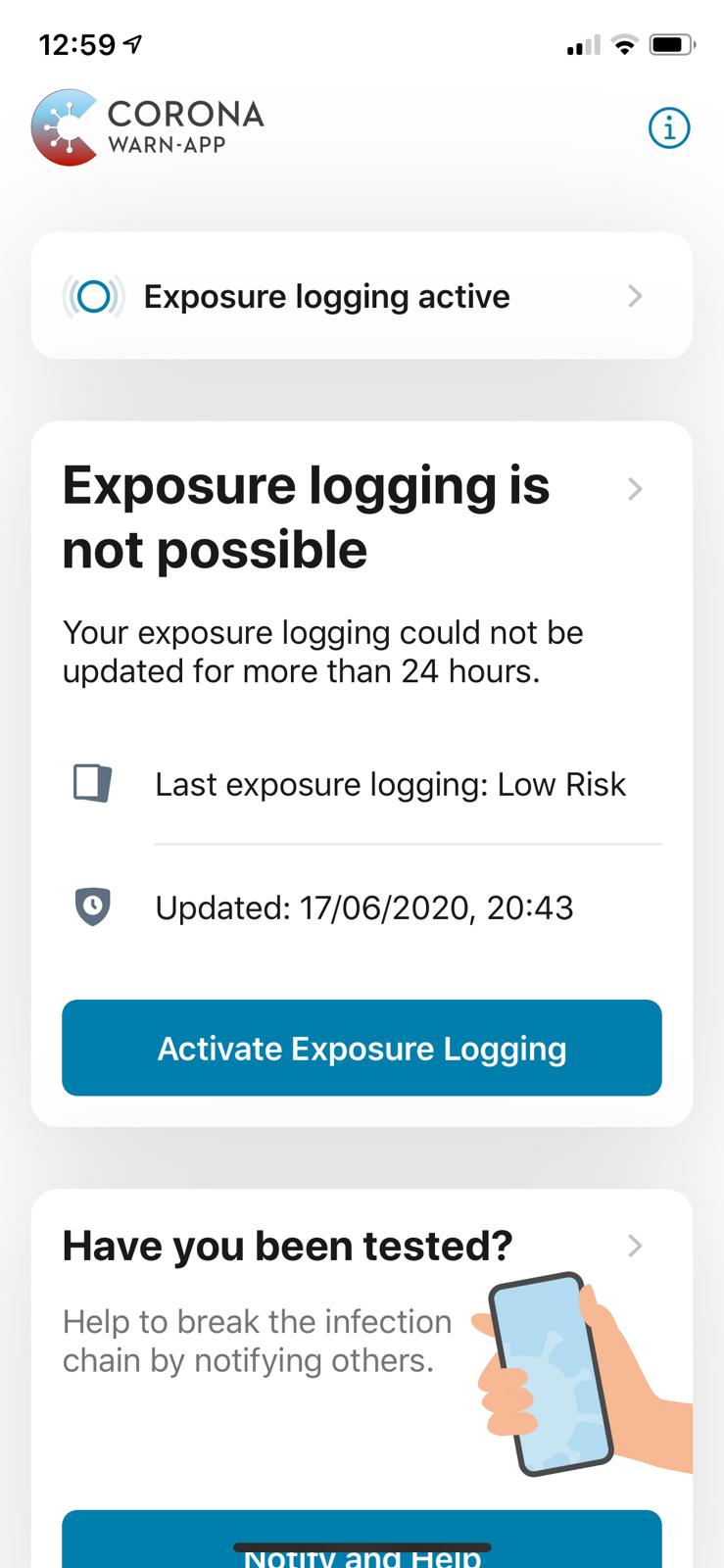
When opening the app, this error message is shown:
Exposure logging is not possible. Your exposure logging could not be updated for more than 24 hours.
Right below there is a Activate Exposure Logging button.
However Exposure Logging is indeed active, as confirmed on the upper part of the same view (see attached screenshot).
Moreover, the issue wasn't immediately there: the day after I downloaded the app, the box was green and showing a "Low Risk" information panel. The issue appeared on 3rd day since the installation.
Expected behaviour
This info panel should display the risk information instead of an error, given that the above mentioned setting is already on.
Steps to reproduce the issue
Error is visible immediately on the main view on the app. Restarting (the app or even the device) didn't solve the issue.
Technical details
- iOS Version: 13.5.1
- Device: iPhone Xs
Additional context
When going to Settings -> Corona-Warn there's a setting called COVID-19 Exposure Notifications which is active.
Internal Tracking ID: EXPOSUREAPP-1955
 antoniocosentino
All 29 comments
Same Problem
iPhone Xs / iOS 13.5.1
 httpdop
on 21 Jun 2020
httpdop
on 21 Jun 2020
Same problem here:
App version: 1.0.2
iOS version: 13.5.1
on iPhoneX
Also, the timing was the same. Low risk 1 day after installation, “Risiko-Ermittlung nicht möglich” the following day and persisting ever since.
 borderlineinteractive
on 22 Jun 2020
borderlineinteractive
on 22 Jun 2020
UPDATE: this morning I expanded the info panel (by clicking on the arrow next to Exposure logging is not possible) and then I clicked on the Update button. This seems to have solved the issue for me: I now have again a green box with "Low Risk". However it's still not clear why this is needed and I think the original error message is kind of misleading, because it's suggesting to activate a setting which is already active.
antoniocosentino
on 22 Jun 2020
The “Update” button also worked for me. Based on the error message, it was not obvious to me that a simple press on an update button would fix this problem. And I missed this button previously as you have to scroll down to see it.
borderlineinteractive
on 22 Jun 2020
I am currently working on this issue. I would like to be 100% transparent with you which includes letting you know my current working theories + background information that might be interesting for you.
The App has two Modes
The app has two different modes of operation:
automatic: In this mode the app tries to automatically detect your risk (approx. every 24 hours). This mode is enabled if the app is allowed to schedule background tasks. An app running in this mode won't show a button that allows you to manually trigger a risk calculation. The app checks the date of the last risk calculation and if enough time (24+ hours) has passed it will automatically perform a risk calculation. The time passes is checked every time you launch the app or the app moves into forground.
manual: In this mode the app simply enables a button that allows you to trigger a risk calculation manually. The button is enabled after enough time has passed since the last calculation has been performed.
Timings
The app tries to do a risk calculation approx. every 24 hours (automatic mode). In manual mode the button to do a risk calculation is enabled after 24 hours.
A risk calculation has a "lifetime" of 2 days. This means the app discards every risk calculation that is older than 2 days.
Theory
I think in your case the app was not able to do a risk calculation for 2+ days. A risk can only be calculated if exposure notification is enabled (in Settings) and if the app has successfully downloaded everything it needs.
In addition the error message is probably a bit "misleading" or could at least be optmimized a bit.
I will talk to UX about that.
The good news is that I was able to reproduce your issue under "lab" conditions.
I think that the app was not able to do a risk calculation for two days - for whatever reason.
Next Steps & Workarounds
Could you do me a favor and:
- Ensure that your device has a working internet connection. (You basically did that by tapping on the refresh button) - but in case you run into this issue again.
- Ensure that you have enough free disk space. (system preferences usage report)
- Report back here in case this happens again.
One additional node: We have noticed that sometimes the app shows "you are online" even when you are not (and vice versa). So in case you experience the issue again please really tripple check your internet connection - for example by downloading the app config. This is how the app determines whether or not it is online or offline.
I will talk to UX about the error message.
In the meantime you can use the workaround you found yourself (tap on the card and then on the refresh button).
Can you think about any reason for the app not being able to do a risk calculation for 2 days?
I will report back here once I have found out more.
 ChristianKienle
on 22 Jun 2020
ChristianKienle
on 22 Jun 2020
Same here, I think this is a multipart issue.
Part one is up to ux in my opinion.
First box says "Exposure logging active", in the second box you get the misleading error message "Exposure logging is not possible", which, if I understood your previous comment the right way, should be something like "couldn't do risk calculation for xx days". And then, in the second box as well, you get the more then misleading call to action button "Activate exposure logging" (remember, box one stated "Exposure logging active"), which should be something like "Update risk calculation".
Part two I think is confusion about the "background app refresh" / "background app activities" settings in iOS.
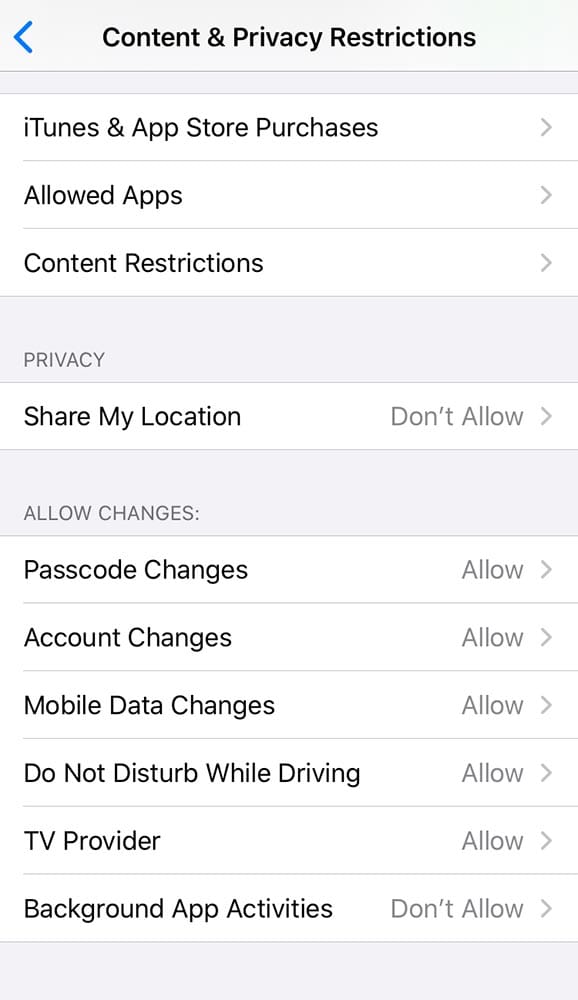
I have "background app refresh" deactivated on all my devices for a number of reasons like battery health, traffic control and so on. To make this worse I have been setting "background app activities" for all my children using "screentime" -> "family, kids name..." -> "content & privacy restrictions" to "don't allow".
So, do I need "background app refresh" activated for the app to function in general like exchanging id's (I don't think so) or just for "automatic risk calculation"? And is there no way to check "background app refresh" iOS settings status during install / runtime and notify the user of the necessity to activate this setting (if really needed an not just nice to have for risk calculation)?


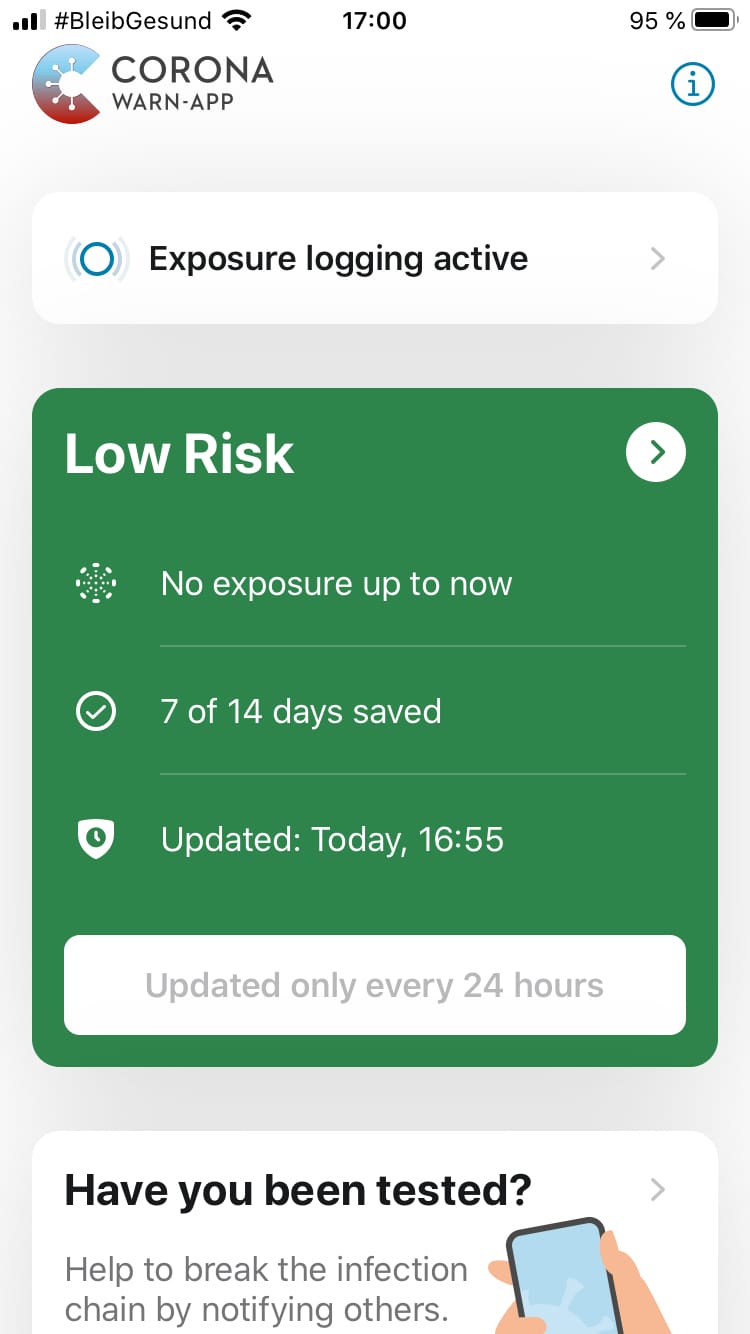
If I expand the panel by clicking on the error message and then hit the update button homescreen of the app looks like this:
 ringobowie
on 23 Jun 2020
ringobowie
on 23 Jun 2020
In case this can be useful, same as @ringobowie reported, I also have Background App Refresh off in my general settings, so might be related.
@ChristianKienle thanks for the update. Regarding your question: the phone was normally able to access Internet during those 2 days and iPhone storage has more than 20GB available. In case the issues pops up again I will provide you with more details.
antoniocosentino
on 23 Jun 2020
I use the manual mode configuration (backround tasks disabled). Yesterday the button worked also for me. I will continue to monitor the behavior of the application.
httpdop
on 23 Jun 2020
It's a translation / labeling issue. There seem to be (at least) two states leading to "Home Inactive card".
State one I can triggered by turning off "COVID-19 Exposure Logging" in "Privacy" -> "Bluetooth". The second state seems to be triggered if there is no background calculation possible by turning of "Background app refresh".
Strangely state one leads me to:
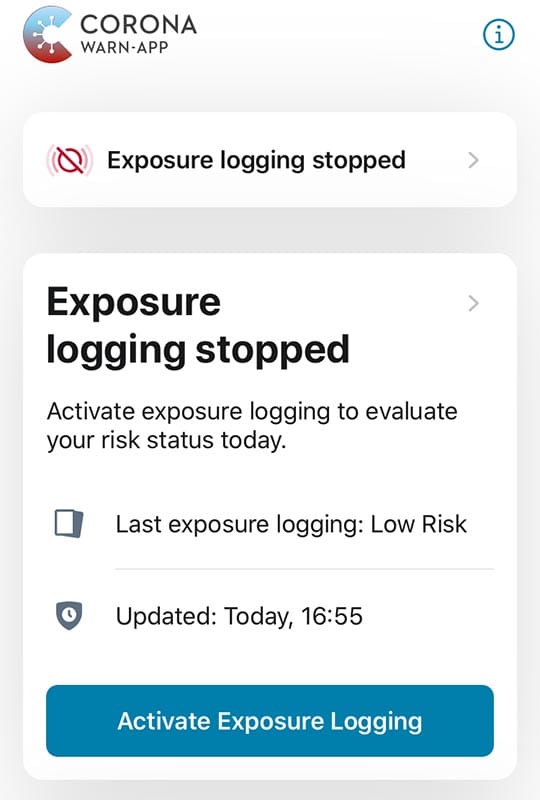
"Home_Risk_Inactive_NoCalculation_Possible_Title" = "Exposure logging stopped";
"Home_Risk_Inactive_NoCalculation_Possible_Button" = "Activate Exposure Logging";
and state two to:
"Home_Risk_Inactive_Outdated_Results_Title" = "Exposure logging is not possible";
"Home_Risk_Inactive_Outdated_Results_Button" = "Activate Exposure Logging";
So for state one the labeling is correct but the variable naming is misleading (maybe something like "Home_Risk_Inactive_ExposureLoggingDeactivated_Title").
For state two the variable naming seems to be correct but the labels are more than confusing.
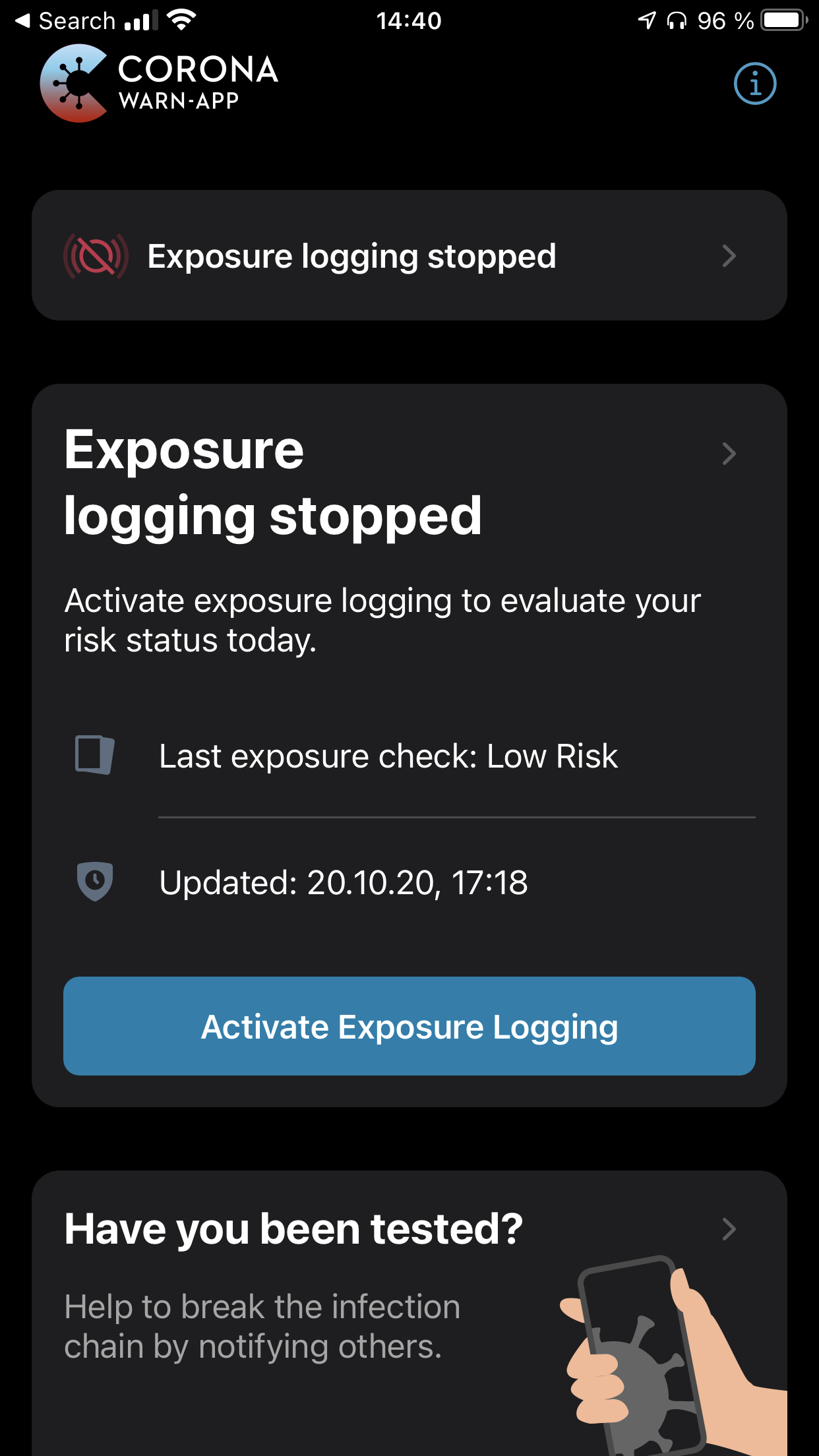
Screenshot shows "Home inactive card" after disabling "COVID-19 Exposure Logging" in "Privacy" -> "Bluetooth":
ringobowie
on 23 Jun 2020
Thanks for the update. Concerning your question:
Can you think about any reason for the app not being able to do a risk calculation for 2 days?
Not really. The error occurred on my son's phone, so I don't know everything he does, but as far as I know he is online almost all the time, either via mobile network or via WiFi. -- He does however have to go into flight mode (while explicitly activating Blutooth for the App...) in school. -- Maybe the App doesn't register when the internet connection becomes available again?
 aschafu
on 6 Jul 2020
aschafu
on 6 Jul 2020
Today, suddenly "Exposure Logging Stopped" was shown.
No changes were made to settings, so bluetooth and background app refresh are all set to on, the app has been granted all needed access since the first day I installed it.
iPhone X
iOS 13.6 (beta)
Corona Warn App 1.0.4
 Nithilher
on 7 Jul 2020
Nithilher
on 7 Jul 2020
Addendum:
I activated exposure logging. However, a bit later, it again switched to „exposure logging stopped“.
Didn‘t experience this behavior before update to iOS 13.6
Nithilher
on 8 Jul 2020
Just for keeping track: this issue seems to be the same as https://github.com/corona-warn-app/cwa-app-ios/issues/872.
 daimpi
on 3 Aug 2020
daimpi
on 3 Aug 2020
Is there any update on this issue? I quite frequently see ppl on twitter with this problem. I usually link them to this instruction for activating "Background App refresh": https://github.com/corona-warn-app/cwa-app-android/issues/637#issuecomment-655543400 which in almost all cases seemed to fix the issue for them.
Isn't there a way the app itself could instruct them to do this in case of this error?
Also: Imo it would be helpful to at least have a FAQ entry for this in the meantime.
Here are some of the users on Twitter who experienced this problem:
https://twitter.com/_NonBlonde_/status/1290406524326686722
https://twitter.com/tilsteff/status/1290380213499703297
https://twitter.com/Zimtsternfunkel/status/1290573254269243393
https://twitter.com/merissarsilk/status/1290710434522243072
https://twitter.com/Detailhochzwei/status/1290950100961951744
https://twitter.com/camilloschumann/status/1290915794227003392
https://twitter.com/CantorBrahe/status/1291345991631806464
https://twitter.com/GerdKebschull/status/1291947137346031621
daimpi
on 8 Aug 2020
Just to state that the problem still occurs with version 1.2.0 and 1.2.1.
The app displays the contradictory statements:
- Exposure Logging Active, and
- Exposure logging is not possible ... Activate Exposure Logging
The English language Corona Warnapp hotline suggested switching off bluetooth for 25 hours.
The German language Corona Warnapp hotline did indeed know the solution (switch on background refresh), but nevertheless I do think that since the UI is currently so contradictory and easy to fix it should be improved.
 alanrick
on 14 Aug 2020
alanrick
on 14 Aug 2020
I have the same problem. I am not able to use the app. After deleting and reinstalling the app works for some time. I assume this has to do with disabling and enabling bluetooth/air plane mode.
 yannicgraeser
on 21 Aug 2020
yannicgraeser
on 21 Aug 2020
Fyi, once I've changed the language settings from English to German, the "logging: restricted" disappears. Might not be updated in the English version then yet?
 tdienlin
on 4 Sep 2020
tdienlin
on 4 Sep 2020
In the latest version _1.3.0 (6)_ the English text has become more confusing than before.
The text „Activate exposure logging to evaluate your risk status today“ is an even bigger contradiction to the „Exposure Logging Active“ statement.

alanrick
on 22 Sep 2020
@alanrick
See my comment here: https://github.com/corona-warn-app/cwa-backlog/issues/1#issuecomment-687175144
Nobody answered...
 Ein-Tim
on 22 Sep 2020
Ein-Tim
on 22 Sep 2020
@alanrick Please restart the app with a working internet connection in 1.3.1 there is a error for this case
 thomasaugsten
on 22 Sep 2020
thomasaugsten
on 22 Sep 2020
@thomasaugsten
Is there a plan to update this Screen? Because always the user is offline he/she sees this...
Ein-Tim
on 22 Sep 2020
This screen should only occurs when you start the app without internet
thomasaugsten
on 22 Sep 2020
Yes it does. But don't you see the contradiction in this screen?
Imho this has to be fixed somehow
See my comment here
Ein-Tim
on 22 Sep 2020
If there’s an explanation for this behaviour then surely the contradictory text can be avoided.
E.g. _Activate exposure logging or activate your internet connection to evaluate your risk status today_
(BTW I can see from the screenshot that the Internet was connected but my point is about the text, not the behaviour)
alanrick
on 22 Sep 2020
The cause for this problem should be fixed in release 1.6. Please check if the error still occurs for you @alanrick
Corona-Warn-App Open Source Team
 heinezen
on 17 Nov 2020
heinezen
on 17 Nov 2020
Indeed. I’m temporarily using the Irish app (cos of #916) and so the exposure logging for CWA 1.6.1 is off and the text of the remedy is consistent 👍
alanrick
on 17 Nov 2020
@alanrick, thanks for the feedback.
@antoniocosentino, we suggest closing this issue. DS
Best wishes,
DS
Corona-Warn-App Open Source Team
 dsarkar
on 9 Dec 2020
dsarkar
on 9 Dec 2020
Closing the issue, since I can't reproduce it anymore. Thanks to everybody involved!
antoniocosentino
on 9 Dec 2020
@antoniocosentino, many thanks for the feedback and your contributions here. Best, DS.
Corona-Warn-App Open Source Team
dsarkar
on 9 Dec 2020
Related issues
 tom-georg
·
3Comments
tom-georg
·
3Comments
 rsplaul
·
3Comments
rsplaul
·
3Comments
 Hermann12
·
3Comments
Hermann12
·
3Comments
 Lhendrichs
·
3Comments
Lhendrichs
·
3Comments
 janberlin
·
3Comments
janberlin
·
3Comments
Most helpful comment
I am currently working on this issue. I would like to be 100% transparent with you which includes letting you know my current working theories + background information that might be interesting for you.
The App has two Modes
The app has two different modes of operation:
automatic: In this mode the app tries to automatically detect your risk (approx. every 24 hours). This mode is enabled if the app is allowed to schedule background tasks. An app running in this mode won't show a button that allows you to manually trigger a risk calculation. The app checks the date of the last risk calculation and if enough time (24+ hours) has passed it will automatically perform a risk calculation. The time passes is checked every time you launch the app or the app moves into forground.
manual: In this mode the app simply enables a button that allows you to trigger a risk calculation manually. The button is enabled after enough time has passed since the last calculation has been performed.
Timings
The app tries to do a risk calculation approx. every 24 hours (automatic mode). In manual mode the button to do a risk calculation is enabled after 24 hours.
A risk calculation has a "lifetime" of 2 days. This means the app discards every risk calculation that is older than 2 days.
Theory
I think in your case the app was not able to do a risk calculation for 2+ days. A risk can only be calculated if exposure notification is enabled (in Settings) and if the app has successfully downloaded everything it needs.
In addition the error message is probably a bit "misleading" or could at least be optmimized a bit.
I will talk to UX about that.
The good news is that I was able to reproduce your issue under "lab" conditions.
I think that the app was not able to do a risk calculation for two days - for whatever reason.
Next Steps & Workarounds
Could you do me a favor and:
One additional node: We have noticed that sometimes the app shows "you are online" even when you are not (and vice versa). So in case you experience the issue again please really tripple check your internet connection - for example by downloading the app config. This is how the app determines whether or not it is online or offline.
I will talk to UX about the error message.
In the meantime you can use the workaround you found yourself (tap on the card and then on the refresh button).
Can you think about any reason for the app not being able to do a risk calculation for 2 days?
I will report back here once I have found out more.