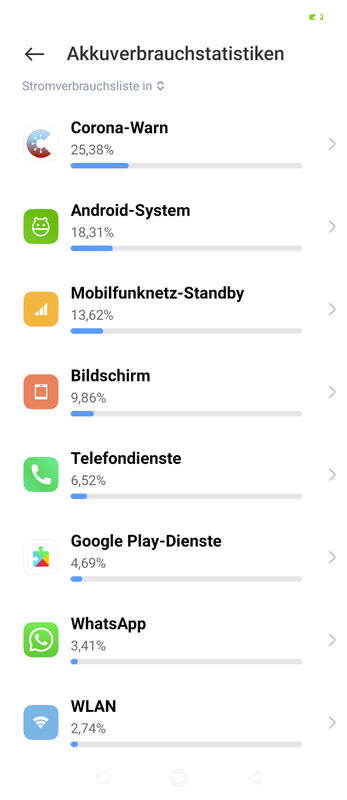
Cwa-app-android: Corona Warn App is consuming over 25% of entire battery after update.
Avoid duplicates
- [x] Bug is not mentioned in the FAQ
The energy consumption was normal before the updates.
- [x] Bug is specific for Android only, for general issues / questions that apply to iOS and Android please raise them in the documentation repository
I only own android, but I believe so. It might even be device specific.
- [x] Bug is not already reported in another issue
https://github.com/corona-warn-app/cwa-app-android/issues/1759
Whilst other users say they receive warnings, their consumption is 2% and not 25%.
I would not classify this as duplicate since the high severity on this Xiaomi device here.
Describe the bug
The Corona Warn App on Android used to have normal battery consumption in the past. Since the recent updates I have noticed my phone barely lasts 2 days now without a charge. Battery consumption is 25%!
Expected behaviour
A consumption around 2-5% would be normal. It worked very well in the past. Can we isolate the cause of this issue and have the app consume very little?
Steps to reproduce the issue
Normal usage of the app. It is 99% of the time in background just checking my status automatically. I manually check my status 2-3 times a day.
Technical details
- Mobile device: Xiaomi Redmi Note 8 Pro 128GB
- Android version: 10 (QP1A.190711.020 / Security Patches 2020-09-01)
Possible Fix
Regression testing on Xiaomi hardware?
Additional context
Internal Tracking ID: EXPOSUREAPP-4197
 vulpes9
All 7 comments
Hi @vulpes9,
Thank you very much for reporting. Your issue is tracked internally: Internal Tracking ID: EXPOSUREAPP-4197. Could you please confirm (screenshot if possible) what CWA battery consumption is if you don't open CWA for one day?
Dear community,
we would appreciate some feedback on the battery usage by the CWA on your phones. E.g. on my device, I see the following usage:
iPhone 6 / iOS 14.2 / CWA 1.7.1 / EN 13 % / CWA 5 % / opening CWA several times per day
Best wishes,
DS
Corona-Warn-App Open Source Team
 dsarkar
on 8 Dec 2020
dsarkar
on 8 Dec 2020
@dsarkar as this ticket is for Android, do you really want numbers for iOS here?
 ndegendogo
on 8 Dec 2020
ndegendogo
on 8 Dec 2020
@ndegendogo, no problem to post here. We can still move the issue to documents or open another issue later. Thanks.
dsarkar
on 8 Dec 2020
Ok, here we go.
Percent usage of cwa depends also on my settings and usage pattern of other applications...
Location services disabled. No battery saving mode. Background processing enabled only for selected apps (email, cwa, various messengers, chats and similar).
During workdays I use mainly the browser for one hour in the morning and another in the evening. I open cwa very seldom, not even daily, and only very short.
Percentage of battery usage:
browser > 50%
ENF 25%
email 17%
other apps ~ 1% each
cwa negligible.
The sum of all this is indeed 100%, so they don't show power consumption of the system.
iPhone 8 / iOS 14.2 / CWA 1.7.1
Unfortunately I have no numbers of older cwa versions - it would be interesting how much the impact of the 4-hour check is.
But: I appreciate this frequent check very much, and I have absolutely no issue with this battery usage.
ndegendogo
on 8 Dec 2020
@ndegendogo, thanks. DS
Corona-Warn-App Open Source Team
dsarkar
on 9 Dec 2020
And another number, one day later, same configuration:
browser > 60%
ENF 13%
email 9%
This shows that the procentual values should be interpreted with care
cwa 1.7.1 / iOS 14.2 / iPhone 8
ndegendogo
on 9 Dec 2020
@vulpes9, Good morning, could you also report updated values? DS
Best wishes,
DS
Corona-Warn-App Open Source Team
dsarkar
on 9 Dec 2020
Related issues
 MikeMcC399
·
3Comments
MikeMcC399
·
3Comments
 Diapolo
·
3Comments
Diapolo
·
3Comments
 Teddy265
·
3Comments
Teddy265
·
3Comments
 sdschulze
·
3Comments
sdschulze
·
3Comments
 ironjan
·
3Comments
ironjan
·
3Comments
Most helpful comment
Ok, here we go.
Percent usage of cwa depends also on my settings and usage pattern of other applications...
Location services disabled. No battery saving mode. Background processing enabled only for selected apps (email, cwa, various messengers, chats and similar).
During workdays I use mainly the browser for one hour in the morning and another in the evening. I open cwa very seldom, not even daily, and only very short.
Percentage of battery usage:
browser > 50%
ENF 25%
email 17%
other apps ~ 1% each
cwa negligible.
The sum of all this is indeed 100%, so they don't show power consumption of the system.
iPhone 8 / iOS 14.2 / CWA 1.7.1
Unfortunately I have no numbers of older cwa versions - it would be interesting how much the impact of the 4-hour check is.
But: I appreciate this frequent check very much, and I have absolutely no issue with this battery usage.