Cwa-app-android: wrong message "KEINE INTERNETVERBINDUNG" (no internet connection)
Avoid duplicates
There is a similar issue for IOS: #942 (but closed).
Describe the bug
Sometimes the App says "KEINE INTERNETVERBINDUNG" though it uses the WLAN.
Expected behaviour
It should perform the exposure check and then say "Aktualisiert: Heute".
Steps to reproduce the issue,
It happens less than once a week, so I cannot reproduce the error.
- "Priorisierte Hintergrundaktivität" is not active. Smartphone was in the WLAN all night, CWA has not been opened today.
- Start the CWA. Normally it says "Prüfung läuft" and then "Aktualisiert: Heute", but sometimes "KEINE INTERNETVERBINDUNG":
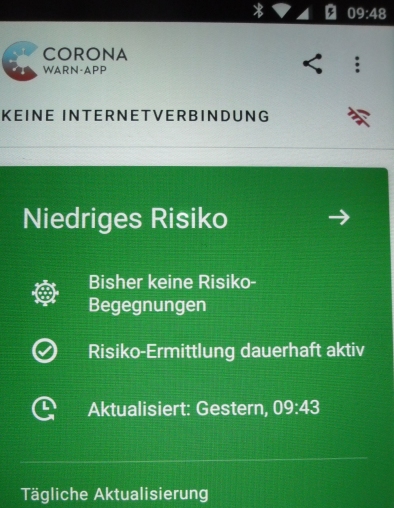
Note the time: 09:48 (and the WLAN-icon). Switch to ENF

The exposure check has been performed at 09:47. all-exposure-checks_20200910.txtBack to CWA
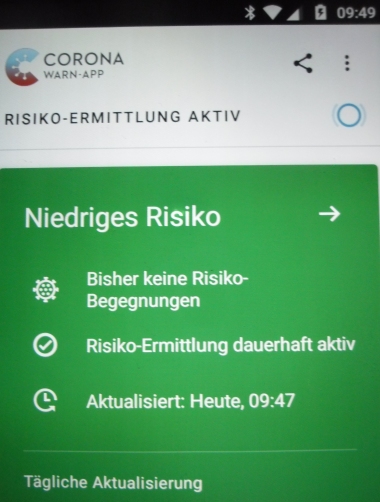
Everything fine, so it was just a wrong message.
Maybe the display should just be refreshed, as in #1024 Wrong "Aktualisiert: ..." / "Updated: ..." - Information on CWA start screen
Technical details
- Mobile device: Motorola G3
- Android version: 6.0.1
- CWA version 1.3.0
- ENF 16203302004
- no "Priorisierte Hintergrundaktivität"
Internal Tracking ID: EXPOSUREAPP-2627
 kereng5
All 25 comments
I managed to reproduce a very similar issue.
Here are the steps to reproduce:
Mobile device has access to WiFi (and mobile data as fall-back).
- Open CWA
Status is "EXPOSURE LOGGING ACTIVE" - Enable flight mode (stops WiFi, mobile data and Bluetooth)
Status is now "BLUETOOTH TURNED OFF" - Disable flight mode (re-enables WiFi and Bluetooth)
Status changes to "EXPOSURE LOGGING ACTIVE" then to "NO INTERNET CONNECTION" where it remains stuck. - Close and reopen CWA
Status now "EXPOSURE LOGGING ACTIVE"
It is easiest to see this when CWA and Settings are opened in split screen view.

- Mobile device: Samsung Galaxy A50 SM-A505FN
- Android version: 10
- CWA version:
1.3.01.3.1 - Exposure Notification System:
1620330200417203915000
Also reproducible on:
- Mobile device: emulated Pixel 3a from Android Studio V4.1
- Android version: 11
After disabling Flight mode wait approx. 1 minute for the CWA status to incorrectly change to "NO INTERNET CONNECTION".
 MikeMcC399
on 10 Sep 2020
MikeMcC399
on 10 Sep 2020
Hello everyone and thanks for your feedback.
I have created an internal Jira ticket EXPOSUREAPP-2627 and assigned it to the development team.
Best regards,
SG
Corona-Warn-App Open Source Team
 svengabr
on 11 Sep 2020
svengabr
on 11 Sep 2020
Duplicate of Related to https://github.com/corona-warn-app/cwa-backlog/issues/1.
I can also reliably reproduce this on my phone.
 daimpi
on 12 Sep 2020
daimpi
on 12 Sep 2020
I don't think my issue is a
Duplicate of corona-warn-app/cwa-backlog#1.
The title there is "Exposure Logging is in false 'restricted' state without internet connection" and in my case there has always been an usable internet connection.
What both issues have in common is the durability of the message "KEINE INTERNETVERBINDUNG".
kereng5
on 12 Sep 2020
Fair enough, I've edited my comment 🙂.
daimpi
on 12 Sep 2020
After restarting my phone, which made it ten times faster, I had no problem with the CWA for a week.
But today "KEINE INTERNETVERBINDUNG" again, this time together with a successful exposure check:
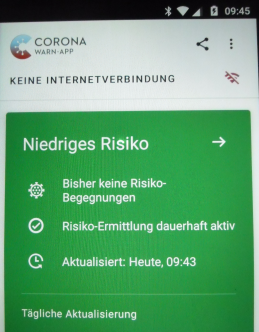
- "Priorisierte Hintergrundaktivität" is not active. Smartphone was in the WLAN all night, CWA has not been opened today.
- Have a look at API to see if there have been exposure checks today (no, not yet).
- Start the CWA ... "Prüfung läuft".
- Come back after two minutes to make the screenshot
There are nine lines from 9:43 and five from 9:45 in the exposure log.
CWA version 1.3.1, ENF 17203704005
kereng5
on 13 Oct 2020
@kereng5
I can still reproduce this error: see https://github.com/corona-warn-app/cwa-app-android/issues/1141#issuecomment-690506390, so it's really up to the developers to take a look.
MikeMcC399
on 13 Oct 2020
@MikeMcC399
In your reproduction you turned the internet access off for some seconds.
I wonder how the CWA got the idea that there was no internet in my case. Maybe it tries to connect to a server and does not wait long enough for an answer. Then this issue would be like the timeout while waiting for the google API.
kereng5
on 13 Oct 2020
@kereng5
I guess it could be a timeout issue in your case. In my repro case, I don't think there is any timeout involved, but it could be some sort of other timing issue. I found that I can also reproduce on an Android 11 emulator.
I'm also wondering if it is linked to the 39508 error issue. We don't know why there is a gap in your example:
There are nine lines from 9:43 and five from 9:45 in the exposure log.
Why did it stop at 9:43 and then continue 2 minutes later? Did it think it had temporarily lost its Internet connection? In this example it seems to have got its 14 exposure checks done correctly in two goes. In other examples I have seen it stops after a certain number e.g. 8, then at a later time it tries to do a full 14 and oversteps the quota of 20.
(Edited after I found out that I could reproduce on Android 11 as well.)
MikeMcC399
on 13 Oct 2020
@MikeMcC399
It happens quite often on my phone that the timestamps in the exposure log skip one minute:
all-exposure-checks.txt
kereng5
on 13 Oct 2020
@kereng5
It happens quite often on my phone that the timestamps in the exposure log skip one minute
Looking at your log, it seems that the skips are 2 minutes, like mine was. It also looks like you had three days where you hit the quota of 20.
MikeMcC399
on 13 Oct 2020
@MikeMcC399
Yes, one minute is not seen in the log, so you can call it skips of 2 minutes.
Before I switched my phone off and on one week ago, I had some unsuccessful exposure checks ("Aktualisiert: Gestern"), but without the message "39508". On Oct 2 the check wrote 20 lines into the log but was successful (if my notes are correct).
Edit: only 19 lines for Oct 2.
kereng5
on 13 Oct 2020
Today the log has 6 lines from 3:24 and 8 from 3:26 while the CWA says "aktualisiert heute 3:25".
One more thing I don't understand: my Phone is never switched off, "Priorisierte Hintergrundaktivität" is never active and the phone is at the charger every night. The exposure check started at night on August 15, 20, 24, 28, September 21, 24, 25, 26, 27, 29, 30, October 1, 2, 6, 15. On the other days it started when I opened the CWA.
But that is off-topic for this issue.
kereng5
on 15 Oct 2020
@kereng5
Today the log has 6 lines from 3:24 and 8 from 3:26 while the CWA says "aktualisiert heute 3:25".
I opened https://github.com/corona-warn-app/cwa-app-android/issues/948 about the timestamp mismatch between CWA and Google Exposure checks. It is assigned but not yet addressed so far.
One more thing I don't understand: my Phone is never switched off, "Priorisierte Hintergrundaktivität" is never active and the phone is at the charger every night. The exposure check started at night on August 15, 20, 24, 28, September 21, 24, 25, 26, 27, 29, 30, October 1, 2, 6, 15. On the other days it started when I opened the CWA.
If the phone is on a charger then power management is not supposed to kick in. See Power management restrictions, which says: "These restrictions do not apply while the device is charging.", so I don't understand that either!
MikeMcC399
on 15 Oct 2020
@kereng5 and @MikeMcC399
One more thing I don't understand: my Phone is never switched off, "Priorisierte Hintergrundaktivität" is never active and the phone is at the charger every night. The exposure check started at night on August 15, 20, 24, 28, September 21, 24, 25, 26, 27, 29, 30, October 1, 2, 6, 15. On the other days it started when I opened the CWA.
If the phone is on a charger then power management is not supposed to kick in. See Power management restrictions, which says: "These restrictions do not apply while the device is charging.", so I don't understand that either!
My personal assumption is this:
CWA 1,3.1 has 60 seconds in all to perform these tasks (otherwise there will be a timeout):
- fetch diagnosis keys for matching from server and store them to local disk in an appropriate format
- fetch a configuration for the risk assessment from server (or use cached one)
- provide all diagnosis key files for exposure matching to the ENF: one by one, 14 times.
If something goes wrong with the file downloads (and storing), then quite an amount (or all) of the 60 seconds will be used/lost, and there is no time left to provide the diagnosis keys to the ENF. In that case, this process is completely aborted and restarted somewhat later. Good thing here is, if we still didn't provide any key file to the ENF (API-call), then our API rate limit stays untouched and CWA can retry later without any problem.
But I believe, that also providing the key files to the ENF takes quite a lot of time:
CWA 1.3.1 provides all 14 key files one by one. Actually this procedure is programmed in a manner, as if all 14 key files could be submitted in parallel, at the same time. The submission to the ENF is split to 14 asynchronous coroutines - see them as 14 lightweighted tasks, that could basically run in parallel. So, 14 tasks are calling the ENF-API, to take over one key file (plus risk assessment configuration and a token). But the ENF-API has probably just one task, to take over the call from CWA (this is the critical point, where I could be wrong. But if I'm right, the massive problems we see now, are explainable). The metaphore to this situation would be like one kindergardener, where 14 children around it want to provide their self made painting of Little Red Riding Hood in a forest at the same time, everyone wants to be first, but kindergardener just can pick one painting at a time. Back to ENF: ENF picks the first API-call, takes over the first key file, and immediately starts an instance for matching the keys of that files against the collected Rolling Proximity Identifiers, which takes much computational time due to the nescessary cryptography. In our metaphore, the kindergardener would still try to find Little Red Riding Hood hidden in the forest in the painting of the first child, while the second child is already asking the kindergardener to take over the next painting. Grabbing for the next painting takes a little more time, because kindergardener is still trying to search for Little Red Riding Hood in the first painting. Back to ENF: while still matching diagnosis keys against RPIs, ENF is taking over the next key file for matching, and creates the next instance for matching. Even more CPU power is now bound to the matchings, that taking over the next API-call will take more and more time. In our metaphore, we end up with a kindergardener, that holds quite many paintings in his hands, trying to find Little Red Riding Hood on all paintings in the same time, while still lots of children are screaming to also hand over their paintings. Quite difficult. And kindergardener has just one minute, because after one minute all children will start to run away (CWA: transaction timeout).
So, why do we apperently have such a congestion of work (people without working Risiko-Ermittlung) especially in the last days? Because of the increasing infection rates in Germany, more and more people are sharing their diagnosis keys for CWA. So, ENF needs to match more and more keys against RPIs, and this takes more and more time.
And as we have only 60 seconds to hand over the key files, it's becoming more and more unlikely that we will finish in time. Hence, it's becoming likely to run into a timeout. In that case, the whole transaction is aborted, and everything is rolled back. CWA will try again later. Unfortunately, every API-call before counts against the rate limit, and CWA 1.3.1 doesn't take care of it. So, when trying again, CWA will again submit 14 key files, doing 14 API-calls. But if the last transaction was aborted (with timeout) while CWA already had transmitted more than 6 key files, then in the new try we will hit the rate limit of 20 matching calls per day. Hence, ENF will throw an error, API 39508. By the way, if CWA is running in the foreground (you opened the app) and the matching is aborted with a timeout, then the error you will see is: cause 9002: timed out while waiting for 60000ms.
Why is it working better for some users, and for others worse? Many factors can influence the speed:
- CPU power (slow/old devices have more problems)
- Other apps/tasks running concurrently (especially when awaking phone from doze mode, or restarting phone, many tasks are started to do their jobs. This is, why people switching off their phones during the night have more problems)
- Low internal storage or RAM (when tasks are paused/stopped, their state/data could be written to disk. If disk is rather full, it takes more time to find and allocate free space. If many tasks are running concurrently, this could be one additional bottleneck)
- ~Many collected RPIs: If you work on an airport or train station, it's likely that you will collect many, many RPIs from other users. All diagnosis keys needs to be matched against all RPIs. If you sit alone at home for weeks without going out (collecting no RPIs), it's likely you won't face any problem.~ just learned, that RPIs are not really relevant in consuming CPU.
With CWA 1.5 one big change will help us:
If your ENF is at least version 1.6, then CWA will not provide 14 single key files anymore, but just one batch of many files. Remember our metaphore? 14 children (now plus children from classes of other countries) want to provide their paintings of Little Red Riding Hood. But before they even see the kindergardener, someone else is picking up all that paintings, and pre-sorting it a little. All children can already run away for playing outside. The helper will now provide all paintings in one batch at the same time to the kindergardener. The kindergardener can just sit down on its table, relax, and examine all paintings without any hassle.
No timeout anymore.
Hope I could support some understanding.
 vaubaehn
on 15 Oct 2020
vaubaehn
on 15 Oct 2020
@kereng5 and @MikeMcC399
oops, I think I got you wrong above, and my reply didn't fit too well to the subject here...
Anyway, it helps to understand following:
Why did it stop at 9:43 and then continue 2 minutes later? Did it think it had temporarily lost its Internet connection? In this example it seems to have got its 14 exposure checks done correctly in two goes. In other examples I have seen it stops after a certain number e.g. 8, then at a later time it tries to do a full 14 and oversteps the quota of 20.
The chechks are started somewhats in parallel. If the checking of one file is finished, ENF creates the log entry. Sometimes the checking of one file can take a long time, so that one minute might be skipped.
How many key files are checked, depends on how many key files could have been submitted to the ENF successfully. If just some key files could have been submitted, and transaction is aborted, then CWA sometimes tries to retry immediately. I think, this is why we sometimes see 20 checks in one minute. If CWA retries later in the day, the checks are spread over at least two points in time accordingly.
vaubaehn
on 15 Oct 2020
@vaubaehn and @MikeMcC399
In my collection of logfiles starting in August there are _never_ consecutive timestamps ("minute and minute+1"), but more than 10 times "minute and minute+2", most of them in October. Maybe the timestamp ist programmed in a way that it cannot have a difference of just one minute.
kereng5
on 15 Oct 2020
@kereng5
When the exposure checks succeeded split in two parts, my only explanation for this is, that ENF had a break for whatever reason meanwhile. That the exposure checks succeeded means, CWA was able to hand over all nescessary data for _all_ 14 key files. I assume ENF creates the log entry with the timestamp after the check for the key file, but it could do so also before - in the end it doesn't matter.
So, when there are timestamps of "minute and minute+2", I assume, the system was busy for more than 60 seconds doing other things between two checks. Or, the checks are actually done sequentially, and one check just took more than 60 seconds.
Just to share another observation (TL;DR):
Two days ago, I unfortunately fell asleep on the sofa with the phone next to me, unplugged. In the early morning at 4:15 I woke up, and nervously trying to find out, if my checks failed 2nd day in a row (API39508 as the symptom the day before). First I opened Google's Covid-19-notifications, and saw, that there was already a check at 2:50. Then my phone became sluggy in responding. I opened the checking history, to find one entry at 2:50, and one entry at 4:15. I checked both entries for their number of keys and they were similar files. After returning from the second entry, there was another entry for 4:15. I checked the number of keys of that also, and it was the similar key file like the first 2. When returning to the log, there now was a 4th entry for 4:15, checking this out, it was a _new_ key file checked. Returning, I saw some more entries for 4:15 (maybe 3), so I began jumping back and forth between the screens. Until new entries were added to the history, there were completely different delays between <1s and at least 5-10s between some entries. Finally, it was over, and the history held 1 entry for 2:50 and 15 entries for 4:15. So I whitnessed live, how the log was created. For some reason the transaction at 2:50 was aborted, after only one keyfile had been submitted. At 4:15, the next submission had also been aborted after the first key file. And the 3rd submission of key files finally succeeded for all 14 key files, showing significant computation times (the delay until they showed up in the history) for some but not all key files.
vaubaehn
on 15 Oct 2020
But to get back to the original topic: https://github.com/corona-warn-app/cwa-app-android/issues/1141#issue-698054817
I also observed the notification "Keine Internetverbindung" from time to time. My guess is, that the phone sometimes loses the connection to wifi (could be for a very short second) and then silently re-connects. For the time of re-connection, you indeed don't have any internet connection. Android then sends this notification to CWA, but CWA just doesn't update the state after re-connection anymore.
And if I understand PR #1096 right, for the next release of CWA at least in the home screen there will be no more notification about lost internet connection,
vaubaehn
on 15 Oct 2020
@vaubaehn
And if I understand PR #1096 right, for the next release of CWA at least in the home screen there will be no more notification about lost internet connection,
I think you are right. We'll need to check back after the release is available.
MikeMcC399
on 15 Oct 2020
I cannot reproduce the issue as I described it in https://github.com/corona-warn-app/cwa-app-android/issues/1141#issuecomment-690506390 running with the new version CWA 1.5.0.
Also, when I individually disabled first WiFi, then Mobile data, it did not affect the status display "EXPOSURE LOGGING ACTIVE". It stayed active.
So I believe that this issue could be closed. Perhaps @kereng5 could give feedback after updating to CWA 1.5.0?
MikeMcC399
on 19 Oct 2020
@kereng5 Did you encounter the issue again after updating to CWA version 1.5?
Corona-Warn-App Open Source Team
 heinezen
on 22 Nov 2020
heinezen
on 22 Nov 2020
@heinezen
We didn't get any feedback from @kereng5 for over one month, but perhaps there will be a reaction to your reminder?
I went back to the steps in https://github.com/corona-warn-app/cwa-app-android/issues/1141#issuecomment-690506390 using
- Mobile device: emulated Pixel 3a from Android Studio V4.1.1
- Android version: 11
First I installed CWA Android 1.3.1 from a saved apk. The problem was reproducible.
Then I updated CWA via Google Play Store to 1.6.1 (currently the latest version) and I was unable to reproduce the problem.
I do believe therefore that it is solved.
MikeMcC399
on 22 Nov 2020
No, I haven't seen the message in version 1.5.x or 1.6.x.
kereng5
on 22 Nov 2020
Thanks, then we can close this :)
Corona-Warn-App Open Source Team
heinezen
on 22 Nov 2020
Related issues
 crcsn
·
3Comments
crcsn
·
3Comments
 wmertens
·
3Comments
wmertens
·
3Comments
 marceljay
·
3Comments
marceljay
·
3Comments
 HuiiBuh
·
3Comments
HuiiBuh
·
3Comments
 Diapolo
·
3Comments
Diapolo
·
3Comments
Most helpful comment
No, I haven't seen the message in version 1.5.x or 1.6.x.