Cwa-app-android: Can’t access test results b/c CWA is stuck at “Datenabruf”
Avoid duplicates
Checked. It is not entirely clear currently whether this is Android exclusive, but as it happened under Android I've opened the issue here. If it turns out to also affect iOS, feel free to move this issue to the documentation repo.
Describe the bug
This is an issue @kira99 experienced for the first time yesterday (26.08).
On August 4th she got tested at "Rastanlage Donautal-Ost an der A3 bei Passau", scanned the QR code with CWA and never received her results.
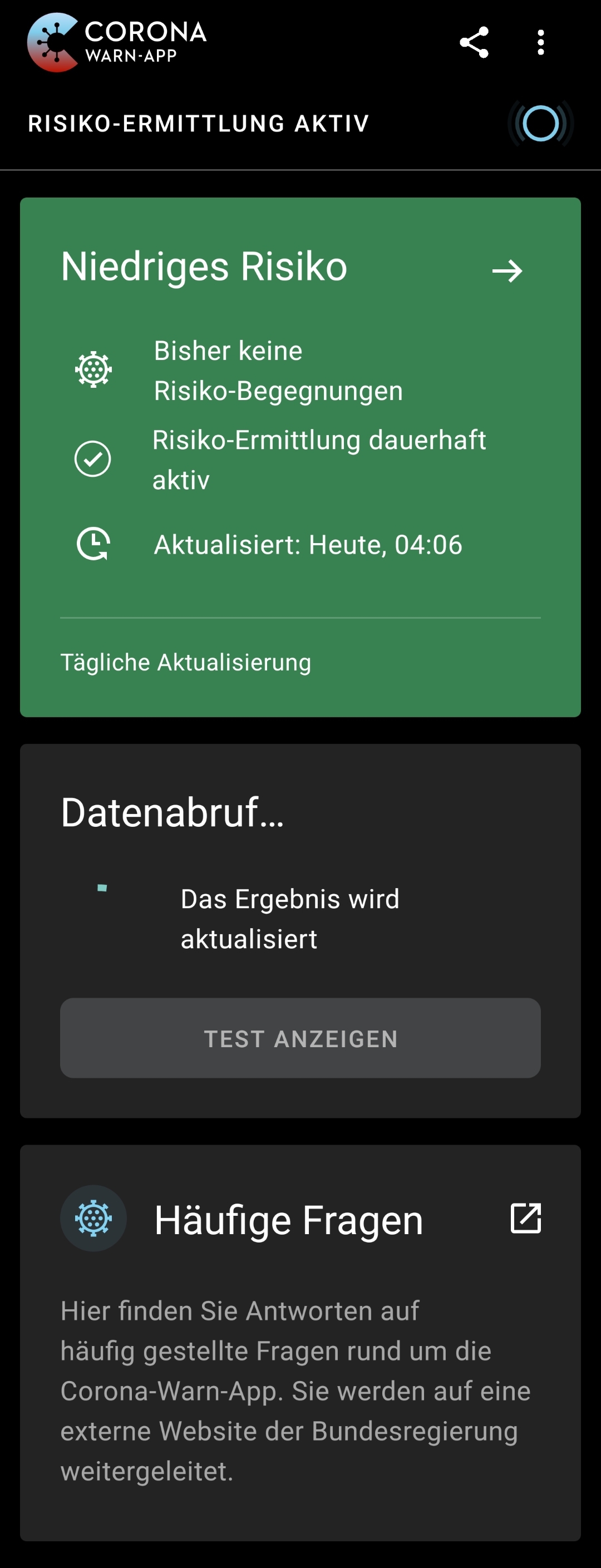
Since then she has left the test in CWA and yesterday noticed that she cannot access her test anymore, instead this area now says
Datenabruf...
⚫ Das Ergebnis wird aktualisiert
And the wheel keeps spinning indefinitely.

Expected behaviour
Ability to access (and delete) ones stored test and therefore no indefinitely spinning wheel in the area where tests can be added on the main screen.
Steps to reproduce the issue
See description.
Technical details
- Mobile device: Xiaomi Redmi Note 7
- Android version: 10
- CWA 1.2.1
Additional context
Just guessing from the indefinitely spinning wheel symptom and the timing this could be related to: https://github.com/corona-warn-app/cwa-app-android/issues/1063 and https://github.com/corona-warn-app/cwa-app-android/issues/967#issuecomment-680019497.
Internal Tracking ID: EXPOSUREAPP-2398
 daimpi
All 118 comments
IPhone XR with test from the same day and facility has this error:

 kira99
on 27 Aug 2020
kira99
on 27 Aug 2020
After 21 days the variable to receive the test result is deleted on the server. We will fix the appearance of this state in the app.
 thomasaugsten
on 27 Aug 2020
thomasaugsten
on 27 Aug 2020
Exact the same behaviour as described by daimpi on my OnePlus 7 Pro on Android 10 and CWA 1.2.1.
After I sucessfully received my test result on 3rd August via CWA I could access the test resukts for a couple of days. Since I left the test in CWA I noticed that I cannot access my test anymore, instead the "datenabruf" never finishes.
 nerdiges
on 4 Sep 2020
nerdiges
on 4 Sep 2020
@kira99 @nerdiges
Now that CWA 1.3.0 is available for Android and iOS, could you update and check whether the error persists?
(For me the update to 1.3.0 unfortunately didn't fix my problem).
daimpi
on 4 Sep 2020
1.3 is not solving this issue we are working on it to solve also this 400 error
thomasaugsten
on 4 Sep 2020
1.3 is not solving this issue we are working on it to solve also this 400 error
Ah ok thanks for the info. I was under the impression that there would be some kind of fix in 1.3 b/c of this statement (from my issue):
Hey,
we included a fix for this behaviour in RC1 for the 1.3.0 release, this means the fix is sadly not part of the 1.2.1 release. If the issue still persists after 1.3.0 has been released via google play please let me know :)
But thanks for clarifying that 1.3 doesn't contain a fix yet 🙂.
daimpi
on 4 Sep 2020
I appreciate the update. I hope that will land sometime, as I cannot add a new test in the meantime. My original test result was never added to the server (probably the infamous non-ticked box on the test form) but I didn't remove it. Now, being stuck on "Your result is being updated", I couldn't even remove it to add a new test if I got one right now. And judging from how many people had the issue of non-reported results to their QR codes, I think a lot of phones will be stuck in this state now.
But at least it's being worked on. :)
 parttimehorse
on 4 Sep 2020
parttimehorse
on 4 Sep 2020
I experienced a similar situation. I was tested at SXF airport on 1st of September. I do not know if box 9 was filled or not. A fillable sheet I got was for the doctor, so I did not fill it. I registered the test in the app and updated periodically. A friend told me two days later that she already had her results so I immediately checked it again. The app displayed "no results yet" but by fortune I found the results in a message from screeninglabor.de that was hidden among a pile of messages. I completely missed it and when I found it I was cautious because it inspired no confidence at all. By the way, the app still says "Test result is not yet available".
I find this behaviour misleading because I trusted more app notifications. In the app I know that I am receiving the results from an official source and the update button gives the impression that you are up-to-date. At that moment I though: the result is not available yet and the mail message could be phishing or be hiding a script behind the link given.
 zyth0s
on 7 Sep 2020
zyth0s
on 7 Sep 2020
Hey @zyth0s
The problem you are mentioning is this one: https://github.com/corona-warn-app/cwa-documentation/issues/400
We are currently working on this to resolve this issue. We are in close contact with the laboratories at the moment and are making progress every day. Many parties are involved in a solution to counter this issue and we will post updates on the mentioned issue as soon as the issue gets resolved.
Best regards,
SG
Corona-Warn-App Open Source Team
 svengabr
on 8 Sep 2020
svengabr
on 8 Sep 2020
As mentioned above I meant to write it in another issue. Thanks for the feedback.
zyth0s
on 8 Sep 2020
I'm having the same issue. Several weeks ago I did a test, scanned the QR code, got a negative test result via the app a few days later, forgot to remove the test result, and now the app is stuck at "Data being retrieved…" and the wheel is spinning infinitely. This is quite a serious problem since I would not be able to add a new test result without first resetting the CWA data, which means all the apps contacts are gone, i.e. I couldn't warn anyone with the app.

A possible quick fix for this could be to automatically delete a test result from the app a certain number of days after the QR code is scanned, though there could be problems if the system time is changed for whatever reason. A button to "delete all my test results", as a softer alternative to deleting all the app data could also be a quick work-around for the problem.
Is this issue likely to be fixed within the next week or two?
 Manik7
on 16 Sep 2020
Manik7
on 16 Sep 2020
Hello @Manik7,
thanks for your feedback.
As mentioned by @svengabr this issue is known and we are working on it.
Sadly, I cannot tell you when exactly this will be fixed.
As soon as I get more information regarding this issue I will let you know.
Best regards,
ABB
Corona-Warn-App Open Source Team
 abro1i
on 16 Sep 2020
abro1i
on 16 Sep 2020
Same issue here. Got tested at Stuttgart Train Station at Sept 7th, and could access my test results after two days. Now the result should have been deleded on the server and my app is spinning at "Datenabruf" indefinitely. No error message.
Device Xiaomi A2 lite, Android 10
 mhhagen
on 1 Oct 2020
mhhagen
on 1 Oct 2020
@mhhagen
One thing which you could try is resetting the app data in CWA, that should not delete any of the collected keys as they are saved in the Google Exposure Notification Framework (ENF) and are only deleted once you uninstall the last ENF app: https://www.coronawarn.app/en/faq/#delete_random_ids
In the case that you reset the data in CWA your day counter will start from 0 again, but that's just a cosmetic issue which doesn't have an effect on actual functional aspects and can also be circumvented by following the steps described here if this is important for you.
Edit (Oct 30): Crossed out the last part of the sentence because of this.
daimpi
on 1 Oct 2020
Short update:
The developers worked on the issue but are currently blocked due to UI/UX not final yet. We are waiting for feedback here.
Developer response:
This bug is related to a family of errors that all stem in some kind of failure during fetch of a users test result on the Homescreen. Since there is currently no design or specification on how to handle these issues except for "keep showing the loading card" we proposed introduction of a new ui state for the test result card on main screen wich displays the issue state and allows the user refetch/remove the test. This proposal is currently being investigated by the design team and is blocking implementation work.
svengabr
on 2 Oct 2020
Thanks for the update @svengabr. I hope the design team can soon come up with an proposal, even if it's just a temporary one… just showing the option to delete/refetch would help a lot b/c this is the kind of error where users will probably not be very understanding why this is not already fixed and why they have to go to such lengths just to get their app working properly again, even though a solution seems so straightforward…
daimpi
on 2 Oct 2020
Isn't this quite a serious issue, given that a lot of people are currently using the app to retrieve their test results and a potentially large fraction of them will not delete the test result manually in time?
If I understand correctly this will entirely block these users from sharing a future positive test result - they would have to delete the CWA app data to be able to enter their test result, which in turn would lead to the loss of the links to their recent contacts. Or am I not understanding something correctly here? I'm just surprised that this issue remains open for so long.
 lkuchenb
on 10 Oct 2020
lkuchenb
on 10 Oct 2020
If I understand correctly this will entirely block these users from sharing a future positive test result - they would have to delete the CWA app data to be able to enter their test result, which in turn would lead to the loss of the links to their recent contacts. Or am I not understanding something correctly here? I'm just surprised that this issue remains open for so long.
Fortunately the "resetting" can be done without loosing any keys saved on the device as I mentioned above as long as you don't re-install the app.
daimpi
on 10 Oct 2020
I see, thanks for clarifying. I was fooled by the day counter effect then. I guess a regular Android user unaware of app data resetting may be inclined to reinstall the app when it doesn't work though.
lkuchenb
on 10 Oct 2020
Indeed. When I had to do it, it triggered a few hours of constant error messages whenever I opened the app ("Ursache 3") so that was kind of unsettling even though I knew why it happened and that it was temporary. So I too am looking forward to this fix and hope it gets there asap. I appreciate the update very much as to why it's taking a little longer.
parttimehorse
on 12 Oct 2020
As this issue seems to be not trivial to fix, maybe there should be some entry in the CWA-FAQ, especially about the reset option that apparently does not reset ENF data...
 PostmanLee
on 15 Oct 2020
PostmanLee
on 15 Oct 2020
Am i right that this issue wasn't handled in version 1.5 that will roll out today?
Is it still an UI design question? That's ridicolous...
mhhagen
on 19 Oct 2020
I will ask for the latest feedback in Jira and I will update this post once more information is available.
svengabr
on 19 Oct 2020
The error still exists in the current version 1.5.
 Pixelrise
on 19 Oct 2020
Pixelrise
on 19 Oct 2020
An update for this issue would be much appreciated. So many people are getting tested now for a second time after being tested in the summer and this is a huge hurdle to properly register tests and warn other users.
 MarBor8
on 20 Oct 2020
MarBor8
on 20 Oct 2020
The latest feedback in Jira is from today morning:
[...] is currently preparing a new state with the information that the test is expired and a delete Button to delete the Test. UI Design will be attached soon
svengabr
on 22 Oct 2020
Is anyone aware of how many people are already stuck with this error? Just a quick reminder: It prohibits people from entering a (new) test result into the app. That makes the app pretty much useless.
I got me and a close friend of mine who had the same error on her app. Like me, she was testet at an popup testing station at an aiport, back in August. She eventually uninstalled and reinstalled the app, deleting all traces(!).
(Having read this thread I know now that this was not too smart, but this app has to be LART proof!)
I therefore don't want to hurry anyone, but this issue was first reported in late August(!) -- maybe even earlier, b/c an update fixed the former error 9002 to this 'new' reported one, which is basically is the same thing and was the error I had until ~Septemer 6th.
Whoever is responsible of prioritising bugfixes, please think about the first two sentences of this comment. Think about the consequences this error brings to all(?) app users who got tested one time already, at best at popup test stations, and who can't add another test once this first result got stuck like this in their app. This should be thousands of "Reiserückkehrer"-users, who won't be able to add another/new test to their app.
So I guess this "soon" in "UI Design will be attached soon", is someting you guys might want to push a little more, @svengabr.
 moaxislaven
on 25 Oct 2020
moaxislaven
on 25 Oct 2020
Is anyone aware of how many people are already stuck with this error? Just a quick reminder: It prohibits people from entering a (new) test result into the app. That makes the app pretty much useless.
I got me and a close friend of mine who had the same error on her app. Like me, she was testet at an popup testing station at an aiport, back in August. She eventually uninstalled and reinstalled the app, deleting all traces(!).
(Having read this thread I know now that this was not too smart, but this app has to be LART proof!)I therefore don't want to hurry anyone, but this issue was first reported in late August(!) -- maybe even earlier, b/c an update fixed the former error 9002 to this 'new' reported one, which is basically is the same thing and was the error I had until ~Septemer 6th.
Whoever is responsible of prioritising bugfixes, please think about the first two sentences of this comment. Think about the consequences this error brings to all(?) app users who got tested one time already, at best at popup test stations, and who can't add another test once this first result got stuck like this in their app. This should be thousands of "Reiserückkehrer"-users, who won't be able to add another/new test to their app.
So I guess this "soon" in "UI Design will be attached soon", is someting you guys might want to push a little more, @svengabr.
Exactly right, I completely agree.
This error is troubling in the face of how many new cases are reported and the fact that it pretty much renders it useless for many people. If they test positive their contacts will not be notified, giving a false sense of security. Which is the opposite of the purpose of this app. Not everyone who has the problem and can't enter their test reads here etc.
Please make this error a priority, it has been ages that it exists
MarBor8
on 26 Oct 2020
a PR has been opened to fix this issue: https://github.com/corona-warn-app/cwa-app-android/pull/1481
 kolyaopahle
on 26 Oct 2020
kolyaopahle
on 26 Oct 2020
Great. Here's to hoping this lands and makes it into a hotfix release asap 🙂
parttimehorse
on 26 Oct 2020
So I am assuming that no change made it into the new update?
MarBor8
on 27 Oct 2020
It was merged into the 1.6.x branch yesterday.
With the last update (yesterday) 1.5.1 was released.
Pixelrise
on 27 Oct 2020
Hi, I started to search for this error because I am experiencing it myself at the moment. I need to add a new test however the app is stuck with 'Data being retrieved..'. I have updated the app to the newest version - still the same problem.
 carinaufer
on 28 Oct 2020
carinaufer
on 28 Oct 2020
@carinaufer Unfortunately, the bug fix is finished and merged (into version 1.6 branch) but 1.5.1 does not include this. Until 1.6.0 comes out or the fix gets backported to 1.5.x and released in a hypothetical 1.5.2 update, you will have to make due with the workaround @daimpi introduced: (resetting data within the CWA, which does not delete your stored keys but resets the counter and removes an old test) -> https://github.com/corona-warn-app/cwa-app-android/issues/1084#issuecomment-702193741
parttimehorse
on 28 Oct 2020
@carinaufer
Do not uninstall the app but simply do the following:
Choose the three dots at the top right corner of the home screen and select 'Settings' -> 'Reset App'. This will not delete the random IDs collected by the phone.
The only disadvantage is that the app will now no longer show that you the risk calculation has been permanently active and will start counting at 0 days again. That's only a display issue though.
I'm deleting the following method as it might result in deleted IDs (see discussion below):
If that display is important to you, you can use this workaround - you need the follow the steps precisely in this order:
1. On your phone, navigate to Settings > Apps > Corona-Warn-App.
2. Click on “Force Stop”.
3. Select “Storage” and then clear the cache and data by clicking the respective buttons.
4. In order to ensure that the Corona-Warn-App takes the entire last 14 days into account the next time it is started for the risk determination, you can first change the system date of your phone. So that all codes for the risk determination are downloaded from the server, it is sufficient if you set the date to yesterday's date. If you also want the Corona-Warn-App to display that your risk determination has been permanently active in the last 14 days, you can set the system date back 14 days
5. To change the system date, go to Settings > Date and Time on your phone. To set the date, you may have to deactivate Set time automatically.
6. Now open the Corona-Warn-App. You will be shown the introduction again (the onboarding). Follow the onboarding to the end. When you see the main screen, wait for any risk status to appear and then close the app.
7. Now set the system date back to the current day (Android Settings > Date and Time). If necessary, activate the automatic time determination again.
8. Now open the Corona-Warn-App again. You should now see your correct risk status (“low risk” or “increased risk”).
 MikeJayDee
on 28 Oct 2020
MikeJayDee
on 28 Oct 2020
On one hand I'm pleased to hear this issue has been fixed. Great job!
On the other I can't understand why the fix was merged to 1.6 instead of doing another bugfix release as fast as possible.
With rapidly increasing infection numbers and therefore increasing tests the possibility to get another test into the app is essential. Most users with this error will do the usual routine of uninstalling and reinstalling the app which will render it nearly useless.
Only a minority will find it's way to this thread to find a solution for this.
Please roll out the fix immediately!
mhhagen
on 29 Oct 2020
On one hand I'm pleased to hear this issue has been fixed. Great job!
On the other I can't understand why the fix was merged to 1.6 instead of doing another bugfix release as fast as possible.
With rapidly increasing infection numbers and therefore increasing tests the possibility to get another test into the app is essential. Most users with this error will do the usual routine of uninstalling and reinstalling the app which will render it nearly useless.
Only a minority will find it's way to this thread to find a solution for this.Please roll out the fix immediately!
Completely agree. A small minority will be able to fix this, the rest will uninstall and reinstall or get frustrated enough to permanently uninstall. Plus there is the issue that many will face a language barrier getting to this information, with all of this discussion being held in English.
Please make rolling this fix out a priority!
Please
MarBor8
on 29 Oct 2020
@MikeJayDee
@carinaufer
Do not uninstall the app but simply do the following:Choose the three dots at the top right corner of the home screen and select 'Settings' -> 'Reset App'. This will not delete the random IDs collected by the phone.
The only disadvantage is that the app will now no longer show that you the risk calculation has been permanently active and will start counting at 0 days again. That's only a display issue though. If that display is important to you, you can use this workaround - you need the follow the steps precisely in this order:
- On your phone, navigate to Settings > Apps > Corona-Warn-App.
- Click on “Force Stop”.
- Select “Storage” and then clear the cache and data by clicking the respective buttons.
- In order to ensure that the Corona-Warn-App takes the entire last 14 days into account the next time it is started for the risk determination, you can first change the system date of your phone. So that all codes for the risk determination are downloaded from the server, it is sufficient if you set the date to yesterday's date. If you also want the Corona-Warn-App to display that your risk determination has been permanently active in the last 14 days, you can set the system date back 14 days
- To change the system date, go to Settings > Date and Time on your phone. To set the date, you may have to deactivate Set time automatically.
- Now open the Corona-Warn-App. You will be shown the introduction again (the onboarding). Follow the onboarding to the end. When you see the main screen, wait for any risk status to appear and then close the app.
- Now set the system date back to the current day (Android Settings > Date and Time). If necessary, activate the automatic time determination again.
- Now open the Corona-Warn-App again. You should now see your correct risk status (“low risk” or “increased risk”).
I did follow your description in all steps, but it is still stuck at "Datenabruf", although date is 15th of October, now.
XIAOMI Redmi Note 7 CWA 1.5.0
kira99
on 29 Oct 2020
@daimpi
@mhhagen
One thing which you could try is resetting the app data in CWA, that should not delete any of the collected keys as they are saved in the Google Exposure Notification Framework (ENF) and are only deleted once you uninstall the last ENF app: https://www.coronawarn.app/en/faq/#delete_random_idsIn the case that you reset the data in CWA your day counter will start from 0 again, but that's just a cosmetic issue which doesn't have an effect on actual functional aspects and can also be circumvented by following the steps described here if this is important for you.
I cleared cache, but test "Datenabruf" is still there.
kira99
on 29 Oct 2020
@kira99
I cleared cache, but test "Datenabruf" is still there.
You need to clear data. Clearing data carries out clear data and clear cache. You actually only need to clear data.
Clearing cache alone is not enough.
Edit: Based on new information it is not recommended to reset the app via Android app clear data / cache. Resetting the app by clear data will delete stored keys. Instead use the Reset App function inside Corona-Warn-App itself.
 MikeMcC399
on 29 Oct 2020
MikeMcC399
on 29 Oct 2020
@kira99
I cleared cache, but test "Datenabruf" is still there.
You need to clear data. Clearing data carries out clear data and clear cache. You actually only need to clear data.
Clearing cache alone is not enough.
@MikeMcC399 @mhhagen
I did clear all data for CWA. Set date back 14 days and to current date again. Good is "Datenabruf" is gone, but my one Risikobegegnung is gone, too. So it seems, all keys are gone. Same effect as with deleting the app.
kira99
on 29 Oct 2020
@kira99
So it seems, all keys are gone. Same effect as with deleting the app.
Oo that shouldn't happen… did you delete anything in the Google ENF settings?
Is your EN log also starting from zero, or have the entries there been preserved?
daimpi
on 29 Oct 2020
@kira99
So it seems, all keys are gone. Same effect as with deleting the app.
Oo that shouldn't happen… did you delete anything in the Google ENF settings?
Is your EN log also starting from zero, or have the entries there been preserved?
No, I just deleted CWA data with app settings as described. My App shows "Risikoermittlung dauerhaft aktiv".
kira99
on 29 Oct 2020
@kira99 has your EN log been preserved? And if so could you share it here?
daimpi
on 29 Oct 2020
@daimpi
@kira99 has your EN log been preserved? And if so could you share it here?
Where can I access the log?
kira99
on 29 Oct 2020
Android main screen -> Settings -> Google -> Coivid-19 Exposure Notifications -> click on the "x checks in the last 14 days" -> burger menu upper right corner -> export.
Just rename the .json file to .txt then you can upload it here 🙂.
daimpi
on 29 Oct 2020
kira99
on 29 Oct 2020
@kira99 thanks, looks like the EN log got deleted… I did a reset of my data within the CWA settings 9 days ago:
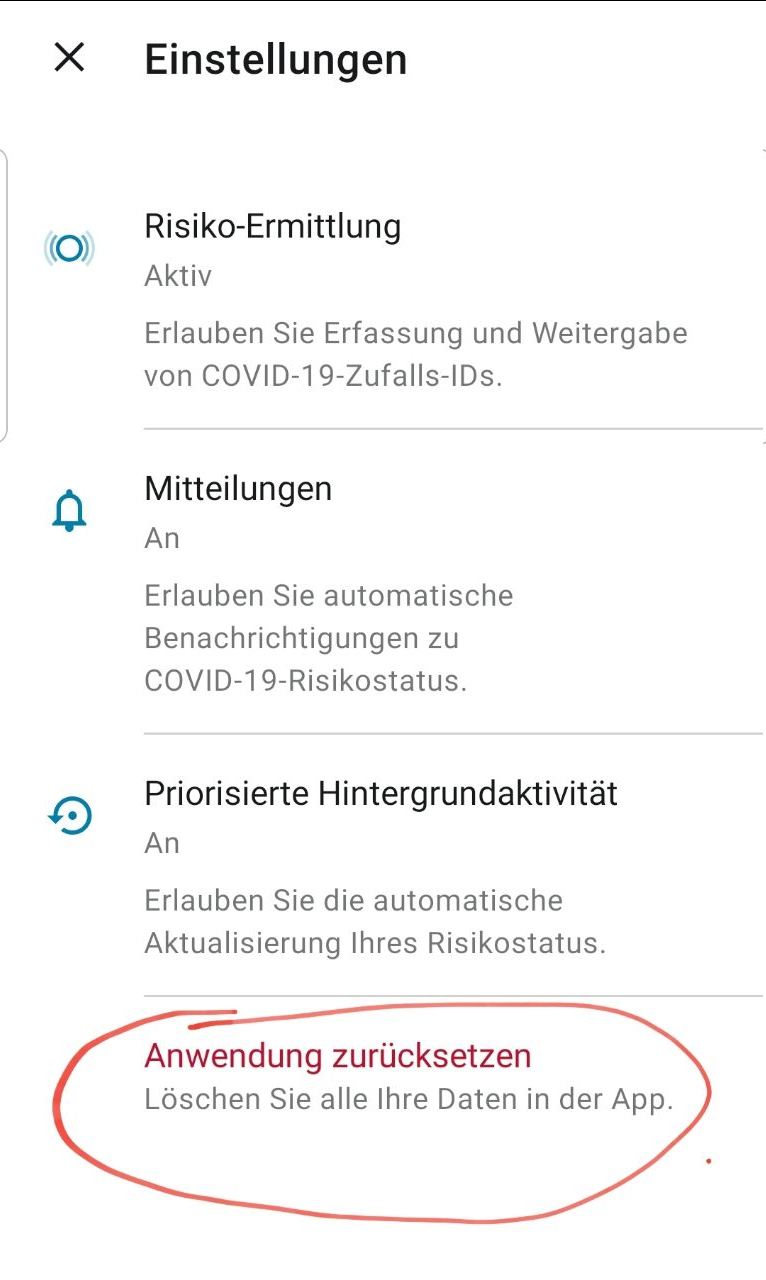
And my log didn't get deleted: me-29.txt
But I didn't use the procedure with stopping CWA and deleting data + cache…
@vaubaehn: is it expected with this procedure to loose the EN log entries?
daimpi
on 29 Oct 2020
No, I just deleted CWA data with app settings as described. My App shows "Risikoermittlung dauerhaft aktiv".
This is also odd - why would this be shown if all app data was deleted?
I will be able to test this myself in a few days with my old phone, which also has a "pending" test. But I want to wait until my new phone has been recording IDs for 14 days.
MikeJayDee
on 29 Oct 2020
No, I just deleted CWA data with app settings as described. My App shows "Risikoermittlung dauerhaft aktiv".
This is also odd - why would this be shown if all app data was deleted?
I think this is b/c of this trick:
Set date back 14 days and to current date again.
Which was described here by @vaubaehn.
daimpi
on 29 Oct 2020
@kira99
I just tried the method with deleting cache + data on a secondary device and yes I can confirm that this deletes the EN log…
This is in contrast to using the method of resetting the data within the CWA settings which preserves the EN log.
@vaubaehn are we relatively confident that your method doesn't delete any keys but just the EN log b/c @kira99 reported above that she lost an encounter using this method.
daimpi
on 29 Oct 2020
@daimpi
You might remember on Sep 2 I also tried out force-stopping the app then deleting data, which lost the history. I wrote about this in
https://github.com/corona-warn-app/cwa-app-android/issues/642#issuecomment-685632924
After that @thomasaugsten wrote on Sep 7 in https://github.com/corona-warn-app/cwa-app-android/issues/642#issuecomment-688267231
We double check with Google and they are not plan to store the keys after the last Covid19 App is deleted.
Because is not aware after deleting he has to remove data in the Android settings.
This mean a save way to reset the app is:
Android > Settings > Apps > CWA > Storage > delete data/cache
So since then we have been relying on this information from Google via the Open Source Team that although the history is not shown, the keys are still preserved. If that is not true, then we'd need to know, because it affects about using this method as a workaround.
MikeMcC399
on 29 Oct 2020
@MikeMcC399 thanks for the summary I actually had forgotten some of those details.
I think it would be great to actually test this…
@kbobrowski would you maybe have time and energy to conduct such a test? 🙂
- Create an artificial exposure
- Use @vaubaehn's method to reset CWA.
- check whether the exposure is still present in CWA after this reset method.
daimpi
on 29 Oct 2020
@daimpi
This is in contrast to using the method of resetting the data within the CWA settings which preserves the EN log.
I'd also forgotten some of these details, but thankfully I was able to find them again!
We should ask @vaubaehn to review whether deleting the data via (Google) Settings > App > delete data is still the recommended way. @kbobrowski can maybe also add expertise here as you suggest.
CWA > Settings > Reset App provides a reset function (as you mention above directly in the CWA app), however until the CWA Version 1.5.0 was released, using this function immediately caused a 39508 error (see https://github.com/corona-warn-app/cwa-app-android/issues/934, which is now closed). This problem has been indirectly fixed because a normal exposure check only uses up one call from the quota instead of the previous 14. Resetting the app now will use up an additional call from the quota instead of the previous 14 additional calls, so in total the 2 calls with Version 1.5.0 are now less than the allowed quota of 20, therefore no 39508 error condition occurs. In versions before 1.5.0 you would typically see 28 exposure check calls, 14 before, 14 after reset, which exceeded the allowed quota of 20.
So can reset app inside CWA now be the standard problem-solving step instead of the heavy-handed delete data at the OS level?
MikeMcC399
on 29 Oct 2020
So can reset app inside CWA now be the standard problem-solving step instead of the heavy-handed delete data at the OS level?
Yes actually that seems like a good idea… you can even get the "14 days active" status by using the clock method on the reset within CWA. I just tested this and it works…
daimpi
on 29 Oct 2020
Wouldn't it be better to put this energy in forcing the update instead of hunting down an app behaviour that we wouldn't need if the fix would be rolled out?
mhhagen
on 30 Oct 2020
@kira99
I cleared cache, but test "Datenabruf" is still there.
You need to clear data. Clearing data carries out clear data and clear cache. You actually only need to clear data.
Clearing cache alone is not enough.@MikeMcC399 @mhhagen
I did clear all data for CWA. Set date back 14 days and to current date again. Good is "Datenabruf" is gone, but my one Risikobegegnung is gone, too. So it seems, all keys are gone. Same effect as with deleting the app.
I've got the same on my phone. I did the reset as described. Now my app is completely blank. The one "Risikobegegnung" is gone.
My app version: 1.5.1
I am really wondering what is happening with this 69 Million Euro, when a simple bug, which has a really critical impact, cannot be fixed (and rolled out) in a very short time. This bug is now open since 2 months. At the end it leads to people infecting others and probably people loosing their lifes.. One could assume that such a bug should be fixed within days (not within months).
 chraxo
on 30 Oct 2020
chraxo
on 30 Oct 2020
@mhhagen
Wouldn't it be better to put this energy in forcing the update instead of hunting down an app behaviour that we wouldn't need if the fix would be rolled out?
Those things are kind of orthogonal: none of us in this conversation is a CWA dev, so it doesn't really take time away from implementing a fix for this issue here (which btw. has already been done with https://github.com/corona-warn-app/cwa-app-android/pull/1481 it's just not being rolled out yet).
But knowing how this works could be important for other reasons: the workaround described above is currently the go-to method for fixing issues related to problems with ESP and/or sqlite database errors. If this were to actually delete all the keys it would be pretty bad.
daimpi
on 30 Oct 2020
I use v 1.5.1 and did as described above and my four Risikokontakte have since disappeared. Don't try this at home!
 mlkiefer
on 30 Oct 2020
mlkiefer
on 30 Oct 2020
@mlkiefer thanks for the report. When you say "did as described above" do you mean the method where you go to
Android > Settings > Apps > CWA > Storage > delete data/cache
or did you reset data within CWA as I described here?
daimpi
on 30 Oct 2020
Hi @daimpi, I deleted it via
Android > Settings > Apps > CWA > Storage > delete data/cache
However, that was yesterday afternoon, and it seems that I missed the new method by a couple of hours :-(
mlkiefer
on 30 Oct 2020
@mlkiefer thanks for the info. It's not entirely clear that the method you used deletes any keys (it actually shouldn't) but it's surprising to see multiple ppl using this method reporting that from one moment to the next they lost their encounters, something doesn't seem to add up here 😕. Were your encounters present right before the data deletion and right after it they were gone and your App showed "No encounters" again?
daimpi
on 30 Oct 2020
@daimpi Yes
kira99
on 30 Oct 2020
@kira99
I cleared cache, but test "Datenabruf" is still there.
You need to clear data. Clearing data carries out clear data and clear cache. You actually only need to clear data.
Clearing cache alone is not enough.@MikeMcC399 @mhhagen
I did clear all data for CWA. Set date back 14 days and to current date again. Good is "Datenabruf" is gone, but my one Risikobegegnung is gone, too. So it seems, all keys are gone. Same effect as with deleting the app.I've got the same on my phone. I did the reset as described. Now my app is completely blank. The one "Risikobegegnung" is gone.
My app version: 1.5.1[...]
This is how it looks. Could it be, that it in the background the app has the info about the risk contacts, but doesn't shows them, as the app assumes, that is does not have enough data?
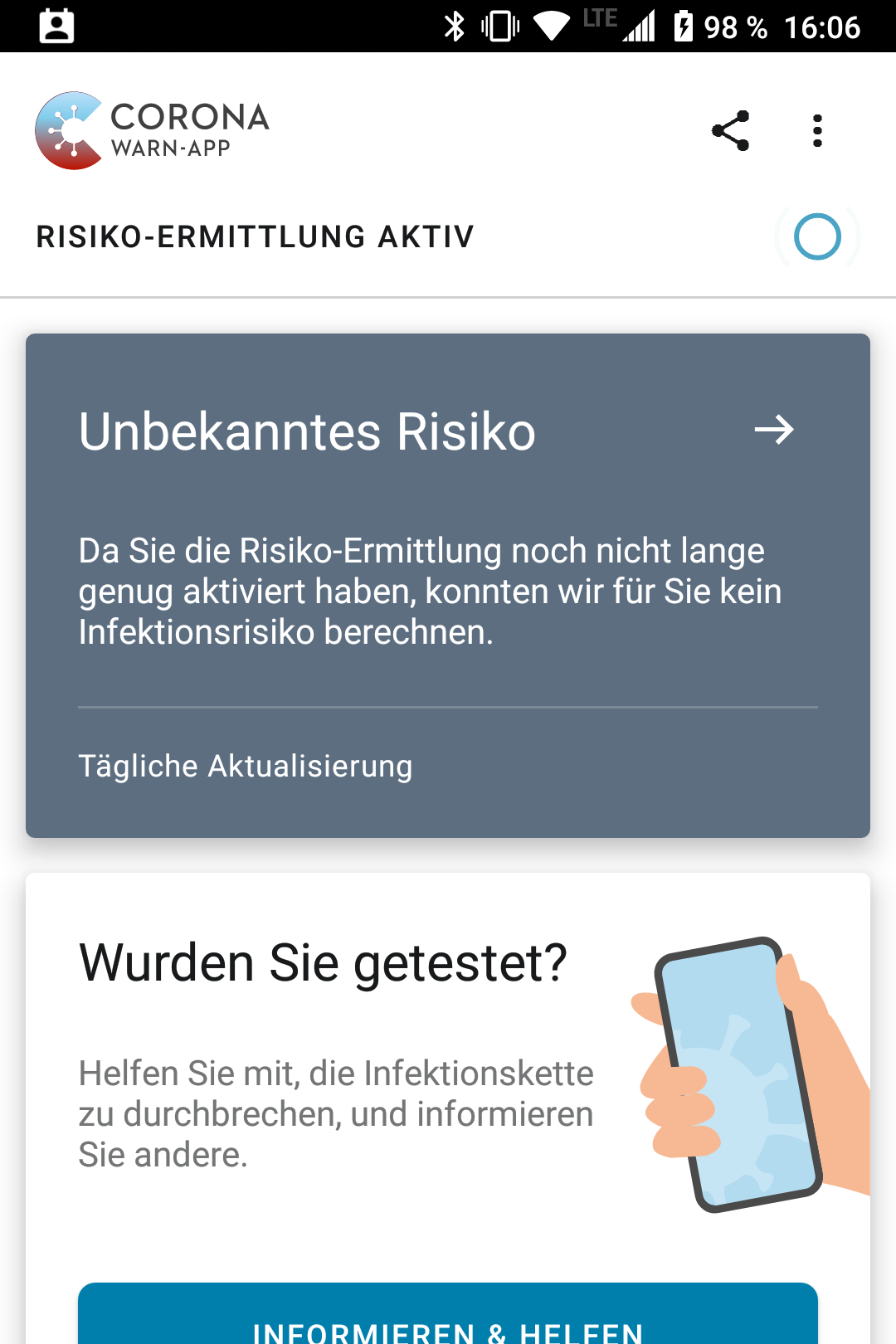
chraxo
on 30 Oct 2020
@chraxo
Could it be, that it in the background the app has the info about the risk contacts, but doesn't shows them, as the app assumes, that is does not have enough data?
Yes maybe. Could you check your EN log to see whether it shows any matches? (See here on how to find your EN log).
daimpi
on 30 Oct 2020
@chraxo
Could it be, that it in the background the app has the info about the risk contacts, but doesn't shows them, as the app assumes, that is does not have enough data?
Yes maybe. Could you check your EN log to see whether it shows any matches? (See here on how to find your EN log).
My log contains about 160 entries. Here a small excerpt:
,{"timestamp":"25. Oktober 2020, 08:38","keyCount":282934,"matchesCount":1,"appName":"Corona-Warn","hash":"Cvl3+jjmVebIDD+DJdbQg0+zwYraO57vtO9PXi9gELI="},{"timestamp":"24. Oktober 2020, 09:15","keyCount":23657,"matchesCount":0,"appName":"Corona-Warn","hash":"FmksVqcKrN8X72caj6d58AoIbGv7R9aGOE+46lxx+4M="},
chraxo
on 30 Oct 2020
@daimpi , yes I had the four encounters before the reset. Afterwards, they were all gone.
mlkiefer
on 30 Oct 2020
@chraxo
My log contains about 160 entries.
Did you reset CWA data
- as I described here or
- did you use the other method (Android > Settings > Apps > CWA > Storage > delete data/cache)?
Could you share your EN log here (just rename the ending from .json to .txt)?
daimpi
on 30 Oct 2020
I think it would be great to actually test this…
@kbobrowski would you maybe have time and energy to conduct such a test?
- Create an artificial exposure
- Use @vaubaehn's method to reset CWA.
- check whether the exposure is still present in CWA after this reset method.
@daimpi when clearing app data from Android settings all RPIs are deleted, and I'd assume the same applies to TEKs, although did not check the latter. This will not happen only if there is another app (from another country) installed on the device
 kbobrowski
on 30 Oct 2020
kbobrowski
on 30 Oct 2020
@kbobrowski wow, thanks that's great to know, thank you so much for testing this ❤️ 😊.
I did some of my own tests (w/o root) and found that the EN log entries seem to disappear even if you have another ENF app installed (I tested it with Immuni) but it's great to know that the actually important data (i.e. the keys) is not affected if another app is installed during this process 🙂.
daimpi
on 30 Oct 2020
@chraxo
My log contains about 160 entries.
Did you reset CWA data
- as I described here or
- did you use the other method (Android > Settings > Apps > CWA > Storage > delete data/cache)?
Could you share your EN log here (just rename the ending from .json to .txt)?
The answer is >1.<
chraxo
on 30 Oct 2020
@chraxo ok thanks, yes that explains why your EN log didn't get reset and also why you didn't loose any keys.
PSA for anyone encountering this problem:
- Use the reset method (1) within CWA as described here!
- If you insist on using reset method (2) (Android > Settings > Apps > CWA > Storage > delete data/cache) make sure you have another ENF app (e.g. Immuni) installed while doing the reset, otherwise all your keys will be lost.
daimpi
on 30 Oct 2020
@daimpi I doubled check and it looks Google is now registering the data deleting and turns off the exposure notification framework this leads to a key wiping. We will update our FAQ
thomasaugsten
on 30 Oct 2020
@thomasaugsten When you are in contact with Google, could you try to convince them not to delete the RPIs immediately on uninstall but only after a day or so? A typical reaction of users to problems with the app is to uninstall and reinstall. It would be good if the RPIs could survive this.
MikeJayDee
on 30 Oct 2020
@MikeJayDee
When you are in contact with Google, could you try to convince them not to delete the RPIs immediately on uninstall but only after a day or so? A typical reaction of users to problems with the app is to uninstall and reinstall. It would be good if the RPIs could survive this.
I'm not sure why the keys have to be deleted at all. Why not just continue to age them out over the 14 day period, the same as specified for when a Covid-19 app is in use, deleting them a day at a time? I had submitted a related wish-list item https://github.com/corona-warn-app/cwa-wishlist/issues/164 two months ago, but no reaction so far. 😞
MikeMcC399
on 30 Oct 2020
I'm not sure why the keys have to be deleted at all.
They seem very worried to handle the data privacy protection 150% right.
After all, it is health-related data...
 ndegendogo
on 31 Oct 2020
ndegendogo
on 31 Oct 2020
I am running v1.5.1 on Android and encountered this issue. I reset the data from within the CWA settings which reset the app. The EN log is still on my device, but I assume now some internal counter has been reset, and my app doesn't show the exposures that I had seen before.
How is it possible that such a crucial feature (IMHO) - being able to get test results - has not been fixed within two months given that the project is funded with millions of euros?
 otacke
on 31 Oct 2020
otacke
on 31 Oct 2020
@ndegendogo
They seem very worried to handle the data privacy protection 150% right.
After all, it is health-related data...
There are probably legal reasons why Google is deleting the data immediately, but we can only suppose what they were thinking. It would be reasonable to ask Google to hang on to the data for a little longer though, as whatever terms & conditions the user agreed to when they installed and activated CWA would survive app de-installation. Deleting the CWA app data directly at the Android apps level is triggering the exact mechanism which is triggered when the last COVID-19 app is de-installed. (See stop() method in Exposure Notifications API - Methods).
MikeMcC399
on 31 Oct 2020
Hi @otacke
I reset the data from within the CWA settings which reset the app. The EN log is still on my device, but I assume now some internal counter has been reset, and my app doesn't show the exposures that I had seen before.
Are you now seeing the "Unknown Risk" screen when you open CWA? It may be worth opening a separate issue for this topic to get some feedback from the developers, so that the risk can be immediately re-evaluated. Until version 1.5.0 if you used Reset App inside CWA you would usually get a 39508 error and have to wait until the next day until that error disappeared, so people avoided invoking the Reset App function. There was another workaround being suggested, which involved setting the clock back. It would be good if we didn't need workarounds though!
MikeMcC399
on 31 Oct 2020
@MikeMcC399 Yes, I get a regular "Unknown Risk" screen, no error message. I'll wait if something changes after 24 hours (or the upcoming update to 1.6 maybe) before opening another issue. And I agree: Workarounds shouldn't be necessary. I don't know the code, but from a user's perspective, this doesn't feel like a complicated problem that would take a million dollar project take two months to fix.
otacke
on 31 Oct 2020
@otacke
Yes, I get a regular "Unknown Risk" screen, no error message. I'll wait if something changes after 24 hours (or the upcoming update to 1.6 maybe) before opening another issue.
Many thanks for confirming. I have opened a new issue https://github.com/corona-warn-app/cwa-app-android/issues/1510 which you are welcome to follow and add any comments if you want. I hope this will get picked up by the community managers and developers.
MikeMcC399
on 31 Oct 2020
Just to mirror the workaround for the "unknown risk" screen from https://github.com/corona-warn-app/cwa-app-android/issues/1510#issuecomment-719927707 here:
- Before you do the reset within CWA, set the date 1 day in the past in the settings of your phone (or 14 days in the past if you immediately want the "permanently active" status in CWA) and disable automatic time synchronization.
- Reset the data within CWA: Open CWA > three-dot menu > Settings > Reset App
confirm RESET APP, RESET - Go through onboarding sequence
- Note that Unknown Risk card appears
- Change the time back to the current day and enable automatic time synchronization again in your phone settings.
- Check CWA again and note that the risk evaluation has been active permanently or for one day depending on how you set the date in step (1) and CWA is showing you the results of previous encounters right away.
daimpi
on 31 Oct 2020
Just to mirror the workaround for the "unknown risk" screen from #1510 (comment) here:
- Before you do the reset within CWA, set the date 1 day in the past in the settings of your phone (or 14 days in the past if you immediately want the "permanently active" status in CWA) and disable automatic time synchronization.
- Reset the data within CWA: Open CWA > three-dot menu > Settings > Reset App
confirm RESET APP, RESET- Go through onboarding sequence
- Note that Unknown Risk card appears
- Change the time back to the current day and enable automatic time synchronization again in your phone settings.
- Check CWA again and note that the risk evaluation has been active _permanently_ or _for one day_ depending on how you set the date in step (1) and CWA is showing you the results of previous encounters right away.
I can confirm that this procedure works as described (setting the date 14 days into the past to 18 October). It solved the "stuck at 'Datenabruf'" problem and preserved both the low risk encounter I had, and the "permanently active" status.
Before reset:
After reset:
Note that this added two additional checks for the day 14 days ago (18 October), but since there were only 14 checks on that day, this did not trigger a quota exceeded error message. The checks were after changing the date when opening the app before resetting the app, and directly after the reset. I attach three EN logs:
all-exposure-checks pre-time-change, pre-reset.txt
all-exposure-checks post-time-change, pre-reset.txt
all-exposure-checks post-reset, post-time-change-back.txt
This was tested on a non-rooted Pixel 2 with Android 11, CWA version 1.5.1, Exposure Notifications version 17203915000 and Google Play Services version 20.39.15 (150400-335085812). No other EN app from another country installed.
MikeJayDee
on 1 Nov 2020
So, I'm running version 1.6 and still the same issue. I can't believe this.
I'm still stuck at "Datenabruf" and there is no choice to delete the old test or whatever...
What are the devs doing???
mhhagen
on 11 Nov 2020
Version 1.6 and it is still an issue. The workarounds are nice but not for non-technical persons like my 80+ years old parents... the importance of this issue is underestimated, at least in my book.
 pieska
on 11 Nov 2020
pieska
on 11 Nov 2020
@mhhagen
So, I'm running version 1.6 and still the same issue. I can't believe this.
I'm still stuck at "Datenabruf" and there is no choice to delete the old test or whatever...
It would be good to get some feedback from the developers as apparently https://github.com/corona-warn-app/cwa-app-android/pull/1481 has not worked in your situation.
You should be able to apply the workaround from https://github.com/corona-warn-app/cwa-app-android/issues/1084#issuecomment-719928037 I think if you want to get rid of the issue on your device.
MikeMcC399
on 11 Nov 2020
This is getting absolutely ridiculous. I'm sorry, but this is frustrating. It has been 2 and a half months since this thread has been created and nothing is fixed. A huge issue
MarBor8
on 11 Nov 2020
I can confirm that this issue is still present with 1.6.
Seems that the fix was not tested properly:
 ThomasPiskol
on 11 Nov 2020
ThomasPiskol
on 11 Nov 2020
@mhhagen
So, I'm running version 1.6 and still the same issue. I can't believe this.
I'm still stuck at "Datenabruf" and there is no choice to delete the old test or whatever...It would be good to get some feedback from the developers as apparently #1481 has not worked in your situation.
You should be able to apply the workaround from #1084 (comment) I think if you want to get rid of the issue on your device.
Apparently the patch for #1084 works for no one as I've not read about this working. I don't know how and why you come up with #1481 now as this is another problem.
This is also not about trying a workaround. I know how this COULD work and how I could solve this. That is not the point.
It's about a very well funded application that cannot get an (in my opinion) MISSION CRITICAL bug solved. It seems to be impossible to implement a button to simply delete a test.
But hey, who am I to judge over the devs. Maybe it's really more important to provide a logbook function for infected ppl than to bugfix a user interface that the majority of users look at.
If I were in the position I'd raise the priority level of this really severe bug to one of the highest levels.
Edit: Typo
mhhagen
on 11 Nov 2020
@mhhagen
So, I'm running version 1.6 and still the same issue. I can't believe this.
I'm still stuck at "Datenabruf" and there is no choice to delete the old test or whatever...It would be good to get some feedback from the developers as apparently #1481 has not worked in your situation.
You should be able to apply the workaround from #1084 (comment) I think if you want to get rid of the issue on your device.Apparently the patch for #1084 works for no one as I've not read about this working. I don't know how and why you come up with #1481 now as this is another problem.
This is also not about trying a workaround. I know how this COULD work and how _I_ could solve this. That is not the point.
It's about a very well founded application that cannot get an (in my opinion) MISSION CRITICAL bug solved. It seems to be impossible to implement a button to simply delete a test.But hey, who am I to judge over the devs. Maybe it's really more important to provide a logbook function for infected ppl than to bugfix a user interface that the majority of users look at.
If I were in the position I'd raise the priority level of this really severe bug to one of the highest levels.
Agree!
A workaround is all fine and dandy. However, I would bet that over 90% of people will never get to the point of researching and finding the fix. They will quite simply not log their result or just uninstall the app altogether. This is an app that is supposed to be used by the public. All of it. And most people just simply will get frustrated with it.
This is not some little fun app with a game. It is a really well funded app that has an impact on public health. But only if a lot of people use it effectively. That fact alone should make it CRITICAL to fix this really speedily.
MarBor8
on 11 Nov 2020
@mhhagen
Apparently the patch for #1084 works for no one as I've not read about this working. I don't know how and why you come up with #1481 now as this is another problem.
It's good that you asked. Firstly I looked through this thread and found the entry from the developer @kolyaopahle https://github.com/corona-warn-app/cwa-app-android/issues/1084#issuecomment-716551517 which said:
a PR has been opened to fix this issue: #1481
followed by a cross-reference
1481 "Cannot delete tests older than 21 days - DE: Tests die älter als 21 Tage sind, können nicht gelöscht werden (EXPOSUREAPP-2398)"
Then I checked in https://github.com/corona-warn-app/cwa-app-android/releases/tag/v1.6.0 to see the contents of version 1.6.0 and according to that list EXPOSUREAPP-2398 is part of the release V1.6.0.
That's all I can contribute here, as a community member, I'm afraid. The Open Source Team will need to respond.
MikeMcC399
on 11 Nov 2020
So to me this looks like the issue that we were able to reproduce is not actually the issue that is causing this problem to happen "in the wild", ill do some more digging today and will hopefully get to the root cause by tomorrow.
So, I'm running version 1.6 and still the same issue. I can't believe this.
I'm still stuck at "Datenabruf" and there is no choice to delete the old test or whatever...
What are the devs doing???
i understand that this is quite frustrating, this issue has been a consisten problem for quite a while but it seems to be caused by multiple different underlying issues. A few of them have been fixed already and, sadly, the one that is affecting you and also quite a few other people still seems to be ongoing. As mentioned before i will do some more research here and will update tomorrow with at-least some info and maybe a fix.
kolyaopahle
on 11 Nov 2020
Just for the record, I am facing the same issue since late August. Version 1.6 didn't solve the problem for me either. Looking forward for a working bugfix in the next release.
 JonathanSchubert
on 11 Nov 2020
JonathanSchubert
on 11 Nov 2020
@kolyaopahle Maybe you should simply implement an unconditional possibility to delete a test and not wait for some errors to occur...
mhhagen
on 11 Nov 2020
I wonder why the app can't just handle several tests?
Apart from the fact that each individual could take several tests over time, I had to scan my child's test, because she does not have a cell phone yet. There is currently no solution at all for this use case.
Pixelrise
on 11 Nov 2020
@Pixelrise here is the corresponding wishlist issue: https://github.com/corona-warn-app/cwa-wishlist/issues/109
Feel free to upvote 🙂.
daimpi
on 11 Nov 2020
Can confirm this issue on two different phones / users as well.
I like the solution that @mhhagen proposed. If I could just delete the test that causes the "Datenabruf" to run forever / crash, it would be fine for an intermediary fix.
Long term, the error handling should be improved. It would be nice to run into timeouts and see an error code / message back.
 Fannon
on 11 Nov 2020
Fannon
on 11 Nov 2020
@kolyaopahle Maybe you should simply implement an unconditional possibility to delete a test and not wait for some errors to occur...
I like the solution that @mhhagen proposed. If I could just delete the test that causes the "Datenabruf" to run forever / crash, it would be fine.
sounds quite sensible actually, ill propose something similiar for the settings menu in our scrum tomorrow 👍 nevertheless these bugs should obviously still be fixed.
kolyaopahle
on 12 Nov 2020
I've created another PR(#1586) that fixes another issue we've identified with the test status, this one should hopefully fix the issues people are having in production.
I like the solution that @mhhagen proposed. If I could just delete the test that causes the "Datenabruf" to run forever / crash, it would be fine.
concerning this proposal, i've informed the product owners about it and mentioned that there is quite a bit of push behind it from the community and also from our team. I'll keep you updated with the decision if this is to be implemented or not :)
kolyaopahle
on 12 Nov 2020
@kolyaopahle Thanks! And I really appreciate that you're following up these posts while managing feedback from stakeholders (via some support team) and getting them into shape for the product backlog is rather the product owner's (main) job in Scrum.
otacke
on 13 Nov 2020
Thanks, @kolyaopahle !
mhhagen
on 13 Nov 2020
Same issue here.
 smartissimo
on 16 Nov 2020
smartissimo
on 16 Nov 2020
This is getting absolutely ridiculous. I'm sorry, but this is frustrating. It has been 2 and a half months since this thread has been created and nothing is fixed. A huge issue
Guys, now seriously: How can this bug still be an open issue?!
moaxislaven
on 16 Nov 2020
My brother has the same issue Xperia Z3 Android 6. He can not insert his new test he had to apply to because of his enhanced risk. I'll try the reset. Happily he negativ anyway
 HrGaertner
on 16 Nov 2020
HrGaertner
on 16 Nov 2020
It's being publicy discussed, that too less users put their positive results into the app; therefore makeing the app useless and/or pointless.
Once again:
THIS REPORTED ERROR PREVENTS PEOPLE FROM DOING SO.
It should be on top of every priority list.
Sorry to be this harsh, but you guys this is first reported in August. 80+ days and counting.
moaxislaven
on 16 Nov 2020
Are there any updates on the situation? This is so frustrating. We are almost at the three month mark since this issue was reported here.....
MarBor8
on 17 Nov 2020
@MarBor8 PR https://github.com/corona-warn-app/cwa-app-android/pull/1586 addressing this is merged, so the fix should be available in the next release (CWA 1.7).
Corona-Warn-App Open Source Team
 heinezen
on 17 Nov 2020
heinezen
on 17 Nov 2020
Any Forecast when version 1.7 will be available? The last time it took 16 days from merging (26th October) until the new version was available in the play store (11th November).
ThomasPiskol
on 17 Nov 2020
@MarBor8 PR #1586 addressing this is merged, so the fix should be available in the next release (CWA 1.7).
Corona-Warn-App Open Source Team
Ok. Fingers crossed then. Because that was also the info for 1.6.
MarBor8
on 17 Nov 2020
Hi @ThomasPiskol, @MarBor8, once we have confirmed dates, we will let you know here when the next release is going to be available.
Best wishes,
DS
Corona-Warn-App Open Source Team
 dsarkar
on 20 Nov 2020
dsarkar
on 20 Nov 2020
Dear community,
Thanks for contributing here. Regarding the update to CWA 1.7.1 (for both iOS and Android): Please note that it is a staged rollout. Over the next two days, 100% of the users should have received the update.
We would appreciate very much your feedback regarding this issue over the next few days!
Best wishes,
DS
Corona-Warn-App Open Source Team
dsarkar
on 26 Nov 2020
I just got the new version 1.7.1 and I can confirm that the issue is fixed.
ThomasPiskol
on 28 Nov 2020
I also had a stuck test result. With 1.7.1 I now was able to remove the test. Looks good.
 fra-nz
on 28 Nov 2020
fra-nz
on 28 Nov 2020
I can confirm as well that the issue is resolved. I could finally delete the test result without being stuck at "Datenabruf". Instead the test is marked outdated and can be deleted.
Google Pixel 4a, Android 11
 schorschl
on 28 Nov 2020
schorschl
on 28 Nov 2020
Dear community,
Thanks for all the contributions and feedback!
For the moment we keep that issue open in order to monitor the feedback.
Best wishes,
DS
Corona-Warn-App Open Source Team
dsarkar
on 28 Nov 2020
We would appreciate very much your feedback regarding this issue over the next few days!
Same as the other recent replies here: We were able to delete old/expired tests from our phones with 1.7.1 which were stuck before. One phone Android 7.1.2 with 32 bit, the other is a newer Android version (I think 8.x) with 64 bit.
Thank you!
 ThomasAH
on 30 Nov 2020
ThomasAH
on 30 Nov 2020
Issue seems fixed. I could delete the old test.
Thank to the devs! Good job!
mhhagen
on 30 Nov 2020
Dear @mhhagen, @ThomasAH, @schorschl, @fra-nz, @ThomasPiskol, community,
Many thanks for the feedback and all your contributions. We will close this issue now! Best wishes,
DS
Corona-Warn-App Open Source Team
dsarkar
on 1 Dec 2020
Related issues
 sdschulze
·
3Comments
sdschulze
·
3Comments
 schuhmi2
·
3Comments
schuhmi2
·
3Comments
 marceljay
·
3Comments
marceljay
·
3Comments
 ParthaEth
·
3Comments
ParthaEth
·
3Comments
 Alestrix
·
3Comments
Alestrix
·
3Comments
Most helpful comment
Is anyone aware of how many people are already stuck with this error? Just a quick reminder: It prohibits people from entering a (new) test result into the app. That makes the app pretty much useless.
I got me and a close friend of mine who had the same error on her app. Like me, she was testet at an popup testing station at an aiport, back in August. She eventually uninstalled and reinstalled the app, deleting all traces(!).
(Having read this thread I know now that this was not too smart, but this app has to be LART proof!)
I therefore don't want to hurry anyone, but this issue was first reported in late August(!) -- maybe even earlier, b/c an update fixed the former error 9002 to this 'new' reported one, which is basically is the same thing and was the error I had until ~Septemer 6th.
Whoever is responsible of prioritising bugfixes, please think about the first two sentences of this comment. Think about the consequences this error brings to all(?) app users who got tested one time already, at best at popup test stations, and who can't add another test once this first result got stuck like this in their app. This should be thousands of "Reiserückkehrer"-users, who won't be able to add another/new test to their app.
So I guess this "soon" in "UI Design will be attached soon", is someting you guys might want to push a little more, @svengabr.