Cwa-app-android: Ursache: 4000, http status 901, using Firewall though no web access logged
I put this as a question, as I see, it is related to the use of a firewall, but I would like to understand, how I would have to configure the FW to get the Corona-Warn-App (CWA) working with it.
Describe the bug
When starting the CWA it opens with the message
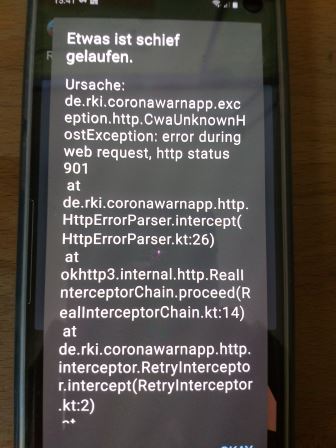
URSACHE: 4000
Etwas ist schief gelaufen ...
error during web request, http status 901
Behind the message it shows the screen "Unbekanntes Risiko" (unknown risk).
This happens when the firewall (Firewall ohne Root) is active. If the firewall is deactivated, the problem does not appear.
I would expect that I see the CWA sending requests in the firewall log, but that does not happen. Even if I allow Google Play-Services / Google-Service-Framework and Google Play Store, the error message appears.
Expected behaviour
The CWA starts and shows the risk status. It was installed 10 days ago.
Steps to reproduce the issue
- On new start of the CWA.
- Screen: Unbekanntes Risiko / Unknown risk ->
10 seconds after clicking the "->" - Screen: X Ihr Risikostatus / Your risk status
Unbekanntes Risiko / Unknown risk
10 seconds after clicking the "X"


Technical details
- Mobile device: Samsung S10
Android version: Android 10 (Stock)
Android-Securitypatch-Level 1. June 2020Location: active
- WLAN or mobile data: active
- "Firewall ohne Root" active
For Corona-Warn-App all access granted (WLAN + mobil).
- CWA: Risiko-Ermittlung / Risk evaluation: activ
Possible Fix
Not using the firewall.
This is no adequate option, though.
Internal Tracking ID: EXPOSUREAPP-1906
 Hobowty
All 11 comments
Please try to whitelist
- *.coronawarn.app
- *.t-online.de
These are the URLs used by Corona-Warn-App to do network communication
 jakobmoellersap
on 30 Jun 2020
jakobmoellersap
on 30 Jun 2020
Did the whitelisting solve the problem?
jakobmoellersap
on 1 Jul 2020
Unfortunately not. :-(
Same error message, even if allow any communication for the CWA.
Could it be that certain Google services require network communication for the CWA to run properly?
Hobowty
on 4 Jul 2020
Had the same issue today, but was able to solve it by whitelisting "t-online.de" on my DNS server (DNS-over-TLS using pi-hole for ad and tracking protection).
On my phone, the app issues two DNS requests when trying to update the list of tokens
- a request for the A record for svc90.main.px.t-online.de and
- a request for the DS record of t-online.de (to check for DNSSEC)
The latter domain, "t-online.de", was blocked by pi-hole and thus the server responded to the DS request with the 0.0.0.0 address rather than no result. This prevents the system from properly detecting there is no DNSSEC for svc90.main.px.t-online.de and to move on.
Adding t-online.de to the whitelist did the trick.
 jp-coding
on 17 Aug 2020
jp-coding
on 17 Aug 2020
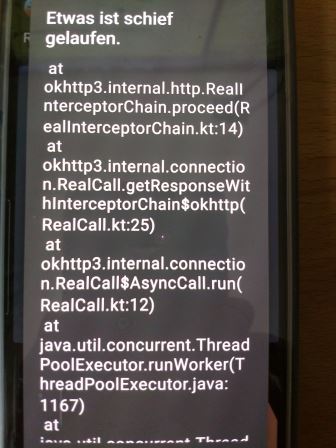
@Hobowty the stack trace of your crash report points to the same direction, like @jp-coding figuered out, how to solve it.
Your stack trace shows "Unknown Host Exception" -> is there any way to manage the DNS-settings for your firewall and to whitelist both urls like jp-coding did?
 vaubaehn
on 17 Aug 2020
vaubaehn
on 17 Aug 2020
Dear community,
We would appreciate some feedback on this issue. With the current CWA version 1.6.1 do you still experience this issue? Thank you!
Best wishes,
DS
Corona-Warn-App Open Source Team
 dsarkar
on 20 Nov 2020
dsarkar
on 20 Nov 2020
Now (CWA 1.6.1) there is no error message anymore with _Firewall ohne Root_ active and whitelist:
*.coronawarn.app
*.t-online.de
Thanks for your efforts,
Howboty
Hobowty
on 21 Nov 2020
Hi @svengabr , @dsarkar and @heinezen ,
would you agree that it could be useful to add these information in very short somewhere to the FAQ, before this issue here is closed and the relevant information is forgotton?
Maybe here? https://www.coronawarn.app/en/faq/#minimum_requirements
Could be added:
"In case you make use of a firewall (router or app), be sure to enable *.coronawarn.app and *.t-online.de for web requests as well for DNS requests."
Or is there a better place?
What do you think?
vaubaehn
on 22 Nov 2020
@vaubaehn I've created https://github.com/corona-warn-app/cwa-website/issues/613 for this.
Corona-Warn-App Open Source Team
 heinezen
on 22 Nov 2020
heinezen
on 22 Nov 2020
@heinezen Looks nice ❤ Though working, hope you have a pleasant Sunday night.
vaubaehn
on 22 Nov 2020
Dear all, we have now a FAQ entry regarding this issue.
We will therefore close this issue. Many thanks for contributing!
Best wishes,
DS
Corona-Warn-App Open Source Team
dsarkar
on 14 Dec 2020
Related issues
 Magoli1
·
3Comments
Magoli1
·
3Comments
 marceljay
·
3Comments
marceljay
·
3Comments
 schuhmi2
·
3Comments
schuhmi2
·
3Comments
 sdschulze
·
3Comments
sdschulze
·
3Comments
 wmertens
·
3Comments
wmertens
·
3Comments
Most helpful comment
Had the same issue today, but was able to solve it by whitelisting "t-online.de" on my DNS server (DNS-over-TLS using pi-hole for ad and tracking protection).
On my phone, the app issues two DNS requests when trying to update the list of tokens
The latter domain, "t-online.de", was blocked by pi-hole and thus the server responded to the DS request with the 0.0.0.0 address rather than no result. This prevents the system from properly detecting there is no DNSSEC for svc90.main.px.t-online.de and to move on.
Adding t-online.de to the whitelist did the trick.