Cwa-app-android: Fehler bei Kommunikation mit Google API (39508)
Avoid duplicates
- [x] Bug is not mentioned in the FAQ
- [x] Bug is specific for Android only, for general issues / questions that apply to iOS and Android please raise them in the documentation repository
- [x] Bug is not already reported in another issue
Describe the bug
Opening the app I get "Fehler bei Kommunikation mit Google API (39508)"
A details page shows a stack trace.
Expected behaviour
No error message!
Steps to reproduce the issue
- (Re-)open the app
- See error message
- Swear why the app forbids to take screen shots 👎
- Search for other smart phone
- Take photos:


Technical details
- Mobile device: One Plus Two
- Android version: 6.0
Possible Fix
Additional context
Internal Tracking Id: EXPOSUREAPP-1854
 ascheman
All 213 comments
I get the same bug
Device: Honor 6c (DIG-L21HN)
Android Version: 6.0
App Version: 1.0.4
[Update 2020-06-29 09:15 - error resolved for me, thanks]
 tobiaslvoss
on 28 Jun 2020
tobiaslvoss
on 28 Jun 2020
I get the same bug 39508
Mobile Device: Honor 7 (PLK-L01)
Android Version: 6.0
App Version: 1.0.4
 pyromaniac78
on 28 Jun 2020
pyromaniac78
on 28 Jun 2020
First question: WHY IS IT NOT POSSIBLE TO MAKE SCREEN SHOTS? THE APP DISABLES IT - IT WOULD BE VERY HELPFUL TO SEND ERROR REPORTS!?
Writing in caps (aka screaming) isn't helping. The screenshot prevention is being discussed.
 tomjschwanke
on 28 Jun 2020
tomjschwanke
on 28 Jun 2020
First question: WHY IS IT NOT POSSIBLE TO MAKE SCREEN SHOTS? THE APP DISABLES IT - IT WOULD BE VERY HELPFUL TO SEND ERROR REPORTS!?
Writing in caps (aka screaming) isn't helping. The screenshot prevention is being discussed.
You are right, sorry. Removed it (was a bit annoyed that forwarding details about the problem is such a pain).
ascheman
on 28 Jun 2020
You are right, sorry. Removed it (was a bit annoyed that forwarding details about the problem is such a pain).
I understand your frustration. Let's hope the screenshot prevention only gets applied to the TAN screen (although maybe people would maybe demand screenshot of risk status)
tomjschwanke
on 28 Jun 2020
get the same error since today. Additional Info: "Risiko Ermittlung" is active, but still it requires to activate it. Before it was working properly since 11 days...
HTC One A9s
Android 6.0
 wende60
on 28 Jun 2020
wende60
on 28 Jun 2020
get same issue
Sony Experia E5 (F3311)
Android 6.0
 tekkiexxl
on 28 Jun 2020
tekkiexxl
on 28 Jun 2020
Same issue on
LG G4
Android 6.0 (not rooted)
Tried reboot, cleaning cache of Google Play Services, refreshing all updates
App states last successful update yesterday (2020-06-27) 19:25
Worked properly for 11 days
 KlugB
on 28 Jun 2020
KlugB
on 28 Jun 2020
The error is related to rate limiting as a result of Error 10 since we have a sporadical SSL breakdown that we are working on together with Google as documented in #737. We keep you posted. Please wait for a day and the issue will resolve itself. Sorry for the inconvenience, and thanks for helping us with your reports.
 jakobmoellersap
on 29 Jun 2020
jakobmoellersap
on 29 Jun 2020
Nope, it does not resolve itself. I am out of sync for three days now, though the error has change to Fehler bei Kommunikation mit Google API (10) meanwhile.
ascheman
on 29 Jun 2020
This means the error has in fact resolved itself however Error 10 still persists for you as mentioned.
jakobmoellersap
on 29 Jun 2020
Same here.
Worked for 8 days. Now the error 39508.
Android 6.0
Huawei P9.
 grmblfxhoch10
on 29 Jun 2020
grmblfxhoch10
on 29 Jun 2020
Worked 4 days until yesterday night.
After turning on GPS+BT this morning, error 39508
Galaxy S5-neo, Android 6.0.1
Screenshot of remote control via Anydesk:

 YvesKlein111
on 29 Jun 2020
YvesKlein111
on 29 Jun 2020
Problem persists on my device since 26.06, despite reinstallation of app and Google-Play-Services cache reset
Model: Samsung S5 neo, SM-G903F
Android: 6.0.1
 DieterHelmutGreiner
on 29 Jun 2020
DieterHelmutGreiner
on 29 Jun 2020
The error will not reset if you do not explicitly wait for 24 hours until the next query. The limiting will reset at 0:00 UTC
jakobmoellersap
on 30 Jun 2020
This means the error has in fact resolved itself however Error 10 still persists for you as mentioned.
Hmm, yesterday I had error 39508, today I have 10 again. It seems the error is kind of oscillating between these two states, @jakobmoellersap?
ascheman
on 30 Jun 2020
This means the error has in fact resolved itself however Error 10 still persists for you as mentioned.
Hmm, yesterday I had error 39508, today I have 10 again. It seems the error is kind of oscillating between these two states, @jakobmoellersap?
Same here, error 39508 is gone, now error "Fehler bei Kommunikation mit Google API(10)".
grmblfxhoch10
on 30 Jun 2020
For all errors regarding Error Code 10, please refer to #737 where we will update accordingly.
jakobmoellersap
on 30 Jun 2020
This means the error has in fact resolved itself however Error 10 still persists for you as mentioned.
Hmm, yesterday I had error 39508, today I have 10 again. It seems the error is kind of oscillating between these two states, @jakobmoellersap?
Yes, depending on when 10 happens, 39508 is triggered or not. Jakob describe that also here: https://github.com/corona-warn-app/cwa-app-android/issues/737#issuecomment-651663304
 tkowark
on 30 Jun 2020
tkowark
on 30 Jun 2020
Same Error here on LG 4 and Android 6.0
 x662
on 1 Jul 2020
x662
on 1 Jul 2020
Same error(s) on my smartphone: Samsung Galaxy A3 (2015), Android 6.0.1. Last update was 29.06. 18:27. Error changing from 10 to 39508 and back.
I installed this app the first day it was published (16.6.?).
 morber13
on 1 Jul 2020
morber13
on 1 Jul 2020
According to some hints I re-installed the app. Now apparently all data has been deleted: "unbekanntes Risiko".
This is not the aim of the app - run 14 days and then restart from start...
morber13
on 1 Jul 2020
For such cases issue #17 (Report Error Context...) would be very helpful!
morber13
on 1 Jul 2020
@morber13 since you uninstalled the app, all data has been deleted. This is by design. I am not sure where you got the idea that reinstalling the Application would solve the problem mentioned here, but I would appreciate if you could give us a direction on where you have retrieved this information from.
jakobmoellersap
on 1 Jul 2020
@jakobmoellersap in #737 somewhere i found: Your chain of keys is not broken. These are not stored by the app and deleting the app will not remove the keys. To do that, you have to explicitly remove them via the Settings for the Covid-19 Exposure Protocol.
So I tried to re-install.
morber13
on 1 Jul 2020
Same error, first time here.
At first API (10), then directly after that API (39508).
Android 6.0.1
Google LG Nexus 5
Google Play Dienste 20.21.17 (040308-316502805)
 gizmo21
on 2 Jul 2020
gizmo21
on 2 Jul 2020
in #737 somewhere i found: Your chain of keys is not broken. These are not stored by the app and deleting the app will not remove the keys. To do that, you have to explicitly remove them via the Settings for the Covid-19 Exposure Protocol.
So I tried to re-install.
That was me. And that statement is still correct. The RPIs in the exposure log are not deleted upon deletion of the app. All app data, such as the active days or your current risk state is of course deleted when you delete the app.
See https://github.com/corona-warn-app/cwa-app-android/issues/774#issuecomment-653101543 for an update.
tkowark
on 2 Jul 2020
Hello @tkowark , I think this is not correct. The Google Exposure Notification API contains a method called "stop()".
It is described as such:
Disables the broadcast and scan process. You can call this directly. It's also called when a user uninstalls the app. When it’s called as part of the uninstallation process, the database and keys are deleted from the device.
This means that an "Uninstall" will delete the database.
Just clearing the memory of an App (in Android "App" menu) might have a different effect, but the behavior of "Uninstall" is fixed.
 jkrwdf
on 2 Jul 2020
jkrwdf
on 2 Jul 2020
Thanks for the pointer @jkrwdf - we'll clarify this again with Google to then give you a definitive answer
tkowark
on 2 Jul 2020
While waiting for an official answer, we, of course, could not leave a potentially wrong FAQ on the website. Hence, we updated it to reflect the currently observed behaviour and including a warning to delete the app only as a last resort:
https://www.coronawarn.app/en/faq/#delete_random_ids
Sorry for the confusion, the different behaviour in iOS might have led to some miscommunication on our end.
tkowark
on 2 Jul 2020
Get exactly the same error since 3 days. Samsung Galaxy J5 (SM-J500FN), Android version: 6.01. Google Play Dienste 20.21.17 (040306-316502805). App doesn't recognize that "Risiko-Ermittlung" is active, at the same times it shows, that it IS active?!? Same error message as YvesKlein111 above. https://github.com/corona-warn-app/cwa-app-android/issues/774#issuecomment-651230652
App worked properly for about 11 days inclusive its update to 1.04. There was an update of Google LLC to version 11.16.13.21.arm in between...
 WMM2020-S
on 3 Jul 2020
WMM2020-S
on 3 Jul 2020
Same here. The app seemed to perform flawlessly until the logs hit 14 days; since then, it will refuse to update with the described error.
Android 6.0.1
cyanogenmod 13.0 (yes I know that's old as balls)
GT-i9195 (serranoltexx)
com.google.android.gms.common.api.ApiException:
39508:
  at
android.support.v4.media.MediaDescriptionCompatApi21$Builder.setResultOrApiException(MediaDescriptionCompatApi21.java:3)
  at
com.google.android.gms.inernal.nearby.zzae.onResult(com.google.android.gms:play-services-nearby@@18.0.2-eap:2)
  at
com.google.android.gms.common.api.internal.IStatusCallback$Stub.zaa(com.google.android.gms:play-services-base@@17.3.0:2)
  at
com.google.android.gms.internal.base.zaa.onTransact(com.google.android.gms.play-services-base@@17.3.0:3)
  at
android.os.Binder.execTransact(Binder.java:453)
edit: this error persisted for one day, and then went away without any action on my part. Maybe something was fixed on the server side?
edit - the error is back since the last update of the App, cannot download contact data :(
 anApeThrummingAViola
on 3 Jul 2020
anApeThrummingAViola
on 3 Jul 2020
After it changed to Error 10 for a couple of days, I'm back at 39508 again. Additionally it shows "Risiko-Ermittlung nicht möglich - Letzte Risiko-Ermittlung: Niedriges Risiko - Aktualisiert: 30. Juni, 23:39" since today.
These errors seem to come in many "flavors" and I do not see this being addressed in the FAQ appropriately. I highly recommend frequent updates (at least daily) about the status of fixing. Otherwise users will
- lose trust in CWA,
- try "fixing" it by themselves and thus deleting their contact data and
- the media will rip you to shreds.
Users won't wait for over 5 days for a fix with nothing happening.
Also, wouldn't it be possible to create a new release of the app that at least creates some less disconcerting error messages? Like: "This error is being addressed. Please do not uninstall the app in the meanwhile. Your data is safe. Please refer to [link to a website with timely updated information about the status of development] for further information."
Going silent for days, however, might be the worst you can do now.
KlugB
on 3 Jul 2020
After it changed to Error 10 for a couple of days, I'm back at 39508 again. Additionally it shows "Risiko-Ermittlung nicht möglich - Letzte Risiko-Ermittlung: Niedriges Risiko - Aktualisiert: 30. Juni, 23:39" since today.
These errors seem to come in many "flavors" and I do not see this being addressed in the FAQ appropriately. I highly recommend frequent updates (at least daily) about the status of fixing. Otherwise users will
1. lose trust in CWA,

2. try "fixing" it by themselves and thus deleting their contact data and

3. the media will rip you to shreds.
Users won't wait for over 5 days for a fix with nothing happening.
Also, wouldn't it be possible to create a new release of the app that at least creates some less disconcerting error messages? Like: "This error is being addressed. Please do not uninstall the app in the meanwhile. Your data is safe. Please refer to [link to a website with timely updated information about the status of development] for further information."
Going silent for days, however, might be the worst you can do now.
Absolutely agree with @KlugB here....
I get the error 10 again (after multiple changing between 10 and 39508).
Google Service: "Letzte Überprüfung [...] am 30. Juni um 10:02"
I'm a great supporter of the app and the whole concept and try to convince all of the people I talk to (with mask of course...). But when I want to show them how the app works I just can show an error.
As @KlugB mentioned before, please give us an update when changes or app-updates are planned.
Thx in advance.
grmblfxhoch10
on 3 Jul 2020
may I also think so, entirely agree with @KlugB and @grmblfxhoch10 . Such is not a funny hackathon and that is not a free and open source competition with voluntary students. That is highly paid, crazily actually :-) .. and it shall safe lives.
Yes being silent, here, is not the way to go.
and Yes, absolutely everyone who had told me about this issue, had also been doing what one is doing with apps: to the trash - reinstall. means their EFFORTS WERE USELESS for 2 weeks. there MUST BE a far better error message. Probably in German! Probably not the dev-log. Probably the hint, in red, not to do deletions.
May I please give to consider. The price of it. The intended result. And, again: that is not a funny hackathon and FOSS project.
Thank you
 SummerIsC0ming
on 3 Jul 2020
SummerIsC0ming
on 3 Jul 2020
Dear @SummerIsC0ming,
and Yes, absolutely everyone who had told me about this issue, had also been doing what one is doing with apps: to the trash - reinstall. means their EFFORTS WERE USELESS for 2 weeks. there MUST BE a far better error message. Probably in German! Probably not the dev-log. Probably the hint, in red, not to do deletions.
In principle: agreed.
May I please give to consider. The price of it. The intended result. And, again: that is not a funny hackathon and FOSS project.
Nitpick: this actually is a FOSS project, the license is the Apache-2.0 License and the code is open. And while the error itself is annoying (I'm also affected btw, Android 6, some ASUS ZenPad), this is not the place to talk bad about FOSS projects. There are countless very professional organized and driven FOSS projects. How this bug is handled here, is no flaw of FOSS in general and it is off-topic for the actual problem. Please stop your ranting about FOSS.
 LeSpocky
on 3 Jul 2020
LeSpocky
on 3 Jul 2020
As a retired software developer, I know that there is no software without errors. However the majority of users don't. They heard about the price (x millions) and are wondering why they get an app that doesn't work.
As this error is well known and because you are working on it, you should release an update that displays an appropriate message in german, eg. "Dieser Fehler ist uns bereits bekannt, wir arbeiten hart daran! Bitte haben Sie Geduld und unternehmen Sie nichts. Insbesondere versuchen Sie nicht, die App erneut zu installieren. "
morber13
on 3 Jul 2020
We'll discuss the clearer error message with the product owners and see whether it can be included in one of the upcoming fixes or the next app version.
To also re-iterate: we already explained the meaning of the 39508 error and how it relates to error 10. Hence, without error 10 (#737) being fixed, 39508 might occasionally re-appear.
Furthermore, just as a quick information about why we are not rolling out such seemingly trivial changes at a much faster pace. Each new version of the app needs to not only be published but go through legal checks and app store reviews. These reviews can be expedited by Google/Apple, but this bypass should be reserved for exceptional cases and cannot be used on a daily basis.
tkowark
on 3 Jul 2020
It is very urgent. Pls look here:
https://www.bedienungsanleitung24.de/frage/corona-app-fehler-mit-google-api-10
Thus, beaurocratic obstacles make a good Software fail...
morber13
on 3 Jul 2020
It is very urgent. Pls look here:
https://www.bedienungsanleitung24.de/frage/corona-app-fehler-mit-google-api-10
Thus, beaurocratic obstacles make a good Software fail...
Yes, we understand the urgency. But the document you linked refers to error 10, which, as stated above, is discussed in #737
tkowark
on 3 Jul 2020
But 10 and 39508 are alternating...
I just posted the same comment on #737 .
morber13
on 3 Jul 2020
But 10 and 39508 are alternating...
I just posted the same comment on #737 .
https://github.com/corona-warn-app/cwa-app-android/issues/774#issuecomment-651675837
tkowark
on 3 Jul 2020
URSACHE: 3 ... Kommunikation mit Google API (39508)
Same problem on
- Moto G v2
- Android 6.0
- Google Play Services 20.21.17
CWA is active for 14 days now.
This phone's user claims that the error persists since yesterday (every time she switches to the status page). Looking at the settings - Google - Nearby-Protocol(~) - it dates last checked contact as one hour ago.
 void-arch
on 3 Jul 2020
void-arch
on 3 Jul 2020
Yes, we understand the urgency. But the document you linked refers to error 10, which, as stated above, is discussed in #737
OK, I get that you can't release a fix every day. But if you'd really understand the urgency you'd communicate about that in the public. I reckon Telekom/SAP have huge PR departments. Also you should have a serious word with your UX team.
KlugB
on 3 Jul 2020
Fix for this error on rooted device: EN framework has a simple mechanism of counting executed calls, it increases a count in this protobuf file:
/data/data/com.google.android.gms/files/nearby/shared/exposure_notification_client_records.pb
7 {
    2 {
      1: 18447
      2: 20
    }
  }
18447 is current day:
$ TZ='utc' date -d@$((18447 * 60 * 60 * 24)) +"%Y-%m-%d %H:%M"
2020-07-04 00:00
and 20 is current count of calls to provideDiagnosisKeys. It can be set to zero with following script:
filename=/data/data/com.google.android.gms/files/nearby/shared/exposure_notification_client_records.pb
patchname=${filename}_patch
pos=155
pos1=$(($pos+1))
cp $filename $patchname && \
dd if=/dev/zero of=$patchname bs=1 seek=$pos count=1 && \
dd if=$filename of=$patchname bs=1 seek=$pos1 skip=$pos1 && \
dd if=$patchname of=$filename && \
rm $patchname
Just make sure that byte which holds quota used (in case of this error it would be 20: 00010100) is indeed at the position 155 in this file, it should be the case. In case something goes wrong then simply removing /data/data/com.google.android.gms/files/nearby/shared/ and re-enabling exposure notification will fix it.
Alternatively on non-rooted device date can be set 1 day forward, but it's not a good solution since a number which holds current date (18447) will never go back, so in case a date is set back to correct one it can result in exceeding quota again.
Unfortunately error 10 which is likely the cause of error 39508 won't be fixed by this, com.google.android.gms.persistent seems to be buggy and will be fixed in upcoming Play Services update, or it can be patched with this frida script: https://github.com/kbobrowski/en-api-exception-10-debug/blob/master/input_stream_read_patch.js
 kbobrowski
on 4 Jul 2020
kbobrowski
on 4 Jul 2020
Same Error here on LG 4 and Android 6.0
Same same, not different here. With latest app. Happened today, minutes ago. At least I am not the last person with a LG4 ,-)
 bufemc
on 4 Jul 2020
bufemc
on 4 Jul 2020
@LeSpocky Hello and thank you for your comment, just wanted to say that I am very sorry for my wording, I think that FOSS is the way to go and I know it is a FOSS project - what I please wanted to say, was to take this project as serious as any project, less with the laissez-faire that some FOSS projects show / which is not the "fault" of FOSS of course, rather of the payment.
So anyhow I am very glad to see that the issue is taken serious now, yes - it might be a technically small issue not worth or possible a release however for the people, the clients so to say, it is the reason to be unprotected after some weeks of effort.
In the meantime I have seen that in the FAQ, there are a lot of explanations, which is fine, also the indication not to delete the app, which is also fine. However it seems that most people will install the app and may not read them. So maybe it is a good idea to improve the error message, and do a minor release for it .. those people who have read this thread or have people around how are reading this thread they know, now, that they shall in no case delete the app.
Anybody else may not know it.
Thank you for taking it serious.
SummerIsC0ming
on 4 Jul 2020
I just had the error (and only that one) as well for the first time. Pixel 2 with fully up to date Android 10 and play services beta 20.26.13.
What has changed is that instead of my normal internet connection, I have a rather flaky WiFi in a holiday home.
Edit: Some more detail as it was very late last night. The error happened when I opened the app between midnight and 1 am; I believe it was on 5 July at 00:21 as this was when 9 checks were shown in the EN log in settings. The previous checks were on 4 July at 07:19 (11 checks) and on 3 July at 00:40 (9 checks).
6 hours after the error, at 07:34 on 5 July, there were another 12 checks.
When I open the app now, it shows no error and it shows that the last update was at 07:34.
Further info: I installed the app an hour after release and updated it whenever an update was available. I switched to Google Play Services Beta a few days ago so I can see the EN check log in settings.
And indeed, I posted the "me too" as I hadn't seen a device with Android 10 on this issue before, and with a Pixel 2, the device should not have any relevant OEM customisations.
Could it be that we have now reached 11 packages that are being sent to the framework for a check? So if two checks happen within 24 hours, the rate limit of 20 is being hit (if I recall the rate limit correctly)?
 MikeJayDee
on 5 Jul 2020
MikeJayDee
on 5 Jul 2020
I have error 39058 as well for days, but unlike many previous posters on a new device:
Mobile Device: Samsung Galaxy M21 (SM-M215F)
Android version: 10
App Version: 1.0.4
Play Services: 20.21.17
 Thunderbolt32
on 5 Jul 2020
Thunderbolt32
on 5 Jul 2020
I can confirm the same issue on my stock Pixel 1 with Android 10 since a couple of minutes too!
I am using the app since the first day of release and it is up to date.
It shows 14 of 14 days traced since a couple of days.
Phone: Google Pixel G-2PW4200 sailfish
Android version: 10
App version: 1.0.4
Play Services: 20.24.14
One interesting to mention, I do not know if it's a coincident:
I opened the Covid-19 messages in the Google settings. Then I opened the "Überprüfung auf mögliche Begegnungen" dialog. This wasn't possible before, because I saw some screenshot of this dialog in some other issue couple of weeks ago and was wondering. And since then error is occuring. I do not know if this is related.

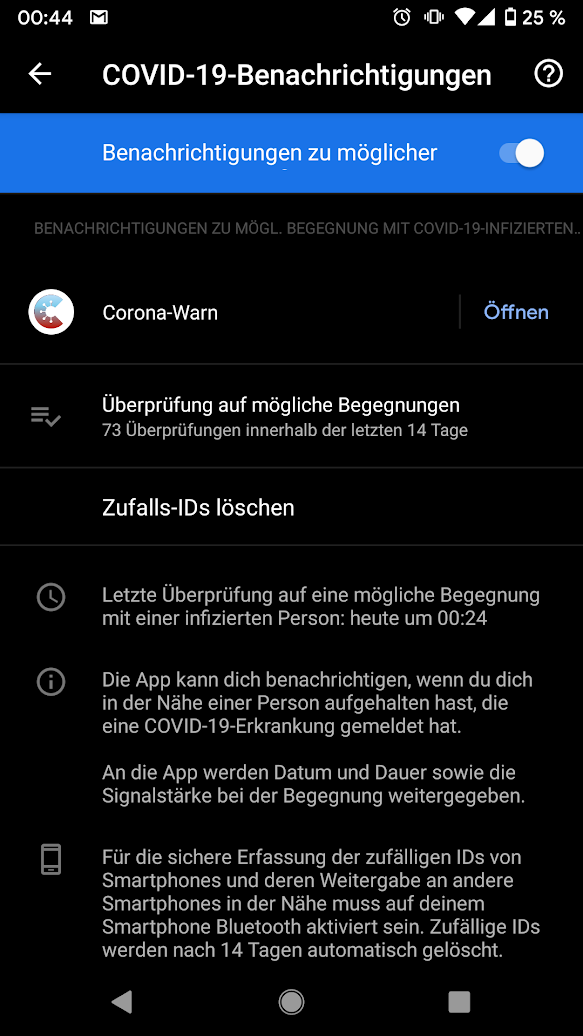
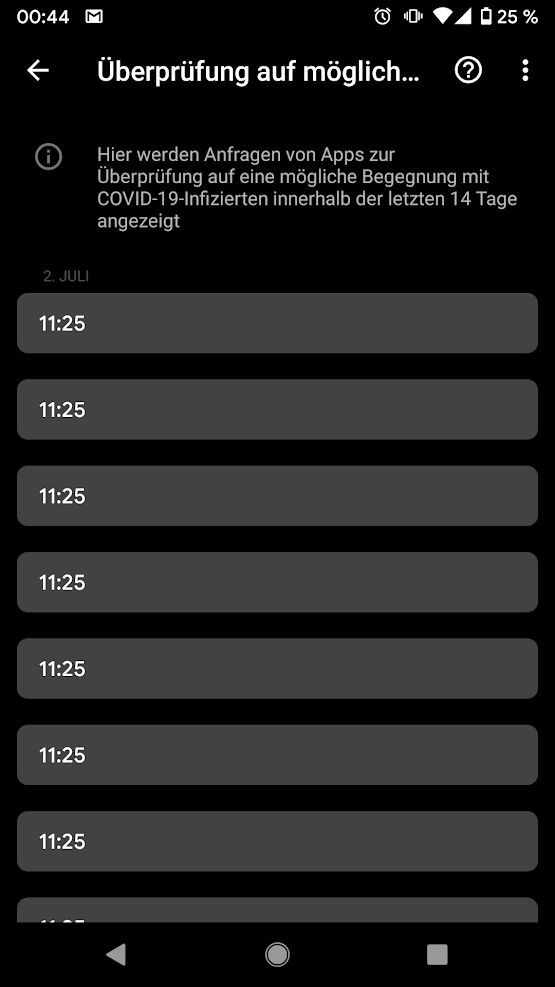
 fredsleeve
on 5 Jul 2020
fredsleeve
on 5 Jul 2020
Same error for the first time, but only API (39508) without error 10.
Motorola Moto G4
Android 7.0
App Version: 1.0.4
Google Play Services: 20.21.17
Has been running well since launch day until today. I usually check everyday. It seems to be a different first day of occurrence for some users.
Thanks for your hard work!
 metalhead777
on 5 Jul 2020
metalhead777
on 5 Jul 2020
Additionally, I get a second error every time I start the app with mobile data: "URSACHE: 9002 Etwas ist schief gelaufen." "timeout" java.net.SocketTimeoutException: timeout at okio.SocketAsyncTimeout.newTimeoutException(JvmOkio.kt:1)
Thunderbolt32
on 5 Jul 2020
Interesting that the issues start to appear on Android 10, so far it seemed like it is just Android 6. Could not reproduce it so far on Android 10, but Android 6 almost always fails with error 10 (followed by error 39508).
If you want to take a dive and debug it you may find this project useful: https://github.com/kbobrowski/en-i13n - allows for whitelisting any app, but requires rooted device
kbobrowski
on 5 Jul 2020
Indeed - I added some more detail to my comment from last night above:
https://github.com/corona-warn-app/cwa-app-android/issues/774#issuecomment-653819198
MikeJayDee
on 5 Jul 2020
Edit: Some more detail as it was very late last night. The error happened when I opened the app between midnight and 1 am; I believe it was on 5 July at 00:21 as this was when 9 checks were shown in the EN log in settings. The previous checks were on 4 July at 07:19 (11 checks) and on 3 July at 00:40 (9 checks).
6 hours after the error, at 07:34 on 5 July, there were another 12 checks.
When I open the app now, it shows no error and it shows that the last update was at 07:34.
The error on my phone is also no longer present. My last checks were on July 5 at 00:24 (9 checks), now on July 5 at 10:35 there are 12 checks (after switching off airplane mode). I encountered the issue at similiar time like @MikeJayDee.
Previous checks were: July 4 at 15:15 (11 checks) and July 3 at 15:27 (10 checks).
fredsleeve
on 5 Jul 2020
@MikeJayDee @fredsleeve this seems like a bug in current implementation - if the app is updating Diagnosis Keys between midnight and 02:00 it still does it on the previous day UTC time between 22:00 and midnight, which results in exceeding quota of 20 calls to provideDiagnosisKeys
kbobrowski
on 5 Jul 2020
And the bug only manifested itself now for many people because we only now have more than 10 packages that are being checked in one go. So until yesterday or two days ago, two sets of checks would have still fit in the quota of 20.
MikeJayDee
on 5 Jul 2020
I get the same bug (39508) since today (05 July)
Device: Honor 8 (FRD-L09)
Android Version: 7.0
App Version: 1.0.4
Everything is fine again (07.07.2020)
 7BitLogic
on 5 Jul 2020
7BitLogic
on 5 Jul 2020
So this seems to be spreading now to all versions and not only to nerd secondary devices. Guess there will be many deinstalls and hopefully media will not pick it up soon (or perhaps it would be good if some one with high reach would tell everyone not to deinstall if app doesn't)
gizmo21
on 5 Jul 2020
Same error on my Android 6 Phone (Galaxy S5 mini) since today.
It worked until yesterday, about 2pm.
Yesterday in the evening, a new google update has been installed.
Today I get the same error.
Fortunately, this is only my "backup phone" for sports. On my main phone (iOS) it works without problems.
 AnOtherMuenchner
on 5 Jul 2020
AnOtherMuenchner
on 5 Jul 2020
@MikeJayDee @kbobrowski Since the issue you found seems to be different from 39508 being a consequential error of, e.g., error 10, would it make sense to track this in a separate issue?
tkowark
on 5 Jul 2020
@tkowark separated to #822 for visibility
kbobrowski
on 5 Jul 2020
Same problem for me:
Samsung Note 8
Android 8.0
App Version 1.0.4
 AlterHut
on 6 Jul 2020
AlterHut
on 6 Jul 2020
Get the same Google Api Error since a few days!
Samsung S5
Android 6.01
 FilestormGER
on 6 Jul 2020
FilestormGER
on 6 Jul 2020
Same on
LG G8S Thinq
Android 9
 ChrisHolter
on 6 Jul 2020
ChrisHolter
on 6 Jul 2020
No more comments, but fits to first part of the issue topic "Fehler in der Kommunikation" :
< end of off-topic >
gizmo21
on 6 Jul 2020
In the meantime, there does not works anything anymore.
The app says to me that the last risk calculation has been done more than 24 hours ago (on 2020-07-04, 13:30) and I should enable the "Risikoermittlung".
However bluetooth is enabled and working.
The error 39508 occurs since more than a week. But the first days it was sufficient to switch off and switch on again the mobile.
I am also wondering why the Google Covid-19 contact tracking always says that there has been verfications of keys just now.
AnOtherMuenchner
on 6 Jul 2020
I got no problems until today. Cause of the bug " 13 Tage von 14 aktiv" I got that the last 3 weeks I have done the following:
I deinstalled Corona warn app. Then I installed it new from the Google playstore.
NOW I saw the first time the Error 3. API 39508.
What is the problem ? Should I delete the App again ?
I got always the newest version 1.0.4. ...
Does the warn app continue to work with this error or not?
What can I do ?
I have a Huawei P20 smart phone / Android 10 /
 MikeHundKatze
on 6 Jul 2020
MikeHundKatze
on 6 Jul 2020
DO NOT UNINSTALL to or all data is lost:
gizmo21
on 6 Jul 2020
@MikeHundKatze @FilestormGER @ChrisHolter If you don't get the additional error 10, you can check out issue #822 and check Exposure Notifications count. Maybe your errors are related to this, after 02:00 CEST this is fixed but will occur again.
fredsleeve
on 6 Jul 2020
@MikeHundKatze by uninstalling you also might have triggered the 39508 issue manually. When your last update was less than 24h ago, the app will of course retry when you reinstall (it does not know anymore when it last tried) and then run into the api rate limiting.
tkowark
on 6 Jul 2020
Bei mir lief die App eigentlich bis heute Nacht ohne Probleme.
Das 39508-Problem trat heute Nacht erstmals auf und war nach ca. einer Stunde wieder weg.
Ich stellte allerdings heute morgen gesehen, dass zur Fehlerzeit die Google-Sicherung VOG L29 lief.
Ich nutze ein Huawei P30 Pro mit Android 10.
 wataga
on 7 Jul 2020
wataga
on 7 Jul 2020
I'm also getting the Google API(39508) error on my work phone. It says last successful update was 01-Jul-20 08:32.
Device: Samsung Galaxy S5 Neo (SM-G903F)
Android Version: 6.0.1
Google Play Services Version: 20.21.17
App Version: 1.0.4
Is there a workaround?
 nichu42
on 7 Jul 2020
nichu42
on 7 Jul 2020
Now the error no longer occurs...
Am Mo., Juli 6, 2020 at 18:55 schrieb fredsleevenotifications@github.com:
@MikeHundKatze @FilestormGER @ChrisHolter If you don't get the additional error 10, you can check out issue #822 and check Exposure Notifications count. Maybe your errors are related to this, after 02:00 CEST this is fixed but will occur again.
—
You are receiving this because you were mentioned.
Reply to this email directly, view it on GitHub, or unsubscribe.
MikeHundKatze
on 7 Jul 2020
Now the error is not coming up again...........
Am Di., Juli 7, 2020 at 15:31 schrieb nichu42notifications@github.com:
I'm also getting the Google API(39508) error on my work phone. It says last successful update was 01-Jul-20 08:32.
Device: Samsung Galaxy S5 Neo (SM-G903F)
Android Version: 6.0.1
Google Play Services Version: 20.21.17
App Version: 1.0.4
Is there a workaround?
—
You are receiving this because you were mentioned.
Reply to this email directly, view it on GitHub, or unsubscribe.
MikeHundKatze
on 7 Jul 2020
@nichu42 there is a workaround for rooted device: https://github.com/kbobrowski/en-i13n
pipenv run python en.py patch will just patch a bug in Play Services which is causing error 10, and then 39508 as a consequence. Can be executed before opening CWA, and then files with Diagnosis Keys will be parsed properly without causing error 10.
If 39508 is caused by an error with time zones - it will be fixed in upcoming release - but with en-i13n you can deploy app from dev branch without waiting for it rolling out via Play Store. It's possible even to remove completely the limit on calls to provideDiagnosisKeys which is causing 39508 - but the latter option is only for development since it requires to clean all the app data to go back to previous behavior.
Use at your own risk ;)
kbobrowski
on 7 Jul 2020
@nichu42 there is a workaround for rooted device: https://github.com/kbobrowski/en-i13n
pipenv run python en.py patchwill just patch a bug in Play Services which is causing error 10, and then 39508 as a consequence. Can be executed before opening CWA, and then files with Diagnosis Keys will be parsed properly without causing error 10.If 39508 is caused by an error with time zones - it will be fixed in upcoming release - but with
en-i13nyou can deploy app fromdevbranch without waiting for it rolling out via Play Store. It's possible even to remove completely the limit on calls toprovideDiagnosisKeyswhich is causing 39508 - but the latter option is only for development since it requires to clean all the app data to go back to previous behavior.Use at your own risk ;)
When will an update for the google services be available?
AnOtherMuenchner
on 7 Jul 2020
Same error.
Environment: Huawei CLT-L29 with EMUI 10.0.0 / Android 10. CoronaWarnApp 1.0.4.
Description:
The app worked from day 1 to day 14 flawlessly, then it stopped counting the days and kept being at day 14 for about 5 days. Today it started to provide above error 39508. I have not installed lately other software nor changed the timezone or whatsever. Rebooted the phone - same error message. There seems to be no newer version on Google Playstore. What shall I do?
 arnoldu
on 8 Jul 2020
arnoldu
on 8 Jul 2020
Same error on Samsung A50/Android 10 after update.
Annoying error, no fix, weired communication, no workaround: App deinstalled
 xlthor
on 8 Jul 2020
xlthor
on 8 Jul 2020
Same here
CWA Update 1.0.5 and same errors and no message that it is dealt with and no message not to deinstall.
gizmo21
on 8 Jul 2020
Update 1.0.5? Does the update install itself?
39508 failure comes not up at the moment. Only 1 day after the new installion, now there is silence.... ... At the moment I have no problems..... The counter is now 1 of 14 days.. Waiting in until 14 of 14 😉
Am Mi., Juli 8, 2020 at 14:57 schrieb gizmo21notifications@github.com:
Same here
CWA Update 1.0.5 and same errors and no message that it is dealt with and no message not to deinstall.
—
You are receiving this because you were mentioned.
Reply to this email directly, view it on GitHub, or unsubscribe.
MikeHundKatze
on 8 Jul 2020
Got 1.0.5 today. I have two LG G4, Android 6.0. On the first one the error(s) disappeared - seems to work fine now. On the second Error 10 keeps popping up. Keep fixing, guys...
Update 2020-07-09: Error 10 on both devices again. And still no communication, users are kept insecure.
Back to Error 39508 in the afternoon.
KlugB
on 8 Jul 2020
Now also installed 1.0.5. Everything`s still fine.... No errors are coming up.
Is there an automatic update option which will install new versions automatically ? I'm going through the app menue of the p20.. and doing it by hand........
Am Mi., Juli 8, 2020 at 20:38 schrieb Björn Klugnotifications@github.com:
Got 1.0.5 today. I have two LG G4, Android 6.0. On the first one the error(s) disappeared - seems to work fine now. On the second Error 10 keeps popping up. Keep fixing, guys...
—
You are receiving this because you were mentioned.
Reply to this email directly, view it on GitHub, or unsubscribe.
MikeHundKatze
on 8 Jul 2020
Just updated to 1.05. Situation with Errors 10 & 39508 unchanged.
WMM2020-S
on 9 Jul 2020
After update to 1.0.5 I'm getting the "Fehler bei Kommunikation mit Google API (39508)" error constantly while CWA is open.
Device: LG G8s ThinQ (LM-G810EAW)
Android Version: 9
Google Play Services Version: 20.21.17
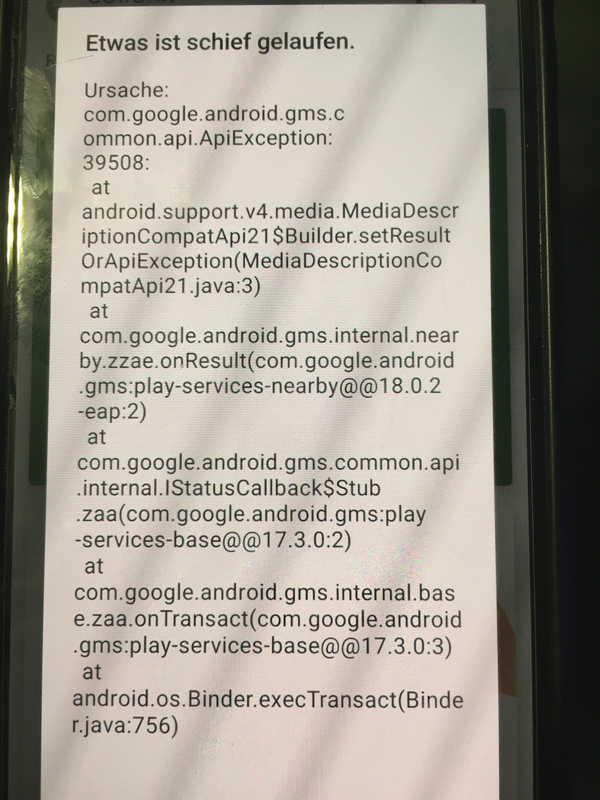
 MichaWen
on 9 Jul 2020
MichaWen
on 9 Jul 2020
I am using S5 neo rooted and got API 39508 error some days ago changing to API 10 error (did not check it daily... perhaps with new cwa version yesterday?). Anyway: Always displaying last sync was on 30th of June.
Today morning I deleted the cache of Google Play Services in the Device settings after closing cwa. This helped me to resync cwa again. Just hoping it stays like this...
kind regards!
 DL4SEQ
on 9 Jul 2020
DL4SEQ
on 9 Jul 2020
After updating to Version 1.0.5, i get the same Error as: https://github.com/corona-warn-app/cwa-app-android/issues/774#issuecomment-655811281
Device: Huawei P20 (EML-L09)
Android Version: 10
Google Play Services Version: 20.21.17
 Muffl0n-DE
on 9 Jul 2020
Muffl0n-DE
on 9 Jul 2020
S5-neo, Android 6.0.1
With app version 1.0.5 still alternating errors 10 and 39508.
YvesKlein111
on 9 Jul 2020
Receiving error 39508 on an Android 7 device after updating to 1.0.5. Error 10 did not occur on this device.
The app shows "last update: 2020-07-07, 17:30" (not 17:32 or today!).
The Google/Covid checks show the following checks:
- 2020-07-07 17:30 (4 times)
- 2020-07-07 17:32 (10 times)
- 2020-07-09 13:09 (20 times)
Note that an update from 1.0.4 to 1.0.5 was applied only shortly after today's check (around 13:15 according to Google Play) and I have first seen this error on 1.0.5.
Update: Updating Google Play Services from 20.21.17 to 20.24.14 (which needs to be done manually on that device for some reason) didn't change anything.
 nidico
on 9 Jul 2020
nidico
on 9 Jul 2020
Receiving error 39508 on an Android 7 device after updating to 1.0.5. Error 10 did not occur on this device.
The app shows "last update: 2020-07-07, 17:30" (not 17:32 or today!).
The Google/Covid checks show the following checks:
- 2020-07-07 17:30 (4 times)
- 2020-07-07 17:32 (10 times)
- 2020-07-09 13:09 (20 times)
Note that an update from 1.0.4 to 1.0.5 was applied only shortly after today's check (around 13:15 according to Google Play) and I have first seen this error on 1.0.5.
@nidico This issue could also related to #822 and was not implemented in version 1.0.5 yet - afaik. After 1500 CEST (1300 UTC) this error could be gone. Please reply again. Thanks.
fredsleeve
on 9 Jul 2020
This issue could also related to #822 and was not implemented in version 1.0.5 yet - afaik. After 1500 CEST (1300 UTC) this error could be gone. Please reply again. Thanks.
Unfortunately, this has hasn't changed (16:02 CEST).
nidico
on 9 Jul 2020
@nidico Thanks for ur feedback. Maybe you can check tomorrow again after midnight UTC (0200 CEST) . But I doubt that it will work again, due to your last update status is 2020-07-07.
fredsleeve
on 9 Jul 2020
The error has been gone on my S5 mini after the last update.
@nidico
When I got the error, I could solve it with switching off and on the mobile.
AnOtherMuenchner
on 9 Jul 2020
When I got the error, I could solve it with switching off and on the mobile.
Doesn't apply in my case unfortunately.
Will try again tomorrow morning.
nidico
on 9 Jul 2020
Ich bekomme den Fehler 39508 immer dann, wenn ich die App nachts zwischen 0:00 und 02:00 aufrufe.
Nach 02:00 ist alles wieder ok.
Dieses offensichtliche Zeitzonen Problem ist auch in Version 1.0.5 noch vorhanden.
wataga
on 10 Jul 2020
Still getting the error 10 (updated to 1.0.5).
Restarting the mobile doesn't change anything.
grmblfxhoch10
on 10 Jul 2020
Same here
CWA Update 1.0.5 and same errors and no message that it is dealt with and no message not to deinstall.
So today after two days on 1.0.5 and still on Google Play Services from 20.21.17 (without update possibility on 6.0.1 - can I do that manually elsewhere than "Apps" oder "Play"?) the device suddenly ceased the error and I have a green 14 of 14 day riskstatus low.
Weird, let's see how long, and how long it takes google to roll out to those old OSes.
gizmo21
on 10 Jul 2020
the device suddenly ceased the error and I have a green 14 of 14 day riskstatus low.
What "suddenly" happend is that simply because the time has progressed, the most recent day on which you had temporarily disabled tracing in the CWA has moved out of the 14 days period (means you played with this switch on 25 June last time).
Proof: When you today switch off tracing in CWA for a second and then back on, you will have again 13 days (until 25 July, or until 1.0.6).
jkrwdf
on 10 Jul 2020
Ich bekomme den Fehler 39508 immer dann, wenn ich die App nachts zwischen 0:00 und 02:00 aufrufe.
Nach 02:00 ist alles wieder ok.
Dieses offensichtliche Zeitzonen Problem ist auch in Version 1.0.5 noch vorhanden.
Dieser Fehler wird in einem separaten Issue behandelt, laut Kommentar dort sollte der Fehler möglicherweise in der nächsten Version gefixt sein: https://github.com/corona-warn-app/cwa-app-android/issues/822#issuecomment-656156441
MikeJayDee
on 10 Jul 2020
Quick update: Deleting Google Play Service Cache did not help very long: Synced yesterday, today again Error API(10). (Galaxy S5 neo rooted)
kind regards!
DL4SEQ
on 10 Jul 2020
@nidico Thanks for ur feedback. Maybe you can check tomorrow again after midnight UTC (0200 CEST) . But I doubt that it will work again, due to your last update status is 2020-07-07.
Surprisingly, it now works again: 14 checks 2020-07-10 11:28 (CEST), app shows last update today 11:27.
nidico
on 10 Jul 2020
@gizmo21
So today after two days on 1.0.5 and still on Google Play Services from 20.21.17 (without update possibility on 6.0.1 - can I do that manually elsewhere than "Apps" oder "Play"?)
What I needed to do in order to update GPS on the Android 7 device here, was Settings -> Apps -> Google Play Services -> App Details - only here an update button has appeared.
nidico
on 10 Jul 2020
Still getting alternating errors (10),(39508)
Even after GPS cache reset & restart
Model: S5-neo
Android: 6.0.1
GPS: 20.24.14
CWA: 1.0.5
DieterHelmutGreiner
on 10 Jul 2020
Error 10 is most likely related to difference in behavior between Harmony-based implementations (used by Android 6) and OpenJDK when it comes to piped streams. This small app is demonstrating this issue: https://github.com/kbobrowski/piped-streams-demo - it should work in "expected" way on all Android >= 7, but on Android 6 it may often receive less bytes than were sent. Both behaviors are correct according to Java specification. _Write once run anywhere_ ;)
kbobrowski
on 11 Jul 2020
I've the same problem ( Google API (39508) ):
Smartphone: Motorola moto g pro
Android: 10 (1. Mai 2020)
Google Play Systemupdate: 01.05.2020
Corona Warn App: Version 1.0.5
 SilverMeise
on 11 Jul 2020
SilverMeise
on 11 Jul 2020
39508 (if there is no error 10 before) should be fixed in CWA 1.0.6
kbobrowski
on 11 Jul 2020
Looking forward to the patch to enable my Samsung S5 Neo again (Android 6.0.1 Kernel 3.10.61-14252124).
Would be location service with WLAN and mobile network sufficient or do I need to allow GPS?
Thank You
 stefanesch
on 11 Jul 2020
stefanesch
on 11 Jul 2020
39508 (if there is no error 10 before) should be fixed in CWA 1.0.6
Is there already a date for version 1.0.6 ? I've only the 39508 error without an error 10 before.
SilverMeise
on 11 Jul 2020
Error 10 is most likely related to difference in behavior between Harmony-based implementations (used by Android 6) and OpenJDK when it comes to piped streams. This small app is demonstrating this issue: https://github.com/kbobrowski/piped-streams-demo - it should work in "expected" way on all Android >= 7, but on Android 6 it may often receive less bytes than were sent. Both behaviors are correct according to Java specification. _Write once run anywhere_ ;)
@kbobrowski
But then i hope Google will implement the fix you suggested in GPS. Is there any news?
DieterHelmutGreiner
on 11 Jul 2020
@DieterHelmutGreiner I guess the fix to Play Services should be rolled out soon, but I have no concrete information
kbobrowski
on 11 Jul 2020
My App works well since today, 08:06. (Android 6.0.1). Has the Bug been fixed and rolled out now or is this a random effect?
I have Google Play-Dienste 20.24.14
morber13
on 13 Jul 2020
No Update since 5 July 13:59
ASUS Zenfone Zoom ZX551ML
Google Play Services 20.26.13
Android 6.0.1 WW-4.21.40.304
rooted with Magisk 20.4 Core
Is it even planned to fix this on x86 CPUs?
 tcmaps
on 13 Jul 2020
tcmaps
on 13 Jul 2020
error 10 seems to be fixed in Play Services 20.26.13
kbobrowski
on 14 Jul 2020
error 10 seems to be fixed in Play Services 20.26.13
My LG G4 is stuck at 20.24.14 - tried deleting cache and data in both Google Play Services and Google Play - no effect. How can you force an update?
KlugB
on 14 Jul 2020
@KlugB 20.26.13 is in beta, so either you have to subscribe to beta update channel in Play Store (for Play Services) and wait for update or you can force update via adb by downloading proper APK e.g. from https://www.apkmirror.com/apk/google-inc/google-play-services/ (just make sure that you select proper architecture, android version and DPI - in case of doubt use "nodpi") and executing adb install -r gms.apk
But if you don't want to risk anything going wrong then safest way would be just to wait until 20.26.13 is out of beta and is rolled out to devices official way, may take couple of days unfortunately
kbobrowski
on 14 Jul 2020
Same problem here
"Fehler bei Kommunikation mit Google API(39508)"
Smartphone: Samsung Galaxy S7
Android: 8.0.0
Google Play Dienste: 20.24.14
Corona Warn App: Version 1.0.5 // installed: 2020-06-16
Last status update: 2020-07-17 19:45
Error message appearded today for the first time.
During the last weeks the message, "Risikoermittlung" had to be activated, appeared now and than - although it was activated all the time.
 DillyDallyDroid
on 17 Jul 2020
DillyDallyDroid
on 17 Jul 2020
@DillyDallyDroid
This error message with cause 3 also appears if you open the app between midnight and 2 a.m. if you are in the Central European Summer Time zone. Maybe you did this for the first time today?
See issue #822 - apparently fixed in the next version.
MikeJayDee
on 17 Jul 2020
@MikeJayDee
Thanks for the quick reply!
Yes, it's "cause 3"/"Ursache 3" and indeed I opened the app shortly after midnight – which I probably did for the first time – and yes, I'm in the Central European Summer Time zone.
The error message disapearded after 2 a.m. but the app said for two seconds, risk assessment/Risikoermittlung wasn't active long enough to assess a risk. Strange.
And since midnight it shows, it would be active 13 of 14 days. Befor ist was 14 of 14 days.
So was there any downtime in risk tracking and potential risk contacts were not recorded?
DillyDallyDroid
on 17 Jul 2020
Same problem here. (39508)
Warning: What follows won't help to fix the problem. Just a rant to get this off me, as I'm frankly somewhat pissed.
I'm not getting it: The app seems to be broken, and the solution is... to wait for google to fix it?
Either the app is important and should be used by as many people and as regular as possible, or it isn't.
Now that the restrictions are getting lifted, people are getting more and more in touch with each, so this app is getting more important than ever. And you're telling me there's nothing that can be done?
BTW, the error message does not help the not-so-tech-savvy users at all.
If this was an app that was developed by some hobby-developers in their spare time, I wouldn't say anything. But this app was sponsored heavily (20mio Euro, if I recall correctly) by the tax payer. This bug was reported more than three weeks ago, but it hasn't been fixed yet?
SAP and Dt. Telekom, get your s**t together.
 hwacookie
on 19 Jul 2020
hwacookie
on 19 Jul 2020
@hwacookie Please have a look at our code of conduct. Though we completely understand that we have a disappointing situation here, but we still need to keep discussions here on-topic and professional. The timezone issue is (at least) mitigated with https://github.com/corona-warn-app/cwa-app-android/pull/818 and further improvements are on the way.
However, when it comes to dependencies towards Google or Apple infrastructure and their bugs, we also need to be crystal clear: The schedules for Google Play/iOS updates and their deliverables are in the exclusive domain of Google and Apple.
Mit freundlichen Grüßen/Best regards,
SW
Corona Warn-App Open Source Team
 SebastianWolf-SAP
on 19 Jul 2020
SebastianWolf-SAP
on 19 Jul 2020
@SebastianWolf-SAP : Please pardon my french. I DO know this is not the right forum for such a discussion. I actually came here to report and possibly find a workaround. However, finding out that the problem exists for three weeks already really annoyed me - hence the above rant. Sorry for that.
To be a bit more constructive:
a) If you DO know that this error occurs (or can occur), may I suggest to release a new version that captures the exception and wraps it in a user-message that doesn't look like "This app is useless because it's not working properly"?
From what I understand the app IS in fact still recording all encounters, and as there's nothing the user can do anyway, why bothering him/her with an alarming error message?
b) you definetly need to implement an in-app update warning. Mine was version 1.0.4, and I found out only manually that a newer version existed. A lot of people turn off auto-updates. For an app that is touted as so essential, people need to get informed if a new version exists.
c) I suggest to add a"Hey, I'm not working properly!" message (as long as it's not a situation as described in "a)" ).
I'm not checking the app daily, so I wouldn't even know that it is NOT working properly.
I'm a software developer myself. I know how painful it can be to have to work around bugs in APIs that you do not control. However, your app is not the 25th re-incarnation of flappy birds, but an essential tool in the fight against Corona. It is difficult enough to convince some people to install and use the app. All that effort becomes futile if an error shows up and doesn't get a fix in three weeks.
hwacookie
on 19 Jul 2020
@hwacookie Thanks for your 2nd message. Apologies accepted!
Concerning your ideas: We (the community managers) have been investing a considerable amount of our working time in the last days and weeks to hand in, discuss, motivate etc. improvement suggestions like the ones you describe to the project partners. a) and c) have already been on our list for quite a long time and we are quite confident that they will be implemented more sooner than later. The delay is unfortunate, but also related to the fact that we are all just humans and our devs couldn't simply continue in the same "burn-the-midnight-oil" working mode as before.
Idea b) is a very good addition, thanks for that! We will add that to the list. So far the auto-update/update notification is only there if the backend changes in an incompatible way. That can probably be extended...
Mit freundlichen Grüßen/Best regards,
SW
Corona Warn-App Open Source Team
SebastianWolf-SAP
on 19 Jul 2020
Can confirm:
Fehler bei Kommunikation mit Google API (39508)
Model: LG G4 (H815)
OS: Android 6.0
Time of error: Just then, at about 10am
Play Services: 20.24.14
 Fell
on 20 Jul 2020
Fell
on 20 Jul 2020
@KlugB @kbobrowski
@KlugB 20.26.13 is in beta, so either you have to subscribe to beta update channel in Play Store (for Play Services) and wait for update or you can force update via
adbby downloading proper APK e.g. from https://www.apkmirror.com/apk/google-inc/google-play-services/ (just make sure that you select proper architecture, android version and DPI - in case of doubt use "nodpi") and executingadb install -r gms.apkBut if you don't want to risk anything going wrong then safest way would be just to wait until 20.26.13 is out of beta and is rolled out to devices official way, may take couple of days unfortunately
I was also looking to apkmirror, and I was a little bit irritated that some "older" versions of Google Play Services were still published as if they were still under development, for example after version 20.24.14 (uploaded July 6) there are new versions like 20.24.65 (uploaded July 16) or even 20.21.75 (uploaded July 16).
But, even 20.26.13/20.26.14 is still announced as "beta" there, my phone automatically updated from 20.24.14 (received around July 10) to 20.26.14 last Friday (skipping 20.24.65), even I am not participant in the beta-program...
And, unfortunately, Google Play Services 20.26.14 does not solve the problems for me (API 10 and API 39508 with Android 6).
So I guess we need to wait some more weeks...
 vaubaehn
on 20 Jul 2020
vaubaehn
on 20 Jul 2020
@vaubaehn 20.26.13/14 seems to contain both implementations (buggy and fixed) and the switch is triggered somehow, perhaps by Google. Initially just after update it may still be using buggy one resulting in error 10
kbobrowski
on 20 Jul 2020
@kbobrowski thanks for that interesting information. If so, they might do reliability evaluation of the fixes on testing devices, and, if everything works fine, pull the switch for everyone after. As the fix seemingly goes very deep into the source of 'harmony', that would be plausible to not brick devices in case 'something went wrong' with the fix ;)
After 3 days, I'm still using the buggy implementation. Let's see and hope...
edit: typo
vaubaehn
on 20 Jul 2020
for those interested in technical background behind error 10: proper way to read from input stream is in a while loop which does not make use of any "special features" of individual Java implementations and complies with the standard, as fixed in published snippets of EN framework:
kbobrowski
on 22 Jul 2020
@kbobrowski thanks again for your valuable input. I then had a misunderstanding according to my last post - I thought PipedInputStream/PipedOutputStream in Apache Harmony was somehow broken.
Let me try to sum up all formerly given information related to that issue:
Exception API 10 (pipe closed) occurs as "a bug" of the Exposure Notification (EN) framework from google. The root cause is, that in the "buggy" version of ENF data were read from PipedInputStream once (with a given buffer size), in expectation that the whole data package is received, which does not comply to the standard. For OpenJDK this works somehow, but not for Apache Harmony. Instead, to comply with standards, the read from PipedInputStream should continue, until the amount of expected bytes are received and PipedInputStream returns -1 as end of stream. (Is this, why you use a while loop for a cleanup here https://github.com/kbobrowski/piped-streams-demo/blob/1a4190abb57a803feb387187c683a326107f6427/app/src/main/java/com/example/inputstreamdemo/MainActivity.java#L55 ?)
Further attempts in the exposure key export then end up in API 39508 (rate limit).
Would you say, this is correct?
vaubaehn
on 22 Jul 2020
@vaubaehn yes your observations are correct. Java standard only constrains following:
PipedOutputStream.write(byte[] b, int off, int len)must block until all bytes are written to output stream: https://docs.oracle.com/javase/7/docs/api/java/io/PipedOutputStream.html#write(byte[],%20int,%20int)PipedInputStream.read(byte[] b, int off, int len)must block until at least one byte is received (and same for.read(byte[] b)): https://docs.oracle.com/javase/7/docs/api/java/io/PipedInputStream.html#read(byte[],%20int,%20int)
So it's up to the implementation how it handles read, if it reads always only 1 byte regardless of len passed, or if it reads random number of bytes every time - it still complies with the standard.
Harmony PipedOutputStream.write is just calling method from parent class, which would just call in a loop this synchronized method in PipedInputStream - this results in bytes written one by one to the other end of the pipe. OpenJDK has custom implementation of PipedOutputStream.write which calls directly package-private method in PipedInputStream - and this method will copy all the bytes within one synchronized method call. That's the reason why Google implementation worked at all on OpenJDK.
kbobrowski
on 22 Jul 2020
@kbobrowski Thank you very much again for your time and thorough explanation! I think, I got it now. I highly appreciate all your contributions here.
vaubaehn
on 22 Jul 2020
@vaubaehn you're welcome :) it was quite interesting issue to debug, just goes to show that Java's promise of "run anywhere" is quite difficult to achieve, basically each method used should be considered carefully with specification docs (and not with implementation code / docs), and then tested with every implementation it is supposed to interact with
kbobrowski
on 22 Jul 2020
And, unfortunately, Google Play Services 20.26.14 does not solve the problems for me (API 10 and API 39508 with Android 6).
So I guess we need to wait some more weeks...
Meanwhile my device updated to 20.26.14 (and GWA 1.1.1) - no improvement.
KlugB
on 24 Jul 2020
App is working now, no error 10 or 39508 anymore!
Thx for solving!
grmblfxhoch10
on 24 Jul 2020
@KlugB what's your ENF version? (https://www.coronawarn.app/de/faq/#ENF_version)
tkowark
on 24 Jul 2020
15202902003
KlugB
on 24 Jul 2020
And you are still getting Error 10 or Error 39508? If it's "only" 39508, the issues should be gone by tomorrow, hopefully.
tkowark
on 24 Jul 2020
I got Error 10 once today, and 39508 since then. Will check again tomorrow.
KlugB
on 24 Jul 2020
I got also Error 10 once today, and 39508 since then.
ENF version: 202414000
CWA: 1.1.1
Model: Motorola Moto G 3
OS: Android: 6.0.1 (not rootet)
Play Services: 20.26.14
CWA worked before for 11 days and then it stopped to work.
Tried to deinstall and install the CWA but the issue (error 39508) is still there.
 pathmapper
on 24 Jul 2020
pathmapper
on 24 Jul 2020
@pathmapper you still have the old ENF version, so error 10 cannot be gone for you, yet. De- and reinstalling also likely enforces error 39508 (api rate limit), since the reinstalled app does not know when the previous one last tried a risk level update. As written in the FAQ, please don't try that to fix this error.
tkowark
on 24 Jul 2020
@tkowark thanks for your response, is there a way to manually trigger an update of the ENF version? If not, when will it be updated automatically? (didn't found anything in the FAQs about it)
As written in the FAQ, please don't try that to fix this error.
The FAQ doesn't mention that "De- and reinstalling also likely enforces error 39508."
In the FAQ is only mentioned that the contacts are lost.
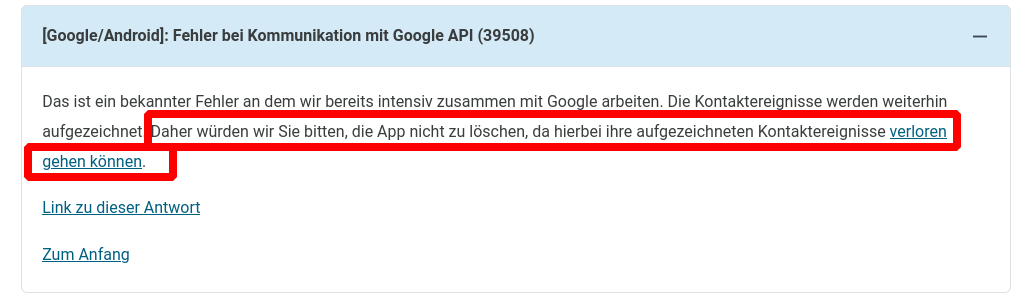
Error 39508 was there before reinstaling of the app. Since it was showing "Risiko Ermittlung nicht aktiv" in conjunction with 39508 and the fact that the app was working before I hoped I could get a working app again by reinstaling.
Would be good to mention in the FAQ that reinstalling could make things worse...
pathmapper
on 24 Jul 2020
@pathmapper if it's ok, I'll answer for @tkowark, as in my eyes he definitively deserves a week-end now...
As far as I know, there is no way to trigger the update to ENF v1.5.
I was also affected of API 10/API 39508, impatiently waiting for the update, after everyone else except me seemed to already have gotten ENF 1.5.
I was then updated this morning.
So, just wait for some hours more, I guess it'll resolve by itself then.
Re-installing the app does not enforce API 39508, it just doesn't resolve it. It 'just' erases the stored data of all exposures in the last 14 days, which would be sad, as they can't be then checked for risk encounters after your ENF will have been updated.
Best regards
Ah, one thing more:
I would also recommend not to delete the data of Google Play Services. I did it yesterday morning to try to trigger ENF update - and for me it looked like that this also erased all related data of the ENF, because after erasing I neither had API 10 (I suppose all my saved keys were gone, so there was nothing to match anymore) nor API 39508 (maybe because without keys API had not been called, or a counter was reset). Additionally, some Google account information had to be setup again (backup-account, credit card for GPay...)
Unfortunately, in Google App store, the 'support guys', who answer to reviews of users, recommend to follow Google's instructions from a official support web page to update Google Play Services. One step in these instructions is also to delete Play Services' data.
According to my experiences, I'd recommend this as the very last resort only, if nothing else works.
Would be nice if you could give a short line here, after your ENF was updated and if it solved problems for you.
vaubaehn
on 24 Jul 2020
@vaubaehn thanks for your reply
which would be sad, as they can't be then checked for risk encounters after your ENF will have been updated.
True, but I wasn't sure if the app was still collecting exposures because it was showing "Riskoermittlung nicht aktiv" and no status for three days. So these three days were already lost and every further day with a non working CWA makes further already collected exposure data useless checking for risk encounters. So I tried the reinstallation. But let's focus on how to solve the current situation.
It was then updated this morning.
Was there a notification when the update happened or is the ENF update shown as available PlayServices update in the PlayStore? Or do you have to check regularly the ENF version number yourself to find out if it has been updated?
According to
https://developers.google.com/android/exposure-notifications/release-notes
Version 1.5 of the Exposure Notifications API started rolling out on 2020-07-09.
So since more than two weeks it wasn't rolled out to my phone and I didn't find any information why this is the case or when it will happen. The PlayStore shows no available updates and says everything is up-to-date.
As far as understood the reason for distributing the ENF via the PlayServices was to make sure that the ENF is available immediately for all users and you don't have to rely on regular Android updates distributed by manufacturers etc.
So the current situatuation is very unsatisfactory:
I spent several hours to find a solution and all I got is the answer:
It's not working because your ENF is not updated to 1.5.
@tkowark @SebastianWolf-SAP as the CWA is dependent on the ENF to work as intended I would expect that the CWA team would get in contact with Google to provide answers to the questions:
- Why are more than two weeks after the release of ENF 1.5 still devices around which are not updated to this version despite there is no update available in the PlayStore?
- When will these devices be updated automatically?
- Is there a way to manually trigger the update?
pathmapper
on 25 Jul 2020
And you are still getting Error 10 or Error 39508? If it's "only" 39508, the issues should be gone by tomorrow, hopefully.
It's a miracle. "Risiko-Ermittlung dauerhaft aktiv - Aktualisiert: Heute, 03:07" No more errors.
Now I have another problem: Due to all this hassle I bought a new phone already. Where can I claim a refund?
KlugB
on 25 Jul 2020
OK, I'm now also on ENF version 15202902003, there was no notification nor did I trigger the update as far as I know (I checked the ENF version number reguarly since yesterday as described in https://www.coronawarn.app/de/faq/#ENF_version, and now the mentioned version is shown).
The error 10 is gone but 39508 is still there (also after a reboot).
pathmapper
on 25 Jul 2020
@pathmapper Happy to hear, don't worry about 39508. There is a counter inside ENF to count API calls, and limit rate at 20 calls per day. I guess, in this day your device already tried to check risk encounters (either manually when opening CWA or scheduled automatically in the background) before ENF update was updated, thus ending up in error. After ENF update your API call rate for this day is supposed to be already finished. So, if you try again tomorrow, 39508 should be gone into history for you...
vaubaehn
on 25 Jul 2020
Thanks @vaubaehn, I'll check and report back tomorrow.
pathmapper
on 25 Jul 2020
Looking forward to your feedback tomorrow, @pathmapper ! If the error is gone for you then, we'll probably close this issue (hopefully for good) as the update seems to reliably fix this bug 😀
tkowark
on 25 Jul 2020
@tkowark Let's hope, that this issue, beside API 10, can be closed, and never has to be opened again :)
However, I think it may be good to still have an _easy_ to find reference on these issues for all users, that may still have old versions of Google Play Services or ENF on their phones when they install CWA for the first time. They would then freshly run into our hopefully and already resolved problems. Concretely, I'm thinking of users, who want to reactivate their old "desk drawer" phones to fit up their family members, in case infection numbers are increasing here again, or any other users who restart an older phone after a longer period of time. As we saw, it might take 2 weeks (or even longer) until these phones receive updates of Google Play Services or ENF, with CWA newly installed before. Future API 10/API 39508-affected people then quickly find information that their problems might resolve themselves, if they just wait long enough for automatic updates by Google.
Maybe in this context it might also be a good idea to pin a _moderated/locked_ issue/thread "Bekannte Probleme / Known Issues" on top of the "corona-warn-app / cwa-app-android" page, where users may find (short) summaries of already resolved issues (including solutions, references to closed issues), but also information regarding current issues (references to open issues). My first contact with github was 10 days ago, and to understand the structure of the platform, and to find the information I seeked took quite a time and needed patience. One easy starting point from a pinned issue would help people like me. An additional suggestion for a pinned issue "Bekannte Probleme / Known Issues" would be to keep it bilingual in German and English, to also include people who have some problems understanding English language.
If you consider this to be a good idea, the FAQ of www.coronawarn.app then also may reference certain issues to related comments of that pinned 'thread'. In case, I think https://github.com/corona-warn-app/cwa-app-android/issues/478 might be replaced, as it is a little bit outdated now, imho.
And regarding the wish of transparency according to potential problems of CWA, as it is treated in the media in these days, this might also be a supportive point to deal with it.
I'd love to volunteer to write some summaries for that, but I'm a little short in spare time right now (there is also still another proposal open https://github.com/corona-warn-app/cwa-app-android/pull/864#issuecomment-661024156 I'd like to do...), but maybe next week.
regards to everyone
vaubaehn
on 26 Jul 2020
I'm happy to report that error 39508 is gone today, thanks everyone.
As we saw, it might take 2 weeks (or even longer) until these phones receive updates of Google Play Services or ENF, with CWA newly installed before. Future API 10/API 39508-affected people then quickly find information that their problems might resolve themselves, if they just wait long enough for automatic updates by Google.
Are there good reasons why you don't get the latest ENF version immediately?
If not, maybe it's worth to contact Google and ask them to change the ENF update process.
pathmapper
on 26 Jul 2020
The error 39508 appears again even with ENF 15202902003 if the CWA is resetted (Settings menu -> "Anwendung zurücksetzen") and used again afterwards.
I guess the error will be gone tomorrow, but it's unfortunate that using a functionality of the CWA ("Anwendung zurücksetzen") triggers 39508 for the rest of the day.
pathmapper
on 26 Jul 2020
Der Updatemechanismus der App scheint noch fehlerhaft zu sein.
Meine aktuelle Beobachtung über den heutigen Tag:
Heute um 8:45 Uhr habe ich die App geöffnet. Internet war noch aus. Die App zeigte an: "Letztes Update: gestern, 9:02 Uhr" und hat dann lt. Anzeige im Risikostatus versucht, Daten runterzuladen (konnte es mangels Internet aber nicht). Trotzdem hat die App dann lt. Protokoll Daten abgeglichen, offenbar den Download von gestern. Das letzte Update bliebt auch auf "gestern, 9:02 Uhr" stehen.
9:30 Uhr: Internet war an. Es wurden nochmals Daten runtergeladen. Dann kam Fehler 39508. Lt. Protokoll wurden Schlüssel abgeglichen. Dann hat man die 20 gerissen. :-) GUI: Letztes Update "gestern, 9:02 Uhr".
Heute Nachmittag gegen 18:00 Uhr: App geöffnet, wieder wurden Daten runtergeladen. Dann natürlich wieder Fehler 39508. Klar, die 20 sind ja noch ausgeschöpft.
In der GUI steht, dass der letzte Abgleich gestern um 9:02 Uhr war. Das stimmt. Aber warum:
- Macht man einen Abgleich, obwohl man keine Daten runtergeladen hat bzw. mangels Internetanbindung auch keine runterladen konnte (heute um 8:45)? Man scheint hier ja zu erkennen, dass man keine neue Daten hat, sonst hätte sich das Updatedatum geändert. Abgesehen davon wäre der Check ja tournusmäßig erst nach 24h, also 9:02 Uhr an der Reihe gewesen.
- Erkennt man zudem nicht, dass der Abgleich an dem Tag schon einmal fehlgeschlagen ist (nämlich heute um 9:30), also braucht man es um 18:00 doch nicht noch einmal versuchen.
Das heute um 9:30 Uhr war ein Folgefehler von 8:45 Uhr. Man hatte nun neue Daten, aber sein Vergleichskontingent für den Tag schon aufgebraucht. Man hätte 8:45 Uhr keinen Abgleich durchführen dürfen, denn man hatte keine neuen Daten runtergeladen.
AnOtherMuenchner
on 26 Jul 2020
Thank you all again for your input! Unfortunately, the current state of the issue and the discussions makes it close to impossible to track the error in its various incarnations.
In general, the issue is more an information that the rate limit was reached rather than a real issue that stops the app from working as expected. Hence, please do not try to reinstall the app to fix it (https://www.coronawarn.app/de/faq/#API39508).
As a way forward:
- If you receive 39508 in specific situations (e.g., after opening SwissCovid #816 , after resetting the app @pathmapper , etc.), please open a dedicated issue for that occurrence
- If you receive 39508 in co-occurrence with another issue (e.g., as it happened in conjunction with error 10), please open a dedicated issue for the other error as 39508 is generally an aftereffect, then.
That way, we can better avoid running into the error at all, or directly tackle the corresponding root causes. Thanks for your understanding!
A final remark regarding the proposal by @vaubaehn : I really like your idea and we'll discuss how to best make that happen (which issues to include, how should the format look like, etc.).
tkowark
on 27 Jul 2020
Twice I had an isolated Google API(39508) error when I first opened the app in the morning, without showing any other error before. But that was before CWA version 1.1.1.
 aurisnoctis
on 27 Jul 2020
aurisnoctis
on 27 Jul 2020
Got the error 39508 today (upon opening of the app after a restart of the phone) on an Samsung Galaxy S6 edge with Android 7. CWA was already up to date (version 1.1.1). After getting the error I've instaled an update of the "Google" app (not the google play services app). I'm still getting the error each time when I'm opening the app. Can still reproduce the problem after a restart of the phone.
Let's see if the error is gone tommorrow (due to the update of the "Google" app?).
 barfoo4711
on 2 Aug 2020
barfoo4711
on 2 Aug 2020
I am using a Samsung Handy (SM-A320FL) and i made the following experience:
I am using on my Samsung the function of low energy (maximal mode). Then i have installed the CWA version 1.1.1
It worked at the beginning without problems. Then i noticed after 7 days the error message "Fehler bei Kommunikation mit Google API (39508)". During the time when i was allone at home i am running this low energy modus without activation of location (Standort) and without activation of bluetooth. I got the signal from the app, that it is not active at the moment.
When i am leaving my home i unactivate the low energy level and also the app is running well.
Above mentioned error came up to me for a few days (after day 7), when i opened my cwa app.
Then after 10 or 11 days i decided to run my low energy modus (maximal mode) together with activation of location (Standort) and together with bluetooth function. In other words: the cwa app was active for the hole day.
Result, when i opened my app: the app runs well without the error message.
Means for me: The app will not run as expected, if the phone is off or if the app is several times of the day not active.
 stevie21
on 5 Aug 2020
stevie21
on 5 Aug 2020
Hi @stevie21
Is the problem reproduceable, means, after it ran fine with location and bluetooth now, when you turn on again maximal mode of low energy with location and bluetooth off also triggers API 39508 again?
vaubaehn
on 5 Aug 2020
@barfoo4711 The Google app is working independently from anything that is related to CWA. Error 39508 occurs when CWA tried to check for risk exposures "too often", as the Google ENF only allows 20 checks per day, and one complete scan of CWA performs 14 checks. For some reason on that day when you experienced 39508, CWA tried to check a second time and was then blocked by the Google ENF API.
Is the error still occuring, or gone for you now?
vaubaehn
on 5 Aug 2020
Hi @vaubaehn,
i am actually on date 11 of my CWA. I will wait if next upload of risk determination (under the precondition, that cwa app is active all the time) will work again without any error. If this will come up (without error), then i will switch again to "old" "wrong" handling as described above and will see if i run into same error situation again.
stevie21
on 5 Aug 2020
Ok, @stevie21 , thank you, and please leave a line here after, how it worked out for you.
vaubaehn
on 6 Aug 2020
Same Problem with Samsung Galaxy S7. In use since the App was released. Error Message is a bit different "Schnittstelle" instead of "API".
I've installed afterwards all available Updates of my apps in Google Play, cleaned cache and restarted the phone. Same error message.
I have not started the App more than 14 times a day. Only during the night flight Modus is on and Bluetooth therefore off, same for Location.
 ikterus
on 7 Aug 2020
ikterus
on 7 Aug 2020
@ikterus as this is a rate-limiting error try the following:
- Kill the app
- wait 24 h without opening the app
- after 24 h open the app again and see whether the error has disappeared
 daimpi
on 7 Aug 2020
daimpi
on 7 Aug 2020
Hi @vaubaehn and of course to all others,
I will give a short feedback for day 12 and day 13 of my CWA. The CWA app was each day 24 hours active. After 24 hours was gone i opened the cwa app and the cwa was actualizing his data without error (see also the following 2 attatchments)
Now i will start my "old" "wrong" procedure and will run my handy in that mode that cwa is not active, when i am lonley at home:
In the screenshot you can see in the left top edge, that my cwa is not active:

Of course i will activate the cwa app, when i am leaving my home. I will run this handling for a few days and will see if i run into the same error again. I will keep you informed.
stevie21
on 7 Aug 2020
Sorry, i inserted the wrong picture of my handy
This is the correct one with inactive corona warn app:
stevie21
on 7 Aug 2020
Hi @stevie21 , thank you very much for your update! I'm curious, if the switch back will show an error or not. If yes, it should be addressed by opening a new issue (bug report), but I'll explain more about it, if an error occurs again.
There is just one more caveat here: an update of CWA (1.2.0) was pushed to the Google Play Store yesterday afternoon, it might be able for updating today in the evening hours or tomorrow during the course of the day. Depending on if you update or not (automatic updates enabled?), the error message that might pop up, may differ. To not get things mixed up, it would be easiest if you wait with update of v 1.2.0 to after it is clear, if or if not a message shows up. If you update, then a more unspecific message might show up, where I am also curious about the details.
Thank you :)
vaubaehn
on 7 Aug 2020
Hi @vaubaehn,
i will keep version 1.1.1 and i inform you about the fact, that i did not make the installation of CWA over Google Play Store.
I also have no account there. I am very appropriate with my handy, and i do not want to have a connection to google play store.
So i downloaded the apk (Corona Warn App_v1.1.1_apkpure.com.apk) from https://apkpure.com/de/search?q=cwa onto my PC and then i put it on my handy and then i made the installation of the CWA. I think you should know this, not knowing if this has any influence. Actually my handy is in the mode (no bluetooth active and no location active) so that cwa shows me, that it is not active. Tomorrow (again after the 24 hours) i will open the cwa app and will see if i get error 35908 or not. If you think i should not wait 24 hours and start the CWA app earlier, then keep me informed.
stevie21
on 7 Aug 2020
@stevie21 are you running CWA without a Google Acc?
How did you get Google Play Services going?
I'm asking b/c someone was asking exactly the same question here: https://github.com/corona-warn-app/cwa-website/issues/255 and maybe you could help them out 🙂.
daimpi
on 7 Aug 2020
Hi @vaubaehn,
today i opened my cwa app at about 13:00. I got the message that my app runs well (see picture)
The actualization of my app was not (as expected from me) at the moment (about 13:00) when i open the cwa app.
It was already earlier at 11:02. May be this was the time when i switched from my handy (low energy level to normal energy level) and by this activation of the cwa app.
Of course i will watch also the next days, where i will run my handy in this low energy mode with no active cwa app and will keep you informed.
stevie21
on 8 Aug 2020
Hi @vaubaehn,
today at 14:07 i went from low energy mode (without active cwa) into normal energy mode (cwa active). Then i opened the cwa and the cwa started the exchange of data and it took a lot of time. Then i have got a error message (i think 6000 or 6002) something like "time problem". Do you know this kind of error? Would also be helpful to have a list of "6000" errors. If i see it i will remember the exact error code. I wanted to make a foto, touched the screen and the error dissapeared. Then i closed my cwa and started it again. Then I went immediateley into our error 39508:
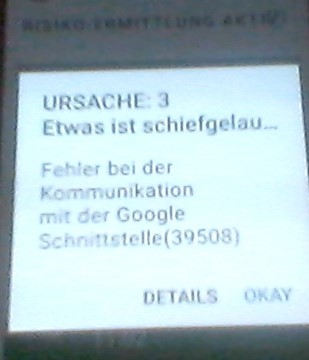
After confirmation of above error i got the following information on my screen:
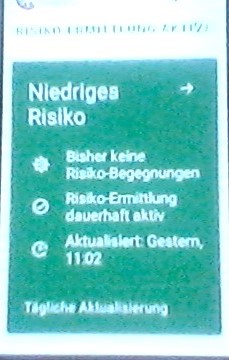
Maybe the error 6xxx was the root cause and 39508 is a kind of follow up error?
I will watch what tommorow will happen. If i hear nothing from you, then i will go on in my low energy mode (without active cwa) and try tomorrow again.
stevie21
on 9 Aug 2020
The explanation that the database was queried too often is not entirely plausible. My Internet connection had been disabled for ~48 hours, and immediately after re-enabling it and starting the app I got an error 39508.
This problem seems to persist for a lot of users, in my opinion this needs to be reopened and fixed. Broken APIs are not unprecedented. Maybe a workaround can be found.
anApeThrummingAViola
on 10 Aug 2020
Hi @vaubaehn,
today at about 13:00 i went from low energy mode (without active cwa) into normal energy mode (cwa active). Then i opened the cwa and again the cwa started the exchange of data and again it took a lot of time. Now i remember also the error message from yesterday because today it also came up again. It was 9002 and not 6xxx (sorry, my wrong memory) See picture:
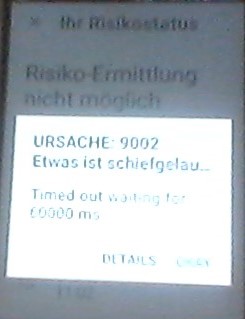
Again i closed the cwa and opened it again. I run again into 39508 error. Now the screen of my cwa shows the following picture:
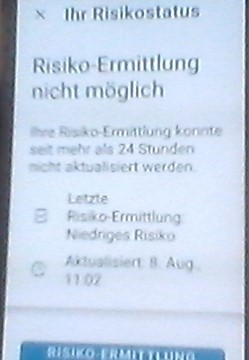
I will start now and run cwa active for more then 24 hours and then open cwa tomorrow again. I will keep you informed.
stevie21
on 10 Aug 2020
Hi @stevie21 , thanks for all your efforts! I don't have much time right now, but would come back to you this evening or tomorrow night. But I feel that there may be a useful hint inside this puzzle...
My thoughts are now going towards 'hanging task due to background prioritazation'. See you later!
vaubaehn
on 10 Aug 2020
Hi @vaubaehn,
on today at: 13:10 i had same behaviour then yesterday. Since yesterday i had my cwa active. I started the cwa nothing happened.
I closed it and opened it again. Then it started the data exchange. Again i run into error 9002 (like yesterday) and then i got error 39508 like yesterday. I hope that it will run on tomorrow. I will keep my cwa active.
stevie21
on 11 Aug 2020
Hi @stevie21,
at first I try to sum up your facts here:
- your device is Samsung (SM-A320FL)
- you don't use Google Play Store, instead you side-downloaded CWA 1.1.1 from apkpure.com
- at home, you are switching your phone to maximal power saving mode (low energy) and turn off location services and turn off bluetooth
- when you are leaving you home, you are disabling power saving mode (normal energy) and turn location services and bluetooth on again.
- you first experienced issues, i. e. exception API 39508 after 7 days of usage after opening CWA.
- some days later, your tried switching to maximal power saving, but now location services and bluetooth stayed turned on. -> No error message after starting CWA.
- in the next 2 days, no error message showed up, and CWA obviously ran exposure matching (downloading diagnosis keys from Telekom servcer, handling data over to the Google ENF-API, ENF checking for matching exposures with stored RPIs (received bluetooth beacons) from contacts) automatically in the background successfully.
- the next day, CWA ran exposure matching successfully on the background, even 1 hour earlier than expected, maybe at point in time when switching from power saving to normal mode.
- the next day, you switched from power saving mode to normal mode and then you (immediately?) opened CWA. Exposure matching took a lot of time. Then you ran into exception 9002: Timed out waiting for 60000 ms. You closed CWA, opened again and got API exception 39508.
- next day, you again switched from power saving mode to normal mode and then you again (immediately?) opened CWA. Again, exposure matching took a lot of time, and again you ran into exception 9002: Timed out waiting for 60000 ms. You closed CWA, opened again and got API exception 39508. Now CWA displayed: Risiko-Ermittlung nicht möglich.
- today, before you openend CWA, it was 'active' (means, no power saving enabled since yesterday meanwhile?). After opening, nothing happened. You closed CWA, opened it again, exposure matching process was started, but timed out with error 9002. After openening 39508 again, you ran into exception 39508.
Ok, now let's try to exclude some sources of errors:
- even you are not using Google Play Store for installation of CWA, in some periods it ran fine. So no need to worry here, imho.
- if I understand right, if you received an exception or not, was not always dependend on if location services or bluetooth were turned on/off. So, I would also exclude the state of location services/bluetooth here.
What remains a little bit mystical:
- the first 7 days without any problem
- in the last days additionally exception 9002 occured.
What I think has happend here:
I think you actually experience a problem caused by the power saving mode (low energy). My guess is, that this mode lowers the speed/clock of the phone's CPU significantly, even scheduled background tasks are not killed completely, and are able to run in general.
The checking/matching for exposures is actually a CPU intensive task (because of cryptography). It looks like, when your phone is in power saving mode, the diagnosis keys are downloaded from Telekom server, but the matching with RPIs inside ENF fails due to time out - the matching takes much longer than it is expected to do.
Why didn't it happen in the first 7 days? The CPU-load and time for matching also depends on the number of diagnosis keys and received RPIs that have to be matched. And it seems, that from day 1 to day 7 the number of keys that had to be matched with RPIs were just small enough that everything worked out fine. Also, the number of keys to be matched are dependend on how many people uploaded their own keys after a positive test, and theses numbers were increasing over the past two weeks - so your phone needed to do more and more work.
When the matching starts in the background (by a scheduled job), and it fails, no error message is popping up, it's just silently discarded. The problem is now, that Google (and Apple) implemented a quota, on how often CWA is allowed to call the API of ENF for exposure matching. When the process fails for some reason, then this try obviously already counts against the quota!
When you open CWA the next time, CWA 'realizes' that it has not a complete matching for the current day, and tries again to match exposures, calls API for that again, but then runs above the limitation of allowed calls, and the exception 39508 is thrown, hence the exposures cannot be matched anymore for that day.
Later, you experienced exception 9002 (timeout) after switching to normal power mode (CPU should run again) and opening CWA (matching started). I can only guess, that at that moment the full CPU power was still not available (maybe many tasks of the OS or other apps also start to 'run' at one again in the background), or maybe because of limited background priotarization there was a 'hanging', still sleeping task somewhere in CWA or ENF, that this job could not be run in time. After the 2nd try then again -> 39508.
What can be done?
Maybe you should now try to update to CWA 1.2.0 after it becomes available on apkpure, or you try https://www.apkmirror.com/apk/robert-koch-institut/ if this also can work for you.
A new feature has been implemented that should wake up CWA once per day independently from OS and power savings settings. Maybe this can already work for you.
If not, then I guess you need to run your device on normal power mode in general, or at least wait (and use!) your phone some time after switching from power saving to normal mode and before opening CWA, in hope that this wakes up all needed tasks for exposure matching.
If then 9002 still persists, you might try to erase the complete app-data (not only cache) of CWA. If this still not helps, you might then erase also the data of the Google Play Services (despite not having a Google account, I guess, they're active on your device?), but then you'll loose all potential exposures from the last 14 days.
I'm curious what helped for you!
Regards, V.
vaubaehn
on 11 Aug 2020
Hi @vaubaehn,
For item 9 and item 10 of your above list i can confirm: I immediateley opened CWA app after switching from power saving mode to normal mode. For last item 11 of your above list: No i also had power saving function active since yesterday, switched to normal energy modus at 13:10. Then opened cwa app at 13:10 first time. Nothing happened. Closed it and opened again. Then download started and it happened first 9002, and then our 39508.
Now since 13:10 i did not open cwa again and i am running my handy in normal energy mode. Tomorrow i will open cwa again hoping that full power all the time will help. Is there a special time when i shall open my cwa app again? I think i will wait more then 24 hours. I hope that helps. I keep you informed.
stevie21
on 11 Aug 2020
Hi @vaubaehn,
One additional comment from my side to have same understanding.
There was one difference between item 9 and item 10 of your above comments.
For item 9 (it was my day 14 of cwa) i had power saving function active and in this mode i had cwa unactive. So I got this "unactive signal" from the cwa app:

Then for item 10 (it was my day 15 of cwa) i had again power saving function active but in this mode i activated bluetooth and standort (location) function so that cwa was active at this day 15 in power saving mode (means: above "unactive signal" of the cwa app was not coming up at this day).
Then (as mentioned above in my last statement): i switched yesterday (my day 16 of cwa) at 13:10 from low energy mode into normal mode. Only in this normal mode i can start the cwa app. So i started the cwa app at 13:10 (first start nothing happened, second start: download happened with the errors) as explained in my last statement.
stevie21
on 12 Aug 2020
Hi @vaubaehn,
good news (for me). Few minutes ago at about 14:00 (of my day 17 of cwa) i opened my cwa app. My handy was since yesterday 13:10 in normal modus (no power saving modus) and all of this time my cwa was active (means bluetooth and Standort (location) was active). When I opened the cwa app i have got immediateley the following picture:
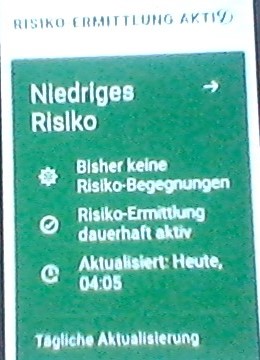
So actualization in background modus at 04:05 worked for me. I will try to find a way that i can use as well the power saving mode and also the normal mode. And experience is now: normal power mode should be active a certain time, so that actualization can be done in background, before i open the cwa app in normal mode.
Thank you also for the link to the new CWA version 1.2.0. I will not yet install it. Reason: If you are somehow interested in more tests under version 1.1.1 i will do it. If you give to me signal that this is no longer needed, i will go on version 1.2.0.
stevie21
on 12 Aug 2020
Hi @stevie21 , thank again for your thorough reports!
I think, we're coming closer :)
I'm more and more suspecting low energy power mode to cause problems for many users.
Even in the past some background checks worked fine for you in low energy mode, I guess the reason for this was that the number of diagnosis keys to be matched was just small enough to complete the checks on a slow and dozing device. As numbers of keys to be checked vary from day to day with regard to increasing/decreasing infection rates and submitted positive test results, it may sometimes work in low energy and sometimes not, with increasing infection rates most likely not.
To be sure to exclude any impact of your bluetooth and location settings, I'd ask you to continue to run your phone with CWA 1.1.1 in normal mode (no power saving) and network enabled, but turn off bluetooth and location for the night. Tomorrow after waking up, please open CWA (still with bluetooth and location settings turned off). I expect CWA to now show a check performed around 3:00 - 5:00, and it should not crash or display any error, except warning you, that bluetooth and location are turned off.
Let's see how it'll work out! Have a good day
vaubaehn
on 12 Aug 2020
@stevie21 one more question: Yesterday when you first opened CWA nothing happend. Was it just showing the regular main screen, but no update was performed? Or did it show any sign of processing something? And you closed it manually, it was not closing by itself, right? How long did you wait before closing?
vaubaehn
on 12 Aug 2020
@stevie21 and one additional question: the power saving mode that you use, is it the ordinary Android built-in 'battery saver', or is it a specific Samsung feature? Can you provide a screenshot maybe?
vaubaehn
on 12 Aug 2020
Hi @vaubaehn,
No problem: I will keep CWA 1.1.1 version and i will run it in normal mode (no power saving) and network enabled, and i will turn off bluetooth and location for the night. Lets see what will happen. I will give you a feedback. Shall i wait again 24 hours before opening again the CWA, or shall i open it already in the morning?
For your second question:
I opened the CWA and i have got directly the regular main screen (this picture):
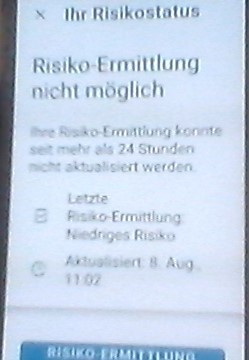
Nothing happened. Lets say i had it open for 15 or 20 seconds, and then i closed cwa.
To your third item:
I used the following function for low energy mode:
Button: "Energie sparen".
stevie21
on 12 Aug 2020
Hi @stevie21 ,
the last background check was performed this morning around 4am. I'd expect CWA to do the check tomorrow morning at 4 (+ 4 hours at max.) again, so I'd suggest to open CWA tomorrow morning after 8am, and see if it worked like expected.
CWA-did-nothing-screenshot: thanks, it cleared it up.
Battery-saver-screenshot: without exactly knowing, I'd guess it's the built-in Android battery saver. That information also may help a lot later.
Good night, see you tomorrow!
vaubaehn
on 12 Aug 2020
Hi @vaubaehn,
today (day 18 of my cwa) i opened my cwa at 10:24. I did run my mobile in normal modus and in the night i switched off bluetooth and Standort (location) and i had WLAN active. The result was good. Actualization at 2:28:
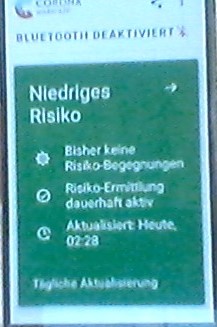
I can run such additional tests by input from your side. Just keep me informed.
stevie21
on 13 Aug 2020
Hi @stevie21 , these are good news!
One important question I forgot before: did you ever enable "Priorisierte Hintergrundaktivität" from the settings menu inside CWA until today?
vaubaehn
on 13 Aug 2020
Hi again, @stevie21 , anyway, I think we could go the last steps of investigation now.
I'd suggest to install CWA 1.2.0 (or 1.2.1, if already available).
Start it in normal power mode. It may be, that you will be asked to enable "Priorisierte Hintergrundaktivität" on start-up. If so, accept. If you are not asked to turn it on, then go to menu -> settings -> and turn on "Priorisierte Hintergrundaktivität" if it is not enabled yet.
Now close CWA, before sleep turn on low energy mode (max. power saving), and keep network enabled. Set bluetooth and location to a mode of your choice.
Then tomorrow after 8.30, try to reproduce 9002 (time out waiting for...) like you did in the past.
Let's see
vaubaehn
on 13 Aug 2020
Hi @vaubaehn,
i had "Priorisierte Hintergrundaktivität" from the beginnning on active.
Now i am late at home and I will start with CWA 1.2.0 next week, because on the weekend (from tomorrow morning) i am on a tour with some friends. I will make above steps (maybe already on sunday) and keep you informed.
stevie21
on 14 Aug 2020
Hi @stevie21 , enjoy your trip, take care & stay healthy! See you next week.
vaubaehn
on 14 Aug 2020
Hi @anApeThrummingAViola ,
The explanation that the database was queried too often is not entirely plausible. My Internet connection had been disabled for ~48 hours, and immediately after re-enabling it and starting the app I got an error 39508.
This problem seems to persist for a lot of users, in my opinion this needs to be reopened and fixed. Broken APIs are not unprecedented. Maybe a workaround can be found.
a late reply to your post:
I think you're completely right, and I assume that API 39508 is a consequence of silently discarded exceptions, occuring while the diagnosis keys are matched with received RPIs by the ENF in a background task.
I suppose we are seeing here a combination of two different bugs/misbehaviours:
When the Google ENF-API is called by ProvideDiagnosisKeys(), it obviuosly first counts the API-call from the ENF-app (CWA) in a variable stored inside ENF. The ENF then starts a task to match the diagnosis keys downloaded from server and stored on local storage with RPIs received from bluetooth and stored inside ENF. But this task may fail(!), for example as we saw above (stevie21) due to a time out that might be caused by throttled CPU speed due to active power saving mode.
So, CWA provided data to the API, got an API-call count, but didn't receive anything back except a silently discarded exception.
Next time CWA tries to provide data to the API, API checks quota, but uh-oh, the rate limit is exceeded, and API throws exception 39508.
So, two things would need to be done:
By Google (ENF):
a) secure the task of matching received RPIs with diagnosis keys against time out!
b) only count API-call, when ProvideDiagnosisKeys() finished sucessfully without exception. => This would most likely prevent any API 39508 in the future.
By dev team (CWA):
a) Handle exceptions better.
b) maybe: only start ProvideDiagnosisKeys() when all prerequisits are met, in this example here: only if all power saving modes are disabled (full CPU speed can be guaranteed).
c) in general, try to test if prerequisites are met for a certain task, for example, test for established internet connection before downloading diagnosis keys from server, to avoid exceptions as much as possible.
But as @GPclips assigned @JoachimFritsch here only 2 hours ago, for a long closed (!) issue-thread, there is a chance, that this subject might get some more attention in future again.
@JoachimFritsch : I plan to create a seperate issue about cause 9002 Time out while waiting 60000 ms and API 39508 as a consequence for the next week. It will then also addresss the issues mentioned in this comment.
Have a good week-end everyone! Kind regards
V.
vaubaehn
on 14 Aug 2020
Hi @vaubaehn,
now i installed cwa version 1.2.0 (17.08.2012 at 14:35). Also in this version cwa app runs in mode "Priorisierte Hintergrundaktivität" as already before.
On weekend i had no problems with cwa (running my handy in normal energy mode)
I also run my handy now in normal energy mode. I will switch in the night to low energy mode and keep network enabled. I will set bluetooth and location to inactive mode (in the night).
On tuesday morning i will switch from low energy mode to normal mode and will start directly cwa app to see if actualization will be done online and if i will run again into error 9002 and then into 39508.
If i shall do something other: keep me informed.
stevie21
on 17 Aug 2020
Hi @stevie21 ,
sounds like a good plan, let's wait for the results then! Good that it worked with normal energy in the week-end.
vaubaehn
on 17 Aug 2020
Hi @vaubaehn,
I switched today from low energy mode into normal energy mode. I immediateley opened cwa app.
I got immedateley the message that actualization was done on yesterday (again at 03:33). See screen:

So i was confident. Then (without any aim, just by luck) i touched the green screen and i immedateley get the following screen:

I also made screens of the details, but do not upload now (only if you need it). After confirmation with OKAY i went to next screen "Ihr Risikostatus":

The expectation from my side is, that switching from screen "Niedriges Risiko" to screen " X Ihr Risikostatus" should be done without any error message. Also when i go back from screen " X Ihr Risikostatus" to screen "Niedriges Risiko" i get this error message inbetween.
I also have a additional proposal for next night.
When i switch my handy into low energy mode, then automatically WLAN, Bluetooth, and Standort (location) are switched off by this low energy function. But you are able to switch them manually on active again. Next night i keep all 3 of them as inactive. Then on next day in the morning i will go back into normal mode and open cwa immediateley. Then i think that actualization will be done again in online mode and let's see what happens. If you have other proposal: just let me know.
stevie21
on 18 Aug 2020
Hi @stevie21 ,
thanks for reporting back!
I think, your today's error message is related to this: https://github.com/corona-warn-app/cwa-app-android/issues/1021#issue-679051909 - I had a similar problem this morning.
If it's ok for you, could you keep WLAN on again this night? It's just to be sure, that not WLAN is causing your 9002: Timed Out while waiting... (it can also cause a slightly different error, when CWA is opened while WLAN is still getting initialized).
Thanks for all your efforts! I think, tomorrow we're done.
vaubaehn
on 18 Aug 2020
Hi @vaubaehn,
yes i will keep WLAN on and i will go into low energy mode this night. I will again report the behaviour back tomorrow.
stevie21
on 18 Aug 2020
Hi @vaubaehn,
some minutes ago (12:40) i switched my handy from low energy mode to normal energy mode. WLAN was active all the time, since my last message (see above). Bluetooth and location (Standort) was off. But i think that's not so important. I got immediateley the following screen:

When i switched the screen to "X Ihr Risikostatus" i got again the screen: "Ursache: 3 Etwas ist schiefgelaufen" (see above picture from yesterday). Also again when i switched back to main screen, i got again the switch to the screen with message "Ursache: 3 ... ", before i came back to main screen.
If i shall run my handy in other mode just let me know. If i hear nothing from you this day i will run my handy in low energy mode until 23:00. And i will switch to normal mode over the night. If you have other proposal: just let me know.
stevie21
on 19 Aug 2020
Hi @stevie21 ,
hmmm... that's not so good news, seemingly there was an automatic background update for diagnosis keys during the night, and low energy mode might have prevented to sucessfully check for exposures in the background. In that thecase, you run into Ursache 3: API 39508", because after opening CWA manually, CWA is not allowed anymore to call the ENF api...
Another reason could be, that you received an ENF update, and possibly due to initialization there were 2 unsuccessfull calls to the API in the background.
Could you provide your ENF version, like described here: https://www.coronawarn.app/de/faq/?search=enf#ENF_version
And could you maybe have a look into the Covid-19-Benachrichtigungen (phone's settings > Google > Covid-19-Benachrichtigungen > Überprüfungen auf mögliche Begegnungen) how was the timeline for the checks. Was there a check last night with excactly 20 queries? Or a check with 14 queries? Or none for last night?
In any case, I'd recommend to turn off low energy for the next night, to be sure, you get over the 39508 error, and automtic exposures checks work fine in the background.
vaubaehn
on 19 Aug 2020
Hi @vaubaehn
My ENF Version of my handy is 16203302004. That means: Smartphone has version 1.5 (as described in your link from above)
I checked the number of queries: On 19.08 i had 20 queries at 12:42.
Then at 18.08 i had also 20 queries: 17 at 10:44 and 3 at 10:42
I will keep my handy in normal energy mode and will see if it runs well on tomorrow. I will inform you.
stevie21
on 20 Aug 2020
Hi @vaubaehn
I opened my cwa app at about 10:55 on today. I immediateley hat green screen with actualization info at 02:27 :

Also when i switch in cwa app to other screen: No error message.
I also checked the number of queries: On 20.08 i had 14 queries at 02:28.
Now it runs as it shall run. I will run my handy now (like yesterday) during the day in low energy mode and will switch to normal mode at 23:00 (so like yesterday). But if you have other proposal or you want some additional testings: just let me know.
stevie21
on 20 Aug 2020
Hi @stevie21 ,
My ENF Version of my handy is 16203302004. That means: Smartphone has version 1.5 (as described in your link from above)
Unfortunately, the FAQ pages are not uptodate yet. The 16xxxxxxxxx means, you already have version 1.6, the latest version :)
I checked the number of queries: On 19.08 i had 20 queries at 12:42.
That is a problem, that many people reported already. I also had a similar issue. My guess is, that this was occuring once for everyone of us, when the latest ENF version had its first initialization. But I don't know for sure.
Then at 18.08 i had also 20 queries: 17 at 10:44 and 3 at 10:42
That is indeed a little bit suspicious. That means, that after 3 trials to match diagnosis keys from server with your exposures, the routine in ENF stopped working. Two minutes later it tried again. If the regular 14 matches would have been successful, then it would have stopped at 10:44, counting 17 checks in all (including the 3 at 10:42). But as it is 20 checks in all, it seems that also the 2nd check had a failure, and even a 3rd checking was started in the same minute. To find out, what actually happened, it would need to dive deeper into the exposure logs, but I think it's not worth the time at this moment, as the last check from this night finished sucesssfully.
Now it runs as it shall run. I will run my handy now (like yesterday) during the day in low energy mode and will switch to normal mode at 23:00 (so like yesterday). But if you have other proposal or you want some additional testings: just let me know.
To find out, if you can reproduce '9002: Timed Out waiting for 60000ms' it would now make sense, to repeat the experimental scenario once again: during the night, switching to low energy mode, keeping wifi on. In the morning, before switching anything or opening CWA, you could check, if the automatic background update and exposure checking worked like it should by looking at the number of queries (Covid-19-Benachrichtigungen > Überprüfungen auf mögliche Begegnungen), if they were actually checked.
After that you could switch energy to normal mode and immediately opening CWA, and see, what happens. Would it be ok for you? In worst case, as a side effect, you would not be informed for tomorrow, if there was a risk exposure, as you would run again into the API 39508 then... Just see, if you're comfortable with it.
Regards, V.
(By the way, I also tried to reproduce that problem with my own device, but it was not possiblem, because even in low energy mode, it's consuming much power. But that's about the design of my device, I can be happy, if I don't need to charge within 12 hours...)
vaubaehn
on 20 Aug 2020
Hi @vaubaehn
In low energy mode i have also limited access to my handy. So in low energy mode i am not able to go to (Covid-19-Benachrichtigungen > Überprüfungen auf mögliche Begegnungen). I have 2 options:
1) In the night i run low energy mode with WLAN on. Then in the morning i switch to normal energy mode. Then i go to (Covid-19-Benachrichtigungen > Überprüfungen auf mögliche Begegnungen) and then i open my CWA app. What i did not understand:
In case number of queries is not 20: i will open CWA app. And in case number of queries is not 20 i do not open CWA? And i will open it then at next day?
2) Other option: If i run my handy in the night with low energy mode and keep WLAN unactive, then actualization can not be done. When i switch my handy in the morning from low energy mode to normal energy mode, my WLAN will be active and then opening cwa to see if cwa wants to make actualization in online mode.
If i hear nothing from you, i will go this night by first of above 2 options.
stevie21
on 20 Aug 2020
Hi @vaubaehn
For some other reason i had to run my handy today (i think since 11:00) in online mode. Then i checked at about 15:15 (no other time before) my handy and i have green screen:

Also when i checked number of queries: today i had 15 queries at 12:24.
On tomorrow i will proceed with item 1 from above (see my last message).
stevie21
on 21 Aug 2020
Hi @vaubaehn,
Last night i run my handy in low energy mode with WLAN actice. Today i switched at 11:25 from low energy mode to normal energy mode. My first action was: I went to (Covid-19-Benachrichtigungen > Überprüfungen auf mögliche Begegnungen). As i mentioned already yesterday: To call this function is not possible for me in low energy mode, so i made it in normal energy mode as first action. Result: There was no entry for today 22.08.
Then i went back and immediateley opened my cwa app. Actualization was done on yesterday. I saw this on the first screen and then i switched to screen "X Ihr Risikostatus". There you can see the last actualization time. Yesterday at 12:24:

This time information was also visible on the first start screen. But i did not make a foto.
Then i went back from screen "X Ihr Risikostatus" to start screen. This was done immediateley without any signal to a user that something will be processed. Then i got the following screen:

So the actualization must have been done in this minute at 11:26 on today. Next action from me: I left cwa app and went again to (Covid-19-Benachrichtigungen > Überprüfungen auf mögliche Begegnungen). Result now: 16 items for today at 11:26

So it seems to me, that in this version 1.2.0 of cwa a online actualization (as i know it from last version 1.1.1) is not executed and that it is somehow also in the background, even if you have cwa opened or not.
stevie21
on 22 Aug 2020
Hi @stevie21 ,
sorry for coming back late to you - I needed to work and had some family time.
In low energy mode i have also limited access to my handy. So in low energy mode i am not able to go to (Covid-19-Benachrichtigungen > Überprüfungen auf mögliche Begegnungen). I have 2 options:
Can you maybe describe more concretely, what are you able to do in low energy mode, and what not? If I enable battery saving on my phone, like you do, I can still use everything, but with a darker display, no visual effects etc. That information might be useful to target this issue even more. What exactly hinders you to go to Covid-19-Benachrichtigungen?
- In the night i run low energy mode with WLAN on. Then in the morning i switch to normal energy mode. Then i go to (Covid-19-Benachrichtigungen > Überprüfungen auf mögliche Begegnungen) and then i open my CWA app. What i did not understand:
In case number of queries is not 20: i will open CWA app. And in case number of queries is not 20 i do not open CWA? And i will open it then at next day?
I meant, you can open CWA either way, it would just be good to find out, if CWA does the background check if your low energy mode is enabled. And to reproduce the 9002: Timed Out while waiting... you'd first need to check for Covid-19-Benachrichtigungen, turn on normal power, and then immediately open CWA.
- Other option: If i run my handy in the night with low energy mode and keep WLAN unactive, then actualization can not be done. When i switch my handy in the morning from low energy mode to normal energy mode, my WLAN will be active and then opening cwa to see if cwa wants to make actualization in online mode.
This, indeed, could cause also different errors, for example if internet connection has not been established yet :)
But anyway, you decided for option 1.
Your next day:
For some other reason i had to run my handy today (i think since 11:00) in online mode. Then i checked at about 15:15 (no other time before) my handy and i have green screen.
This looks like the automatic background update didn't take place during low energy mode, as it was updated with a delay of about 10 hours, after you turned on normal power mode.
Also when i checked number of queries: today i had 15 queries at 12:24.
On tomorrow i will proceed with item 1 from above (see my last message).
When there were 15 queries, it looks like, the first call didn't succeed...
Then your next day:
Last night i run my handy in low energy mode with WLAN actice. Today i switched at 11:25 from low energy mode to normal energy mode. My first action was: I went to (Covid-19-Benachrichtigungen > Überprüfungen auf mögliche Begegnungen). As i mentioned already yesterday: To call this function is not possible for me in low energy mode, so i made it in normal energy mode as first action. Result: There was no entry for today 22.08.
Then i went back and immediateley opened my cwa app. Actualization was done on yesterday. I saw this on the first screen and then i switched to screen "X Ihr Risikostatus". There you can see the last actualization time. Yesterday at 12:24
This time information was also visible on the first start screen. But i did not make a foto.
Then i went back from screen "X Ihr Risikostatus" to start screen. This was done immediateley without any signal to a user that something will be processed. Then i got the following screen
So the actualization must have been done in this minute at 11:26 on today. Next action from me: I left cwa app and went again to (Covid-19-Benachrichtigungen > Überprüfungen auf mögliche Begegnungen). Result now: 16 items for today at 11:26
So it seems to me, that in this version 1.2.0 of cwa a online actualization (as i know it from last version 1.1.1) is not executed and that it is somehow also in the background, even if you have cwa opened or not.
What I understand from your report is, that again the automatic background update failed because of the low energy mode. In the minute you opened CWA, the update was triggered. There is a display issue, see here -> #1024 that the new update time is actualized only, when you switch to a different screen and back.
By the way, since CWA 1.2.0 screenshots are enabled again :) May be more easy to use.
Ok, I'd really like to see, if with the new versions of CWA and also the Google Exposure Notification Framework (ENF) it is still possible to trigger the 'Time Out waiting for 60000 ms'. As an ENF update is currently being rolled out, that might solve that problem, I'd suggest to wait one week with our experiments, and meet again here after, if you like.
What do you think?
Kind regards, and have a nice Sunday!
vaubaehn
on 23 Aug 2020
Hi @vaubaehn,
To have same understanding: In low energy mode it is not possible for me to start the cwa app or to open the "Covid-19-Benachrichtigungen" app.
There are 2 possibilities to use the low energy mode. There is version "middle" and version "max" and i am always using version "max". In this mode i have limited access to "Einstellungen" and i can exchange some apps on the start screen. But there are only certain apps, which are possible to be exchanged. And the cwa app is not in that list of usable apps that i can exchange. Also the "Covid-19-Benachrichtigungen" app is not in the list of usable apps
Of course: i can wait a week and we can go on then.
Have a nice week.
stevie21
on 24 Aug 2020
Same problem Ursache:3 Etwas ist schiefgelaufen (39508) on Xiaomi Mi A2 lite (Android 10) since Oct. 3
 joey1949
on 5 Oct 2020
joey1949
on 5 Oct 2020
@joey1949
Same problem Ursache:3 Etwas ist schiefgelaufen (39508) on Xiaomi Mi A2 lite (Android 10) since Oct. 3
This issue is now tracked over here: https://github.com/corona-warn-app/cwa-app-android/issues/1021
It seems your error doesn't disappear after 24h, is this correct? If so you could try what I suggested here. If you do I'd be interested to hear what you find (let's continue this conversation over at #1021 though).
daimpi
on 5 Oct 2020
working for month same procedure every day and now 39508 - Xiaomi Redmi Note 8T :(
 birgit-xy
on 17 Oct 2020
birgit-xy
on 17 Oct 2020
@birgit-xy this issue is now tracked over here: https://github.com/corona-warn-app/cwa-app-android/issues/1021
CWA 1.5 should fix the problem and it should appear in the Google Play store on Monday.
daimpi
on 17 Oct 2020
I do have the same problem - last actualisation was 01.10.2020
Android Version: 6.0.1
Device is: Samsung Galaxy S5 Mini
Modell Number: SM-G800F
App Version: 1.3.1
Google Play Services Version: 20.36.15
 DanielKroegerPriv
on 18 Oct 2020
DanielKroegerPriv
on 18 Oct 2020
Same problem here, also after updating CWA to version 1.5. ENF is downloading new keys but there seems to be a problem in the communication between CWA and ENF API. Exception is the same that was shown in the screenshot from the first post is this issue.
Android Version: 7
Device is: Moto G4
App Version: 1.5
ENF Version: 17203704005
Play Service Version: 20.36.15
I'm happy to help if you need any further logs or dumps to troubleshoot this issue.
 elanfer
on 19 Oct 2020
elanfer
on 19 Oct 2020
same here - updated to Version 1.5 right now and even after restart the error 39508 persists!
Android Version: 10
Device is: Moto G7plus
App Version: 1.5
ENF Version: 17203704005
Play Service Version: 22.2.13-21
Would be nice if the App worked as planned.
Let me know if you need further information.
 masema67
on 19 Oct 2020
masema67
on 19 Oct 2020
Yes, v1.5 didn't fix it.
Android Version: 6.0.1
Device is: Samsung Galaxy S5 Neo SM-G903F
App Version: 1.5
ENF Version: 17203915000
Play Service Version: 20.39.15 updated 06-Oct-2020
Last signature download was 12-Oct-2020 09:01 - since then I'm getting the error message as mentioned in the OP.
I'm glad the app works on own / private phone.
nichu42
on 19 Oct 2020
This issue is tracked over here: https://github.com/corona-warn-app/cwa-app-android/issues/1021
If your rate limit was already hit today, there is nothing that the CWA update can do to revert this for today. This limit will be reset tomorrow though at 02:00 CEST (00:00 UTC). From then on CWA 1.5 should prevent this problem from occurring again. Please wait at least until then and report back afterwards (over at #1021) whether the problem still exists or disappeared for you 🙂.
daimpi
on 19 Oct 2020
In my case it was the API limit, today the update worked and I've got no error anymore (v1.5).
elanfer
on 20 Oct 2020
Please continue the discussion in our main issue here: https://github.com/corona-warn-app/cwa-app-android/issues/1021
 svengabr
on 20 Oct 2020
svengabr
on 20 Oct 2020
Related issues
 ironjan
·
3Comments
ironjan
·
3Comments
 schuhmi2
·
3Comments
schuhmi2
·
3Comments
 ParthaEth
·
3Comments
ParthaEth
·
3Comments
 Diapolo
·
3Comments
Diapolo
·
3Comments
 tegutistgut
·
3Comments
tegutistgut
·
3Comments
Most helpful comment
@SebastianWolf-SAP : Please pardon my french. I DO know this is not the right forum for such a discussion. I actually came here to report and possibly find a workaround. However, finding out that the problem exists for three weeks already really annoyed me - hence the above rant. Sorry for that.
To be a bit more constructive:
a) If you DO know that this error occurs (or can occur), may I suggest to release a new version that captures the exception and wraps it in a user-message that doesn't look like "This app is useless because it's not working properly"?
From what I understand the app IS in fact still recording all encounters, and as there's nothing the user can do anyway, why bothering him/her with an alarming error message?
b) you definetly need to implement an in-app update warning. Mine was version 1.0.4, and I found out only manually that a newer version existed. A lot of people turn off auto-updates. For an app that is touted as so essential, people need to get informed if a new version exists.
c) I suggest to add a"Hey, I'm not working properly!" message (as long as it's not a situation as described in "a)" ).
I'm not checking the app daily, so I wouldn't even know that it is NOT working properly.
I'm a software developer myself. I know how painful it can be to have to work around bugs in APIs that you do not control. However, your app is not the 25th re-incarnation of flappy birds, but an essential tool in the fight against Corona. It is difficult enough to convince some people to install and use the app. All that effort becomes futile if an error shows up and doesn't get a fix in three weeks.