cvat tool works fine in localhost:8080 in ubuntu 18.04 but when try to change it to public ip it won't do anything, i followed all the instruction given in installation page. i did override yml file likes this
# docker-compose.override.yml
version: "2.3"

services:
  cvat_proxy:
    environment:
      CVAT_HOST: '152.21.5.214'
    ports:
    - "80:3365"

  cvat:
    environment:
      ALLOWED_HOSTS: '*'
 vasanththangavel
All 16 comments
@vasanththangavel Hi
format of ports option should be "your public port:80", you should not change the internal port, i.e.
cvat_proxy:
    environment:
      CVAT_HOST: '152.21.5.214'
    ports:
    - "3365:80"
Please use gitter for such questions in the future, also this guide my be usefull https://docs.docker.com/compose/networking/
 azhavoro
on 18 May 2020
azhavoro
on 18 May 2020
@azhavoro i tried that also still not working, any ideas how to change it to public
vasanththangavel
on 18 May 2020
Please provide more information about your issue:
- what kind of error did you get in the browser?
- Please attach logs
docker logs cvatanddocker logs cvat_proxy
azhavoro
on 18 May 2020
Cvat log attached but there is nothing in cvat_proxy and in google chrome this page is not working somewhat like that error came and there is no console error
cvat log:
`2020-05-18 12:54:59,844 INFO RPC interface 'supervisor' initialized
2020-05-18 12:54:59,844 CRIT Server 'unix_http_server' running without any HTTP authentication checking
2020-05-18 12:54:59,844 INFO supervisord started with pid 1
2020-05-18 12:55:00,848 INFO spawned: 'ssh-agent' with pid 8
2020-05-18 12:55:00,851 INFO spawned: 'rqscheduler' with pid 9
2020-05-18 12:55:00,855 INFO spawned: 'runserver' with pid 10
2020-05-18 12:55:00,857 INFO spawned: 'rqworker_low' with pid 11
2020-05-18 12:55:00,860 INFO spawned: 'rqworker_default_0' with pid 12
2020-05-18 12:55:00,863 INFO spawned: 'rqworker_default_1' with pid 15
2020-05-18 12:55:00,865 INFO spawned: 'git_status_updater' with pid 17
2020-05-18 12:55:00,866 DEBG 'ssh-agent' stdout output:
SSH_AUTH_SOCK=/tmp/ssh-agent.sock; export SSH_AUTH_SOCK;
echo Agent pid 14;
2020-05-18 12:55:00,867 DEBG 'ssh-agent' stderr output:
debug2: fd 3 setting O_NONBLOCK
2020-05-18 12:55:00,871 DEBG 'rqscheduler' stderr output:
wait-for-it.sh: waiting for redis:6379 without a timeout
2020-05-18 12:55:00,876 DEBG 'runserver' stderr output:
wait-for-it.sh: waiting for db:5432 without a timeout
2020-05-18 12:55:00,878 DEBG 'rqscheduler' stderr output:
wait-for-it.sh: redis:6379 is available after 0 seconds
2020-05-18 12:55:00,879 DEBG 'rqscheduler' stderr output:
bash: cannot set terminal process group (-1): Inappropriate ioctl for device
bash: no job control in this shell
2020-05-18 12:55:00,881 DEBG 'rqworker_low' stderr output:
wait-for-it.sh: waiting for redis:6379 without a timeout
2020-05-18 12:55:00,882 DEBG 'rqworker_default_0' stderr output:
wait-for-it.sh: waiting for redis:6379 without a timeout
2020-05-18 12:55:00,883 DEBG 'runserver' stderr output:
wait-for-it.sh: db:5432 is available after 0 seconds
2020-05-18 12:55:00,885 DEBG 'rqworker_default_1' stderr output:
wait-for-it.sh: waiting for redis:6379 without a timeout
2020-05-18 12:55:00,887 DEBG 'runserver' stderr output:
bash: cannot set terminal process group (-1): Inappropriate ioctl for device
bash: no job control in this shell
2020-05-18 12:55:00,887 DEBG 'rqworker_low' stderr output:
wait-for-it.sh: redis:6379 is available after 0 seconds
2020-05-18 12:55:00,887 DEBG 'git_status_updater' stderr output:
wait-for-it.sh: waiting for redis:6379 without a timeout
2020-05-18 12:55:00,889 DEBG 'rqworker_low' stderr output:
bash: cannot set terminal process group (-1): Inappropriate ioctl for device
bash: no job control in this shell
2020-05-18 12:55:00,889 DEBG 'rqworker_default_0' stderr output:
wait-for-it.sh: redis:6379 is available after 0 seconds
2020-05-18 12:55:00,891 DEBG 'rqworker_default_0' stderr output:
bash: cannot set terminal process group (-1): Inappropriate ioctl for device
bash: no job control in this shell
2020-05-18 12:55:00,891 DEBG 'rqworker_default_1' stderr output:
wait-for-it.sh: redis:6379 is available after 0 seconds
2020-05-18 12:55:00,894 DEBG 'rqworker_default_1' stderr output:
bash: cannot set terminal process group (-1): Inappropriate ioctl for device
bash: no job control in this shell
2020-05-18 12:55:00,894 DEBG 'git_status_updater' stderr output:
wait-for-it.sh: redis:6379 is available after 0 seconds
2020-05-18 12:55:00,896 DEBG 'git_status_updater' stderr output:
bash: cannot set terminal process group (-1): Inappropriate ioctl for device
bash: no job control in this shell
2020-05-18 12:55:00,970 DEBG 'ssh-agent' stderr output:
debug2: fd 4 setting O_NONBLOCK
debug1: XXX shrink: 3 < 4
2020-05-18 12:55:00,974 DEBG 'ssh-agent' stderr output:
debug2: fd 4 setting O_NONBLOCK
2020-05-18 12:55:00,974 DEBG 'ssh-agent' stderr output:
debug1: type 11
debug1: XXX shrink: 3 < 4
2020-05-18 12:55:00,979 DEBG 'ssh-agent' stderr output:
debug2: fd 4 setting O_NONBLOCK
2020-05-18 12:55:00,980 DEBG 'ssh-agent' stderr output:
debug1: type 17
2020-05-18 12:55:00,982 DEBG 'rqworker_low' stderr output:
Identity added: /home/django/.ssh/id_rsa (/home/django/.ssh/id_rsa)
2020-05-18 12:55:00,982 DEBG 'ssh-agent' stderr output:
debug1: XXX shrink: 3 < 4
2020-05-18 12:55:00,985 DEBG 'ssh-agent' stderr output:
debug2: fd 4 setting O_NONBLOCK
2020-05-18 12:55:00,987 DEBG 'ssh-agent' stderr output:
debug1: type 17
2020-05-18 12:55:00,988 DEBG 'ssh-agent' stderr output:
debug1: XXX shrink: 3 < 4
2020-05-18 12:55:00,991 DEBG 'ssh-agent' stderr output:
debug2: fd 4 setting O_NONBLOCK
debug1: type 11
2020-05-18 12:55:00,992 DEBG 'ssh-agent' stderr output:
debug1: XXX shrink: 3 < 4
2020-05-18 12:55:00,994 DEBG 'ssh-agent' stderr output:
debug2: fd 4 setting O_NONBLOCK
2020-05-18 12:55:00,996 DEBG 'ssh-agent' stderr output:
debug1: type 17
2020-05-18 12:55:01,000 DEBG 'ssh-agent' stderr output:
debug1: XXX shrink: 3 < 4
2020-05-18 12:55:01,003 DEBG 'ssh-agent' stderr output:
debug2: fd 4 setting O_NONBLOCK
2020-05-18 12:55:01,004 DEBG 'ssh-agent' stderr output:
debug1: type 11
debug1: XXX shrink: 3 < 4
2020-05-18 12:55:01,004 DEBG 'rqscheduler' stderr output:
12:55:01 Registering birth
2020-05-18 12:55:01,009 DEBG 'ssh-agent' stderr output:
debug2: fd 4 setting O_NONBLOCK
2020-05-18 12:55:01,010 DEBG 'ssh-agent' stderr output:
debug1: type 17
2020-05-18 12:55:01,014 DEBG 'ssh-agent' stderr output:
debug1: XXX shrink: 3 < 4
2020-05-18 12:55:01,018 DEBG 'ssh-agent' stderr output:
debug2: fd 4 setting O_NONBLOCK
2020-05-18 12:55:01,019 DEBG 'ssh-agent' stderr output:
debug1: type 11
2020-05-18 12:55:01,019 DEBG 'ssh-agent' stderr output:
debug1: XXX shrink: 3 < 4
2020-05-18 12:55:01,023 DEBG 'ssh-agent' stderr output:
debug2: fd 4 setting O_NONBLOCK
2020-05-18 12:55:01,027 DEBG 'ssh-agent' stderr output:
debug1: type 17
2020-05-18 12:55:01,031 DEBG 'ssh-agent' stderr output:
debug1: XXX shrink: 3 < 4
2020-05-18 12:55:01,036 DEBG 'ssh-agent' stderr output:
debug2: fd 4 setting O_NONBLOCK
2020-05-18 12:55:01,036 DEBG 'ssh-agent' stderr output:
debug1: type 11
debug1: XXX shrink: 3 < 4
2020-05-18 12:55:01,999 DEBG 'rqworker_low' stderr output:
12:55:01 RQ worker 'rq:worker:c853b5325824465b90d65336432d805c' started, version 1.0
2020-05-18 12:55:01,999 INFO success: ssh-agent entered RUNNING state, process has stayed up for > than 1 seconds (startsecs)
2020-05-18 12:55:01,999 INFO success: rqscheduler entered RUNNING state, process has stayed up for > than 1 seconds (startsecs)
2020-05-18 12:55:01,999 INFO success: runserver entered RUNNING state, process has stayed up for > than 1 seconds (startsecs)
2020-05-18 12:55:01,999 INFO success: rqworker_low entered RUNNING state, process has stayed up for > than 1 seconds (startsecs)
2020-05-18 12:55:01,999 INFO success: rqworker_default_0 entered RUNNING state, process has stayed up for > than 1 seconds (startsecs)
2020-05-18 12:55:02,000 INFO success: rqworker_default_1 entered RUNNING state, process has stayed up for > than 1 seconds (startsecs)
2020-05-18 12:55:02,000 INFO success: git_status_updater entered RUNNING state, process has stayed up for > than 1 seconds (startsecs)
2020-05-18 12:55:02,000 DEBG 'rqworker_low' stderr output:
12:55:01 * Listening on low...
2020-05-18 12:55:02,000 DEBG 'rqworker_low' stderr output:
12:55:02 Cleaning registries for queue: low
2020-05-18 12:55:02,001 DEBG 'rqworker_default_1' stderr output:
12:55:02 RQ worker 'rq:worker:0fe3b0308b3b44f880574ba7699f4566' started, version 1.0
2020-05-18 12:55:02,001 DEBG 'rqworker_default_1' stderr output:
12:55:02 * Listening on default...
2020-05-18 12:55:02,002 DEBG 'rqworker_default_1' stderr output:
12:55:02 Cleaning registries for queue: default
2020-05-18 12:55:02,015 DEBG 'rqworker_default_0' stderr output:
12:55:02 RQ worker 'rq:worker:ffc05f35eed14251a98f93f50fc2c49d' started, version 1.0
2020-05-18 12:55:02,016 DEBG 'rqworker_default_0' stderr output:
12:55:02 * Listening on default...
2020-05-18 12:55:02,816 DEBG 'runserver' stdout output:
Operations to perform:
Apply all migrations: account, admin, annotation, auth, authtoken, contenttypes, engine, git, sessions, sites, socialaccount
Running migrations:
No migrations to apply.
Your models have changes that are not yet reflected in a migration, and so won't be applied.
Run 'manage.py makemigrations' to make new migrations, and then re-run 'manage.py migrate' to apply them.
2020-05-18 12:55:03,147 DEBG 'ssh-agent' stderr output:
debug2: fd 4 setting O_NONBLOCK
2020-05-18 12:55:03,151 DEBG 'ssh-agent' stderr output:
debug1: type 17
2020-05-18 12:55:03,153 DEBG 'ssh-agent' stderr output:
debug1: XXX shrink: 3 < 4
2020-05-18 12:55:03,158 DEBG 'ssh-agent' stderr output:
debug2: fd 4 setting O_NONBLOCK
2020-05-18 12:55:03,158 DEBG 'ssh-agent' stderr output:
debug1: type 11
2020-05-18 12:55:03,158 DEBG 'ssh-agent' stderr output:
debug1: XXX shrink: 3 < 4
2020-05-18 12:55:03,676 DEBG 'runserver' stdout output:
0 static files copied to '/home/django/static', 386 unmodified.
2020-05-18 12:55:03,866 DEBG 'ssh-agent' stderr output:
debug2: fd 4 setting O_NONBLOCK
2020-05-18 12:55:03,870 DEBG 'ssh-agent' stderr output:
debug1: type 17
2020-05-18 12:55:03,874 DEBG 'ssh-agent' stderr output:
debug1: XXX shrink: 3 < 4
2020-05-18 12:55:03,878 DEBG 'ssh-agent' stderr output:
debug2: fd 4 setting O_NONBLOCK
2020-05-18 12:55:03,879 DEBG 'ssh-agent' stderr output:
debug1: type 11
2020-05-18 12:55:03,879 DEBG 'ssh-agent' stderr output:
debug1: XXX shrink: 3 < 4
2020-05-18 12:55:04,765 DEBG 'runserver' stdout output:
Successfully ran command.
Server URL : http://localhost:8080/
Server Root : /tmp/mod_wsgi-localhost:8080:1000
Server Conf : /tmp/mod_wsgi-localhost:8080:1000/httpd.conf
Error Log File : /dev/stderr (INFO)
Request Capacity : 5 (1 process * 5 threads)
Request Timeout : 60 (seconds)
Startup Timeout : 15 (seconds)
Queue Backlog : 100 (connections)
Queue Timeout : 45 (seconds)
Server Capacity : 20 (event/worker), 20 (prefork)
Server Backlog : 500 (connections)
Locale Setting : C.UTF-8
2020-05-18 12:55:04,810 DEBG 'runserver' stderr output:
[Mon May 18 12:55:04.810256 2020] [mpm_event:notice] [pid 10:tid 140672374675328] AH00489: Apache/2.4.18 (Ubuntu) mod_wsgi/4.6.2 Python/3.5 configured -- resuming normal operations
[Mon May 18 12:55:04.810325 2020] [mpm_event:info] [pid 10:tid 140672374675328] AH00490: Server built: 2019-10-08T13:31:25
[Mon May 18 12:55:04.810331 2020] [core:notice] [pid 10:tid 140672374675328] AH00094: Command line: 'apache2 (mod_wsgi-express) -f /tmp/mod_wsgi-localhost:8080:1000/httpd.conf -D MOD_WSGI_MPM_ENABLE_EVENT_MODULE -D MOD_WSGI_MPM_EXISTS_EVENT_MODULE -D MOD_WSGI_MPM_EXISTS_WORKER_MODULE -D MOD_WSGI_MPM_EXISTS_PREFORK_MODULE -D FOREGROUND'
2020-05-18 12:55:04,811 DEBG 'runserver' stderr output:
[Mon May 18 12:55:04.810261 2020] [wsgi:info] [pid 244:tid 140672374675328] mod_wsgi (pid=244): Starting process 'localhost:8080' with threads=5.
2020-05-18 12:55:04,811 DEBG 'runserver' stderr output:
[Mon May 18 12:55:04.811093 2020] [wsgi:info] [pid 244:tid 140672374675328] mod_wsgi (pid=244): Python home /usr.
[Mon May 18 12:55:04.811143 2020] [wsgi:info] [pid 244:tid 140672374675328] mod_wsgi (pid=244): Initializing Python.
2020-05-18 12:55:04,837 DEBG 'runserver' stderr output:
[Mon May 18 12:55:04.837078 2020] [wsgi:info] [pid 244:tid 140672374675328] mod_wsgi (pid=244): Attach interpreter ''.
2020-05-18 12:55:04,839 DEBG 'runserver' stderr output:
[Mon May 18 12:55:04.839738 2020] [wsgi:info] [pid 244:tid 140672374675328] mod_wsgi (pid=244): Imported 'mod_wsgi'.
[Mon May 18 12:55:04.839778 2020] [wsgi:info] [pid 244:tid 140672374675328] mod_wsgi (pid=244, process='localhost:8080', application=''): Loading Python script file '/tmp/mod_wsgi-localhost:8080:1000/handler.wsgi'.
2020-05-18 12:55:05,016 DEBG 'ssh-agent' stderr output:
debug2: fd 4 setting O_NONBLOCK
2020-05-18 12:55:05,020 DEBG 'ssh-agent' stderr output:
debug1: type 17
2020-05-18 12:55:05,024 DEBG 'ssh-agent' stderr output:
debug1: XXX shrink: 3 < 4
2020-05-18 12:55:05,030 DEBG 'ssh-agent' stderr output:
debug2: fd 4 setting O_NONBLOCK
debug1: type 11
2020-05-18 12:55:05,030 DEBG 'ssh-agent' stderr output:
debug1: XXX shrink: 3 < 4
`
vasanththangavel
on 18 May 2020
cvat log looks ok
empty cvat_proxy log indicate that nginx doesn't receive any request
Could you please describe what do you mean as page is not working? What do you see in the browser?
azhavoro
on 18 May 2020
@azhavoro i attached the screenshot for ur reference

vasanththangavel
on 18 May 2020
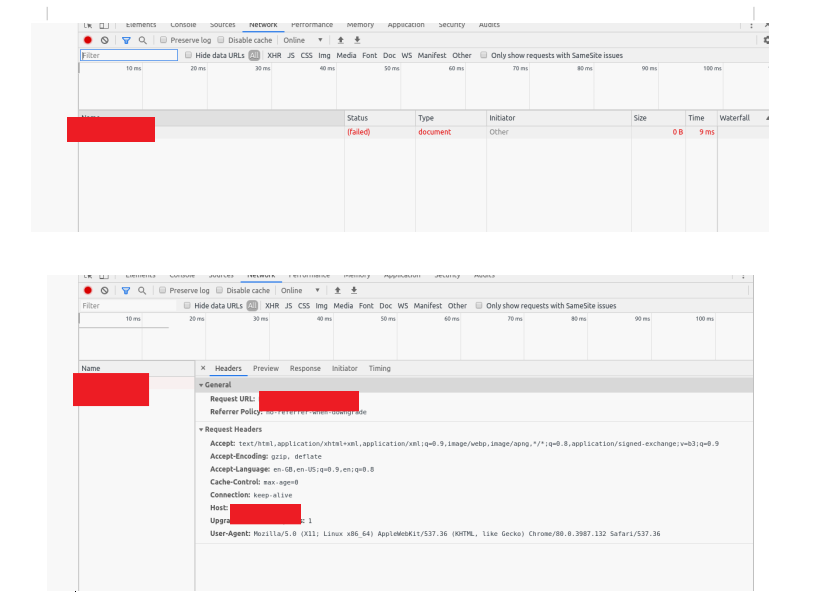
seems there is a network issue, could you open chrome devtools and find the failed request to the server and attach details?
azhavoro
on 18 May 2020
@azhavoro there is no response in the console and in network tab nothing info just my ipaddress with failed.
vasanththangavel
on 18 May 2020
Could you please check that network is ok with base nginx docker image?
docker run --rm -d -p your_port:80 nginx
note: stop cvat_proxy container before. Can you see Nginx "Welcome page"?
azhavoro
on 18 May 2020
@azhavoro i tried with the above cmd ,result look like this
Error response from daemon: driver failed programming external connectivity on endpoint sad_bell (35bbd03d9d79acf18293b6ff76476930b272c961d4f105c5b10ff3eb3c33fa24): Error starting userland proxy: listen tcp ip_address: bind: cannot assign requested address.
vasanththangavel
on 18 May 2020
hmmm, what exact command did you use?
azhavoro
on 18 May 2020
@azhavoro
docker run --rm -d -p your_port:80 nginx and before that i stopped cvat_proxy and i replaced port with mine like this 156.21.41.124:3365:80
vasanththangavel
on 18 May 2020
You should not use IP with -p option, for you case it will be docker run --rm -d -p 3365:80 nginx
azhavoro
on 18 May 2020
@azhavoro after running docker run --rm -d -p 3365:80 nginx i got result like this but my port is free only.
docker: Error response from daemon: driver failed programming external connectivity on endpoint mystifying_bell (aad7bdbce2a3e230c1f7e278147ab0fae6aa6b7298b79e2b1815bcb0f44d002c): Bind for 0.0.0.0:3365 failed: port is already allocated.
vasanththangavel
on 19 May 2020
@azhavoro i just reinstalled everything and do the same following steps, now it's working.port forwarding was not done properly because of that issue happened now it resolved.. Thanks for ur valuable time.
vasanththangavel
on 19 May 2020
@MrDiudiu could you please attach your compose config?
azhavoro
on 25 Aug 2020
Related issues
 oostap1
·
3Comments
oostap1
·
3Comments
 TOsmanov
·
5Comments
TOsmanov
·
5Comments
 syonekura
·
4Comments
syonekura
·
4Comments
 JK-97
·
3Comments
JK-97
·
3Comments
 davodogster
·
4Comments
davodogster
·
4Comments
Most helpful comment
@vasanththangavel Hi
format of ports option should be
"your public port:80", you should not change the internal port, i.e.Please use gitter for such questions in the future, also this guide my be usefull https://docs.docker.com/compose/networking/