Environment information
- Operating System: macOS 10.15.6
- Cutter version: 1.12.0
- Obtained from:
- [ ] Built from source
- [x] Downloaded release from Cutter website or GitHub
- [ ] Distribution repository
- File format:
Describe the bug
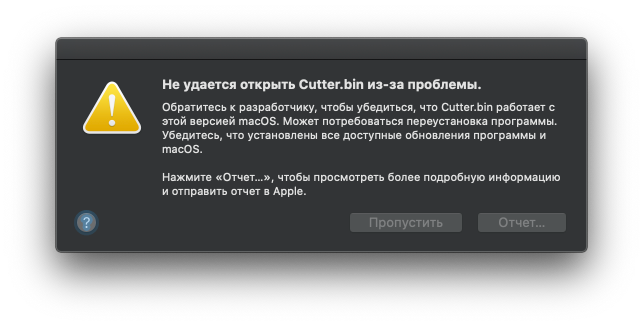
Crashes on startup:
Application Specific Information:
dyld: launch, loading dependent libraries
DYLD_FRAMEWORK_PATH=/Applications/Cutter.app/Contents/MacOS/../Frameworks
DYLD_LIBRARY_PATH=/Applications/Cutter.app/Contents/MacOS/../Frameworks

Dyld Error Message:
  Library not loaded: /usr/local/opt/gettext/lib/libintl.8.dylib
  Referenced from: /Applications/Cutter.app/Contents/Frameworks/Python.framework/Versions/3.6/Python
  Reason: image not found
To Reproduce
Open Cutter.
Expected behavior
Continue to use IDA Pro :)
Screenshots
 vit9696
All 19 comments
Thanks for reporting this issue :)
The release works on my macos machine, we will investigate what went wrong when running on yours.
Thank you again!
 ITAYC0HEN
on 13 Sep 2020
ITAYC0HEN
on 13 Sep 2020
@ITAYC0HEN From the error log it seems that it is trying to load a dynamic library outside the app. I assume that the macOS machine on which you tried it happened to have the same library installed in the same place. Depending on OS libraries might be fine in some cases, but /usr/local/opt is probably from homebrew. The .app should be selfcontained and not depend on homebrew libraries being installed to run.
 karliss
on 13 Sep 2020
karliss
on 13 Sep 2020
Please check installation source. It seems like you have installed Cutter via Homebrew instead of using precompiled release package. However, if you want to use current version please consider following this dirty hack.
Have a nice day!
 doublegrey
on 15 Sep 2020
doublegrey
on 15 Sep 2020
Downloaded from here: https://github.com/radareorg/cutter/releases/tag/v1.12.0
Binary dmg, if it is not obvious.
vit9696
on 15 Sep 2020
I tried to reproduce your issue on my macOS Catalina Version 10.15.6 and macOS Mojave 10.14.6
It seems like described error is related to your system, the release build is fine. As a workaround, please try building from source
Have a nice day!
doublegrey
on 16 Sep 2020
The release build contains references to Homebrew libintl.8.dylib, which is obviously not supposed to be present on a vanilla system:
$ otool -L Cutter.app/Contents/Frameworks/Python.framework/Versions/3.6/Python
Cutter.app/Contents/Frameworks/Python.framework/Versions/3.6/Python:
    /Users/travis/build/radareorg/cutter-deps/python/Python.framework/Versions/3.6/Python (compatibility version 3.6.0, current version 3.6.0)
    /System/Library/Frameworks/CoreFoundation.framework/Versions/A/CoreFoundation (compatibility version 150.0.0, current version 1454.90.0)
    /usr/local/opt/gettext/lib/libintl.8.dylib (compatibility version 11.0.0, current version 11.0.0)
    /usr/lib/libSystem.B.dylib (compatibility version 1.0.0, current version 1252.50.4)
The library is not bundled with the app either (no output other than that):
$ find Cutter.app -name libintl.8.dylib
This makes it obvious that your assumption about my system being the cause of a problem is not valid, but rather your binaries contain dependencies they are not supposed to have.
Check man install_name_tool to understand how you can resolve such issues when bundling the applications. I once dealt with a similar problem when bundling the software built with MacPorts and attached a script I wrote for that purpose. Perhaps it can be used as a reference. deployfix.sh.zip
vit9696
on 16 Sep 2020
We are currently using windeployqt, linuxdeployqt and macdeployqt for this purpose. As you observed in configuration it misses some libraries. Cutter is currently lacking macOS developers so @vit9696 if you feel comfortable with this topic pull request would be appreciated. The top level script currently doing packaging can be found here https://github.com/radareorg/cutter/blob/ad66718f375b013a3021e531891c71082ee48867/.travis.yml#L233 .
Don't know about macdeployqt but at least the corresponding Linux tool can copy all the libraries not only Qt and it's direct dependencies. Might be worth checking if changing the the orde so that macdeployqt gets run after packaging python helps in any way. If not then the python packaging script needs to be modified.
karliss
on 16 Sep 2020
MacOS Building error.

 SteveMoore18
on 25 Sep 2020
SteveMoore18
on 25 Sep 2020
@SteveMoore18 Please do not post unrelated problems to existing issues. Building error and the build not working are two completely different things. Also your issue is most likely due to use of incompatible r2 version. Please use the version specified in submodule which is also what CI build use, anything else is not guaranteed to work.
karliss
on 25 Sep 2020
MacPorts user here. I have gettext installed and my libraries are installed in /opt/local/lib instead, so by re-creating the directory as expected and doing a softlink, I can get Cutter to run for now. A temporary workaround I know, but at least it runs :-)
sudo mkdir -p /usr/local/opt/gettext/lib
sudo ln -s /opt/local/lib/libintl.8.dylib /usr/local/opt/gettext/lib/libintl.8.dylib
 cheemeng
on 26 Sep 2020
cheemeng
on 26 Sep 2020
Just install
brew install gettext
I added this problem to troubleshooting section in building from source doc.
 NikitaMalakhov
on 1 Oct 2020
NikitaMalakhov
on 1 Oct 2020
We added a potential solution for it to our docs in PR #2436 Please check if it fixes your issue :)
ITAYC0HEN
on 1 Oct 2020
It is not a "potential solution", because I obviously _can_ workaround the problem myself. Point is, neither I, nor many other people use brew, and I third-party libraries should not be a requirement to launch the application. Fix your build scripts please.
vit9696
on 1 Oct 2020
"potential solution" might have been bad choice of words. Yes, fixing build scripts is the proper solution. Until that happens knowing a workaround is useful for some people assuming they need to get Cutter working at any cost.
karliss
on 16 Oct 2020
Since Brew would not be a native solution, would making gettext from GNU Ftp tar archive work? Could this be a potential resolution to this issue?
If yes, I would be happy to help.
cc: @ITAYC0HEN / @karliss / @NikitaMalakhov
 ICEBERG98
on 23 Oct 2020
ICEBERG98
on 23 Oct 2020
@ICEBERG98 I have a feeling that you misunderstood the problem. gettext from GNU Ftp archive wouldn't be any better or worse than one from brew. Where it's obtained from is partially orthogonal to the problem of Cutter packaging scripts not including all the transitive dependencies. How it's obtained mostly depend on how the direct dependencies of Cutter compiled and linked.
karliss
on 24 Oct 2020
Since this seems to take a while and people don't seem to be opposed to ugly workarounds i figured i'd chime in with another that doesn't include installing homebrew or macports..
As libintl is part of gnu gettext which is used by a bunch of different software projects to provide translations, so chances are you already have a copy (or a few) installed, bundled with some other application. To find out if you do check the output of
find /Applications -name "*libintl*" -type f
On my system i got
$ find /Applications -name "*libintl*" -type f
/Applications/Signal.app/Contents/Resources/app.asar.unpacked/node_modules/sharp/vendor/include/libintl.h
/Applications/Signal.app/Contents/Resources/app.asar.unpacked/node_modules/sharp/vendor/lib/libintl.8.dylib
/Applications/Zenmap.app/Contents/Resources/lib/libintl.8.dylib
/Applications/IINA.app/Contents/Frameworks/libintl.8.dylib
...
Unless you happen to have the same apps installed as me you'll likely get something different, but hopefully you'll get _something_. Select one (i went with IINA) and check the version of it (second row of output):
$ otool -L /Applications/IINA.app/Contents/Frameworks/libintl.8.dylib
/Applications/IINA.app/Contents/Frameworks/libintl.8.dylib:
    @rpath/libintl.8.dylib (compatibility version 11.0.0, current version 11.0.0)
    /usr/lib/libiconv.2.dylib (compatibility version 7.0.0, current version 7.0.0)
    /System/Library/Frameworks/CoreFoundation.framework/Versions/A/CoreFoundation (compatibility version 150.0.0, current version 1675.129.0)
    /usr/lib/libSystem.B.dylib (compatibility version 1.0.0, current version 1281.100.1)
Before making cutter's bundled version of python use whatever-you-select's bundled version of libintl (i told you it'd be ugly) first check that the versions match (fourth row of output here):
$ otool -L /Applications/Cutter.app/Contents/Frameworks/Python.framework/Versions/3.6/Python
/Applications/Cutter.app/Contents/Frameworks/Python.framework/Versions/3.6/Python:
    /Users/travis/build/radareorg/cutter-deps/python/Python.framework/Versions/3.6/Python (compatibility version 3.6.0, current version 3.6.0)
    /System/Library/Frameworks/CoreFoundation.framework/Versions/A/CoreFoundation (compatibility version 150.0.0, current version 1454.90.0)
    /usr/local/opt/gettext/lib/libintl.8.dylib (compatibility version 11.0.0, current version 11.0.0)
    /usr/lib/libSystem.B.dylib (compatibility version 1.0.0, current version 1252.50.4)
for me it did, if it doesn't for you, try another one of the libintl's (if none of the search results' versions match you'll have to use another work around, but i can really recommend IINA - i much prefer it over VLC). When you've found one that matches use the aptly named install_name_tool that @vit9696 mentioned above to make the switch
sudo install_name_tool -change "/usr/local/opt/gettext/lib/libintl.8.dylib" "/Applications/IINA.app/Contents/Frameworks/libintl.8.dylib" /Applications/Cutter.app/Contents/Frameworks/Python.framework/Versions/3.6/Python
(you should of course replace the IINA path with whatever you find) and presto! hopefully, maybe, it'll work until it brakes again.
To be clear, this is pretty nasty and makes cutter depend on other software meaning it could/will break again when that one updates/is removed .
 donkey-konkey
on 15 Nov 2020
donkey-konkey
on 15 Nov 2020
Just install
brew install gettext
I added this problem to troubleshooting section in building from source doc.
This fixed it for me ! Thanks !
 rattatosk
on 16 Dec 2020
rattatosk
on 16 Dec 2020
install gettext does not works for me, while using the older version of cutter works.
 Kxrr
on 17 Dec 2020
Kxrr
on 17 Dec 2020
Related issues
 s0i37
·
5Comments
karliss
·
3Comments
s0i37
·
5Comments
karliss
·
3Comments
 Maijin
·
4Comments
Maijin
·
4Comments
 hamsterwoede
·
4Comments
hamsterwoede
·
4Comments
 kidmose
·
5Comments
kidmose
·
5Comments
Most helpful comment
It is not a "potential solution", because I obviously _can_ workaround the problem myself. Point is, neither I, nor many other people use brew, and I third-party libraries should not be a requirement to launch the application. Fix your build scripts please.