Cutter: Cutter decompiler code formatting feature
Is your feature request related to a problem? Please describe.
Currently, I am trying to format/organize the decompiled code to make it easy for others to follow it but the code lines sticking to each other, not well-structured and I can't organize it within cutter.
Describe the solution you'd like
By adding an option for the decompiler widget to automatically format the code and allow manual formatting by making the decompiler widget act as the code editor.
 oviche
All 8 comments
I am trying to format/organize the decompiled code to make it easy for others to follow it but the code lines sticking to each other
Could you provide an image of code lines sticking to each other? Just wanted to verify if it is the expected behavior.
 NirmalManoj
on 31 Aug 2020
NirmalManoj
on 31 Aug 2020
I am trying to format/organize the decompiled code to make it easy for others to follow it but the code lines sticking to each other
Could you provide an image of code lines sticking to each other? Just wanted to verify if it is the expected behavior.
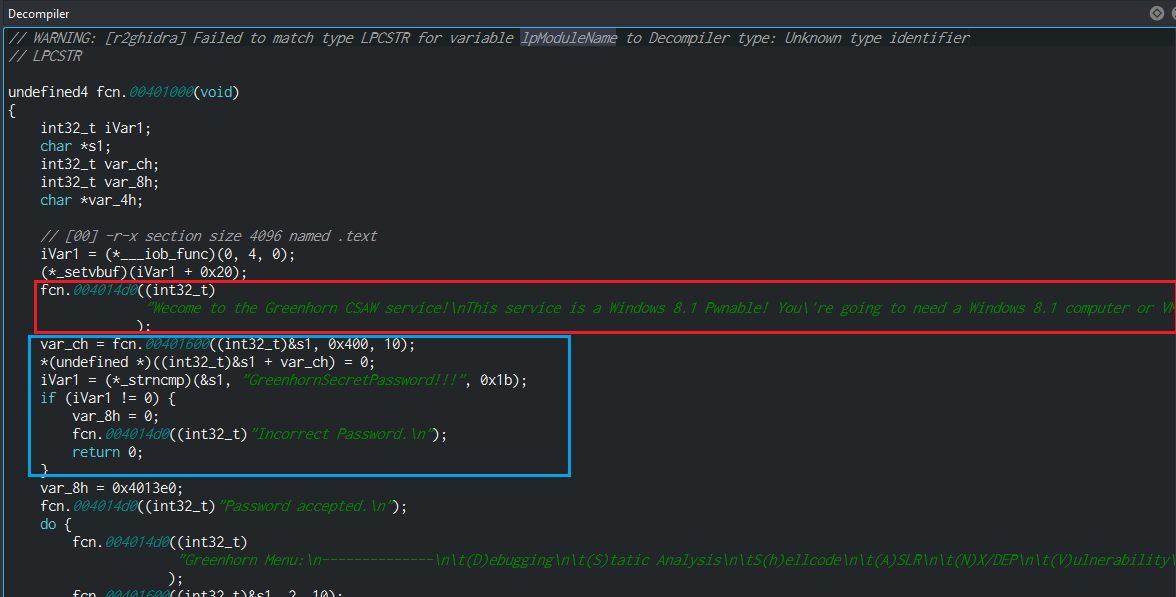
I am sorry if I didn't make it clear, what I mean about sticking lines of code is something like the if condition within the blue rectangle in the attached capture, As it has no empty line before for separation from the lines above it to make code easier to read.
Besides that, I wanted to cut the long string within a red rectangle in the attached capture to multi-lines to make it easier to follow.
Briefly, I just want to be able to add spaces and newlines as code editor to organize/format the code to make it easier to follow.
oviche
on 31 Aug 2020
@oviche What you are observing is indeed the expected behavior. I'm not sure if it will be possible to improve the decompiler in the way you want anytime soon.
Secondly, a lot of improvements have been done to the decompiler. The existing decompiler had been refactored to support context-sensitive annotations. As of now, Ghidra plugin supports all the new actions. You can read about all the improvements here: https://cutter.re/improving-decompiler-widget-gsoc
In order to use them, you will have to compile the latest master of Cutter and r2ghidra-dec. See here for Cutter: https://cutter.re/docs/building.html#building-steps
See here for r2ghidra-dec: https://github.com/radareorg/r2ghidra-dec#building
I don't know why you want to do this, but if it helps, you can copy-paste the entire code from the new decompiler to an editor to make it more readable. This can be more useful for your second point. But if you want it to get updated when you make changes, this probably is not the solution you want.
NirmalManoj
on 31 Aug 2020
I understand very good the need you have, I experienced the same frustration and wish to have such features as well.
As Nirmal said, implementing some of these features wouldn't be easy at all an will require some work
 ITAYC0HEN
on 31 Aug 2020
ITAYC0HEN
on 31 Aug 2020
@NirmalManoj
- Firstly, building them from sources will achieve different results than downloading the compiled cutter version from the official site which already contains the r2ghidra plugin by default?
- Secondly, I know that's the expected behavior however I just recommended it in order to make the decompiler more user-friendly. Besides achieving the flexibility to do whole tasks within one place (the decompiler itself). I know that feature maybe will not be provided soon as it may not be essential functionality but it will be cool to get achieved.
Thanks in advance :))
oviche
on 31 Aug 2020
- Firstly, building them from sources will achieve different results than downloading the compiled cutter version from the official site which already contains the r2ghidra plugin by default?
@oviche Improvements between each release will be merged to master. All of the significant improvements for the decompiler was done on a separate branch named decompiler-refactoring in Cutter, r2ghidra-dec, and radare2. This was recently merged with the master branch. But in order for this to become available in the form of a release, you will have to wait till the next release. This is basically how most projects work.
Thanks for creating the issue:-)
NirmalManoj
on 31 Aug 2020
@oviche you won't experience meaningful difference in the decompiled code. The major experience you'll feel is working with the now context-sensitive context menu.
ITAYC0HEN
on 31 Aug 2020
There were some inconsistencies with the copy selected text action in the previous context menu. That's mainly why I mentioned it, so that code can be copied properly.
NirmalManoj
on 31 Aug 2020
Related issues
 Maijin
·
5Comments
Maijin
·
5Comments
 doublegrey
·
4Comments
doublegrey
·
4Comments
 karliss
·
3Comments
karliss
·
3Comments
 xarkes
·
4Comments
xarkes
·
4Comments
 dukebarman
·
4Comments
dukebarman
·
4Comments
Most helpful comment
I am sorry if I didn't make it clear, what I mean about sticking lines of code is something like the if condition within the blue rectangle in the attached capture, As it has no empty line before for separation from the lines above it to make code easier to read.
Besides that, I wanted to cut the long string within a red rectangle in the attached capture to multi-lines to make it easier to follow.
Briefly, I just want to be able to add spaces and newlines as code editor to organize/format the code to make it easier to follow.