Cutter: Add settings to control analysis verbosity
Is your feature request related to a problem? Please describe.
Currently, if Cutter (r2) faces an analysis issue, there is no good way for the user to know what happened. For example, when trying to define a function at some address, I couldn't understand why it fails. Only when enabled e anal.verbose I saw that it fails because it can't set functions on non-executable sections.
Describe the solution you'd like
Add an option to the preferences widget to enable verbose analysis (anal.verbose)
 ITAYC0HEN
All 7 comments
@ITAYC0HEN shouldn't this be in analysis options dialog too during open file? Also, where should it be added in preferences exactly as I don't see any analysis specific section?
 Surendrajat
on 2 Jun 2020
Surendrajat
on 2 Jun 2020
Hey :) It can be on Initial Analysis dialog, but it will create a lot of verbose and msgs during the analysis so I won't encourage users to use it.
Regarding the section, I'd add a new Analysis section for this.
Something like this issue can also be part of this section: https://github.com/radareorg/cutter/issues/875
Probably, more options from e??~anal can be there as well (options that are relevant to change after the initial analysis). But this stuff can be decided later on :)
ITAYC0HEN
on 2 Jun 2020
I'd like to work on this issue. Do you have more suggestions for other analysis options besides anal.verbose?
 ocastejon
on 21 Jul 2020
ocastejon
on 21 Jul 2020
This is a good question :)
I opened this for a list in which we can select the options we like to put in there
https://hackmd.io/@Megabeets/H1jBD3Hxv/edit
ITAYC0HEN
on 22 Jul 2020
Hi everyone,
I'm sharing with you a first version of the "Analysis" section. Since this is my first contribution to Cutter, I think it's a good idea to first share the code before creating the PR. If you think that it makes sense, I can then create the PR for a proper code review. Of course, if you prefer that I create the PR directly, this is perfectly fine with me.
You'll be able to see the changes with respect to master here.
Some considerations I have taken into account:
- To keep it simple, for now I narrowed down the selected options at https://hackmd.io/@Megabeets/H1jBD3Hxv/edit to only those that have boolean values. When I have some feedback on the current code, I can add the remaining options, in this or subsequent PRs.
- In general, I tried to keep the code as simple as possible and modify existing files as little as possible. For example, I chose to use the
Core()->getConfigbmethod directly instead ofConfig()->getConfigto avoid having to modify this one. - Similarly, I decided to use the already existing
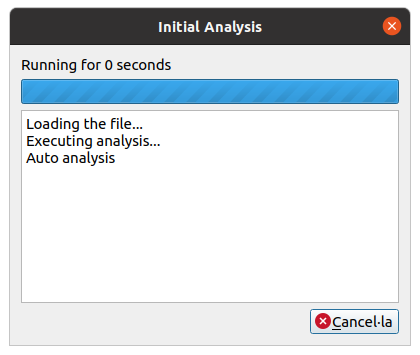
AnalTaskto handle the analysis. As a consequence, the title of the async task dialog is "Initial Analysis" and you can see the message "Loading the file...", which is not quite accurate:
However, I thought it was OK, for now at least. - The selected options are not maintained between two different sessions. However, if you think it's worth it, I can add it, as well as a "Restore defaults" button (just as in the Disassembly section).
- I chose the icon
cog_light.svg, since it seemed that a cog is a good representation for "Analysis" and it was already there. Let me know if that's OK, or what other icon would you think fits better. Also, I took into account that for the light theme the color of the icon changes, so added the corresponding image too.
Let me know your thoughts on it! Thanks!
ocastejon
on 25 Jul 2020
Hey yo @ocastejon! Great comment, very thorough :+1:
I would love to seed it as a PR and then we can comment on some of the things you mentioned.
Using the Analysis Task for the inital analysis is a wise decision, but it will have to get some tweaks (as you mentioned, the logs aren't correct).
The icon is quite fine :) Can't think of any better one from the top of my head
ITAYC0HEN
on 25 Jul 2020
Hi @ITAYC0HEN! Thank you! I just created the pull request #2332. Looking forward to your feedback! :)
ocastejon
on 26 Jul 2020
Related issues
 karliss
·
3Comments
karliss
·
3Comments
 doublegrey
·
4Comments
doublegrey
·
4Comments
 0x913
·
3Comments
0x913
·
3Comments
 dhucul
·
3Comments
dhucul
·
3Comments
 Pamplemousse
·
3Comments
Pamplemousse
·
3Comments
Most helpful comment
Hi everyone,
I'm sharing with you a first version of the "Analysis" section. Since this is my first contribution to Cutter, I think it's a good idea to first share the code before creating the PR. If you think that it makes sense, I can then create the PR for a proper code review. Of course, if you prefer that I create the PR directly, this is perfectly fine with me.
You'll be able to see the changes with respect to master here.
Some considerations I have taken into account:
Core()->getConfigbmethod directly instead ofConfig()->getConfigto avoid having to modify this one.AnalTaskto handle the analysis. As a consequence, the title of the async task dialog is "Initial Analysis" and you can see the message "Loading the file...", which is not quite accurate:However, I thought it was OK, for now at least.
cog_light.svg, since it seemed that a cog is a good representation for "Analysis" and it was already there. Let me know if that's OK, or what other icon would you think fits better. Also, I took into account that for the light theme the color of the icon changes, so added the corresponding image too.Let me know your thoughts on it! Thanks!