Is your feature request related to a problem? Please describe.
Not all of our users are familiar with .cutterrc (and even not with .radare2rc). There is no comfortable way to edit it from inside Cutter. The use of .cutterrc can complete the settings we don't expose in the UI.
Describe the solution you'd like
I suggest exposing a simple text editor widget to edit the .cutterrc file. When opened, the widget will fetch the content of .cutterrc and display it in the text editor. Then, can be updated and saved to the file.
It would be nice to have:
- Syntax highlighting (in case it looks good with r2 commands)
- Some examples of useful settings that the user can set
 ITAYC0HEN
All 25 comments
I would like to work on this issue. Is there anything that I should keep in mind apart from what is described?
 NirmalManoj
on 20 Mar 2020
NirmalManoj
on 20 Mar 2020
For syntax highlighting look for example in hexdump widget right side panel.
It would be nice to have some kind of path indicator or button to help opening it externally
Not strictly necessary but some kind of autocomplete for e variables would be very cool. There is a r2 command for listing all of their names and descriptions.
 karliss
on 20 Mar 2020
karliss
on 20 Mar 2020
I have a doubt regarding the location of the config file. For .radare2rc in radare2, this file could be in multiple locations (https://radare.gitbooks.io/radare2book/configuration/files.html).
radare2 will first try to load /usr/share/radare2/radare2rc
Each user in the system can have its own r2 scripts to run on startup to select the color scheme, and other custom options by having r2 commands in there.
~/.radare2rc
~/.config/radare2/radare2rc
~/.config/radare2/radare2rc.d/
For cutter, the .cutterrc is stored in (if it exists), ~/.cutterrc. If I haven't missed any code related to this, this is the only location where .cutterrc should be stored. Can you please tell me if I missed something? And should I make any change in the location of .cutterrc or can I let the following code be.
void CutterCore::loadCutterRC()
{
    CORE_LOCK();
    auto home = QDir::home();
    if (!home.exists()) {
        return;
    }
    auto cutterRCFileInfo = QFileInfo(home, ".cutterrc");
    if (!cutterRCFileInfo.isFile()) {
        return;
    }
    auto path = cutterRCFileInfo.absoluteFilePath();
    qInfo() << "Loading" << path;
    r_core_cmd_file(core, path.toUtf8().constData());
}
PS : Please assign this issue to me. I am working on this.
NirmalManoj
on 20 Mar 2020
Indeed I have several points to keep in mind.
It is not as simple as it looks, you can implement this in parts. Please make sure to create the following widgets flexible so they can be used in other places in Cutter as well. Make sure to create all the helper functions you need globally, as well as proper using of class, subcllassing and inheritence.
Order of search
Don't only check for .cutterrc in the home folder. In addition, check inside all the standard locations for the files. See how it is implemented in plugins load:
e.g it will search in /home/username/.local/share/RadareOrg/Cutter/plugins, /usr/local/share/RadareOrg/Cutter/plugins, /usr/share/RadareOrg/Cutter/plugins ...
This will help it support multiple locations and OS.
Multiple initialization files can be loaded.
Test on Linux, Windows, and macOS
Make sure to test this feature on multiple OS, ask us for help if you don't have all of them, we can help with executing on our dev machines.
Useful Commands
Make a list of useful eval commands to use. You can discuss it in with the devs and with a community. You can have them all commented or as place holders.
Syntax Highlighting
I am not sure how good radare2 handles syntax highlighting, this is not a must since radare2 shell scripts aren't complicated. But it could be nice, we need to test how it looks like.
Documentation
Make sure to add it to the user documentation. Document the existence of .cutterrc and the usage of the dialog.
See related issue: #2063
Editor UI
I suggest to add it to the Preferences widget. I imagine the UI for this feature as similar to IDE's preferences editor. Here is a sketch I made:
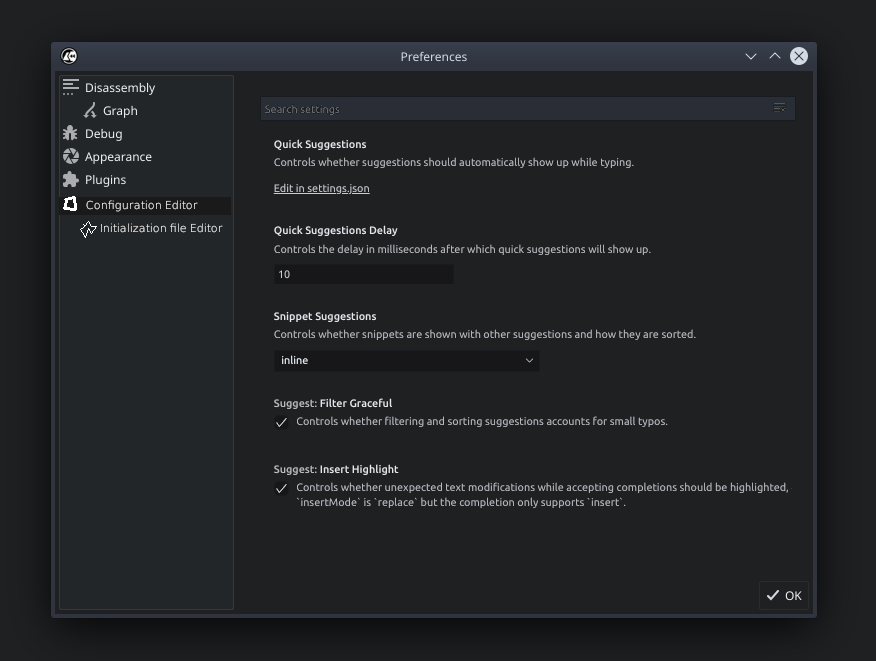
As you can see in this sketch I made, two items were added to the left pane. The first is a visual configuration editor. The second is a subitem of the text editor.
Configuration Editor
This will be a configuration editor that is dynamically created from radare2 configuration options. The implementation should understand what type of value each configuration receives and what is the best component to use in it. For example, boolean configuration keys can be with a checkbox (V / X), integer can be spinbox, if it has hardcoded configuration values then combobox is best to be used, and so on.
A search box can be used to quickly search in the config.
Then, each change to this config can be applied to a cutterrc initialization file.
File editor
This is a multi-line text area that users can script their configuration and set it manually.
Retrieving the config
To retrieve the information to display you can simply use the e?j command. It will have all the information you need.
[0x00000000]> e?j~{}
Do you want to print 4426 lines? (y/N) y
[
  {
    "name": "anal.a2f",
    "value": false,
    "type": "bool",
    "desc": "Use the new WIP analysis algorithm (core/p/a2f), anal.depth ignored atm",
    "ro": false
  },
  {
    "name": "anal.arch",
    "value": "x86",
    "type": "str",
    "desc": "Select the architecture to use",
    "ro": false,
    "options": [
      "6502",
      "6502.cs",
      "8051",
... [truncated] ...
 {
    "name": "anal.armthumb",
    "value": false,
    "type": "bool",
    "desc": "aae computes arm/thumb changes (lot of false positives ahead)",
    "ro": false
  },
  {
    "name": "anal.autoname",
    "value": false,
    "type": "bool",
    "desc": "Speculatively set a name for the functions, may result in some false positives",
    "ro": false
  },
  {
    "name": "anal.bb.maxsize",
    "value": "512K",
    "type": "str",
    "desc": "Maximum basic block size",
    "ro": false
  },
  {
    "name": "anal.from",
    "value": -1,
    "type": "addr",
    "desc": "Lower limit on the address range for analysis",
    "ro": false
  },
  {
    "name": "anal.gp",
    "value": 0,
    "type": "int",
    "desc": "Set the value of the GP register (MIPS)",
    "ro": false
  },
...
Wow..this is something very different and more real than what I was thinking. I am amazed to see the amount of customization and features you had in mind related to this configuration editor you envisaged. The profoundness of this work encourages me to learn more and do this. Most surely, I will be doing this in parts. But I will need help along the way.
NirmalManoj
on 20 Mar 2020
Is .cutterrc searched for in the given standard locations currently? Is it also not something I should do?
NirmalManoj
on 20 Mar 2020
This the code r2 uses to load radare2rc (if I am not mistaken), in this QStandardPaths are not used. So are we planning to use QStandardPaths now because it's better code? (I'm asking to clarify this for myself).
R_API void r_core_parse_radare2rc(RCore *r) {
    bool has_debug = r_sys_getenv_asbool ("R_DEBUG");
    char *homerc = r_str_home (".radare2rc");
    if (homerc && r_file_is_regular (homerc)) {
        if (has_debug) {
            eprintf ("USER CONFIG loaded from %s\n", homerc);
        }
        r_core_cmd_file (r, homerc);
    }
    free (homerc);
    homerc = r_str_home (R2_HOME_RC);
    if (homerc && r_file_is_regular (homerc)) {
        if (has_debug) {
            eprintf ("USER CONFIG loaded from %s\n", homerc);
        }
        r_core_cmd_file (r, homerc);
    }
    free (homerc);
    homerc = r_str_home (R2_HOME_RC_DIR);
    if (homerc) {
        if (r_file_is_directory (homerc)) {
            char *file;
            RListIter *iter;
            RList *files = r_sys_dir (homerc);
            r_list_foreach (files, iter, file) {
                    if (*file != '.') {
                        char *path = r_str_newf ("%s/%s", homerc, file);
                        if (r_file_is_regular (path)) {
                            if (has_debug) {
                                eprintf ("USER CONFIG loaded from %s\n", homerc);
                            }
                            r_core_cmd_file (r, path);
                        }
                        free (path);
                    }
                }
            r_list_free (files);
        }
        free (homerc);
    }
}
afair, we don't load it from any other place than home folder.
You can ignore radare2rc completely, it has nothing practical to do with the feature. We implement cutterrc on our own side, so you don't have to dig into C code.
Cutter is already loading cutterrc, just make sure it searches in more than one place, as I showed in plugin manager :)
ITAYC0HEN
on 20 Mar 2020
The configuration editor part sounds like #1965 .
karliss
on 20 Mar 2020
Multiple initialization files can be loaded.
@ITAYC0HEN Do you mean we could load all of them and deal with conflicts while initiliazing or do you mean that the we should select the first cutterrc present from the standard locations while checking in order?
NirmalManoj
on 21 Mar 2020
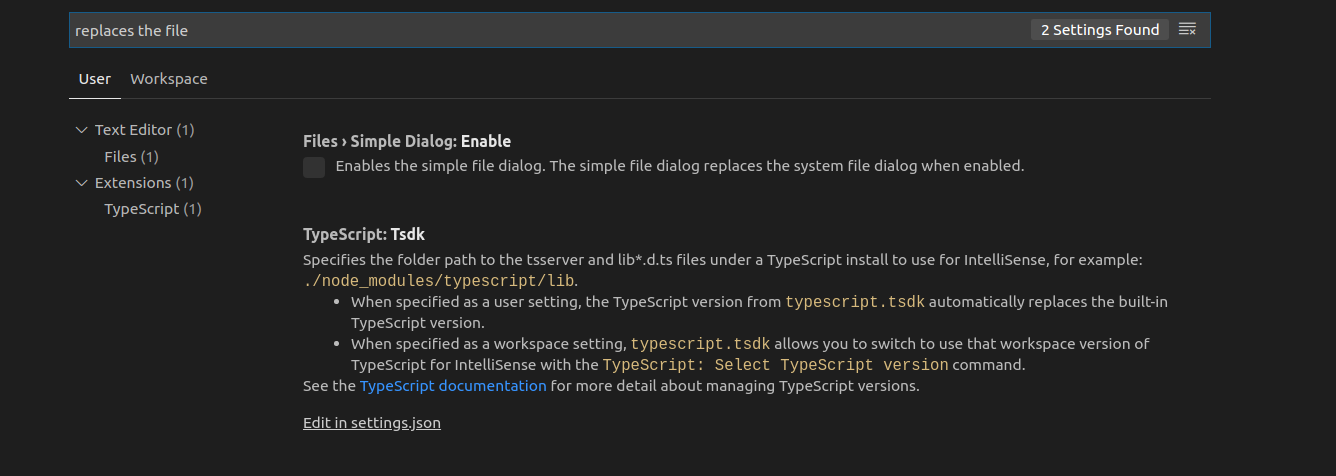
This is how the search settings option looks in the vscode settings. I am trying to make it like this. A search option like this where users can search by the config variables as well as their description.
NirmalManoj
on 21 Mar 2020
Multiple initialization files can be loaded.
@ITAYC0HEN Do you mean we could load all of them and deal with conflicts while initiliazing or do you mean that the we should select the first cutterrc present from the standard locations while checking in order?
all off them. just tell the user you did it, similar as in plugins. The configuration changes in the editor should be written to such file.
and about the vscode, yeah absolutely. Check how it is implemented in our theme editor (preferences > appearance > copy theme > edit theme). There's filtering there. But as you said, let's do this one by one. Let's don't overwhelm this task 😅 Just make sure that every step is built in a modular way for next steps. And make the new components and widgets flexible. for example, make a generic text+highlighter, make a common function for search order which will be used both in plugins and in cuterrc search (both are using the same code so better not to duplicate).
think of your steps and plane them >
so we have the search order,
we have the text editor with highlight,
we have the visual editor,...
visual editor has its own issue open. Show us a quick plan and start implementing it one by one. We can merge first steps before the final ones because it works and already helpful :)
ITAYC0HEN
on 21 Mar 2020
@ITAYC0HEN As we have discussed on telegram, the plan will be the following.
Part a - Load all files. (Have submitted a pull request, testing for mac/windows is required)
Part b - Add simple text editor to edit data in .cutterrc in a standard location. (we have to decide this standard location, preferably the last loaded one as this will supercede all the previously loaded cutterc.
Optional Part c - Giving syntax highlight feature for this text editor
Part d onwards - I havent' decided the exact plan. I will update after Part b. This will be about making the dynamic configuration editor.
NirmalManoj
on 22 Mar 2020
For part b, my plan is to load cutterrc from a single location which will be the last one to get loaded during start of the cutter.
Making this specific for each instance/installation of Cutter is one way. For this, we should be keeping this location inside the Cutter _installation directory_. This way, if someone have multiple installations of cutter in different directories (for some reason), they can easily handle .cutterrc for each cutter installation. I also don't expect people to have multiple .cutterrc in multiple standard locations. At the same time, in case such of conflicts, having a .cutterrc in the installation directory itself will help users easily supercede all the other files which will be loaded.
NirmalManoj
on 23 Mar 2020
sounds good. You can also artificially make sure a specific folder in the list is loaded last, e.g the one in the installation folder
ITAYC0HEN
on 23 Mar 2020
I disagree with storing it in installation folder. In many cases this folder will be read only. Just use QStandardPaths::writableLocation(AppConfigLocation) for choosing it.
If an installation specific system config gets used it should be with lowest priority so that user can easily override those settings using his config.
If the setup you described gets used for managing multiple configs for different use cases using multiple installations seems like a hack and can already by done using "Run script file" option when opening a file.
karliss
on 23 Mar 2020
Sounds good. Other than that, and after it wil be fixed, I think it is ready to me merged
ITAYC0HEN
on 23 Mar 2020
@ITAYC0HEN I think you can merge the PR now (Haven't tested on Mac).
As @karliss suggested, we could use QStandardPaths::writableLocation(AppConfigLocation) for loading last loaded file.
But, if I do that, would this location not be present on the first loaded locations as well? In order to avoid this problem, should I be loading from this location again after loading files from all locations as usual? Or is there a better workaround for this?
One idea I can think of is using QStandardPaths::writableLocation(AppDataLocation) instead for loading the last loaded .cutterrc. Or this could be some other standard location available which is better for this.
https://doc.qt.io/qt-5/qstandardpaths.html#StandardLocation-enum
NirmalManoj
on 23 Mar 2020
I am going to start building of part B, which is adding a simple text editor to edit data in .cutterrc in a standard location.
Currently, I am thinking about using QPlainTextEdit and loading .cutterrc from the location with the highest priority (to be decided). After this, it will work pretty much like a normal text editor. But for part C, I will be experimenting with some syntax highlighting features like in hexdump widget right-side panel that @karliss had pointed out.
_This multi-line text area for users to script their initializing config would not be having anything to do with the dynamic config editor as per my current idea._
I would like to know if I can proceed with this idea. Also, I will be loading .cutterrc from the home location for now. When a better location is decided, I can change this to that.
NirmalManoj
on 8 Apr 2020
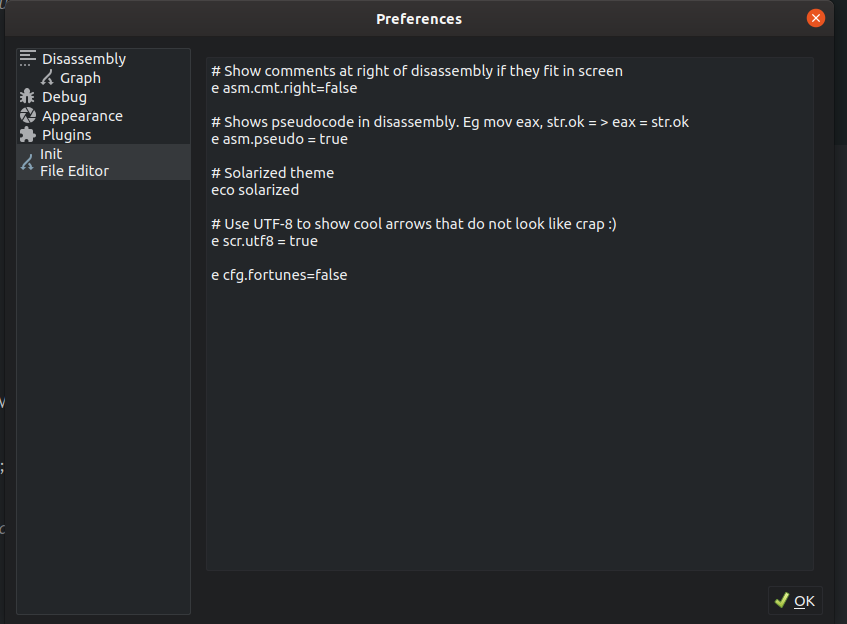
I have been working on part b when I got time. I would like to know the significance of the _OK_ Dialogue button. Is it ever used for saving anything? As far as I could find, when we click it, it closes the preferences window. Just that. So if I add a _'Save'_ button in it's place, would it be okay?
@ITAYC0HEN @karliss
NirmalManoj
on 15 Apr 2020
our settings dialog indeed saves every change automatically and applies it to the interface. So users can quickly see what changed, without exiting and entering the dialog again and again.
This benefit is irrelevant for .cutterrc so I think that a save button is agood idea. But not a (save as...)
ITAYC0HEN
on 15 Apr 2020
The work in part b is almost over. I will probably make a PR tomorrow. I want some help in choosing the location. I have been using Home directory to test in my PC. But could this be a read only location in any case? @karliss @ITAYC0HEN
NirmalManoj
on 17 Apr 2020
QStandardPaths::writableLocation(AppConfigLocation) is in my opinion better. No need to pollute home folder.
karliss
on 17 Apr 2020
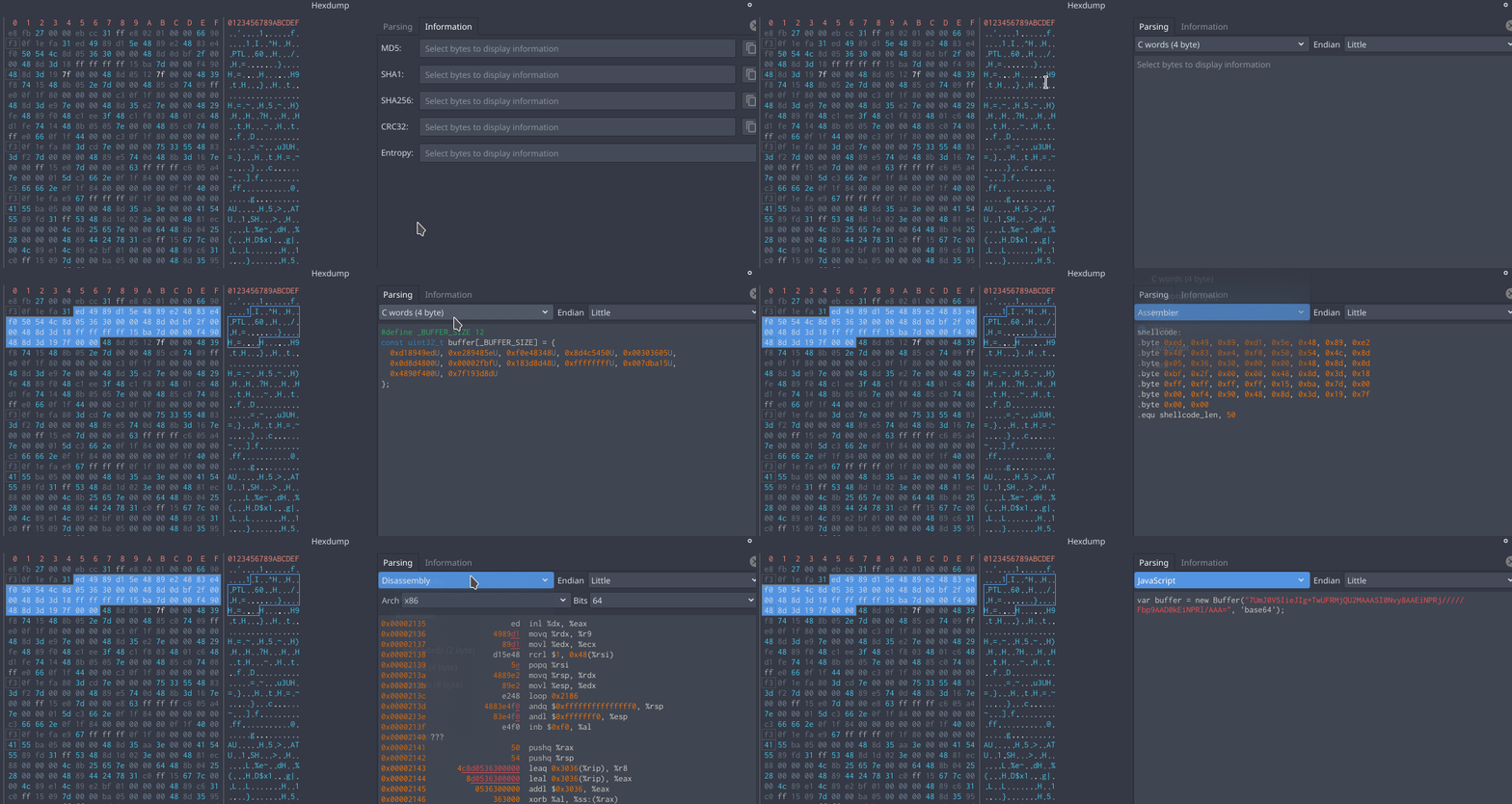
For syntax highlighting look for example in hexdump widget right side panel.
@karliss Can you please share a screenshot of hexdump widget right side panel that highlights syntax?
I don't seem to have any syntax highlighting in this panel
NirmalManoj
on 11 May 2020
ITAYC0HEN
on 11 May 2020
Related issues
 xarkes
·
4Comments
karliss
·
3Comments
xarkes
·
4Comments
karliss
·
3Comments
 AxelPotato
·
4Comments
AxelPotato
·
4Comments
 0x913
·
3Comments
0x913
·
3Comments
 Maijin
·
5Comments
Maijin
·
5Comments
Most helpful comment
I disagree with storing it in installation folder. In many cases this folder will be read only. Just use
QStandardPaths::writableLocation(AppConfigLocation)for choosing it.If an installation specific system config gets used it should be with lowest priority so that user can easily override those settings using his config.
If the setup you described gets used for managing multiple configs for different use cases using multiple installations seems like a hack and can already by done using "Run script file" option when opening a file.