Cutter: Software is not compatible with high resolutions with high DPI
Environment information
- Operating System: Windows 10
- Cutter version: 1.7.2
- File format:
Describe the bug
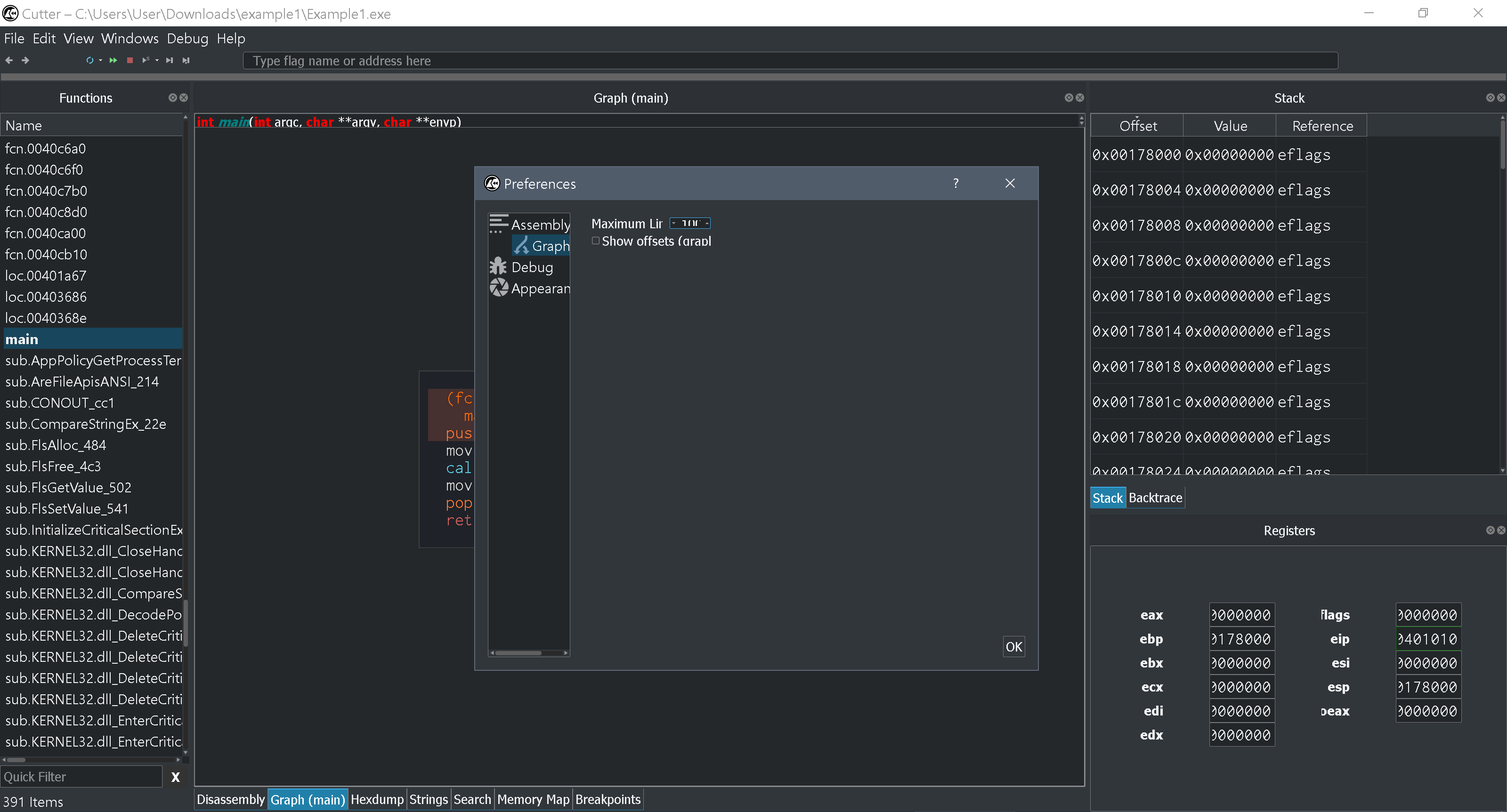
Running 3200x1800 resolution. Windows is at the recommended scaling of 250%. Some elements of the software does not scale. The majority of it does just fine.
To Reproduce
Steps to reproduce the behavior:
- Buy a high resolution screen or a device with one built in.
- Run the software.
Expected behavior
For things to scale appropriately.
Screenshots
Additional context
No.
 fredddii
All 11 comments
Related: #675
 pelijah
on 18 Dec 2018
pelijah
on 18 Dec 2018
 ITAYC0HEN
on 18 Dec 2018
ITAYC0HEN
on 18 Dec 2018
@thestr4ng3r do you have any idea about it?
ITAYC0HEN
on 13 Feb 2019
Not really, I would have to test myself. But right now I don't have any Windows dev environment set up.
 thestr4ng3r
on 13 Feb 2019
thestr4ng3r
on 13 Feb 2019
Running same DPI as you, to fix this for just your main display do the following:
cmd.exe /c "set QT_AUTO_SCREEN_SCALE_FACTOR=1 & cutter.exe"
Currently If you take any other windows and move them to lower DPI monitors the windows look okay but the font will be either too small or too large.
Based off the QT documentation it should be something that can be looked at fixing in the future, I'm interested in helping out if I get some time.
Also it should be relatively easy to add a simple environment variable in a minor release until the rest is sorted. That's my thought.
__References:__
https://doc.qt.io/qt-5/highdpi.html
 lillypad
on 22 Apr 2019
lillypad
on 22 Apr 2019
@lillypad thanks for the insights! Can we have your help with handling these issues with DPI? It would be great :)
ITAYC0HEN
on 28 Jun 2019
Yeah I have enough time to make a patch for a minor release to make it a little better.
lillypad
on 28 Jun 2019
Thank you very much :)
ITAYC0HEN
on 29 Jun 2019
Hey @lillypad, any chance you took a look on this issue? :)
ITAYC0HEN
on 19 Jul 2019
I started setting up build environments for testing on different os and graphic environments and started considering to get a monitor.
Those environment varibles are somewhat temporary workarounds that can prevent UI from being terribly broken. We should use them if necessary until proper support is implemented.
 karliss
on 19 Jul 2019
karliss
on 19 Jul 2019
Here are my work in progress notes for systematic approach to this https://gist.github.com/karliss/3e2da4c372ea9c49fab8652bfae0c7b8
karliss
on 21 Sep 2019
Related issues
 Maijin
·
5Comments
Maijin
·
5Comments
 dukebarman
·
4Comments
dukebarman
·
4Comments
 s0i37
·
5Comments
s0i37
·
5Comments
 optizone
·
3Comments
optizone
·
3Comments
 doublegrey
·
4Comments
doublegrey
·
4Comments
Most helpful comment
Running same DPI as you, to fix this for just your main display do the following:
Currently If you take any other windows and move them to lower DPI monitors the windows look okay but the font will be either too small or too large.
Based off the QT documentation it should be something that can be looked at fixing in the future, I'm interested in helping out if I get some time.
Also it should be relatively easy to add a simple environment variable in a minor release until the rest is sorted. That's my thought.
__References:__
https://doc.qt.io/qt-5/highdpi.html