The dark theme option is still present, but it's not very reliable. It should update every widget and set it's style to the dark one. Also it should change the disassembly colors, etc.
- [x] The arrow buttons are white/black (On the darker background, they look inverted.).
- [x] Most list's selected item/hover colors are explicitly set and don't necessarily match dark themes.
- [x] Disassembly color presets are not perfect yet. Specified in
Configuration::loadDefaultTheme()andConfiguration::loadDarkTheme() - [x] The background of the window borders within Cutter is gray/white.
- [x] Tabbed views (e.g. Dashboard | Disassembly | Graph..., or Sections | Comments) are gray/white.
- [x] The dashboard is gray/white.
- [x] The headers of the lists with multiple columns (e.g. the sections window in the bottom left) are gray/white.
- [x] The sections chart has a white background.
- [x] The opcode description is white/black.
 xarkes
All 9 comments
+1, this is what Cutter using the Dark theme looks like with the Arc-Dark GTK theme on XFCE:

And Cutter with the default theme, with the Arc GTK theme:

 CodingKoopa
on 10 Nov 2017
CodingKoopa
on 10 Nov 2017
The white buttons on the top left with default theme is weird.
xarkes
on 10 Nov 2017
@TheKoopaKingdom could it be that you don't have Qt's SVG support? How did you build cutter or did you use the builds from the GitHub releases?
I think we will also have to add that to the .pro file:
QT += svg
 thestr4ng3r
on 18 Nov 2017
thestr4ng3r
on 18 Nov 2017
I built it myself. I followed the instructions to install Radare2, and, in src, ran the usual mkdir build && cd build, cmake .., and make.
(Can't test with the qmake option right now.)
CodingKoopa
on 19 Nov 2017
So I suppose you used Qt from your distribution's packages? What distribution+version is this?
thestr4ng3r
on 19 Nov 2017
@TheKoopaKingdom Can you test with the latest version and tell what's broken exactly?
xarkes
on 20 Nov 2017
So I suppose you used Qt from your distribution's packages? What distribution+version is this?
Yep. This is Arch Linux, Qt version 5.9.2.
Can you test with the latest version and tell what's broken exactly?
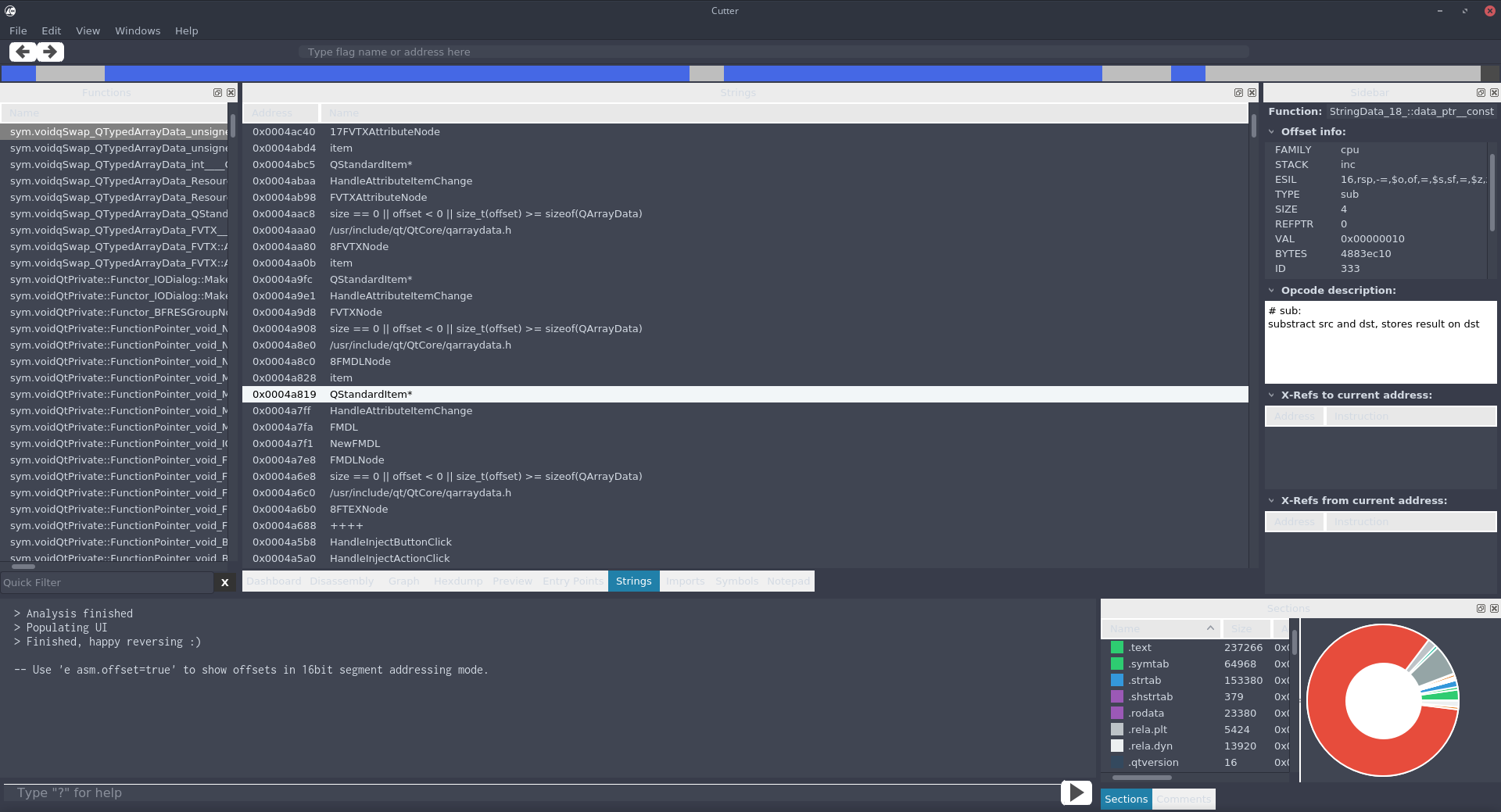
Rebuilt with the latest version, some of it is better now.
Issues that still persist:
- The disassembly has dark text on a dark background in some cases.
- The background of the window borders within Cutter is gray/white.
- Tabbed views (e.g.
Dashboard | Disassembly | Graph..., orSections | Comments) are gray/white. - The dashboard is gray/white.
- The headers of the lists with multiple columns (e.g. the sections window in the bottom left) are gray/white.
- The sections chart has a white background.
- The opcode description is white/black.
- The arrow buttons are white/black (On the darker background, they look inverted.).
- The function list's highlight color is white (Should be blue, like the offset info of the sidebar.)


CodingKoopa
on 21 Nov 2017
I could reproduce the white icons when QtSvg is not installed. It is now required as of https://github.com/radareorg/cutter/commit/9927f2cf206a92b1b63b41adf36c179297811f7b.
thestr4ng3r
on 21 Nov 2017
Fixed most of the issues:
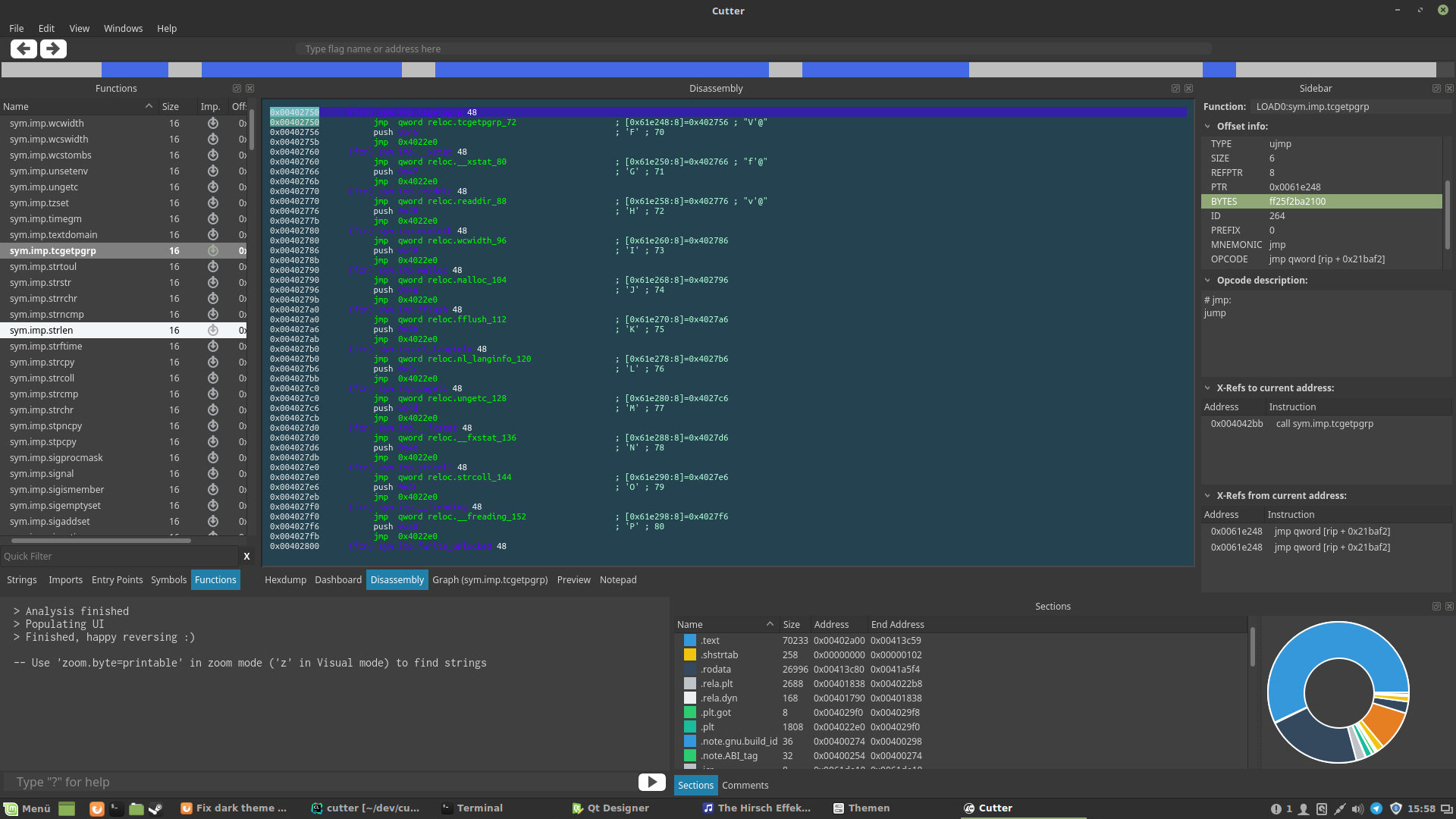
Note the different highlight colors in functions on the left (explicitly set) and offset info on the right (system default). In my opinion, we could just use system colors for all lists.
By the way, I found out it is possible to refer to palette colors from stylesheets: http://doc.qt.io/qt-5/stylesheet-reference.html#paletterole
thestr4ng3r
on 25 Nov 2017
Related issues
 optizone
·
3Comments
optizone
·
3Comments
 dhucul
·
3Comments
dhucul
·
3Comments
 mirh
·
3Comments
mirh
·
3Comments
 0x913
·
3Comments
0x913
·
3Comments
 Maijin
·
5Comments
Maijin
·
5Comments
Most helpful comment
Fixed most of the issues:

Note the different highlight colors in functions on the left (explicitly set) and offset info on the right (system default). In my opinion, we could just use system colors for all lists.
By the way, I found out it is possible to refer to palette colors from stylesheets: http://doc.qt.io/qt-5/stylesheet-reference.html#paletterole