Cura: Cannot switch to Czech language in Cura 4.8
Application version
Ultimaker_Cura-4.8.0-amd64.exe
Platform
Windows 10 (64bit)
(also reproducible on Fedora Linux 33 (64bit) with Ultimaker_Cura-4.8.0.AppImage)
Printer
I do not think that it is relevant but I have Creality Ender 3.
Reproduction steps
- Install Cura 4.8
- Start Cura
- Go to "Preferences" > "Configure Cura..."
- In the "General" > "Interface" section open the "Language" dropdown
Screenshot(s)

Actual results
The Czech language ("Čeština" in Czech) is missing in the selection even when you can see on the screenshot that my interface is in Czech.
If I switch to "English" and restart Cura, I am not able to switch back to Czech any more.
Expected results
I should be able to select Czech language.
In Cura 4.7 I was able to select Czech language and Cura was still in Czech after update to Cura 4.8, however the option is missing now.
Project file
Not relevant
Log file
stderr.log
stdout.log
Additional info
In one user group that I am part of a member that did clean installation of Cura 4.8 was not able to switch to Czech and thought that Cura 4.8 does not support Czech language anymore. He then recommended Prusa Slicer instead of Cura to a newcomer without good knowledge of English language for this specific reason.
 sustmi
All 11 comments
Oh, I can see that it was a deliberate decision: https://github.com/Ultimaker/Cura/commit/0821b1bdb1e548eb8c484b69a10bcf852c23ad7b
I will try to add the missing translations.
sustmi
on 23 Nov 2020
The Czech translation is a comunity translation. Since this is work done on a voluenteer basis, we can't ensure that it's there (unlike the languages that we officially support and pay translators for).
 nallath
on 23 Nov 2020
nallath
on 23 Nov 2020
Thank you for your reply @nallath .
I did not really know how you manage to translate Cura to Czech. Thank you for the insight.
How should I understand the fact that you closed the issue?
Would be my contribution welcome? If I sent you a pull request with the missing translation will you re-enable Czech language in Cura?
I think I can understand your situation. In the past I received pull requests to my small project to add Italian, French, Brazilian Portuguese, German or Japanese translations.
I do not speak any of these languages however I am grateful that there are people that are willing to contribute and translate my extension to their native language. I simply have to trust them to do their best. I tried to translate few strings back to Czech/English by translator and saw that it looks OK. I can see that the translations are not complete but I still think that for some people it is better than nothing.
I also understand that you want to keep some level of quality for your product.
Do you have any experience that somebody tried to exploit the fact that you cannot check every translation? Or did somebody complained about the translation to be that bad that he/she would rather use different software?
Could you for example put the option back to the dropdown as "Czech (community translation)" with a note like "Community translations may have lower quality than the officially supported languages. If you find any issues or missing translation you can make a pull request on GitHub."
I think that having a slicer software in a language you are fluent in is one of the most important things in order to get started with 3D printing. I always liked that you make a great slicer software for free (similarly how Makerbot creates Thingiverse.com for free). I understand that you get literally zero dollars for it. But I still believe that it would be sad if you stopped doing it.
What if I found people in the Czech 3D printing community willing to continuously crowdfund the Czech translation of Cura (I have Patreon on my mind)? Would that be an option for you?
Also, I still think that crowdfunding by pull request is a viable solution. I checked how often new strings are added and I think I would be willing to translate that without any monetary motivation from you. The simple fact that I can help Czech 3D printing community by doing this will be sufficient for me personally.
Anyway, big thanks to the whole team for everything you did for me for free so far. :+1: :1st_place_medal:
I appreciate that.
sustmi
on 23 Nov 2020
Just for some context about Czech Republic and it's 3D printing community:
- the biggest Czech 3D printing user group on Facebook - 3D tisk has 12k members
- Creality3D Ender CZ/SK user group has 4k members (I am one of them because I own Creality Ender 3 printer)
I am aware that not all of them use Cura (Prusa Slicer is also very popular; however my guess from reading the posts is that it's at least one third of the Creality Ender 3 group that uses Cura) and not all of them have problems to understand English.
Sadly, English language was not common in our elementary schools back than (15 years ago and I am not sure if it is now) like in some other European countries. I read not only once that someone looked even for a translated Marlin firmware for their 3D printer.
sustmi
on 23 Nov 2020
How should I understand the fact that you closed the issue?
It's more of a "We can't really do something to fix it and it was indeed intentionally removed". It's not a "We don't want it back" (because I do want it back; that's also why we accept community translations!).
Would be my contribution welcome? If I sent you a pull request with the missing translation will you re-enable Czech language in Cura?
Yes! We'd love to re-enable it again. We freeze the strings when we release the beta and send them out to the translators. This gives them +- 2 weeks to do the translations. This is usually only a few strings (eg; small changes & new strings) so it should be pretty doable.
If you want to help out, I think we have a list of comunity contributors that we notify if this is the case. @Ghostkeeper will probably know if that's the case.
Do you have any experience that somebody tried to exploit the fact that you cannot check every translation? Or did somebody complained about the translation to be that bad that he/she would rather use different software?
Not that I know off. We do have one engineer in the office that speaks Czech, so I think we asked him to check the translations.
Could you for example put the option back to the dropdown as "Czech (community translation)" with a note like "Community translations may have lower quality than the officially supported languages. If you find any issues or missing translation you can make a pull request on GitHub."
That's a pretty good idea.
What if I found people in the Czech 3D printing community willing to continuously crowdfund the Czech translation of Cura (I have Patreon on my mind)? Would that be an option for you?
Uh. I'm not sure how that would work though. It might sound a bit silly, but it's probably a bit tricky for us to set that up (since it would include a fair bit of extra administration!)
Also, I still think that crowdfunding by pull request is a viable solution. I checked how often new strings are added and I think I would be willing to translate that without any monetary motivation from you. The simple fact that I can help Czech 3D printing community by doing this will be sufficient for me personally.
I think that is probably the best solution. You could also set up a patreon if people want to compensate you for the work of translating it.
nallath
on 23 Nov 2020
I managed to translate all the missing messages but there is one particular message from fdmprinter.def.json that I struggle to translate properly.
It is the description for the "Mesh Processing Rank" setting (context "infill_mesh_order description"):
Determines the priority of this mesh when considering multiple overlapping infill meshes. Areas where multiple infill meshes overlap will take on the settings of the mesh with the lowest rank. An infill mesh with a higher order will modify the infill of infill meshes with lower order and normal meshes.
It says that areas where multiple infill meshes overlap will take on the settings of the mesh with the lowest rank.
However I tested this configuration and it looks like the settings from the object with the highest processing rank are actually used.
It seems to me that the second and the third sentence are in contradiction. Is the original message wrong or am I misunderstanding it?
sustmi
on 26 Nov 2020
If you want to help out, I think we have a list of comunity contributors that we notify if this is the case. @Ghostkeeper will probably know if that's the case.
Indeed. It currently has a translator for Brazilian and Traditional Chinese. If you e-mail me at r.dulek at ultimaker com then we'll send you a notification around the beta of 4.9 to ask if you'd like to update the translations, send you files where you can fill in the missing translations and generally help you through the process.
Also, I still think that crowdfunding by pull request is a viable solution. I checked how often new strings are added and I think I would be willing to translate that without any monetary motivation from you. The simple fact that I can help Czech 3D printing community by doing this will be sufficient for me personally.
I think that is probably the best solution. You could also set up a patreon if people want to compensate you for the work of translating it.
Note that I don't think Ultimaker would be willing to pay for these translations even if the pay gets compensated through Patreon or something. Ultimaker is a decently big company so there is some overhead involved in administration, discussions and taxes. I don't think they want to take the risk either if Patreon comes up short. If you or anyone wants to set that up themselves this would be a good solution though. We currently pay Lionbridge to translate Cura to Ultimaker's own languages.
It says that areas where multiple infill meshes overlap will take on the settings of the mesh with the lowest rank.
However I tested this configuration and it looks like the settings from the object with the highest processing rank are actually used.
It seems to me that the second and the third sentence are in contradiction. Is the original message wrong or am I misunderstanding it?
I think you're right! Good find. I'll adjust the description.
 Ghostkeeper
on 26 Nov 2020
Ghostkeeper
on 26 Nov 2020
@Ghostkeeper: Thank you for your answer. I will translate the message so that it corresponds to how Cura really behaves.
I have two more questions / topics to discuss regarding to the Czech translation:
1. "Mesh"
While translating the new strings I tried to keep the same vocabulary as the existing ones use. However, I am not really satisfied with how the term "mesh" is translated to Czech.
In Cura, the term "mesh" is usually translated as Czech word "síť" or "mřížka". The meaning of the Czech word "síť" is close to "web" or "network" in English. The meaning of the Czech word "mřížka" is close to "grid" or "lattice".
As far as I know there is no direct translation of word "mesh" to Czech.
I, personally, would only use terms "síť" and "mřížka" if I wanted to talk about the wire model itself (ie. vertices, edges and faces):

When the term "mesh" is used in context of "Mesh Type" setting:

I would rather translate:
- "Mesh Type" as "Typ objektu" (ie. "Object Type" in English)
- "mesh" as "objekt" (ie. "object" in English)
I am aware that the terms "mesh" and "object" are not always synonyms however I believe that in this context it should not cause any confusion. Can I improve these translations?
2. "Infill Mesh"
I tried to understand what exactly "Infill Mesh" means. I found that it is related to the mesh type "Modify settings for overlaps" selected on the screenshot:

According to this code:
https://github.com/Ultimaker/Cura/blob/a4fd701f4b51612e34acf45eb362003a848d09bd/plugins/PerObjectSettingsTool/PerObjectSettingsPanel.qml#L160
the "Infill mesh only" option corresponds to infillMeshType while the "Cutting mesh" option corresponds to the cuttingMeshType.
However, I think that in fdmprinter.def.json the translations with "infill_mesh" in msgctxt actually use the term "infill mesh" to describe an object with "Mesh Type: Modify settings for overlaps".
https://github.com/Ultimaker/Cura/blob/a4fd701f4b51612e34acf45eb362003a848d09bd/resources/i18n/fdmprinter.def.json.pot#L5861
According to this post: https://3dprinting.stackexchange.com/a/6523
there used to be a setting called "Infill Mesh" that was transformed into "Mesh Type" setting in later versions of Cura.
Do I understand it correctly that eg. "Mesh Processing Rank" (msgctxt "infill_mesh_order label") works for both "Infill mesh only" and "Cutting mesh"?
sustmi
on 26 Nov 2020
1. Mesh
The correct usage of "mesh" is referring to the vertices and triangle data forming a 3D model.
The correct usage of "object" in Cura is referring to something you can select in the 3D scene. This is similar to a mesh, but in different context.
As far as Cura's front-end is concerned, "3D model" is synonym with "object" and they are used interchangeably. However internally the programmers tend to refer to a "model" only when talking about the 3D model and an "object" when talking about the scene node (also containing several attachments such as the collision area, convex hull, bounding box and per-object settings).
Cura itself is not 100% consistent with its terminology. I've written a glossary of terminology in Cura in the Settings Guide: https://github.com/Ghostkeeper/SettingsGuide/blob/master/resources/articles/about/glossary.md (and the Settings Guide happens to also be translated into Czech, see the upcoming pull request: https://github.com/Ghostkeeper/SettingsGuide/pull/40/files#diff-a8440f8c2c75a3fff3a4ce9c7302e139072e435fc0f0fdb69385361921fb5139)
For Mesh Type and family I'd rather have you stay closer to English, so that'd be "Typ mřížka" or however you'd inflect that. The infill mesh changes settings wherever the mesh (=vertices, triangles, volume) overlaps with another mesh. This is more about geometry than about selectable objects.
2. Infill Mesh
If you set the Mesh Type to "modify settings for overlaps" then your mesh will be either an infill mesh or a cutting mesh, depending on that choice of the drop-down. In reality Cura has 5 mesh types: Normal, Support, Anti-overhang ("support blocker"), Infill and Cutting. For better user experience we decided to collate the Infill Mesh and Cutting Mesh under one single button because they do something very similar, and then have this drop-down to select between the two. So that's why there are only 4 buttons in the interface.
These mesh types are implemented with 4 checkbox settings (Infill Mesh, Cutting Mesh, Support Mesh and Anti-overhang Mesh). You used to have to go through the per-object settings list and add those setting overrides to the object manually. We've made that easier with these buttons. The settings themselves have not been renamed. Clicking the buttons enables the appropriate settings.
I'll refer to that same glossary again: https://github.com/Ghostkeeper/SettingsGuide/blob/master/resources/articles/about/glossary.md
In short, an "infill mesh" is a mesh that modifies settings for the infill areas of other meshes. A "cutting mesh" is a mesh that can modify everything of other meshes, but as a result cuts the mesh in two.
Do I understand it correctly that eg. "Mesh Processing Rank" (
msgctxt "infill_mesh_order label") works for both "Infill mesh only" and "Cutting mesh"?
Yes, that's correct.
Ghostkeeper
on 27 Nov 2020
Oh, thank you for mentioning the glossary. I checked it and I can see that it also uses term "síť" for "mesh": https://github.com/vb138/SettingsGuide/blob/master/resources/translations/cs_CZ/about/glossary.md .
I checked Russian translation (Russian language is closer to Czech since it is Slavic languages; even though it uses Cyrillic script) and it uses term "объект" (nominative case): https://github.com/Ultimaker/Cura/blob/4df5fbc2153ac7c95aab80345b4011968f3bf71e/resources/i18n/ru_RU/cura.po#L2235
which is "objekt" in Latin script or "object" in English.
I also checked Polish translation (also a Slavic language even closer to Czech than Russian) and it uses term "siatka" (nominative case): https://github.com/Ultimaker/Cura/blob/4df5fbc2153ac7c95aab80345b4011968f3bf71e/resources/i18n/pl_PL/cura.po#L2219
which is diminutive form of word "szyć" which is "síť" in Czech.
However I can see that Polish language is disabled too: https://github.com/Ultimaker/Cura/blob/4df5fbc2153ac7c95aab80345b4011968f3bf71e/resources/qml/Preferences/GeneralPage.qml#L169
so I am not sure about the quality of the translations:
I am still not convinced that either "síť" or "mřížka" is the right word in most of the contexts in Cura. I understand that there are cases when one needs to use a specific term to make a distinction between mesh and the object and I also understand that those are two different terms for the developers. However, imagine that you are a normal user and there is no such word as "mesh".
The UI could use the term "network" instead of "mesh" and it would look like this:

or it could use the word "object":
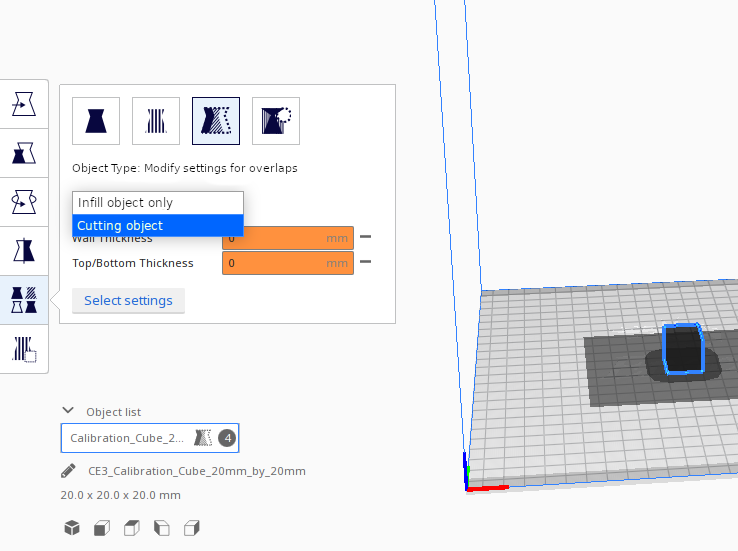
The first screenshot is basically the experience that Czech users have now.
Nevertheless, I will submit a pull request that will only add the missing translations and will use word "síť".
I may later create another PR that will use word "object" in places where "síť" does not make sense and we can open the discussion again but it is more important to me that the translation Czech will again be available to users.
sustmi
on 27 Nov 2020
so I am not sure about the quality of the translations:
Nobody really tries to ensure that terms with the same etymological origin are used across languages. But indeed we've seen with some languages that the translation isn't perfect because the translator didn't understand the subject matter well, in particular the professional translators. The Polish translation is disabled for being incomplete (similar to Czech), not for being wrong. It's best-effort, and we accept corrections from native speakers.
Just "object" will be fine as long as it gets the message across.
Ghostkeeper
on 30 Nov 2020
Related issues
 probonopd
·
3Comments
probonopd
·
3Comments
 jornada812
·
3Comments
jornada812
·
3Comments
 wi1k1n
·
3Comments
wi1k1n
·
3Comments
 dstulken
·
3Comments
dstulken
·
3Comments
 ferociousdiablo
·
3Comments
ferociousdiablo
·
3Comments