Cura: [4.8] infill for walls seems broken
Application version
4.8
Platform
Windows 10
Printer
Ender 3
Reproduction steps
Slice attached STL with 30% Infill and Cubic Pattern, Wall Thickness 0.2, Wall Line Count 2
(feel free to ask for more relevant profile settings, or is there an easy way of exporting?)
Edit: increasing Wall Line Count to 3 results in solid lines(without additional infill) as in Cura 4.6.2 with Wall Line Count set to 2
Screenshot(s)
Created Infill:
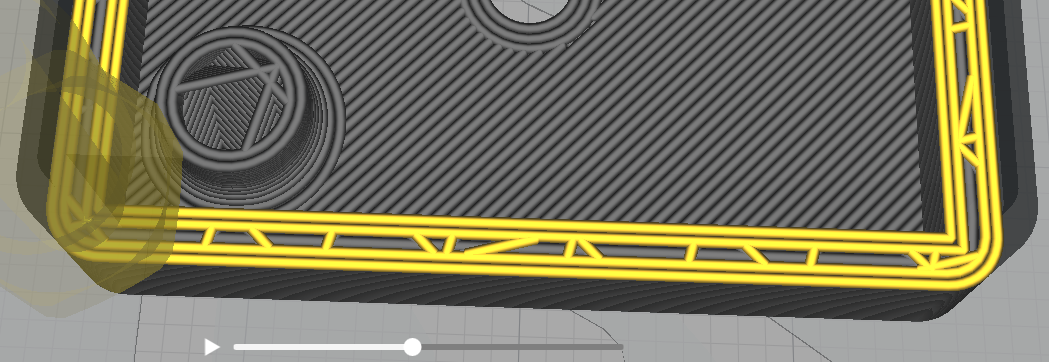
Same Layer but after printing infill:
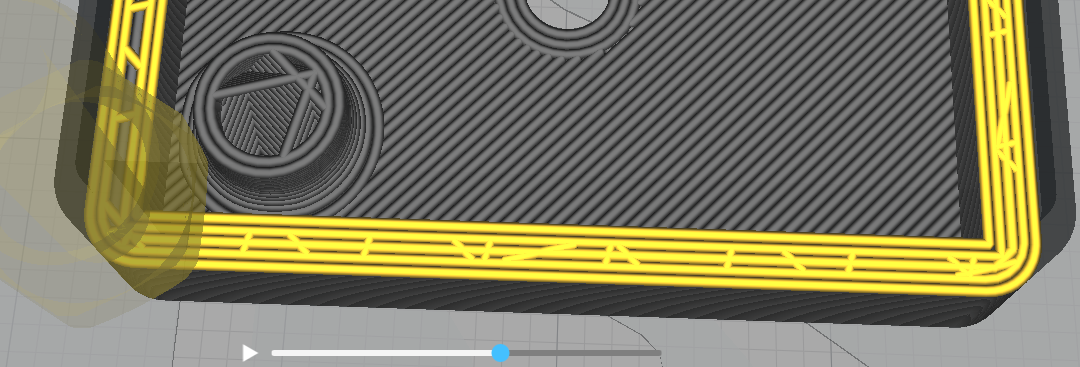
Same STL & Profile sliced with Cura 4.6.2 looks better:

Actual results
Inner wall lines are printed with infill as well as solid in a single layer.
Expected results
Per layer the walls should either be printed with infill or solid per line.
Project file
project_file.zip
 7FM
7FM
All 6 comments
I can't reproduce it on master, I suspect it was fixed with ultimaker/curaengine#1353
Will check in more detail tomorrow
 jellespijker
on 10 Nov 2020
jellespijker
on 10 Nov 2020
Confirming this bug in shipped 4.8.
 shauneccles
on 14 Nov 2020
shauneccles
on 14 Nov 2020
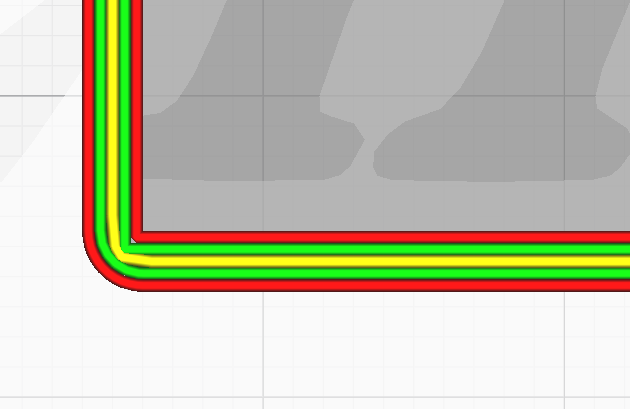
I can reproduce this. What you are seeing here is the gap filling technique overlapping with the infill.
Fill Gaps Between Walls: Everywhere
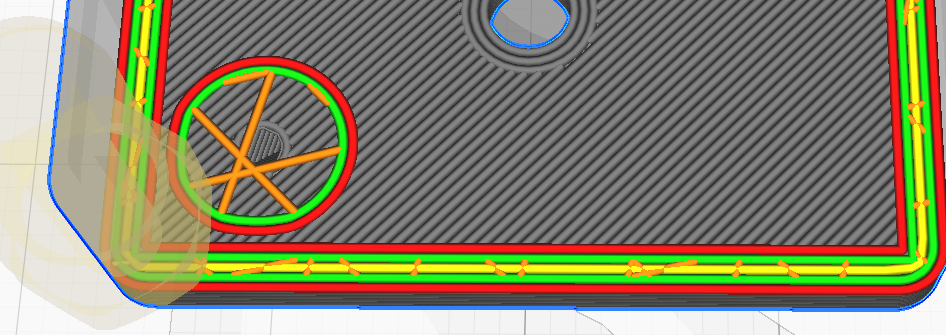
Fill Gaps Between Walls: Nowhere
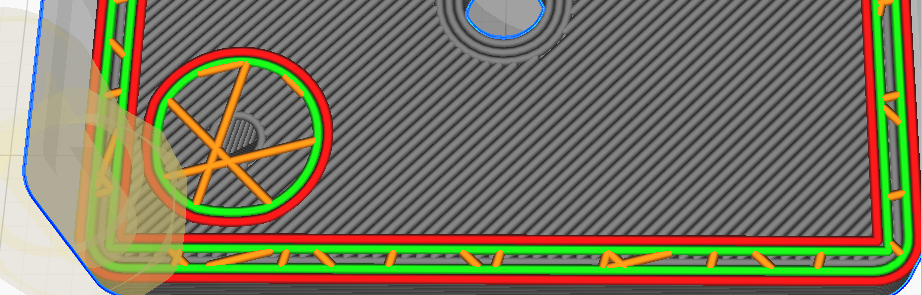
This is something we also recently discovered. However, we decided we won't fix that in the current master, since it will be fixed by the new variable-line width, wall-generating technique that we have in the works.
 konskarm
on 16 Nov 2020
konskarm
on 16 Nov 2020
You can work around this issue for the time being by increasing the Wall Line Count by 1 and keeping the Fill Gaps Between Walls as Everywhere. Then the small gap will be filled only by the gap-fillling but not by infill. This happens because CuraEngine tries to add an extra wall to replace the infill, but the wall doesn't fit, so it is then replaced by a gap-filling (yellow) wall with smaller width.
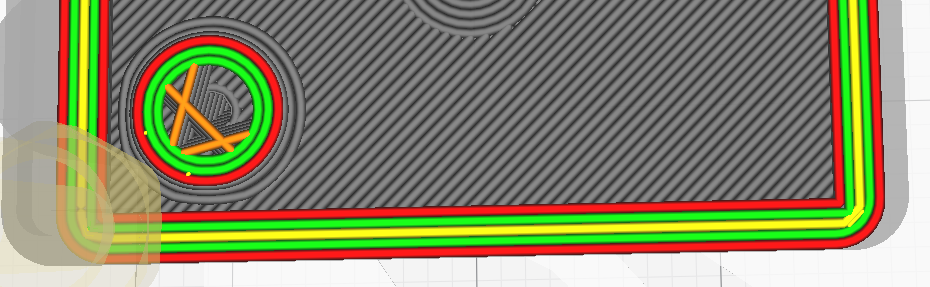
As a small preview, this is how it will look like using libArachne:
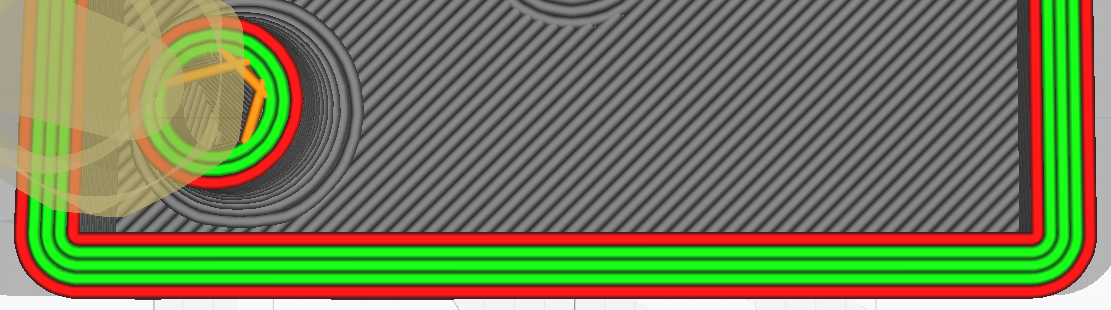
The middle inner wall, which cannot be as wide as the rest of the inner walls, is properly printed with an adapted line width.
konskarm
on 16 Nov 2020
As a small preview, this is how it will look like using libArachne:
image
The middle inner wall, which cannot be as wide as the rest of the inner walls, is properly printed with an adapted line width.
On the image you have increased the wall count to 3 (see circle) too which is your current suggested workaround, I hope it works with a wall count of one less as well. Else the bug would still be present.
Besides that I am not sure if the suggested workaround will always work, because increasing the wall count might cause new problem regions as previously there was enough free space that wall gab filling wasn't triggered (but is triggered with the new increased wall count). If so you would have to increase the wall count as long as this problem occurs (iteratively), resulting in longer prints & filament usage (if needed I might be able to create a proof of concept showing this hypothesis). Maybe setting fill gabs between walls to nowhere is a better workaround.
7FM
on 16 Nov 2020
That's true. We haven't implemented the gap-filling technique to work with libArachne yet, so the middle wall at the moment will not be filled at all. Nevertheless, it will look something like the above image, with the difference that the middle wall will be a skin wall (since infill cannot fit in there).
konskarm
on 16 Nov 2020
Related issues
 JRRN
·
3Comments
JRRN
·
3Comments
 jornada812
·
3Comments
jornada812
·
3Comments
 StanislavJochman
·
3Comments
StanislavJochman
·
3Comments
 DamianSepczuk
·
3Comments
DamianSepczuk
·
3Comments
 DmitryBychkov
·
3Comments
DmitryBychkov
·
3Comments
Most helpful comment
I can't reproduce it on master, I suspect it was fixed with ultimaker/curaengine#1353

Will check in more detail tomorrow