Cura: Change AtoZ no display apply layer
*Application version:(cura 4.7.)
*Platform:(WIN8 SURFACE PRO3.)
**Printer: (DIY UM2)
issue descripsion:
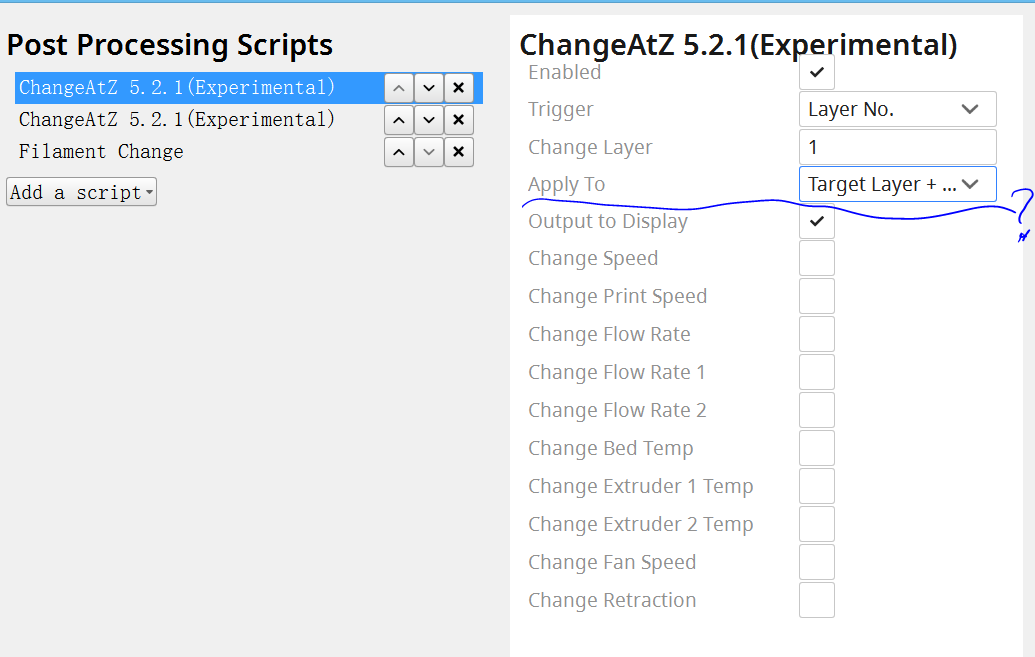
when i add "change A to Z plugins" and i want to apply muti-layer change e.g. layer No.1 to No.19, then i choice apply to "target layer+subsequent layer "but it not show subsequent layer which i can set.
not sure if it is bugs or other issue?
 lipk888
All 3 comments
Subsequent layers keeps the change for _all_ subsequent layers rather then reverting the change for the next (as opposed to 'single layer'). If you want to change multiple _specific_ layers, you'll have to add multiple ChangeAtZ scripts in the 'single layer' mode.
 rburema
on 15 Sep 2020
rburema
on 15 Sep 2020
So for instance you'd add a ChangeAtZ script that changes at layer 1 and subsequent layers, the print speed to 150%.
Then you'd add another ChangeAtZ script that changes from layer 19 and subsequent layers, the print speed to 66.7%, resulting in the rest of the print being printed at 100% speed again.
 Ghostkeeper
on 16 Sep 2020
Ghostkeeper
on 16 Sep 2020
thanks team, it seems work now
lipk888
on 18 Sep 2020
Related issues
 wi1k1n
·
3Comments
wi1k1n
·
3Comments
 timherrm
·
3Comments
timherrm
·
3Comments
 rudowinger
·
3Comments
rudowinger
·
3Comments
 JRRN
·
3Comments
JRRN
·
3Comments
 jornada812
·
3Comments
jornada812
·
3Comments