Cura 4.6.1
Egal was ich bei Fluss einstelle, es ändert sich nichts an der Wandstärke.
Testwürfel mit 2 Wänden a 0,42 mm bei 100 % Fluss = 0,76 mm breite
Bei 150% Fluss auch 0,76mm breite
Habe mal das Profil mit 100% Fluss hochgeladen
Google translated version below:
Cura 4.6.1
No matter what I set in the river, nothing changes in the wall thickness.
Test cube with 2 walls a 0.42 mm at 100% flow = 0.76 mm wide
At 150% flow also 0.76mm wide
I uploaded the profile with 100% flow
 Kaicura
All 5 comments
I'm seeing this when I open your project file.
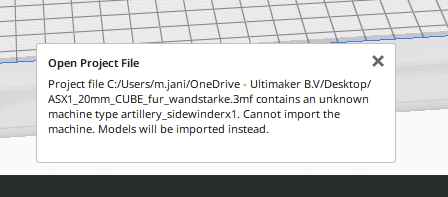
How did you add this machine definition?
 mahtDFR
on 25 May 2020
mahtDFR
on 25 May 2020
It is from Site 3D nexus
, Artillery Sidewinder x1 cura Profil s and Printer and Nozzel definations
Gesendet über myMail für Android Montag, 25 Mai 2020, 04:39PM +02:00 von maht [email protected] :
I'm seeing this when I open your project file.
How did you add this machine definition?
—
You are receiving this because you authored the thread.
Reply to this email directly, view it on GitHub , or unsubscribe .
Kaicura
on 25 May 2020
Here the Files for CURA 4.6.1
3DN Artillery SWX1 and Genius Cura 4.6.1.zip
Import the Cura profils at Profilsmanager, Copy the Folders to Cura / resources
Here the Link, to the Files.
https://3d-nexus.com/resources/file-archives/download/8-artillery-evnovo/32-3dn-artillery-swx1-and-genius-cura-4-6-1-machines-and-profiles-installation-package
Kaicura
on 25 May 2020
The reason is that your object overrides the Flow setting in its per-object settings.
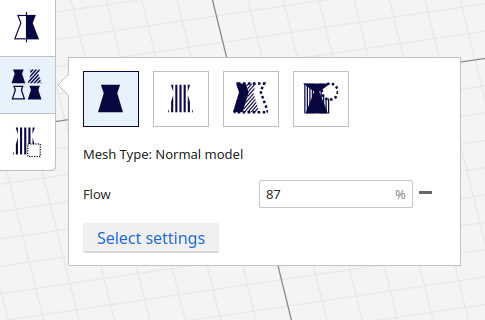
The per-object settings override the global (or per-extruder) settings.
 Ghostkeeper
on 26 May 2020
Ghostkeeper
on 26 May 2020
Thanks a lot for your great and fast support
Kaicura
on 27 May 2020
Related issues
 probonopd
·
3Comments
probonopd
·
3Comments
 DamianSepczuk
·
3Comments
DamianSepczuk
·
3Comments
 wi1k1n
·
3Comments
wi1k1n
·
3Comments
 dstulken
·
3Comments
dstulken
·
3Comments
 JRRN
·
3Comments
JRRN
·
3Comments