Cura: Maximum X and Y axis usage limited by Travel Avoid Distance and Build Plate Adhesion Type
Application version
Cura 4.6.1
Platform
Windows 10 Pro Version 10.0.18363 Build 18363
Printer
Prusa i3 MK3S
Reproduction steps
Adding a model with 210 mm in Y direction.
Screenshot(s)
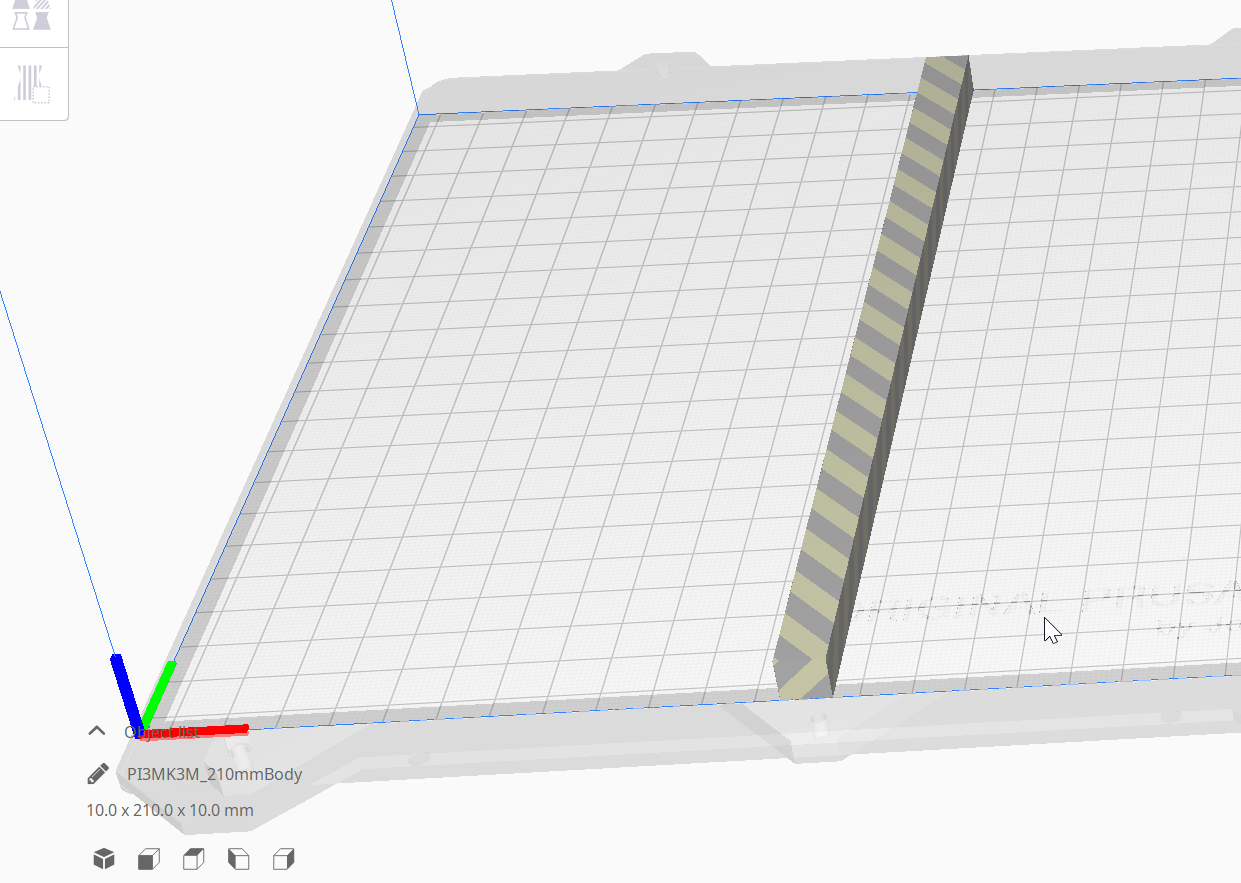

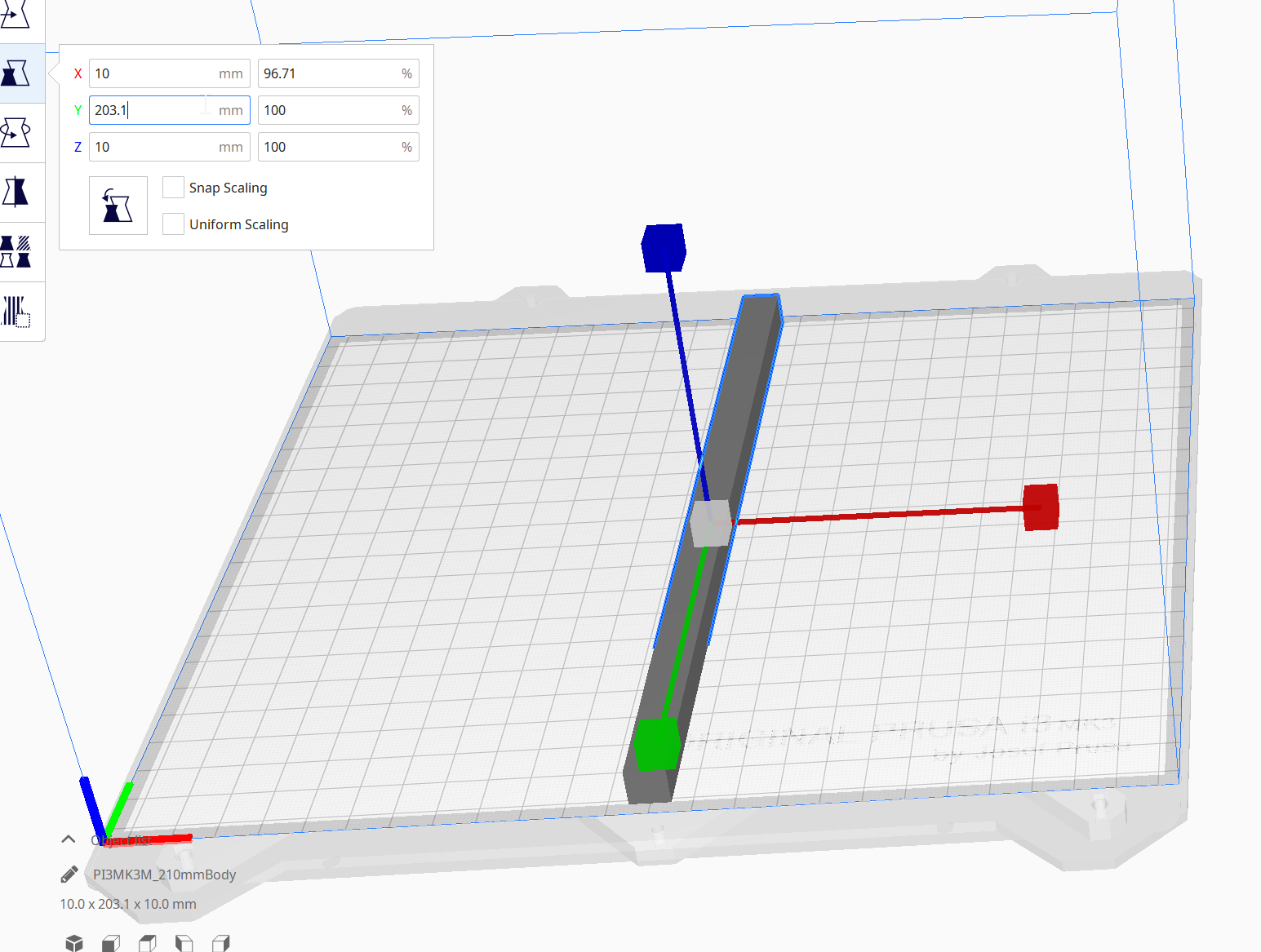
Actual results
It is not possible to slice even though it is the maximum amount according to the config. The actual limit seems to be 203.1 mm where it will still slice but at 203.11 mm it will not. See the screenshots.
Expected results
A model of up to 210 mm in Y direction should be sliced correctly.
Project file
PI3MK3M_210mmBody.zip
 kbehren
All 24 comments
Hello @kbehren,
Are you sure your printer is really able to do this size ?
If yes, a dirty workaround is to configure you own printer configuration by adding a "Custom FFF printer" and manually define all settings
(you can try and print a part then measure if your piece is to the proper size. Sometime some printer are limited in here firmware too and event you ask for a bigger print, the software in the printer "protect" to prevent over usage )
Thank you
 64Florian
on 24 May 2020
64Florian
on 24 May 2020
Hi @64Florian,
Yes I have printed something with 210 mm in Y direction before with Prusa Slicer.
I just tested the other axes to and this also affects the X axis which should be able to go up to 250 mm where it stops being printable at 248.71 mm Z seems to be the only axis that can go to the maximum just fine.

The configuration itself looks fine.
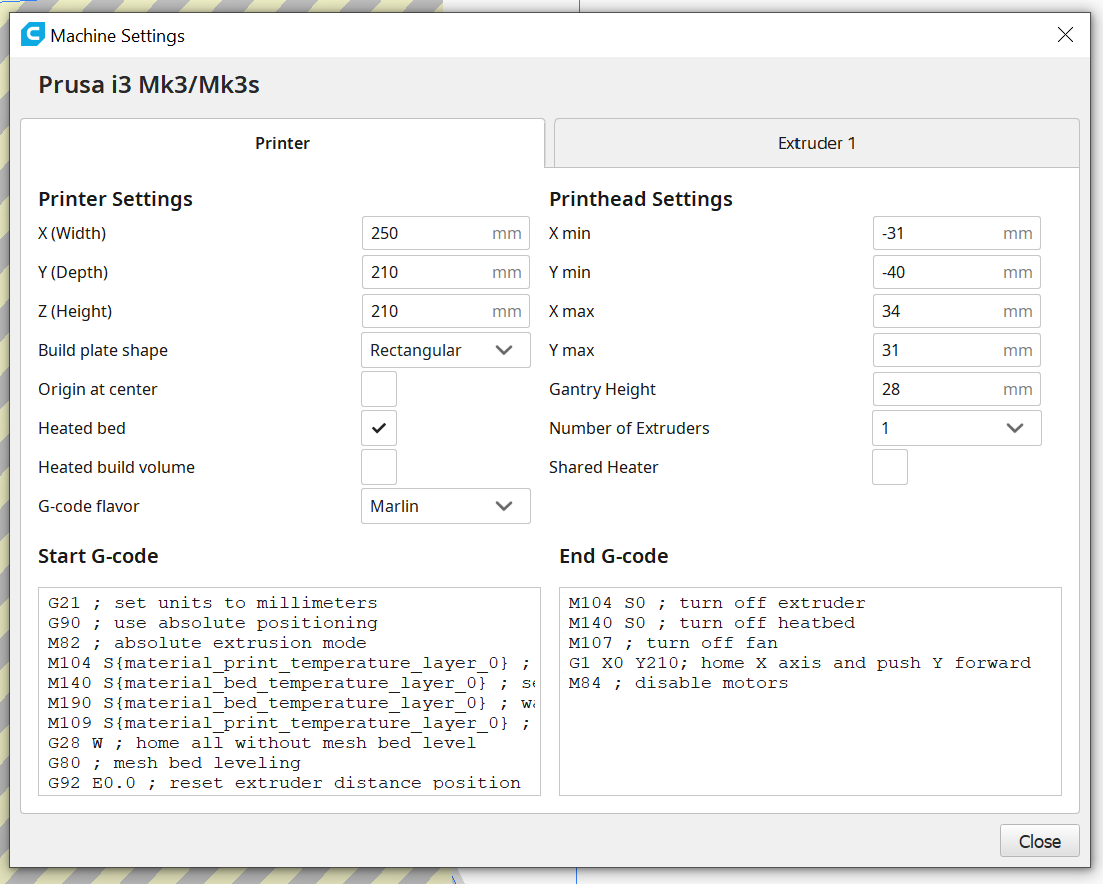
Are there other reasons that might limit this? I set the build plate adhesion to none but this made no difference either.
kbehren
on 24 May 2020
I just noticed if I zoom in really close I can see the an artificial offset being applied in the preview.
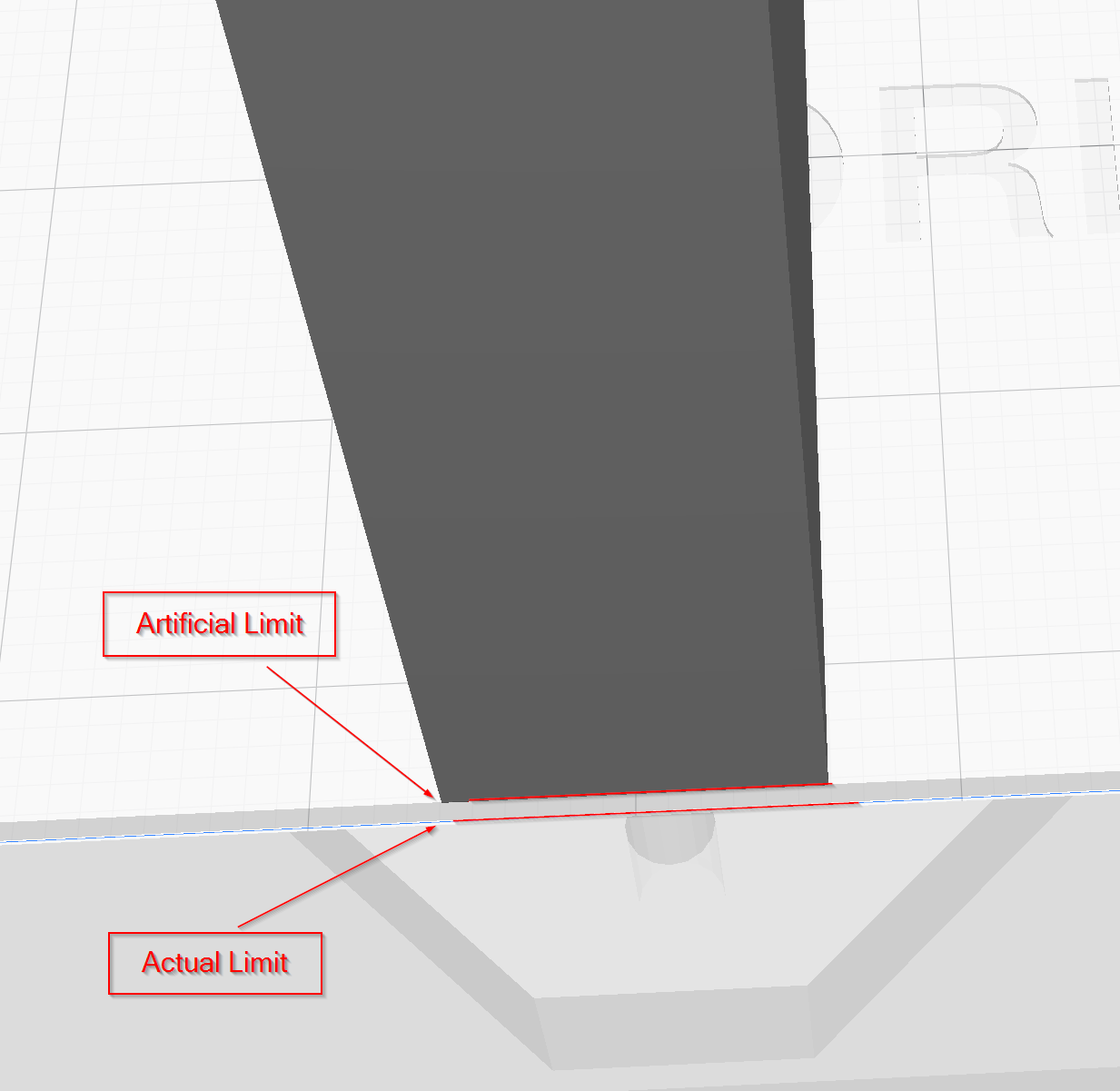
Correcting my previous statement build plate adhesion actually influences this offset but even with it set to none I can not use the absolute maximum size.
kbehren
on 24 May 2020
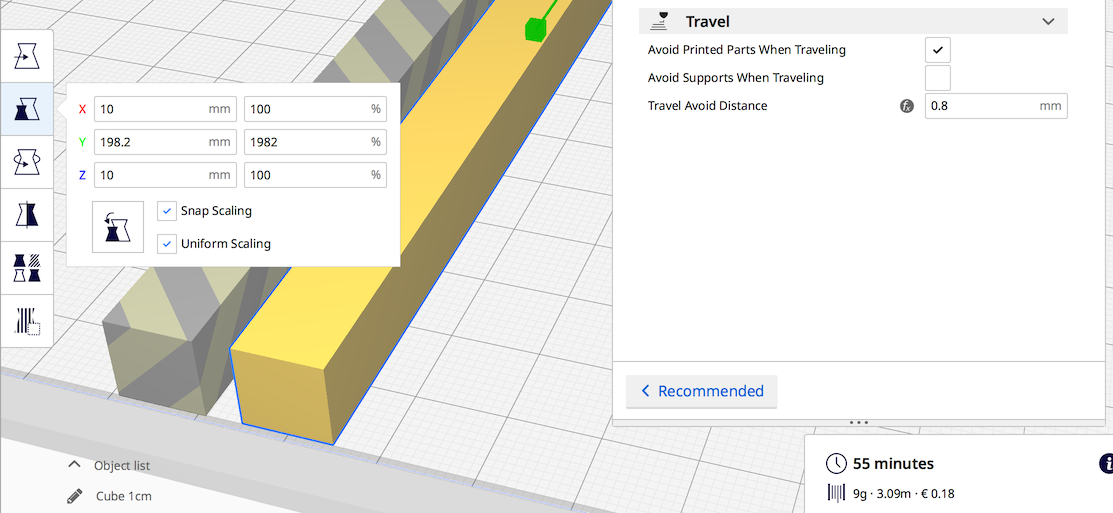
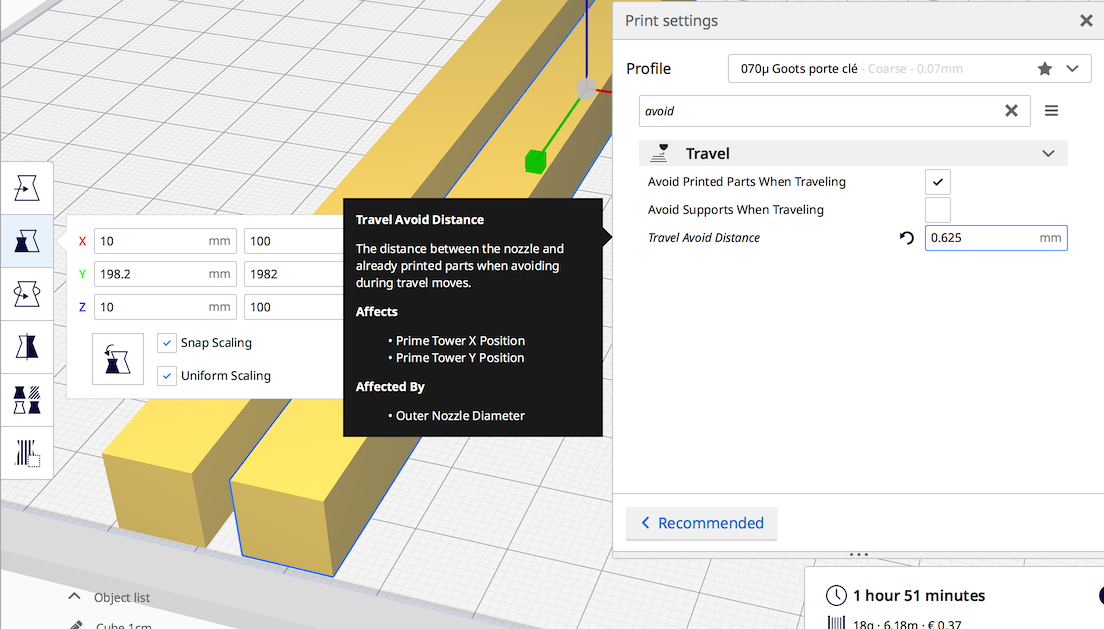
Yes, if a you add a "build plate adhesion type" this area change.
For the extreme limit (_None for adhesion_) I noticed I haven't the same size if I use default settings (198.6 for 200) than if I use an old profile (198.2 usable)
-> means this "limit" is "configurable"
FOUND "Travel Avoid Distance":
64Florian
on 24 May 2020
@ kbehren, In my point of view, it could be better to keep this value and "extend" your max limit of your build plate to be able to print "full size"
64Florian
on 24 May 2020
I think the "Travel Avoid Distance" should only apply to spaces between objects it does not make sense that it is applied here.
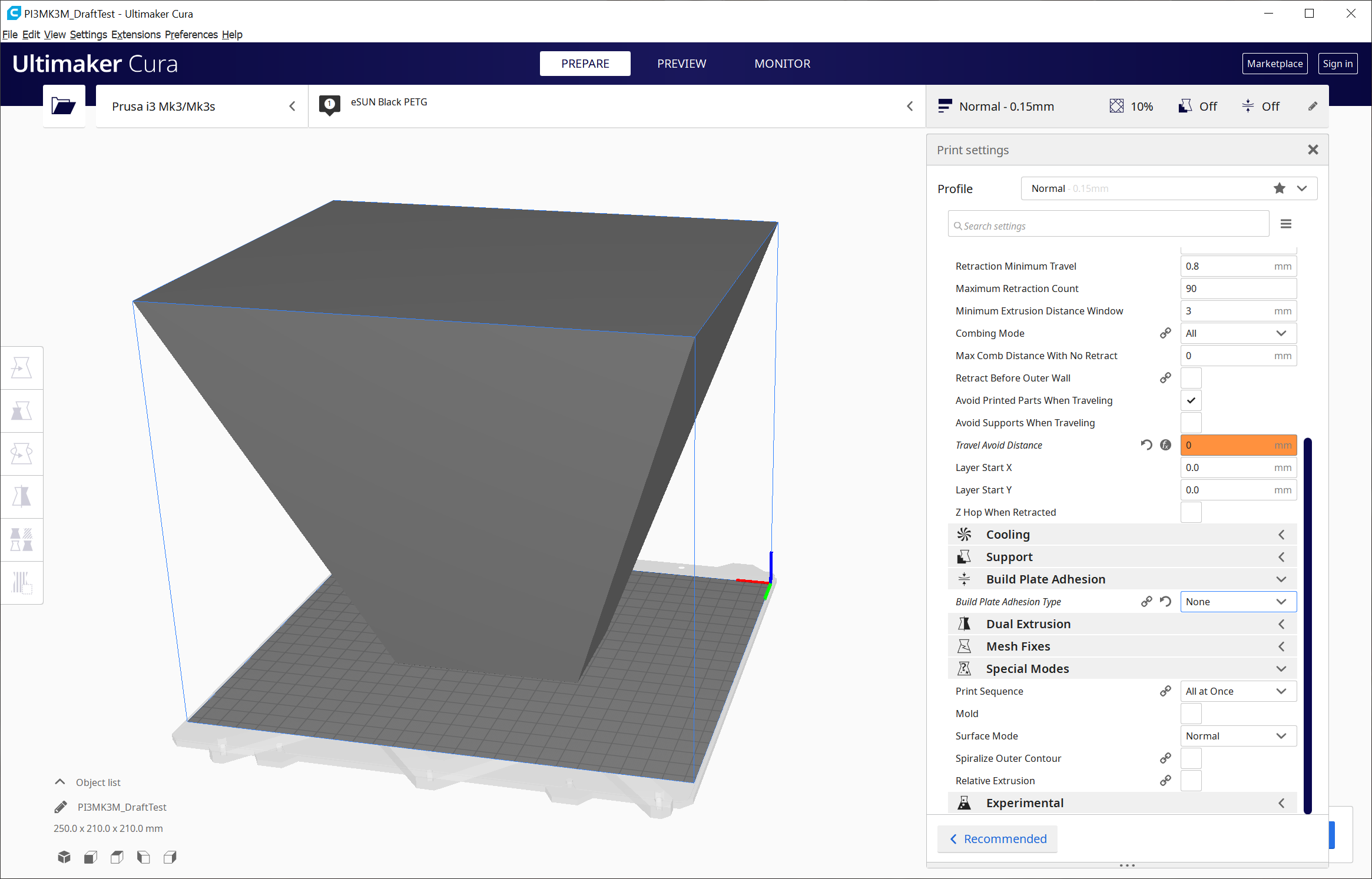
I tested a bit more and the skirt or brim distance also is applied to the outside edge of the print bed even if the skirt or brim would not reach the edge. For the test I created the model attached which has a smaller surface that touches the build plate and then widens at the top.

kbehren
on 24 May 2020
@64Florian I would like to avoid setting a build plate size that is larger than spec as I don't know if the generated gcode would try to get outside of the existing bounds of the hardware. I adjusted the Ticket title to reflect the new information and as this does not seem to be Prusa specific anymore.
kbehren
on 24 May 2020
avoid setting a build plate size that is larger than spec as I don't know if the generated gcode would try to get outside
This is only my experience and with my old Tevo Tarantula with rebuilt firmware, but in my case my printer refuse to go too far ... (but it's clearly depend of the firmware and it's settings !!)
Thank you for title adjustment, it will be easier for Cura teams to determine the next step !
64Florian
on 24 May 2020
Thank you for title adjustment, it will be easier for Cura teams to determine the next step !
You're welcome, that was my intention with the change, to get someone to look into this.
kbehren
on 24 May 2020
The behavior you see is intentional. If you print multiple objects, the platform adhesion can be "shared" between objects (eg; objects can stand closer together than the size of the platform adhesion). So in order to reflect this behavior, the amount of space that it needs is added to the edges (If you place an object right at the edge there, the platform adhesion will be printed in the area that is marked).
So in that sense, the blue cube shows you the _print area_ which is different from the _object area_. The print area is essentialy "where can my nozzle be", whereas the object area represents "what objects can be printed, given the current settings". Most, if not all, printer manufacturers advertise with the print area, because it's bigger (but it doesn't quite reflect the reality).
This is also why the travel avoid distance is applied here; The nozzle needs to have some extra area around the object to avoid it (and as such, no object should be there).
Currently, we use a projection of the convex hull on the build plate, mostly to keep the code running fast and somewhat understandable (Supports for instance will become a big issue if you don't!)
 nallath
on 25 May 2020
nallath
on 25 May 2020
@nallath Thank you for the response.
This still looks like very strange behavior to me, as if you look at the draft test model the bottom does not occupy much space but if I set a brim of lets say 20 mm I would loose 40 mm of maximum print area at the top of the model where every thing is fine to print in that space.
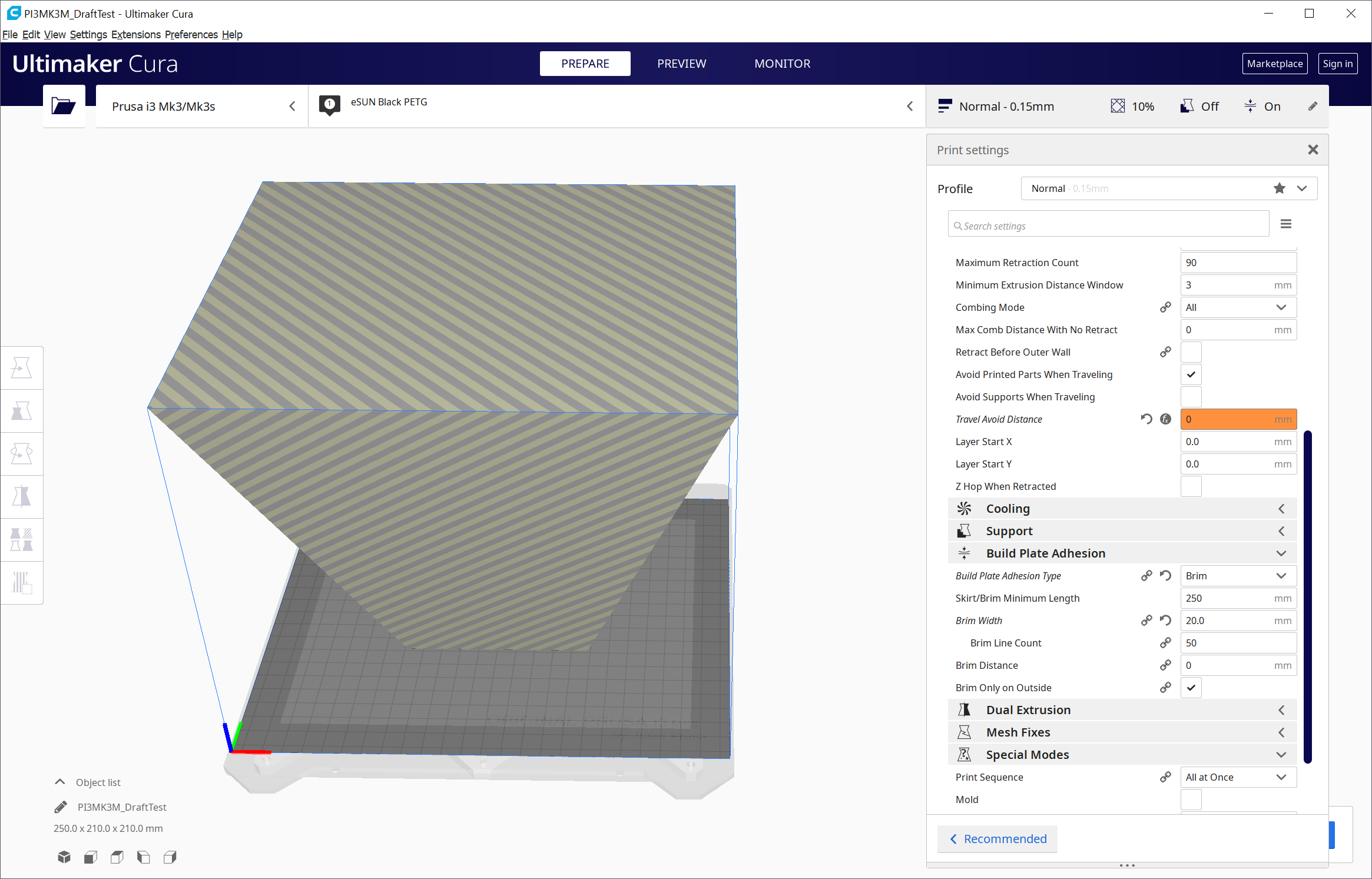
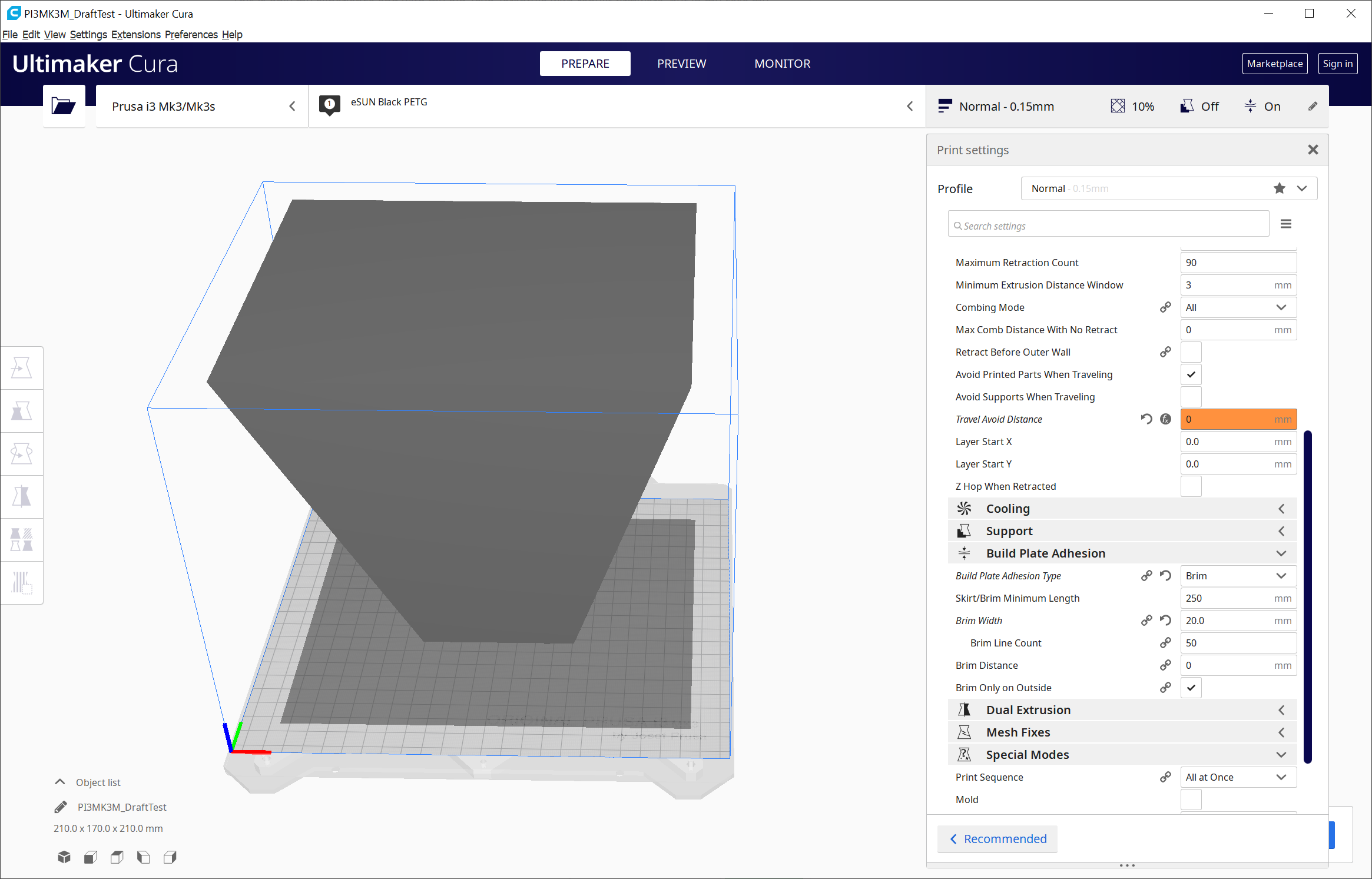
I have printed the vase which made me notice this problem before in Prusa Slicer and it went all the way to the Y and Z maximum so this is not a hardware limitation.
There are other problems with the Prusa Slicer that make me want to use Cura but this is currently limiting me.
kbehren
on 25 May 2020
@nallath
, the platform adhesion can be "shared" between objects
Yes for sure ... but for Object. .. In this case the build plate work "as an object" -> This is a bad thing in my point of veiw
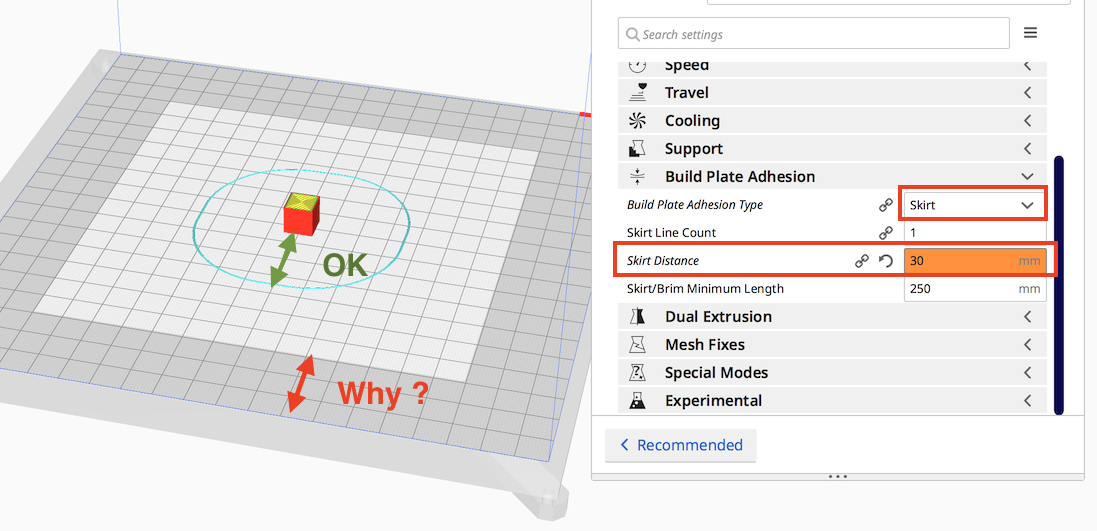
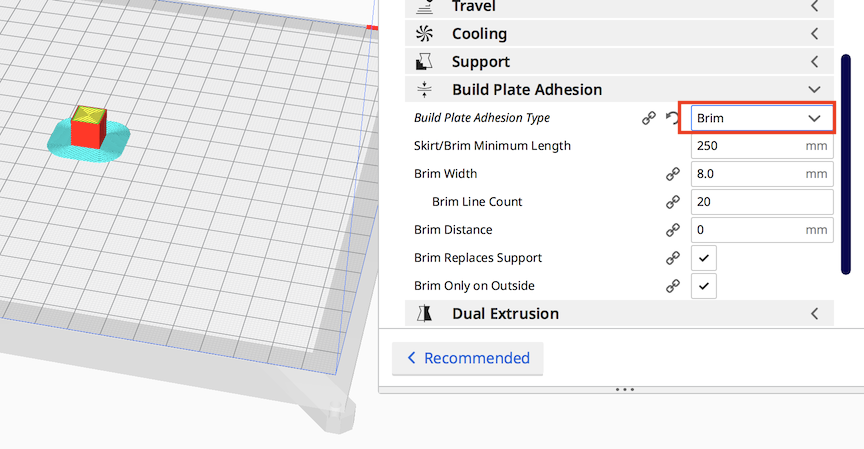
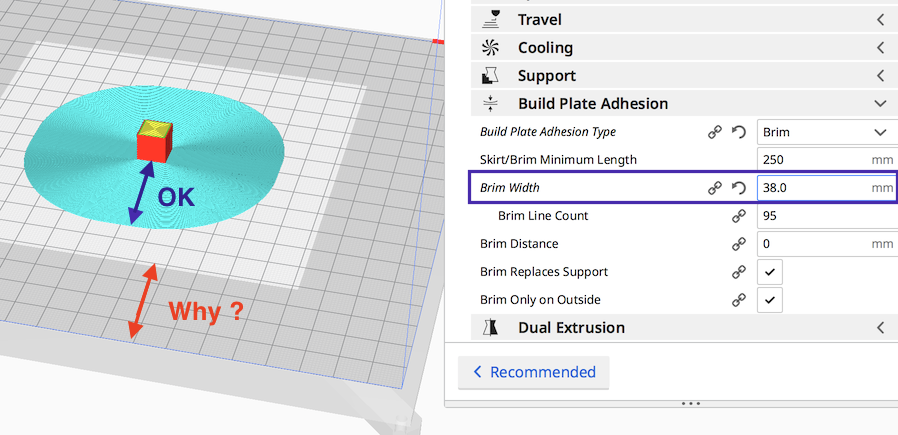
Let me show in image:
64Florian
on 25 May 2020
@64Florian thank you for that example I probably made mine overly complicated being stuck in my mindset of vase design.
kbehren
on 25 May 2020
In @64Florian's screenshots, you will see that the blue "OK" arrow is the same size as the red "Why" arrow. If you shift the model (the cube) towards the edge of the buildplate, you will see that the cyan helper can overlap the grey zone as long as the model doesn't. That is "why"; Cura reserves room for the helper.
In the case of the vase, which is smaller around the bottom than higher up, Cura reserves too much room. This is because of a performance optimisation as @nallath alluded to.
 fieldOfView
on 25 May 2020
fieldOfView
on 25 May 2020
Thank you @fieldOfView for the precision
performance optimisation as @nallath alluded to.
I didn't notice this notion of performance optimization in the message sorry about that.
So, according to many optimization, is it possible to add an option to disable it in some case ?
64Florian
on 25 May 2020
It's currently not possible to disable it. There is good reason for that, because it would make it pretty easy to break a machine if we did (and that would mean that a lot of people start shouting at us, because we are then _the worst developers on earth_ for making it possible to disable it)
nallath
on 26 May 2020
I think what @64Florian meant to say is if this is only a performance issue as mentioned it would be nice to have a checkbox to say it is okay to take longer for the slicing as long as I get more printable space for it.
I don't quite understand why the room at the edge of the build plate is reserved at all as you already have somehow created the skirt/brim in the right location and could probably treat it like it is part of the model. But then again I'm not familiar with how exactly model placement works in Cura.
I understand that this might not be a bug from your perspective but I still think it would be a worthwhile improvement that fixes at least for me as a user a hard to understand behavior that really limits the printing area.
kbehren
on 26 May 2020
The performance issue is not about the time it takes to slice a file. The complexity is in calculating where it is safe to place an object, taking into account space needed for things like adhesion helpers and bed clips and other areas that could cause a collission between a part of the printer and the head.
Cura takes the "shortcut" of checking this in 2D instead of 3D, by looking at the "shadow" projected straight down. Doing the calculations in 3D would be more "expensive" to calculate (here's the performance optimisation), but also more complex to implement. There is not a simple "do it in 3d instead" switch because the 3d method is simply not implemented.
fieldOfView
on 26 May 2020
While it's not possible to disable the brim, you can still make your build volume bigger at your own risk and then place the object in the back-right corner where it expanded the build volume into.
The 2D collision vs 3D collision has been asked before a couple of times, e.g. here. Calculating the size of the first layer essentially requires making a slice of that layer. This is performance-intensive, not just for making the slice itself which is a few % of the progress bar, but mostly because it requires sending over the entire scene and settings to CuraEngine. I'm going to reject that.
For the rest, I'd say that this is working as intended. I hope that Nallath, Florian and fieldOfView have clarified sufficiently why it's behaving like that.
 Ghostkeeper
on 26 May 2020
Ghostkeeper
on 26 May 2020
Oh, and I don't think it's been mentioned yet. The vertical (Z) size is reduced due to Z hops and any raft, if those are enabled.
Ghostkeeper
on 26 May 2020
Calculating the size of the first layer essentially requires making a slice of that layer.
You could get a fair estimation with Trimesh: https://trimsh.org/trimesh.html#trimesh.Trimesh.section
fieldOfView
on 26 May 2020
Not quite, because support can also affect the brim.
nallath
on 26 May 2020
For the rest, I'd say that this is working as intended. I hope that Nallath, Florian and fieldOfView have clarified sufficiently why it's behaving like that.
Yeah I understand. It's a little bit disappointing but I get it. Thanks everyone for responding.
kbehren
on 26 May 2020
@kbehren, in your case,
print "solid" plate 0.3mm thick and disable brim ...
(Cura isn't able to manage big brim with big object -> make it by yourself ... )
I'm a bit lost about "technical arguments" ...
I have certainly miss something
-> in fact Yes: Projection is not the base of the object
The gray is her for positioning the object according his projection
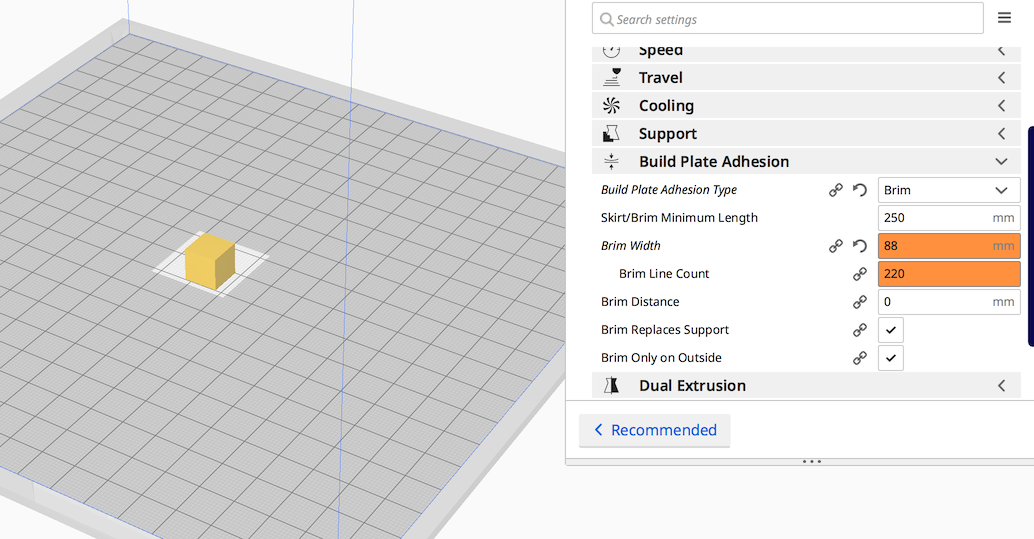
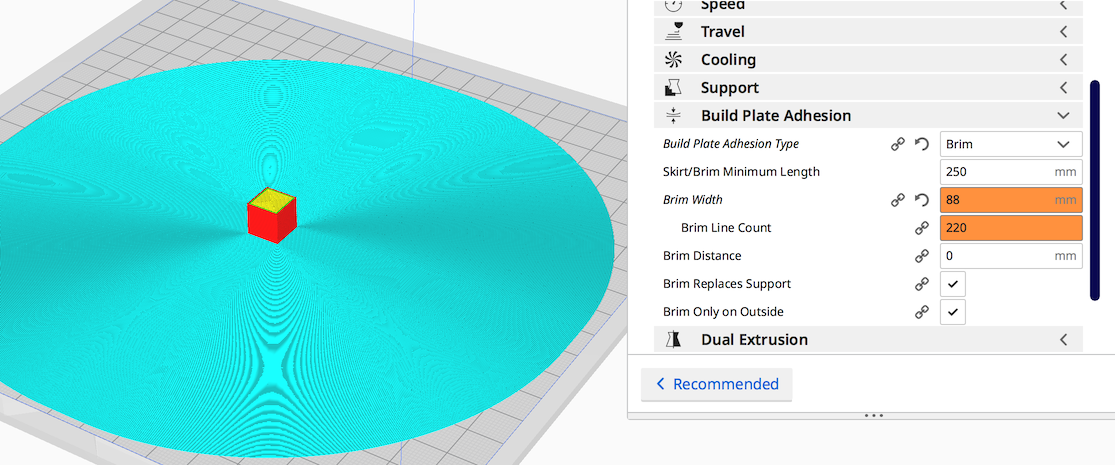

64Florian
on 26 May 2020
Related issues
 muhammadelmogy
·
3Comments
muhammadelmogy
·
3Comments
 dstulken
·
3Comments
dstulken
·
3Comments
 timherrm
·
3Comments
timherrm
·
3Comments
 Liger0
·
3Comments
Liger0
·
3Comments
 JRRN
·
3Comments
JRRN
·
3Comments
Most helpful comment
In @64Florian's screenshots, you will see that the blue "OK" arrow is the same size as the red "Why" arrow. If you shift the model (the cube) towards the edge of the buildplate, you will see that the cyan helper can overlap the grey zone as long as the model doesn't. That is "why"; Cura reserves room for the helper.
In the case of the vase, which is smaller around the bottom than higher up, Cura reserves too much room. This is because of a performance optimisation as @nallath alluded to.