Cura: [4.6.1] [MacOS] printing profiles disappearing
Just today, all default printing profiles just disappeared - list is empty. When I go to "Manage Profiles", only my custom ones are still on the list, but those are not displayed in main dropdown menu.
 jarekdudzinski
All 16 comments
Hello,
Did you recently update your CURA version ?
Could you try to rename the profile folder (Menu : Help -> show configuration folder -> finder should open in a 4.6 folder)
Please rename 4.6 Folder as 4.6_Ko and keep it for analysis !
Could You add a zipped version of your 4.6_Ko folder in this ticket please ?
then you restart Cura, an upgrade from your old profile (from older CURA version) should be made and you should be able to work
 64Florian
on 18 May 2020
64Florian
on 18 May 2020
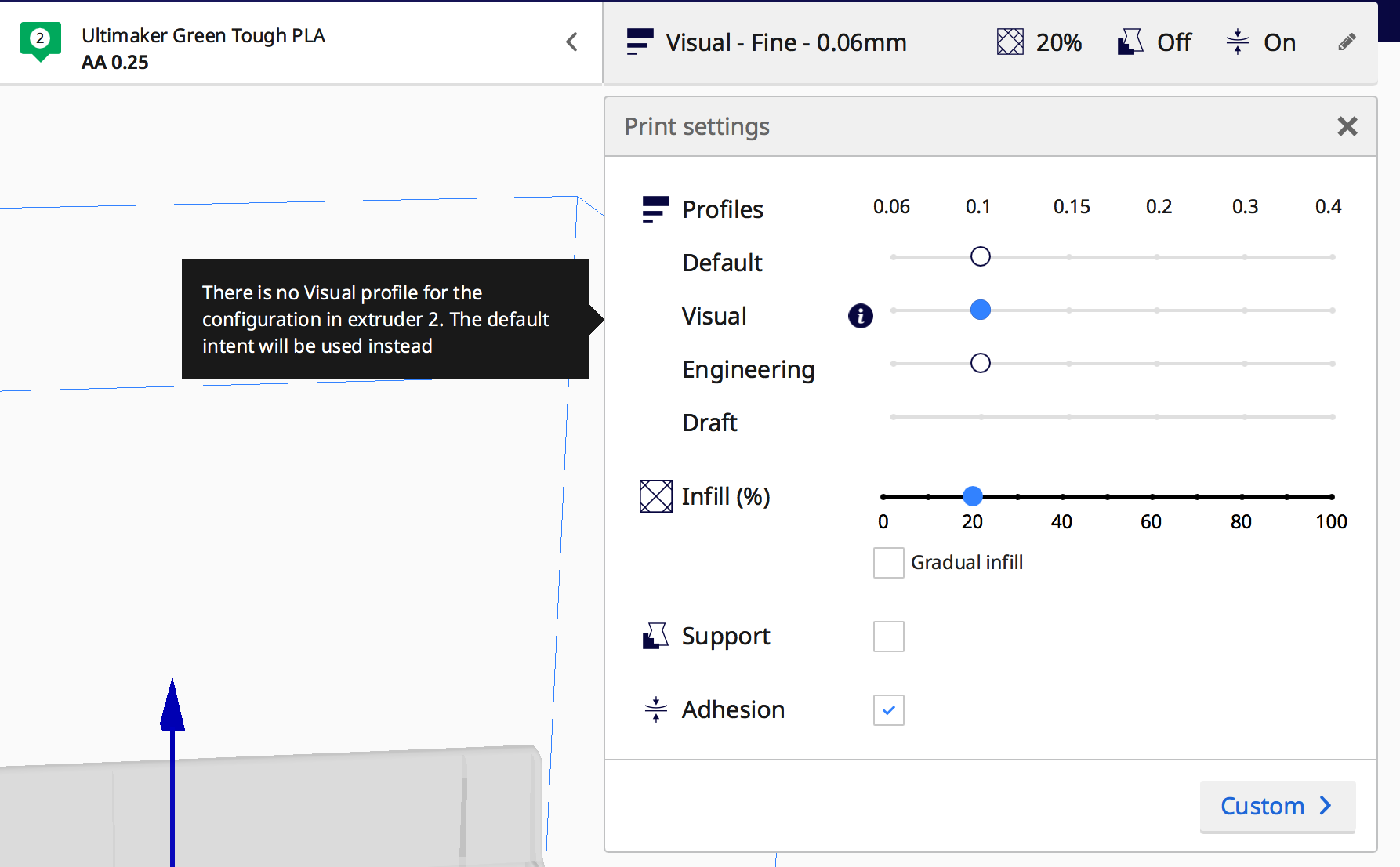
I saw the same problem this morning. I was on the Recommended print settings drop down and saw dots representing all the default profiles for my Ultimaker s3 for Default, Visual, Engineering, and Draft rows. I had the Default Fine profile selected. I switched over to the Custom print settings and made a few hidden settings visible in the list. When I went back to Recommended view of the print settings, all the dots in the Profile selector had disappeared except for the Fine profile dot on the Default, Visual, and Engineering rows. Only these three Profiles now appear in the profile drop down selector on the Custom version of the print settings. If I go into the Manage Profiles Preferences screen (pop up dialog box) I can see the other profiles listed. But they do not appear on the Recommended and Custom print settings drop down. I am running Cura on a 15" MacBook Pro with MacOS 10.13.6 (High Sierra). A zipped version of my 4.6 folder is attached.
4.6.zip
 chewyguy
on 23 May 2020
chewyguy
on 23 May 2020
Adding screenshot of my Recommended print settings drop down showing the 3 remaining profile dots:
chewyguy
on 23 May 2020
Hello @chewyguy, Did you try to rename this 4.6 folder as "4.6_Ko" (with Cura closed) and try to restart Cura ?
64Florian
on 23 May 2020
No. I'll give that a try now.
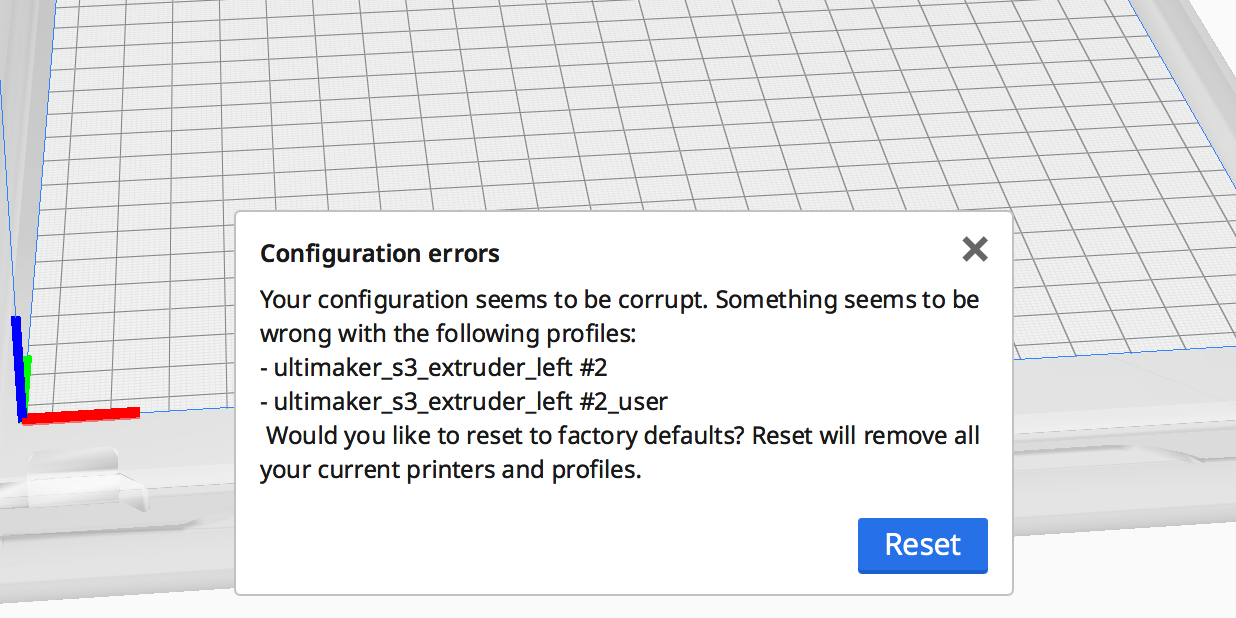
I just tried this and I'm receiving the following error. I'm assuming I should press the "Reset" button". FYI, this error popped up as soon as I restarted Cura:
chewyguy
on 23 May 2020
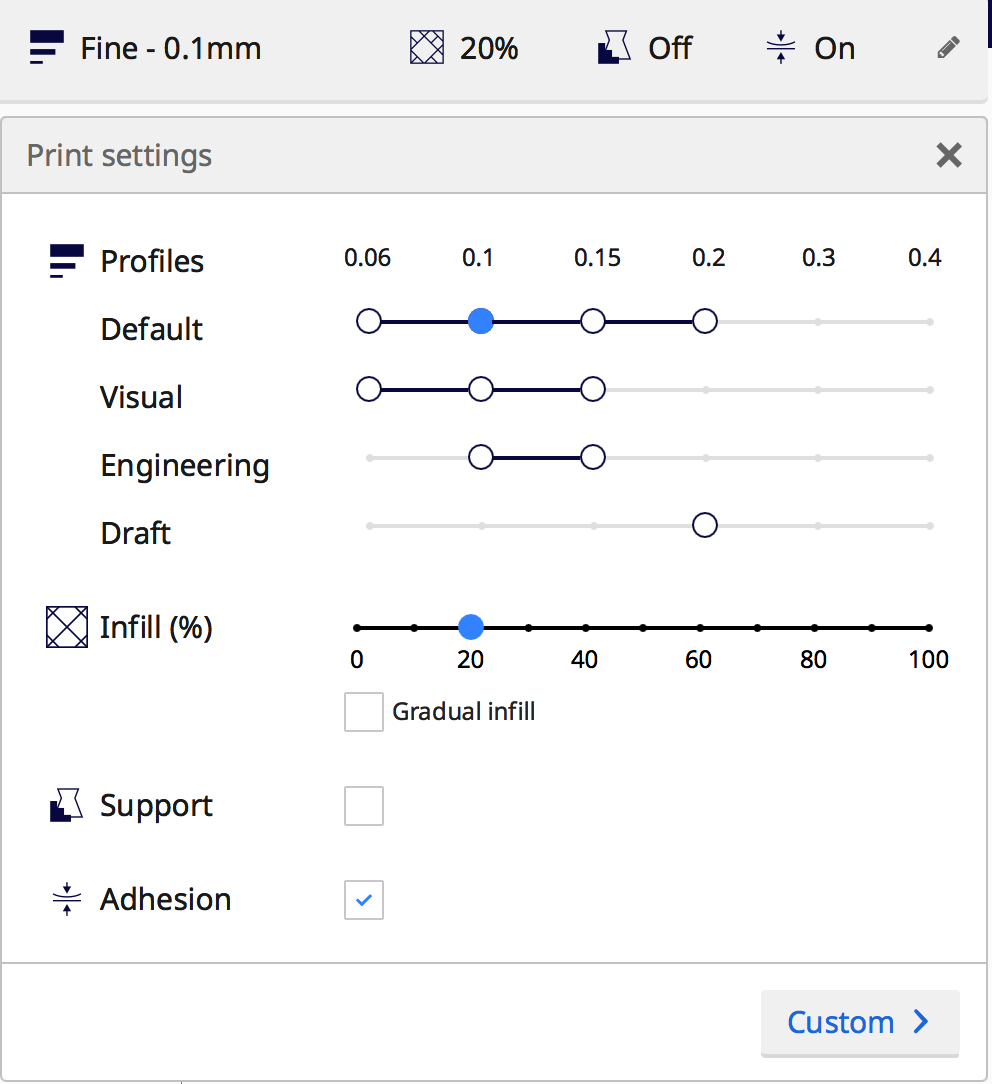
Pressing reset caused Cura to shutdown. When I restarted it, I have all my printing profiles available again. Seems I'm back in business, although I'm guessing I lost any changes I made to the profiles. For comparison, here's a screenshot of what the Recommended print settings screen looks like now:
chewyguy
on 23 May 2020
You can try to remove the new 4.6 folder and restore the old one ... I think your issue could back, but It still a interesting test to to see if it was a profile issue or just Cura was lost ...
64Florian
on 23 May 2020
Adding screenshot of my Recommended print settings drop down showing the 3 remaining profile dots:
This is actually expected behaviour. You have a 0.25mm nozzle loaded. For that nozzle there are only profiles for the 0.1mm layer height; not even the 0.06mm layer height. You are limited by the quality levels that both nozzles can support.
If you're not using the 0.25mm nozzle for a particular print, you can disable the nozzle in the configuration drop-down (where you select the nozzle and material). That will allow you to use all of the profiles that the 0.4mm nozzle supports.
For the original problem from @jarekdudzinski I'd still like to see either a project file (preferred, and it's easy, just press Cmd+S, zip up that file and upload it here) or a configuration folder like 64Florian asked.
 Ghostkeeper
on 26 May 2020
Ghostkeeper
on 26 May 2020
@Ghostkeeper thanks for the tip. I just added the 0.25mm nozzle to my setup so I wasn't aware of the more limited profile selection. I also decided (brilliantly) to upgrade Cura to 4.6.1 when I installed the new nozzle. So I assumed the issue was a bug in the new software rather than a feature of the new hardware. Thanks for setting me straight!
chewyguy
on 26 May 2020
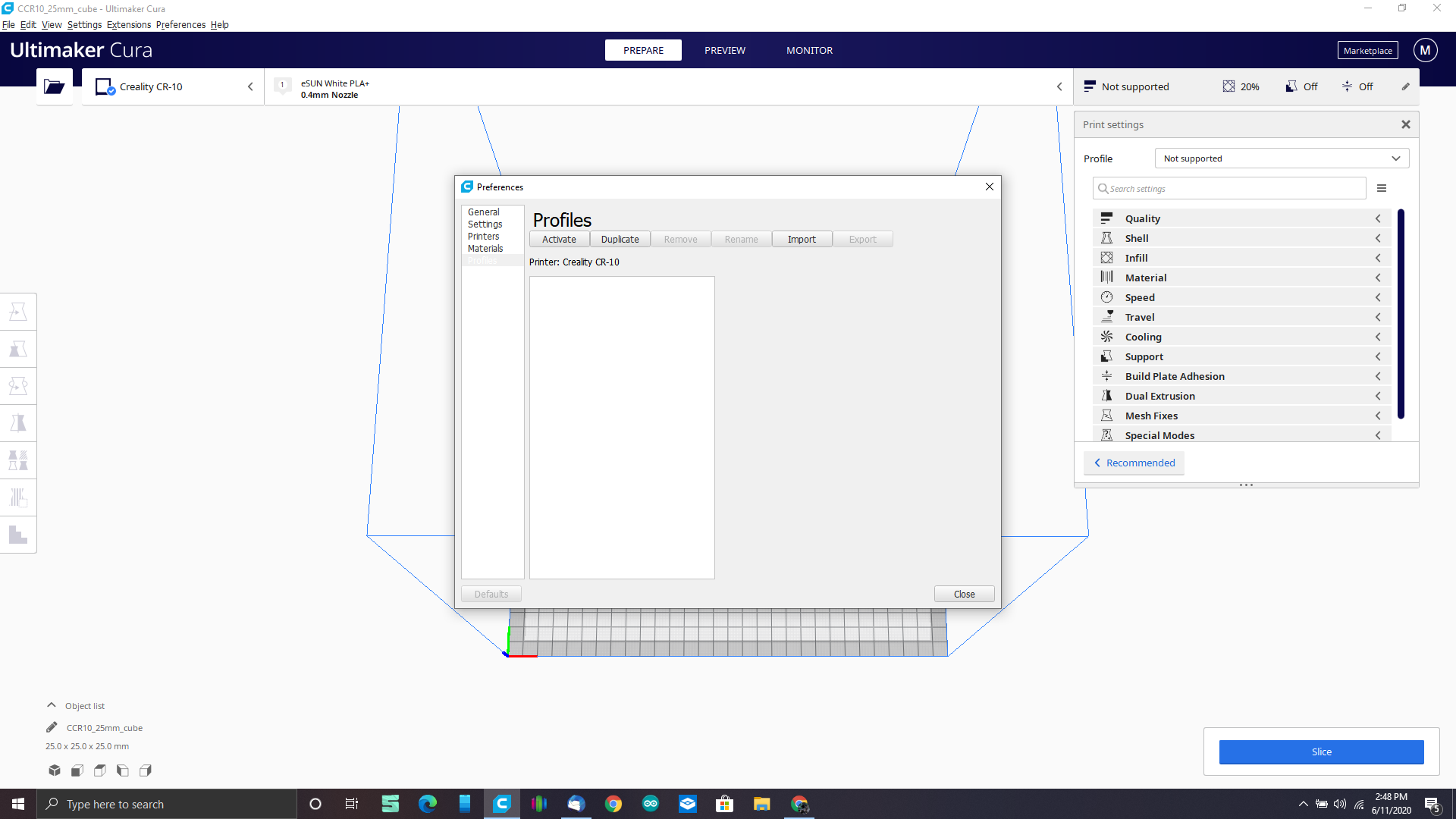
I am basicly haveing the same problem with windows 10 my profiles just gone i have to reinstall two minutes later same thing disabled my AntiVirus just incase nope same thing.
So i made a new login on my computer tried to install a new copy on that login only
nope same problem please fix this I paid for Simplify3D and it sucks I love Cura its a great program
 mauiredman420
on 12 Jun 2020
mauiredman420
on 12 Jun 2020
@mauiredman420 Nobody ever made any profiles for eSUN PLA+ on the Ender 3 with the 0.4mm nozzle. Or if they did, they didn't share them with us. So Cura is correct there that it indicates that there are no profiles. Without profiles you can still use Cura, but you'll be using the defaults for eSUN PLA+. You can still create your own profiles if you want.
Ghostkeeper
on 15 Jun 2020
Perhaps "not available" would be better wording than "not supported"? After all, there is no Profile available. Printing with the material can still be done ("is supported").
 fieldOfView
on 15 Jun 2020
fieldOfView
on 15 Jun 2020
Well first off I have a CR-10V2 and the profile is there but when I go to
slice it is when it craps out and all my profiles disappear I have to
uninstall then reinstall then my profiles are back if I use the generic PLA
profile it works.
I know it has a working profile because if I use my Linux distro it works
perfectly.
But in windows it vanishes when I hit slice.
And I'm thinking of trying it on this Mac mini I have but I really hate
Macintosh computers
On Mon, Jun 15, 2020, 12:38 AM Aldo Hoeben notifications@github.com wrote:
Perhaps "not available" would be better wording than "not supported"?
After all, there is no Profile available. Printing with the material can
still be done ("is supported").—
You are receiving this because you were mentioned.
Reply to this email directly, view it on GitHub
https://github.com/Ultimaker/Cura/issues/7772#issuecomment-644049613,
or unsubscribe
https://github.com/notifications/unsubscribe-auth/AMVLSB22CDHFKJ6JRNKYJ2DRWX23TANCNFSM4NC4W3RQ
.
mauiredman420
on 16 Jun 2020
Perhaps "not available" would be better wording than "not supported"? After all, there is no
Profileavailable. Printing with the material can still be done ("is supported").
With a similar argument though: The material is available to the user. It's just that there can be no expectations of quality out of the box.
Ghostkeeper
on 16 Jun 2020
But in windows it vanishes when I hit slice.
The act of slicing changes your profiles? Does it also change the settings? Normally when the profile changes, any ongoing or starting slice is cancelled.
Ghostkeeper
on 16 Jun 2020
This issue has been automatically closed because there has been no response to our request for more information from the original author. With only the information that is currently in the issue, we don't have enough information to take action. Please reach out if you have or find the answers we need so that we can investigate further.
![no-response[bot] picture](https://avatars2.githubusercontent.com/u/26350515?v=4&s=40) no-response[bot]
on 19 Jun 2020
no-response[bot]
on 19 Jun 2020
Related issues
 ferociousdiablo
·
3Comments
ferociousdiablo
·
3Comments
 StanislavJochman
·
3Comments
StanislavJochman
·
3Comments
 DamianSepczuk
·
3Comments
DamianSepczuk
·
3Comments
 JRRN
·
3Comments
JRRN
·
3Comments
 DmitryBychkov
·
3Comments
DmitryBychkov
·
3Comments
Most helpful comment
Hello,
Did you recently update your CURA version ?
Could you try to rename the profile folder (Menu : Help -> show configuration folder -> finder should open in a 4.6 folder)
Please rename 4.6 Folder as 4.6_Ko and keep it for analysis !
Could You add a zipped version of your 4.6_Ko folder in this ticket please ?
then you restart Cura, an upgrade from your old profile (from older CURA version) should be made and you should be able to work