Cura: Print time bug 0.2 and 0.28 CURA 4.6.1 CR10S pro
Bonjour,
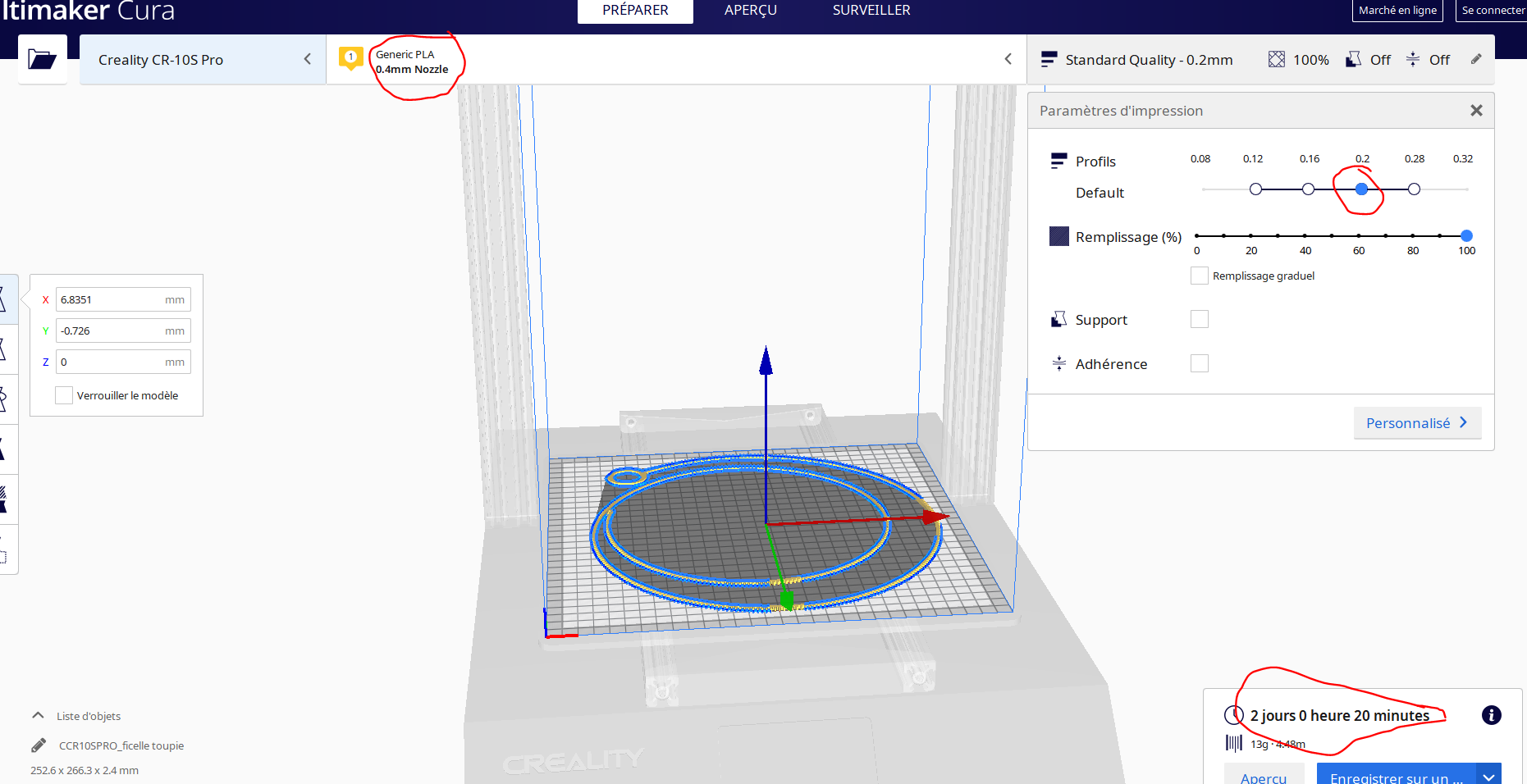
Je constate un bug au niveau du temps de fabrication, lorsque que je sélectionne un remplissage 100% une épaisseur de couches de 0.2 ou 0.28 avec la matière PLA le temps de fabrication augmente de façon considérable.
Lorsque je passe à une épaisseur de couche inférieure à 0.2, le temps de fabrication passe à des valeurs correctes.
Pas de problème avec d'autre matériaux
test avec profile matière et machine d'origine (CR10S et CR10S pro)(matière tous les Profile PLA)


 jp131313
All 8 comments
Remplissez ce formulaire svp (en anglais si possible).
Application version
(The version of the application this issue occurs with.)
Platform
(Information about the operating system the issue occurs on. Include at least the operating system and maybe GPU.)
Printer
(Which printer was selected in Cura?)
Reproduction steps
- (Something you did.)
- (Something you did next.)
Screenshot(s)
(Image showing the problem, perhaps before/after images.)
Actual results
(What happens after the above steps have been followed.)
Expected results
(What should happen after the above steps have been followed.)
Project file
(For slicing bugs, provide a project which clearly shows the bug, by going to File->Save. For big files you may need to use WeTransfer or similar file sharing sites.)
Log file
(See https://github.com/Ultimaker/Cura#logging-issues to find the log file to upload, or copy a relevant snippet from it.)
Additional information
(Extra information relevant to the issue.)
 mahtDFR
on 7 May 2020
mahtDFR
on 7 May 2020
Application version
CURA 4.6.1
Platform
Windows 10 and Mac osx Majave 10.14.6
Printer
CR10S and CR10S pro
Reproduction steps
- installation CURA 4.6.1
- Selection Imprimante CR10S pro
- Selection matière Generique PLA
- Ouvrir le fichier
- Paramètre d'impression (epaisseur 0.2, remplissage 100%)
- Découpage
Screenshot(s)
Actual results
Print time 2 days
Expected results
Print time 3hours
Project file
https://drive.google.com/open?id=1mLnnXuAIfHvmmocxhsgLQvzJEfiHK6Ge
Log file
cura.log
Additional information
(Extra information relevant to the issue.)
jp131313
on 7 May 2020
Ah yes I see, that is strange!
I tried it on an S5 buildplate and I'm not able to reproduce the issue, so I think it has something to do with that machine profile.
mahtDFR
on 7 May 2020
Hello @jp131313,
could you made following tests :
- in cura, open help -> show configuration folder
- in the explorer, you should be in the 4.6 folder ..
- go back in CURA, and change languages in preferences -> general Interface French and switch to english English
- Close CURA
- rename the 4.6 folder to 4.6_Kc
- restart cura and test again
=> it could be a translation issue in settings
En francais ...
- ouvrez aide -> afficher le dossier de configuration
- L'exploreur doit s'ouvrir et vous deriez être dans un dossier 4.6
- retour dans CURA, changez la langue dans le menu préférences -> général pui interface utilisateur "francas" passez en "english"
- Fermez CURA
- renommer le dossier 4.6 en 4.6_Kc
- relancez CURA et testez de nouveau
=> c'est peut être un problème de tradution des réglages par défaut
Thank you
 64Florian
on 7 May 2020
64Florian
on 7 May 2020
Hi,
I performed this procedure and I have the same problem.
It seems to be related to the shape of the 3d stl part.
This bug does not exist with a previous version
regards
Le jeu. 7 mai 2020 à 19:57, TFlorian notifications@github.com a écrit :
Hello @jp131313 https://github.com/jp131313,
could you made following tests :
- in cura, open help -> show configuration folder
- in the explorer, you should be in the 4.6 folder ..
- go back in CURA, and change languages in preferences -> general
Interface French and switch to english English- Close CURA
- rename the 4.6 folder to 4.6_Kc
- restart cura and test again
=> it could be a translation issue in settings
En francais ...
- ouvrez aide -> afficher le dossier de configuration
- L'exploreur doit s'ouvrir et vous deriez être dans un dossier 4.6
- retour dans CURA, changez la langue dans le menu préférences ->
général pui interface utilisateur "francas" passez en "english"- Fermez CURA
- renommer le dossier 4.6 en 4.6_Kc
- relancez CURA et testez de nouveau
=> c'est peut être un problème de tradution des réglages par défaut
Thank you
—
You are receiving this because you were mentioned.
Reply to this email directly, view it on GitHub
https://github.com/Ultimaker/Cura/issues/7699#issuecomment-625407671,
or unsubscribe
https://github.com/notifications/unsubscribe-auth/APPRWGNG5ONBXKISV33DQCDRQLZBNANCNFSM4M3DUL5Q
.
jp131313
on 7 May 2020
Argh, that Google Drive link is giving me a "Page is not redirecting properly" error :(
 Ghostkeeper
on 11 May 2020
Ghostkeeper
on 11 May 2020
@Ghostkeeper , The link work well on my IMac with Firefox ..
I have DW for you and added as zip file
drive-download-20200511T135059Z-001.zip
64Florian
on 11 May 2020
Thanks! I can reproduce the issue now. It seems to be a concatenation of two things, one of them a bug and the other just a bad setting.
The bug is that these gap filling lines don't join together to form a single line:
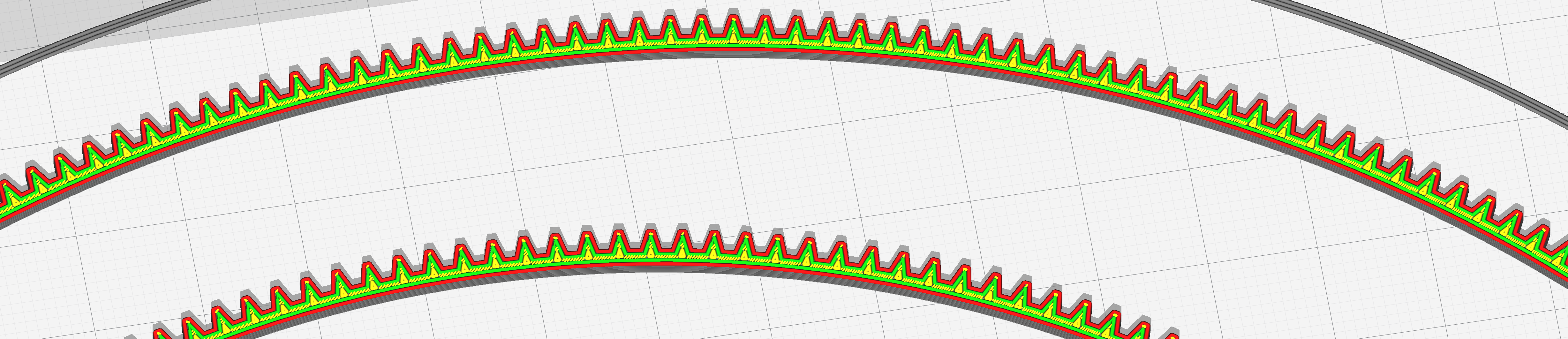
We've seen this issue before: https://github.com/Ultimaker/Cura/issues/5110 . It's one of the more serious bugs in CuraEngine that we have. We have a plan to resolve this with a new algorithm here, but it's still a ways off: https://github.com/Ultimaker/CuraEngine/pull/1210
For now there is a workaround. Adjust your Wall Line Width so that the lines fit better. In your case, setting it to 0.35mm reduces the print time by more than 50%, to 21 hours.
If you look then at the print time breakdown you'll find that it spends 62% on retractions and 27% on travel (together 89% of overhead). Going through a single layer with the horizontal slider you can see that it's going back and forth across the spiral for every tooth. This is because the Combing Mode is set to "Not in Skin", the default for your printer. "Not in Skin" prevents travelling through skin, so that you don't get ugly scars on your top surface. Instead it can only go through infill or follow the walls. Since you have no infill, it follows the walls, leading it to make a huge detour every time it decides to approach the gap from the other side. In your case, your shape is a perfect storm of having gaps that are more or less the same distance removed from each side (so it randomly chooses a side due to rounding) and a very long detour.
Solution: Set combing to "All". This then reduces the print time to a reasonable 3 hours.
Since the second issue is not really a bug, I'll close this issue as a duplicate of https://github.com/Ultimaker/Cura/issues/5110 , the first issue.
Ghostkeeper
on 13 May 2020
Related issues
 jellewie
·
3Comments
jellewie
·
3Comments
 wi1k1n
·
3Comments
wi1k1n
·
3Comments
 DmitryBychkov
·
3Comments
DmitryBychkov
·
3Comments
 Nemernemer
·
3Comments
Nemernemer
·
3Comments
 JRRN
·
3Comments
JRRN
·
3Comments
Most helpful comment
@Ghostkeeper , The link work well on my IMac with Firefox ..
I have DW for you and added as zip file
drive-download-20200511T135059Z-001.zip