Cura: Cubic Subdivision pattern slightly rotated by default
This is a follow-up from #7541
Application version
4.5.0
Platform
Windows 10 x64
nVidia Geforce 1080 Ti
Printer
Ender 3 Pro
Reproduction steps
- Place a cube on the bed which is aligned with the X/Y axes
- Slice using Cubic Subdivision
Screenshot(s)

Actual results
The pattern is very subtly rotated by a degree or two
Expected results
The horizontal lines are properly horizontal
 evilC
evilC
All 12 comments
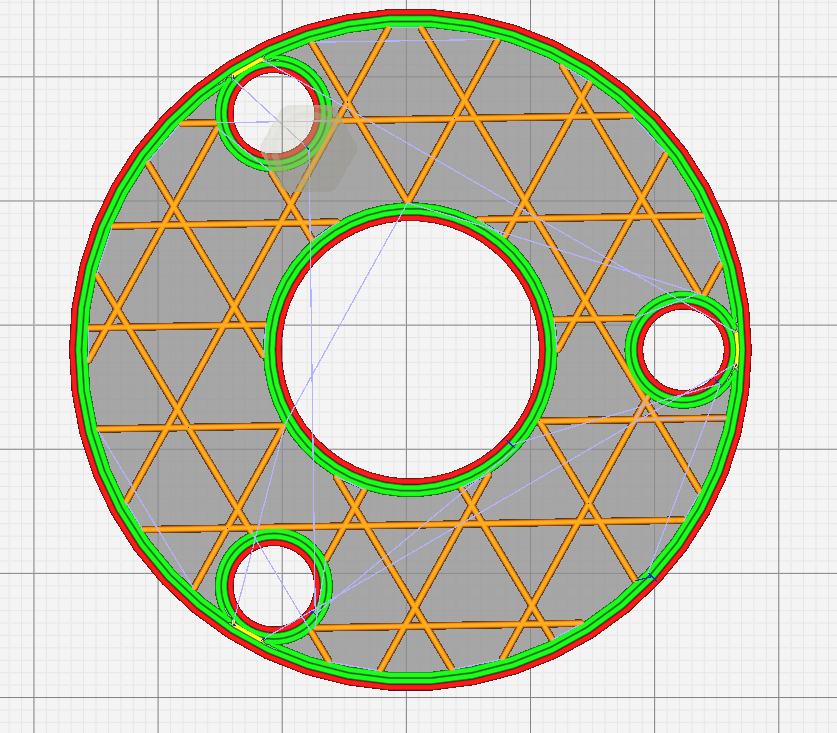
Here's something that isn't right, in SubDivCube::precomputeOctree(), the variable infill_angle is given type AngleRadians but initialised with 45 which looks like degrees. Later on, infill_angle is passed to the PointMatrix constructor which looks like it expects a value in degrees. So I would have thought that infill_angle should be of type AngleDegrees rather than AngleRadians. However, with that change, the line orientation is different but still not what I expected. Setting infill_angle to 0, however, has the desired effect.
Using AngleDegrees infill_angle = 0;
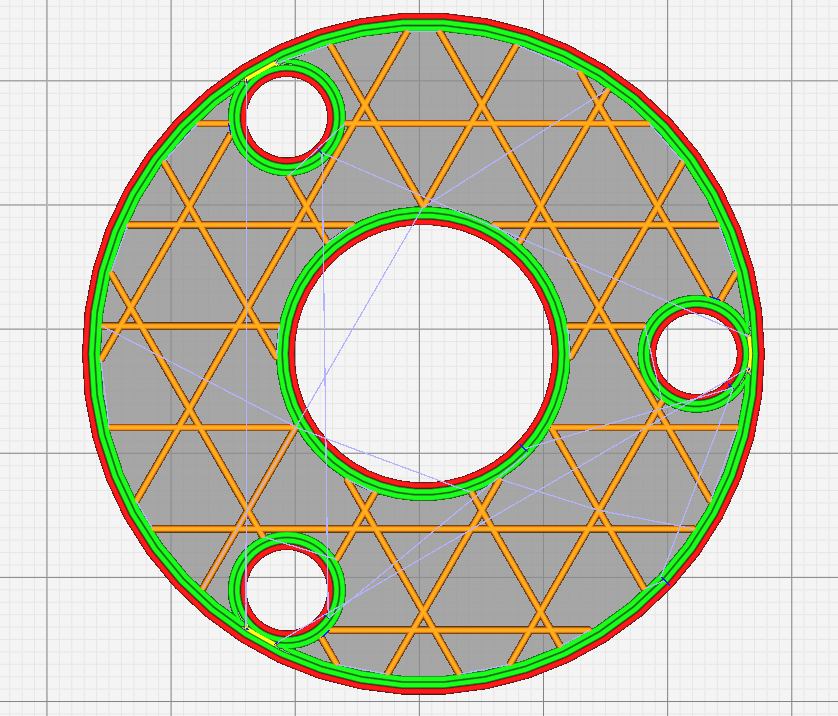
Using AngleDegrees infill_angle = 45;

Using AngleRadians infill_angle = 45;
 smartavionics
on 30 Apr 2020
smartavionics
on 30 Apr 2020
Awesome, thank you @smartavionics
evilC
on 30 Apr 2020
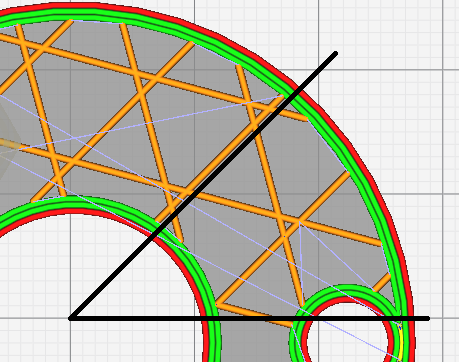
So I would have thought that infill_angle should be of type AngleDegrees rather than AngleRadians. However, with that change, the line orientation is different but still not what I expected.
The 45 degree one? It looks right to me
 widget-
on 30 Apr 2020
widget-
on 30 Apr 2020
By jove, Sir! I think you could be right, I was looking at the wrong line, methinks.
So, perhaps just changing that one line in the source to declare infill_angle to be of type AngleDegrees will be sufficient to fix the jaunty orientation that it has at the moment. Let's leave that to the UM devs to ponder...
smartavionics
on 30 Apr 2020
In the absence of adding support for allowing us to pick rotation angle via the UI, could we please have the infill_angle set to 0?
Now that #7541 is implemented and the pattern is centered on the mesh, using 45 degrees will still tend to yield a non-symmetrical infill
evilC
on 30 Apr 2020
Oh, and @smartavionics, any chance of one of your custom builds set like this while I wait for the proper release? Windows x64
evilC
on 30 Apr 2020
Sure, I can make a build using:
AngleDegrees infill_angle = 0;
I'll do it tomorrow, I'm too tired to do it now.
smartavionics
on 30 Apr 2020
Oh and those two commits that went into master too
Much appreciated
evilC
on 30 Apr 2020
45 radians ~2,578.31°. If you take out the full loops (7 of) than you're left with ~58.31°. Given the offset angle of the pattern at 60°, that would make for the line going lower-left to upper-right being what has taken that value, indeed putting the entire pattern off by ~1.69°, which matches up with @evilC's rough estimate. So there's almost certainly a superfluous conversion going on there.
Regarding symmetry, rotating by 30° may give the results you're looking for.
 Asterchades
on 1 May 2020
Asterchades
on 1 May 2020
Hi @evilC , a Windows-64 build that features these changes (including rotation) should be available to download in about 30 mins. Have fun!
smartavionics
on 1 May 2020
@smartavionics Thank you, I can confirm that in your version, everything works exactly as I desire :)
evilC
on 1 May 2020
The PR's from @smartavionics regarding this issue have been merged, so this will be resolved in the next Cura release (i.e., v4.7).
 evtrados
on 22 May 2020
evtrados
on 22 May 2020
Related issues
 DamianSepczuk
·
3Comments
DamianSepczuk
·
3Comments
 jellewie
·
3Comments
jellewie
·
3Comments
 rudowinger
·
3Comments
rudowinger
·
3Comments
 Liger0
·
3Comments
Liger0
·
3Comments
 thopiekar
·
3Comments
thopiekar
·
3Comments