Cura: profiles settings not matching up in the application
Application version
See on 4.6.0 tested Ko too in 4.2.1
Work great on 3.5.1, 2.7.0
Platform
Mac OS 10.12.6 (16G1510)
iMac (Retina 5K, 27 pouces, fin 2015)
4 GHz Intel Core i7
AMD Radeon R9 M395 2048 Mo
Printer
Tevo tarentula
Reproduction steps
- find an old profile with "custom" speed in (profile in the application)
- Check values in profile manager
Screenshot(s)

Actual results
Values are not the same
Expected results
Both match
Project file
(For slicing bugs, provide a project which clearly shows the bug, by going to File->Save. For big files you may need to use WeTransfer or similar file sharing sites.)
Log file
(See https://github.com/Ultimaker/Cura#logging-issues to find the log file to upload, or copy a relevant snippet from it.)
Additional information
tevo_tarantula_100%C2%B5_renne_demo_hd.inst.cfg.zip
as I can see:
- if you try to create a new profile with custom speed, profile manager show as "no modification" (on 4.6.0)
- If you open an Old profile data mismatch (see in my zip if you can reproduce in your side the same issue as show in my attached picture)
- As I can see, on 4.6.0, the CFG (for profile) file is empty of all speed_* event if you have made changes
- But the CFG (for profile EXTRUDER) have the speed_* !!
Please have a look
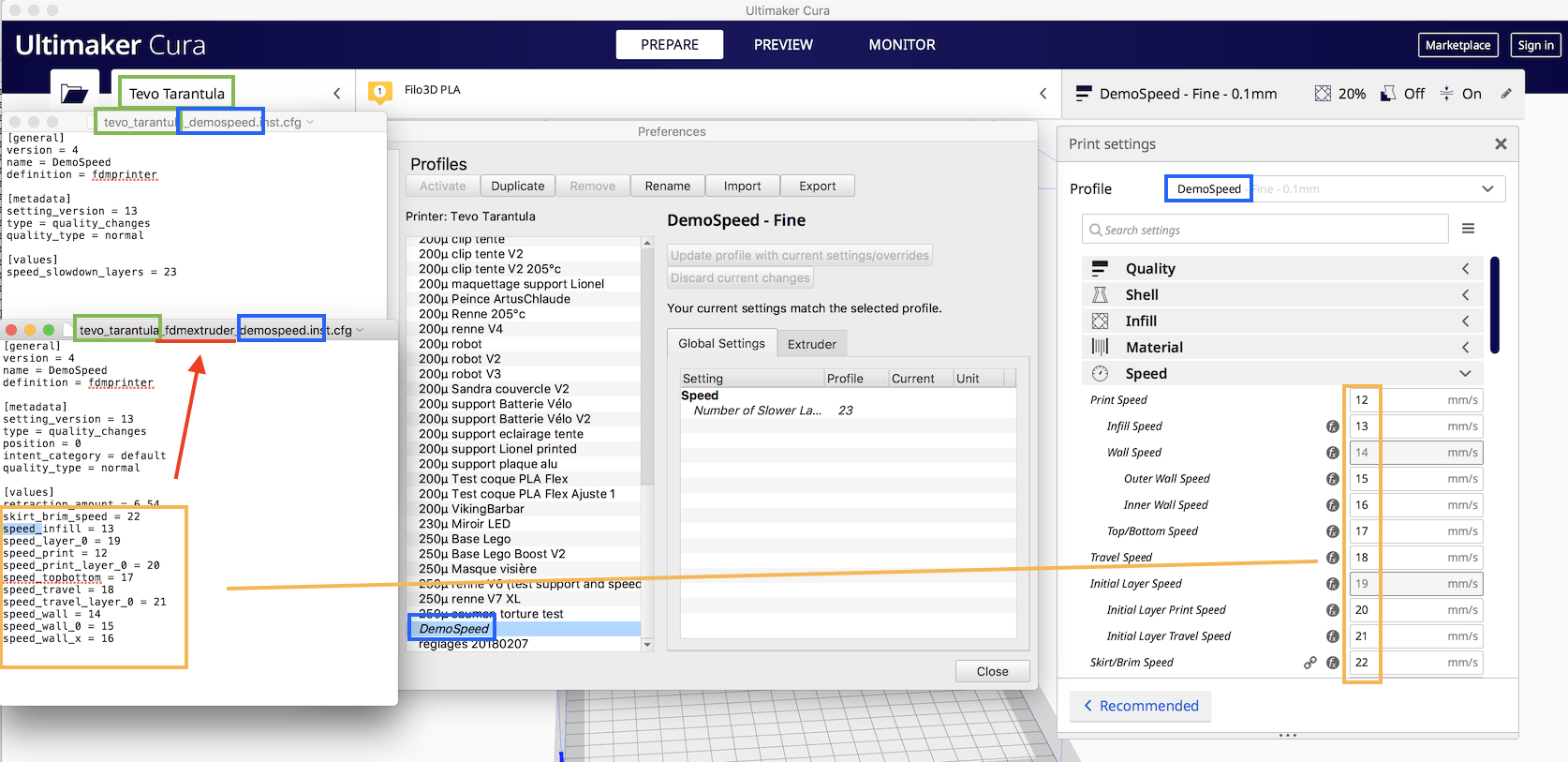
Note : My "extruder" panel is empty
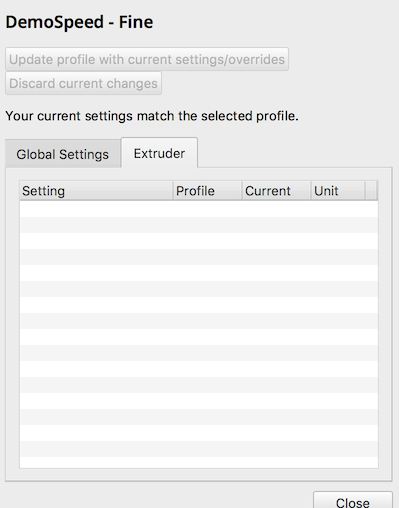
PS :
I open this ticket after the request of @Ghostkeeper :
https://github.com/Ultimaker/Cura/issues/7605#issuecomment-620939252
 64Florian
All 12 comments
The real problem here is that the extruder settings appear in the global tab. They are probably using the value from the global stack there then, which gets overridden by a quality profile or material.
 Ghostkeeper
on 1 May 2020
Ghostkeeper
on 1 May 2020
Thank you for this highlighting of this problem !
I found why since few versions I'm not able to tune my speed anymore !
As I can see in my cfg files, I have a file (2019-09-23) with following settings inside
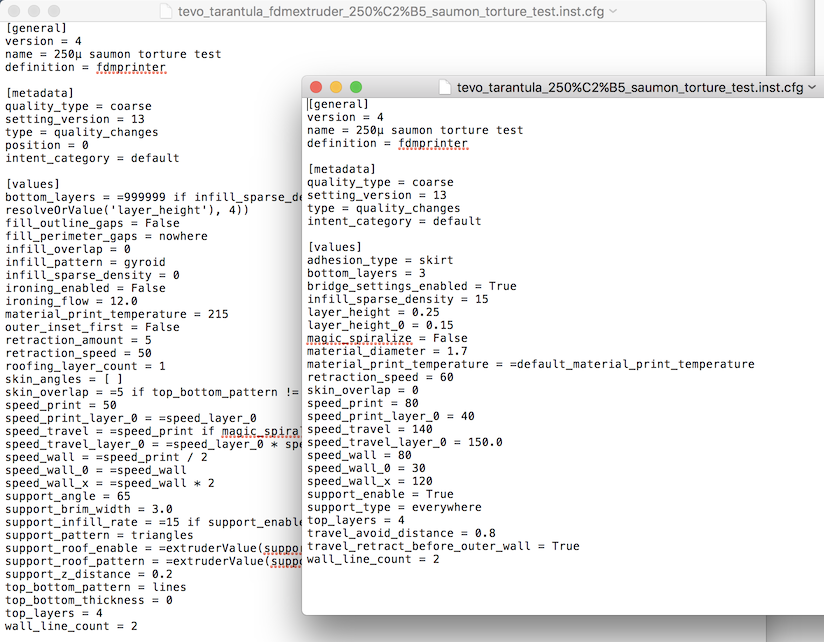
In fact I use Cura at least since version 2.7.0
all the time I upgrade and hop to preserve my "precious" settings
I have more or less use those version :
2.7.0
Cura-3.1.0-Darwin(Ultimaker ) (not really used or removed from my computer)
Ultimaker Cura-3.2.0-Darwin (not really used or removed from my computer)
Ultimaker Cura-3.5.0-Darwin (not really used or removed from my computer)
Ultimaker Cura-3.5.1-Darwin
Ultimaker_Cura-3.6.0-Darwin
Ultimaker_Cura-4.1.0-Darwin (not really used)
Ultimaker_Cura-4.2.1-Darwin
As I can see, my "saumon torture test" was made with 4.2.1 version from a fork of an older profil and have 2 settings ...
"Good" news this version (4.2.1) was still able to display properly those settings
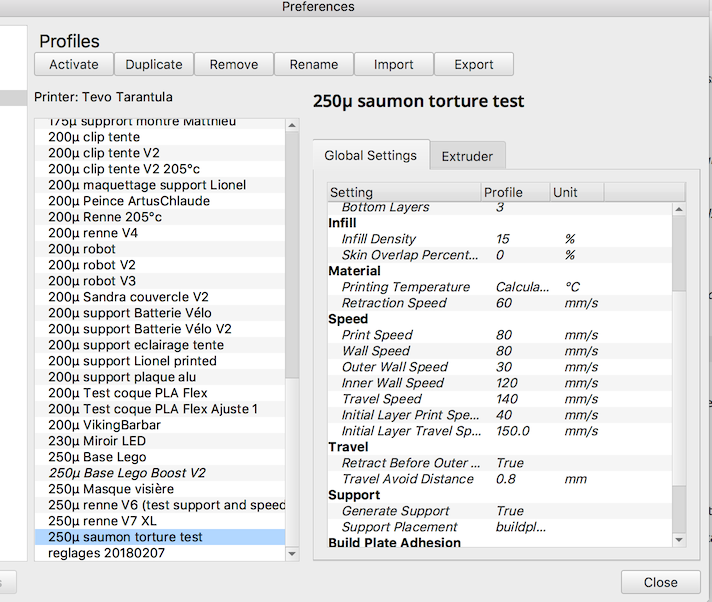
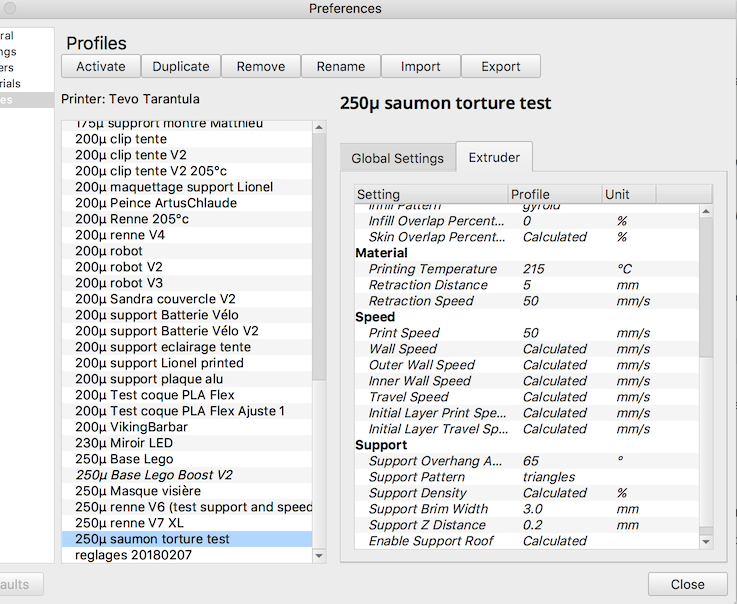
and as far as I can see the files and the screen seem to match
If I create a new profile from scratch I have this:

cfg file content as expected
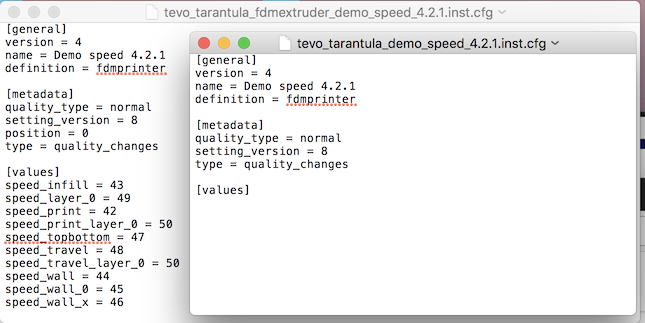
Note: 4.2.1 have setting_version = 8 and with 4.6.1 it's setting_version = 13
64Florian
on 1 May 2020
In 4.5.0 it was already broken
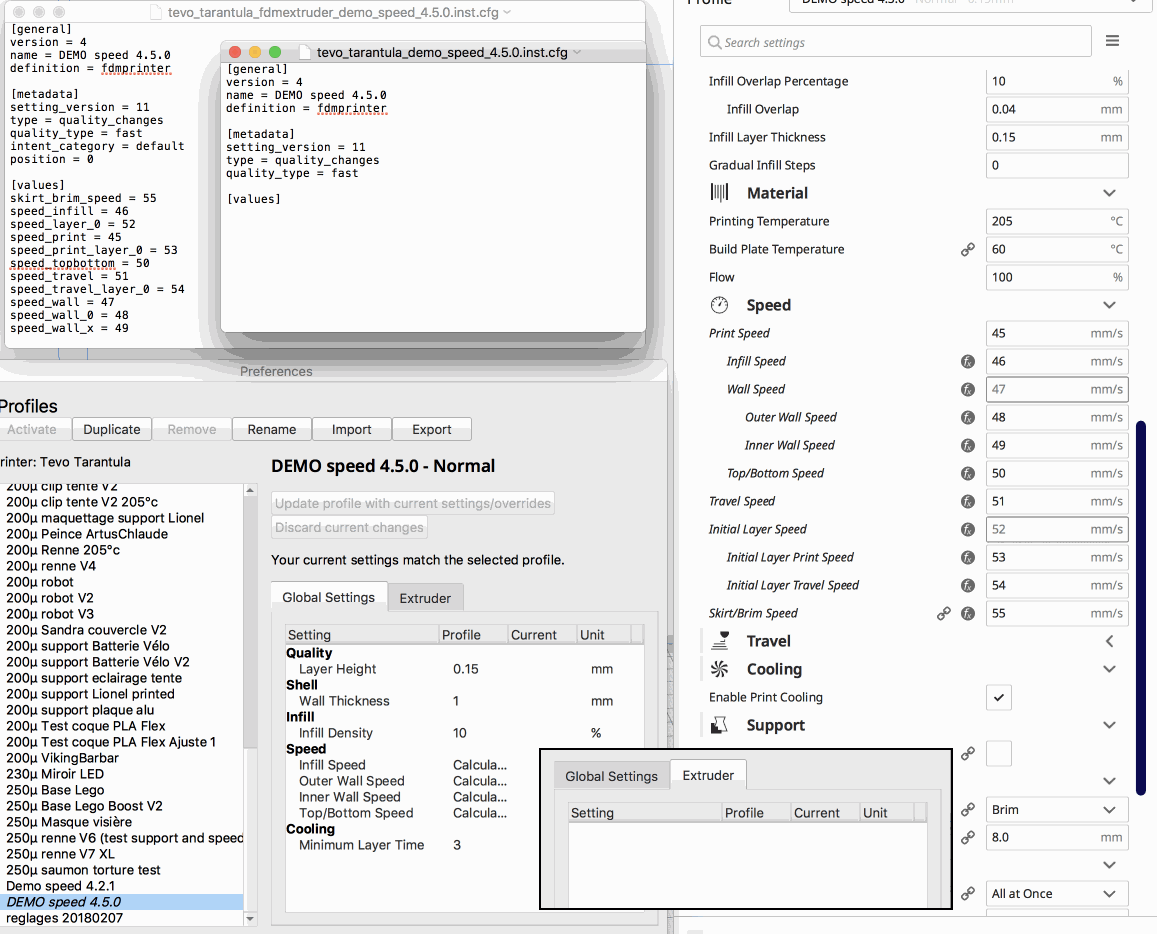
same thing with 4.4.0-BETA
still digging
64Florian
on 1 May 2020
Test method :
- load "normal" profile
- change speed
- save as new profile
- check in profile manager
With 4.3.0-BETA I think I have a strange behavior: I have speed in global and extruder ...
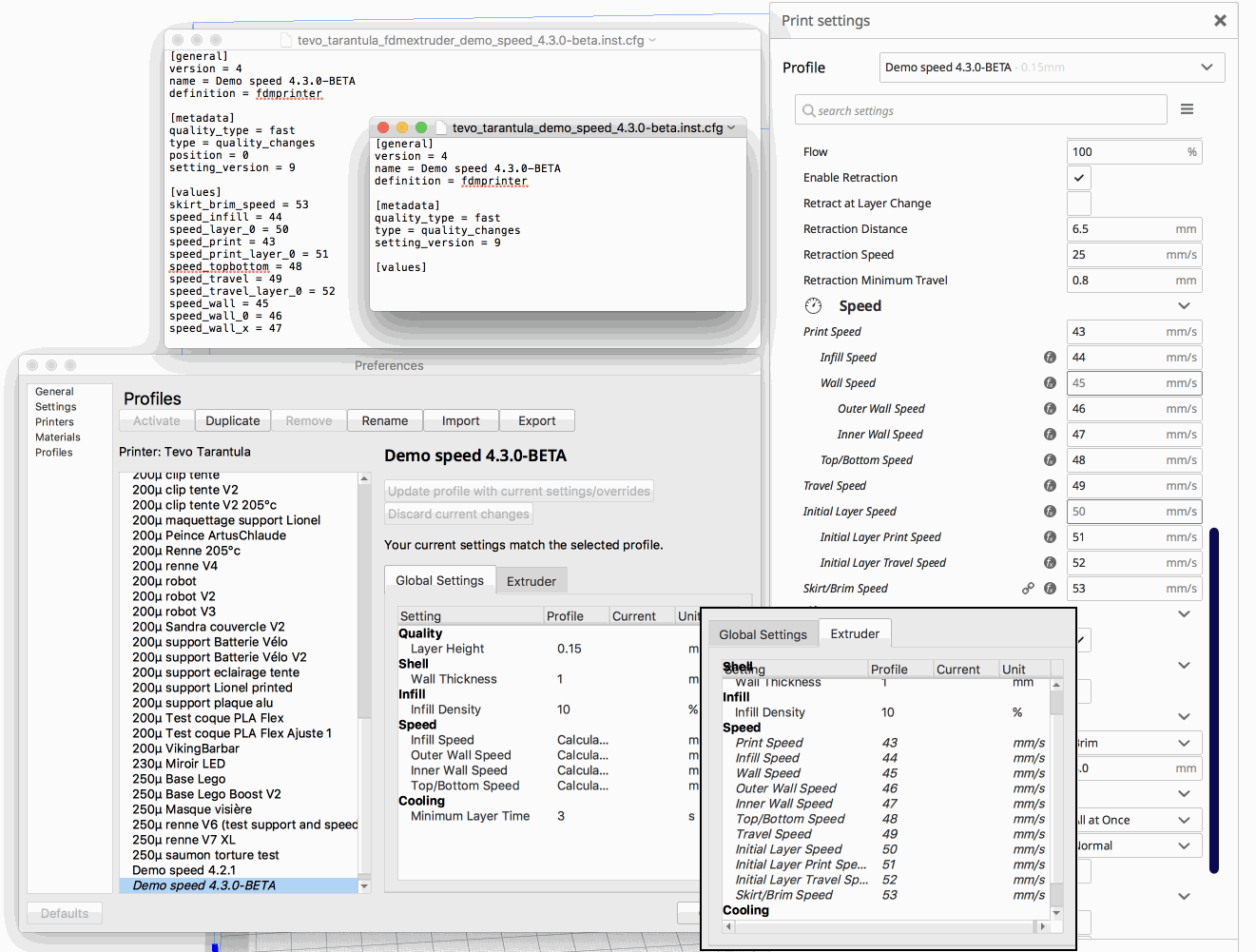
64Florian
on 1 May 2020
Tested OK with 4.3.0 final (setting_version = 9)
Tested Ko with 4.4.0 beta-pre-release (setting_version = 10)
diff 4.3/quality_changes/tevo_tarantula_fdmextruder_demo_speed_4.3.0_final.inst.cfg
 4.4/quality_changes/tevo_tarantula_fdmextruder_demo_speed_4.4.0_alpha.inst.cfg
3c3
< name = Demo speed 4.3.0 Final
---
> name = Demo Speed 4.4.0 Alpha
7,8c7,8
< position = 0
< type = quality_changes
---
> intent_category = default
> setting_version = 10
10c10,11
< setting_version = 9
---
> type = quality_changes
> position = 0
13,23c14,24
< skirt_brim_speed = 53
< speed_infill = 44
< speed_layer_0 = 50
< speed_print = 43
< speed_print_layer_0 = 51
< speed_topbottom = 48
< speed_travel = 49
< speed_travel_layer_0 = 52
< speed_wall = 45
< speed_wall_0 = 46
< speed_wall_x = 47
---
> skirt_brim_speed = 54
> speed_infill = 45
> speed_layer_0 = 51
> speed_print = 44
> speed_print_layer_0 = 52
> speed_topbottom = 49
> speed_travel = 50
> speed_travel_layer_0 = 53
> speed_wall = 46
> speed_wall_0 = 47
> speed_wall_x = 48
diff 4.3/quality_changes/tevo_tarantula_demo_speed_4.3.0_final.inst.cfg
4.4/quality_changes/tevo_tarantula_demo_speed_4.4.0_alpha.inst.cfg
3c3
< name = Demo speed 4.3.0 Final
---
> name = Demo Speed 4.4.0 Alpha
7c7
< type = quality_changes
---
> setting_version = 10
9c9
< setting_version = 9
---
may be not linked but when I click on an "old" profile, I received following traces in /Users/florian/Library/Logs/cura/stderr.log using "Console" mac application:
QualitySettingsModel.py:152: DeprecationWarning: <function GlobalStack.extruders at 0x608000d018d8> is deprecated (since 4.4): Please use extruderList instead.
Unfortunately I was not able to localize QualitySettingsModel.py file on my computer...
64Florian
on 1 May 2020
I Looking in console app because I noticed, when you click on one profile in profile manager, my computer tack literally 2 seconds to display it (even If I have a pretty decent I7 at 4Ghz)
It's at least 3 times faster with 4.3.0 !
-> tested with 4.4.0-beta-pre-release
64Florian
on 1 May 2020
4.4 introduced intent profiles, which is probably where this got broken then. Thanks for the analysis.
Ghostkeeper
on 4 May 2020
I discovered how useful could be a saved workspace ...
I attache on on my "strange" profile
4.6.1 - profile renne V5 with Cube 1cm.3mf.zip
it could be easier to use for debug than my screenshot
64Florian
on 8 May 2020
Indeed it would. The project file doesn't reproduce the problem for me though. These settings seem to be correct:
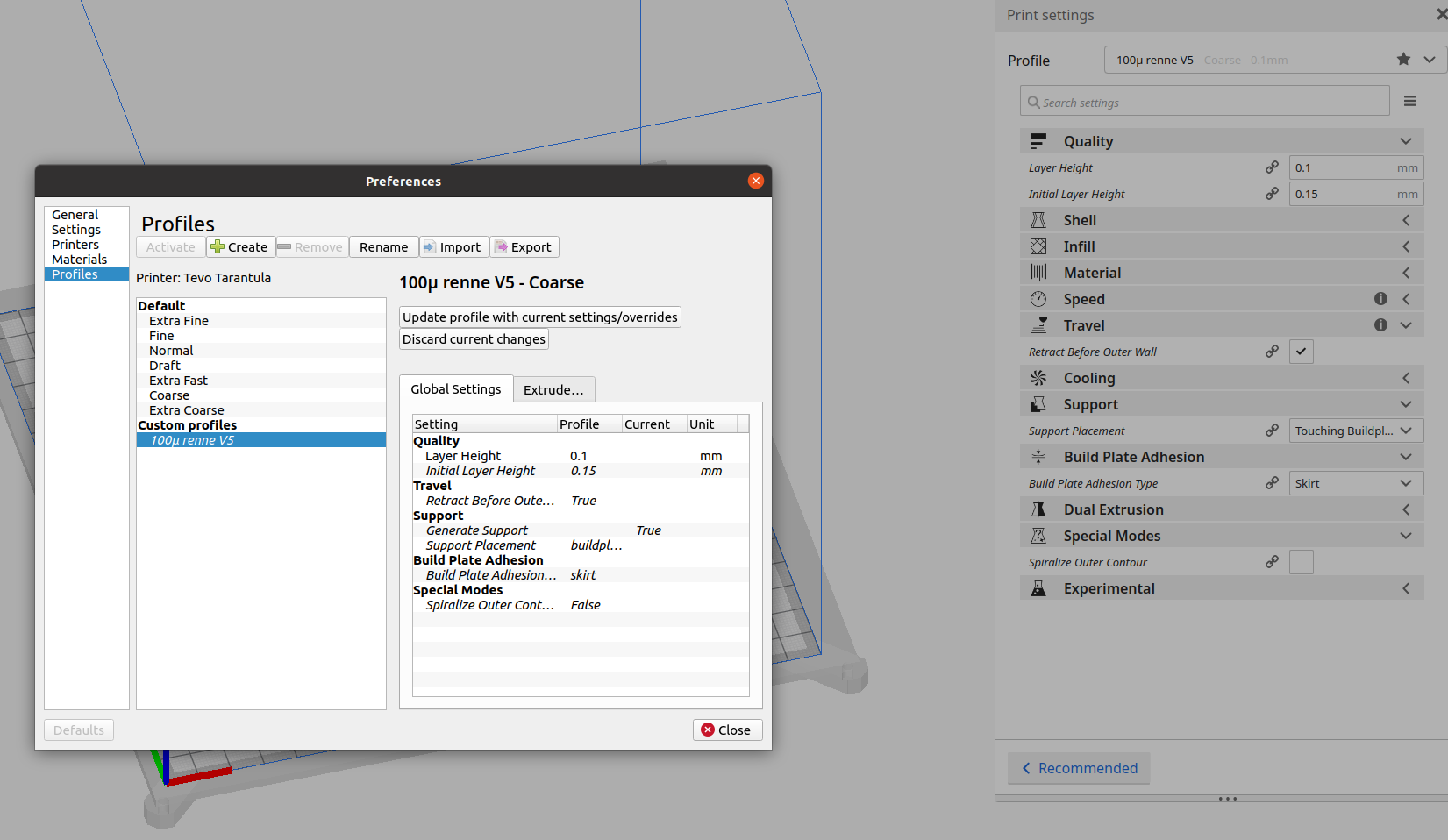
(I enabled support so that the Support Placement setting becomes visible.)
I think it's some update problem, that the list is outdated or something...
Ghostkeeper
on 11 May 2020
Really interesting !
In fact I'm pretty sure is because when I save my profile I save "only" good files not bad one ...
Is it the same if you replace your 4.6 profiles with mines ?
4.6.zip
P.S. I use "tevo tarantula" printer
My actual settings :
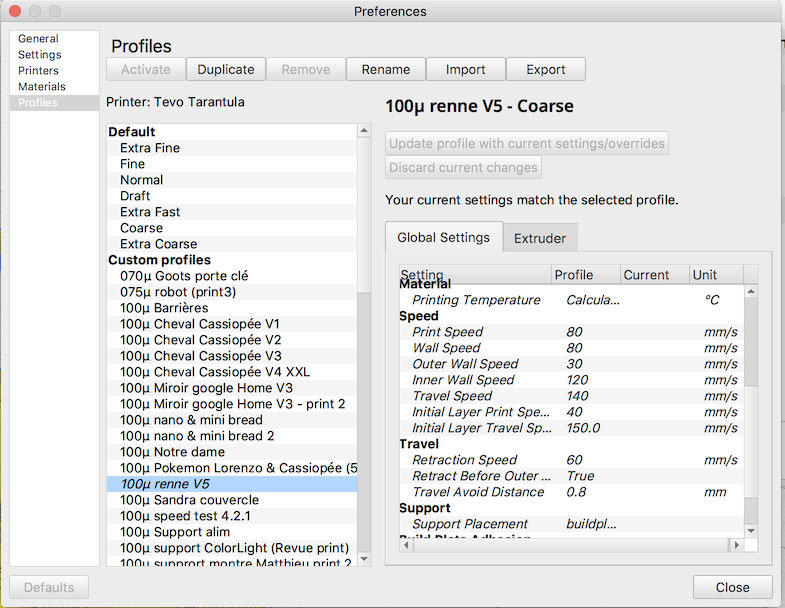
64Florian
on 11 May 2020
With that folder it's still mostly the same, except that I found one incongruity:
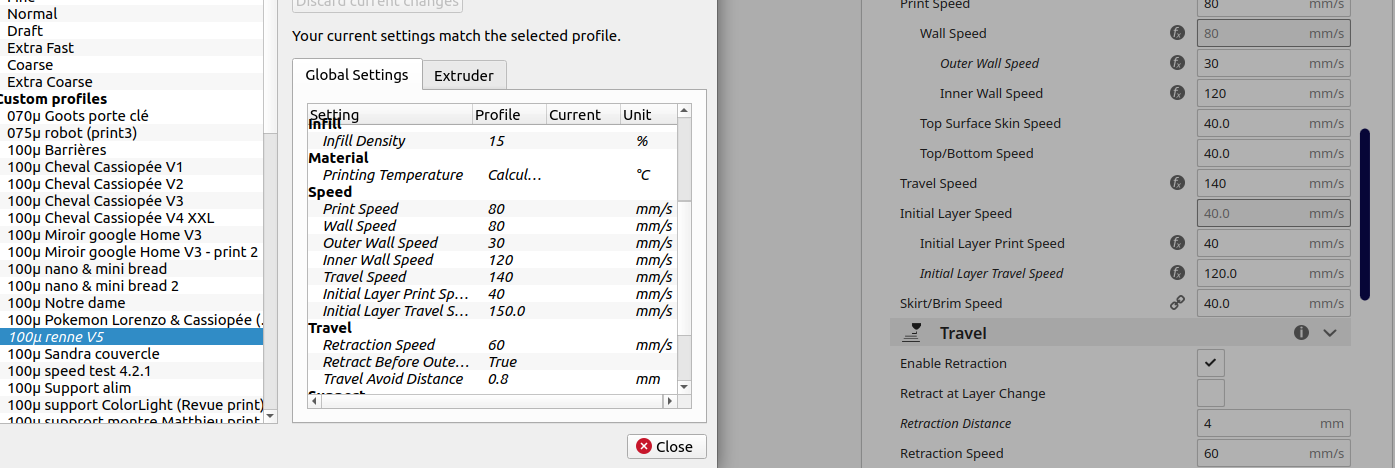
It mentions Initial Layer Travel Speed as 150, but it ends up being 120.
Using the God Mode plug-in, I can see that your profile sets it globally to 150 and then overrides that in the extruder with 120. As far as I know this should never happen.
When the user modifies a global setting it needs to go into the global stack. When the user modifies a per-extruder setting it needs to go into the extruder stack of the extruder it's modified on. So there shouldn't be an Initial Layer Travel Speed in the global settings at all. I don't understand how it got there. And neither for the rest of those per-extruder settings in the global stack, for that matter.
The resolution of the final setting value is correct at least. Only you can't see the setting override in the extruder tab because of this bug.
Ghostkeeper
on 13 May 2020
Related issues
 jornada812
·
3Comments
jornada812
·
3Comments
 timherrm
·
3Comments
timherrm
·
3Comments
 mnswamp1
·
3Comments
mnswamp1
·
3Comments
 thopiekar
·
3Comments
thopiekar
·
3Comments
 ferociousdiablo
·
3Comments
ferociousdiablo
·
3Comments