Cura: Wait for User error driving me crazy
Application version
(The version of the application this issue occurs with.)
Cura 4.4.1
Platform
(Information about the operating system the issue occurs on. Include at least the operating system and maybe GPU.)
Windows 10 ver 1809 64 bit
Printer
(Which printer was selected in Cura?)
Crealty CR20
Reproduction steps
- (Something you did.)
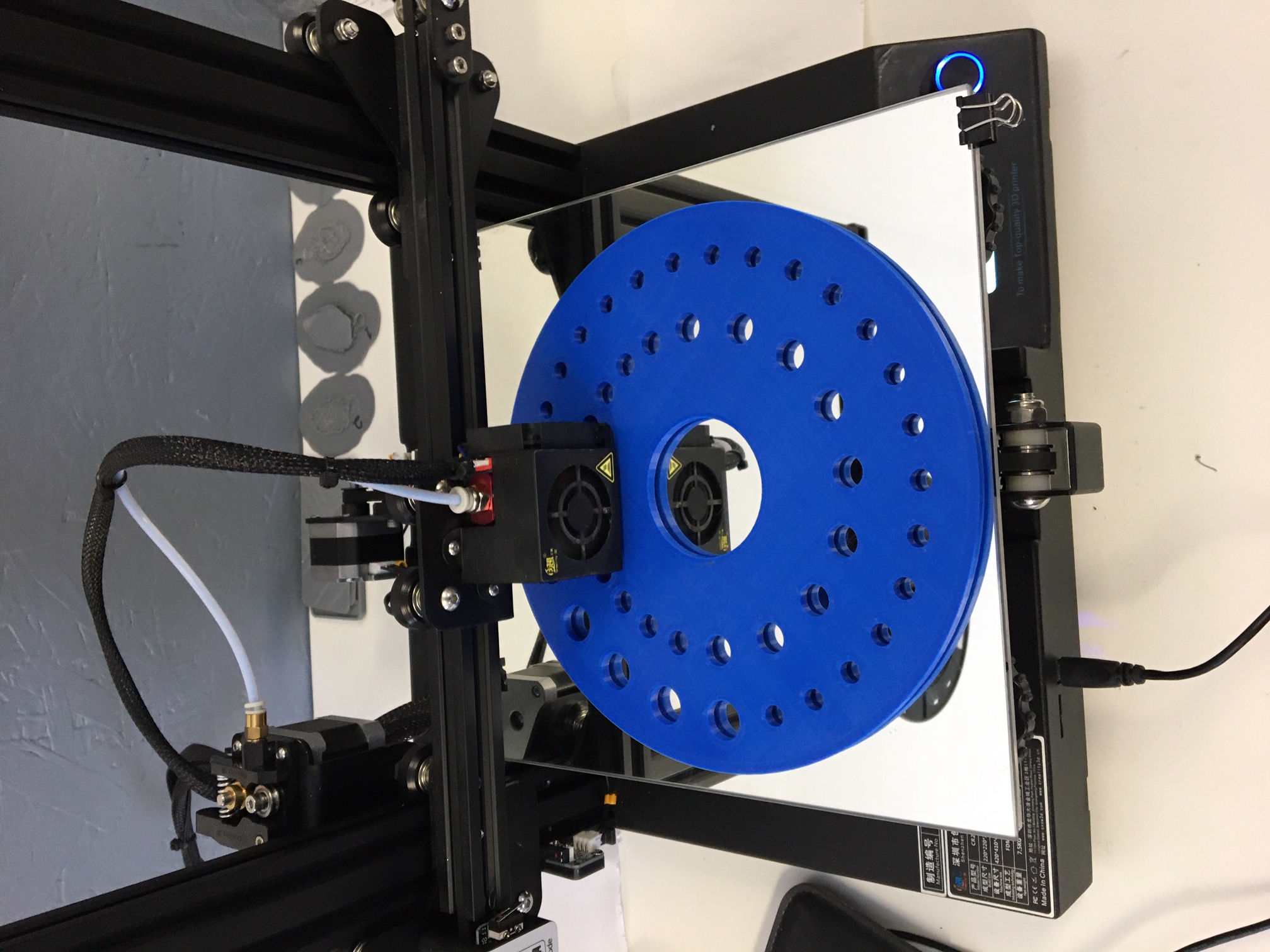
This printer has worked well and done hundreds of prints. I tried a large print that fills the build plate and this wait for user error emerged.
- (Something you did next.)
This is the first time I have seen this error. I tried both lines and zigzag in the Cura profile for the bottom layers and first layer but no improvement
Screenshot(s)
(Image showing the problem, perhaps before/after images.)

Actual results
(What happens after the above steps have been followed.)
The printer stops randomly with "Wait for User" showing in the printer lcd panel. Pushing the control knob on the printer starts the print but in a few minutes the printer stops again. This keeps happening every few minutes throughout the print. It is very frustrating and makes it impossible to print.
Expected results
(What should happen after the above steps have been followed.)
This print is a rotating tool holder. It is in three parts. The top is full of holes and features. It printed perfectly . The base is a solid piece and this is where the "Wait for User" problem is happening.
Project file
(For slicing bugs, provide a project which clearly shows the bug, by going to File->Save. For big files you may need to use WeTransfer or similar file sharing sites.)
Log file
(See https://github.com/Ultimaker/Cura#logging-issues to find the log file to upload, or copy a relevant snippet from it.)
See the date 2020-02-24 for the log entries associated with the problem print.
Additional information
(Extra information relevant to the issue.)
I have read other posts suggesting that this problem emerges when the model has long print lines. The top part of this model printed perfectly but it has many holes and features that interrupt the print lines. The base does not, it is one solid piece and the print lines run right across the build plate. It seems that the long lines have something to do with this problem.
 Shopgeezer
All 6 comments
Hello @Shopgeezer do you have a post processing script enabled? Sounds like Pause at height. Is there hammer and spanner icon next to the slice button? Disable this and the problem should disappear.
 mahtDFR
on 26 Feb 2020
mahtDFR
on 26 Feb 2020
Hi. Thanks for the suggestion. There is no post processing script enabled, no icon showing by the slice button. I put a circle of holes in the model where they don’t show in the final assembly to interrupt the long print lines. I started the print this morning and so far it is printing continuously. Lots of hours to go however so I will see how it works and report back.
On Feb 26, 2020, at 9:58 AM, maht notifications@github.com wrote:
Hello Shopgeezer, do you have a post processing script enabled? Sounds like Pause at height. Is there hammer and spanner icon next to the slice button? Disable this and the problem should disappear.
—
You are receiving this because you authored the thread.
Reply to this email directly, view it on GitHub https://github.com/Ultimaker/Cura/issues/7161?email_source=notifications&email_token=AKX6KCCMSIS7KIGUQ2DXU7TRE2GS7A5CNFSM4K3OOWJ2YY3PNVWWK3TUL52HS4DFVREXG43VMVBW63LNMVXHJKTDN5WW2ZLOORPWSZGOENAZPYY#issuecomment-591501283, or unsubscribe https://github.com/notifications/unsubscribe-auth/AKX6KCG56P2TLJHW7IWLBNLRE2GS7ANCNFSM4K3OOWJQ.
Shopgeezer
on 26 Feb 2020
Maybe you could show us a copy of the g-code that produces the problem.
However I'm fearful that you might just be running into a firmware bug here. There are plenty of other people running into this issue with various Creality printers. See also the thread you're creating a duplicate of: https://github.com/Ultimaker/Cura/issues/4590
 Ghostkeeper
on 28 Feb 2020
Ghostkeeper
on 28 Feb 2020
Hi. Yes I read that thread previously. That is where I found the suggestion about the long print lines causing the problem. I am chasing down this possibility by introducing holes in the model that interrupt the length of the lines. If this does cure the problem then I suspect it is a firmware bug as you suggest.
I am in discussions with the vendor about updating the firmware but having difficulty with English/Chinese language issues.
The Cura log file that I sent has strange entries in the Feb 24 log. There is dense heiroglyphics that run for 10 lines every so often in that log. Any chance that may be part of the problem?
Sent from my iPhone
On Feb 28, 2020, at 7:20 AM, Ghostkeeper notifications@github.com wrote:
Maybe you could show us a copy of the g-code that produces the problem.However I'm fearful that you might just be running into a firmware bug here. There are plenty of other people running into this issue with various Creality printers. See also the thread you're creating a duplicate of: #4590
—
You are receiving this because you were mentioned.
Reply to this email directly, view it on GitHub, or unsubscribe.
Shopgeezer
on 28 Feb 2020
I'm not seeing any hieroglyphics in your log. But then again, I read Cura log files like Cypher reading the Matrix; I just see redhead, blonde, USB printing, slice starting, etc.
You mean the urllib\request.py things maybe? That's just trying to send anonymous information when you save the g-code, but failing because it can't make a connection for some reason. Or maybe you meant all of the __onQmlWarning things? Those are parts of the layout reverting to 0 because we didn't link them together properly.
Ghostkeeper
on 28 Feb 2020
I don’t know what to look for so the text makes little sense to me. If I look closer the densely packed parts of the log seem to be associated with the profile in Cura ( looks like all the profile entries are listed in a big pile of text). Here is one.
[Backend] [WARNING] -s retraction_combing_max_distance="30" -s infill_pattern="cubic" -s spaghetti_infill_extra_volume="0" -s gradual_support_infill_steps="0" -s infill_material_flow="100" -s extruder_prime_pos_x="0" -s jerk_layer_0="8" -s raft_surface_jerk="8" -s wireframe_nozzle_clearance="1" -s switch_extruder_retraction_amount="16" -s line_width="0.4" -s infill_mesh_order="0" -s material_print_temperature="210" -s retraction_extrusion_window="10" -s bridge_skin_speed="12.5" -s acceleration_infill="500" -s date="24-02-2020" -s speed="0" -s machine_max_acceleration_y="500" -s machine_show_variants="False" -s mold_roof_height="0.5" -s retraction_min_travel="1.5" -s infill_wipe_dist="0.0" -s infill_angles="[ ]" -s support_interface_pattern="grid" -s coasting_min_volume="0.8" -s xy_offset_layer_0="0" -s support_interface_angles="[ ]" -s wireframe_flow_flat="100" -s skin_no_small_gaps_heuristic="False" -s magic_mesh_surface_mode="normal" -s wall_0_material_flow="100" -s material_flush_purge_speed="0.5" -s spaghetti_flow="20" -s skin_overlap_mm="0.04" -s skin_line_width="0.4" -s acceleration_ironing="500" -s mesh_rotation_matrix="[[1,0,0], [0,1,0], [0,0,1]]" -s roofing_layer_count="0" -s raft_base_line_spacing="1.6" -s experimental="0" -s support_interface_skip_height="0.2" -s infill_sparse_thickness="0.16" -s small_feature_speed_factor="50" -s infill_sparse_density="20" -s brim_width="8.0" -s speed_support="25.0" -s wipe_retraction_retract_speed="25" -s infill_before_walls="False" -s coasting_volume="0.064" -s wireframe_strategy="compensate" -s wall_0_wipe_dist="0.0" -s wireframe_flat_delay="0.1" -s jerk_wall_x="8" -s support_skip_some_zags="False" -s support_infill_angles="[ ]" -s spaghetti_max_infill_angle="10" -s gradual_infill_step_height="1.5" -s machine_nozzle_temp_enabled="True" -s speed_wall="25.0" -s outer_inset_first="False" -s jerk_travel="8" -s infill_mesh="False" -s wipe_repeat_count="5" -s skin_angles="[ ]" -s meshfix_union_all="True" -s default_material_bed_temperature="50" -s material_print_temperature_layer_0="210" -s machine_use_extruder_offset_to_offset_coords="True" -s acceleration_print_layer_0="500" -s machine_min_cool_heat_time_window="50.0" -s support_bottom_angles="[ ]" -s layer_start_y="0.0" -s retraction_prime_speed="25" -s adhesion_extruder_nr="0" -s jerk_wall="8" -s prime_tower_enable="False" -s bridge_skin_material_flow_3="110" -s wall_overhang_angle="90" -s draft_shield_height="10" -s top_bottom_thickness="0.8400000000000001" -s minimum_interface_area="10" -s material_guid="" -s raft_base_jerk="8" -s support_join_distance="2.0" -s remove_empty_first_layers="True" -s support_supported_skin_fan_speed="100" -s jerk_support_roof="8" -s machine_gcode_flavor="RepRap (Marlin/Sprinter)" -s prime_tower_wipe_enabled="True" -s prime_tower_min_volume="6" -s raft_surface_layers="2" -s gantry_height="25" -s raft_interface_line_width="0.8" -s z_seam_type="back" -s draft_shield_height_limitation="full" -s jerk_skirt_brim="8" -s machine_steps_per_mm_y="50" -s adaptive_layer_height_threshold="0.2" -s travel_avoid_supports="True" -s wall_x_extruder_nr="-1" -s wall_extruder_nr="-1" -s material_anti_ooze_retracted_position="-4" -s alternate_extra_perimeter="False" -s gradual_support_infill_step_height="1" -s bridge_settings_enabled="False" -s roofing_material_flow="100" -s acceleration_print="500" -s ironing_pattern="zigzag" -s support_fan_enable="False" -s top_thickness="0.8400000000000001" -s retraction_hop_after_extruder_switch_height="0.2" -s support_connect_zigzags="True" -s speed_wall_0="25.0" -s print_temperature="210" -s coasting_speed="90" -s speed_equalize_flow_max="150" -s wipe_move_distance="20" -s support_interface_enable="True" -s machine_acceleration="500" -s wall_0_inset="0" -s machine_center_is_zero="False" -s smooth_spiralized_contours="True" -s raft_surface_line_width="0.4" -s bridge_wall_speed="12.5" -s acceleration_wall_x="500" -s support_roof_pattern="grid" -s material="0" -s meshfix_maximum_travel_resolution="0.05" -s wireframe_bottom_delay="0" -s bridge_wall_min_length="5" -s retraction_combing="noskin" -s raft_jerk="8" -s support_tree_wall_count="1" -s retraction_hop_only_when_collides="False" -s support_interface_extruder_nr="0" -s default_material_print_temperature="210" -s wireframe_fall_down="0.5" -s small_hole_max_size="0" -s wireframe_height="3" -s magic_fuzzy_skin_enabled="False" -s infill_offset_x="0" -s mesh_position_y="0" -s material_flow_dependent_temperature="False" -s bridge_skin_speed_2="12.5" -s travel_compensate_overlapping_walls_0_enabled="False" -s acceleration_travel_layer_0="500" -s machine_max_jerk_xy="10" -s wall_line_width_0="0.4" -s acceleration_enabled="False" -s support_z_distance="0.16" -s skin_preshrink="1.2000000000000002" -s acceleration_skirt_brim="500" -s infill_randomize_start_location="False" -s support_enable="True" -s acceleration_support="500" -s brim_line_count="20" -s machine_end_gcode="G91 ;Relative positioning
Anyway I put a bunch of holes in the base of the print spaced geometrically so that there were no long lines, everything is broken up, and it is printing just fine right now. If it finishes without problems overnight than I would have to say that it is a problem with print lines that are as long as the bed dimension and probably a firmware problem.
Thanks for your help. I should put an entry in the original thread when I get things figured out. It would be helpful for other users with this problem.
On Feb 28, 2020, at 8:31 AM, Ghostkeeper notifications@github.com wrote:
I'm not seeing any hieroglyphics in your log. But then again, I read Cura log files like Cypher reading the Matrix; I just see redhead, blonde, USB printing, slice starting, etc.
You mean the urllib\request.py things maybe? That's just trying to send anonymous information when you save the g-code, but failing because it can't make a connection for some reason. Or maybe you meant all of the __onQmlWarning things? Those are parts of the layout reverting to 0 because we didn't link them together properly.
—
You are receiving this because you were mentioned.
Reply to this email directly, view it on GitHub https://github.com/Ultimaker/Cura/issues/7161?email_source=notifications&email_token=AKX6KCBEFZO6MH6XJR5CWT3RFEN3HA5CNFSM4K3OOWJ2YY3PNVWWK3TUL52HS4DFVREXG43VMVBW63LNMVXHJKTDN5WW2ZLOORPWSZGOENIWUHA#issuecomment-592538140, or unsubscribe https://github.com/notifications/unsubscribe-auth/AKX6KCCMUE3RER2J4F4YFYTRFEN3HANCNFSM4K3OOWJQ.
Shopgeezer
on 28 Feb 2020
Related issues
 ferociousdiablo
·
3Comments
ferociousdiablo
·
3Comments
 JRRN
·
3Comments
JRRN
·
3Comments
 jellewie
·
3Comments
jellewie
·
3Comments
 tomoinn
·
3Comments
tomoinn
·
3Comments
 DamianSepczuk
·
3Comments
DamianSepczuk
·
3Comments