Cura: Poor hi-dpi font rendering on Monitor tab
Application version
Cura 4.4.1
Platform
Windows 10 64-bit
Printer
N/A (but S3)
Reproduction steps
- Set Windows 10 DPI to 150%
- Print something
Screenshot(s)
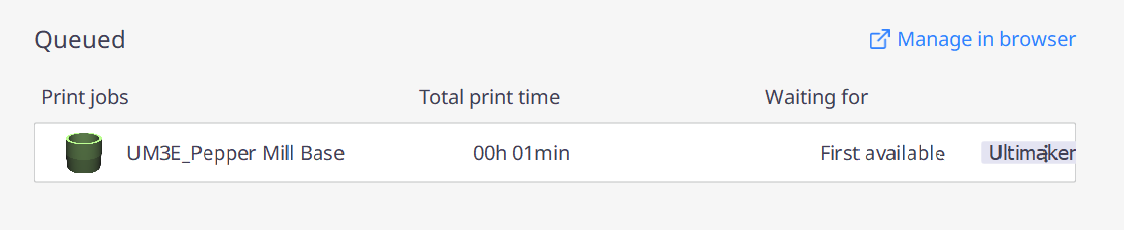
(Make sure to view screenshot at full size, as the issue is mitigated when the image is scaled down.)
 mqudsi
All 6 comments

Thanks for the report. Here are my results (v4.5 beta). The DPI seems acceptable. It's unlikely we're going to support scale and layouts above 100%. See also related issue #7094
 mahtDFR
on 18 Feb 2020
mahtDFR
on 18 Feb 2020
It's unlikely we're going to support scale and layouts above 100%.
That's a silly statement; Cura already supports scale and layouts above 100%, or it would not be compatible with Retina macs and laptops with 4k screens.
@mahtDFR I don't think you understand the problem. The problem is that on the specific part highlighted by @mqudsi the font rendering is broken in the MonitorPrintJobCard. This is caused by the font being rendered on a fractional pixel offset.
Apart from the font rendering, you can also see that the border of the MonitorPrintJobCard is not drawn on a full pixel offset; the top and bottom border are thicker than the sides because the top and bottom are being drawn "between two pixels". You'll have to zoom in to the image a little (or a lot, depending on your eye-sight 8-) ).
I have not yet spotted the real cause of the fractional offset, but it might be in MonitorQueue instead of MonitorPrintJobCard. I promised someone a while ago I would not fix bugs in that code.
 fieldOfView
on 18 Feb 2020
fieldOfView
on 18 Feb 2020
Ah yes, I see. I'll sticky it.
mahtDFR
on 18 Feb 2020
@mqudsi Can you check if this issue persists in 4.5 beta? We made some font changes between versions.
mahtDFR
on 19 Feb 2020
It is not the font, it is the font rendering.
fieldOfView
on 19 Feb 2020
I've made some quick fixes that make it look a lot better (I have the font rendering issues as well). There seem to be some vertical alignment issues left though outside of the file that I was editing.
This is an issue that could've been prevented entirely if this plug-in used the theme file, instead of hard-coding its sizes everywhere.
The real fix for this is in our backlog as CURA-6927, for our developers (an internal ticket at Ultimaker).
 Ghostkeeper
on 25 Feb 2020
Ghostkeeper
on 25 Feb 2020
Related issues
 DmitryBychkov
·
3Comments
DmitryBychkov
·
3Comments
 probonopd
·
3Comments
probonopd
·
3Comments
 jornada812
·
3Comments
jornada812
·
3Comments
 rudowinger
·
3Comments
rudowinger
·
3Comments
 konvoj
·
3Comments
konvoj
·
3Comments
Most helpful comment
That's a silly statement; Cura already supports scale and layouts above 100%, or it would not be compatible with Retina macs and laptops with 4k screens.
@mahtDFR I don't think you understand the problem. The problem is that on the specific part highlighted by @mqudsi the font rendering is broken in the MonitorPrintJobCard. This is caused by the font being rendered on a fractional pixel offset.
Apart from the font rendering, you can also see that the border of the MonitorPrintJobCard is not drawn on a full pixel offset; the top and bottom border are thicker than the sides because the top and bottom are being drawn "between two pixels". You'll have to zoom in to the image a little (or a lot, depending on your eye-sight 8-) ).
I have not yet spotted the real cause of the fractional offset, but it might be in MonitorQueue instead of MonitorPrintJobCard. I promised someone a while ago I would not fix bugs in that code.