Cura: Z-hop does not work when moving (cura 4.5)
Hello, in the new version of the cura, raising the z axis does not work when moving, although the settings are set correctly.

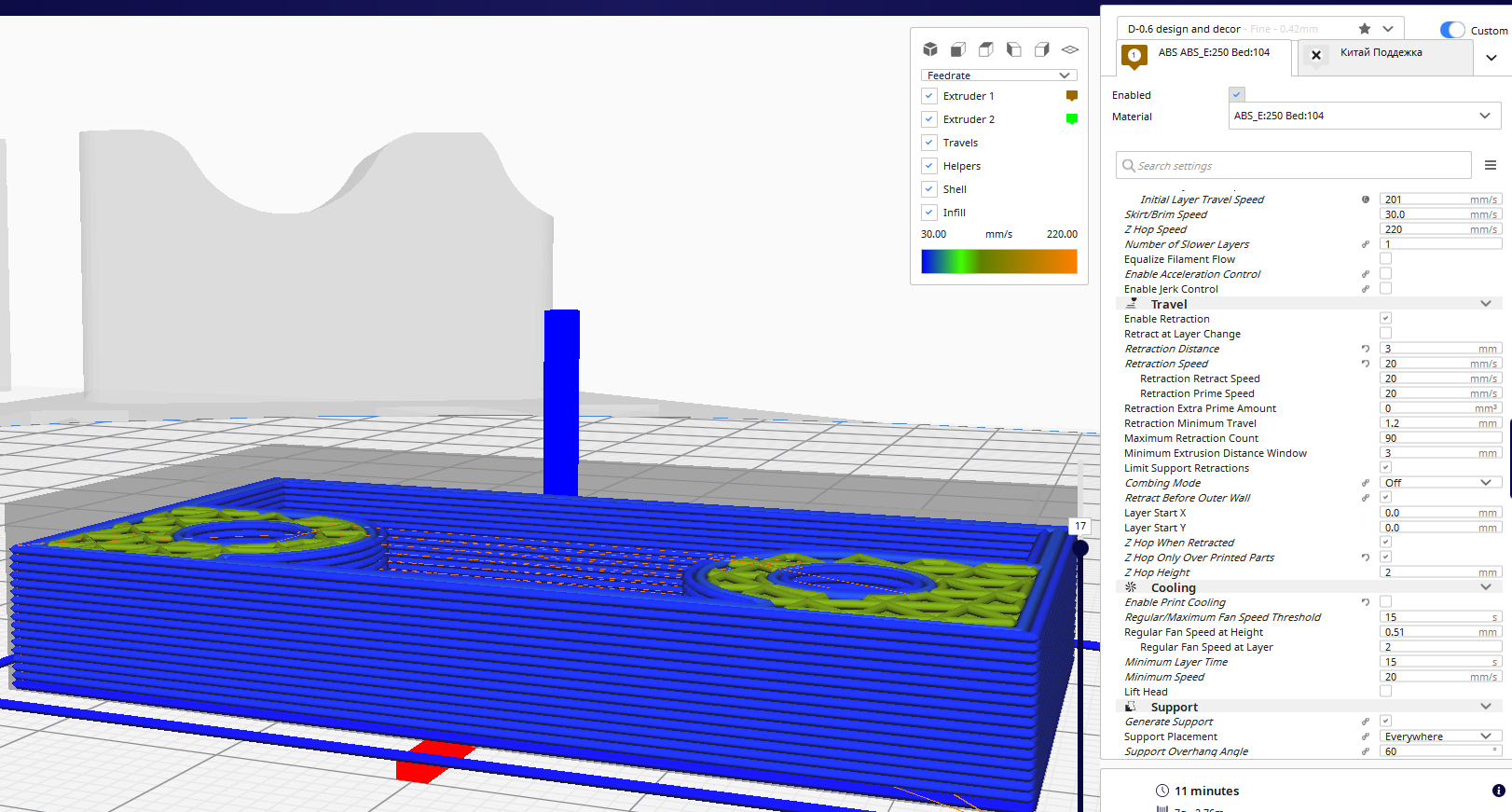
judging by these three settings, z-hop should only be done provided that a retract occurs.
But this does not happen.
when printing, the nozzle is scraped over the part over long distances
I don’t want to turn off the combining mode completely, for short distances you need it, and for long distances you also need to z-hop
It seems that they have already tried to fix it, but in the new version this function still does not work
 Goodfeat
All 20 comments
I think the crux here lies in the "Z Hop Only Over Printed Parts" setting. That one caught even the developers at unawares sometimes. Speaking from experience :stuck_out_tongue:
If that is enabled, it will only perform a Z hop if a different part is in the middle that can't be avoided.
Can you provide an example of where you think it's working incorrectly? As in, some reproduction steps?
 Ghostkeeper
on 25 Feb 2020
Ghostkeeper
on 25 Feb 2020
I chose a simple file for analysis
saved one file in 3fm with all the settings, and the second saved as g-code
I made a short video.
To analyze the g-code, I used the repetier-host, since there is no such tool for analysis in the cura program.
and besides, it’s impossible even to visually analyze the code in the cura, since Z-hop animations are simply not provided
so I use a third-party tool, sorry
https://youtu.be/FMpbVrpnqfc
the program must make a z-jump, because the maximum distance without a flash is indicated in the settings.

I interpret the setting like this:
if the program has a jump everywhere,
then he must do it everywhere. but you need to make a jump only if the distance is beyond the limits.
if this information is not enough, I will try to provide another example much more successfully
Goodfeat
on 25 Feb 2020
We can't load that project file since it's based off a printer definition that you added to Cura's configuration files manually, the "deltabotm". But the video is clear. Repetier can show the travel moves by the way. Cura will also show Z hops but only after saving the g-code and re-loading it.
I also tried slicing with your model there, using the Ultimaker S5 defaults. I disabled Z Hop Only Over Printed Parts so that it should hop there. I also set Combing Mode to Within Infill, otherwise it would just go through the side instead of making a retraction. Then I sliced and the result has Z hops:

The little stripes above the print are the travel moves. It's a bit hard to see but I had to use this angle in order to show that it's above the print.
Ghostkeeper
on 28 Feb 2020
combing mode : off
combing mode : all

combing mode : not in Skin

combing mode : Within Infill

I do not understand one. why do you have a visualization displaying the path of raising the z axis, but I do not have such a display anywhere
I have no such visualization in all modes, although if I turn off combing completely, then I know that lifting will work along the z axis everywhere
I think the problem is much more serious than I expected
Goodfeat
on 28 Feb 2020
I do not understand one. why do you have a visualization displaying the path of raising the z axis, but I do not have such a display anywhere
The normal visualisation is limited to 2D layers, but if you save the g-code and load it again by opening the .gcode file in Cura you should be able to see the 3D moves like Z hop (or spiralise, or wire printing, etc).
Ghostkeeper
on 3 Mar 2020
this archive contains the entire configuration of my printer. you can check the file by downloading my configuration
Unfortunately, your analysis is not suitable to make sure everything is working fine.
I attached another archive with three files, a completely different detail.
there are three files in the archive with the current settings and the exported G-code

if you look exactly how you are doing, then on the visualization you can see that everything is in order (It seems to be)
On this visualization there are lines that perform Z-hop

but this is not enough, we need a thorough analysis of the g-code
I downloaded the exported g-code to another program (Repetier-host)

the screenshot shows that in some places Z-hop is not performed
(a piece of the g-code is highlighted on the right, in which there is no direction along the z axis)
I decided to look at the code further to make sure that the z-hop is working somewhere. After all, the visualization shows that he is present
and when viewing found places where he fulfills

here in this place he works out as expected, but here the distance is much less than on the previous screen
This problem is really hard to detect. Now I think this is a bug and the Cura is very selective in where to do it Z-hop and where not
Goodfeat
on 3 Mar 2020
In that case it's not retracting because your combing mode is set to "all". And since it's not retracting it's also not Z hopping.
Ghostkeeper
on 9 Mar 2020
Here is a flow chart that includes when it should be retracting and Z hopping: https://github.com/Ultimaker/CuraEngine/blob/master/docs/assets/retraction_combing_hop.svg
In the bottom if it says "retract" or "hop" that would still need to check whether retraction or hop is enabled though.
Ghostkeeper
on 9 Mar 2020
I looked at the circuit.
now I see that the parameter "max comb distance with no retract" does not work as I thought
then this topic will now rather be a request for a new feature

this function will be justified by the fact that at long distances the nozzle can cling to the model and as a result there will be skipping steps and shifting layers.
on my delta this is due to moving too fast. this does not occur at short distances and can be dispensed with without a retract.
I have to completely turn off the combining mode so as not to reduce the speed of movement. but when the combining mode is off, the printer quite often raises the nozzle at short distances, which unnecessarily spends a lot of time and retracts.
Is it possible to add such an additional function as in the picture?
Goodfeat
on 9 Mar 2020
Using hop as well as combing doesn't really make sense though. If you're going over everything with a Z hop, why would you also follow/avoid the walls horizontally?
Ghostkeeper
on 13 Mar 2020
I can’t use the combining function in any way, because many times my printing crashed due to fast movement over long distances. Speed 250mm /. at this speed, the nozzle clings to the model in combining mode. When combing is completely turned off, the problem with layer shifts disappears completely, but very small movements of raising the Z axis appear in which there is no point. it was because of them that I asked to add another function
new feature will help disable z-hop at short distances
Goodfeat
on 13 Mar 2020
Then I think you'll need to try these things first:
- Disable combing.
- Increase the Retraction Minimum Travel setting so that your small movements don't trigger a retraction and then don't trigger a Z hop.
Another thing you might want to look at is to reduce the travel speed and/or acceleration a bit. It really won't impact your total printing time a lot.
Ghostkeeper
on 13 Mar 2020
Disabling combing just helps, but as I said earlier, there are many unnecessary small movements
I will try to increase the setting Retraction Minimum Travel. I'll see what happens
If this setting helps in solving the problem, then it will be great
Goodfeat
on 13 Mar 2020
I'm experiencing the same issue - I'm pretty sure v4.5.0 is not generating a Z-hop when it should.
I'm printing a large model with travel distances >100mm on most layers - there are no Z-hops _at all_ in my GCODE if I have _any_ combing mode on at all, and with any distance set.
I'm pretty confident this worked (as expected?) in previous versions. I will roll back and confirm.
Please note that I'm saying that the behaviour described in the flowchart posted is not occurring, I'm not complaining about the design / logic of the algorithm - this is correct, but the generated GCODE is not as per the logic.
 amil109
on 11 Apr 2020
amil109
on 11 Apr 2020
AFAIK, combed travel moves only use z-hop if they move across air.
 smartavionics
on 11 Apr 2020
smartavionics
on 11 Apr 2020
The plot thickens - it seems that Cura is behaving correctly with smaller models, but the larger STLs I am slicing never get the Z-hop.
Tested with Cura 4.4.0, 4.4.1 and 4.5.0 - all give the same symptoms. Looks like it's not a version issue.
Settings:
Combing: All (but reproduces with 'Within Skin' and 'Infill only' also)
Z-Hop when retracted: Checked
Z hop height: 0.22mm (so I could easily search for 'hopped' Z heights in the GCODE)
Small model (<100mm high, <12MB GCODE output) - Cura behaves exactly as expected, no issue. Retracts are accompanied by Z-hops.
Large model (180mm high, ~26MB GCODE output) - Cura does not put in the Z-hop on retract, but all other aspects of the GCODE are correct.
Large model (190mm high, ~14MB GCODE output) - Cura does not put in the Z-hop on retract, but all other aspects of the GCODE are correct.
Is it something related to the height of the model?
If anyone is able to assist, please let me know which log files are needed to troubleshoot the issue. Unfortunately I can't share the STLs as I don't own the rights to them (model purchased, but I can't redistribute it).
amil109
on 12 Apr 2020
Is it possible to provide the 14MB gcode file? If so, please zip it up and attach to this issue.
smartavionics
on 12 Apr 2020
Further testing on my part suggests that I had indeed misinterpreted the functionality - my apologies for this, and thank you @smartavionics for your help!
On reviewing the flow chart again, and making some simple test cases in OpenSCAD, I figured out my issue - it was not the size of the models, but the geometry - any combing moves in the larger models never required that the print head _cross a wall_ (in practical terms, this means moving across open space), and so there was no Z-hop. The retracts were done correctly, as noted.
With all of this in mind, I would also endorse the feature request made by @Goodfeat here: https://github.com/Ultimaker/Cura/issues/7108#issuecomment-596548449 - I think this would be a good addition, as for large models with travel moves >100mm, I often found my nozzle 'scraping' on the print surface, especially where it crossed infill.
I'll play around with the other travel settings to see if I can get what I need for these particular models.
Thanks again for the swift replies! I've attached a zip-file with the simple files I used to test for reference, but no action is needed.
amil109
on 12 Apr 2020
I still took the advice of @Ghostkeeper, I completely turned off the combing mode. And set the Retraction Minimum Travel 15mm setting. It seems to work.
At a lower value Retraction Minimum Travel, z-hop does not work and retraction also does not turn on. With a larger value, both z-hop and retraction work.
This is practically what I was striving for. it was just necessary to completely disable combing mode
Goodfeat
on 12 Apr 2020
This issue has been automatically closed because there has been no response to our request for more information from the original author. With only the information that is currently in the issue, we don't have enough information to take action. Please reach out if you have or find the answers we need so that we can investigate further.
![no-response[bot] picture](https://avatars2.githubusercontent.com/u/26350515?v=4&s=40) no-response[bot]
on 19 Jun 2020
no-response[bot]
on 19 Jun 2020
Related issues
 jellewie
·
3Comments
jellewie
·
3Comments
 StanislavJochman
·
3Comments
StanislavJochman
·
3Comments
 timherrm
·
3Comments
timherrm
·
3Comments
 ferociousdiablo
·
3Comments
ferociousdiablo
·
3Comments
 muhammadelmogy
·
3Comments
muhammadelmogy
·
3Comments