Cura: Version 4.4.0 and version 4.4.1 ignore nozzle diameter changes.
Application version
(The version of the application this issue occurs with.)
Platform
(Information about the operating system the issue occurs on. Include at least the operating system and maybe GPU.)
Printer
(Which printer was selected in Cura?)
Reproduction steps
- (Something you did.)
- (Something you did next.)
Screenshot(s)
(Image showing the problem, perhaps before/after images.)
Actual results
(What happens after the above steps have been followed.)
Expected results
(What should happen after the above steps have been followed.)
Project file
(For slicing bugs, provide a project which clearly shows the bug, by going to File->Save. For big files you may need to use WeTransfer or similar file sharing sites.)
Log file
(See https://github.com/Ultimaker/Cura#logging-issues to find the log file to upload, or copy a relevant snippet from it.)
Additional information
(Extra information relevant to the issue.)
 ReHoAeb
All 16 comments
Version 4.4.0 and version 4.4.1 ignore nozzle diameter changes.
ReHoAeb
on 15 Jan 2020
You need to use the comma. (0,4 instead of 0.4 ) :-/
 Twigho
on 15 Jan 2020
Twigho
on 15 Jan 2020
Thanks for copying the issue template but it doesn't appear to be populated with info. Can you tell me more about your printer setup so I can try to replicate the issue?
 mahtDFR
on 15 Jan 2020
mahtDFR
on 15 Jan 2020
Application version
4.4.1
Platform
Windows 10 64bits
Printer
Artillery Sidewinder X1 prile here : https://3d-nexus.com/resources/file-archives/category/8-artillery-evnovo
Reproduction steps
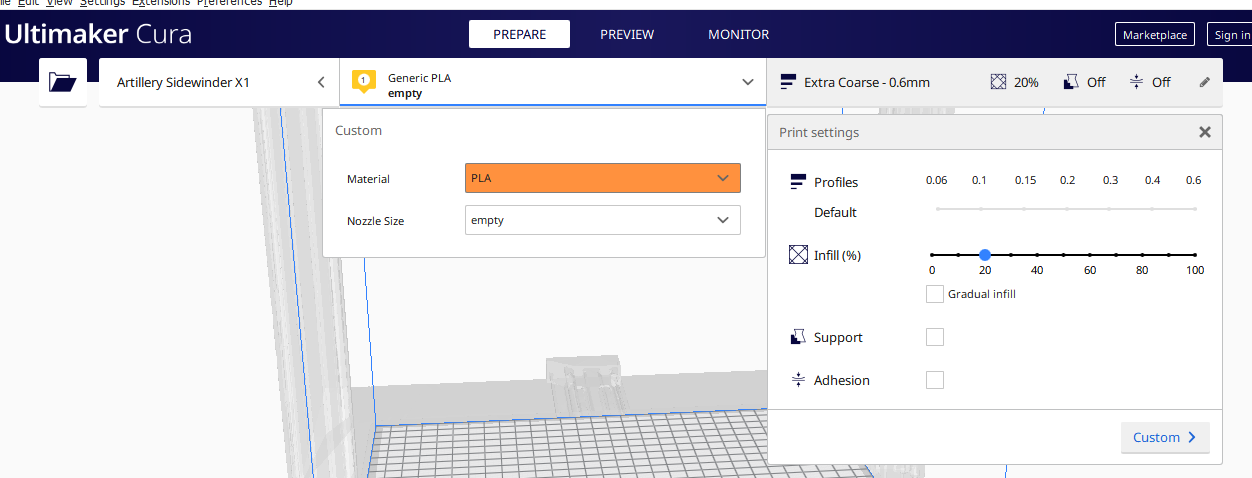
Every thing is OK with Cura 4.2.1 - see screenshot :

and with Cura 4.4.1 : nozzle size is empty and there is no quality profile also - see screenshot :
Log file
cura.log
 Amapem
on 15 Jan 2020
Amapem
on 15 Jan 2020
This issue seems to be related to broken nozzle size definitions.
Version 4.4 introduced an extra layer of the settings stack for Intent profiles. As a result your nozzle size metadata (which is configured correctly for 4.2 but not 4.4) is getting ignored. Read the discussion here for more detail: #6666
A workaround would be to edit the metadata and populate it with the correct info. This is located in the resources folder of the install folder. Also found some clues in the log you provided:
2020-01-14 22:18:38,411 - ERROR - [MainThread] UM.Logger.logException [88]: UM.Settings.ContainerFormatError.ContainerFormatError: When trying to deserialize artillery_base_extruder_0 #2, we received an unknown container ID (artillery_sidewinder_x1_0.4)
You could also nudge the developer of this profile to update it for compatibility with 4.4+ They could even make a pull request to merge their printer profile directly with our repo so it can be included it in the printer selection menu by default - the result of that is a more user-friendly experience with less messing around with the file system by the user.
Hope this gives some clues
mahtDFR
on 17 Jan 2020
@ReHoAeb , did you use the comma as mentioned by @Twigho ?
@Amapem, is that after an upgrade from 4.2 to 4.4? If so, can you try w/o an upgrade?
 Vandrasc
on 17 Jan 2020
Vandrasc
on 17 Jan 2020
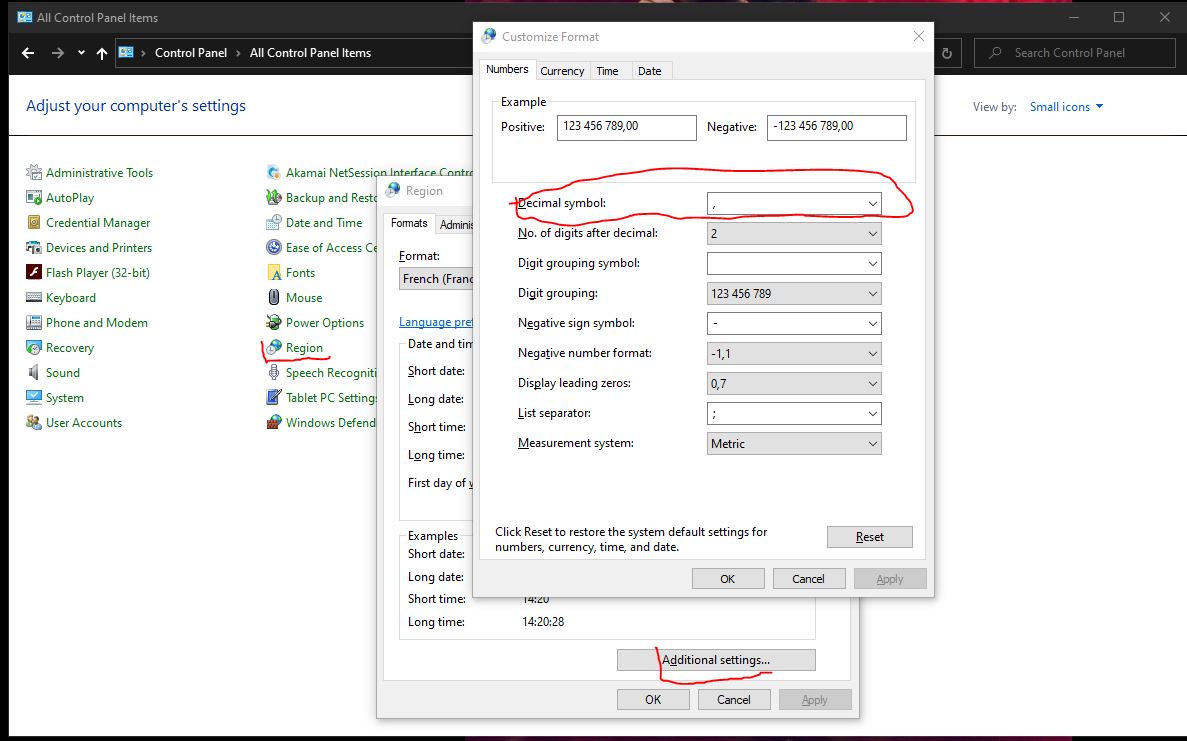
Maybe you can try changing this Windows setting: (A very old tip was to replace the comma with the dot)
Twigho
on 17 Jan 2020
@Amapem, is that after an upgrade from 4.2 to 4.4? If so, can you try w/o an upgrade?
This was with a new cura 4.4.1 installation.
I didn't see how to upgrade cura, I've both versions in different folders.
Amapem
on 17 Jan 2020
Maybe you can try changing this Windows setting: (A very old tip was to replace the comma with the dot)
Just tried this but it didn't work for me unfortunately.
@Amapem, is that after an upgrade from 4.2 to 4.4? If so, can you try w/o an upgrade?
This was with a new cura 4.4.1 installation.
I didn't see how to upgrade cura, I've both versions in different folders.
You can install a later version of Cura without overwriting an old installation, just be sure not to remove the old version using the installer. The application and the appdata will be stored in separate versioned folders
mahtDFR
on 17 Jan 2020
This issue seems to be related to broken nozzle size definitions.
Version 4.4 introduced an extra layer of the settings stack for Intent profiles. As a result your nozzle size metadata (which is configured correctly for 4.2 but not 4.4) is getting ignored. Read the discussion here for more detail: #6666
A workaround would be to edit the metadata and populate it with the correct info. This is located in the resources folder of the install folder. Also found some clues in the log you provided:
2020-01-14 22:18:38,411 - ERROR - [MainThread] UM.Logger.logException [88]: UM.Settings.ContainerFormatError.ContainerFormatError: When trying to deserialize artillery_base_extruder_0 #2, we received an unknown container ID (artillery_sidewinder_x1_0.4)You could also nudge the developer of this profile to update it for compatibility with 4.4+ They could even make a pull request to merge their printer profile directly with our repo so it can be included it in the printer selection menu by default - the result of that is a more user-friendly experience with less messing around with the file system by the user.
Hope this gives some clues
Can you explain the Metadata to edit ?
Thx
Amapem
on 18 Jan 2020
After some discussion we have decided to defer this bug. Given that this is a third party profile that's not in our repo, and we don't have a printer here for testing, we can't devote our resources to it right now.
mahtDFR
on 20 Jan 2020
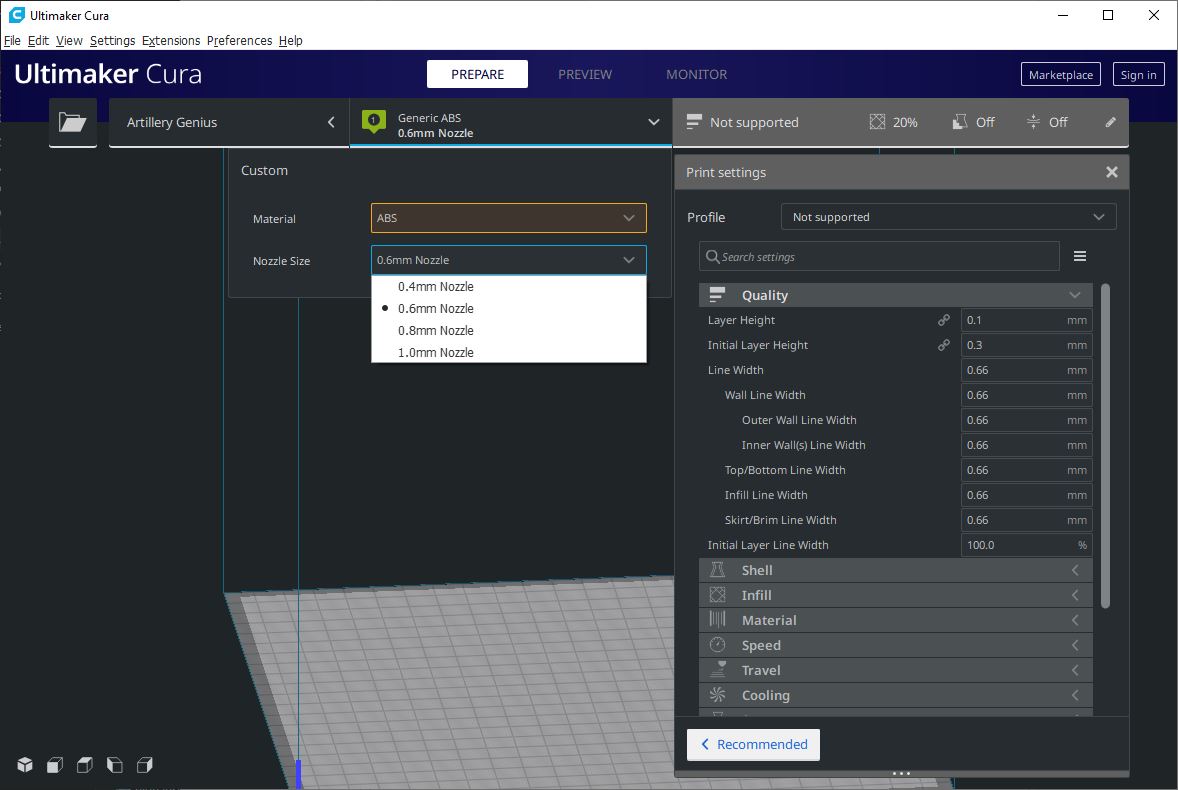
to find your nozzle, it must change the line "setting_version = 8" with "setting_version = 10" on the files in the folder "variants".
For the quality and the material, I believe that it make a file for each material and each quality, in the folder "quality". (Look at the files already present for an example. (It sounds very boring))
Twigho
on 20 Jan 2020
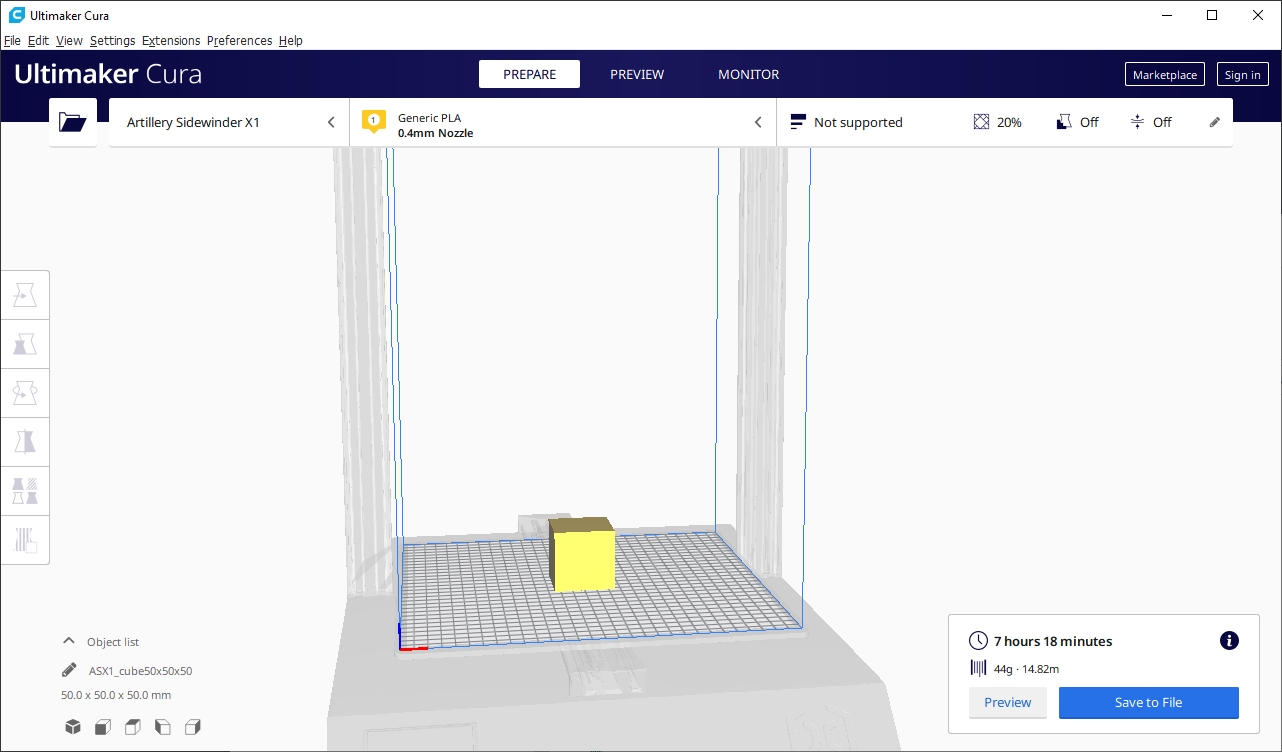
Confirmed. Updating the setting version from 8 to 10 in the variants makes it register the nozzle size in 4.4.1
Tested for generic PLA using 0.4 nozzle.
Well done @Twigho !
To expand on my answer above, this issue is out of scope for us to spend development time on as it is a user error rather than a bug, as the profile was added manually. We do have update scripts in place for custom printers when added this way that catch such issues, but the variants directory is out of scope for this.
Again, I would still recommend the manufacturer to make a pull request so we can integrate the printer with our repo so that end users can get this particular printer up and running quickly. That's up to you to petition them though.
https://github.com/Ultimaker/Cura/wiki/Adding-new-machine-profiles-to-Cura
mahtDFR
on 20 Jan 2020
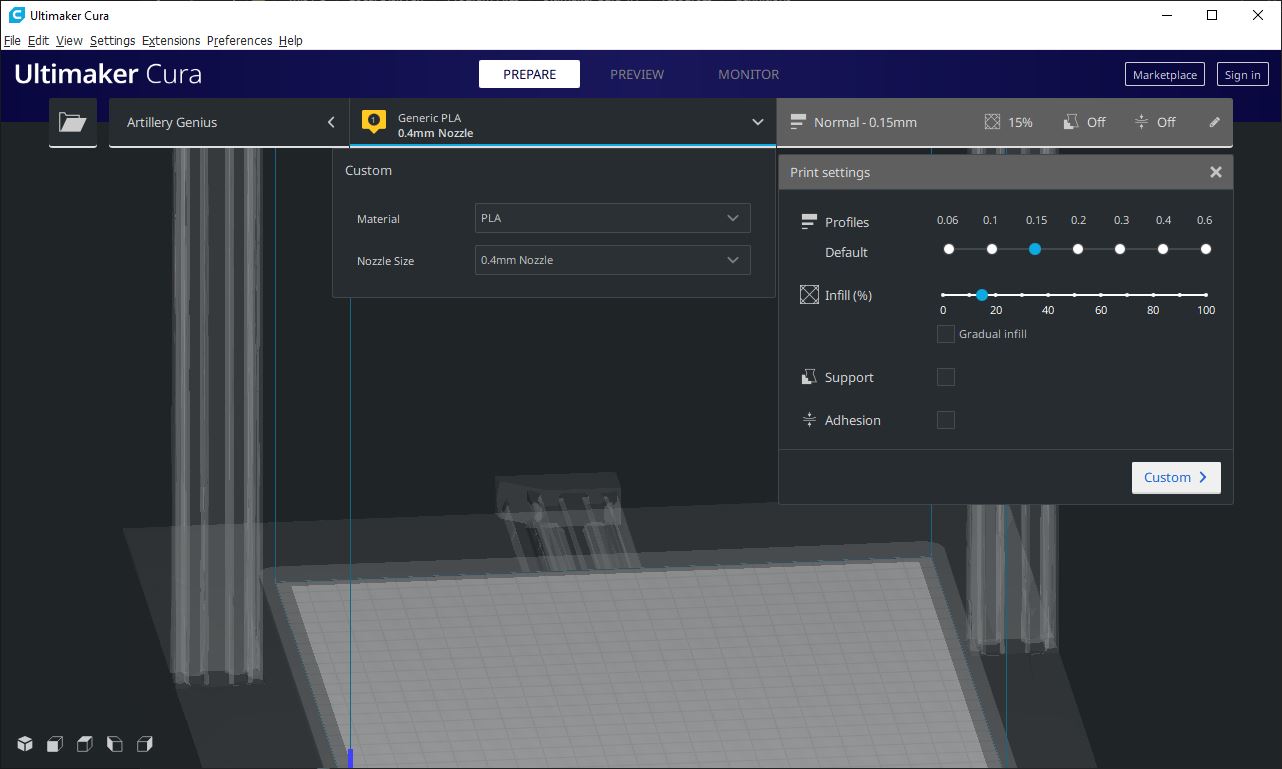
To retrieve the profiles:
set the line ' "has_machine_quality": true, ' to false in the file artillery_base.def.json in the folder definition. All seem unlock.
Twigho
on 20 Jan 2020
Will close this off now as it seems solved.
mahtDFR
on 21 Jan 2020
Another post :
https://www.thingiverse.com/thing:4117423
Amapem
on 21 Jan 2020
Related issues
 jornada812
·
3Comments
jornada812
·
3Comments
 Liger0
·
3Comments
Liger0
·
3Comments
 DamianSepczuk
·
3Comments
DamianSepczuk
·
3Comments
 rudowinger
·
3Comments
rudowinger
·
3Comments
 konvoj
·
3Comments
konvoj
·
3Comments
Most helpful comment
This issue seems to be related to broken nozzle size definitions.
Version 4.4 introduced an extra layer of the settings stack for Intent profiles. As a result your nozzle size metadata (which is configured correctly for 4.2 but not 4.4) is getting ignored. Read the discussion here for more detail: #6666
A workaround would be to edit the metadata and populate it with the correct info. This is located in the resources folder of the install folder. Also found some clues in the log you provided:
2020-01-14 22:18:38,411 - ERROR - [MainThread] UM.Logger.logException [88]: UM.Settings.ContainerFormatError.ContainerFormatError: When trying to deserialize artillery_base_extruder_0 #2, we received an unknown container ID (artillery_sidewinder_x1_0.4)You could also nudge the developer of this profile to update it for compatibility with 4.4+ They could even make a pull request to merge their printer profile directly with our repo so it can be included it in the printer selection menu by default - the result of that is a more user-friendly experience with less messing around with the file system by the user.
Hope this gives some clues