Cura: Please give us the opportunity to access the selected .stl file
Is your feature request related to a problem? Please describe.
I need to persist all data regarding a model.
Describe the solution you'd like
(A clear and concise description of what you want to happen. If possible, describe why you think this is a good solution.)
Im developing a plugin that will persist all settings and should also persist the selected stl file in a database. I got all the settings, but i cant find a way to get the .stl-file.
I tried using the getOutputDevice().requestWrite() function but that asks the user to save the file. I want to either directly select the file or get the path of the currently selcted file.
Describe alternatives you've considered
(A clear and concise description of any alternative solutions or features you've considered. Again, if possible, think about why these alternatives are not working out.)
None
Affected users and/or printers
(Who do you think will benefit from this? Is everyone going to benefit from these changes? Or specific kinds of users?)
I think several plugin developers can benefit from this change. Maybe the functionality is already there and i just didn't find it yet.
 LieberLois
All 18 comments
Another possibility would be to use that method and save to a StringIO / BytesIO Buffer
LieberLois
on 4 Dec 2019
I'm not quite sure what the flow of your plugin is, but I guess you want to store some information every time a file is saved or sent to the printer. Based on that assumption, you should have a look at the "writeStarted" signal of the output device manager. That signal is fired every time a write happens.
The STL writer can be obtained by using something like
Application.getInstance().getMeshFileHandler().getReaderForFile(path)
 nallath
on 5 Dec 2019
nallath
on 5 Dec 2019
Thanks for the answer!
Why would getReaderForFile(path) give me a writer though? The name suggests otherwise!
Also one thing: what python interpreter is the project using? I'm trying to use the pymongo-package which is installed in my python interpreter, but the plugin can't access it.
LieberLois
on 5 Dec 2019
I think @LieberLois is trying to save an STL from a plugin, without the user being prompted for a filename.
@LieberLois, STL is a bad format for this because it only supports a single "body" per file. You could join all bodies into a single mesh, but then you loose the opportunity to have per model settings. You could also save each body individually, but then you have to store the scenegraph (how models are parented) separately.
 fieldOfView
on 5 Dec 2019
fieldOfView
on 5 Dec 2019
If you want to go the STL route, see application.getMeshFileHandler().getWriter("STLWriter") and STLWriter.write(self, stream, nodes, mode = MeshWriter.OutputMode.TextMode)
fieldOfView
on 5 Dec 2019
Thank you @fieldOfView , thats exactly what im trying to do. Currently got it working by using the STLWriter-Plugin code ^^
I understand your issue with STL-Files, but it's what i need for my project.
My main problem is not being able to install new python packages, since python appears to be shipped with Cura ...
LieberLois
on 5 Dec 2019
Also one thing: what python interpreter is the project using?
The builds are using CPython 3.5.2 at the moment. These interpreters are built from source in our build system, and indeed shipped with Cura.
 Ghostkeeper
on 6 Dec 2019
Ghostkeeper
on 6 Dec 2019
So how would i add new packages to the Python Interpreter?
LieberLois
on 6 Dec 2019
You can add additional Python packages to your plug-in itself. I do that for two of my plug-ins. This plug-in for instance will install with Mistune, a Markdown parser. Here I'm downloading Mistune:
The result is that Mistune comes shipped in my plug-in folder:
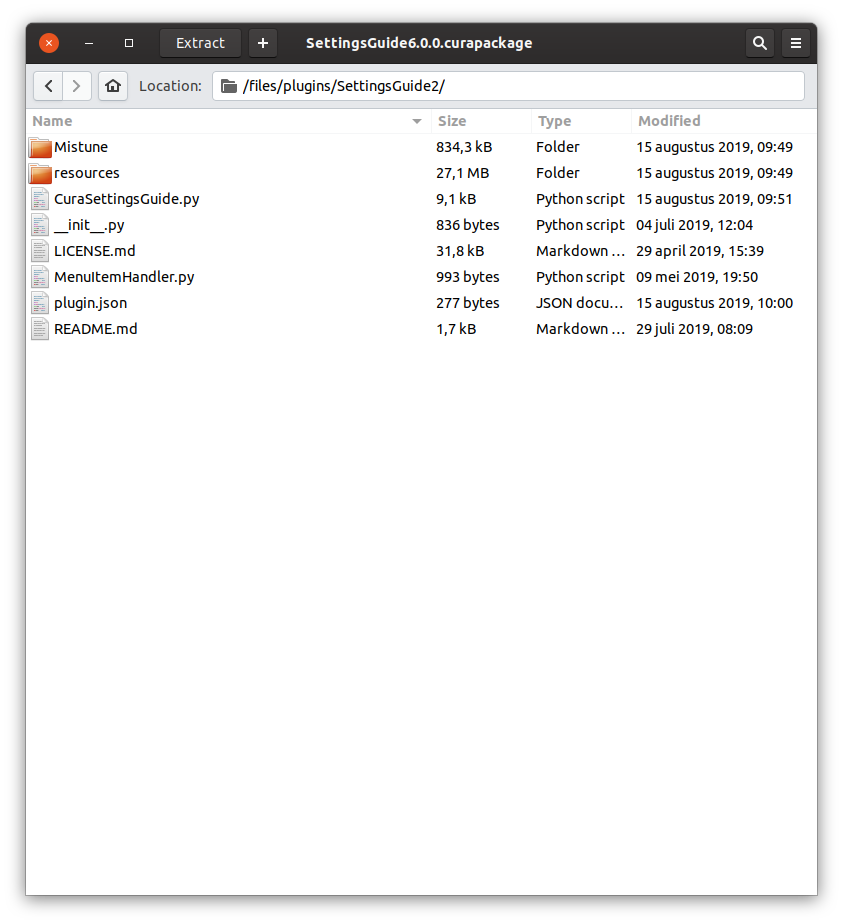
This way I can just import it relatively:
Ghostkeeper
on 6 Dec 2019
I think the main question in this thread is handled so I'll close it. But feel free to continue discussing.
Ghostkeeper
on 6 Dec 2019
You can add additional Python packages to your plug-in itself.
This will only work with pure-python modules, right?
fieldOfView
on 6 Dec 2019
Yeah if the module needs to be different per operating system (for instance because it's compiled C code) then you won't be able to import it easily this way. You can then have 3 different versions and import the correct one depending on the platform. I've done something similar with an executable here:
Ghostkeeper
on 6 Dec 2019
Dear @Ghostkeeper,
i tried following your instructions to import the pymongo-package into my plugin. Unfortunately Cura crashes, even though im just trying to import the package.
Any other ideas?
LieberLois
on 9 Dec 2019
What's the crash log?
Ghostkeeper
on 9 Dec 2019
2019-12-09 10:51:09,887 - CRITICAL - [MainThread] cura.CrashHandler.__init__ [61]: An uncaught error has occurred!
2019-12-09 10:51:09,889 - CRITICAL - [MainThread] cura.CrashHandler.__init__ [64]: Traceback (most recent call last):
2019-12-09 10:51:09,891 - CRITICAL - [MainThread] cura.CrashHandler.__init__ [64]:   File "<frozen importlib._bootstrap>", line 969, in _find_and_load
2019-12-09 10:51:09,893 - CRITICAL - [MainThread] cura.CrashHandler.__init__ [64]:   File "<frozen importlib._bootstrap>", line 958, in _find_and_load_unlocked
2019-12-09 10:51:09,895 - CRITICAL - [MainThread] cura.CrashHandler.__init__ [64]:   File "<frozen importlib._bootstrap>", line 664, in _load_unlocked
2019-12-09 10:51:09,897 - CRITICAL - [MainThread] cura.CrashHandler.__init__ [64]:   File "<frozen importlib._bootstrap>", line 634, in _load_backward_compatible
2019-12-09 10:51:09,899 - CRITICAL - [MainThread] cura.CrashHandler.__init__ [64]:   File "__startup__.py", line 12, in <module>
2019-12-09 10:51:09,900 - CRITICAL - [MainThread] cura.CrashHandler.__init__ [64]:   File "<frozen importlib._bootstrap>", line 969, in _find_and_load
2019-12-09 10:51:09,902 - CRITICAL - [MainThread] cura.CrashHandler.__init__ [64]:   File "<frozen importlib._bootstrap>", line 958, in _find_and_load_unlocked
2019-12-09 10:51:09,904 - CRITICAL - [MainThread] cura.CrashHandler.__init__ [64]:   File "<frozen importlib._bootstrap>", line 664, in _load_unlocked
2019-12-09 10:51:09,906 - CRITICAL - [MainThread] cura.CrashHandler.__init__ [64]:   File "<frozen importlib._bootstrap>", line 634, in _load_backward_compatible
2019-12-09 10:51:09,908 - CRITICAL - [MainThread] cura.CrashHandler.__init__ [64]:   File "Console.py", line 24, in <module>
2019-12-09 10:51:09,910 - CRITICAL - [MainThread] cura.CrashHandler.__init__ [64]:   File "X:\4.0\build\inst\bin\cura_app.py", line 132, in <module>
2019-12-09 10:51:09,912 - CRITICAL - [MainThread] cura.CrashHandler.__init__ [64]:   File "X:\4.0\build\inst\lib\python3.5\site-packages\cura\CuraApplication.py", line 692, in run
2019-12-09 10:51:09,914 - CRITICAL - [MainThread] cura.CrashHandler.__init__ [64]:   File "X:\4.0\build\inst\lib\python3.5\site-packages\UM\Qt\QtApplication.py", line 287, in run
2019-12-09 10:51:09,915 - CRITICAL - [MainThread] cura.CrashHandler.__init__ [64]:   File "X:\4.0\build\inst\lib\python3.5\site-packages\UM\Application.py", line 214, in run
2019-12-09 10:51:09,917 - CRITICAL - [MainThread] cura.CrashHandler.__init__ [64]:   File "X:\4.0\build\inst\lib\python3.5\site-packages\cura\CuraApplication.py", line 436, in startSplashWindowPhase
2019-12-09 10:51:09,919 - CRITICAL - [MainThread] cura.CrashHandler.__init__ [64]:   File "X:\4.0\build\inst\lib\python3.5\site-packages\UM\Qt\QtApplication.py", line 179, in startSplashWindowPhase
2019-12-09 10:51:09,921 - CRITICAL - [MainThread] cura.CrashHandler.__init__ [64]:   File "X:\4.0\build\inst\lib\python3.5\site-packages\cura\CuraApplication.py", line 687, in _loadPlugins
Hmm, that doesn't actually show the error. Is there more in the log? This only shows that there is an error occurring during the loading of plug-ins.
Cura is running on Python 3.5.2. If your PyMongo package was made for that version of Python, I'd expect it to import fine.
Ghostkeeper
on 10 Dec 2019
Mhm yeah ill just keep trying.
One more thing: how does the STLWriter compress the data? When i use the STLWriter, the stl-files become twice as big as before ...
LieberLois
on 10 Dec 2019
It's probably because it's writing it in ascii mode instead of binary.
nallath
on 10 Dec 2019
Related issues
 probonopd
·
3Comments
probonopd
·
3Comments
 thopiekar
·
3Comments
thopiekar
·
3Comments
 jellewie
·
3Comments
jellewie
·
3Comments
 StanislavJochman
·
3Comments
StanislavJochman
·
3Comments
 rudowinger
·
3Comments
rudowinger
·
3Comments
Most helpful comment
If you want to go the STL route, see
application.getMeshFileHandler().getWriter("STLWriter")andSTLWriter.write(self, stream, nodes, mode = MeshWriter.OutputMode.TextMode)