Cura: Question: How to select faces the "intended" way
Looked over the Cura and Uranium code and came to this: UM.Scene.Selection
On the other hand I found useful bits in plugins/SupportEraser, which determines the location where the click done with the cursor hits the mesh.
This function would already be great, but for some reason I'm more interested to select a face, ask which model it belongs to and do my further investigations.
Do you know of a plugin, which uses your selection tool in "face" mode?
Thanks! 😉
 thopiekar
All 8 comments
Face-selection was added to 4.3, and not really announced beforehand, so nobody's had the chance to write a plugin for it yet. Though I suppose the rotate-tool is also a plugin? :-)
Also, keep in mind that, in it's current incarnation, it won't work for compatibility profiles!
 rburema
on 26 Sep 2019
rburema
on 26 Sep 2019
TriMesh also has picking functionality:
https://github.com/mikedh/trimesh/blob/master/examples/ray.ipynb
 fieldOfView
on 26 Sep 2019
fieldOfView
on 26 Sep 2019
Ok, I managed to shrink the rotate tool and I'm not getting some things.
First, I defined in the event() function that as long as I press the shift key, that the face selection should be enabled. However, when looking at my debug lines here, the Selection module only keeps in this mode for the first click.
Why? :roll_eyes:
Second, I clearly click on a side of a cube while being in the face selection mode. I should definitly get one or another face there:
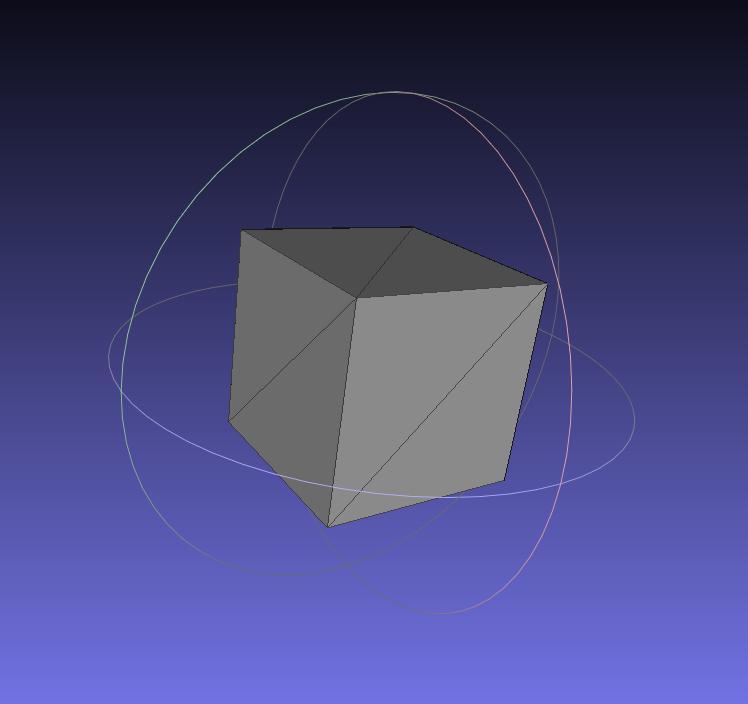
Can someone take a look here?
https://github.com/tetonsim/is-cura-ui/blob/master/SmartSlicePlugin/SmartSliceSelectTool/SmartSliceSelectTool.py
Guess the code tells you more.
@fieldOfView : Hope I will manage with Cura/Uranium functions first. But will take a closer look onto trimesh, if I can't get further with the functions here :wink:
thopiekar
on 29 Sep 2019
@thopiekar The shift key (also) alters the select mode to multiple objects (face select mode can only handle one object at the moment). Bind to another key and you'll see the popup you intended.
[ Apropos of nothing: I can't recommend the minus key as that also shrinks the object... ;-) ]
rburema
on 1 Oct 2019
Is there a list of taken keyboard shortcuts? Personally, not using Cura that extensively. Just due to the work here, I got known that you can rotate models without 5deg steps. 😄
One model is perfectly fine! So instead of the shift key, can you recommend the CTRL key? Or something else that is not taken (and not planned to be taken soon)?
(Would be more interesting to find a way out how to unregister keybindings temporarily.)
Thank you for your reply 😉
thopiekar
on 1 Oct 2019
I know what you mean ... it's not as if we save the used keys on a central spot :-)
I can't recommend the ctrl key, as that has a similar 'ctrl + click' meaning (select object in group). Alt was avoided as that has a special meaning in some linux distro's.
The last official word is (but that may be out of date): https://ultimaker.com/en/resources/52011-hotkeys-controls
A more up-to-date one might be: https://defkey.com/ultimaker-cura-4-shortcuts
(Sorry for the late reply last time... I'm usually off on Mondays.)
_ETA_ Hotkey management (especially including plugins) is still on our wishlist (at least the ticket for it will be recreated today) so we'll hopefully get to that at some point in the future ... which isn't very helpful _now_ of course, but still.
rburema
on 2 Oct 2019
We've been meaning to implement a hotkey mapper where plug-ins can register hotkeys, but it's quite a lot of work and doesn't get a lot of priority.
The problem with Linux distributions was the alt key, not the control key.
Right now you should also get a QML warning if you're mapping multiple actions to the same hotkey, by the way.
 Ghostkeeper
on 2 Oct 2019
Ghostkeeper
on 2 Oct 2019
Ok, then I will skip these special keys directly. Instead, I will choose something like a character.
(No problem. I was wondering myself how it comes 😉 )
Well, I guess that one will change as soon as there is more attention to this. Right now the current capabilities are just enough. It will only get annoying if another plugin or a new feature in Cura gets the same keybinding.
thopiekar
on 2 Oct 2019
Related issues
 tomoinn
·
3Comments
tomoinn
·
3Comments
 timherrm
·
3Comments
timherrm
·
3Comments
 jornada812
·
3Comments
jornada812
·
3Comments
 ferociousdiablo
·
3Comments
ferociousdiablo
·
3Comments
 StanislavJochman
·
3Comments
StanislavJochman
·
3Comments
Most helpful comment
We've been meaning to implement a hotkey mapper where plug-ins can register hotkeys, but it's quite a lot of work and doesn't get a lot of priority.
The problem with Linux distributions was the alt key, not the control key.
Right now you should also get a QML warning if you're mapping multiple actions to the same hotkey, by the way.