Cura: After upgrading Cura from 4.0.0 to 4.3.0 version, I can't add User Specified Coordinates for Z Seam Alignment.
Application version
Platform
Printer
Reproduction steps
Actual results
Expected results
Additional information
 Roboman10
All 34 comments
When selecting 'User Specified' for 'Z Seam Alignment' in Cura v4.3 you do not get to add the X and Y coordinates for the user specified alignment. It did work in Cura 4.0.0.
OS is Windows 10.
Printer is Creality CR-10 S4.
Roboman10
on 25 Sep 2019
I'm not able to reproduce this, so far.

 Ghostkeeper
on 25 Sep 2019
Ghostkeeper
on 25 Sep 2019
I've just encountered the same problem after upgrading one machine from 4.2.1 to 4.3.0. This PC does not show "Z Seam X" and "Z seam Y" lines under "User Specified". It does show "Back" but it's greyed out and when I hover over it the help text says "This setting is not used because all the settings that it influences are overridden ... Affects Z Seam X ZSeam Y". An identical PC also shows only "Back" but does allow me to set Front, Front Left, etc, but not X/Y coordinates. Both are used with Octoprint and an Ender 3 Pro, both have the same extensions/plugins, and both have all settings turned on under Settings Visibility. Could this be to do with how I installed the upgrade, specifically whether or not I elected to keep previous config?
PCs are running Windows 7 Pro 64-bit
 pnt103
on 20 Oct 2019
pnt103
on 20 Oct 2019
Do you need any logs or some other info? I kept the cura.log (365KB) and stderr.log (57KB) that were created when I upgraded. BTW, while a proper bugfix (if it's really a bug) would be nice, personally I'd be happy with a one-off workaround to get the missing settings back.
pnt103
on 21 Oct 2019
Hide the shell settings by clicking on "<" and then reopen. For me, that fixes this problem.
 smartavionics
on 21 Oct 2019
smartavionics
on 21 Oct 2019
Sorry, that should have been, clicking on "v" (down arrow symbol).
smartavionics
on 21 Oct 2019
So you told me in the other bug report, but it doesn't work for me, though.
pnt103
on 21 Oct 2019
I don't think there will be any of this in the log. Never really hurts to have the stderr.log though.
There's a couple of things you could try:
- Are the settings visible? Could you try making them visible by clicking the button next to the search bar and selecting "Show All Settings"? I don't think this is the actual problem though since from your screenshot it also shows the settings missing while you search.
- Does it still happen when you add a new printer in Cura? If not, then the problem is related to some settings. And then could you save a project file (File -> Save...) and upload it here? That will probably allow us to reproduce the issue then and see where it's coming from.
Ghostkeeper
on 22 Oct 2019
I use the Sidebar GUI (version 4.0.4) so my settings are always visible, and I always have it set to "Show All Settings". I've tried changing that to Basic, Advanced, and Expert, to no effect. I've also tried uninstalling it and restarting Cura, but still the "Z Seam X"and "Z Seam Y" don't show up on either PC, and "Z Seam Position" remains visible but greyed out and stuck on "Back" on the one that was upgraded most recently.
I've attached the stderr.log from that PC.
stderr.log
Adding a second printer is interesting, though not especially helpful. I picked an Ultimaker S3 (seems like an expensive way to fix one menu item, though :-)) On the PC that lets me edit "Z Seam Position" and change it from "Back" to "Front Left" etc, it has apparent no effect, but on the one that would let me see but not change it, it becomes editable. However, as soon as I switch back to my Ender 3 it gets greyed out again, so it's not directly useful. On neither PC does it show the "Z Seam X"and "Z Seam Y" options.
BTW, I tried turning "Z Seam Relative" on and off in case that made a difference but it didn't. The reason I checked is that it does alter the effect of "Layer Start X"and "Layer Start Y" in the Travel settings, which also don't always work as expected, but that's another story.
Here are an STL file and the sliced gcode I've been trying to sort out. This particular one (it's one of a set of 24 printer test/calibration files I'm almost finished working on) was sliced with Z Seam Alignment = User Specified, Z Seam Position = Front Left, Seam Corner Preference = None (AFAIR, though it might have been "Sharpest Corner"), Z Seam Relative = ticked, and Travel => Layer Start X = 101.429, Layer Start Y = 112.403.
retraction_test_example.zip
pnt103
on 22 Oct 2019
Just a thought... could any other plugins affect this? I should have told you this right up front : I have several other Marketplace extensions installed:
Custom Supports 0.0.4
FreeCAD Integration 0.3.1 (I should delete this, I don't use it any more)
OctoPrint Connection 3.5.9
Settings Guide 2.0.2
Sidebar GUI 4.0.4
ThingiBrowser 1.3.0 (also unused!)
Titlebar Info 3.5.2
Z Offset Setting 3.5.3
pnt103
on 22 Oct 2019
I use the Sidebar GUI (version 4.0.4) so my settings are always visible, and I always have it set to "Show All Settings".
My point was to re-try "Show All Settings" since it just makes all settings visible when you press it. If a new setting is added to Cura, such as Z Seam Position that was added in 4.3, then they would still be hidden.
Adding a second printer is interesting, though not especially helpful. I picked an Ultimaker S3 (seems like an expensive way to fix one menu item, though :-)) On the PC that lets me edit "Z Seam Position" and change it from "Back" to "Front Left" etc, it has apparent no effect, but on the one that would let me see but not change it, it becomes editable. However, as soon as I switch back to my Ender 3 it gets greyed out again, so it's not directly useful. On neither PC does it show the "Z Seam X"and "Z Seam Y" options.
I wanted to know what happens then to discern whether the problem was caused by current settings or not. When you add a new printer in Cura it starts with the default settings. So this experiment tells me that something in your current settings is causing this. Could you save a project file (using File -> Save...) and upload that here? That way we can see your settings and we could debug it.
Ghostkeeper
on 23 Oct 2019
Just a thought... could any other plugins affect this? I should have told you this right up front : I have several other Marketplace extensions installed:
I don't think any of these plug-ins should affect this problem. The only one that really does anything with the setting list is the Z Offset Setting and the Sidebar GUI. But the Sidebar GUI re-uses our element for displaying the setting list and doesn't do anything with its contents. Z Offset Setting seems unrelated to me.
Ghostkeeper
on 23 Oct 2019
Thanks for continuing to follow this up. I know how tedious such things can be.
I use the Sidebar GUI (version 4.0.4) so my settings are always visible, and I always have it set to "Show All Settings".
My point was to re-try "Show All Settings" since it just makes all settings visible when you press it.
If a new setting is added to Cura, such as Z Seam Position that was added in 4.3, then they would still be hidden.
Just to be completely clear, I removed the Sidebar GUI, restarted Cura without it, went back to the configuration settings and tested with each of the options, including checking Basic, Advanced, Expert, and Custom - and for Custom, made sure that Check All was enabled under Settings Visibility. I even scrolled down the list to make sure nothing was omitted. "Z Seam X" and "Z Seam Y" are in the Settings Visibility list, and ticked, but never show up in the menu.
I wanted to know what happens then to discern whether the problem was caused by current settings or not. When you add a new printer in Cura it starts with the default settings. So this experiment tells me that something in your current settings is causing this. Could you save a project file (using File -> Save...) and upload that here? That way we can see your settings and we could debug it.
If by "project file" you mean an STL and the resulting gcode, I did that (retraction_test_example.zip at the end of my previous post). If you meant something else, please elucidate :-)
pnt103
on 24 Oct 2019
If by "project file" you mean an STL and the resulting gcode, I did that (retraction_test_example.zip at the end of my previous post). If you meant something else, please elucidate :-)
No, "Project File" is a Cura-specific variant of .3mf. If you go to the menu in the top and click "File" and then click "Save..." it'll allow you to save a project file. This project file contains your build plate (which is probably irrelevant now) as well as all of your currently active settings and profiles. It allows precisely reproducing a print. It'll also allow us to see if it is a setting or preference that causes this problem.
Ghostkeeper
on 25 Oct 2019
Aha! Thank you, I didn't know about that. This one is after I cleared the build plate, because I thought 77KB was better than 30MB :-) However if you want one with a small object, I can do that. And it's a zip file because github won't let me save a .3mf.
Untitled.zip
pnt103
on 25 Oct 2019
With that project file the issue reproduces. I briefly checked the setting properties with the God Mode plug-in but couldn't find anything weird. I'll put it up for my colleagues to see if we can do anything here.
Ghostkeeper
on 25 Oct 2019
Thank you!
pnt103
on 25 Oct 2019
Hello @pnt103 ,
My colleague and I tried reproducing your issue using the project file you attached, but unfortunately we could not. Our view would always include all Z Seam options and would allow us to edit them as well.
On top of version 4.3.0 we tried reproducing the issue on our 4.4 build which is still in development, but encountered the same - correct - behavior.
Something you could try is to check whether the issue still appears without any Cura upgrade scenario (since you metioned that you upgraded from v4.2.1 to v4.3.0). This means that you should clean install Cura (i.e., deleting the _%appdata%\cura\4.3_ directory completely) and then launch v4.3.0. This of course means that all your plugins will be removed as well, so better to make a backup first.
If you can still see the issue after performing the above, I would like to ask you to send us your reproduction steps, so that we take a look (a .3mf file wouldn't hurt also).
Thanks!
 evtrados
on 29 Oct 2019
evtrados
on 29 Oct 2019
check whether the issue still appears without any Cura upgrade scenario (since you metioned that you upgraded from v4.2.1 to v4.3.0).
Note that if you delete the 4.3 folder, Cura will take the last version folder it can find (eg 4.2), copy and upgrade it again. If you want a "fresh" start without any upgrades from previous versions, then you need to delete all the files from the 4.3 folder, but leave the empty folder itself in place.
 fieldOfView
on 29 Oct 2019
fieldOfView
on 29 Oct 2019
Thank you! That seems to have fixed it. Details below if you want them.
So on the machine upgraded from 4.2.1 which was showing "Z Seam Position" as "Back" but greyed out, and not showing the coordinates, %appdata%\Local\Cura\4.3 originally contained:
    cache
        cura_packages [empty]
        definitions
            4.3.0
                {25 printer/extruder definitions}
%appdata%\Roaming\Cura\4.3 originally contained:
    definition_changes  [9 files]
    definitions         [empty]
    extruders           [3 files, for Ender3 and Ultimaker3 x 2]
    machine_instances   [2 files]
    materials           [2 files, for generic PLA]
    plugins             [10 folders, for my plugins]
    quality             [empty]
    quality changes     [2 files, for my "finest" settings]
    scripts             [empty]
    setting_visibility  [empty]
    themes              [empty]
    user                [5 files, Ender3 x 2, Ultimaker3 x 3]
    variants            [empty]
    cura.cfg
    cura.log
    packages.json
    plugins.json
I copied %appdata%\Roaming\Cura\4.3\plugins elsewhere, then deleted everything in %appdata%\Local\Cura\4.3 and %appdata%\Local\Cura\4.3, leaving just those two empty folders.
Installed Cura 4.3.0 from scratch. It asked if I wanted to uninstall the old version, to which I replied "yes", and then if I wanted to remove my configuration files, also "yes". However, that deleted the two folders I'd emptied. Once installed, with "Check all" ticked in "Setting Visibility", the settings were just as before: showing "Z Seam Position" as "Back" but greyed out. It obviously copied settings from the 4.2.1 install and even the Sidebar GUI plugin was working.
Emptied the %appdata% folders again and re-ran the installer but this time didn't allow it to remove the configuration files in %appdata%. This time it went through the interactive printer setup, and this time the "Z Seam X" and "Z Seam Y" fields were present in the settings under "Z Seam Position" and all were editable. Yay!
Of course I had to edit C:\Program Files\Ultimaker Cura 4.{whatever}\plugins\RemovableDriveOutputDevice\WindowsRemovableDrivePlugin.py in the manner proposed by Sharpie7 in https://github.com/Ultimaker/Cura/issues/2438. Isn't it time this was fixed? A: and B: are always supposed to be floppy drives, even with UEFI BIOS systems (confirmed by UEFI.org); it's only certain OS versions that block access to A: after booting.
Just for completeness, I restored the plugins I was using, from the Marketplace, one at a time, closing and restarting Cura after each one:
Sidebar GUI, Settings Guide, OctoPrint Connection, Z Offset, ThingiBrowser, Custom Supports, Material Settings, Mesh Tools, Titlebar Info. Nothing changed adversely.
So this has fixed my installation, and it's obviously something to do with my old 4.2.1 config, but I'm afraid it may not help you find the source of the problem if anyone else has it. I do still have the config from 4.2.1 if needed.
pnt103
on 29 Oct 2019
Thank you for the detailed explanation @pnt103! And great to hear that it worked for you in the end and the issue no longer persists! :)
Indeed, it seems that something was wrong with the v4.2.1 config. Please send your config to us, so that we put it in our backlog and take a look at it at some point in the future.
Can I assume that the issue is perceived closed on your end and, thus, close the issue as well?
evtrados
on 1 Nov 2019
No problem, thank you everyone for helping. I'm happy to give more info, and sorry to give you more work :-) What exactly do you want form my 4.2.1 config? I can zip up the whole of %appdata%\Local\cura\4.2 and/or %appdata%\Roaming\cura\4.2, or is it just the cura.cfg from Roaming\cura\4.2 you want? Either way, everything seems to be working so you can close this once I've given you the file(s).
pnt103
on 1 Nov 2019
Better to create a .zip I would say. I can then copy it and check if I can reproduce your initial issue.
Thanks!
evtrados
on 1 Nov 2019
OK, here's a big zip file. I've removed anything I consider sensitive, such as OctoPrint API keys, and some of the plugins because they made the file too big to upload:
pnt103_cura_4.2.1_config.zip
Thanks for your help. You can close this now.
pnt103
on 1 Nov 2019
You're welcome! Thanks for the zip archive!
evtrados
on 1 Nov 2019
I think this was accidentally closed. Evtrados mentioned this morning that he could reproduce the issue using that config folder.
Ghostkeeper
on 4 Nov 2019
OK. If it seems to be a real bug that needs fixed for Cura going forward, I'm sure it'll find its proper place in your priority queue. OTOH, if it's unique to my config and perhaps just down to user error of some sort, remember I've now got a working config in 4.3.0 so it's less important to me.
pnt103
on 4 Nov 2019
I had the same bug after upgrading from Cura 3.3-ish to the latest without deleting old configuration files. I was able to fix it thanks to pnt103 and fieldOfViews comments. However, instead of uninstalling, deleting everything and reinstalling, I was able to get around this bug by loading one of the default settings profiles, e.g. "Fine", adjusting all the settings, and saving as a new custom profile. If I ever try to load an old profile, the Z seam location setting is still grayed out, so I just deleted and remade all my profiles based on one of the new default profiles.
Thanks!
 2alltheasimov
on 26 Dec 2019
2alltheasimov
on 26 Dec 2019
Can you post one of those old profiles so we can try to reproduce the issue?
fieldOfView
on 27 Dec 2019
This issue has been automatically closed because there has been no response to our request for more information from the original author. With only the information that is currently in the issue, we don't have enough information to take action. Please reach out if you have or find the answers we need so that we can investigate further.
![no-response[bot] picture](https://avatars2.githubusercontent.com/u/26350515?v=4&s=40) no-response[bot]
on 19 Jun 2020
no-response[bot]
on 19 Jun 2020
I was just about to open a bug report, and then I found this here.
The error is still there!
Hide the shell settings by clicking on "<" and then reopen. For me, that fixes this problem.
That helps, but is not a permanent solution or is it?
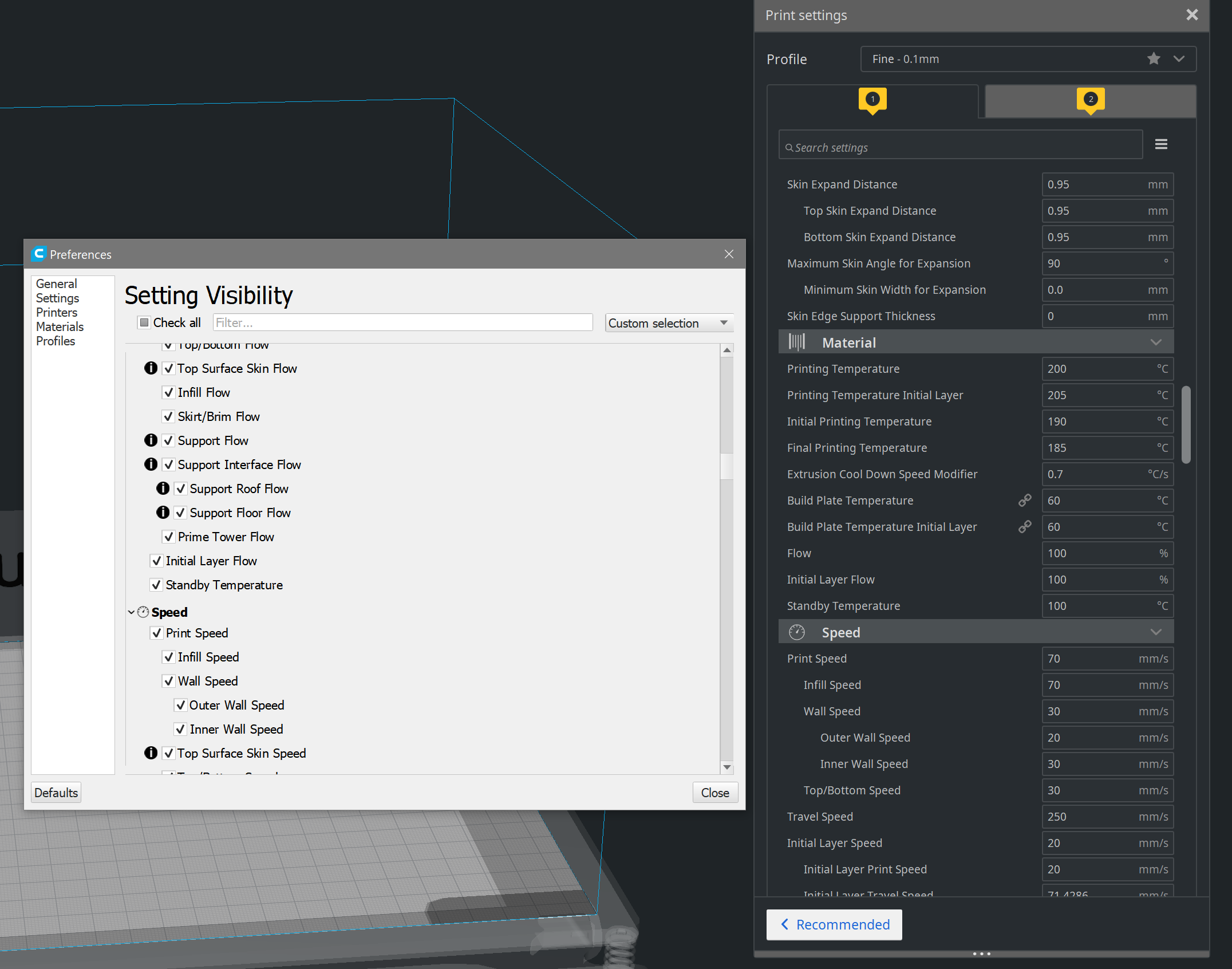
Here is a video + project file where I hope you can replicate it
I think I have already seen this in other settings, unfortunately I did not write it down.
I am currently on the Cura version of Smartavionik from 10/06/2020
 zerspaner-gerd
on 21 Jun 2020
zerspaner-gerd
on 21 Jun 2020
I think I have already seen this in other settings, unfortunately I did not write it down.
just remembered again.
e.g. Prime Tower Flow behaves exactly like this
zerspaner-gerd
on 21 Jun 2020
We have decided not to prioritise this.
This ticket exists on our backlog as CURA-6954, and it has been archived. This ticket will be closed now.
 mahtDFR
on 2 Jul 2020
mahtDFR
on 2 Jul 2020
Actually, this was just fixed for 4.7: https://github.com/Ultimaker/Uranium/pull/629
Ghostkeeper
on 6 Jul 2020
Related issues
 mubarak111nsu
·
3Comments
mubarak111nsu
·
3Comments
 probonopd
·
3Comments
probonopd
·
3Comments
 jellewie
·
3Comments
jellewie
·
3Comments
 rudowinger
·
3Comments
rudowinger
·
3Comments
 StanislavJochman
·
3Comments
StanislavJochman
·
3Comments