Application version
Cura 4.3 BETA
Platform
Windows 10 Enterprise Insider Preview Build 18970.190824-1711
Printer
Creality Ender 3
Reproduction steps
- Open cura.
2 click "Folder" icon in upper left, to open File "Open files" dialog box. - Select .stl file to load
- Model is shown without detail, and is colored "White". Model surface / detail is not visible.
Actual results
Model is shown without detail, and is colored "White". Model surface / detail is not visible. verification of model accuracy cannot be visually obtained.
Expected results
Model should be displayed in a contrasting color, and model surfaces should be visible. An acceptable amount of detail should be present in order to visually confirm model specification prior to print.
Additional information

 oofiksoo
All 22 comments
What sort of GPU do you have? Are the drivers up to date?
 fieldOfView
on 20 Sep 2019
fieldOfView
on 20 Sep 2019
Intel onboard graphics. yes my drivers are current. It has never given me an issue in any previous versions of Cura. I have Cura 4.1 running no issue. 4.2, in mu opinion, is a failed release. I experience this in Cura 4.3 beta only.
oofiksoo
on 21 Sep 2019
I saw a very similar "white" display when I tried the 4.3 beta code on the Pi4 and that was because the Pi4's GLSL is only 1.20 and it needs to be at least 1.50 for the beta code because they were using gl_PrimitiveID in the shader for doing the face selection. That got fixed in later commits and won't be a problem in 4.3. So I am wondering here if the OP's system is, for whatever reason, is also providing an old version of GLSL? No good reason why it should but, I thought I would mention it.
 smartavionics
on 21 Sep 2019
smartavionics
on 21 Sep 2019
If we could see the stderr.log file and/or the cura.log file that would be very useful.
smartavionics
on 21 Sep 2019
Where are these located? a windows explorer search doesn't return results for either file name.
oofiksoo
on 21 Sep 2019
In Cura, do Help -> Show Configuration Folder and it should open explorer to show the fold that contains cura.log. The stderr.log file should be in the folder above that.
smartavionics
on 21 Sep 2019
Attached.
oofiksoo
on 21 Sep 2019
Yes, it's a problem with the use of gl_PrimitiveID but the weird thing is that the reported GLSL version is 4.0.0 which should be fine. Something really screwy going on there.
I'm afraid this isn't really my area of expertise so I can't suggest any remedy.
Hey @rburema, maybe this select face feature is going to cause a problem for lots of people, you should investigate this before the 4.3 release is done.
2019-09-20 16:29:07,066 - DEBUG - [MainThread] UM.View.GL.OpenGL.__init__ [111]: Initialized OpenGL subsystems.
2019-09-20 16:29:07,071 - DEBUG - [MainThread] UM.View.GL.OpenGL.__init__ [112]: OpenGL Version:  4.0.0 - Build 10.18.10.4358
2019-09-20 16:29:07,075 - DEBUG - [MainThread] UM.View.GL.OpenGL.__init__ [113]: OpenGL Vendor:   Intel
2019-09-20 16:29:07,080 - DEBUG - [MainThread] UM.View.GL.OpenGL.__init__ [114]: OpenGL Renderer: Intel(R) HD Graphics 2500
2019-09-20 16:29:07,084 - DEBUG - [MainThread] UM.View.GL.OpenGL.__init__ [115]: GLSL Version:    4.0.0
2019-09-20 16:29:07,094 - DEBUG - [MainThread] UM.View.GL.ShaderProgram.load [56]: Loading shader file [C:\Program Files\Ultimaker Cura 4.3\resources\shaders\default.shader]...
2019-09-20 16:29:07,116 - DEBUG - [MainThread] UM.View.GL.ShaderProgram.load [56]: Loading shader file [C:\Program Files\Ultimaker Cura 4.3\resources\shaders\selection.shader]...
2019-09-20 16:29:07,134 - DEBUG - [MainThread] UM.View.GL.ShaderProgram.load [56]: Loading shader file [C:\Program Files\Ultimaker Cura 4.3\resources\shaders\select_face.shader]...
2019-09-20 16:29:07,149 - DEBUG - [MainThread] UM.View.GL.ShaderProgram.load [56]: Loading shader file [C:\Program Files\Ultimaker Cura 4.3\resources\shaders\default.shader]...
2019-09-20 16:29:07,156 - DEBUG - [MainThread] UM.View.GL.ShaderProgram.load [56]: Loading shader file [C:\Program Files\Ultimaker Cura 4.3\resources\shaders\composite.shader]...
2019-09-20 16:29:07,172 - DEBUG - [MainThread] UM.View.GL.ShaderProgram.load [56]: Loading shader file [C:\Program Files\Ultimaker Cura 4.3\resources\shaders\overhang.shader]...
2019-09-20 16:29:07,184 - ERROR - [MainThread] UM.View.GL.ShaderProgram.setFragmentShader [128]: Fragment shader failed to compile: ERROR: 0:? : 'gl_PrimitiveID' : variable is not available in current GLSL version
smartavionics
on 21 Sep 2019
Hi @oofiksoo, the OpenGL build version reported above is quite old. I had a look for a more recent driver and found this page...
https://downloadcenter.intel.com/download/28799/Intel-Graphics-Driver-for-Windows-15-33-
The HD Graphics 2500 is listed as supported by that driver. Is it worth updating the driver?
smartavionics
on 21 Sep 2019
Thanks for the notification @smartavionics
I have a theory on what's happening here: 4.0 is lower than the threshold we set for the compatibility mode (4.1). So, we then explicitly (but indirectly, via Qt) set the OpenGL-context back to 2.0 to run the compatibility mode. I think this creates a situation where (with this specific card/driver combo) the GLSL version is still reported to the shader as being the max the card can handle, but is actually only 1.10
If this is true, we can fix these kinds of situations by just disabling the new lay-flat for _everyone_ in compatability mode, not just those running the 'right' GLSL version.
 rburema
on 21 Sep 2019
rburema
on 21 Sep 2019
Yes, I think that's what you will have to do. That's a shame because there probably would be some people using, say, OpenGL 3.3 that probably could use the select face feature in the prepare display even though they have to use compatibility mode for the layer display. But if systems are going to lie about the version of GLSL they support, you don't have much choice.
smartavionics
on 21 Sep 2019
There, that should do it. The direct commit to the Cura 4.3 branch should prevent the worst of it, and the PR to the Uranium 4.3 branch will fix the rest.
rburema
on 21 Sep 2019
Hey @oofiksoo we cannot test this internally as we do not have an older version of OpenGL.
Can you kindly check if the fix in this build fixes it for you?
 Ellecross
on 23 Sep 2019
Ellecross
on 23 Sep 2019
That build does not display the window on screen. It's loaded, Its on the task bar, I see the icon in SYSTray, and I see it in Task Manager, but I cannot see it visually. Alt tab does not switch to it, Closing and closing from the task bar closes it, re-opening does not work. And a reboot of the machine did not affect it.
oofiksoo
on 23 Sep 2019
@oofiksoo Thanks for helping us out! What do the logs say this time?
rburema
on 23 Sep 2019
That build does not display the window on screen. It's loaded, Its on the task bar, I see the icon in SYSTray, and I see it in Task Manager, but I cannot see it visually. Alt tab does not switch to it, Closing and closing from the task bar closes it, re-opening does not work. And a reboot of the machine did not affect it.
Hey @oofiksoo, several questions:
Do you have an external monitor attached?
We are aware of this issue at the moment and we think it's related to the machines with Intel GPU. You can have multiple instances of the cura.exe running, yet Cura does not show up.
By any chance, did you download the update from the link from smartavionics before running the new build I sent you? Could you let us know what version of Intel graphics you have NOW + what openGL version you have NOW?
This will be weird, but can you please try again to start Cura.exe if it fails the first few times?
Do you see anything in Appdata\Roaming\Cura\stderr.log ?
Ellecross
on 24 Sep 2019
- Yes, Dual monitors.
- Yes, I followed the link and updated the drivers. The result was what has been reported. I have now removed these drivers, and reverted to what windows believes to be the most recent (my previous drivers). This has allowed your version to be displayed on screen.
The log file is as follows:
2019-09-23 15:23:39,330 - ERROR - [MainThread] LocalContainerProvider.LocalContainerProvider.saveContainer [91]: Failed to get MIME type for container type [
Drivers / Open GL info.
2019-09-23 13:32:42,844 - DEBUG - [MainThread] UM.View.GL.OpenGL.__init__ [111]: Initialized OpenGL subsystems.
2019-09-23 13:32:42,850 - DEBUG - [MainThread] UM.View.GL.OpenGL.__init__ [112]: OpenGL Version: 4.0.0 - Build 10.18.10.4358
2019-09-23 13:32:42,855 - DEBUG - [MainThread] UM.View.GL.OpenGL.__init__ [113]: OpenGL Vendor: Intel
2019-09-23 13:32:42,862 - DEBUG - [MainThread] UM.View.GL.OpenGL.__init__ [114]: OpenGL Renderer: Intel(R) HD Graphics 2500
2019-09-23 13:32:42,869 - DEBUG - [MainThread] UM.View.GL.OpenGL.__init__ [115]: GLSL Version: 4.0.0
To ensure I'm communicating clearly, your version now works if I DO NOT use the updated driver recommendation.The window now loads, and I can see the object, and it's detail.
oofiksoo
on 24 Sep 2019
Yes, I followed the link and updated the drivers. The result was what has been reported. I have now removed these drivers, and reverted to what windows believes to be the most recent (my previous drivers). This has allowed your version to be displayed on screen.
Thank you, this confirms our suspicions.
We now have a decent picture of what was/is going on:
You ran into two issues:
- Your original issue was with the beta, sort-of caused by the (older?) Intel drivers. We 'solved' this by disabling that feature for older versions of OpenGL. (We didn't have much alternative, since the drivers where sort-of lying to us about what version of glsl they where currently running).
- Meanwhile, you updated your drivers, as suggested.
- Then, the newer issue, 'not starting on windows' is something that we've seen occur a lot recently (even with some of our colleagues) but couldn't reproduce reliably. Since it produced no logs and seemed to crash before any sort of setup, we where at a loss for where to begin looking. It now seems it's caused by updating Intel graphics drivers to the latest version, which also explains why it's happening more frequently.
Thanks to this issue, we now have a solid lead, so thank you once again.
rburema
on 24 Sep 2019
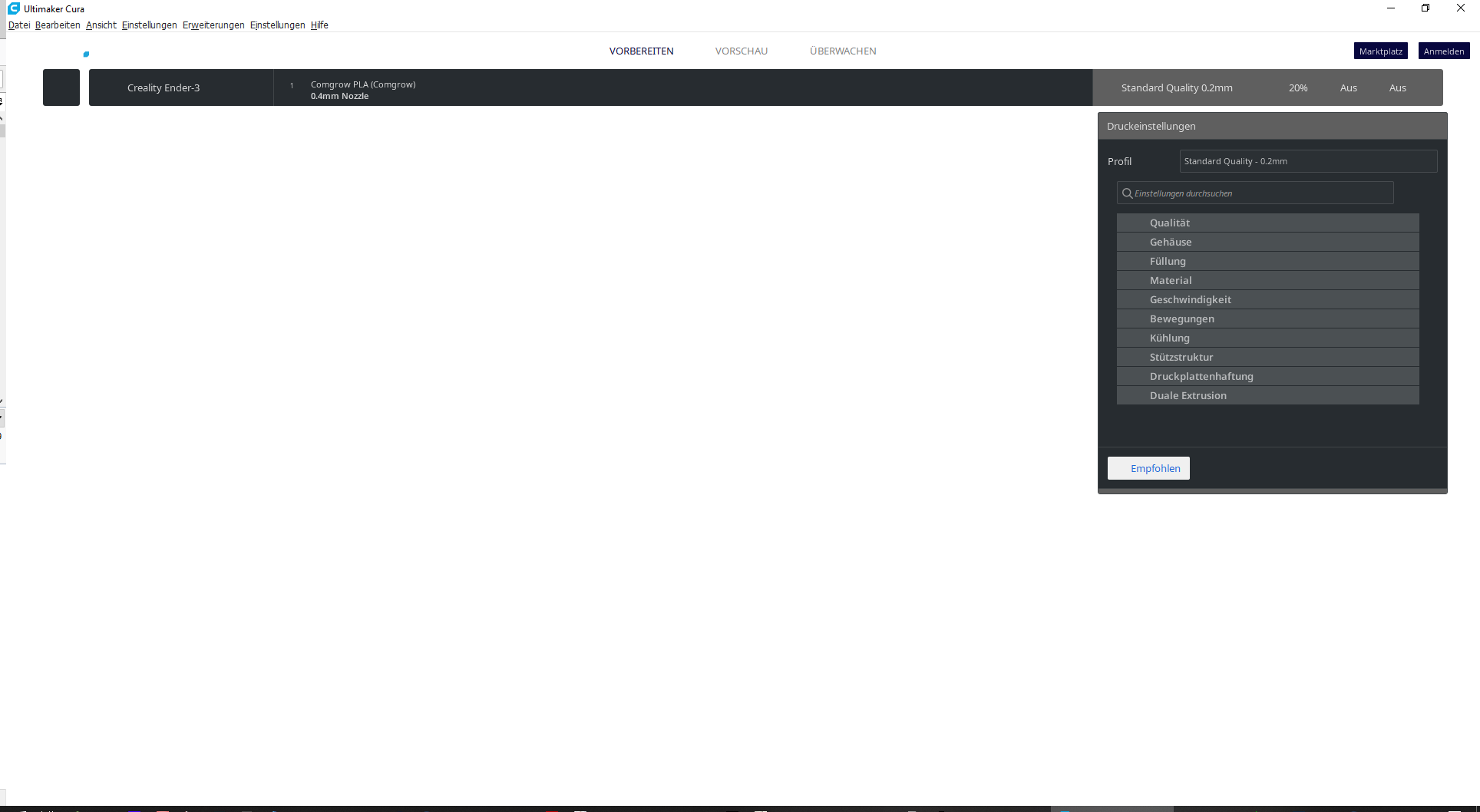
Hi,
my screen looks like this repeatable with the cura 4.3 release.
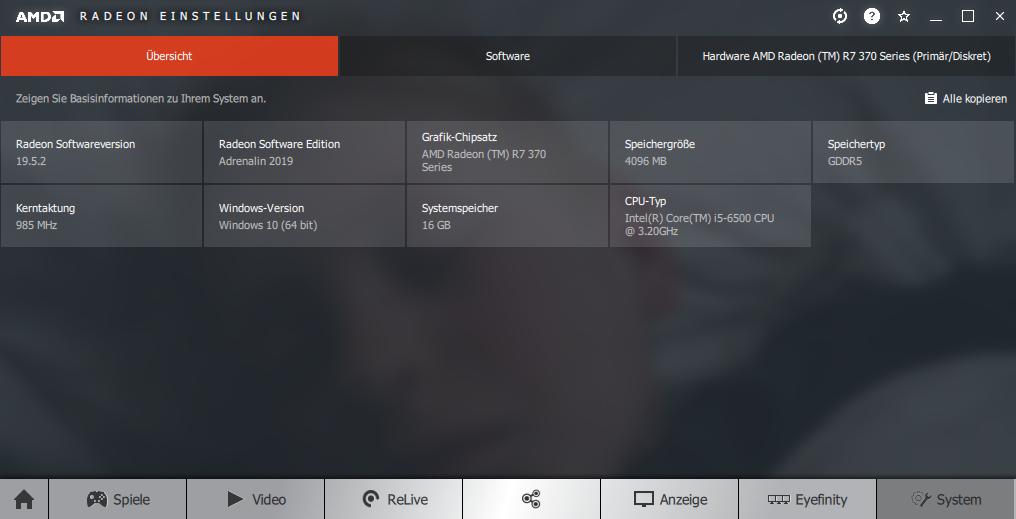
Those are my card & driver version...quite up to date.
Problem is new with 4.3. in 4.2 everything was good.
 Sonnenwerk
on 26 Sep 2019
Sonnenwerk
on 26 Sep 2019
@Sonnenwerk Could you send us the logs? That might show us if this is a related problem or something different.
rburema
on 27 Sep 2019
Hi !
I reinstalled 4.3 again without deleting config. Now it´s working as intended.
Sonnenwerk
on 27 Sep 2019
Huh, maybe the files got corrupted on your hard drive or something then? Or it was installed while Cura was still running?
 Ghostkeeper
on 27 Sep 2019
Ghostkeeper
on 27 Sep 2019
Related issues
 wi1k1n
·
3Comments
wi1k1n
·
3Comments
 jornada812
·
3Comments
jornada812
·
3Comments
 rudowinger
·
3Comments
rudowinger
·
3Comments
 jellewie
·
3Comments
jellewie
·
3Comments
 konvoj
·
3Comments
konvoj
·
3Comments