Cura: Custom Extruder Configuration Error
Application version
4.2.1
Platform
Windows 10 1903
Printer
Untitled 3mf.zip
Reproduction steps
Just open Cura
Actual results
This happens
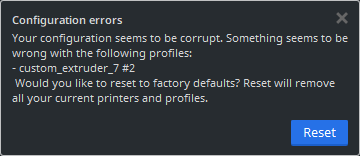
I should probably also mention that because of this error, if I change the printer to have 7 or 8 extruders, it'll omit the 7th extruder from the UI no matter where I check. There won't be a 7th but there'll be the 8th extruder
Expected results
There shouldn't be any error at all and the 7th extruder should show up in the UI
Additional information
I've already tried to backup everything, reset and restore but the issue always come back with restoring so the problem probably lies in one of the config files.
But because I have a lot of custom materials saved I can't just reset and save it like that.
If there's any way to fix this please advise thanks
 yeowjoon99
All 9 comments
I could not get this to reproduce with just the printer definition (or when I adjusted the extruders to number 8 and back to 1 a few times). I think we'll need the other config files as well if we want to find out what's wrong here.
 rburema
on 20 Sep 2019
rburema
on 20 Sep 2019
Which files do you think are likely culprits specifically
I think it'd be better for everyone if I didn't upload the entire folder 😅
yeowjoon99
on 20 Sep 2019
The 'definition_changes', 'definitions', 'extruders' and 'machine_instances' folders, I think. (Maybe 'quality' and 'quality_changes' as well.)
rburema
on 20 Sep 2019
Alright here's everything I could find.
Couldn't find 'definition_changes', 'machine_instances' and 'quality_changes' folders
I did find a .py file named 'MachineInstance.py' though
yeowjoon99
on 20 Sep 2019
These are the ones from the installation, we have those already ;-)
There's the ones in the %appdata%/cura/<version> folder as well, which are the ones we need.
rburema
on 20 Sep 2019
Ohhh I didn't realise there was a folder in %appdata% too
My bad here you go 👍
Compiled Folders.zip
yeowjoon99
on 20 Sep 2019
I just did some exploring and found the cura>4.2>extruders custom_extruder_7+...... was a completely empty config
yeowjoon99
on 20 Sep 2019
So being the simple person I am I just went and deleted that blank file for all my versions of cura in %appdata%/Roaming (just to be sure)
And then I restarted Cura and voila :D
Thanks a lot @rburema for the help
So to anyone in future who gets a similar problem maybe with another extruder idk, just go to %AppData%/Roaming/cura/
yeowjoon99
on 20 Sep 2019
Most likely Cura crashed with a segfault unexpectedly or the computer closed down completely. Cura should be robust against that though... We do employ the technique of "write a temp file first, then move it in the correct location".
 Ghostkeeper
on 23 Sep 2019
Ghostkeeper
on 23 Sep 2019
Related issues
 mnswamp1
·
3Comments
mnswamp1
·
3Comments
 DmitryBychkov
·
3Comments
DmitryBychkov
·
3Comments
 Liger0
·
3Comments
Liger0
·
3Comments
 thopiekar
·
3Comments
thopiekar
·
3Comments
 muhammadelmogy
·
3Comments
muhammadelmogy
·
3Comments