Cura: Minus sign invisible in setting text boxes
Application version
Cura 4.2.1
Platform
Windows 7 Ultimate
Printer
Ender 3 Pro
Reproduction steps
Actual results

Expected results
Additional information
The value of Horizontal Expansion cant show "-" Character, but the actual Print the setting could work properly
 ariefstenza
All 21 comments
I can't reproduce this. The - can only be entered as the very first character in the field.
Oddly, in your screenshot, it looks like there is a space before the first number. I don't know how that could have gotten there; it should not be possible to enter a space in that field.
 fieldOfView
on 29 Aug 2019
fieldOfView
on 29 Aug 2019
yes..i have try to enter - first but the character not show
i do that on Cura 4.0 the - could show
On Thu, 29 Aug 2019, 18:11 Aldo Hoeben, notifications@github.com wrote:
I can't reproduce this. The - can only be entered as the very first
character in the field.
Oddly, in your screenshot, it looks like there is a space before the first
number. I don't know how that could have gotten there; it should not be
possible to enter a space in that field.—
You are receiving this because you are subscribed to this thread.
Reply to this email directly, view it on GitHub
https://github.com/Ultimaker/Cura/issues/6277?email_source=notifications&email_token=AI33VV3RBAEJIEPMTO3JTODQG6VFFA5CNFSM4ISA4LG2YY3PNVWWK3TUL52HS4DFVREXG43VMVBW63LNMVXHJKTDN5WW2ZLOORPWSZGOD5OEAEI#issuecomment-526139409,
or mute the thread
https://github.com/notifications/unsubscribe-auth/AI33VV55JEMN4AMHJXQEP7LQG6VFFANCNFSM4ISA4LGQ
.
ariefstenza
on 29 Aug 2019
How about other fields that should be able to accept negative values? Eg Retraction Distance?
fieldOfView
on 29 Aug 2019
cant too
This is attach setting Using CURA 4.0.0
[image: image.png]
On Thu, Aug 29, 2019 at 6:18 PM Aldo Hoeben notifications@github.com
wrote:
How about other fields that should be able to accept negative values? Eg
Retraction Distance?—
You are receiving this because you are subscribed to this thread.
Reply to this email directly, view it on GitHub
https://github.com/Ultimaker/Cura/issues/6277?email_source=notifications&email_token=AI33VVZRBLB74MGWXR77RV3QG6WB7A5CNFSM4ISA4LG2YY3PNVWWK3TUL52HS4DFVREXG43VMVBW63LNMVXHJKTDN5WW2ZLOORPWSZGOD5OEROQ#issuecomment-526141626,
or mute the thread
https://github.com/notifications/unsubscribe-auth/AI33VVYQK4JSFJCJPE4DRJ3QG6WB7ANCNFSM4ISA4LGQ
.
ariefstenza
on 29 Aug 2019
I also can't reproduce the issue. The "-" sign appears correctly. Is it maybe a rendering thing? Do you have an external monitor?
 diegopradogesto
on 30 Aug 2019
diegopradogesto
on 30 Aug 2019
I'm more interested in a project file for this "Ender 3 pro" thing.
 Ghostkeeper
on 3 Sep 2019
Ghostkeeper
on 3 Sep 2019
We've tested this on several computers and couldn't reproduce this. Though on one computer the minus sign was slightly blurry because of weird Windows font rendering. Perhaps for some DPI screens it disappears entirely?
Ghostkeeper
on 26 Sep 2019
For completeness sake, here is an image that shows a font rendering difference between 4.0 and 4.2/newer (provided by @Stormwing01):
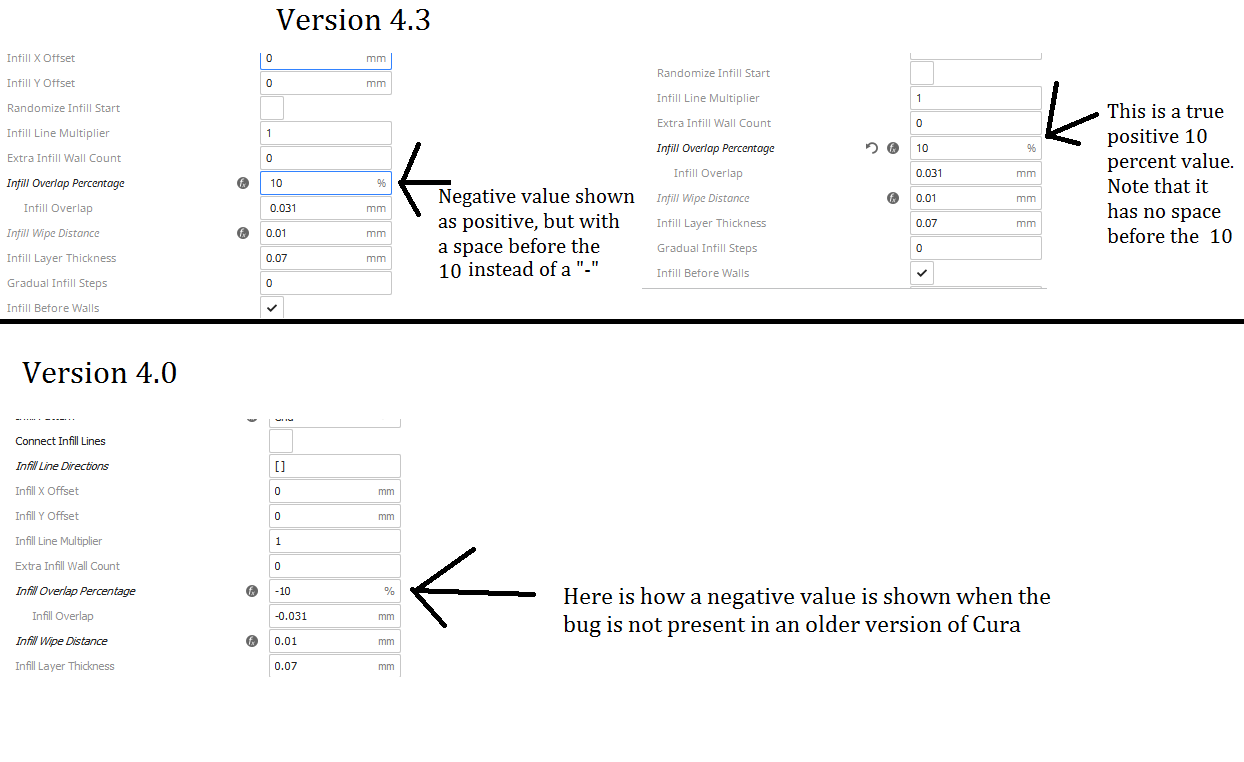
The rendering difference is very visible in the italic text. The rendering difference itself is not a problem, but might be indicative of the cause of this issue.
PS: on my system, 4.3 still uses the font rendering that is shown for 4.0 in the screenshot. That might be why I cannot reproduce this issue.
fieldOfView
on 26 Sep 2019
Coolness. Hopefully the issue gets resolved :) Wouldn't have thought it's a font issue... how odd.
 Stormwing01
on 26 Sep 2019
Stormwing01
on 26 Sep 2019
Thanks for redirect ( I did do a quick search before post so sorry I missed this thread.)
Just for completeness; I do see a movement of the cursor but not the - sign.
I changed the screen resolution but to no avail.
I have downloaded Cura 4.3 to a laptop running Win 7 but still cannot see the - (Negative) sign.
I will try measuring test prints to see if the -0.05% has been applied.
And, of course will keep an eye on this thread - weird bug indeed.
Addition - I highlighted the value and copy/pasted into notepad - There I can see the - sign, so Cura is applying it to the value.
 RegRayRat
on 24 Oct 2019
RegRayRat
on 24 Oct 2019
If you change an infill setting (so that the label becomes cursive), do you also have an lowercase "f" that extends below the font baseline like in the screenshot posted above? I am convinced this is a font rendering issues, but I don't know why some people seem to have a completely different font rendering in the italics than others.
Do you by chance have the Noto Sans font installed as a system font?
fieldOfView
on 24 Oct 2019
I've seen this as well on my Windows 8 laptop now. I can look tonight whether I have Noto Sans installed there or not and how the lowercase f looks.
I'm beginning to see a pattern. Seems like this is not an issue in Windows 10 but only in 7 and 8 so far. Maybe it's got something to do with the ClearType implementation in Windows, because that changed a lot going to Windows 10.
Ghostkeeper
on 25 Oct 2019
The difference is more than just Cleartype. @Ghostkeeper could you confirm that the italic lowercase "_f_" renders with the "leg" of the "_f_" extending below the baseline of the font and curling to the left a bit like in the screenshot above? That means that Windows renders an entirely different set of glyphs for italics.
On my system (and apparently on older versions of Cura as well), italic text renders as just regular text that is slanted. This is called "faux italic". The rendering in Windows 7 and 8 is actually more correct to what the font designer intended (though it is missing the minus sign).
fieldOfView
on 25 Oct 2019
The regular "f" does not have an extender below the base line, but the italic "f" indeed does. That means that it's actually using italics, not just oblique or "faux italic". I don't have Noto Sans installed on my computer, so this font must be coming from Cura.
Note that the setting text boxes in question don't contain italics or obliques. It's just regular.
In older Cura versions it wasn't properly including the Noto Sans font in the Windows build, which is why it looks very different. It was just using a system font then for most people.
Ghostkeeper
on 26 Oct 2019
So what is the result of @fieldOfView and @Ghostkeeper's discussion? I'm using Win7 and cannot see the negative signs on any input window, including the "location", which is troublesome. If this is a Font issue, is there a way to change the Font in Cura so that I can see the negative signs? It was working just fine several versions ago (like before 4.1), but now it's a chore when trying to line up objects on the bed using the "location" input. Any information will be helpful.
 cmarciales
on 5 Nov 2019
cmarciales
on 5 Nov 2019
You could try this:
- go to Help -> Show configuration folder
- in the folder named
themes, create a folder namedsystem_font - in that folder, place this file (named theme.json);
https://gist.github.com/fieldOfView/3e94440bcc66acfd014dd2f71f6a4885 - restart Cura
- in the preferences, select the theme named "Default font"
- restart Cura again
fieldOfView
on 5 Nov 2019
You could try this:
* go to Help -> Show configuration folder

* in the folder named `themes`, create a folder named `system_font`

* in that folder, place this file (named theme.json);
  https://gist.github.com/fieldOfView/3e94440bcc66acfd014dd2f71f6a4885

* restart Cura

* in the preferences, select the theme named "Default font"

* restart Cura again
it worked for me :) though this means I cannot use the dark theme anymore :( any tips on how I can manipulate it so that this fix works on the dark theme as well?
Stormwing01
on 5 Nov 2019
Where the json file says cura-light, change that to cura-dark using a texteditor.
fieldOfView
on 6 Nov 2019
Where the json file says
cura-light, change that tocura-darkusing a texteditor.
That worked, thank you :)
Stormwing01
on 6 Nov 2019
Thank you @fieldOfView!!!!! That worked like a champ! Just in time as I upgrade (finally) to Win10Pro by getting a new computer. But this one will still be around so, it's good that I can now see the negative signs. Again, much thanks!
cmarciales
on 6 Nov 2019
@fieldOfView Thanks for the detailed info on this!
 LipuFei
on 5 Feb 2020
LipuFei
on 5 Feb 2020
Related issues
 thopiekar
·
3Comments
thopiekar
·
3Comments
 DmitryBychkov
·
3Comments
DmitryBychkov
·
3Comments
 ferociousdiablo
·
3Comments
ferociousdiablo
·
3Comments
 mubarak111nsu
·
3Comments
mubarak111nsu
·
3Comments
 konvoj
·
3Comments
konvoj
·
3Comments
Most helpful comment
Thank you @fieldOfView!!!!! That worked like a champ! Just in time as I upgrade (finally) to Win10Pro by getting a new computer. But this one will still be around so, it's good that I can now see the negative signs. Again, much thanks!