Cura: [3.6, 4.0, 4.1, 4.2 BETA] Cura UI broken from one day to the next
Application version
All versions of Cura starting from 3.6 (have not tested older versions), also all 4.x versions.
Platform
AppImagereleases of Cura running on top of Ubuntu 18.04.2 LTS up-to-date as of today- Running on a Lenovo T400, Intel T9400 Core 2 Duo @2.53GHz, 8GB RAM, Intel GM45 chipset GPU running using the
i915driver
Printer
Not applicable, Cura does not even get that far...
Reproduction steps
Start the Cura AppImage.
Actual results
- The loading window appears and shows some information during application start.
- Migrating from once working version (see Additional Information):
Main window opens, model grid is visible, but other areas remain blank. The cube can be moved and turned using the mouse, right clicking opens a blank menu area:
$ ./Ultimaker_Cura-4.1.0.AppImage
Fontconfig error: "/etc/fonts/conf.d/10-scale-bitmap-fonts.conf", line 72: non-double matrix element
Fontconfig error: "/etc/fonts/conf.d/10-scale-bitmap-fonts.conf", line 72: non-double matrix element
Fontconfig warning: "/etc/fonts/conf.d/10-scale-bitmap-fonts.conf", line 80: saw unknown, expected number
qml: TableViewSelection: index out of range
qml: TableViewSelection: index out of range
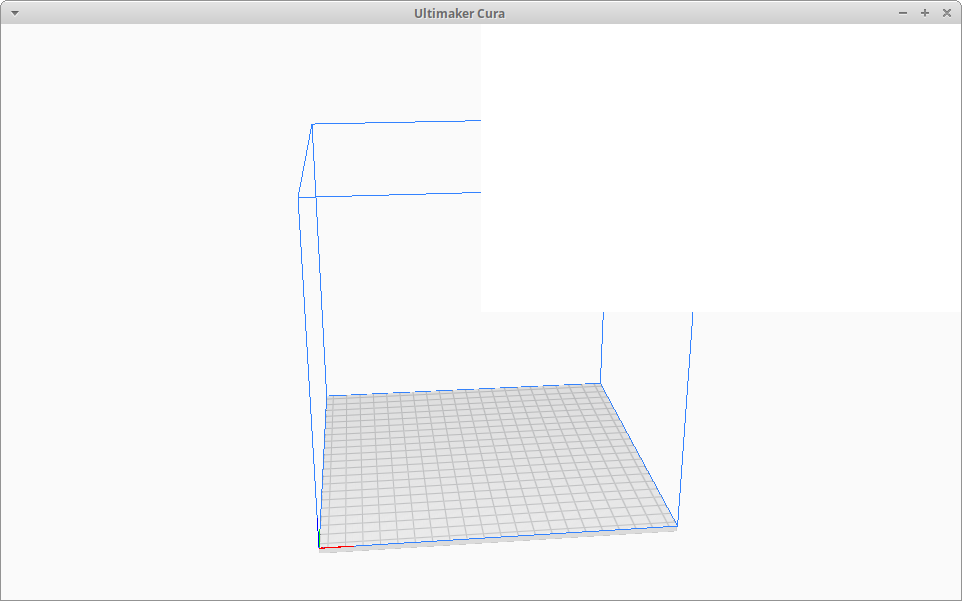
- After removing all Cura related files (
~/.local/share/cura,~/.config/curaand~/.cache/cura) like on a fresh install the main window opens, but only two rectangles appear in the window - not responding to any user input:
$ ./Ultimaker_Cura-4.1.0.AppImage
Fontconfig error: "/etc/fonts/conf.d/10-scale-bitmap-fonts.conf", line 72: non-double matrix element
Fontconfig error: "/etc/fonts/conf.d/10-scale-bitmap-fonts.conf", line 72: non-double matrix element
Fontconfig warning: "/etc/fonts/conf.d/10-scale-bitmap-fonts.conf", line 80: saw unknown, expected number
qml: TableViewSelection: index out of range
qml: TableViewSelection: index out of range
Log file: cura.log - fresh install
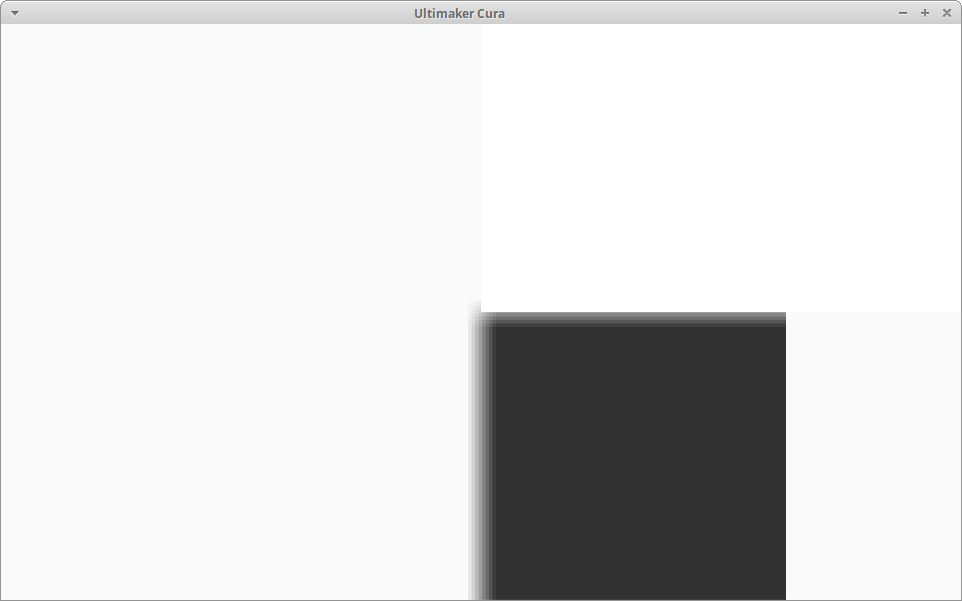
Expected results
Cura should open normally.
Additional information
- Cura was working without any issue since version 3.6 will all the way to 4.0 and 4.1 up until about three days ago (when I last used my printer).
- Besides
apt-getupdates from Ubuntu nothing has been changed on the machine. Restarting has not changed anything. All other applications seem to work fine - at least I found no other applications misbehaving all of the sudden. - I took a look at the logs, but it does not show anything out of the ordinary as fas as I can tell.
The application does not hang - it closes regularly on clicking the 'x' or entering Alt-F4.
Basically I am out of idea what to check further, so any help to get Cura working again is highly appreciated!
Cheers,
tempura
 tempura-san
All 29 comments
Hello @tempura-san , sorry to hear of your woes. Perhaps the apt-get update has broken something? Looking at your log, I can see:
2019-07-26 20:16:08,754 - ERROR - [MainThread] UM.View.GL.OpenGL.__init__ [91]: DecodeError while getting GL_RENDERER via glGetString!
2019-07-26 20:16:08,757 - DEBUG - [MainThread] UM.View.GL.OpenGL.__init__ [99]: Initialized OpenGL subsystems.
2019-07-26 20:16:08,760 - DEBUG - [MainThread] UM.View.GL.OpenGL.__init__ [100]: OpenGL Version:  2.1 Mesa 19.0.2
2019-07-26 20:16:08,763 - DEBUG - [MainThread] UM.View.GL.OpenGL.__init__ [101]: OpenGL Vendor:   Intel Open Source Technology Center
2019-07-26 20:16:08,766 - DEBUG - [MainThread] UM.View.GL.OpenGL.__init__ [102]: OpenGL Renderer: Unknown
That looks bad, something has broken in the OpenGL system.
What do you get if you run glxinfo?
 smartavionics
on 26 Jul 2019
smartavionics
on 26 Jul 2019
Hi @smartavionics , thank you for your reply. I had the same thought (some package update broke something in the GL stuff), but I cannot think of 'why' and 'what'? Especially since I use the AppImage packages, which should provide a runtime environment of their own (as far as I understand).
Running glxinfo gives me this (which looks fine): glxinfo
BTW: Skimming through /var/log/apt/history.log I see that on the 24th of July there have been some updates to 19 MESA packages (from 19.0.2-1ubuntu1.1~18.04.1 to 19.0.2-1ubuntu1.1~18.04.2). This might fit - on the other hand I wonder if I am the only one affected by this? Also, as both OpenSCAD and FreeCAD (both via AppImage) run properly.
The last entry in the changelog for the MESA packages reads:
mesa (19.0.2-1ubuntu1.1~18.04.2) bionic; urgency=medium

  * i965-revert-enabling-softpin.diff: Don't enable softpin, causes
    issues on 32bit installs. (LP: #1836721)

 -- Timo Aaltonen <[email protected]>  Thu, 18 Jul 2019 18:44:14 +0300
But I doubt, that this would be related, as:
- I am using the
i915driver (according tolsmod). - It is a single backport, too. No change was made with respect to the MESA release - it is still at version 19.0.2.
- The fix is for 32-bit systems according to the bugtracker. I am running a 64-bit Xubuntu release here.
Unfortunately I do not see any way to downgrade the MESA packages in order to verify this, as the previous versions are no longer available via the bionic-updates repository (correct me please if I am wrong).
Also I am quite positive, that before retrying Cura 3.6 I checked the logs and the lines you saw were already there - but as the last run has overwritten the log, I cannot say for sure...
Cheers,
tempura
tempura-san
on 26 Jul 2019
Hi. I have the same problem. I have had to use a non-updated computer with bionic to do some changes to a design, and version 3.6 just in case there could be something wrong with newer ones. Maybe as a clue, everything seems to work ok while the splash screen is showing up, including progress messages like "updating configuration.." (the last one is "Loading interface") and all the stuff look right up to when the splashscreen disappears. At that time two "qml: TableViewSelection: index out of range" messages appear (launched from the command line), and there are no menus nor anything I'm able to even click, so I have to kill Cura. I hope this helps.
Sorry for the editing. I have tested the command line with the working installation, and the double message happens too, so it's not the issue. I wonder if there's some switch from the command line I can use to debug or test some option.
 omgslinux
on 27 Jul 2019
omgslinux
on 27 Jul 2019
I have had problems with the fonts rendering for a while, so I was using the copy of Cura that came with my Fedora distribution. It is possible that my system simply got messed up from doing dnf upgrades to switch between Fedora releases though. Currently, the File...Help bar has the text rendering. It seems I am on Fedora 29. Cura 3.6.0 on all seem to not render text right. I hope knowledge of this issue of mine helps improve things.
./Ultimaker_Cura-4.1.0.AppImage
Fontconfig warning: line 5: unknown element "its:rules"
Fontconfig warning: line 6: unknown element "its:translateRule"
Fontconfig warning: line 9: unknown element "description"
Fontconfig warning: "/etc/fonts/conf.d/10-hinting-slight.conf", line 4: unknown element "its:rules"
Fontconfig warning: "/etc/fonts/conf.d/10-hinting-slight.conf", line 5: unknown element "its:translateRule"
Fontconfig warning: "/etc/fonts/conf.d/10-hinting-slight.conf", line 8: unknown element "description"
Fontconfig warning: "/etc/fonts/conf.d/10-scale-bitmap-fonts.conf", line 4: unknown element "its:rules"
Fontconfig warning: "/etc/fonts/conf.d/10-scale-bitmap-fonts.conf", line 5: unknown element "its:translateRule"
Fontconfig warning: "/etc/fonts/conf.d/10-scale-bitmap-fonts.conf", line 8: unknown element "description"
Fontconfig error: "/etc/fonts/conf.d/10-scale-bitmap-fonts.conf", line 76: non-double matrix element
Fontconfig error: "/etc/fonts/conf.d/10-scale-bitmap-fonts.conf", line 76: non-double matrix element
Fontconfig warning: "/etc/fonts/conf.d/10-scale-bitmap-fonts.conf", line 84: saw unknown, expected number
Fontconfig warning: "/etc/fonts/conf.d/20-unhint-small-vera.conf", line 4: unknown element "its:rules"
Fontconfig warning: "/etc/fonts/conf.d/20-unhint-small-vera.conf", line 5: unknown element "its:translateRule"
Fontconfig warning: "/etc/fonts/conf.d/20-unhint-small-vera.conf", line 8: unknown element "description"
Fontconfig warning: "/etc/fonts/conf.d/25-unhint-nonlatin.conf", line 4: unknown element "its:rules"
Fontconfig warning: "/etc/fonts/conf.d/25-unhint-nonlatin.conf", line 5: unknown element "its:translateRule"
Fontconfig warning: "/etc/fonts/conf.d/25-unhint-nonlatin.conf", line 8: unknown element "description"
Fontconfig warning: "/etc/fonts/conf.d/30-metric-aliases.conf", line 4: unknown element "its:rules"
Fontconfig warning: "/etc/fonts/conf.d/30-metric-aliases.conf", line 5: unknown element "its:translateRule"
Fontconfig warning: "/etc/fonts/conf.d/30-metric-aliases.conf", line 8: unknown element "description"
Fontconfig warning: "/etc/fonts/conf.d/40-nonlatin.conf", line 4: unknown element "its:rules"
Fontconfig warning: "/etc/fonts/conf.d/40-nonlatin.conf", line 5: unknown element "its:translateRule"
Fontconfig warning: "/etc/fonts/conf.d/40-nonlatin.conf", line 8: unknown element "description"
Fontconfig warning: "/etc/fonts/conf.d/45-generic.conf", line 4: unknown element "its:rules"
Fontconfig warning: "/etc/fonts/conf.d/45-generic.conf", line 5: unknown element "its:translateRule"
Fontconfig warning: "/etc/fonts/conf.d/45-generic.conf", line 8: unknown element "description"
Fontconfig warning: "/etc/fonts/conf.d/45-latin.conf", line 4: unknown element "its:rules"
Fontconfig warning: "/etc/fonts/conf.d/45-latin.conf", line 5: unknown element "its:translateRule"
Fontconfig warning: "/etc/fonts/conf.d/45-latin.conf", line 8: unknown element "description"
Fontconfig warning: "/etc/fonts/conf.d/49-sansserif.conf", line 4: unknown element "its:rules"
Fontconfig warning: "/etc/fonts/conf.d/49-sansserif.conf", line 5: unknown element "its:translateRule"
Fontconfig warning: "/etc/fonts/conf.d/49-sansserif.conf", line 8: unknown element "description"
Fontconfig warning: "/etc/fonts/conf.d/50-user.conf", line 4: unknown element "its:rules"
Fontconfig warning: "/etc/fonts/conf.d/50-user.conf", line 5: unknown element "its:translateRule"
Fontconfig warning: "/etc/fonts/conf.d/50-user.conf", line 8: unknown element "description"
Fontconfig warning: "/etc/fonts/conf.d/51-local.conf", line 4: unknown element "its:rules"
Fontconfig warning: "/etc/fonts/conf.d/51-local.conf", line 5: unknown element "its:translateRule"
Fontconfig warning: "/etc/fonts/conf.d/51-local.conf", line 8: unknown element "description"
Fontconfig warning: "/etc/fonts/conf.d/60-generic.conf", line 4: unknown element "its:rules"
Fontconfig warning: "/etc/fonts/conf.d/60-generic.conf", line 5: unknown element "its:translateRule"
Fontconfig warning: "/etc/fonts/conf.d/60-generic.conf", line 8: unknown element "description"
Fontconfig warning: "/etc/fonts/conf.d/60-latin.conf", line 4: unknown element "its:rules"
Fontconfig warning: "/etc/fonts/conf.d/60-latin.conf", line 5: unknown element "its:translateRule"
Fontconfig warning: "/etc/fonts/conf.d/60-latin.conf", line 8: unknown element "description"
Fontconfig warning: "/etc/fonts/conf.d/65-0-lohit-bengali.conf", line 32: unknown element "langset"
Fontconfig warning: "/etc/fonts/conf.d/65-fonts-persian.conf", line 34: unknown element "its:rules"
Fontconfig warning: "/etc/fonts/conf.d/65-fonts-persian.conf", line 35: unknown element "its:translateRule"
Fontconfig warning: "/etc/fonts/conf.d/65-nonlatin.conf", line 4: unknown element "its:rules"
Fontconfig warning: "/etc/fonts/conf.d/65-nonlatin.conf", line 5: unknown element "its:translateRule"
Fontconfig warning: "/etc/fonts/conf.d/65-nonlatin.conf", line 8: unknown element "description"
Fontconfig warning: "/etc/fonts/conf.d/69-gnu-free-sans.conf", line 24: unknown element "langset"
Fontconfig warning: "/etc/fonts/conf.d/69-gnu-free-serif.conf", line 24: unknown element "langset"
Fontconfig warning: "/etc/fonts/conf.d/69-unifont.conf", line 4: unknown element "its:rules"
Fontconfig warning: "/etc/fonts/conf.d/69-unifont.conf", line 5: unknown element "its:translateRule"
Fontconfig warning: "/etc/fonts/conf.d/80-delicious.conf", line 4: unknown element "its:rules"
Fontconfig warning: "/etc/fonts/conf.d/80-delicious.conf", line 5: unknown element "its:translateRule"
Fontconfig warning: "/etc/fonts/conf.d/90-synthetic.conf", line 4: unknown element "its:rules"
Fontconfig warning: "/etc/fonts/conf.d/90-synthetic.conf", line 5: unknown element "its:translateRule"
Something different for 3.6.0 included this:
qml: TableViewSelection: index out of range
qml: TableViewSelection: index out of range
 nathanielstenzel
on 27 Jul 2019
nathanielstenzel
on 27 Jul 2019
Hi. I think the opengl messages above are not part of the problem. Can you see if there's any diagnostics in the stdout.log and stderr.log files which should be in ~/.local/share/cura.
smartavionics
on 27 Jul 2019
I have done a backup of both ~/.local/share/cura and ~/.config/cura, removed both trees to start from scratch and I attach both std*.log files and I attach both here.
stderr.log
stdout.log
omgslinux
on 27 Jul 2019
Hi. I don't yet know why this problem is occurring so I can't offer a solution.
However, I would be grateful if you could try running the most recent development AppImage I have produced as this is using the latest Qt and PyQt (5.13 as opposed to 5.10 which is used in the Ultimaker releases and also until very recently my releases also). I expect that to fail as well but it's worth trying just to verify. You can find my builds at https://www.dropbox.com/sh/s43vqzmi4d2bqe2/AAADdYdSu9iwcKa0Knqgurm4a?dl=0
smartavionics
on 27 Jul 2019
@smartavionics Thank you for your efforts! I just tried to run your latest version (Cura-mb-master-x86_64-20190727.AppImage), but Cura does not even start:
$ ./Cura-mb-master-x86_64-20190727.AppImage

(AppImageLauncher:10249): GLib-CRITICAL **: 14:25:39.951: g_file_test: assertion 'filename != NULL' failed
Looking into stderr.log shows:
Error in sys.excepthook:
Traceback (most recent call last):
  File "<frozen importlib._bootstrap>", line 969, in _find_and_load
  File "<frozen importlib._bootstrap>", line 958, in _find_and_load_unlocked
  File "<frozen importlib._bootstrap>", line 673, in _load_unlocked
  File "<frozen importlib._bootstrap_external>", line 665, in exec_module
  File "<frozen importlib._bootstrap>", line 222, in _call_with_frames_removed
  File "/home/markb/3dp/cura/cura-build.git/build/inst/lib/python3/dist-packages/cura/CrashHandler.py", line 17, in <module>
ImportError: libicui18n.so.55: cannot open shared object file: No such file or directory

Original exception was:
Traceback (most recent call last):
  File "/opt/cura/lib/python3.5/site-packages/cx_Freeze/initscripts/__startup__.py", line 12, in <module>
  File "/opt/cura/lib/python3.5/site-packages/cx_Freeze/initscripts/Console.py", line 21, in <module>
  File "/home/markb/3dp/cura/cura-build.git/build/inst/bin/cura", line 134, in <module>
  File "/home/markb/3dp/cura/cura-build.git/build/inst/lib/python3/dist-packages/cura/CuraApplication.py", line 11, in <module>
ImportError: libicui18n.so.55: cannot open shared object file: No such file or directory
Cheers,
tempura
tempura-san
on 27 Jul 2019
Ah, oops! I have recently removed some libraries from the AppImage that I thought would be available on everyone's systems. I will put them back in and update the AppImage. Will post here again when that is done.
smartavionics
on 27 Jul 2019
In the meantime, could you please install the libicu55 package (sudo apt-get install libicu55) and try running again. Thanks.
smartavionics
on 27 Jul 2019
Unfortunately on Bionic only libicu60 is available, so I will wait for your update.
tempura-san
on 27 Jul 2019
Understood. I am doing it now.
smartavionics
on 27 Jul 2019
I am just updating the file in dropbox. When completed, the length should be 165548008.
smartavionics
on 27 Jul 2019
Thank you @smartavionics, I appreciate your efforts, but it's weekend, so take your time! :wink:
I downloaded the new AppImage file, but the output is still the same... It is not starting. stderr.log still shows the same error about libicu...
$ md5sum Cura-mb-master-x86_64-20190727.AppImage
b83d5e4990199703ee5996c199661f65  Cura-mb-master-x86_64-20190727.AppImage
That's weird because the md5sum is what I would expect and when I run that AppImage and look at the files inside, I see this:
ls -l /tmp/.mount_Cura-mRthSA5/usr/bin/libicu*
-rw-r--r-- 1 root root 25916480 Jul 27 13:40 /tmp/.mount_Cura-mRthSA5/usr/bin/libicudata.so.55
-rw-r--r-- 1 root root  2865024 Jul 27 13:40 /tmp/.mount_Cura-mRthSA5/usr/bin/libicui18n.so.55
-rw-r--r-- 1 root root  1761744 Jul 27 13:40 /tmp/.mount_Cura-mRthSA5/usr/bin/libicuuc.so.55
smartavionics
on 27 Jul 2019
Really weird, because I see this:
$ md5sum ./Cura-mb-master-x86_64-20190727.AppImage
b83d5e4990199703ee5996c199661f65  ./Cura-mb-master-x86_64-20190727.AppImage
$ ./Cura-mb-master-x86_64-20190727.AppImage --appimage-mount
/tmp/.mount_Cura-m04U2EN
$ find /tmp/.mount_Cura-m04U2EN -name "libicu*"
<<nothing is found>>
$ ls /tmp/.mount_Cura-m04U2EN/usr/bin
cura                           libdouble-conversion.so.1  libgeos.so.3.7.0   libopenblas.so.0       libQt5DataVisualization.so.5       libQt5QuickControls2.so.5   libQt5Test.so.5             libSM.so.6
CuraEngine                     libEGL.so.1                libgfortran.so.3   libpcre.so.3           libQt5DBus.so.5                    libQt5QuickParticles.so.5   libQt5VirtualKeyboard.so.5  libssl.so.1.0.0
cura.sh                        libffi.so.6                libgomp.so.1       libpng12.so.0          libQt5EglFSDeviceIntegration.so.5  libQt5QuickShapes.so.5      libQt5WebSockets.so.5       libsystemd.so.0
lib                            libfontconfig.so.1         libgpg-error.so.0  libprotobuf-lite.so.9  libQt5EglFsKmsSupport.so.5         libQt5Quick.so.5            libQt5WebView.so.5          libuuid.so.1
libboost_filesystem.so.1.58.0  libfreetype.so.6           libICE.so.6        libpython3.5m.so.1.0   libQt5Gui.so.5                     libQt5QuickTemplates2.so.5  libQt5Widgets.so.5          openssl.cnf
libboost_system.so.1.58.0      libgbm.so.1                libjpeg.so.8       libpython3.5.so.1.0    libQt5Network.so.5                 libQt5QuickTest.so.5        libQt5XcbQpa.so.5           plugins
libcapnp-0.5.3.so              libgcrypt.so.20            libkj-0.5.3.so     libQt5Bodymovin.so.5   libQt5OpenGL.so.5                  libQt5RemoteObjects.so.5    libQt5Xml.so.5              qml
libcrypto.so.1.0.0             libgeos_c.so               liblzma.so.5       libQt5Charts.so.5      libQt5Purchasing.so.5              libQt5Sql.so.5              libquadmath.so.0            qt
libdbus-1.so.3                 libgeos.so                 libncursesw.so.5   libQt5Core.so.5        libQt5Qml.so.5                     libQt5Svg.so.5              libselinux.so.1             resources
:confused:
tempura-san
on 27 Jul 2019
I also have the font issues when I'm running from source, but those shouldn't cause the issues that you seem to have. It just defaults to a different font (which might fuck up some layouting, but that's it)
 nallath
on 29 Jul 2019
nallath
on 29 Jul 2019
I also see those font issues when running with an AppImage but they seem to be harmless. It's using the correct fonts, anyway.
 Ghostkeeper
on 29 Jul 2019
Ghostkeeper
on 29 Jul 2019
For me on Ubuntu 19.04, the 4.1.0 AppImage starts correctly.
Since the images have run fine in the past for you, something on your computer must have changed to break it. I don't expect I'll find something on my computer.
I think the aforementioned OpenGL messages could be a symptom of the problem though. Especially if you're running a graphics card that is less than 11 years old (which should support OpenGL3 rather than 2).
Ghostkeeper
on 29 Jul 2019
@Ghostkeeper I did not say that Cura is broken, but that it fails to start likely after the latest upgrade of the Ubuntu packages. I just wanted to have some pointers to figure out what could be the problem.
In the meantime I travelled down the rocky road of downgrading the Mesa packages by manually re-building them from the Launchpad Git repository. The steps were (do all this in a temporary directory).
WARNING: These steps might leave your system in a bad state - so follow at your own risk. Be sure to read everything before continuing. Don't blame me if things go south!
# some basic stuff
$ sudo apt-get install build-essentials git

# clone the repository for Mesa and select the 18.04.1 point release packages
$ git clone https://git.launchpad.net/ubuntu/+source/mesa
$ cd mesa
$ git checkout applied/19.0.2-1ubuntu1.1_18.04.1

# get build dependencies and build
$ sudo apt-get build-dep mesa
$ debuild -us -uc
Afterwards, downgrade all the Mesa packages to the previous point release:
$ cd ..
$ sudo dpkg -i libgbm1_19.0.2-1ubuntu1.1~18.04.1_amd64.deb \
             libegl-mesa0_19.0.2-1ubuntu1.1~18.04.1_amd64.deb \
             libegl1-mesa_19.0.2-1ubuntu1.1~18.04.1_amd64.deb \
             libegl1-mesa-dev_19.0.2-1ubuntu1.1~18.04.1_amd64.deb \
             libgl1-mesa-dev_19.0.2-1ubuntu1.1~18.04.1_amd64.deb \
             libgl1-mesa-dri_19.0.2-1ubuntu1.1~18.04.1_amd64.deb \
             libgl1-mesa-glx_19.0.2-1ubuntu1.1~18.04.1_amd64.deb \
             libglapi-mesa_19.0.2-1ubuntu1.1~18.04.1_amd64.deb \
             libgles2-mesa_19.0.2-1ubuntu1.1~18.04.1_amd64.deb \
             libgles2-mesa-dev_19.0.2-1ubuntu1.1~18.04.1_amd64.deb \
             libglx-mesa0_19.0.2-1ubuntu1.1~18.04.1_amd64.deb \
             libosmesa6_19.0.2-1ubuntu1.1~18.04.1_amd64.deb \
             libwayland-egl1-mesa_19.0.2-1ubuntu1.1~18.04.1_amd64.deb \
             mesa-common-dev_19.0.2-1ubuntu1.1~18.04.1_amd64.deb \
             mesa-va-drivers_19.0.2-1ubuntu1.1~18.04.1_amd64.deb
Log off and back on to reload the X server and start Cura - and tadaa it's back working. Afterwards I restored the updated packages in order to selectively find out which package introduced the problem. Restoration went along the lines (plus some swearing) of:
$ sudo apt-get -f -o Dpkg::Options::="--force-overwrite" install
$ sudo apt-get -f install
$ sudo apt-get upgrade
Restarted X and - Cura is still working...?
Package-wise I am at the same position as when Cura did not start. So now I really have no idea what went wrong.
Also a fresh start of Cura work flawlessly. Just for the records, the output is the same (means, that this output can be considered as normal):
$ ./Ultimaker_Cura-4.1.0.AppImage
Fontconfig error: "/etc/fonts/conf.d/10-scale-bitmap-fonts.conf", line 72: non-double matrix element
Fontconfig error: "/etc/fonts/conf.d/10-scale-bitmap-fonts.conf", line 72: non-double matrix element
Fontconfig warning: "/etc/fonts/conf.d/10-scale-bitmap-fonts.conf", line 80: saw unknown, expected number
qml: TableViewSelection: index out of range
qml: TableViewSelection: index out of range
Also the fresh cura.log shows the same messages about the OpenGL system:
2019-07-29 20:54:49,295 - DEBUG - [MainThread] UM.Qt.QtRenderer._initialize [181]: Support for Vertex Array Objects: True
2019-07-29 20:54:49,319 - ERROR - [MainThread] UM.View.GL.OpenGL.__init__ [91]: DecodeError while getting GL_RENDERER via glGetString!
2019-07-29 20:54:49,324 - DEBUG - [MainThread] UM.View.GL.OpenGL.__init__ [99]: Initialized OpenGL subsystems.
2019-07-29 20:54:49,328 - DEBUG - [MainThread] UM.View.GL.OpenGL.__init__ [100]: OpenGL Version:  2.1 Mesa 19.0.2
2019-07-29 20:54:49,334 - DEBUG - [MainThread] UM.View.GL.OpenGL.__init__ [101]: OpenGL Vendor:   Intel Open Source Technology Center
2019-07-29 20:54:49,337 - DEBUG - [MainThread] UM.View.GL.OpenGL.__init__ [102]: OpenGL Renderer: Unknown
These can be ruled out, too. As such, there is no indication why the UI was messed up...
@omgslinux Unfortunately I cannot say, what did the trick for me. Maybe something went wrong during the upgrade? I have checked the log at /var/log/apt/term.log and it does not show anything out of the ordinary for when the packages were upgraded...
tempura-san
on 29 Jul 2019
Just to be sure I also restarted my computer and restored my former settings and still everything runs fine. So in the end I can only speculate, that it had _something_ to do with the Mesa packages - but I can't nail it.
@omgslinux Maybe a simple reinstallation of the packages would be sufficient?
@smartavionics, @nallath, @Ghostkeeper: I guess this issue is then 'resolved' - or is there anything further I could provide to investigate this? Otherwise I would close the issue.
Anyway thanks to all of you for your feedback and support!
Cheers,
tempura
tempura-san
on 29 Jul 2019
@Ghostkeeper I did not say that Cura is broken, but that it fails to start likely after the latest upgrade of the Ubuntu packages. I just wanted to have some pointers to figure out what could be the problem.
Yeah sorry, what I meant with "I don't expect to find anything on my computer" is that I can't really help with debugging then.
I'm glad that your workaround worked. To me it confirms that there is probably nothing that Cura can really do about it. We're most likely hitting some path of the code that is buggy in that graphics driver somehow. We'll close this ticket and hold your workaround as truth then.
Ghostkeeper
on 30 Jul 2019
As a previous comment suggested, a version a libicu wasn't found. I've current installed libicu63 and libicu60 (not sure which one is the necessary for cura) and cura works again. The process wasn't fairly simple, but now I can say it works.
omgslinux
on 30 Jul 2019
Yes, I screwed up with my release because I didn't realise that Linux systems use different versions of the icu libraries and I removed the bundled libraries from the AppImage. But now, I have removed the icu libraries completely so the latest releases should be OK for all systems.
smartavionics
on 30 Jul 2019
The fix that I have is deleting the content in /home/username/.cache/qtshadercache/
rm /home/username/.cache/qtshadercache/*
 robertfullarton
on 22 Oct 2019
robertfullarton
on 22 Oct 2019
I'll try this once I get back from vacation - as I am once more affected by this issue. 😞
tempura-san
on 22 Oct 2019
@robertfullarton Thanks a lot! That did it for me, too! :tada:
I wonder if this could be automated or somehow detected if the cache becomes out-of-date?
tempura-san
on 25 Oct 2019
Yeah I've been thinking about this. The problem is not that the cache is out-of-date, really. Cura's original shaders have not changed from one day to the next, at least not unless you used a new version of Cura and even then it'll be in a different mounted path or a different AppImage.
Something seems to get corrupt somewhere, but it's a bit out of our hands where since this is done between the Qt library and the graphics driver somewhere.
What's more, even if something went wrong, messing with the user's Qt Shader Cache can break other applications on the user's computer that are running on Qt. It's a bit scary to do. Especially since the files in that cache folder are binary blobs and not named such that we can recognise which files belong to Cura and which files don't.
Ghostkeeper
on 30 Oct 2019
I understand your reasoning - well, at least now there is a workaround.
Also you are right, it's not related to Cura per se, as it the AppImage has not even changed once the issue arises. On the other hand, I haven't noticed such a behaviour in any other app - could of course be, because no other app uses the Qt shader cache.
I'm not that deep into Qt, but maybe it is possible to invalidate/rebuild the shader cache for the current application's shaders on the start within Qt? This might slow down the startup as the shaders need to be cached once, but it should ensure, that the shaders are cached properly.
tempura-san
on 30 Oct 2019
Related issues
 muhammadelmogy
·
3Comments
muhammadelmogy
·
3Comments
 wi1k1n
·
3Comments
wi1k1n
·
3Comments
 ferociousdiablo
·
3Comments
ferociousdiablo
·
3Comments
 dstulken
·
3Comments
dstulken
·
3Comments
 JRRN
·
3Comments
JRRN
·
3Comments
Most helpful comment
The fix that I have is deleting the content in /home/username/.cache/qtshadercache/
rm /home/username/.cache/qtshadercache/*