Cura 4.1 can not connect to antcubic kossel
Application Version
4.1
Platform
windows 10 64b
Printer
deltabot my printer is a anycubic kossel
Actual Results
wont communicate at all
Additional Information
worked fine in 4.0, tried uninstalling 4.0 and 4.1 and deleting the application folders and printer driver and reinstalling 4.1 with no luck, but reinstall 4.0 and working fine again
test.3mf.zip
 lofud
lofud
All 29 comments
hey @lofud did you use any plugin to connect to your printer?
or do you mean 'connected' via USB?
 Ellecross
on 6 Jun 2019
Ellecross
on 6 Jun 2019
Yes via USB.
No plugins.
lofud
on 7 Jun 2019
We are unable to test this because we don't have the Anycubic Kossel printer. All we can really do is rely on our technical community to figure out a way to fix this and apply the change (as long as it doesn't break it for the rest).
 Ghostkeeper
on 7 Jun 2019
Ghostkeeper
on 7 Jun 2019
The only changes related to this that is new in 4.1 were this commit and this commit. Perhaps they broke it for Anycubic? What exactly does the printer respond to a M105 command?
Ghostkeeper
on 7 Jun 2019
@Ghostkeeper
My Anycubic Kossel Linear Plus is working fine.
I am using Cura 4.1.0 and used the deltabot profile like the instructions said to do.
Also, is the sd card inserted in the 3d printer? It does not show up if it isn't inserted.
 mbartlett21
on 8 Jun 2019
mbartlett21
on 8 Jun 2019
Confirm, can not connect to antcubic kossel, do not display temperature, do not move extruder, it see COM3, but dont respond any command.
 ShikovYurii
on 11 Jun 2019
ShikovYurii
on 11 Jun 2019
I can confirm I am having the same issue with my CR-10S. I have to shut down my computer all the way and then restart and then play a roulette of plugging and unplugging the USB cables before it connects correctly. Cura is seeing the printer, but it's only displaying the extruder temperature and not the heat bed temperature and does not communicate with the printer.
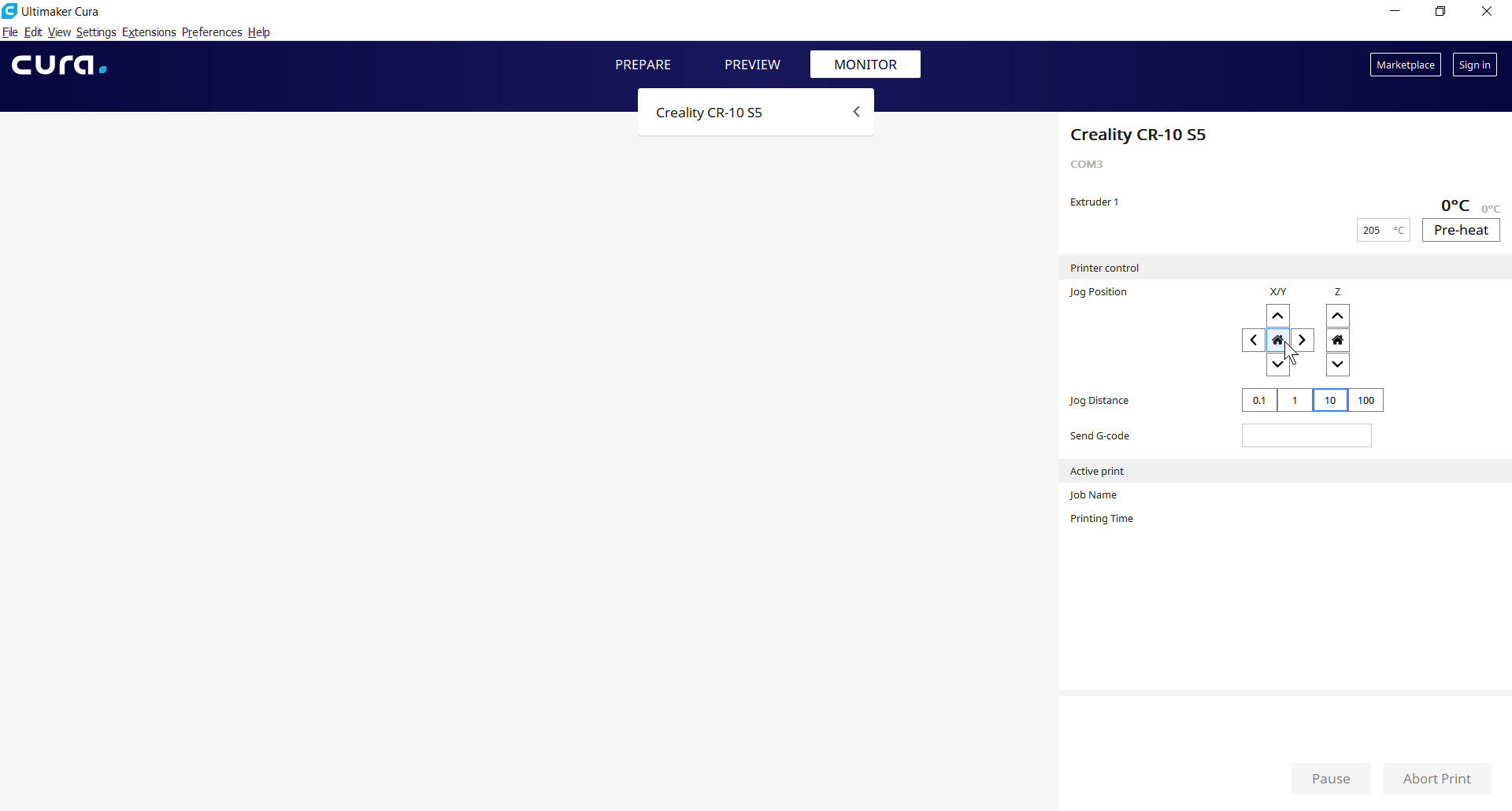
 DmOcRsI
on 13 Jun 2019
DmOcRsI
on 13 Jun 2019
If you connect to it with Pronterface and send it the M105 command, how does the printer respond?
Ghostkeeper
on 14 Jun 2019
Yes, Pronterface has no issues connecting at all.
DmOcRsI
on 14 Jun 2019
Can confirm that Kossel is not working after upgrading from 4.0.0-beta
>>> M105
SENDING:M105
ok T:20.0 /0.0 B:0.0 /0.0 @:0 B@:0
 paulgavrikov
on 16 Jun 2019
paulgavrikov
on 16 Jun 2019
Hmm, that looks fine. It's more or less the same as what the Ultimaker printers respond with anyhow.
You guys got any log files of Cura?
Ghostkeeper
on 17 Jun 2019
I have the same issue with same printer and cura 4.2.1 sometimes
never had this with cura 4.0
 sanczess
on 21 Aug 2019
sanczess
on 21 Aug 2019
Any progress on this? Still have to use 4.0 as of 4.6.1
M105 displays echo:SD init fail line before default output of M105 when you call it first time, then act normal, like @paulgavrikov posted before.
But this happens if only you send m105 before that line appears naturally in the output.
 KazeZlat
on 17 May 2020
KazeZlat
on 17 May 2020
As of logs it seems cura tries to detect baud rate and 4.0 detects 115200 after few retries. 4.6.1 thinks 250000 is the correct one.
Cura 4.6.1:
2020-05-17 19:10:07,239 - DEBUG - [Thread-1] USBPrinting.AutoDetectBaudJob.run [24]: Auto detect baud rate started.
2020-05-17 19:10:07,857 - DEBUG - [Thread-1] USBPrinting.AutoDetectBaudJob.run [50]: Checking COM3 if baud rate 115200 works. Retry nr: 0. Wait timeout: 3
2020-05-17 19:10:13,521 - DEBUG - [Thread-1] USBPrinting.AutoDetectBaudJob.run [50]: Checking COM3 if baud rate 250000 works. Retry nr: 0. Wait timeout: 3
2020-05-17 19:10:15,024 - DEBUG - [Thread-1] USBPrinting.AutoDetectBaudJob.run [80]: Detected baud rate 250000 on serial COM3 on retry 0 with after 0.00 seconds.
Cura 4.0:
2020-05-17 19:16:05,297 - DEBUG - [Thread-2] USBPrinting.AutoDetectBaudJob.run [24]: Auto detect baud rate started.
2020-05-17 19:16:05,953 - DEBUG - [Thread-2] USBPrinting.AutoDetectBaudJob.run [50]: Checking COM3 if baud rate 115200 works. Retry nr: 0. Wait timeout: 3
2020-05-17 19:16:11,615 - DEBUG - [Thread-2] USBPrinting.AutoDetectBaudJob.run [50]: Checking COM3 if baud rate 250000 works. Retry nr: 0. Wait timeout: 3
2020-05-17 19:16:18,141 - DEBUG - [Thread-2] USBPrinting.AutoDetectBaudJob.run [50]: Checking COM3 if baud rate 230400 works. Retry nr: 0. Wait timeout: 3
2020-05-17 19:16:24,645 - DEBUG - [Thread-2] USBPrinting.AutoDetectBaudJob.run [50]: Checking COM3 if baud rate 57600 works. Retry nr: 0. Wait timeout: 3
2020-05-17 19:16:31,149 - DEBUG - [Thread-2] USBPrinting.AutoDetectBaudJob.run [50]: Checking COM3 if baud rate 38400 works. Retry nr: 0. Wait timeout: 3
2020-05-17 19:16:37,652 - DEBUG - [Thread-2] USBPrinting.AutoDetectBaudJob.run [50]: Checking COM3 if baud rate 19200 works. Retry nr: 0. Wait timeout: 3
2020-05-17 19:16:44,155 - DEBUG - [Thread-2] USBPrinting.AutoDetectBaudJob.run [50]: Checking COM3 if baud rate 9600 works. Retry nr: 0. Wait timeout: 3
2020-05-17 19:17:05,659 - DEBUG - [Thread-2] USBPrinting.AutoDetectBaudJob.run [50]: Checking COM3 if baud rate 115200 works. Retry nr: 1. Wait timeout: 15
2020-05-17 19:17:10,684 - DEBUG - [Thread-2] USBPrinting.AutoDetectBaudJob.run [80]: Detected baud rate 115200 on serial COM3 on retry 1 with after 0.02 seconds.
I fixed this problem myself, by modifying the script for searching for the maximum speed of the COM port, it sets too high a speed that the port emulator does not support over USB. I removed all speed options except for the 115200. this solved the problem. And they added higher speeds in versions with 4.0
ShikovYurii
on 17 May 2020
@ShikovYurii do you have config entry name or how can we change this?
KazeZlat
on 17 May 2020
Find
C:\Program Files\Ultimaker Cura 4.5\plugins\USBPrinting\AutoDetectBaudJob.py
in file
`
......
class AutoDetectBaudJob(Job):
def __init__(self, serial_port: int) -> None:
super().__init__()
self._serial_port = serial_port
self._all_baud_rates = [115200, _250000, 500000, 230400, 57600, 38400, 19200, 9600_]`
midify this
==>>> self._all_baud_rates = [115200]
ShikovYurii
on 18 May 2020
@ShikovYurii this requires users to build their own executables and might not be suitable for people with multiple printers.
KazeZlat
on 18 May 2020
115200 most universal speed , and i'm user of cura, not developer. Its need only NotePad to do this.
ShikovYurii
on 18 May 2020
Translated this comment to English for the benefit of others:
I don’t know what your problem is in configurations with many printers, while reading that you yourself sent the logs, the previous one with the version and speed 115200. This problem is with Chinese som-usb converters like ch340 and that since version 4.x + they are in this The script was added with high speeds such as 500,000 which were not previously available and it is now faster to connect with one speed. In general, this solves the problem of what is there to edit in the file or where else let them figure it out, in order to fix the script 1 minute is needed,
Original text:
Не знаю в чем по вашему проблема в конфигурациях с множеством принтеров, у читывая что вы сами прислали логи, предыдущей с версией и скоростью 115200. Эта проблема с китайскими конверторами сом- usb типа ch340 и тем что с версии 4.х+ они в этот скрипт дописали большие скорости типа 500000 которых ранее не было да и конектиться оно теперь быстрее с одной то скорость. Вообщем это решает проблему, чего там править в экзешнике или где ещо пусть сами разбираются, что бы поправить скрипт нужна 1 минута,
ShikovYurii
on 18 May 2020
@ShikovYurii sorry, missed that you was writing about plugin which we can edit ourselves without building executables indeed. Your solution works for me, but some printers work better with higher speeds.
While this is working workaround for those who has only one printer which is failing to monitor I think that correct solution will be config entry for each printer that will allow to override AutoDetectBaudJob behaviour.
For others:
If you only have printers that work on 115200 baud then you're fine if you edit
%Your_Cura_Installation_Path%/plugins/USBPrinting/AutoDetectBaudJob.py line 21:
---         self._all_baud_rates = [115200, 250000, 500000, 230400, 57600, 38400, 19200, 9600]
+++         self._all_baud_rates = [115200]
Well, my expectation is actually that the user doesn't need to manually enter a baud rate. I'd expect that the AutoDetectBaudJob would automatically detect the baud rate. That's what it's named after.
This script tries to connect at various baud rates and sends M105 commands to the printer, querying the temperature sensors on the printer. If the printer responds with a valid response, like ok T:201 B:117 then it assumes that this communication is working.
So my next question is why the Anycubic Kossel responds with a valid temperature response on baud rate 250000, but doesn't allow printing at that baud rate?
Ghostkeeper
on 19 May 2020
No, printer not respond absolutely.
"I'd expect that the AutoDetectBaudJob would automatically detect the baud rate. That's what it's named after."
But do it not right. Speed sets too high , printer not working.
Perhaps the problem is not the printer itself, but the drivers, and that their incorrect response is perceived by the program as correct.
and this problem is also true for versions 4.5,4.6 I checked this
ShikovYurii
on 19 May 2020
In any case, we can't accept the proposed patch into the mainline code here because that would break the connectivity of other printers who are using 250kHz. Can we distinguish a correct response to the M105 from the driver's incorrect response?
Ghostkeeper
on 20 May 2020
as you can see in the message https://github.com/Ultimaker/Cura/issues/5859#issuecomment-629806104 from the logs that, the program version 4.6.1 receives a response for the speed of 250K which immediately takes for correct and stops, but in version 4.0 continues checking and already selects the speed 115200 after a long check of all speeds, and selects the working speed. is it possible that the same check on the M105 command does not actually happen at all ?
ShikovYurii
on 20 May 2020
@Ghostkeeper for me Pronterface isn't connecting at all. Might it be that 250k receives correct response bc 115k took time to connect and connected when 250k check happened?
I purpose to increase timeouts for first try or reorder and make 250k check first, fail it and then connect over 115k.
KazeZlat
on 20 May 2020
There is only one change that was made to USB printing since 4.0. It's this commit: https://github.com/Ultimaker/Cura/commit/70e640be2276955f3befd72bba12538850ebd4ca#diff-a0da3e9c4706ebfbfaa54c9c2db29ef8
You could perhaps go into the source code for the USB printing plug-in and remove those extra characters? See if that helps? The plug-in should be in your installation folder under the "plugins" folder.
Reordering is only going to move the problem to a different printer if that's an issue. I don't think that's any solution.
Might it be that 250k receives correct response bc 115k took time to connect and connected when 250k check happened?
No, because the response is parsed at the same baud rate. So if Cura has already switched to 250k then it would double all of the bits that it received from the 115k call, and the response won't be correct any more.
Ghostkeeper
on 25 May 2020
This issue has been automatically closed because there has been no response to our request for more information from the original author. With only the information that is currently in the issue, we don't have enough information to take action. Please reach out if you have or find the answers we need so that we can investigate further.
![no-response[bot] picture](https://avatars2.githubusercontent.com/u/26350515?v=4&s=40) no-response[bot]
on 19 Jun 2020
no-response[bot]
on 19 Jun 2020
Find
C:\Program Files\Ultimaker Cura 4.5\plugins\USBPrinting\AutoDetectBaudJob.pyin file
`
......
class AutoDetectBaudJob(Job):
def init(self, serial_port: int) -> None:
super().init()
self._serial_port = serial_port
self._all_baud_rates = [115200, _250000, 500000, 230400, 57600, 38400, 19200, 9600_]`midify this
==>>> self._all_baud_rates = [115200]
_### This fixed my issues with cura not responding via usb print_
 JerZeyHakx
on 16 Aug 2020
JerZeyHakx
on 16 Aug 2020
Related issues
 JRRN
·
3Comments
JRRN
·
3Comments
 probonopd
·
3Comments
probonopd
·
3Comments
 rudowinger
·
3Comments
rudowinger
·
3Comments
 DmitryBychkov
·
3Comments
DmitryBychkov
·
3Comments
 muhammadelmogy
·
3Comments
muhammadelmogy
·
3Comments