Cura: Combing with Not in Skin doesn't work properly when using 100% infill
Application Version
3.6
Platform
Windows 10
Printer
solidprint_combing_issue.curaproject.3mf.zip
Steps to Reproduce
Combing on with not in skin set, use 100% infill.
Actual Results
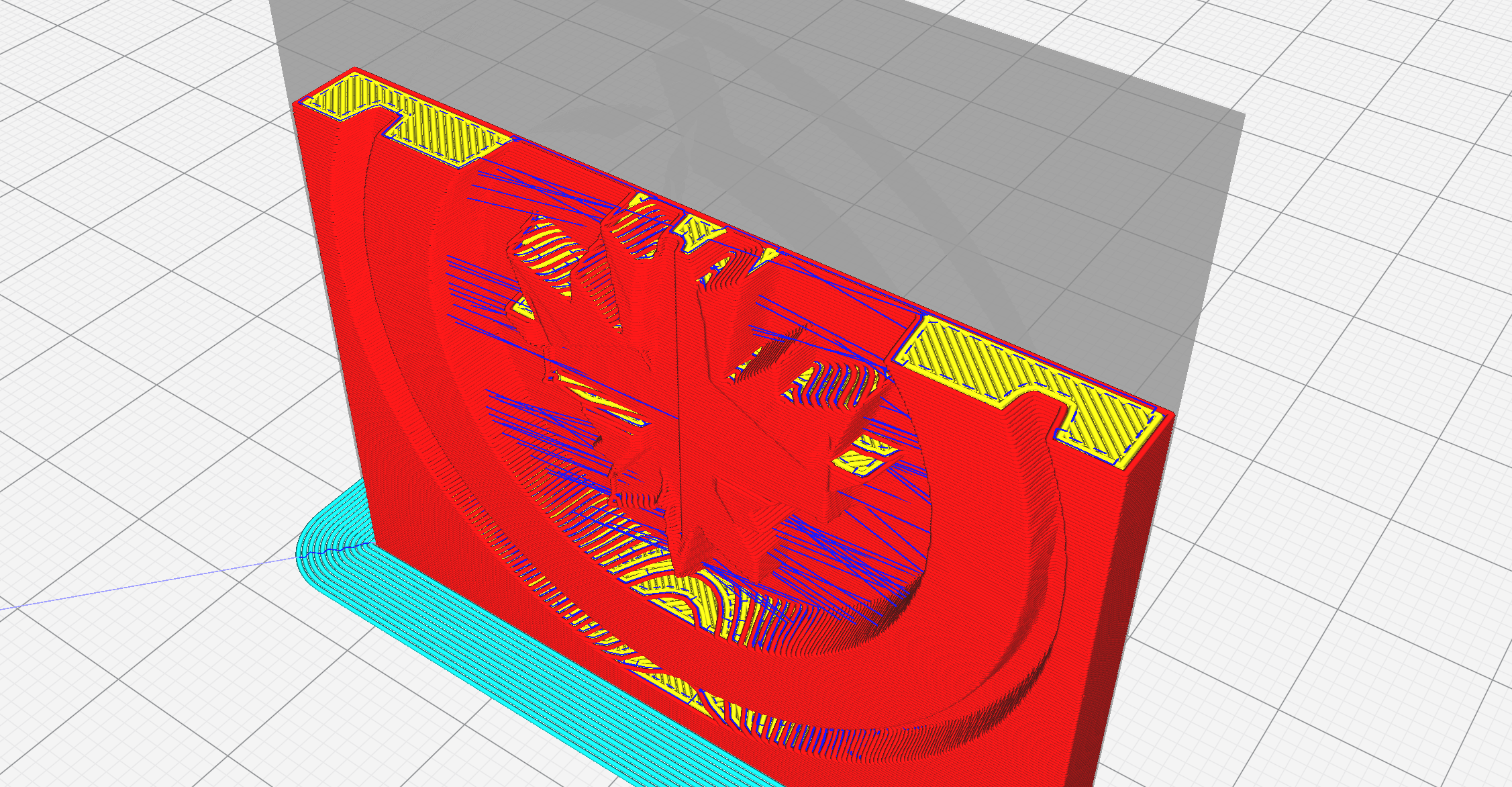
Travels without retraction are occurring over the part causing stringing since Cura treats every layer like top/bottom layer.
Expected results
Combing with "Not in Skin" set needs to be able to identify that a layer isn't actually top/bottom even though Cura treats it like that.
Additional Information
Here's a screenshot that shows the issue.
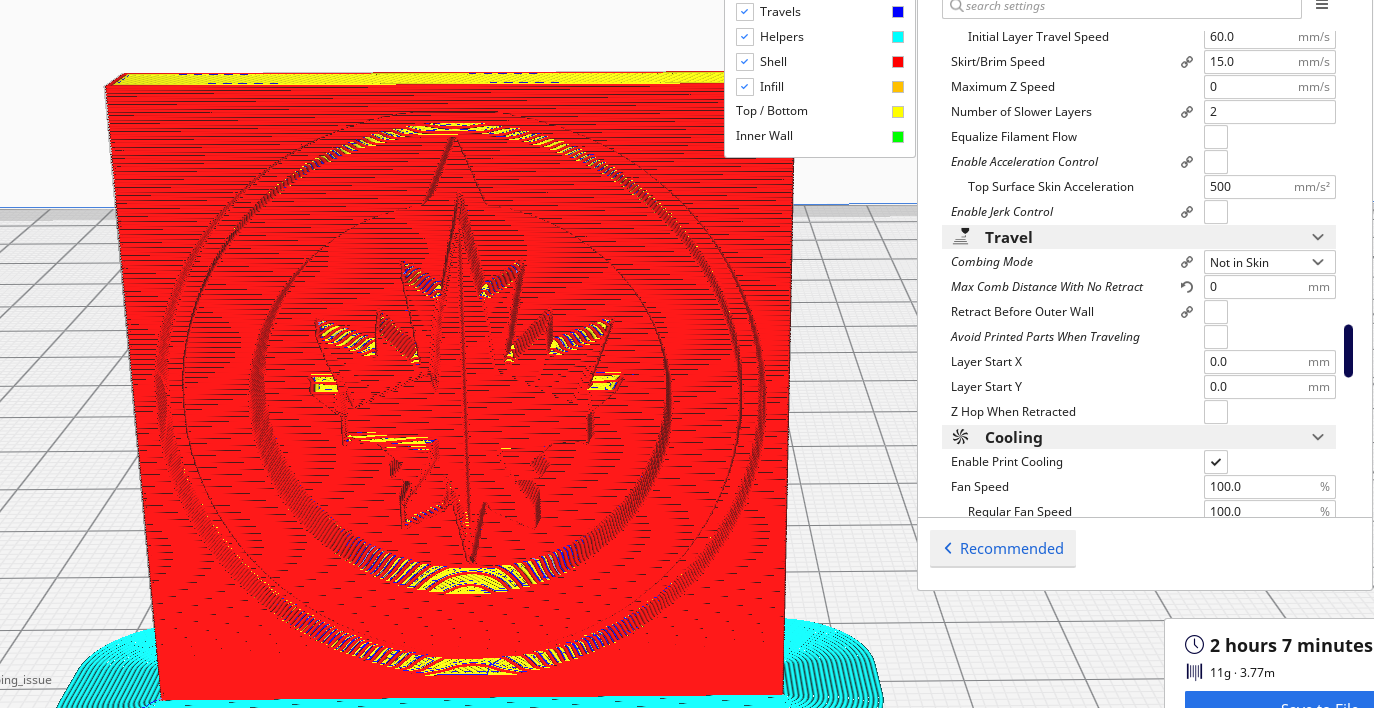
Interestingly, 99% seems to fix it for the most part, but there's still a couple unaccounted for travels that seem they should retract:

My initial recommendation was going to be to fix the fact that middle layers are showing as top/bottom as that just seems wrong to me, but I saw that was raised as a bug before and closed as not fix #2670
 ethanspitz
All 18 comments
Hi @ethanspitz , I agree that those travels across the gaps look weird and I will investigate why they are not being routed over the walls/skin.
BTW - if you set the Max Comb Distance With No Retract setting to some non-zero value (I typically use 10 or 20) then those travels will use retraction and you should not get any stringing.
 smartavionics
on 5 Jan 2019
smartavionics
on 5 Jan 2019
Great tip!! I'll give that a shot, I read about that feature yesterday, but didn't try messing with it yet.
ethanspitz
on 6 Jan 2019
I'm now having problems reproducing this issue, can you please save the project file (which includes both the model and the settings) and zip that and attach it to this issue. Thanks.
smartavionics
on 6 Jan 2019
Is that not the file I have attached in the original issue?
ethanspitz
on 6 Jan 2019
No, that only contained the model and not the settings. Do File->Save (not export). I need to go out now will look at it later. Cheers!
smartavionics
on 6 Jan 2019
Ahhh my bad. Here it is. It's not exactly the settings I had when I filed this as I actually manged to corrupt my entire settings files (ran out of disk space while it was trying to save a profile...), but I managed to reproduce it identically.
5116_Combing_issue.curaproject.3mf.zip
ethanspitz
on 6 Jan 2019
Update - I think I know where the bug is in the combing code but now I need to work out a fix!
smartavionics
on 7 Jan 2019
Hi @ethanspitz , just letting you know that I have fixed the combing problem and now it can slice your project with combing set to no-skin and 100% infill with zero wacky travels. I will be submitting my changes to the Cura team so, hopefully, some time in the future they will be in a Cura release. Thanks for the bug report and help. PS - your model is actually a very good test case for this issue!
smartavionics
on 8 Jan 2019
PPS - the issue wasn't specific to the no-skin combing, that just made it more likely to happen.
smartavionics
on 8 Jan 2019
Awesome! Good work! What was the bug/where is your pull request out of curiosity?
ethanspitz
on 8 Jan 2019
Thanks. So the bug was really a flaw in the original combing implementation. The bit of code that works out whether the line from A to B crosses the boundary of the combing region was too simplistic and so although it worked OK for simple combing regions, when faced with regions that were more wiggly or that contained holes it could screw up and allow the travel path to cross directly regions that it should have followed the combing boundary.
I am not going to submit a PR until it has been tested further but I will be incorporating it into my Cura releases very soon so it will be available for people to try. You can find the current fix in the mb-fix-line-polygon-crossings branch in my CuraEngine github repo.
smartavionics
on 8 Jan 2019
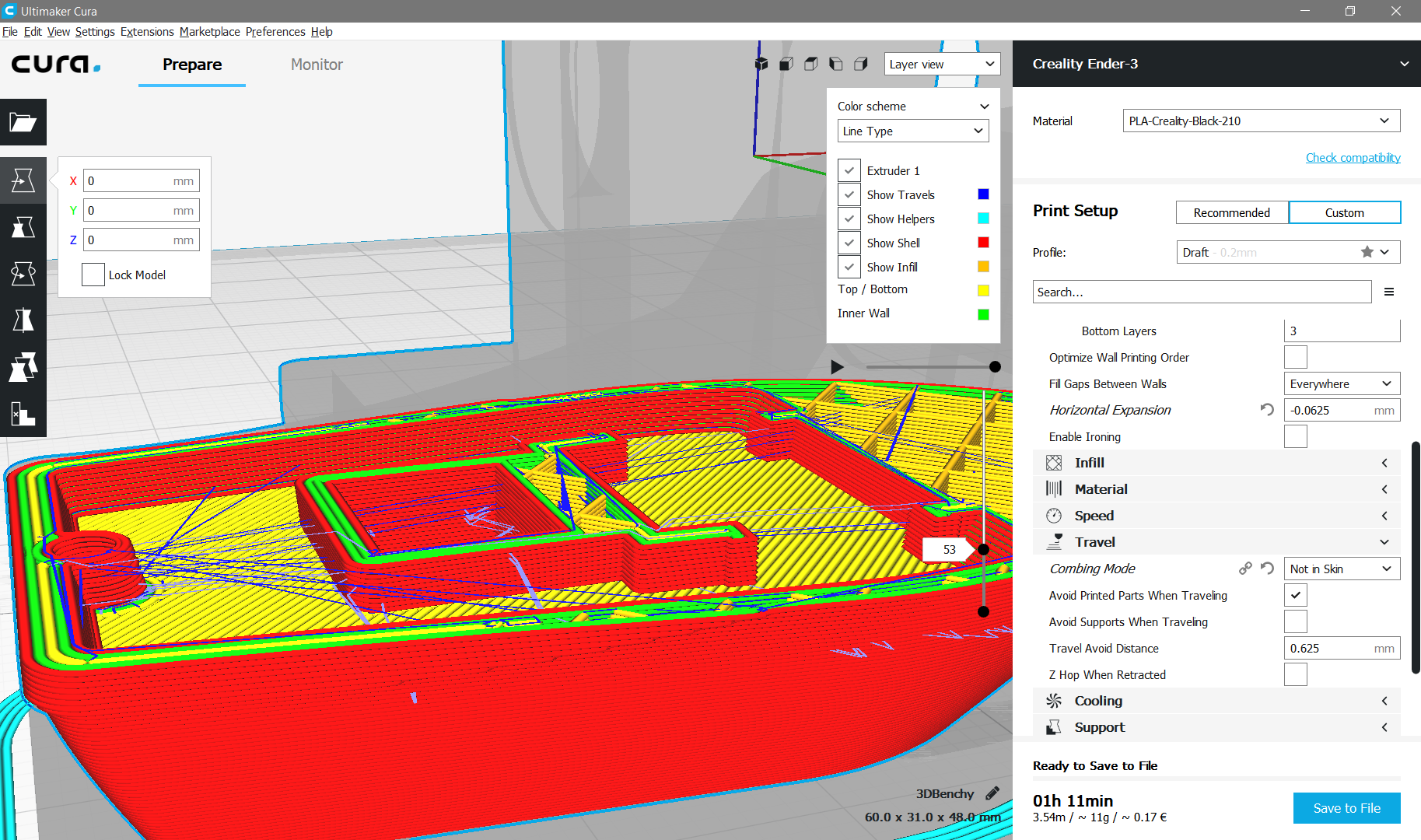
Found another way to reproduce:
- Load standard profile, e.g. Draft for Ender 3
- Set horizontal expansion to -0,625 mm
- Set combing mode to "not in skin"
- Load 3Dbenchy
- Slice
- Zoom in on layers 44 to 53
- Observe unretracted travel lines.
Picture and project file added for reference.
3DBenchy.zip
 holgerpieta
on 12 Feb 2019
holgerpieta
on 12 Feb 2019
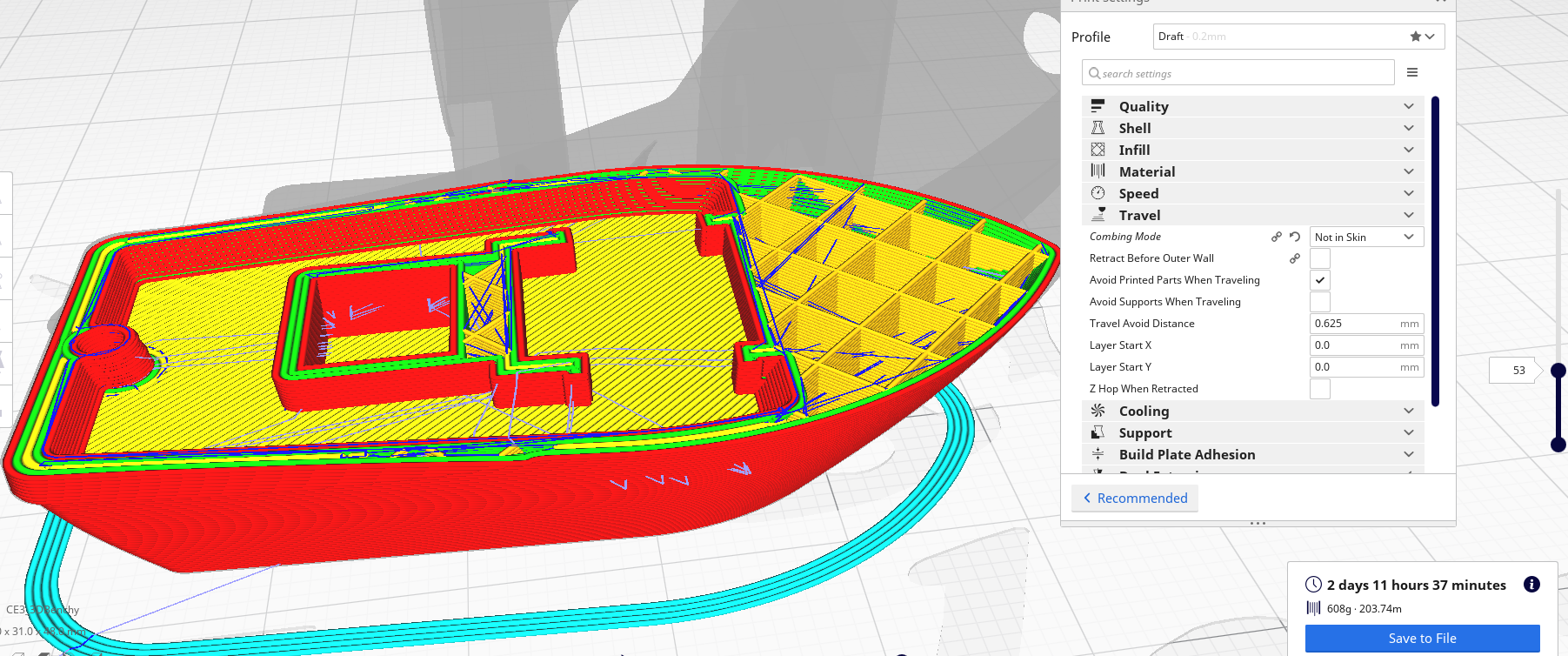
Hello @theWaldschrat , I loaded your project into my Cura and sliced and the fix I have submitted (https://github.com/Ultimaker/CuraEngine/pull/973) has fixed the un-retracted travels. Mind you, the estimated print time and filament usage looks a bit off (that is due to something else completely unrelated to the current issue).
smartavionics
on 12 Feb 2019
Good to hear and thanks for your effort. I'll put some pressure on the PR, for what it's worth.
holgerpieta
on 13 Feb 2019
@smartavionics ,does your latest master release has this feature?
 eskeyaar
on 19 Sep 2019
eskeyaar
on 19 Sep 2019
Yes. Why, are you having a problem with it?
smartavionics
on 19 Sep 2019
No just checking. Also, had issue when ironing feature is enabled. i get few travel lines over it.

Thanks
BTW, Good work on this bug fix.
eskeyaar
on 19 Sep 2019
OK. Looking at that image, the travel lines do seem to be avoiding the printed model, don't they?
smartavionics
on 20 Sep 2019
Related issues
 ferociousdiablo
·
3Comments
ferociousdiablo
·
3Comments
 dstulken
·
3Comments
dstulken
·
3Comments
 DamianSepczuk
·
3Comments
DamianSepczuk
·
3Comments
 muhammadelmogy
·
3Comments
muhammadelmogy
·
3Comments
 timherrm
·
3Comments
timherrm
·
3Comments