Cura: Make elephant foot compensation easier to find and enabled by default

Application Version
3.6
Platform
Linux, probably any
Printer
Ender-3, probably any
Steps to Reproduce
Search for "Elephant"

Actual Results
Nothing shows up
Expected results
An entry field shows up to enter the desired amount of elephant foot compensation
Additional Information
https://ultimaker.com/en/blog/50847-introducing-cura-27 talks about "horizontal expansion on initial layer" but it would be good if searching for "elephant" would find this

 probonopd
All 16 comments
Note to self: This works for me (0.6 mm nozzle):

probonopd
on 29 Dec 2018
It's just that you are using a world invented by yourself.
The correct term is "linear advance", and it's done by enabling it in the firmware and/or Cura marketplace.
 Liger0
on 30 Dec 2018
Liger0
on 30 Dec 2018
Elephant foot compensation is about the first layer being to large in the x-y direction. It is not to be confused with Linear Advance, which is about the corners.
probonopd
on 30 Dec 2018
Elephant foot compensation is about the first layer being to large in the x-y direction. It is not to be confused with Linear Advance, which is about the corners.
I think you can play with the line width and line height for the first layer to adjust it.
Liger0
on 30 Dec 2018
This is why we added the settings guide plugin. That greatly increases the amount of information about certain settings.
 nallath
on 31 Dec 2018
nallath
on 31 Dec 2018
Just my 2 cents:
I also always enable this feature since it makes my printed object more accurate. The used compensation value is however different for each material and nozzle combination, so this should be activated in the material print profiles.
The other request is about the setting being easier to find. How about adding a feature where the search function also searches the help texts?
 ckielstra
on 10 Jan 2019
ckielstra
on 10 Jan 2019
As for it being always active, that's up to our materials & processing engineers to actually do.
Making the setting search field also look through the descriptions might be a good one, but it might need a bit more work (eg; If you're searching for elephants foot and you would suddenly see the horizontal expansion pop up, would you know / realise why it's suddenly there?)
nallath
on 11 Jan 2019
How about adding a feature where the search function also searches the help texts?
I think this is a _great_ idea. I would always type "elephant" because I have already forgotten what the Cura name for this feature is...
probonopd
on 11 Jan 2019
Bump. Had no idea this was a thing in Cura before stumbling on this thread. Elephant foot is a prevalent issue when 3D printing, and it would nice to surface the valuable ability address it in a more intuitive manner. Burying this behind buried tooltips subverts the potential user value here. Maybe
Initial Layer Horiz. Expansion (Elephant Foot)
For comparison, here is how it is handled in PrusaSlicer:

 intelinc
on 16 Jan 2020
intelinc
on 16 Jan 2020
There are many ways to deal with elephant foot though, and initial layer horizontal expansion is not usually the best of them. My first approach would be to look at the strength of the walls above the first layers (since quite often the strongest effect is that the skin doesn't shrink but the walls around the infill do). And then I tend to look at the build plate temperature and cooling. And only after that will I look at compensation methods like initial layer horizontal expansion. I think labelling this as "this will fix elephant foot" is misleading.
In the next version of the SettingsGuide I'm including an article to fix this. I just made some nice pictures of elephant's foot to include.
 Ghostkeeper
on 17 Jan 2020
Ghostkeeper
on 17 Jan 2020
Maybe it's an idea to include the setting descriptions in the search filter?
Ghostkeeper
on 17 Jan 2020
@Ghostkeeper yes, pretty much so. (I search for "Elephant" in Cura every time...)
probonopd
on 18 Jan 2020
We discussed this morning and think it's a good suggestion. It's on the backlog to be implemented in a future release.
 mahtDFR
on 20 Jan 2020
mahtDFR
on 20 Jan 2020
Looking at this video, it seems like version 4.7 is my lucky version :-)
Especially I like how the video explains the feature with the __elephant foot__ example :+1:
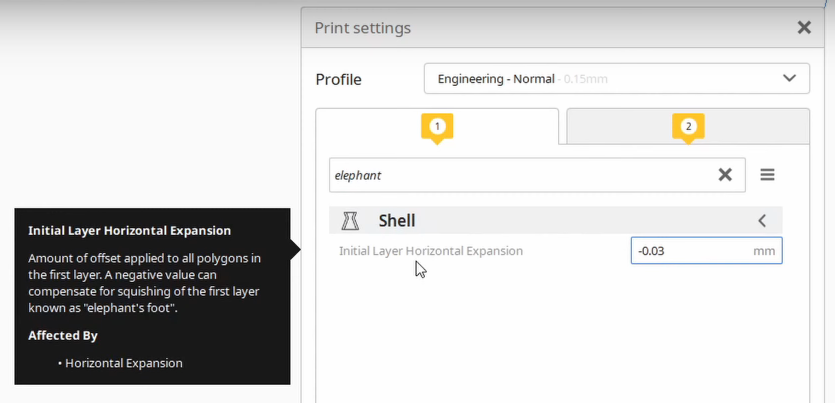
Thank you very much Ultimaker Team!
probonopd
on 25 Aug 2020
It only took us 1.5 year to implement it ;)
nallath
on 26 Aug 2020
It's really effective when combined with the option in the Settings Guide to show the articles in the setting tooltips (which makes it replace the setting descriptions and thus changes what the search function searches through).
Ghostkeeper
on 28 Aug 2020
Related issues
 DamianSepczuk
·
3Comments
DamianSepczuk
·
3Comments
 mubarak111nsu
·
3Comments
probonopd
·
3Comments
mubarak111nsu
·
3Comments
probonopd
·
3Comments
 mnswamp1
·
3Comments
mnswamp1
·
3Comments
 StanislavJochman
·
3Comments
StanislavJochman
·
3Comments
Most helpful comment
Bump. Had no idea this was a thing in Cura before stumbling on this thread. Elephant foot is a prevalent issue when 3D printing, and it would nice to surface the valuable ability address it in a more intuitive manner. Burying this behind buried tooltips subverts the potential user value here. Maybe
Initial Layer Horiz. Expansion (Elephant Foot)For comparison, here is how it is handled in PrusaSlicer:
