Cura: [3.6.0] Concentric Top/Bottom pattern does not print from outside to center of print
Application Version
3.6.0
Platform
Windows 7
Printer
Mingda MD-6L
Saved files here: test_cylinder.zip
Steps to Reproduce
1) Import cylinder model: https://www.thingiverse.com/thing:824730 (attached in above zip file)
2) Scale part by 5x (500%)
3) Set profile to Draft - 0.2mm
4) Wall thickness set to 1.2 mm, top/bottom pattern set to concentric, 10% infill.
5) Click prepare.
Actual Results
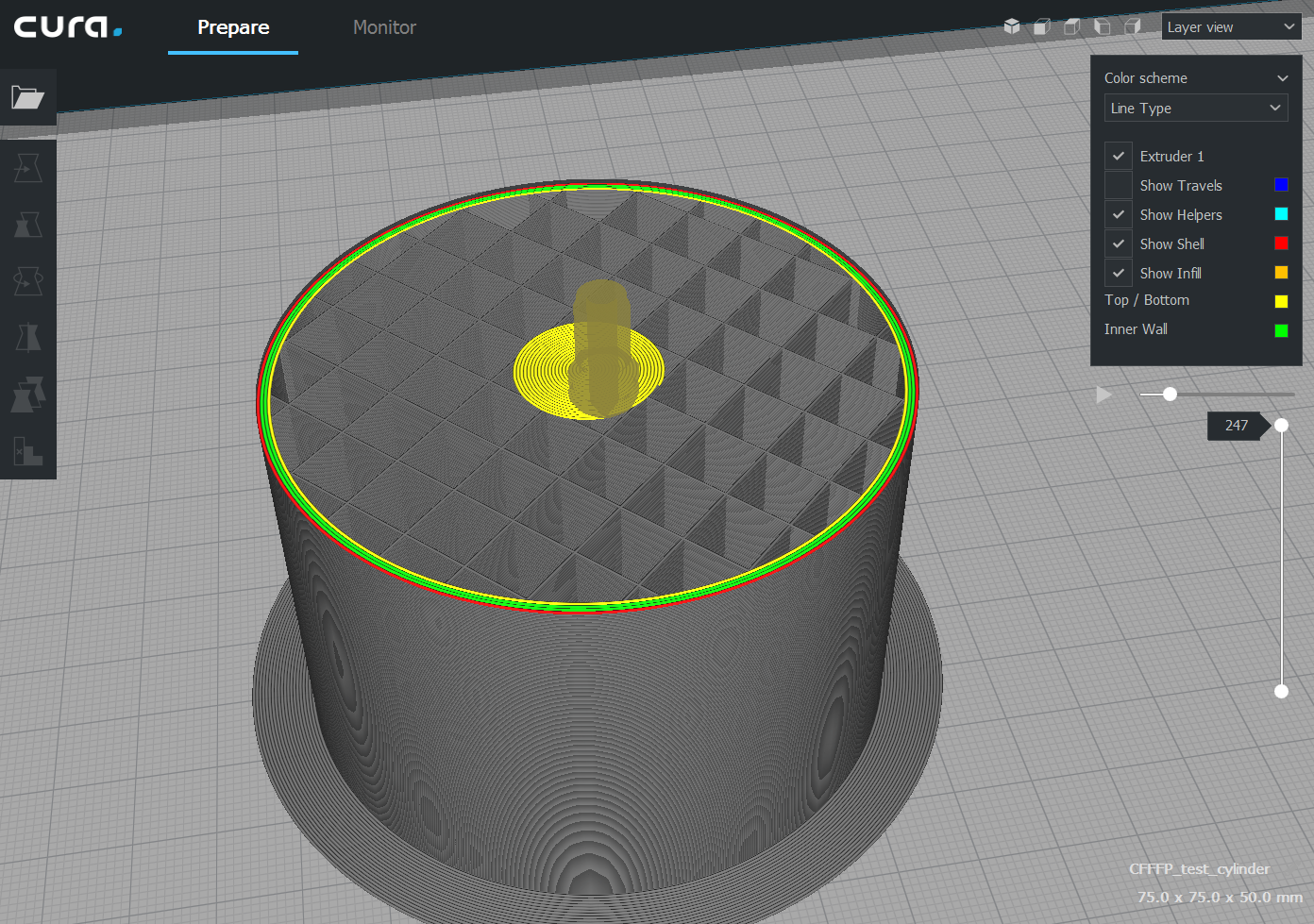
Select Layer view and set layer to the first top layer (layer 247 for me) laid on top of the infill and watch how the layer is printed. The layer prints the walls first, then the nozzle travels to the centre of the part and starts printing the top concentric (spiral) starting from the center and outwards towards the wall.
Expected results
Per the help website: https://ultimaker.com/en/resources/52343-shell, under section Top/bottom pattern:
_Concentric: The pattern is printed from the outside to the center of the print._
I expected the opposite of what was generated.
Additional Information
 stefann82
All 21 comments
Probably this that did it ...
https://github.com/Ultimaker/CuraEngine/commit/c86501427571f2d2879be7aa994e9b38615bd391
 smartavionics
on 20 Dec 2018
smartavionics
on 20 Dec 2018
I have tried this in the following versions:
3.2.1, 3.3.1, 3.4.1, 3.5.1, 3.6 and 4.0 beta
Only in 3.2.1 does the concentric pattern correctly go from the outside of the print to the centre. In all other versions listed, the print goes from centre to outside as the stefann82 said.
 r0zzy5
on 10 Jan 2019
r0zzy5
on 10 Jan 2019
That's not surprising given when the change I cited above was done...
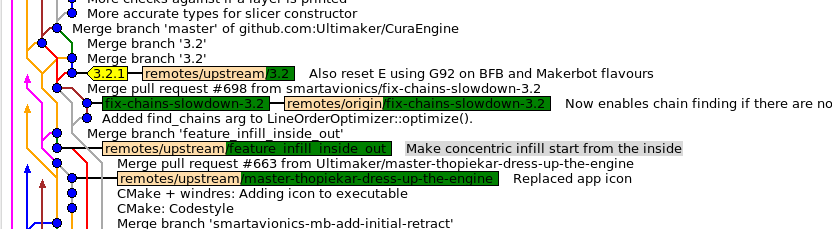
That change was merged just after 3.2.1 was tagged.
smartavionics
on 10 Jan 2019
I thought I was going insane! Thanks for the report that it works properly in 3.2.1 will try that.
 othbert
on 5 Feb 2019
othbert
on 5 Feb 2019
Is there any update on this issue? Could it be a check box to change it from outside-in to inside-out instead of being forced to do it in inside-out direction?
I would think you would get better adhesion by going outside-in.
 Kevin138
on 6 Jul 2019
Kevin138
on 6 Jul 2019
When going from outside to inside the blobbiness tends to ruin your adhesion. We've only seen positives from going from inside to outside so far.
If there is to be made a setting that configures the order in which concentric skin lines are printed, then there would need to be:
- A reason for the setting to be Inside-to-Outside in some cases and a reason for the setting to be Outside-to-Inside in other cases, depending on the model or the printer.
- Some non-zero chance that the average user is going to find this setting, understand what it does and change it.
I'm not seeing either of those, for this feature.
 Ghostkeeper
on 8 Jul 2019
Ghostkeeper
on 8 Jul 2019
The negative situation arose for me with a tall twisting tower structure that was hollow inside and had a platform at the top.
Using supports was not viable as there was no clear path to the buildplate, so support would have had to be laid inside the hollow structure in order to provide a base for the platform. It would have contacted (or simply not been created) with the inner walls of the tower, in a location impossible to reach to remove it. The tower top platform printed with zig zag in the end, but as this was global, it affected the rest of the print.
In order to get this to work exactly as desired I had to cut the model into two separate prints (printed at the same time with per model settings) then attach them together.
othbert
on 8 Jul 2019
In such a case I'd have used tree supports, probably :sunglasses:
Ghostkeeper
on 8 Jul 2019
Tree supports would have reached from the buildplate to the platform, but would still have the consequence of being unable to access the platform base in order to remove the support properly and clean it up :)
othbert
on 8 Jul 2019
FYI the documentation is still wrong ;-)
 mistic100
on 31 Aug 2019
mistic100
on 31 Aug 2019
For my use cases the inside-to-outside default for concentric patterns is almost always the wrong choice and it's very frustrating that this can not be overridden.
PLEASE make the concentric direction a user selectable option. It's the ONE bugbear that has prompted me to look at alternative slicers.
 voxelbec
on 11 Mar 2020
voxelbec
on 11 Mar 2020
When filling in a space that would work fine using lines, concentric starts in the middle, making a pile of spaghetti. Yes, one could put in supports, but why waste the plastic when the software could just as well detect that there's nothing beneath it for several layers and flip to outside-in behavior in that circumstance automatically?
 darkpoetry
on 13 Aug 2020
darkpoetry
on 13 Aug 2020
That would make sense for when the skin is printed in mid-air. What's more, it would be even better if it were to try and print the lines more straightly in that case, because printing curves in mid-air is asking for trouble. Maybe it should switch to a lines pattern? Lines would reduce the distance that needs to be _bridged_.
Ghostkeeper
on 17 Aug 2020
Agreed. I haven't tried any experiments on bridging concentric from an outer edge inward but I imagine lines will work fine in all such cases.
darkpoetry
on 17 Aug 2020
So then your solution is to Enable Bridge Settings and perhaps adjust the threshold for when it starts bridging, with Bridge Skin Support Threshold?
Ghostkeeper
on 19 Aug 2020
I don't know if that would work. I think switching to lines is the most elegant solution to this issue.
darkpoetry
on 19 Aug 2020
Right, that's one of the things that the bridging routine does.
Ghostkeeper
on 24 Aug 2020
Hi Everyone,
I would also very much like to have the ability to print inside outward.
I use a 2mm nozzle with a large volume Delta Printer and only print using a single outer wall.
Having the ability to choose inside out concentric pattern direction would allow the entire print to circulate from the inside of the shape to the final layer providing an very smooth finish and removing the need for any retraction.
 matthewatkins1
on 10 Oct 2020
matthewatkins1
on 10 Oct 2020
Cura will only print concentric patterns from inside outward, currently.
Ghostkeeper
on 12 Oct 2020
Cura will only print concentric patterns from inside outward, currently.
Thats true, but this is a feature request not a support request, ideally, this option would be added.
matthewatkins1
on 14 Oct 2020
You requested the pattern to print from inside outward, and it does. There is no way to make it NOT do what you request. That's indeed what this ticket is about.
Ghostkeeper
on 16 Oct 2020
Related issues
 ferociousdiablo
·
3Comments
ferociousdiablo
·
3Comments
 dstulken
·
3Comments
dstulken
·
3Comments
 JRRN
·
3Comments
JRRN
·
3Comments
 timherrm
·
3Comments
timherrm
·
3Comments
 rudowinger
·
3Comments
rudowinger
·
3Comments
Most helpful comment
For my use cases the inside-to-outside default for concentric patterns is almost always the wrong choice and it's very frustrating that this can not be overridden.
PLEASE make the concentric direction a user selectable option. It's the ONE bugbear that has prompted me to look at alternative slicers.