Cura: Project file doesn't respect positioning
Application Version
3.5.1
Platform
Linux Mint
Printer
UM3
Steps to Reproduce
Install Mesh tools from Aldo
Load hex_tiles.stl.zip
scale to 10%
Split into parts
( Try disabling all preferences related to scaling and positioning )
save project
clear build plate
load project
Actual Results
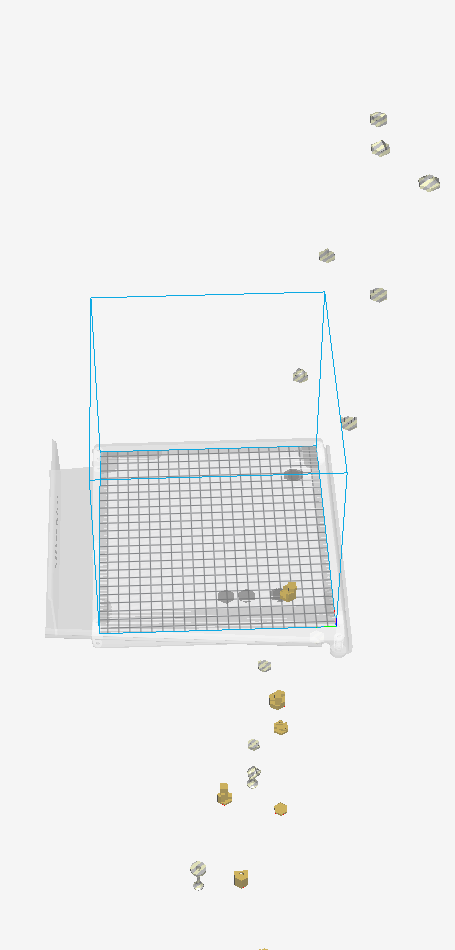
Objects are all over the place
Expected results
Objects retain their positioning
Additional Information
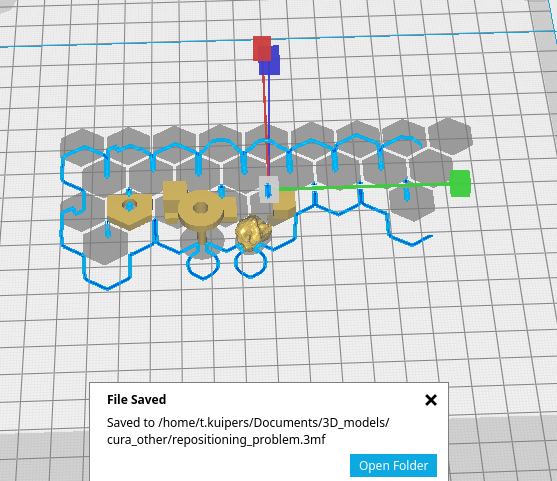
Before save:
After load:
 BagelOrb
All 15 comments
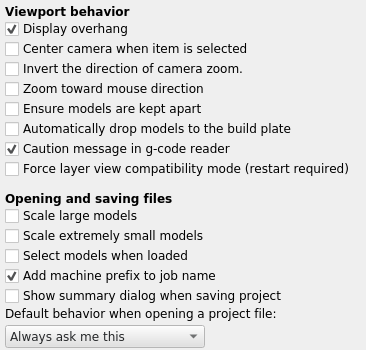
Here's my preferences:
BagelOrb
on 9 Nov 2018
It's really weird, but I can confirm it. I also attach another small STL that consist in 4 small parts and something similar happens.
objects.stl.zip
 diegopradogesto
on 11 Nov 2018
diegopradogesto
on 11 Nov 2018
Do you have any ideas about this, @fieldOfView ? We saw that it only happens after using the 'Split object into parts'
diegopradogesto
on 15 Feb 2019
I am not sure, but it could be that all of the created meshes have the same origin; the origin of the original non-split mesh. If the mesh origin is somehow included in the convex hull of the now individual meshes when loading the 3mf file, and this is used to push the models apart even though the preferences say not to do that, then this spreading apart would be an expected outcome. I remember issues about both these phenomena, but don't remember the outcome.
An interesting way to test this hypothesis is to select all subparts after loading them back in and merge them. They should snap back to their correct relative position. If this confirms the hypothesis, then Cura is doing two things wrong: (1) it makes the origin of a mesh in a 3mf part of the convex hull and (2) it rearranges models after loading even if the push apart option is turned off.
 fieldOfView
on 19 Feb 2019
fieldOfView
on 19 Feb 2019
OK, we will investigate. Thanks for the tips.
Devs. CURA-5931
diegopradogesto
on 19 Feb 2019
For the record, these are the related issues I was thinking about:
https://github.com/Ultimaker/Cura/issues/2132 / https://github.com/Ultimaker/Cura/issues/3847 and https://github.com/Ultimaker/Cura/issues/3201
fieldOfView
on 19 Feb 2019
I can confirm that after merging the model, they snap back to the original position.
diegopradogesto
on 26 Apr 2019
@diegopradogesto @fieldOfView I made a PR to fix this issue: https://github.com/fieldOfView/Cura-MeshTools/pull/8
 LipuFei
on 29 Aug 2019
LipuFei
on 29 Aug 2019
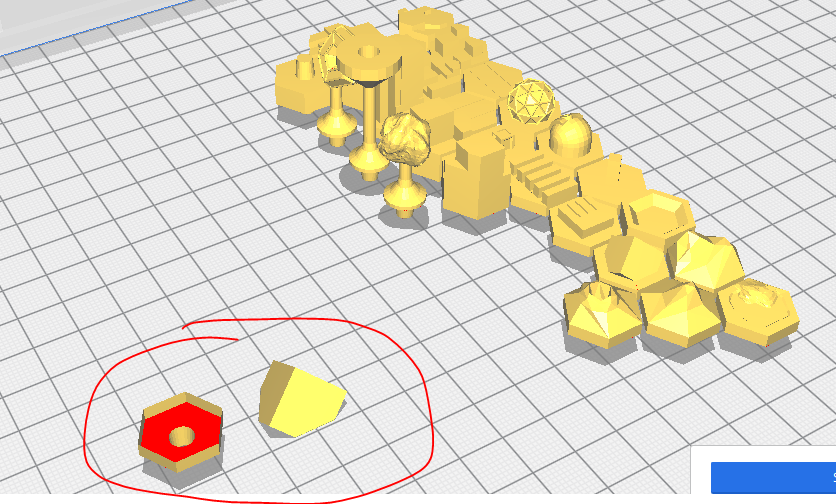
I also found that one part in the hex tiles model seems to get split too much.
LipuFei
on 30 Aug 2019
That's just because I modelled it badly. Not water-tight.
BagelOrb
on 30 Aug 2019
We were taking a look at this issue and after some trials and errors, we've decided to defer this for now at least.
diegopradogesto
on 5 Sep 2019
From my point of view this has nothing to do with the split into parts plugin.
If I save a build plate I expect it to be loaded the same as I saved it, but somehow there is some discrepancy and the model doesn't get loaded the same way it is saved - or not all data used to determine the positions of objects is saved to the project file.
BagelOrb
on 5 Sep 2019
Not a fix, but a workaround: close file, open Cura preferences and uncheck 'automatically drop models to build plate'. Then reopen the project file.
Unfortunately after some investigation we can't spend more time fixing this.
 mahtDFR
on 22 Jan 2020
mahtDFR
on 22 Jan 2020
Wait a minute. If it is still an issue and it clearly is a bug, then shouldn't it be deferred, rather than Wont fix?
BagelOrb
on 22 Jan 2020
Ok, I will switch it back to deferred. It's unlikely we will be able to devote time to fixing it.
mahtDFR
on 23 Jan 2020
Related issues
 Liger0
·
3Comments
Liger0
·
3Comments
 rudowinger
·
3Comments
rudowinger
·
3Comments
 StanislavJochman
·
3Comments
StanislavJochman
·
3Comments
 ferociousdiablo
·
3Comments
ferociousdiablo
·
3Comments
 mubarak111nsu
·
3Comments
mubarak111nsu
·
3Comments