Cura: 3.5 massive underextrussion with 0.8mm nozzle
Application Version
3.5.0
Platform
Windows 64bit
Printer
CFFFP_xyzCalibration_cube.zip
Steps to Reproduce
When using a 0.8 nozzle size and 0.8 line width with 1.75mm filament I get a massiv underextrussion. While the layer view looks like slized with 0.8 line width the extrusion seems to be stuck on the same amount that a 0.4 nozzle would need. Using 200% flow rate seems to workaround the problem
cura.log
Actual Results
massive underextrusion. Lines in the top layer do not connect and have 0.4mm width
Expected results
"normal" extrusion
 TheNitek
All 30 comments
Hi, that file only contains the model. Please save the project into a .3mf file and zip and attach that so I can see all the settings in use. Thanks.
 smartavionics
on 15 Oct 2018
smartavionics
on 15 Oct 2018
Sorry, that's not something I do every day. I hope it's correct now
CFFFP_3DBenchy.zip
(I also noticed it exported 8 extruders now, though I have just created this profile and only selected 1 extruder in the printer settings ...)
TheNitek
on 15 Oct 2018
I know that the printer setting dialog shows the material diameter to be 1.75 for that extruder but it's actually using 2.85. Using @fieldOfView's Printer Setting plugin you can see that there is a setting called Diameter that is set to 2.85 and that is what it is using.
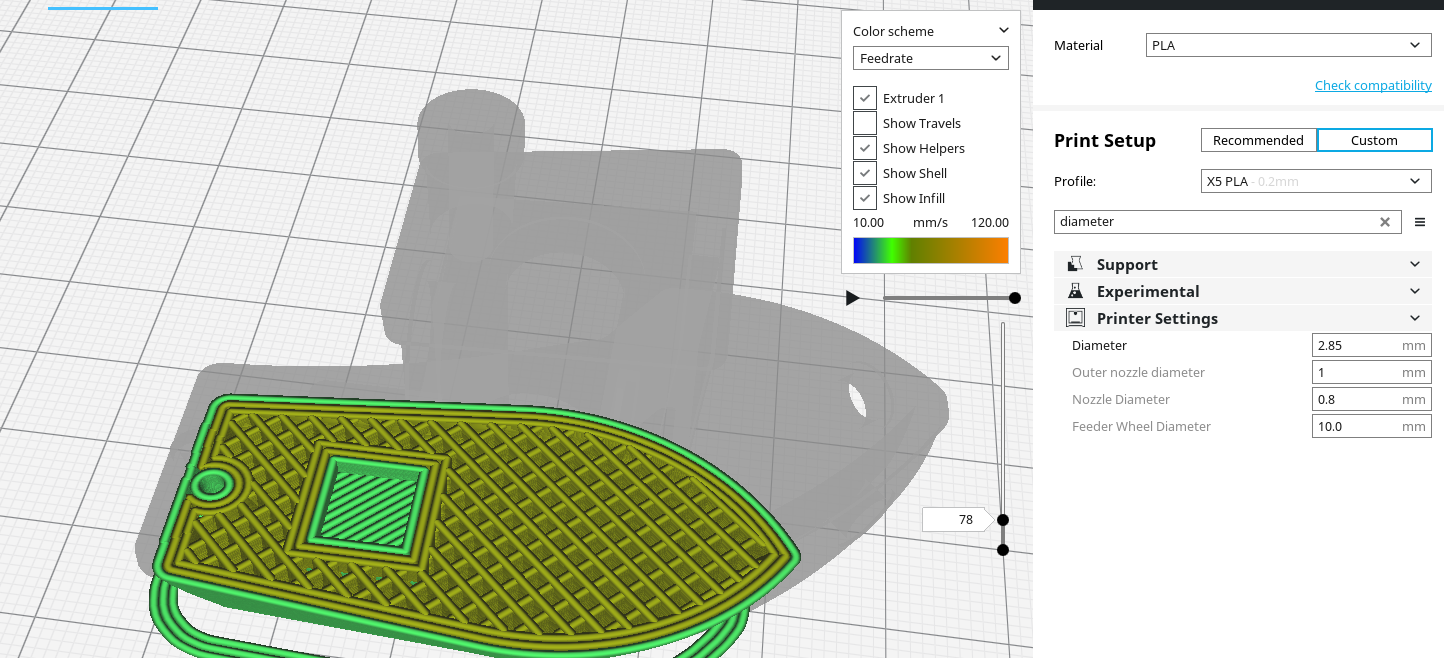
There have been several reports recently of the filament diameter ending up as 2.85 when it shouldn't so I guess there is some regression here. Sorry I don't know more than that.
smartavionics
on 15 Oct 2018
The giveaway here is that your slice info shows 1.91m and 15g. Well, 15g of PLA is approx 5m at 1.75 dia and when you divide 5 by the square of 2.85/1.75 you get 1.88 which is close enough so you can see that it was sliced using 2.85m as the filament dia.
smartavionics
on 15 Oct 2018
Well at least this seems easy to work around then.
I noticed that the extruder tab in the printer settings shows 2.85 for a very short time and switches to 1.75 after a very short time. Maybe that's a hint.
Regression of #3980 ?
TheNitek
on 15 Oct 2018
I noticed that the extruder tab in the printer settings shows 2.85 for a very short time and switches to 1.75 after a very short time. Maybe that's a hint.
Ah, I thought I had imagined seeing that, it changed so quick.
I expect a Cura developer who understands the settings stuff will pick up this issue. Maybe it's already been solved, I don't know.
smartavionics
on 15 Oct 2018
I'm not a 100% sure, but I think we've already fixed this for 3.5.1
 nallath
on 16 Oct 2018
nallath
on 16 Oct 2018
As of right now, the master branch still fails here. Compare the filament diameters shown in the extruder tab and settings pane.
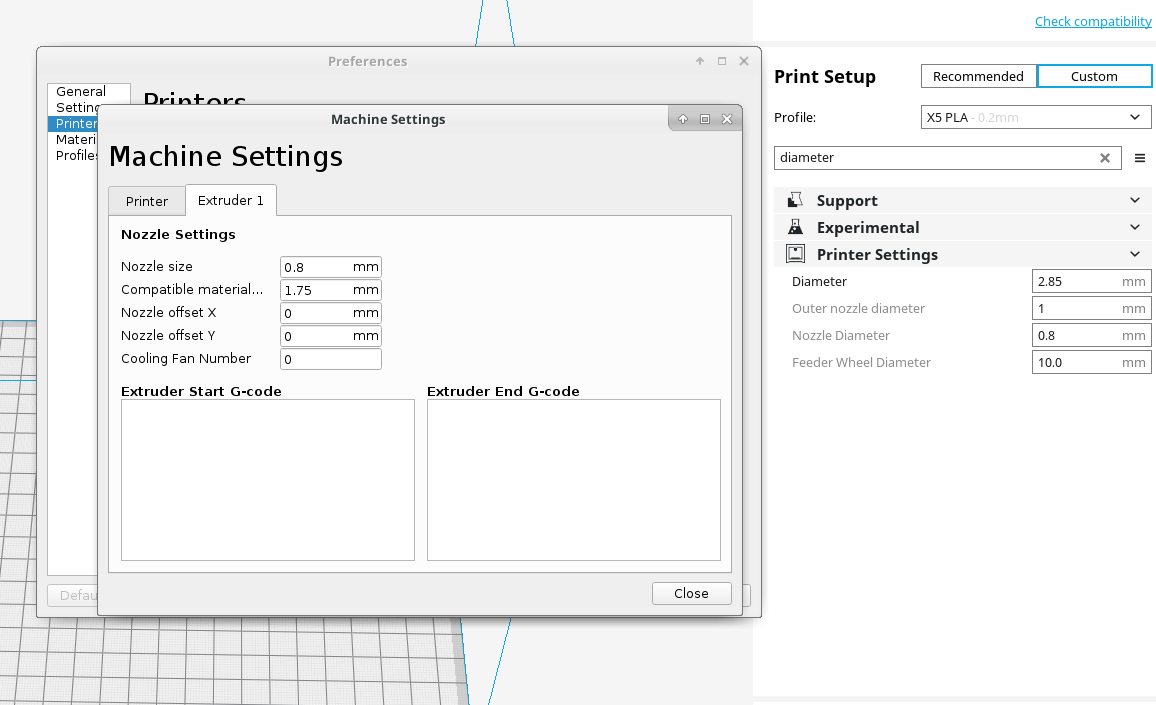
smartavionics
on 16 Oct 2018
I've poked around a bit. At the very least i've found an issue with the material dropdown not updating correctly.
nallath
on 16 Oct 2018
I think the whole material container is not updating correctly to a variation of the same material with the updated "approximate diameter".
 fieldOfView
on 16 Oct 2018
fieldOfView
on 16 Oct 2018
The change that was made on master was to change the default compatible filament diameter for some printers. We didn't create an upgrade to change the currently active material for you to some material that matches the compatible filament diameter. You must change the material to something new from the material selection drop-down.
Also, no change was made for Custom FFF Printer.
 Ghostkeeper
on 16 Oct 2018
Ghostkeeper
on 16 Oct 2018
This probably is a duplicate of https://github.com/Ultimaker/Cura/issues/4512
 LipuFei
on 16 Oct 2018
LipuFei
on 16 Oct 2018
You must change the material to something new from the material selection drop-down.
And that requirement was in the release notes?
smartavionics
on 16 Oct 2018
And that requirement was in the release notes?
There are no release notes yet. And we don't usually put instructions or requirements in our release notes.
If you don't change anything in your stack, you will not notice any difference. We could select a new material for your printer automatically, but that also means that all your previous quality changes profiles are lost since these are dependent on your material selection.
Ghostkeeper
on 16 Oct 2018
Yes, but the OP is using 3.5 not 3.6.
smartavionics
on 16 Oct 2018
Devs. CURA-5834
 diegopradogesto
on 17 Oct 2018
diegopradogesto
on 17 Oct 2018
I am still confused - transferring in from 4580. Compared to 2.7, I got about 25% flow with 3.5.0 and about 75% with 3.5.1. Is 3.5.1 correct, implying that 2.7 was over flowed, or is there still a bug (or my error) to fix? Also, I don't understand the bit about changing the material to something new, I just keep it on PLA in the material drop-down and correct the filament and nozzle diameters in the machine settings. I cannot find settings for these anywhere else.
 JohnRichardReed
on 18 Oct 2018
JohnRichardReed
on 18 Oct 2018
Compared to 2.7, I got about 25% flow with 3.5.0 and about 75% with 3.5.1. Is 3.5.1 correct, implying that 2.7 was over flowed, or is there still a bug (or my error) to fix?
Hmm, I didn't know 2.7 was any different. Perhaps you could export a curaproject file to see which profiles were used there? Perhaps it's using a completely different profile.
Also, I don't understand the bit about changing the material to something new, I just keep it on PLA in the material drop-down and correct the filament and nozzle diameters in the machine settings. I cannot find settings for these anywhere else.
Yes, it's confusing. There are actually two PLA material profiles. Only one of them is visible at a time. Which of them is visible depends on the "compatible material diameter" machine setting. We adjusted that setting for several printers, but didn't make Cura automatically switch to the corresponding 1.75mm version upon upgrading to v3.6. So you'd need to re-select the PLA material from the drop-down to actually fix it (but then you're actually selecting the 1.75mm version).
Ghostkeeper
on 19 Oct 2018
Hi,
if you go to folder path
C:\Users\
you can see the profiles. The old working profile has this setting:
[values]
material_diameter = 1.75
that there is not in the new profile saved with 3.5.0/3.5.1
 Predator75
on 24 Oct 2018
Predator75
on 24 Oct 2018
So pleased I found this issue. I have been battling for days with under extrusion and have been coming to the conclusion the version of cura I am using is causing the issue. I am using 3.5.1 and have also seen the numbers change in the extruder settings page as well.
Was going to uninstall and install the last version I have used that worked. If it helps, I did not upgrade Cura but did a fresh install on a new laptop. That is when I started seeing this issue.
 ajb142
on 24 Oct 2018
ajb142
on 24 Oct 2018
I have Just unistall and delete all folders and files configuration of the version 3.5.1 and old, Reinstalled and Cura ask as first time installation. I create a custom printer with 1.75 but continue the underextrusion. Then I create a new material and I set 1.75 instead 2.84, a message box say that the material is not compatible with my printer
Predator75
on 24 Oct 2018
Yes I found the problem and manual fix,
I confirm the problem is the configuration file.
C:\Users\
we can manual fix adding (after save a custom profile)
[values]
material_diameter = 1.75
in old working version of Cura, in the setting under Material there was
Diameter (see image)
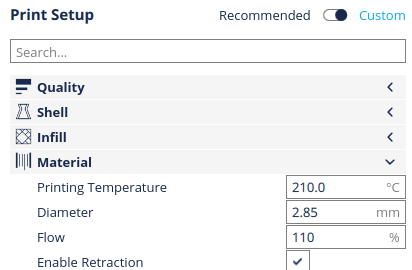
now in 3.5.1 is not visibile, then cura use always 2.85, but we can put mannualy in .cfg file afert save it.
Example if my custom profile is named "Cristian 0.1" in the folder
C:\Users\
we have same file
custom_cristian_0.1.inst.cfg
custom_extruder_1_%232_cristian_0.1.inst.cfg
custom_extruder_1_%232_cristian_0.2.inst.cfg
custom_extruder_1_%232_cristian_0.3.inst.cfg
custom_extruder_1_%232_cristian_0.4.inst.cfg
custom_extruder_1_%232_cristian_0.5.inst.cfg
custom_extruder_1_%232_cristian_0.6.inst.cfg
custom_extruder_1_%232_cristian_0.7.inst.cfg
custom_extruder_1_%232_cristian_0.8.inst.cfg
Open the first custom_extruder file named with 0.1, in my case
custom_extruder_1_%232_cristian_0.1.inst.cfg
and add
[values]
material_diameter = 1.75
I'm sure programmers know this, but can help users
bye
Predator75
on 24 Oct 2018
I just tried predator75's solution and it didnt work straight away.
I modified my cfg files, opened cura, sliced a model and no change to the estimated length of filament.
After a few tries I selected ABS (was originally on PLA) and the estimated length increased by 2.6 times what was before. Changed back to PLA and the estmated length stays the same (the correct, larger number)
I cant seem to re-produce the issue now I have changed materials, re-sliced and closed down cura. every time I open, it defaults to PLA with the correct estimate. Will try to test on my printer tonight.
ajb142
on 24 Oct 2018
I attach my test configuration file with manual fix, and a photo, before/after changing only this setting
(open Cura after edit the file)
Download:quality_changes.zip
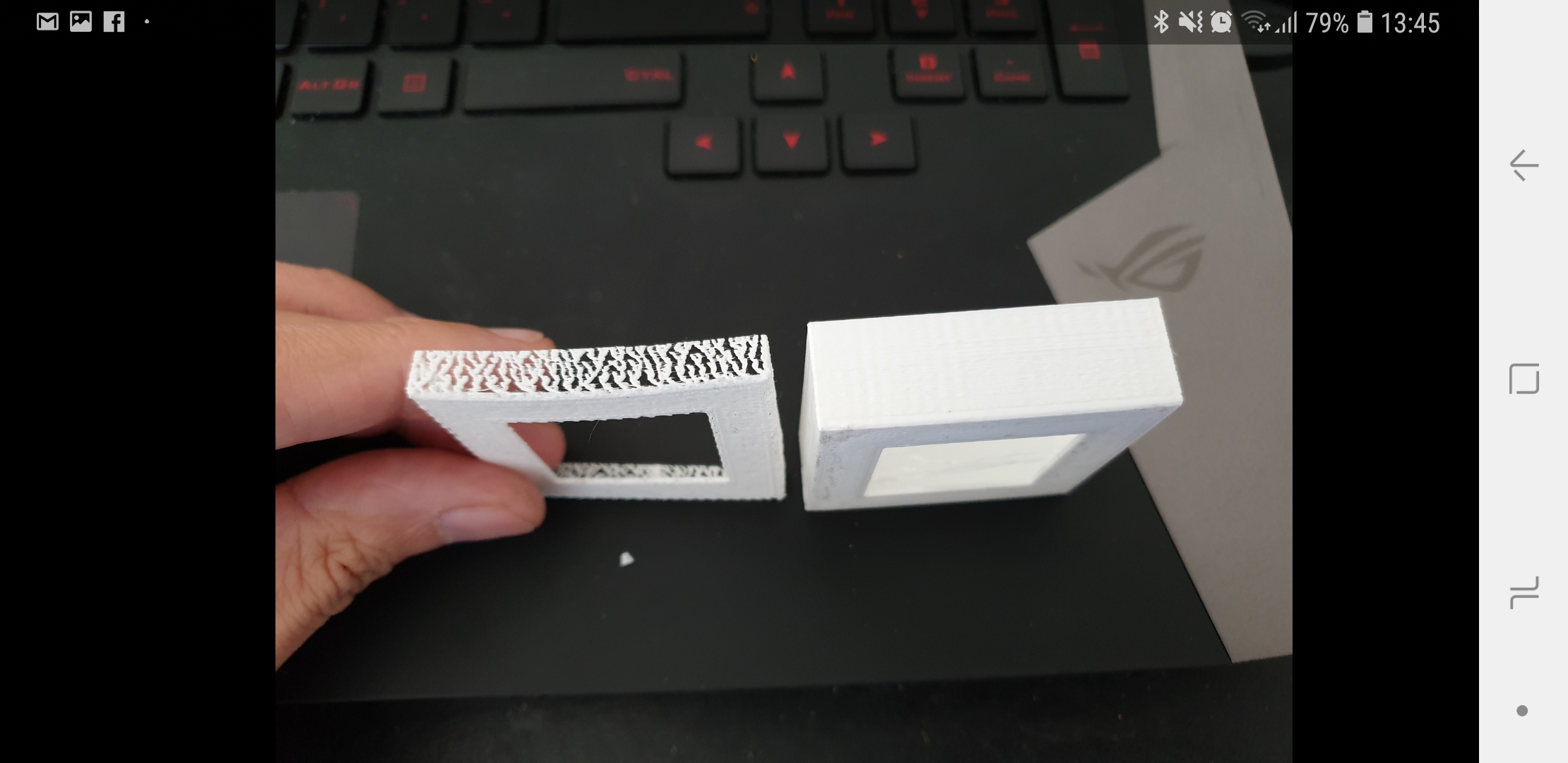
Predator75
on 24 Oct 2018
This issue is fixed now in our internal board and it should be working properly in the upcoming Cura 3.6.
diegopradogesto
on 24 Oct 2018
Since 3.6 is not out yet is their an official response on a workaround? I am experiencing most all the same issues here but with over extrusion. I have checked and my printer extruder diameter and material values are correct, slicing a 20mm xyz cube shows 1.43m/4g which I checked on a site calc and it seems a smidge high in comparison, but much closer than the .55m for 4g of 2.85 filament. I installed the printer settings extension, however is will not display in project saved without it created in 3.5 and shows 1.75 on fresh launch for diameter. My cube was showing telltale signs of over extrusion, mi print I manually dialed Flow rate to 50% and it took a few layers to overcome the over extrusion but it then started printing near my old quality prior to 3.5. Will 3.6 fix this? Only for new projects going forward or will handle old projects too?
Update: Re-Installed 3.4.1 and the cube is now showing 1.33m/4g which aligns with the computation from external site, I tried the workaround @Predator75 mentioned but had no effect. This has made 3.5/3.5.1 completely unusable. I am trying to understand why this 100% breaking issue is not experienced by more....the only thing I could think of is that I restored using the back-up extension?
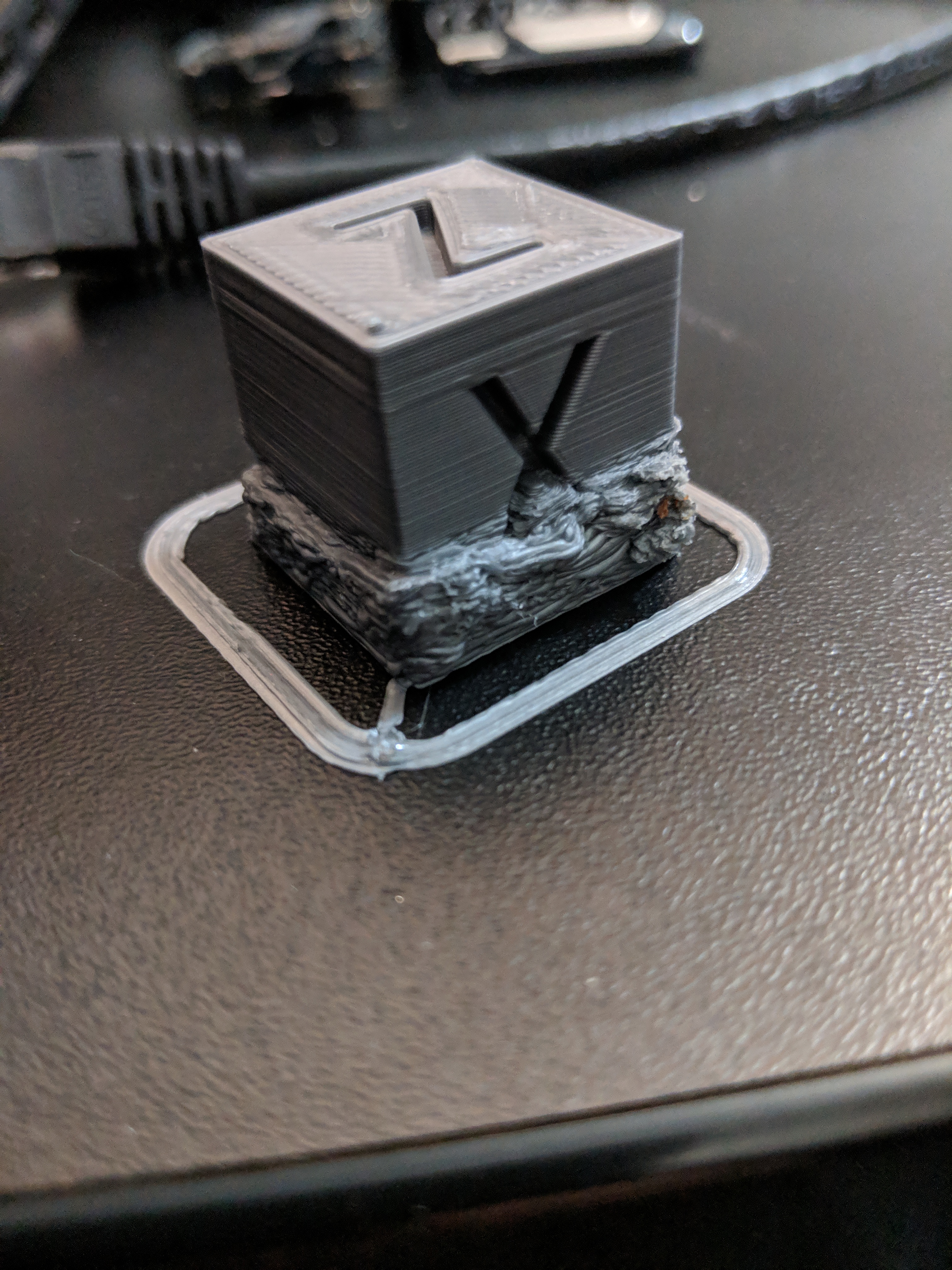
 bryanhunwardsen
on 27 Oct 2018
bryanhunwardsen
on 27 Oct 2018
Bryan.
Did you try the workaround I posted. Change the material to something else. Then back to your actual material.
I changed from pla to abs then back to pla using the drop down in the top right area of the window.
If you slice before and after you should see the length estimate change.
This fixed my prints and I have closed and opened cura many times since and it’s retained the setting.
@Predator75 s Fix did not help me.
ajb142
on 27 Oct 2018
I also had same issue and rolled back to 3.4.1, Waiting for 3.6
 sekarpdkt
on 29 Oct 2018
sekarpdkt
on 29 Oct 2018
3.6 BETA is live now. Please try and see if this is fixed.
diegopradogesto
on 31 Oct 2018
Confirming, this bug eliminated in 3.6 BETA
 CageFox
on 3 Nov 2018
CageFox
on 3 Nov 2018
Related issues
 dstulken
·
3Comments
dstulken
·
3Comments
 wi1k1n
·
3Comments
wi1k1n
·
3Comments
 JRRN
·
3Comments
JRRN
·
3Comments
 probonopd
·
3Comments
probonopd
·
3Comments
 DamianSepczuk
·
3Comments
DamianSepczuk
·
3Comments